Prusa
  • SHOP
    • Learn more
    • All deals
    3D printers
    • CORE One+ (Gen2)
    • CORE One L+
    • XL+
    • MK4S
    • Mini+
    • HT90
    Consumables and Merch
    • Prusament
    • Resin
    • Buddy filament
    • Merch
    • Accessories
  • SHOP
    • Latest products
    BY CATEGORY
    • 3D printers
    • Upgrades
    • Materials
    • Accessories
    • Spare parts
    • Courses
    • Merch
    • Sales inquiry & Price quote
    QUICK LINKS
    • Shipping information
    • Refunds & returns
    • Payment options
    • Warranty
    • VAT & Customs fees
    • FAQ

    0 item in your cartitems in your cart

    Your cart is empty

    Go to cartShop 3D printers

    My profile

    Log in to see orders, saved items

    My profile

    Signed in as

    • Orders
    • Logout
  • 3D PRINTING
    • Explore 3D printing
    FOR BEGINNERS
    • 3D printing 101
    • Types of printers (FDM/SLA)
    • How to choose a 3D Printer
    • Printables (3D models)
    BY APPLICATION
    • Rapid prototyping
    • Manufacturing
    • Engineering
    • Research
    • Arts & design
    GO DEEPER
    • Materials guide
    • Courses
    • Webinars
    • Case studies
    • Custom 3D printing
  • 3D PRINTERS
    • All 3D printers
    FOR
    • Home or garageHobbyists, tinkerers and home printing
    • Shop or studioIn-house production for small teams
    • EnterpriseFleets, security and scale
    • How to choose a 3D Printer
    SHOP & BROWSE
    • CORE One+
    • CORE One+ INDX
    • CORE One L+
    • CORE One L+ INDX
    • XL+
    • MK4S
    • Prusa Pro HT90
    • Prusa Pro AFS
    • Prusa Pro SLX
    MORE FROM PRINTERS
    • Upgrades
    • Spare parts
    • Critical infrastructure
    • Case studies
    • Signature Oak
    • Kits
  • MATERIALS
    • All materials
    BY USE
    • Every-day & design
    • Functional engineering
    • Composites
    • Pro speciality
    • SLA resins
    PRUSAMENT
    • PLA
    • PETG
    • ASA
    • PC
    • PA11
    • Flex
    • TPU
    MORE FROM MATERIALS
    • Materials guide
    • We make material in house
    • Sustainability
    • Order on the store
  • SOFTWARE
    • All software
    PREPARE THE PRINT
    • PrusaSlicer
    PRINT & MONITOR
    • Prusa Connect
    • EasyPrint
    • iOS & Android app
    • Prusa Farm
    GET STARTED
    • Download & install
    • Knowledge base
    MORE FROM SOFTWARE
    • Printables (3D models)
  • SUPPORT
    • Explore support
    FIND ANSWERS
    • Knowledge base
    • Troubleshooting
    • Courses
    • Webinars
    GET HELP
    • Contact us
    • Livechat
    • Shipping information
    • Warranty
    • Refunds & returns
    • Spare parts
    • Factory repair
    COMMUNITY
    • Forum
    • Reddit
    • Printables
  • TRUST CENTER
    • Trust Center overview
    BY TOPIC
    • GDPR
    • Certificates
    • Security
    • Compliance
    COMMITMENTS
    • Sustainability report
    TALK TO US
    • Contact the security team
  • COMPANY
    • About Prusa
    GET TO KNOW US
    • Our story
    • How we make printers
    • Open source
    • Brand & media kit
    NEWS
    • Blog
    • Newsroom
    • Events
    TRUST & PARTNERS
    • Sustainability
    • Resellers & distributors
    • Affiliate program
    • Contact
    • English
    • Čeština
    • Deutsch
    • Español
    • Français
    • Italiano
    • Polski
    • 日本語
  • Signed in as

    • Orders
    • Address
    • In-stock Alerts
    • My Courses
    • Subscription
    • Edit Account
    • Logout

Log in to see orders, saved items

Signed in as
  • Orders
  • Address
  • In-stock Alerts
  • My Courses
  • Subscription
  • Edit Account
  • English
  • Čeština
  • Deutsch
  • Español
  • Français
  • Italiano
  • Polski
  • 日本語
Shop

0 item in your cartitems in your cart

Your cart is empty

Go to cartShop 3D printers

My profile

Log in to see orders, saved items

My profile

Signed in as

  • Orders
  • Logout
SHOP
  • Latest products
BY CATEGORY
  • 3D printers
  • Upgrades
  • Materials
  • Accessories
  • Spare parts
  • Courses
  • Merch
  • Sales inquiry & Price quote
QUICK LINKS
  • Shipping information
  • Refunds & returns
  • Payment options
  • Warranty
  • VAT & Customs fees
  • FAQ

Featured products

    Popular categories

      Trending searches

        Articles

          Blog

            Products

              Categories

                Suggested searches

                  Searching…
                  No results
                  Something went wrong.
                  ↑↓ Select↵ OpenEsc Close search
                  1. Support
                  2. Printer maintenance
                  3. SL1/SL1S maintenance
                   

                  Contents

                  • Regular Printer Maintenance
                  • Keeping the printer clean
                  • FEP film / Tank maintenance
                  • Printing platform maintenance
                  • Exposure screen maintenance
                  • Acrylic lid
                  • UV light and potential health risks
                  • Fan cleaning / Removing dust
                  • Carbon filter replacement
                  • Tower maintenance
                  • Tilt maintenance

                  Blog

                  • Prusa Black Friday 2026 Is Here! Grab the Biggest Deals of the Year
                  • 400°C HT Hotend is out! Plus: New Materials and HighTemp Sheets for CORE One+/L+.
                  • Blender for 3D Printing: The 5-Minute Guide to STL Editing

                  Newsletter

                  Signup and get our monthly squeeze on updates, blog, printables and much more.

                  By clicking, you agree to receive our newsletter.

                  This site is protected by reCAPTCHA Enterprise and the Google Privacy Policy and Terms of Service apply.

                  Heavy Duty Keyboard Holder (No Supports)
                  E-shop
                  • 3D Printers
                  • Printer Upgrades
                  • Filaments
                  • Accessories
                  • Prusa Merchandise
                  Prusa

                  © Prusa Research a.s.

                  Printables
                  • 3D Models
                  • Store
                  • Clubs
                  • 3D Design Contests
                  • Brands
                  Community
                  • World Map
                  • Forum
                  • User Groups
                  • Events
                  Help
                  • Prusa Help
                  • Prusa Academy
                  • 3D Printing Calculators
                  Software
                  • PrusaSlicer
                  • Prusa.app
                  • Prusa Connect
                  • Drivers and Software
                  Company
                  • About Us
                  • Blog
                  • Official Prusa Resellers
                  • Contact Us
                  • Certified for ISO 9001, ISO 14001, ISO 45001
                  • General Terms and Conditions
                  • General Terms and Conditions of Use of the PRUSA Websites
                  • Privacy Policy
                  • Information about cookies
                  • Customer Complaints Policy
                  • Status Page
                  • Do Not Sell or Share My Personal Information
                  • Supplemental Statements
                  Prusa
                  • General Terms and Conditions
                  • General Terms and Conditions of Use of the PRUSA Websites
                  • Privacy Policy
                  • Information about cookies
                  • Customer Complaints Policy
                  • Status Page
                  • Do Not Sell or Share My Personal Information
                  • Supplemental Statements

                  © Prusa Research a.s.

                  JOSEF PRUSA®, PRUSA RESEARCH®, PRUSA POLYMERS®, PRUSA ORANGE®, PRUSA 3D ® AND PRUSAMENT® are registered trademarks of Prusa Development a.s. used by Prusa Research a.s. under licence from Prusa Development a.s.

                  SL1/SL1S maintenance

                  Relevant for

                  SL1
                  SL1S SPEED
                  Article is also available in following languages
                  English
                  Čeština
                  Polski
                  Deutsch
                  Français
                  Español
                  Italiano
                  日本語

                  Regular Printer Maintenance

                  Although the Original Prusa SL1/SL1S has a number of smart sensors and has been carefully designed to be easy to use, it’s still a machine and requires regular maintenance and care. There are several key areas that require attention if you want to keep your printer in good shape for a long time.

                  Keeping the printer clean

                  The key to a trouble-free experience is first and foremost keeping the printer clean. Resins are liquids and they are easily spilled. Every time you use the printer, make sure you are not leaving drops or stains of liquid anywhere. A liquid resin will solidify even in regular daylight, making it much more difficult to remove compared to its liquid form.

                  When removing the printing platform / printed objects, use the black plastic tray to shield the printer from drops of resin. Always keep a bundle of soft paper towels near the printer, so you can wipe any spilled resin/resin drops immediately. To clean drops of resin more effectively, use a piece of cloth/paper towel dipped in isopropyl alcohol. Do not use alcohol or acetone on the FEP film! For more delicate surfaces (such as the display), use a mix of water and dishwashing product.

                  A good practice is to place a plastic tablecloth under the printer for easier cleaning. However, be careful - the tablecloth must not block the fan on the underside of the printer.

                  Do not wash the lid with any alcohol, acetone or chlorine! Also, do not use rough materials to clean the lid (e.g. sanding paper, rough sponges).

                  The lid is made of acrylic glass and it has a special surface finish to block UV light from reaching the printing chamber. You can clean it with standard products for cleaning glass, as long as it does not contain any alcohol, acetone or chlorine. It would damage the acrylic glass.

                  FEP film / Tank maintenance

                  Empty the resin tank after each print. The tank has one corner which has a different shape than the other three. Use it in combination with a funnel to pour the resin out of the tank into a bottle. Don’t mix used resin with unused liquid. Instead, use a new bottle.

                  Inspect the resin tank bottom before and after each print. Look for any scratches, dents, or holes. If the FEP film is damaged, replace it immediately, otherwise, you’re risking a resin spillage.

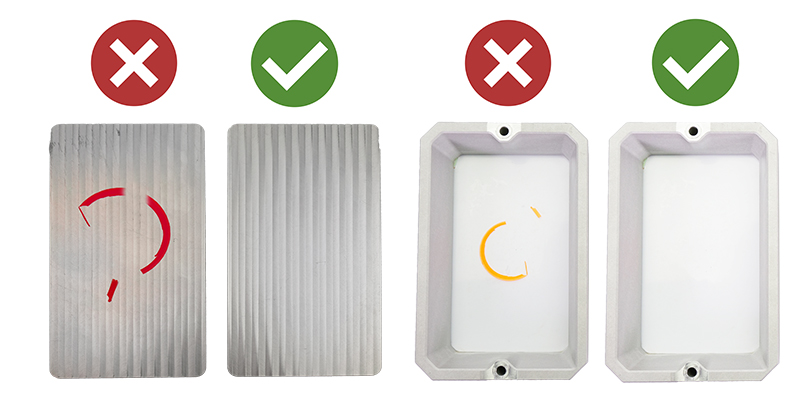
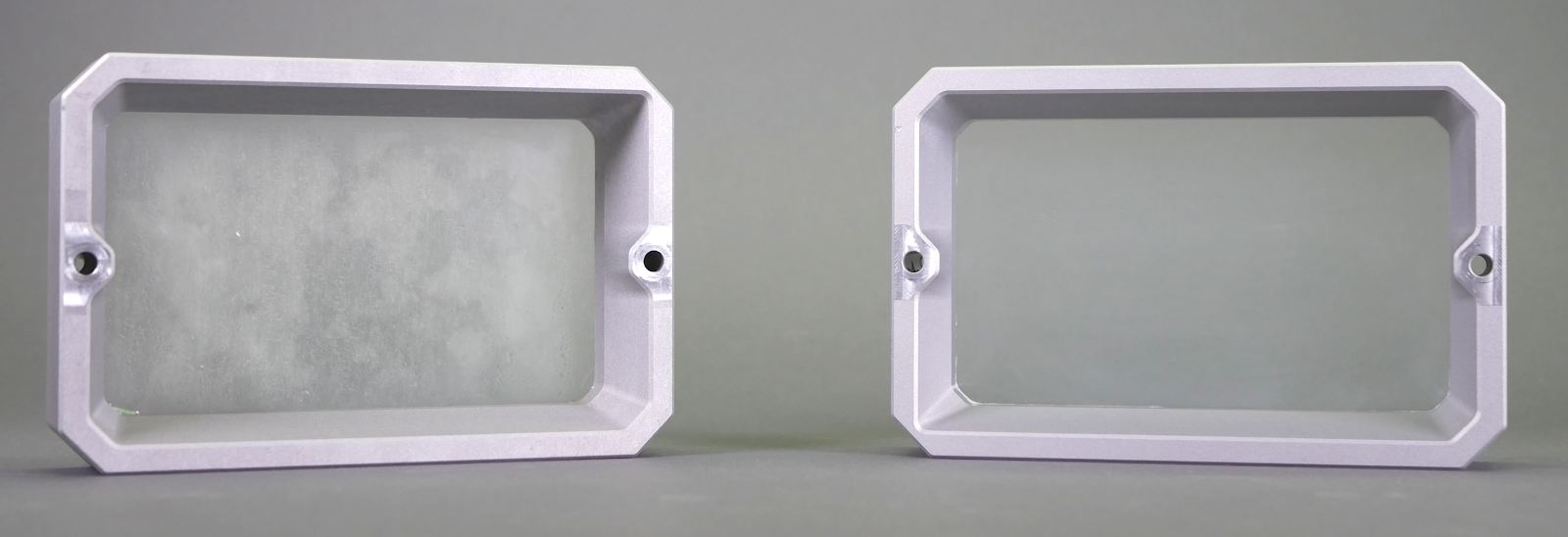
                  If the FEP film has a grey-ish tint, you can restore it to its original look by washing it with warm water with a bit of dishwashing soap (or even regular soap) before you start printing again. Don’t print with a dirty or damaged FEP film, as it will negatively impact the print quality. It may even lead to damage to your printer. NEVER use isopropyl alcohol to clean the FEP film!

                  Cleaning the FEP film - before and after.
                  Printing platform maintenance

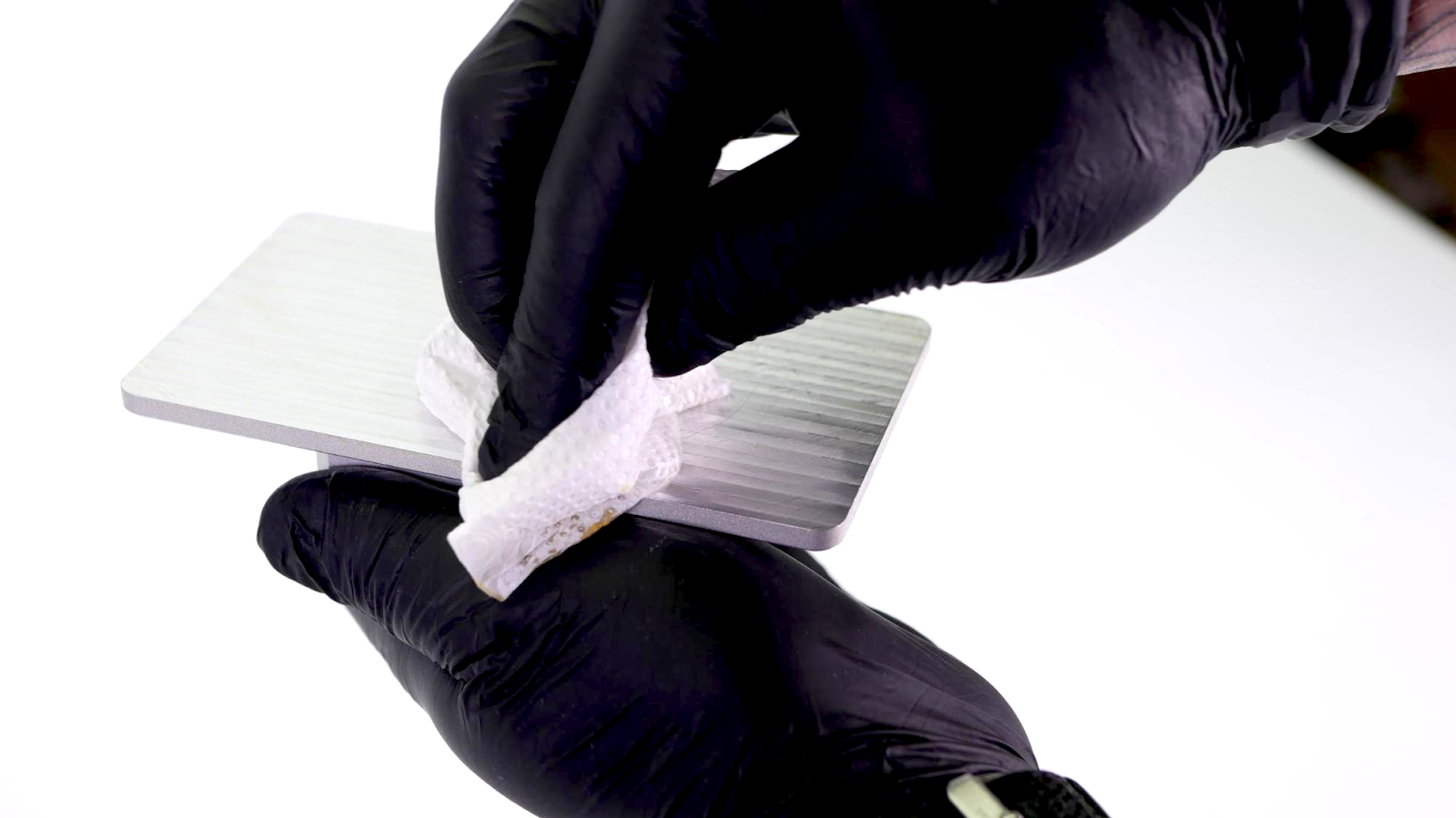
                  The platform should be cleaned thoroughly after every print - usually, there will be some leftover resin on the platform. Once a print finishes, place the black tray on the printer and use paper towels or a spatula to wipe the top of the platform clean, then proceed to remove the platform and the printed object.

                  Once the object is removed, use isopropyl alcohol and paper towels to clean the printing platform thoroughly. Leaving liquid resin on the platform for extended periods of time can lead to solidifying the material.

                  After removing an object, use a metal spatula to scrape any remnants of the previous print and use paper towels to wipe the underside of the printing platform clean - make sure that the printing platform is nice and shiny before you start the next print. Any leftovers on the printing platform (leftover supports, pads) could potentially damage the bottom of the resin tank or even the display. Surface scratches on the print platform won’t affect the quality of the print.

                  After you clean the printing platform with isopropyl alcohol, dry it thoroughly!

                  Exposure screen maintenance

                  Use a damp cloth or LCD cleaning spray to keep the glass / LCD display clean. Don’t use any rough materials (sanding paper) or low-quality paper towels, otherwise, you might scratch the surface. Make sure that the print display is clean before you start a print and that there are no smudges, stains, scratches, or cracks.

                  Do not use sharp objects, such as metal spatulas, knives, flat screwdrivers, and similar tools to remove dirt or resin from the protective glass. Instead, use IPA or dishwashing products in combination with soft paper towels to avoid scratching the display.

                  Acrylic lid

                  The lid has three major functions: it protects the printed model from potential damage, helps to contain resin fumes inside the box and blocks a significant amount of UV light so it doesn’t reach the printing chamber. Especially the last part is important - if you leave the resin in the tank and keep the lid open, it can start to solidify quickly depending on the environment.

                  The lid won’t stop 100% of UV light - do not place the 3D printer next to a window, otherwise, the sunlight might cure the resin in the tank.

                  This also means that you shouldn’t disable the cover check. It may be tempting to watch the print process, but for the sake of better results and safer operation, keep the lid closed during the print. You can, of course, open it for a quick check and then close it again.

                  Don’t run the printer with the lower case panels removed or with any parts missing. The case helps to contain the UV light.

                  Do not wash the lid with any alcohol, acetone or chlorine! Also, do not use rough materials to clean the lid (e.g. sanding paper, rough sponges).

                  UV light and potential health risks

                  Eyes are very sensitive to UV light and UV radiation because the cornea absorbs high amounts of UV light. Extended exposure to strong UV light may lead to corneal damage, macular degeneration, or cataracts - these conditions can ultimately lead to blindness.

                  This is why the Original Prusa SL1/SL1S is designed to contain the UV light inside, which means that when used according to the instructions in the manual, there are no health risks related to UV radiation during regular use.
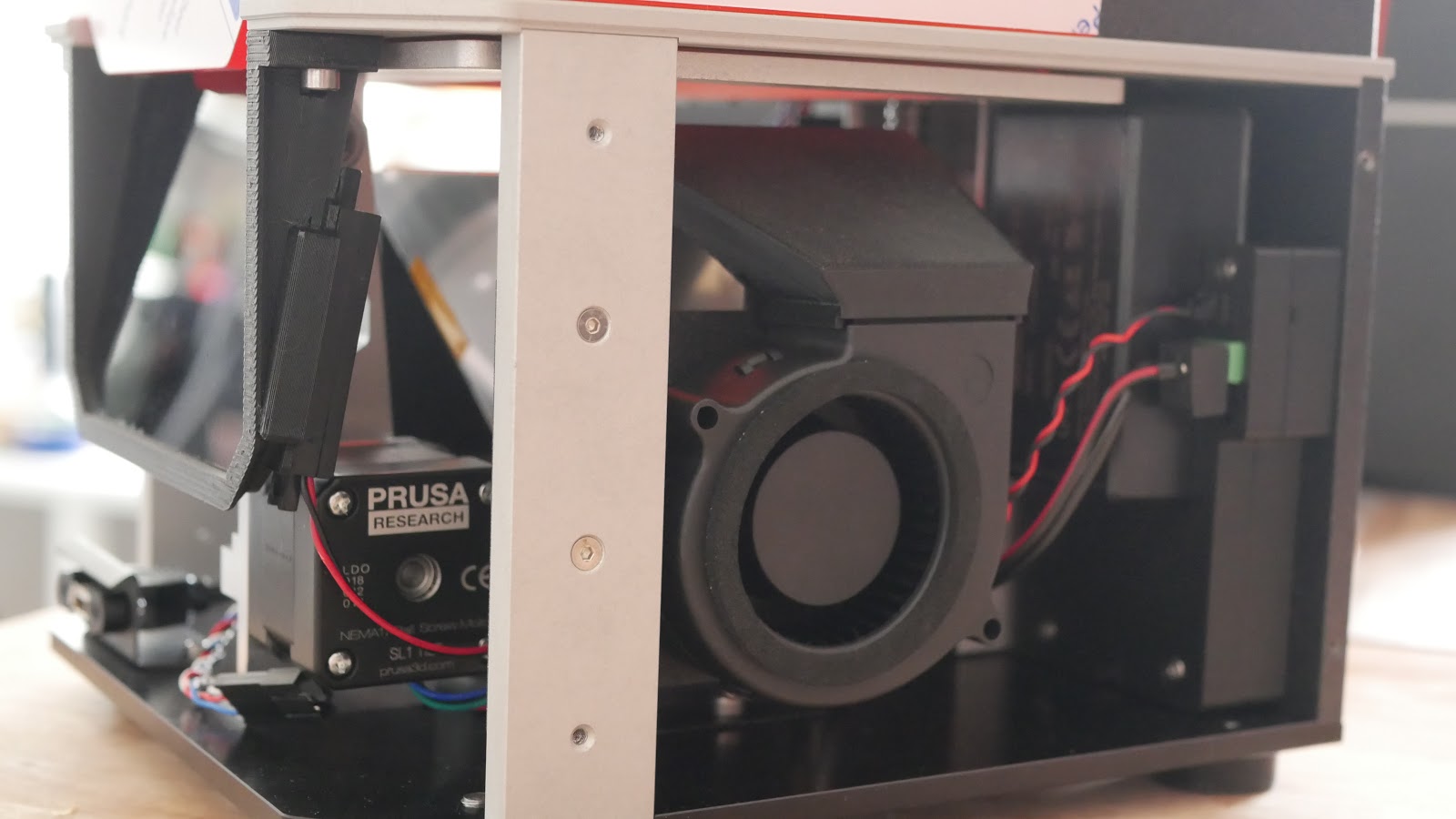
                  DO NOT LOOK DIRECTLY INTO THE UV LIGHT AND DO NOT PRINT WITH THE BODY COVER REMOVED! If you want to check the UV led panel, look at it through your phone camera app or take a photo, so you won’t look directly into the UV light.

                  Fan cleaning / Removing dust

                  It’s a good practice to clean the fans from time to time, especially if you have pets at home - the recommended time period will vary depending on the environment, in which the SL1/SL1S is used. In general, it’s good to inspect the printer every 6-8 weeks. There are three fans placed inside the printer. You can get to the side fan and bottom fan by removing the main body cover.

                  First, turn off the printer and disconnect it from the power source. Locate eight screws on the sides of the printer (four on each side) and remove them with an Allen key. Then carefully slide the body cover out. Be careful not to damage any cables which are attached to the power button. This will give you better access to two fans. Use a can of compressed air to clean the fans carefully.

                  The third fan is located on the backside of the printer. Locate two screws holding a small door closed and remove them. Open the door and use a can of compressed air to clean the fan.

                  Never blow compressed air on running fans!

                  Dust can also accumulate on the underside of the display and on the reflector. You can clean these parts carefully with compressed air. First, unscrew the eight screws holding the display in place, then slowly and carefully remove the display - be careful not to damage the display’s wires. Then, use compressed air from a distance of about 30 cm to clean out the dust particles gently. Do not use sharp or rough objects!

                  Carbon filter replacement

                  Check the carbon filter from time to time to ensure it is in good shape. The carbon filter is located on the backside of the printer under a small door. Use an Allen key to remove two screws holding the door shut. Open the door and remove the filter. Check if it is in good shape, and consider replacing it if it isn’t.

                  Tower maintenance

                  The tower (Z-axis consisting of the trapezoidal rod and the cantilever) requires little to no regular maintenance. In case the printer starts making unwanted noises when lifting or raising the platform, consider applying a lubricant on the trapezoidal rod - any good super lube will do the trick.

                  Tilt maintenance

                  The key to a long-lasting and smoothly running tilt bed is simple: keep it as clean as possible. Use the included plastic tray every time you manipulate the resin or the printing platform with the finished print. The tray will stop the resin from spilling over the tilt bed.
                  Was this article helpful?
                  This action is available only to registered users. Please log-in.
                  Log in  to post a comment
                  No comments

                  Topics

                  • Using the printer
                    • Printer maintenance
                      • How to remove a stripped screw
                      • Firmware updating (SL1/SL1S)
                      • How to replace a blower fan (SL1)
                      • How to replace an optical sensor (SL1)
                      • How to replace the print display (SL1)
                      • How to replace the power button (SL1/SL1S)
                      • How to replace the A64 board (SL1)
                      • How to replace the USB connector (SL1/SL1S)
                      • How to replace the FEP film (SL1S)
                      • How to replace the print display (SL1S)
                      • How to replace a blower fan (SL1S)
                      • How to replace a UV LED fan (SL1S)
                      • How to post-process the printed parts
                      • How to replace UV LED assembly (SL1S)
                      • How to replace a UV LED assembly (SL1)
                      • How to replace a filter (SL1/SL1S)
                      • SL1/SL1S print removing
                      • FEP film replacement (SL1)
                      • SL1/SL1S maintenance
                    • 3D models
                    • Material guide
                    • Slicing
                    • Prusa Connect & PrusaLink