Prusa
  • SHOP
    • Latest products
    BY CATEGORY
    • 3D printersnew
    • 3D printer upgradesnew
    • Materials
    • Accessories
    • Spare parts
    • Courses
    • Merch
    • Get a price quote
    QUICK LINKS
    • Shipping & delivery
    • Returns & refunds
    • Payment & financing
    • Warranty
    • VAT & Customs fees
    • FAQ

    0 item in your cartitems in your cart

    Your cart is empty

    Go to cartShop 3D printers

    My profile

    Log in to see orders, saved items

    My profile

    Signed in as

    • Orders
    • Logout
  • 3D PRINTING
    • Explore 3D printing
    FOR BEGINNERS
    • 3D printing 101
    • How FDM printing works
    • Buying your first printer
    • 3D model catalog
    BY APPLICATION
    • Rapid prototyping
    • Manufacturing
    • Engineering
    • Research
    • Arts & design
    GO DEEPER
    • Materials guide
    • Courses
    • Webinars
    • Case studies
    • Custom 3D printing
  • 3D PRINTERS
    • All 3D printers
    FOR
    • Home or garageHobbyists, tinkerers and home printing
    • BusinessIn-house production for small teams
    • EnterpriseFleets, security and scale
    • Which Prusa is right for me
    SHOP & BROWSE
    • CORE One+new
    • CORE One+ INDXnew
    • CORE One L+new
    • CORE One L+ INDXnew
    • XL+new
    • MK4S
    • Prusa Pro HT90
    • Prusa Pro AFS
    • Prusa Pro SLX
    MORE FROM PRINTERS
    • Parts & upgradesnew
    • Spare parts
    • Critical infrastructure
    • Case studies
    • Signature Oak
    • Kits
  • MATERIALS
    • All materials
    BY USE
    • Every-day & design
    • Functional engineering
    • Composites
    • Pro speciality
    • SLA resins
    PRUSAMENT
    • PLA
    • PETG
    • ASA
    • PC
    • PA11
    • Flex
    • TPU
    MORE FROM MATERIALS
    • Materials guide
    • We make material in house
    • Sustainability
    • Order on the store
  • SOFTWARE
    • All software
    PREPARE THE PRINT
    • PrusaSlicer 3.0New
    PRINT & MONITOR
    • Prusa Connect
    • EasyPrint
    • iOS & Android app
    • Prusa Farm
    GET STARTED
    • Download & install
    • Knowledge base
    MORE FROM SOFTWARE
    • 3D model catalog
  • SUPPORT
    • Explore support
    FIND ANSWERS
    • Knowledge base
    • Troubleshooting
    • Courses
    • Webinars
    GET HELP
    • Contact us
    • Livechat
    • Shipping & delivery
    • Warranty
    • Returns & refunds
    • Service & spare parts
    • Service & Repair
    COMMUNITY
    • Forum
    • Reddit
    • Printables
  • TRUST CENTER
    • Trust Center overview
    BY TOPIC
    • GDPR
    • Certificates
    • Security
    • Compliance
    COMMITMENTS
    • Sustainability report
    TALK TO US
    • Contact the security team
  • COMPANY
    • About Prusa
    GET TO KNOW US
    • Our story
    • How we make printers
    • Open source
    • Brand & media kit
    NEWS
    • Blog
    • Newsroom
    • Events
    TRUST & PARTNERS
    • Sustainability
    • Resellers & distributors
    • Affiliate program
    • Contact
    • English
    • Čeština
    • Deutsch
    • Español
    • Français
    • Italiano
    • Polski
    • 日本語
  • Signed in as

    • Orders
    • Address
    • In-stock Alerts
    • My Courses
    • Subscription
    • Edit Account
    • Logout

Log in to see orders, saved items

Signed in as
  • Orders
  • Address
  • In-stock Alerts
  • My Courses
  • Subscription
  • Edit Account
  • English
  • Čeština
  • Deutsch
  • Español
  • Français
  • Italiano
  • Polski
  • 日本語
Shop

0 item in your cartitems in your cart

Your cart is empty

Go to cartShop 3D printers

My profile

Log in to see orders, saved items

My profile

Signed in as

  • Orders
  • Logout
SHOP
  • Latest products
BY CATEGORY
  • 3D printersnew
  • 3D printer upgradesnew
  • Materials
  • Accessories
  • Spare parts
  • Courses
  • Merch
  • Get a price quote
QUICK LINKS
  • Shipping & delivery
  • Returns & refunds
  • Payment & financing
  • Warranty
  • VAT & Customs fees
  • FAQ

Featured products

    Popular categories

      Trending searches

        Articles

          Blog

            Products

              Categories

                Suggested searches

                  Searching…
                  No results
                  Something went wrong.
                  ↑↓ Select↵ OpenEsc Close search
                  1. Support
                  2. Basic calibration
                  3. Temperature Calibration
                   

                  Blog

                  • Prusament Pellets: Raw material batches for large-format 3D printing or small-scale polymer research & development
                  • Print colorful and glowing Halloween decorations with our spooky offer
                  • Factorio Has Arrived on Printables

                  Newsletter

                  Signup and get our monthly squeeze on updates, blog, printables and much more.

                  By clicking, you agree to receive our newsletter.

                  This site is protected by reCAPTCHA Enterprise and the Google Privacy Policy and Terms of Service apply.

                  Heavy Duty Keyboard Holder (No Supports)
                  E-shop
                  • 3D Printers
                  • Printer Upgrades
                  • Filaments
                  • Accessories
                  • Prusa Merchandise
                  Prusa

                  © Prusa Research a.s.

                  Printables
                  • 3D Models
                  • Store
                  • Clubs
                  • 3D Design Contests
                  • Brands
                  Community
                  • World Map
                  • Forum
                  • User Groups
                  • Events
                  Help
                  • Prusa Help
                  • Prusa Academy
                  • 3D Printing Calculators
                  Software
                  • PrusaSlicer
                  • Prusa.app
                  • Prusa Connect
                  • Drivers and Software
                  Company
                  • About Us
                  • Blog
                  • Official Prusa Resellers
                  • Contact Us
                  • Certified for ISO 9001, ISO 14001, ISO 45001
                  • General Terms and Conditions
                  • General Terms and Conditions of Use of the PRUSA Websites
                  • Privacy Policy
                  • Information about cookies
                  • Customer Complaints Policy
                  • Status Page
                  • Do Not Sell or Share My Personal Information
                  • Supplemental Statements
                  Prusa
                  • General Terms and Conditions
                  • General Terms and Conditions of Use of the PRUSA Websites
                  • Privacy Policy
                  • Information about cookies
                  • Customer Complaints Policy
                  • Status Page
                  • Do Not Sell or Share My Personal Information
                  • Supplemental Statements

                  © Prusa Research a.s.

                  JOSEF PRUSA®, PRUSA RESEARCH®, PRUSA POLYMERS®, PRUSA ORANGE®, PRUSA 3D ® AND PRUSAMENT® are registered trademarks of Prusa Development a.s. used by Prusa Research a.s. under licence from Prusa Development a.s.

                  Temperature Calibration

                  Relevant for

                  MK2.5
                  MK2.5S
                  MK3
                  MK3S
                  MK2S
                  +
                  28 comments
                  Article is also available in following languages
                  English
                  Čeština
                  Polski
                  Deutsch
                  Français
                  Español
                  Italiano
                  日本語

                  All induction proximity probes alter the sensing distance with increased temperature. This might affect the quality of the first printed layer. P.I.N.D.A. v2 probe, included in the MK3S/MK3/MK2.5S/MK2.5, has an embedded thermistor inside its body to measure the temperature and fully compensate for the drift. A pre-calibrated data table is stored in the printer and the temperature calibration is active by default.

                  Since there is no thermistor in the SuperPINDA, temperature calibration is not available or necessary on the MK3S+ or MK2.5/MK2.5S equipped with the SuperPINDA.

                  However, it can drift out of calibration over time, and you may also find this calibration helpful when weather and temperatures change in the spring and autumn.

                  The calibration is fully automatic, but we will lead you through it so you know it went OK.

                  1. Start by taking off the Flexible steel sheet.
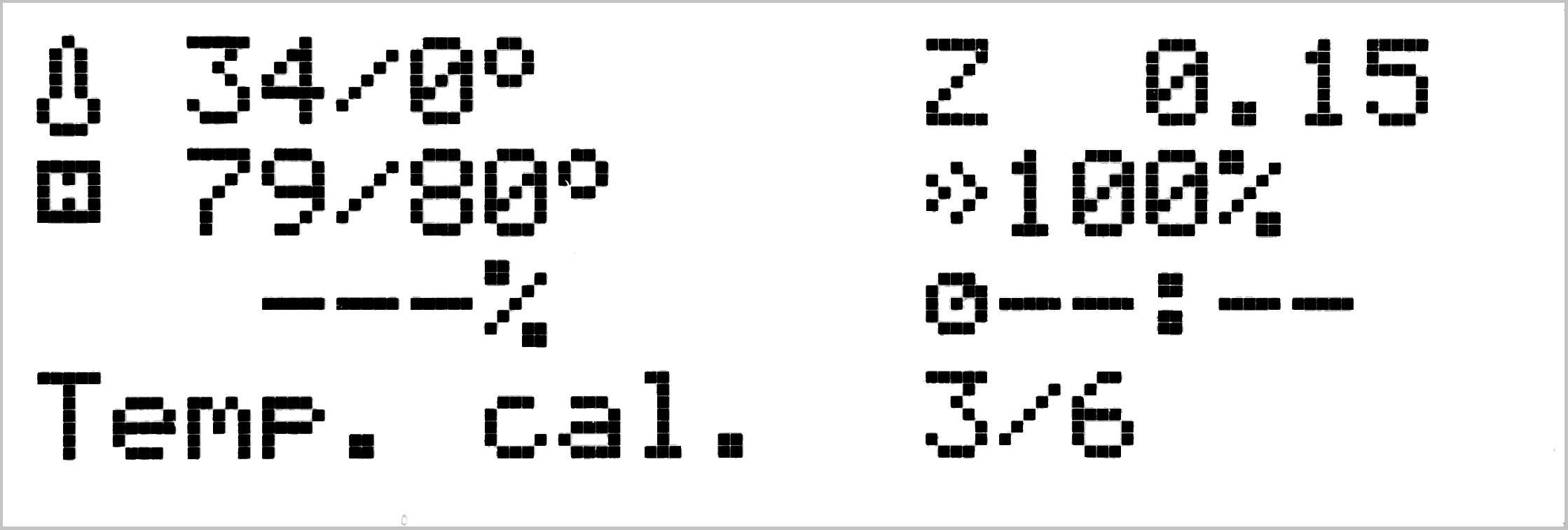
                  2. Navigate the LCD-menu to Calibration -> Temperature calibration. Once selected, the printer will home all axes in order to ensure the correct initial position, and warn you it needs an ambient temperature from 21-26 °C (70 - 80 °F) and a stable surface, then ask if the Steel sheet is on the bed. Make sure it is not on and Select "NO".
                  If you have just heated the printer, the P.I.N.D.A. sensor will need to cool below 35 °C (95 °F). It will move up and show the state of the cooling on the display.
                  1. The extruder will move in over the bed-surface, stop, and with the pinda positioned over the bed, heat up the bed from 75 - 110 °C (167 - 230 °F), across six parts, while checking the readings given by the stationary PI.N.D.A. sensor.

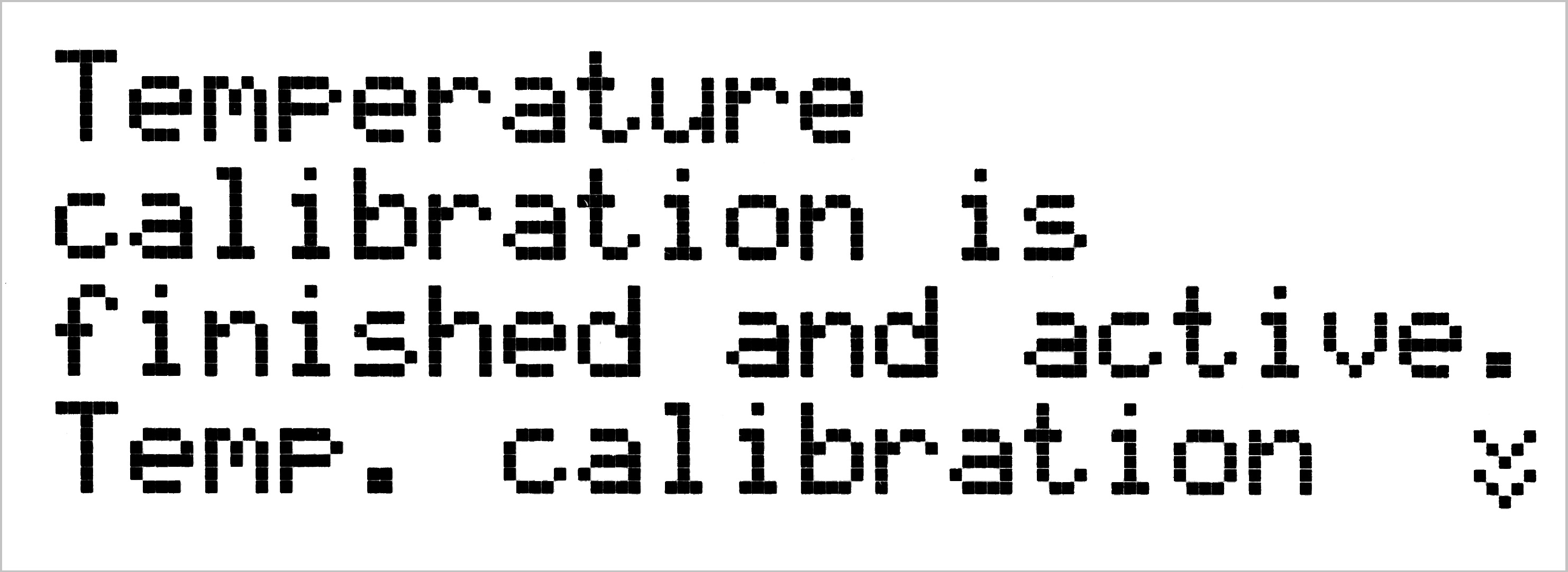
                  When completed it will move the extruder back to the home-position and give you the message "Temperature calibration is finished and active", and where to turn it off.

                  Pro tip: You can check temperature-readings from all thermistors on the Original Prusa MK3S/MK3/MK2.5S/MK2.5 from Support -> Temperatures, on the LCD-menu.

                  This calibration can take 15-20 minutes to go through. The temperature-calibration has to run after a completed XYZ-calibration, and it can be recommended to run PID-calibration beforehand, should you receive any errors, like "Thermal Runaway", when running the calibration.

                  Was this article helpful?
                  This action is available only to registered users. Please log-in.

                  Topics

                  • Calibration
                    • Basic calibration
                      • Selftest failed (MK3/MK3S/MK3S+)
                      • Selftest failed (MK2/S, MK2.5, MK2.5S)
                      • XYZ Calibration details
                      • Mesh bed leveling
                      • XYZ Calibration (MK3/MK3S/MK3S+)
                      • XYZ Calibration (MK2/S)
                      • Full system refresh Original Prusa i3
                      • Temperature Calibration
                      • Failing Z calibration (MK3S/MK2.5S)
                      • Idler screw tension
                      • XYZ Calibration (MK2.5/MK2.5S)
                      • First Layer Calibration (i3)
                    • Advanced calibration
                    • Calibration Error Messages

                  11 comments

                  Log in  to post a comment
                  naseem akhter
                  •
                  sir i have an issue with my prusa i3 mk3s that in normal tempreture the bad temp shown 19c thats right but extruder temp is 52c thats wrong. i changed the heater cartrage and thermistor also. i done reset also. please help me what i do?
                  Reply
                  BRSlicer
                  •
                  Hello, printer beeped during this process when I wasn't looking.  What does the beep indicate? 
                  Also, for anyone reading: my MK3 ran through the first 5 stages relatively quickly, but the 6th is lagging.  I suspect that I messed up the measurement by walking by the machine quickly enough to cause a breeze.  Not sure, but something to look out for.
                  Reply
                  William H. - Official Prusa
                  •

                  Just run it again. I think it indicates it is finished, but since neither you nor I saw it it is hard to say. A breeze/draft or cold environment can slow down the process.

                  Reply
                  BRSlicer
                  •
                  74 degrees Farenheit seems like a reasonable room temperature.  After one breeze I kept the air still.  Needed a hair dryer as noted in the other comments.
                  Reply
                  Sto
                  •
                  Hi there! I haven't used my printer in a few months, and my first recent print was a failure, so I thought I'd give it a refresher. I updated the firmware to the most recent version to date, calibrated X,Y,Z axes. Then I thought I'd try the temperature calibration. (I'll admit this was a bit of an uninformed decision.) It's been at the very least one hour, probably closer to two, and it just moved to step 6/6 about 5 minutes ago. The temperature in the house is above 20ºC, up to 25ºC in the printer's surroundings. I'm afraid it's going to take hours to get through step 6. What do you recommend I do if it does not end soon? (If you need model details: full stock Prusa i3 MK3S kit purchased in May 2019 on Amazon Japan.)
                  Reply
                  Sto
                  •
                  Update: it's been 1 more hour, still at step 6/6. Bed is at 110ºC, PINDA is 57ºC, not increasing...
                  Reply
                  Sto
                  •
                  More info: firmware is 3.9.3-3556, no steel sheet on the bed.
                  Reply
                  Sto
                  •
                  I placed a coin between the bed and the PINDA to transfer heat, as mentioned in another comment, and after a few minutes, calibration ended.It looks like the calibration process was waiting for the PINDA to reach 60ºC, which it could not...
                  Reply
                  Pim B
                  •
                  As adviced, I've tried this calibration. But it hangs on 2/6 and than on 3/6 and than on 4/6 etc. Until I manually heat up my pinda using a heat gun with a somewhat higher temp than needed. Why does the pinda need to reach a certain temp every step? It is a temperure correction calculation, right? If my pinda sais it is stable 3 or 2 degrees below that minimum temp it still should be ok.Mk3s firmware 3.9.3
                  Reply
                  David
                  •
                  Hi! Isn't it too cold in the room you have the printer in? Yes, it is for the height correction at different PINDA v2 temperatures. Usually, this calibration doesn´t need to be done in order for the printer to work as usual. And with SuperPINDA it doesn´t need to be done at all.
                  Reply
                  Cory M
                  •
                  Sat on 6/6 for 50 minutes before I just hit the "x" button the the front.
                  mk3s
                  Reply
                  William H. - Official Prusa
                  •
                  Hello. To be able to resolve this we need more information. Could you please provide your firmware version, how it is situated, as well as confirm whether you have the steel sheet on the printer or not?
                  Reply
                  JBC
                  •
                  I received my MK3S+  last week and assembled. it came with the most recent Firmware uploaded already (3.9.3-3556).  
                   
                  My Printer It is having problems using textured sheet, nothing can be printed on that. So Far I am able to print PLA on Smoth sheet. Tried PTEG, and do not print well, neither on Smooth or Textured. It seem to have issues sticking to the bed (both, smooth with Glue or textured)  
                   
                  I compared the temperature on the Bed as reflected on the LCD upon preheat and during operation with the lecture that picks a Laser Thermometer and the bed is 5-6 degrees lower than what the LCD shows.  
                   
                  Since this is the MK3S+, there is no temperature calibration on the Menu. but even after Hardware reset, flashing again the same firmware, and full Wizard - brand new shining calibration - The bed temperature is 5-6 degrees lower than what 2 different lasser thermometers shows and still I am not able to use textured bed with any material.
                   
                  What should I do?
                  Reply
                  David
                  •

                  Hi! This calibration is meant to correct PINDA v2 offset at different temperatures. It is not needed for MK3S+ with SuperPINDA. What you are describing concerning the heatbed temperatures, is normal behavior. If you are experiencing bed adhesion issues, try cleaning the print sheet with IPA or a dish soap with water first, then calibrating Live adjust Z. 
                  [id=1804|title=See this article]

                  Reply