Prusa
  • SHOP
    • Latest products
    BY CATEGORY
    • 3D printersnew
    • 3D printer upgradesnew
    • Materials
    • Accessories
    • Spare parts
    • Courses
    • Merch
    • Get a price quote
    QUICK LINKS
    • Shipping & delivery
    • Returns & refunds
    • Payment & financing
    • Warranty
    • VAT & Customs fees
    • FAQ

    0 item in your cartitems in your cart

    Your cart is empty

    Go to cartShop 3D printers

    My profile

    Log in to see orders, saved items

    My profile

    Signed in as

    • Orders
    • Logout
  • 3D PRINTING
    • Explore 3D printing
    FOR BEGINNERS
    • 3D printing 101
    • How FDM printing works
    • Buying your first printer
    • 3D model catalog
    BY APPLICATION
    • Rapid prototyping
    • Manufacturing
    • Engineering
    • Research
    • Arts & design
    GO DEEPER
    • Materials guide
    • Courses
    • Webinars
    • Case studies
    • Custom 3D printing
  • 3D PRINTERS
    • All 3D printers
    FOR
    • Home or garageHobbyists, tinkerers and home printing
    • BusinessIn-house production for small teams
    • EnterpriseFleets, security and scale
    • Which Prusa is right for me
    SHOP & BROWSE
    • CORE One+new
    • CORE One+ INDXnew
    • CORE One L+new
    • CORE One L+ INDXnew
    • XL+new
    • MK4S
    • Prusa Pro HT90
    • Prusa Pro AFS
    • Prusa Pro SLX
    MORE FROM PRINTERS
    • Parts & upgradesnew
    • Critical infrastructure
    • Case studies
    • Signature Oak
    • Kits
  • MATERIALS
    • All materials
    BY USE
    • Every-day & design
    • Functional engineering
    • Composites
    • Pro speciality
    • SLA resins
    PRUSAMENT
    • PLA
    • PETG
    • ASA
    • PC
    • PA11
    • Flex
    • TPU
    MORE FROM MATERIALS
    • Materials guide
    • We make material in house
    • Sustainability
    • Order on the store
  • SOFTWARE
    • All software
    PREPARE THE PRINT
    • PrusaSlicer 3.0New
    PRINT & MONITOR
    • Prusa Connect
    • EasyPrint
    • iOS & Android app
    • Prusa Farm
    GET STARTED
    • Download & install
    • Knowledge base
    MORE FROM SOFTWARE
    • 3D model catalog
  • SUPPORT
    • Explore support
    FIND ANSWERS
    • Knowledge base
    • Troubleshooting
    • Courses
    • Webinars
    GET HELP
    • Contact us
    • Livechat
    • Shipping & delivery
    • Warranty
    • Returns & refunds
    • Service & spare parts
    • Service & Repair
    COMMUNITY
    • Forum
    • Reddit
    • Printables
  • TRUST CENTER
    • Trust Center overview
    BY TOPIC
    • GDPR
    • Certificates
    • Security
    • Compliance
    COMMITMENTS
    • Sustainability report
    TALK TO US
    • Contact the security team
  • COMPANY
    • About Prusa
    GET TO KNOW US
    • Our story
    • How we make printers
    • Open source
    • Brand & media kit
    NEWS
    • Blog
    • Newsroom
    • Events
    TRUST & PARTNERS
    • Sustainability
    • Resellers & distributors
    • Affiliate program
    • Contact
    • English
    • Čeština
    • Deutsch
    • Español
    • Français
    • Italiano
    • Polski
    • 日本語
  • Signed in as

    • Orders
    • Address
    • In-stock Alerts
    • My Courses
    • Subscription
    • Edit Account
    • Logout

Log in to see orders, saved items

Signed in as
  • Orders
  • Address
  • In-stock Alerts
  • My Courses
  • Subscription
  • Edit Account
  • English
  • Čeština
  • Deutsch
  • Español
  • Français
  • Italiano
  • Polski
  • 日本語
Shop

0 item in your cartitems in your cart

Your cart is empty

Go to cartShop 3D printers

My profile

Log in to see orders, saved items

My profile

Signed in as

  • Orders
  • Logout
SHOP
  • Latest products
BY CATEGORY
  • 3D printersnew
  • 3D printer upgradesnew
  • Materials
  • Accessories
  • Spare parts
  • Courses
  • Merch
  • Get a price quote
QUICK LINKS
  • Shipping & delivery
  • Returns & refunds
  • Payment & financing
  • Warranty
  • VAT & Customs fees
  • FAQ

Featured products

    Popular categories

      Trending searches

        Articles

          Blog

            Products

              Categories

                Suggested searches

                  Searching…
                  No results
                  Something went wrong.
                  ↑↓ Select↵ OpenEsc Close search
                  1. Support
                  2. Prusa CORE One/+ INDX
                  3. Prusa Connect & PrusaLink
                  4. Prusa Connect and PrusaLink explained
                   

                  Contents

                  • What is Prusa Connect?
                  • What is PrusaLink?
                  • How to set up PrusaLink and Prusa Connect?
                  • New-gen Original Prusa printers
                  • Original Prusa i3 MK3/S/+ or MK2.5/S
                  • Other guides related to Prusa Connect and PrusaLink:
                  • Octoprint / Other / 3rd-party projects:

                  Blog

                  • Print colorful and glowing Halloween decorations with our spooky offer
                  • Factorio Has Arrived on Printables
                  • Prusament PLA Lightweight: 65% lighter than regular PLA. Perfect choice for aircraft, cosplay, and more.

                  Newsletter

                  Signup and get our monthly squeeze on updates, blog, printables and much more.

                  By clicking, you agree to receive our newsletter.

                  This site is protected by reCAPTCHA Enterprise and the Google Privacy Policy and Terms of Service apply.

                  Factorio Transport Belts
                  E-shop
                  • 3D Printers
                  • Printer Upgrades
                  • Filaments
                  • Accessories
                  • Prusa Merchandise

                  © Prusa Research a.s.

                  Printables
                  • 3D Models
                  • Store
                  • Clubs
                  • 3D Design Contests
                  • Brands
                  Community
                  • World Map
                  • Forum
                  • User Groups
                  • Events
                  Help
                  • Prusa Help
                  • Prusa Academy
                  • 3D Printing Calculators
                  Software
                  • PrusaSlicer
                  • Prusa.app
                  • Prusa Connect
                  • Drivers and Software
                  Company
                  • About Us
                  • Blog
                  • Official Prusa Resellers
                  • Contact Us
                  • Certified for ISO 9001, ISO 14001, ISO 45001
                  • General Terms and Conditions
                  • General Terms and Conditions of Use of the PRUSA Websites
                  • Privacy Policy
                  • Information about cookies
                  • Customer Complaints Policy
                  • Status Page
                  • Do Not Sell or Share My Personal Information
                  • Supplemental Statements
                  • General Terms and Conditions
                  • General Terms and Conditions of Use of the PRUSA Websites
                  • Privacy Policy
                  • Information about cookies
                  • Customer Complaints Policy
                  • Status Page
                  • Do Not Sell or Share My Personal Information
                  • Supplemental Statements

                  © Prusa Research a.s.

                  JOSEF PRUSA®, PRUSA RESEARCH®, PRUSA POLYMERS®, PRUSA ORANGE®, PRUSA 3D ® AND PRUSAMENT® are registered trademarks of Prusa Development a.s. used by Prusa Research a.s. under licence from Prusa Development a.s.

                  Prusa Connect and PrusaLink explained

                  Relevant for

                  CORE One family
                  MK4 family
                  XL family
                  PRO family
                  MINI family
                  +
                  24 comments
                  Article is also available in following languages
                  English
                  Čeština
                  Polski
                  Deutsch
                  Français
                  Español
                  Italiano
                  日本語

                  Prusa Connect and PrusaLink are two remote printing solutions developed in-house by Prusa. Its origin is in the management system used in our record-sized print farm located in Prague HQ.

                    • Prusa Connect is a cloud service, available from anywhere.
                    • PrusaLink runs locally on your printer and is accessible only within your local network.
                  If your printer has the xBuddy, make sure that it has the latest firmware. Firmware versions older than 6.4.0 will make the printer unable to connect.

                  What is Prusa Connect?

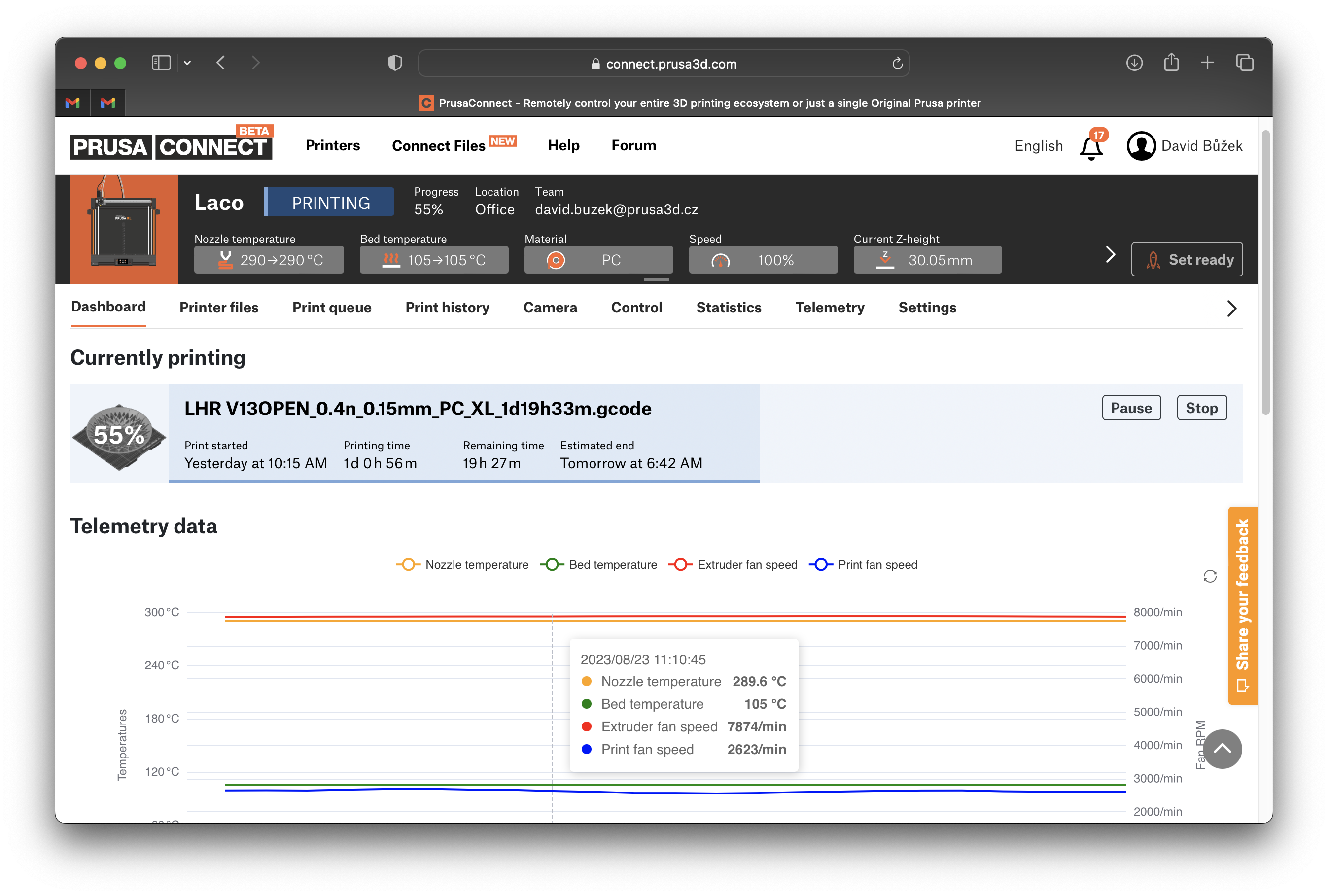
                  Prusa Connect allows control of entire print farms, while tracking each printer separately and providing valuable production statistics.

                  It's free for Prusa printer owners, including 1 GB cloud storage for G-codes and telemetry. For larger-scale or business inquiries, please contact us.

                   It is accessible at Connect.Prusa3D.com, in PrusaSlicer, or using the Prusa Mobile app.
                  What is PrusaLink?

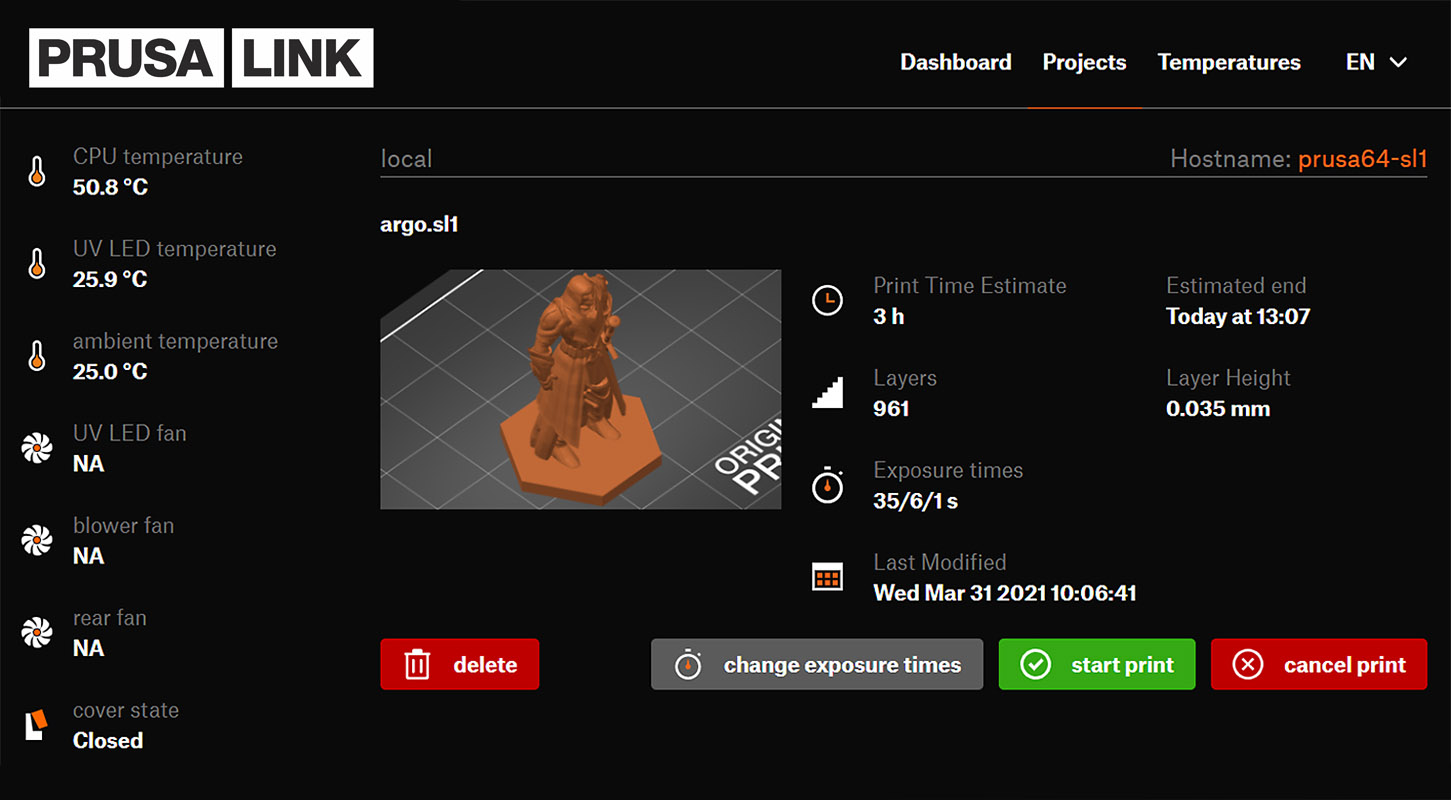
                  PrusaLink allows monitoring, file uploads, and print control without internet access.
                  The PrusaLink web interface is accessible only on your local network. Enter your printer's IP address into your browser to access it.
                  How to set up PrusaLink and Prusa Connect?

                  FDM printersPrusaLinkPrusa Connect
                  Prusa CORE One/+/L, XL, MK4/S, MK3.9/S, MK3.5/Sbuilt-inAvailable
                  Prusa Pro HT90 Available
                  Original Prusa MINI / +Wi-Fi Install & PrusaLinkAvailable
                  Original Prusa i3 MK3/S/+via RPi / RPi Zero (GPIO/USB)Available
                  Original Prusa i3 MK2.5/Svia RPi (USB)Available


                  SLA printersPrusaLinkPrusa Connect
                  Original Prusa SL1S SPEEDbuilt-inAvailable
                  Original Prusa SL1built-inAvailable

                  New-gen Original Prusa printers

                  Printers such as the CORE One/+/L, MK4/S, SL1S, and others have PrusaLink built-in. You can connect them using Wi-Fi or a wired LAN (Ethernet) network. Note: On the MINI/+, you must first install the Wi-Fi module to enable wireless functionality.

                  • Adding printer to Prusa Connect (CORE One, MK4, MK3.9, MK3.5, XL, MINI/+) 
                  • Wi-Fi and PrusaLink setup (CORE One, MK4, MK3.9, MK3.5, XL, MINI/+)
                  • Prusa Connect (HT90)
                  • Installing Wi-Fi and PrusaLink (MINI/+)
                  • PrusaLink / Prusa Connect (SL1/S)

                  Original Prusa i3 MK3/S/+ or MK2.5/S

                  In this case, the PrusaLink name also refers to the required hardware solution of a Raspberry Pi (RPi). PrusaLink supersedes the discontinued PrusaPrint solution (Octoprint and the RPi Zero W).

                  To use the Prusa Connect, first set up the PrusaLink on your printer.

                  On MK3/S/+, attach the RPi Zero using GPIO or use the USB connection.
                  On MK2.5/S, use the USB connection to the RPi.

                  As a storage, you need to get a MicroSD card, SDHC standard, Class 10, 8GB or more. Preferably, a name-brand card known to work with RPi. Do backups regularly to prevent data loss.

                  Supported boards (GPIO): Pi Zero 2 W, Pi Zero W
                  Supported boards (USB): Pi 3, Pi 3+, Pi 4, Pi 5
                  Unsupported: Pi Zero, Pi 2 and older.

                  While powered up, do not: Move the printer's axes by hand. Don't connect or disconnect the RPi. Don't insert or remove the microSD card inside the RPi. Don't touch the RPi board.
                  Only follow the guidance from the official documentation issued by Prusa Research. Prusa Research is not responsible for any damage done by or caused to third-party hardware.

                  • PrusaLink and Prusa Connect setup (MK3/S/+)
                  • PrusaLink/Prusa Connect with RPi 3/4 (MK2.5/S MK3/S/+)
                  • How to update PrusaLink (MK2.5/S MK3/S/+)

                  Other guides related to Prusa Connect and PrusaLink:

                  • Buddy3D Camera
                  • Buddy3D Camera for CORE One
                  • Camera setup for PrusaLink / Prusa Connect
                  • Camera compatibility (RPi + PrusaLink)
                  • ESP Camera for Prusa Connect
                  • Prusa Mobile app
                  • Prusa Connect - Telegram notifications setup
                  • Prusa Connect - Discord notifications setup
                  • Prusa Connect - Slack notifications setup
                  • Sending files from PrusaSlicer to PrusaLink
                  • Sending files from PrusaSlicer to printer via network (Prusa Connect, PrusaLink, Octoprint)
                  • How to set a static IP Address
                  • How to connect to RPi via SSH
                  • Connecting SL1/S to PrusaSlicer
                  • Internet Connection (SL1/S)
                  • Wi-Fi and PrusaLink setup (XL firmware up to 4.7.5)
                  • Adding the printer to Prusa Connect (XL firmware up to 4.7.5)
                  • Prusa Connect Local (OBSOLETE, Firmware 4.0.5 - 4.3.4) (MINI/+) 

                  Octoprint / Other / 3rd-party projects:

                  • Octoprint setup ( CORE One / MK4 / MK3.9 / MK3.5 / XL )
                  • Octoprint Configuration and install (MK2.5/S MK3/S/+)
                  • About Octoprint
                  • ESP32 Cam for Prusa Connect (GitHub)
                  • Prusa Connect Camera API
                  Was this article helpful?
                  This action is available only to registered users. Please log-in.

                  Topics

                  • Using the printer
                    • Prusa Connect & PrusaLink
                      • Prusa Connect Local (MINI)
                      • PrusaLink (SL1/SL1S)
                      • Sending G-codes to printer via network (Prusa Connect, PrusaLink, Octoprint)
                      • PrusaLink and Prusa Connect setup (MK3/S/+)
                      • Buddy3D Camera
                      • Prusa Connect (HT90)
                      • Prusa Mobile App
                      • Installing Wi-Fi and PrusaLink (MINI/+)
                      • Prusa Connect setup (SL1/S)
                      • Wi-Fi and Prusa Connect/Link setup (CORE One, MK4/S, MK3.9, MK3.5, XL, MINI/+)
                      • Adding the printer to Prusa Connect (CORE One, MK4/S, MK3.9/S, MK3.5/S, XL, MINI/+)
                      • Wi-Fi and PrusaLink setup (XL firmware up to 4.7.5)
                      • Adding the printer to Prusa Connect (XL firmware up to 4.7.5)
                      • PrusaLink / Prusa Connect with RPi 3/4 USB (MK2.5/S MK3/S/+)
                      • Camera setup for PrusaLink / Prusa Connect
                      • Prusa Connect - Telegram notifications setup
                      • Prusa Connect - Discord notifications setup
                      • Prusa Connect - Slack notifications setup
                      • Prusa Connect - Camera API
                      • How to update PrusaLink (MK2.5/S MK3/S/+)
                      • Camera compatibility (RPi + PrusaLink)
                      • Connect Registration Failed
                      • How to connect to RPi via SSH
                      • Connect Registration Failed #12401 (MINI)
                      • Connect Registration Failed #21401 (MK3.9)
                      • Connect Registration Failed #23401 (MK3.5)
                      • Connect Registration Failed #17401 (XL)
                      • How to set a Static IP Address
                      • Sending files from PrusaSlicer to PrusaLink
                      • Printing on MK3/S/+ via PrusaLink
                      • Prusa Connect and PrusaLink explained
                      • ESP Camera for Prusa Connect
                    • 3D models
                    • Material guide
                    • Slicing
                    • Printer maintenance

                  16 comments

                  Log in  to post a comment
                  Brianwc
                  •
                  I’m unable to monitor a print using Connect on my iPad. I’m able to slice and print using connect on my HP computer. I’m connecting to my printer using a RPi Zero 2W attached to the printer board on a MK3S+.
                  I also have an IMX 219 camera connected to the RPi via the 22 pin connector but Link or Connect doesn’t see the camera.
                  What am I doing wrong…
                  Reply
                  xte
                  •
                  Link in "What is Prusa Connect?" paragraph is broken and gives 403 error page: https://help.prusa3d.com/admin/article/Connect.Prusa3D.com

                  It should just link to https://connect.prusa3d.com/
                  Reply
                  Tony Cox
                  •
                  How can I delete multiple files from my connect cloud storage as I am reaching the maximum capacity and can only seem to be able to delete one file at a time?
                  Reply
                  Avinash
                  •
                  On the PrusaConnect on PrusaSlicer, you can go to your files, check-box each one, and delete them all at once.
                  Reply
                  Chris D C
                  •
                  how do I register my printer?
                  Reply
                  spicewiesel
                  •
                  In my printing room there are more cooling devices that help my Core One to cool or to heat the chamber. It would be nice if Prusa Link could devlier chamber temperatures and status, so I could turn on/off my devices with home assistant dependend on the chamer status.

                  Thanks!
                  Reply
                  Koubik
                  •
                  Yes, this is vital information, it shows in connect, so I guess link can provide this information, but it has to be published.
                  Also substatus (probing, cleaning, waiting for heating, etc) of the printing operation would be nice to have.
                  Reply