Prusa
  • SHOP
    • Latest products
    BY CATEGORY
    • 3D printersnew
    • 3D printer upgradesnew
    • Materials
    • Accessories
    • Spare parts
    • Courses
    • Merch
    • Get a price quote
    QUICK LINKS
    • Shipping & delivery
    • Returns & refunds
    • Payment & financing
    • Warranty
    • VAT & Customs fees
    • FAQ

    0 item in your cartitems in your cart

    Your cart is empty

    Go to cartShop 3D printers

    My profile

    Log in to see orders, saved items

    My profile

    Signed in as

    • Orders
    • Logout
  • 3D PRINTING
    • Explore 3D printing
    FOR BEGINNERS
    • 3D printing 101
    • How FDM printing works
    • Buying your first printer
    • 3D model catalog
    BY APPLICATION
    • Rapid prototyping
    • Manufacturing
    • Engineering
    • Research
    • Arts & design
    GO DEEPER
    • Materials guide
    • Courses
    • Webinars
    • Case studies
    • Custom 3D printing
  • 3D PRINTERS
    • All 3D printers
    FOR
    • Home or garageHobbyists, tinkerers and home printing
    • BusinessIn-house production for small teams
    • EnterpriseFleets, security and scale
    • Which Prusa is right for me
    SHOP & BROWSE
    • CORE One+new
    • CORE One+ INDXnew
    • CORE One L+new
    • CORE One L+ INDXnew
    • XL+new
    • MK4S
    • Prusa Pro HT90
    • Prusa Pro AFS
    • Prusa Pro SLX
    MORE FROM PRINTERS
    • Parts & upgradesnew
    • Critical infrastructure
    • Case studies
    • Signature Oak
    • Kits
  • MATERIALS
    • All materials
    BY USE
    • Every-day & design
    • Functional engineering
    • Composites
    • Pro speciality
    • SLA resins
    PRUSAMENT
    • PLA
    • PETG
    • ASA
    • PC
    • PA11
    • Flex
    • TPU
    MORE FROM MATERIALS
    • Materials guide
    • We make material in house
    • Sustainability
    • Order on the store
  • SOFTWARE
    • All software
    PREPARE THE PRINT
    • PrusaSlicer 3.0New
    PRINT & MONITOR
    • Prusa Connect
    • EasyPrint
    • iOS & Android app
    • Prusa Farm
    GET STARTED
    • Download & install
    • Knowledge base
    MORE FROM SOFTWARE
    • 3D model catalog
  • SUPPORT
    • Explore support
    FIND ANSWERS
    • Knowledge base
    • Troubleshooting
    • Courses
    • Webinars
    GET HELP
    • Contact us
    • Livechat
    • Shipping & delivery
    • Warranty
    • Returns & refunds
    • Service & spare parts
    • Service & Repair
    COMMUNITY
    • Forum
    • Reddit
    • Printables
  • TRUST CENTER
    • Trust Center overview
    BY TOPIC
    • GDPR
    • Certificates
    • Security
    • Compliance
    COMMITMENTS
    • Sustainability report
    TALK TO US
    • Contact the security team
  • COMPANY
    • About Prusa
    GET TO KNOW US
    • Our story
    • How we make printers
    • Open source
    • Brand & media kit
    NEWS
    • Blog
    • Newsroom
    • Events
    TRUST & PARTNERS
    • Sustainability
    • Resellers & distributors
    • Affiliate program
    • Contact
    • English
    • Čeština
    • Deutsch
    • Español
    • Français
    • Italiano
    • Polski
    • 日本語
  • Signed in as

    • Orders
    • Address
    • In-stock Alerts
    • My Courses
    • Subscription
    • Edit Account
    • Logout

Log in to see orders, saved items

Signed in as
  • Orders
  • Address
  • In-stock Alerts
  • My Courses
  • Subscription
  • Edit Account
  • English
  • Čeština
  • Deutsch
  • Español
  • Français
  • Italiano
  • Polski
  • 日本語
Shop

0 item in your cartitems in your cart

Your cart is empty

Go to cartShop 3D printers

My profile

Log in to see orders, saved items

My profile

Signed in as

  • Orders
  • Logout
SHOP
  • Latest products
BY CATEGORY
  • 3D printersnew
  • 3D printer upgradesnew
  • Materials
  • Accessories
  • Spare parts
  • Courses
  • Merch
  • Get a price quote
QUICK LINKS
  • Shipping & delivery
  • Returns & refunds
  • Payment & financing
  • Warranty
  • VAT & Customs fees
  • FAQ

Featured products

    Popular categories

      Trending searches

        Articles

          Blog

            Products

              Categories

                Suggested searches

                  Searching…
                  No results
                  Something went wrong.
                  ↑↓ Select↵ OpenEsc Close search
                  1. Support
                  2. Original Prusa MMU1
                  3. 3D models
                  4. Printable parts for Original Prusa
                   

                  Contents

                  • The naming of printable parts
                  • Downloading printable parts
                  • Settings
                  • Project files (STEP/SCAD)

                  Blog

                  • Print colorful and glowing Halloween decorations with our spooky offer
                  • Factorio Has Arrived on Printables
                  • Prusament PLA Lightweight: 65% lighter than regular PLA. Perfect choice for aircraft, cosplay, and more.

                  Newsletter

                  Signup and get our monthly squeeze on updates, blog, printables and much more.

                  By clicking, you agree to receive our newsletter.

                  This site is protected by reCAPTCHA Enterprise and the Google Privacy Policy and Terms of Service apply.

                  Factorio Transport Belts
                  E-shop
                  • 3D Printers
                  • Printer Upgrades
                  • Filaments
                  • Accessories
                  • Prusa Merchandise

                  © Prusa Research a.s.

                  Printables
                  • 3D Models
                  • Store
                  • Clubs
                  • 3D Design Contests
                  • Brands
                  Community
                  • World Map
                  • Forum
                  • User Groups
                  • Events
                  Help
                  • Prusa Help
                  • Prusa Academy
                  • 3D Printing Calculators
                  Software
                  • PrusaSlicer
                  • Prusa.app
                  • Prusa Connect
                  • Drivers and Software
                  Company
                  • About Us
                  • Blog
                  • Official Prusa Resellers
                  • Contact Us
                  • Certified for ISO 9001, ISO 14001, ISO 45001
                  • General Terms and Conditions
                  • General Terms and Conditions of Use of the PRUSA Websites
                  • Privacy Policy
                  • Information about cookies
                  • Customer Complaints Policy
                  • Status Page
                  • Do Not Sell or Share My Personal Information
                  • Supplemental Statements
                  • General Terms and Conditions
                  • General Terms and Conditions of Use of the PRUSA Websites
                  • Privacy Policy
                  • Information about cookies
                  • Customer Complaints Policy
                  • Status Page
                  • Do Not Sell or Share My Personal Information
                  • Supplemental Statements

                  © Prusa Research a.s.

                  JOSEF PRUSA®, PRUSA RESEARCH®, PRUSA POLYMERS®, PRUSA ORANGE®, PRUSA 3D ® AND PRUSAMENT® are registered trademarks of Prusa Development a.s. used by Prusa Research a.s. under licence from Prusa Development a.s.

                  Printable parts for Original Prusa

                  Relevant for

                  MMU family
                  MINI family
                  MK3 family
                  OLD PRODUCTS
                  SLA family
                  33 comments
                  Article is also available in following languages
                  English
                  Čeština
                  Polski
                  Deutsch
                  Français
                  Español
                  Italiano
                  日本語

                  Plastic parts used on our 3D printers are printed by the same machines, holding on to the original idea of the RepRap project. If you want to print replacement parts or upgrades, have your printer in a different color, or modify parts, they are all available online.

                  The naming of printable parts

                  To know the origin of our printable parts, the names of the parts always start with an alphabetical letter followed by a number. The identification can be found in larger parts. In smaller printed parts where the identification does not fit, dots and squares are used. It starts with a single dot, and the number of dots corresponds to the serial number of the version. Squares are used for custom plastics. It starts with one square, and the number of squares corresponds to the serial number of the version.

                  • A/B/C/D/E/dots/triangles: Parts printed in the Prusa Farm sent with the printers or found at our e-shop.
                  • R/S/T/squares: Parts that can be found at Prusa Research profile at Printables, Prusa3D site or our Github. These are the parts you can print yourself.

                  The numbers might differ on the parts printed on the farm and the parts printed at home, even if they are the same part.

                  Downloading printable parts

                  Printables.com

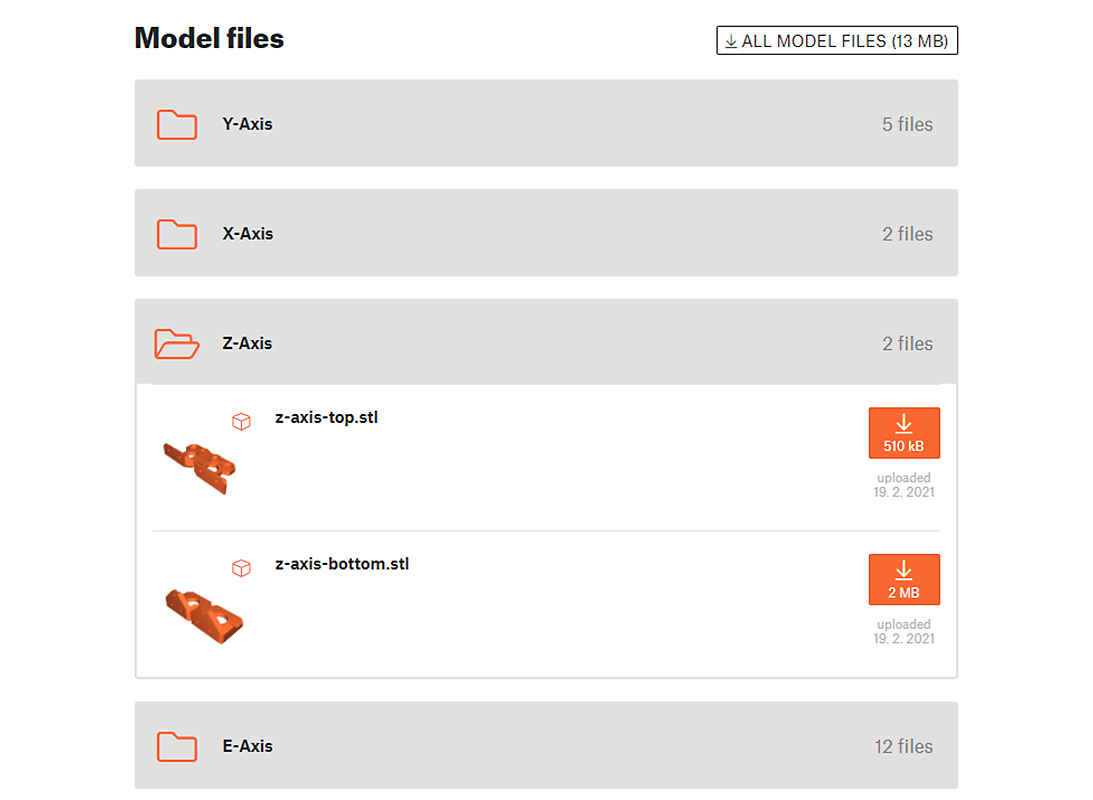
                  We have published STL files for every printable part of our printers, as well as printing instructions, to Printable's print depository. Here you can easily browse and view parts by their area of installation using the Printables folders feature.

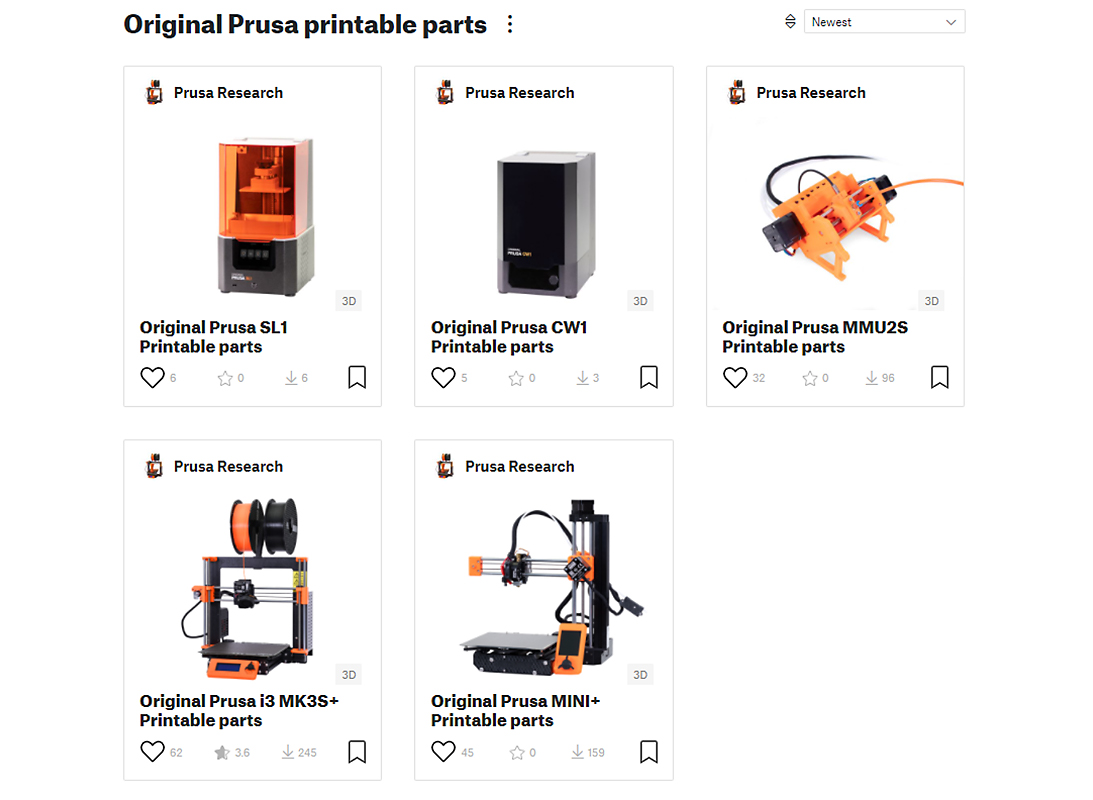
                  Check out the Printable parts collection on Printables to find the parts you need.
                  Prusa3d.com

                  You can find the latest printable parts for all of our 3D printers or printer upgrades at Prusa i3 Printable parts. Printable parts are divided into two groups:

                  • Complete kits - contains a full set of plastic parts for the entire 3D printer.
                  • Upgrades - contains only the parts for upgrading to the new version of the printer.

                  You can download STL files for all plastic parts and pre-sliced GCODES for all upgrades.

                  Settings

                  If you decide to generate your G-codes, it is recommended to use:

                  • Material: PETG
                  • 0.2 mm layer height QUALITY preset
                  • Infill: 15% GRID

                  The 'Fan-shroud'- part, which directs air from the print fan to the part, should be printed in ASA or ABS, but otherwise with the same settings.

                  If you have printed your own plastic parts, check this article for guidance on post-processing.

                  Project files (STEP/SCAD)

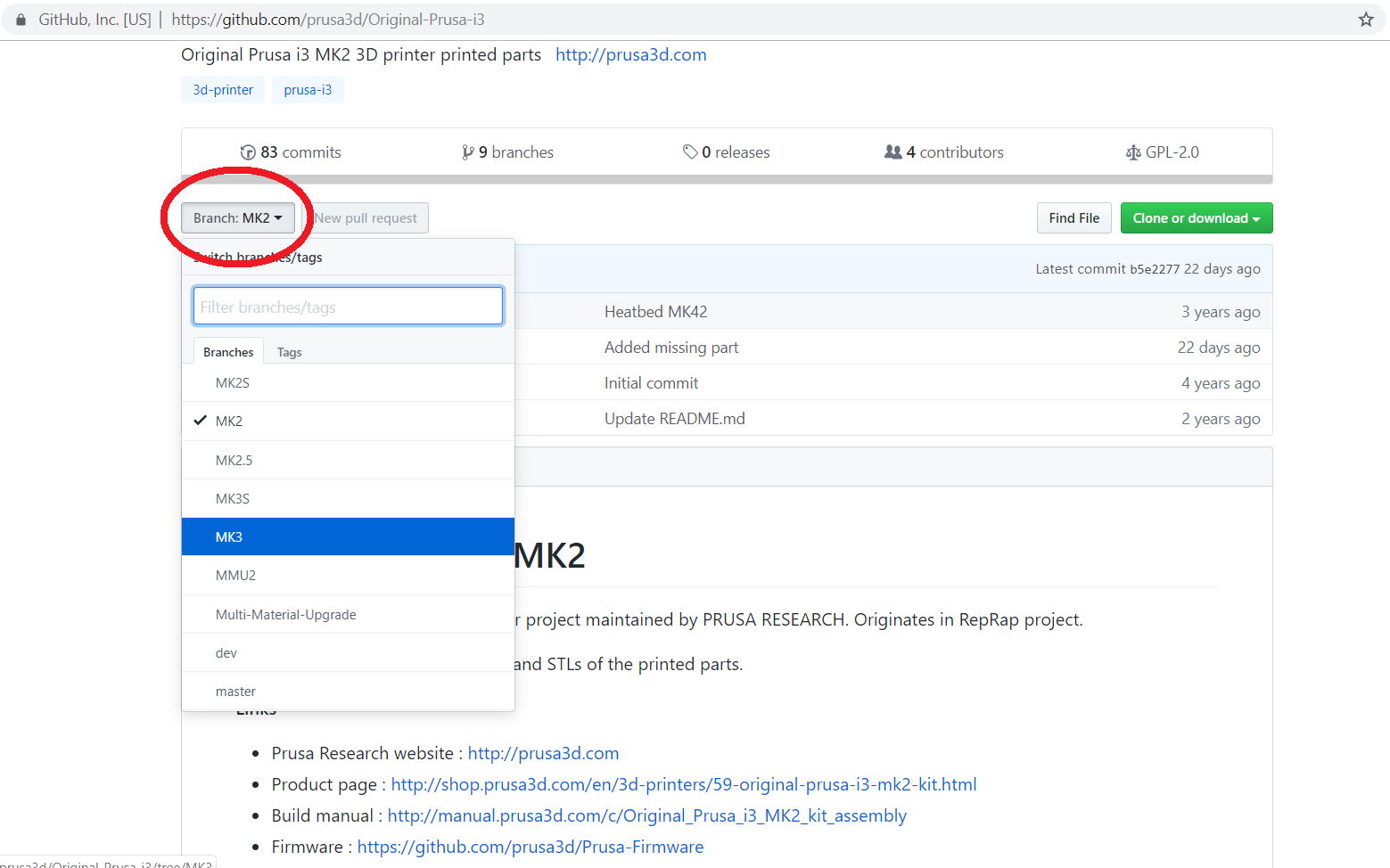
                  We do not provide the actual project files for our printed parts. Too many different programs are being used for that. However, if you are interested in modifying the parts we have made STEP files (in addition to STL files) available on our Github, for all parts.

                  Project files (STEP/SCAD) are only available in the GitHub branch/tree where they were initially released.

                  Some parts were designed using OpenSCAD, where SCAD files are the project files you can edit. For that reason, for all parts designed with OpenSCAD, there are only SCAD files and no STEP files available. This also includes metal parts.

                  • MK-series: https://github.com/prusa3d/Original-Prusa-i3
                  • MINI: https://github.com/prusa3d/Original-Prusa-MINI/releases
                  • SL1: https://github.com/prusa3d/Original-Prusa-SL1

                  For the MK series select the branch for the machine you are after and navigate to the file.
                   
                  Was this article helpful?
                  This action is available only to registered users. Please log-in.

                  Topics

                  • Using the printer
                    • 3D models
                      • Printable parts for Original Prusa
                      • Where can you get 3D models?
                      • Corrupted 3D models for printing
                      • Creating your own 3D models
                      • Creating MMU models: Export model from Fusion 360
                      • G-code preparation for MMU1
                      • Splitting STL using MeshMixer
                      • G-code preparation for MMU2S
                      • Splitting STL with single compact part
                      • How to post-process the printed parts
                    • Material guide
                    • Slicing
                    • Printer maintenance
                    • Prusa Connect & PrusaLink

                  17 comments

                  Log in  to post a comment
                  ehrlmpe5
                  •
                  I have an MMU2s and the parts are stamped "M1".  I don't see "M" mentioned in the naming convention at the start of this article.  What does the "M" signify?
                  Reply
                  voxelmaniam
                  •
                  Are the files as provided in the STLs in the recommended print orientation? Also, nothing is said about supports. Are all of the parts expected to print without supports unless supports are integrated into the design as they are in the fan shroud?
                  Reply
                  Giuliano - Official Prusa CS
                  •
                  Hello. The stl files for the printable parts are meant to be oriented the way they are imported in the slicer and without supports, unless already integrated.
                  Reply
                  d2#CMe52jFS^me
                  •
                  Documentation is not consistent across portal, possible this was changing over years.
                  In this article:
                  "Settings
                  If you decide to generate your G-codes, it is recommended to use:
                  Material: PETG
                  0.2 mm layer height QUALITY preset
                  Infill: 20% GRID"
                   
                  VS for example:
                   
                  "Print instructions
                  Download the latest PrusaSlicer and use the following settings**:
                   
                  Print settings: 0.20mm QUALITY
                  Filament: PETG (tested on Prusament)
                  15% Grid infill
                  ** Note that print settings are recommended, but you can experiment with your own."
                  taken from here: https://www.printables.com/model/706515-mk35-printable-parts
                   
                  So 15 or 20% infill recommendation? :) I think better keep it per model/part than provide as general ultimate recommendation.
                  Reply
                  Marina Curzi - Official Prusa CS
                  •

                  Thank you for the observation, the correct is 15%. It has been fixed.

                  Reply
                  Martin Salazar
                  •
                  The parts on printables are out of date, for example this part:https://www.printables.com/model/88272-i3-mk3s-printable-parts/files#preview:file-lm2R3
                  Clearly shows R5 while the current part on the git is r6
                  https://github.com/prusa3d/Original-Prusa-i3/blob/MK3S/Printed-Parts/STL/extruder-cover.stl
                  I suggest linking to the git for a more permanent solution or updating the Printables collection. 
                   
                  Reply
                  David B.
                  •

                  Hi! You’re comparing a MK3S version to the MK3S+ version.

                  Reply
                  batman
                  •
                  Any plans to release the STEP/OpenSCAD for the MK4 or MMU3?
                  Reply
                  Jakub Dolezal
                  •

                  Hi Batman, it is planned and once ready it will be uploaded here https://www.printables.com/model/531604-mmu3-printable-parts/files 

                  Reply