AA

おすすめ製品

    人気のカテゴリー

      急上昇ワード

        記事

          ブログ

            製品

              カテゴリー

                検索候補

                  検索中…
                  結果がありません
                  エラーが発生しました。
                  ↑↓ 選択↵ 開くEsc 検索を閉じる
                  • English
                  • Čeština
                  • Deutsch
                  • Español
                  • Français
                  • Italiano
                  • Polski
                  • 日本語
                  • 注文
                  • 住所
                  • 在庫ありのアラート
                  • 講座
                  • サブスクリプション
                  • アカウント編集
                  • 3Dプリンター9+▾

                    3Dプリンターnew

                    newPrusa CORE One Lさらに詳しく
                    newPrusa CORE One+さらに詳しく
                    newPrusa CORE One L+ INDX 8-ToolnewPrusa CORE One+ (Gen 2) INDX 8-ToolPrusa CORE One L: Critical InfrastructureOriginal Prusa MK4SnewOriginal Prusa XLOriginal Prusa XL:クリティカルインフラストラクチャー

                    プリンターのアップグレード

                    newCORE One/+ INDX Conversion KitnewMK3S/+ から MK4SnewXL - シリコンプリンティングツールヘッドnewMMU3 (Multi Material Upgrade)
                    Prusa 報酬プログラムシェアして、紹介して、特典をゲット。
                    3Dプリンターを選び方スペース・予算・用途に合わせて最適なマシンを選ぶための基本をご紹介します。
                    無料の電子書籍無料の電子ブック Basics of 3D Printing with Josef Prusa をダウンロードして、3Dプリンティングの世界への第一歩を踏み出しましょう。
                    Original Prusa のプリント可能なパーツOriginal Prusa 3Dプリンターとアップグレード用のプリント可能なスペアパーツコレクション。
                    配送情報プリンターの現在の生産量と納期に関する情報を定期的に更新しています。
                    カスタム3Dプリント様々な素材を使用したプロフェッショナルなカスタム3Dプリントサービス。
                  • マテリアル▾

                    フィラメント

                    PrusamentPLAPETGASA / ABSPCブレンドPA (Nylon)FlexComposites特別Materials clearance sale

                    レジン

                    Prusament Resin Tough柔軟性
                    フィラメントガイドプルサメントスプールをチェック
                    Prusament.com
                  • 部品 & アクセサリー▾

                    アクセサリー

                    エンクロージャーノズルスチールシート必須アクセサリーカメラ&アドオンツール&クラフト接着剤

                    補修部品

                    商品

                    スペアパーツ - すべてのプリンターCORE OneMK4/S & MK3.9/SMK3/MK3S/MK3S+XL
                    Merch
                  • 法人向け▾
                    Prusa Pro HT90Prusa Pro SLXPrusa Pro AFSPrusa Pro Medical OneOriginal Prusa XLOriginal Prusa XL:クリティカルインフラストラクチャー
                    Prusa CORE One+さらに詳しく
                    Prusa CORE One Lさらに詳しく
                    Prusa CORE One L: Critical Infrastructure Edition クリティカルインフラ版(高セキュリティ対応モデル)

                    3Dプリンティングの用途

                    製造と研究開発自動車産業ヘルスケア教育と学術研究建築家とデザイナー映画産業重要インフラ

                    3Dプリンティングのストーリー

                    No items yet.

                    プルサ正規販売代理店
                    サステナビリティ
                    Prusa Education
                    お問い合わせ・ご連絡
                    カスタム3Dプリント
                    ISO認証取得
                  • ソフトウェア▾
                    PrusaSlicer

                    PrusaSlicerPrusaSlicer

                    PrusaSlicer は、オープンソースで機能が豊富、頻繁に更新されるツールで、3Dプリンタ用の完璧なプリントファイルをエクスポートするために必要なものがすべて含まれています。ニュースやリリースログは Github で確認できます。

                    WindowsMacOSLinux
                    Prusa Connect

                    Prusa Connect

                    Prusa Connectは、3Dプリンターの遠隔操作と監視を可能にするクラウドサービスで、安全なデータの取り扱い、簡単なセットアップ、どこからでも複数のプリンターを管理できるサポートを提供します。

                    ログインして接続する
                    Prusa.app

                    Prusa.app

                    Prusa Connect技術を活用し、どこからでもリモートでプリンターを操作可能!Prusa.appは、AndroidおよびiOSデバイス向けに新たなPrusaプリンター体験を提供します。

                    今すぐお試しください!
                    ドライバー&ファームウェア3Dプリンタの最新のファームウェアとドライバをダウンロードしてください。
                    PrusaSlicer サポート
                    Prusa Connect サポート
                  • 3Dモデル▾
                    3Dプリンターアート&デザインホビー&メーカー日用雑貨テーブルトップミニチュアおもちゃ&ゲームPrintablesストア

                    人気の3Dモデル

                    • Top tether hook
                    • SQUATCHEE-SPIN
                    • The Over-engineered Backpack Wall Mount V2
                    • Black Hole Lamp
                    • Strong garden hose holder
                    • Prusa Spool Bot

                    デザインコンテスト

                    • Framework Laptop 12 Mainboard Re-Use2026/9/1 – 2026/9/30
                    • 🏆 Designer Challenge: Magic tricks!2026/9/1 – 2026/9/22
                    • Makeup Organizers2026/9/4 – 2026/9/20
                  • コミュニティ▾

                    イベント情報

                    • 3D Printopia 20262026/9/26 – 2026/9/27 · Pennsylvania, United States · Prusa Team
                    • Maker Faire Bay Area2026/9/25 – 2026/9/27 · Kalifornie, United States · Prusa Team
                    • Hobby Messe2026/10/2 – 2026/10/4 · Sachsen, Germany · Prusa Team
                    • Mezinárodní strojírenský veletrh2026/10/6 – 2026/10/9 · Jihomoravský kraj, Czechia · Prusa Team

                    プルサフォーラム

                    • PrintHaus: click together buildings for 3D printing – beta testers wanted
                    • Heat creep when printing ABS?
                    • Chamber Light Dimming
                    プルサワールドマッププルサワールドマップ地元の3Dプリントユーザーを見つけて、あなたの周りのコミュニティを探索してみてください。
                  • ヘルプ▾
                    ガイド & チュートリアルPrusaSlicerPrusa Connectマテリアル

                    プリンターモデル

                    CORE One INDXCORE One LCORE One+CORE One

                    ハードウェアのトラブルシューティング

                    • Selftest failed (CORE One/+)
                    • ホットエンドの詰まり (MK4)
                    • ベルトテンションの調整(CORE One L/CORE One)
                    • Prusa ConnectとPrusaLink について

                    ドライバー&ファームウェア

                    INDX familyCORE One familyMK4 familyXL familyMMU familyPRO family
                  • コース一覧▾

                    3Dプリンティングのエキスパートになろう

                    Prusa アカデミーでは、3Dプリンティングに関する様々なトピックのオンラインコースを提供しています。各コースの特徴:

                    • 多くの写真と短いビデオを含む読みやすいテキスト
                    • インスピレーションやさらなる学習のためのリンク
                    • 知識を試すためのテスト
                    • 修了証明書
                    Browse all coursesMy courses library
                    • 3D Modeling in Autodesk Fusion
                    • PrusaSlicerマスタークラス – 初心者から上級者まで
                    • Complete Guide to 3D Print Postprocessing, Painting, and Detailing
                    • Beginners' Guide to Blender for 3D Printing: Edit and Remix STLs
                  • ブログ▾
                    • Prusament PLA ColorMix:わずか5巻のフィラメントで45色以上をプリント
                    • PrusaSlicer 3.0プレビュー版 — 3Dプリントの未来を見据えた仕様
                    • より高品質なプリントを、もっと簡単に:Prusa XL+、CORE One L+、CORE One+(Gen 2)― 大規模製品アップグレード
                    電子書籍: 3Dプリンティングの基礎
                  • 会社概要▾

                    Prusa Research について

                    私たちは、ヨーロッパおよびアメリカ最大の3Dプリンターメーカーです。

                    Prusa Research は、チェコ出身のホビイスト/メイカー/発明家である Josef Prusa によって 2012 年に 1 人で立ち上げられました。そこからわずか 15 年で、従業員 1,200 名を超える企業へと成長しました。毎月、チェコ共和国プラハの本社および米国デラウェア州から、160 カ国以上のユーザーに向けて 10,000 台以上の革新的で安全な 3D プリンターを設計・製造・出荷しています。

                    動画をご覧になり、Prusa Research がどのように誕生し、わずか 10 年で何を達成したかをご確認ください!

                    Prusa Research についてタイムラインサステナビリティオープンソース
                    Prusa Research について
                    お問い合わせ
                    ロゴ・写真素材
                    ISO認証取得
                  1. サポート
                  2. プリンターメンテナンス
                  3. Regular printer maintenance (CORE One INDX)
                   

                  内容

                  • Useful tools
                  • Frequent maintenance
                  • Sporadic maintenance
                  • Annual maintenance

                  ブログ

                  • Prusament PLA ColorMix:わずか5巻のフィラメントで45色以上をプリント
                  • PrusaSlicer 3.0プレビュー版 — 3Dプリントの未来を見据えた仕様
                  • より高品質なプリントを、もっと簡単に:Prusa XL+、CORE One L+、CORE One+(Gen 2)― 大規模製品アップグレード

                  ニュースレター

                  ご登録いただくと、毎月 新しいファームウェア、PrusaSlicerの新バージョン、3Dプリントプロジェクトの一般的なヒントなど、役立つ情報をお届けします。

                  クリックして、ニュースレターを受け取る。

                  このサイトはreCAPTCHA Enterpriseによって保護されており、Googleのプライバシーポリシーと利用規約が適用されます。

                  Top tether hook
                  E-shop
                  • 3Dプリンター
                  • プリンターのアップグレード
                  • フィラメント
                  • アクセサリー
                  • Prusa 商品

                  © Prusa Research a.s.

                  Printables
                  • 3Dモデル
                  • Store
                  • Clubs
                  • 3Dデザインコンテスト
                  • Brands
                  コミュニティ
                  • ワールドマップ
                  • フォーラム
                  • ユーザーグループ
                  • イベント
                  ヘルプ
                  • Prusa ヘルプ
                  • Prusa アカデミー
                  • 3Dプリンティング計算機
                  ソフトウェア
                  • PrusaSlicer
                  • Prusa.app
                  • Prusa Connect
                  • ドライバーとソフトウェア
                  会社概要
                  • 私たちについて
                  • Blog
                  • プルサ正規販売代理店
                  • お問い合わせ
                  • ISO 9001・ISO 14001・ISO 45001 認証取得済み
                  • 一般利用規約
                  • PRUSAウェブサイト利用のための一般利用規約
                  • プライバシーポリシー
                  • クッキーに関する情報
                  • お客様の苦情対応に関する方針
                  • Webサイトのステータスページ
                  • Cookie 設定
                  • 一般利用規約
                  • PRUSAウェブサイト利用のための一般利用規約
                  • プライバシーポリシー
                  • クッキーに関する情報
                  • お客様の苦情対応に関する方針
                  • Webサイトのステータスページ
                  • Cookie 設定

                  © Prusa Research a.s.

                  JOSEF PRUSA®、PRUSA RESEARCH®、PRUSA POLYMERS®、PRUSA ORANGE®、PRUSA 3D ® および PRUSAMENT® は、Prusa Development a.s. の登録商標であり、Prusa Research a.s. が Prusa Development a.s. からのライセンスに基づき使用しています。

                  Regular printer maintenance

                  (CORE One INDX)

                  関連するもの

                  CORE One INDX
                  記事 他の言語でもご覧になれます。
                  English
                  Čeština
                  Polski
                  Deutsch
                  Français
                  Español
                  Italiano
                  日本語

                  It is recommended to regularly take some time to maintain your Prusa CORE One INDX. This should be done even if the printer is working perfectly. 

                  Useful tools

                  Besides the usual tools, such as Allen keys, needle-nose pliers, and IPA (Isopropyl Alcohol) + paper towels, you might need:

                  • Compressed air: also known as canned air. Be sure not to hold it upside down while spraying - otherwise, you could damage any electronic components while trying to clean them.
                  • Brass Nozzle Brush: a small brass brush is useful for cleaning the nozzle. If you don't have a brass brush, any brush with hard bristles will do the job.
                  • Prusa Lubricant: used to lubricate the smooth rods with linear bearings and to lubricate the Z-axis leadscrews. DO NOT use Prusa Lubricant on the linear rail! 
                  • Linear rail lubrication set: a set that includes Microlube GL 261, Dosing needle SSS15 2, Cartridge with manual piston 2/2,5mm, and two nitrile gloves. 
                  • Alcohol-free cleaner: used to clean the printer panels. DO NOT use alcohol products, including IPA, to clean the panels. 

                  Frequent maintenance 

                  The following points should be checked before every print. 

                  Keeping the printer clean

                  After several hours of printing, various kinds of debris may start to accumulate around the printer parts or under the heatbed - pieces of filament, dust, scraps, broken supports, etc. Always make sure that the parts of the printer are clean. You can use a brush, a small broom, or a vacuum to remove debris. 

                  Flexible print sheet

                  Acetone should be used sparingly for cleaning and only be used on the Smooth print sheet! Never use acetone on the Textured or Satin print sheet, as the surface will be permanently damaged.

                  Never clean the special PA Nylon sheet with acetone, IPA (isopropyl alcohol), or other alcohol-based solvents (window cleaners, Windex, etc.)! This will damage the surface. 

                  All flexible print sheets should be cleaned regularly to ensure adhesion, but the exact methods and washing solutions can differ depending on your type of sheet.

                  You can find more information on how to take care of your flexible print sheet in this articlein this article.

                  Sporadic maintenance

                  The following checks should be done every 200 hours of printing time. Cleaning the nozzle can be performed as needed, or every 200 hours of printing time, whichever occurs first. 

                  Cleaning the nozzle - Cold pull

                  Do not touch the nozzle during this procedure - it is hot, and there is a risk of burning yourself!
                  To better access the nozzle during cleaning, lower the heatbed using the LCD menu -> Control ->
                  Movement -> Z Axis option.

                  Never heat the nozzle with an external heat source! This could cause irreversible damage to the nozzle. 

                  A cold pull clears carbonized plastic, debris, and partial or full clogs from the nozzle.
                   
                  1. Prepare a piece of light-colored PLA filament. Light colors are ideal because any trapped debris and residues from the nozzle will be clearly visible on the pulled filament.
                  2. Select the INDX Tool with the clogged nozzle in the printer menu. The INDX Toolhead will automatically pick it up.
                  3. Heat the nozzle to the temperature of the currently loaded material or slightly above.
                  4. Remove the PTFE tube from the INDX Toolhead and insert the PLA filament into the filament entry point. Push the filament down manually until it starts coming out of the nozzle, or until you meet firm resistance if the nozzle is completely clogged.
                  5. Turn off the nozzle heating and continue applying light downward pressure on the filament until it solidifies. Once the temperature drops to 100 °C, slowly and steadily pull the filament straight upwards and check the tip for removed impurities.
                  6. Repeat the process if necessary until the pulled filament comes out completely clean and free of any visible residues. At that point, the nozzle is successfully cleared.

                  Axes check - Linear Rail (X-axis)

                  Ensure that there is no debris or dust on the (X-axis) linear rail. If there is, clean it with a clean tissue or a clean cloth, no degreaser or chemicals, as these might damage the rubber in the carriage. 

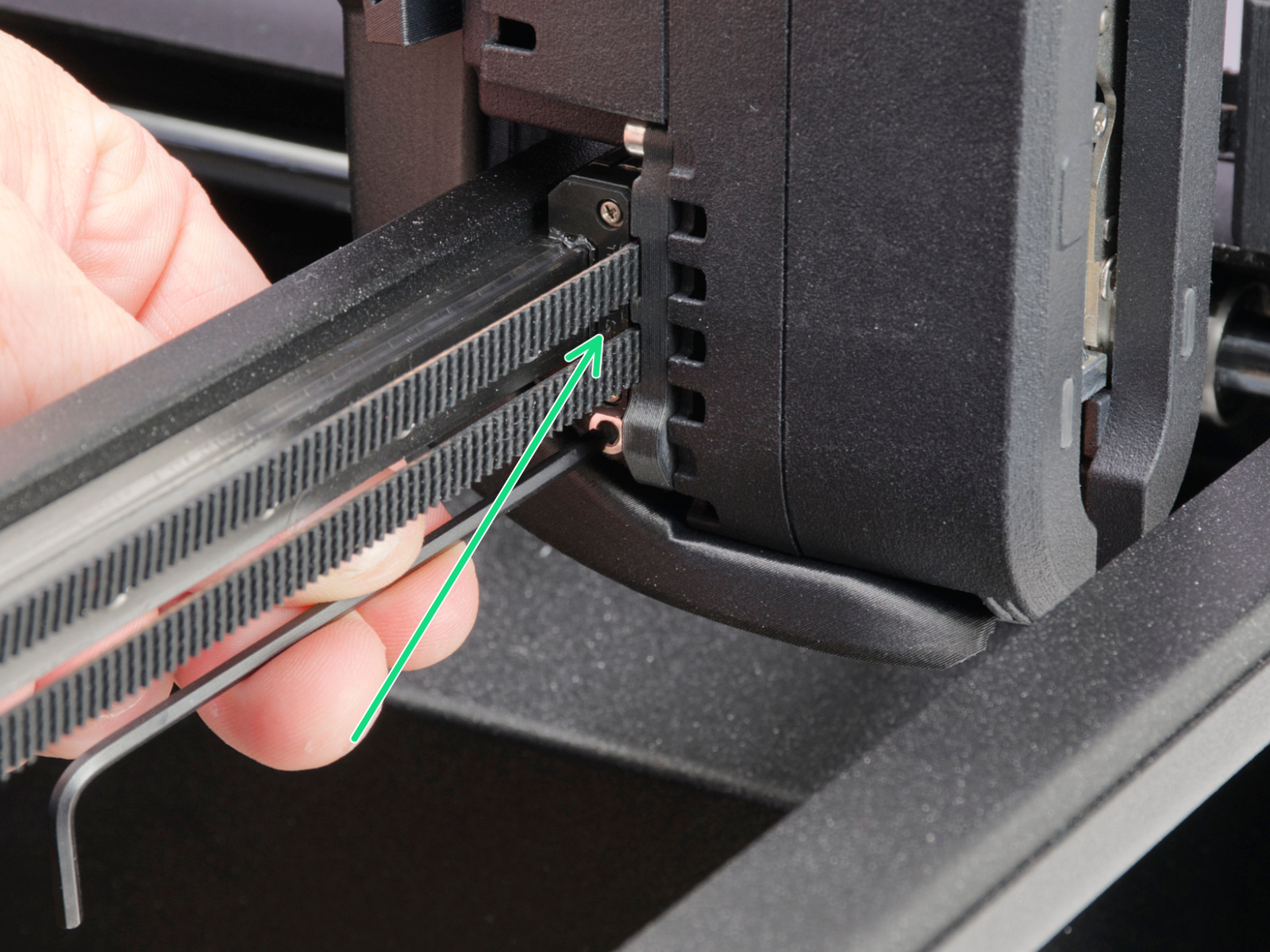
                  We recommend lubricating the linear rail every 3-6 months, using the dedicated linear rail lubrication set at the spots shown below.
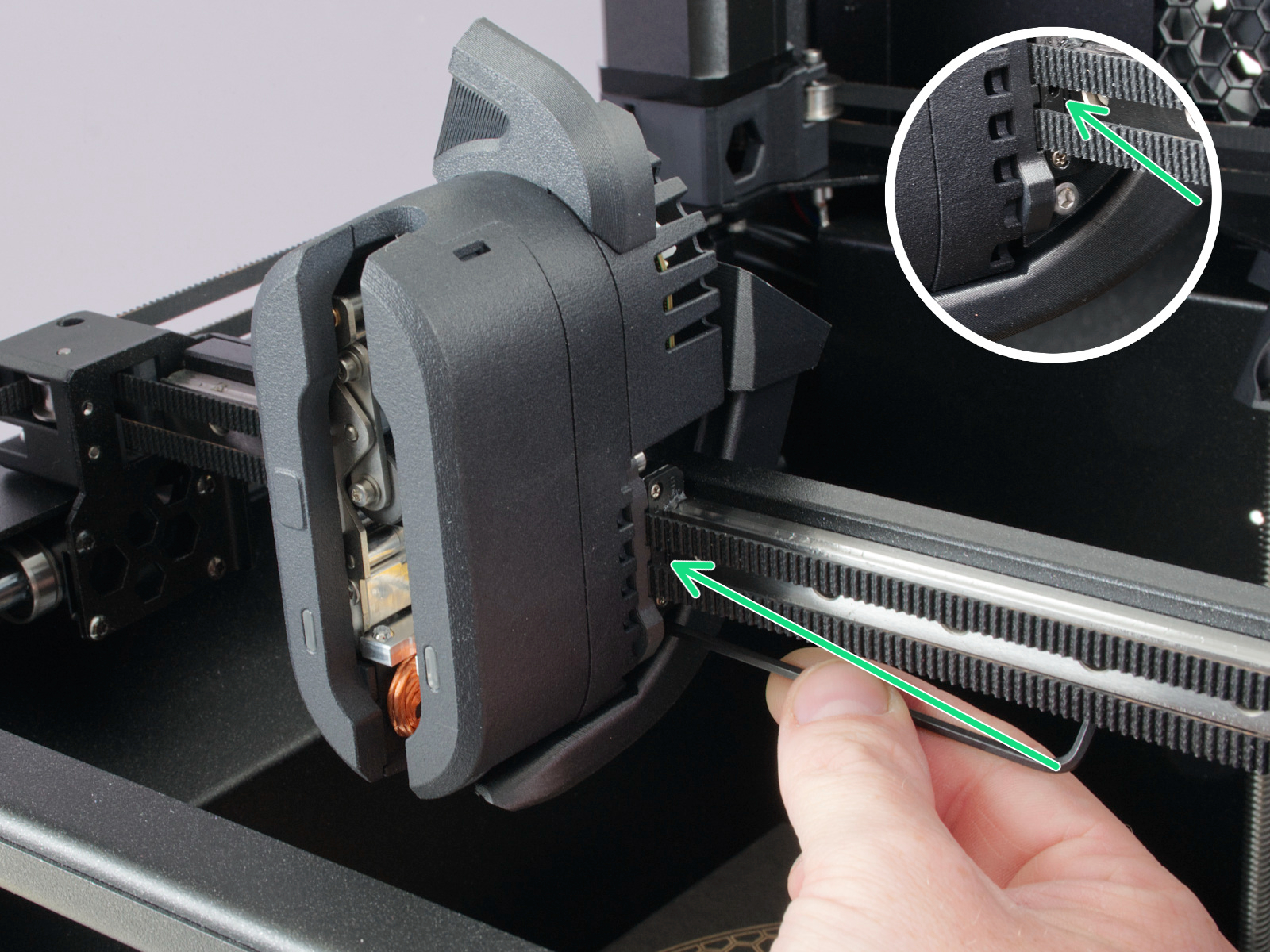
                  On linear rails, DO NOT use Prusa Lubricant or any products not part of the linear rails lubrication set. 

                  Axes check - Smooth Rods and Linear Bearings (Y-axis)

                  Clean the (Y-axis) smooth rods with a clean paper towel, and lubricate them using a small amount of Prusa Lubricant.

                  Only in case you feel the axis is not running smoothly anymore, even after recently cleaning and lubricating the smooth rods, the bearings can be taken out, cleaned with alcohol, and greased on the inside, still using a small amount of Prusa Lubricant. 

                  Axes check - Belt

                  Over a long printing time, the belt can slightly loosen, causing issues such as layer shifting or bad printing quality. The easiest way to check the belt tension is to print a circular object. If the result is not perfectly round, a belt adjustment is needed. 

                  Extruder Feeding Gear

                  The feeding gear in the extruder does not need any lubricant. However, over time, a filament powder deposit may form in the grooves, causing poor extrusion of filament. Remove the debris using compressed air. Small plastic threads can be carefully removed with tweezers.

                  Panels cleaning 

                  Use an alcohol-free cleaner or soapy water to clean the printer panels. 

                  DO NOT use products that contain alcohol, including IPA. Repeat exposure will weaken the panels, causing them to become brittle over time. 

                  Annual maintenance

                  Electronics

                  Before touching the electrical connections, please make sure that the printer is off, and unplugged from the main power source.

                  It is a good practice to check and optionally reconnect the electrical connectors on the xBuddy board, INDX Toolhead, heatbed, PSU, and xLCD every 600-800 hours of printing. 

                  In particular, ensure that the screw-attached connectors are fully tightened, and the Molex-attached connectors are properly connected. 

                  CAUTION: for Molex-attached connectors, it is necessary to press the latch before disconnecting. Otherwise, the connector may get damaged. 

                  この記事は役に立ちましたか?
                  この操作は登録ユーザーのみが利用できます。ログインしてください。
                  ログイン してコメントを投稿する
                  コメントなし

                  トピックス

                  • このプリンターを使用
                    • プリンターメンテナンス
                      • Regular printer maintenance (CORE One INDX)
                      • ファームウェア更新方法 (CORE One, MK4/S, MK3.9/S, MK3.5/S, XL)
                      • How to replace Heatbed (CORE One)
                      • How to replace Heatbed Thermistor (CORE One)
                      • Buddy3D Camera for CORE One Installation
                      • How to replace Z motors (CORE One)
                      • How to reverse the door orientation (CORE One)
                      • How to install Advanced Filtration (CORE One)
                      • How to replace the Heatbed Power Cables (CORE One)
                      • How to replace the Belt Tensioner Pulley (CORE One)
                      • How to replace the Belt Tensioner Left (CORE One)
                      • How to replace the Belt Tensioner Right (CORE One)
                      • How to replace the door sensor (CORE One)
                    • 3Dモデル
                    • 材料ガイド
                    • スライス処理
                    • Prusa Connect [進行中の翻訳]