Prusa
  • ショップ
    • 最新製品
    カテゴリー別
    • 3Dプリンター新着
    • 3Dプリンターアップグレード新着
    • 材料
    • アクセサリー
    • スペアパーツ
    • コース
    • グッズ
    • 見積もりを取得
    クイックリンク
    • 配送と配達
    • 返品と返金
    • 支払いと融資
    • 保証
    • VATと関税
    • よくある質問

    0 点の商品がカートに入っています点の商品がカートに入っています

    カートは空です

    カートを見る3Dプリンターを購入

    マイプロフィール

    ログイン すると注文や保存した商品を確認できます

    マイプロフィール

    ログイン中:

    • 注文
    • ログアウト
  • 3Dプリント
    • 3Dプリントを探る
    初心者向け
    • 3Dプリントの基礎
    • FDM印刷の仕組み
    • 初めてのプリンターを購入する
    • 3Dモデルカタログ
    用途別
    • ラピッドプロトタイピング
    • 製造
    • エンジニアリング
    • 研究
    • アートとデザイン
    さらに深く
    • 材料ガイド
    • コース
    • ウェビナー
    • 導入事例
    • カスタム3Dプリンティング
  • 3Dプリンター
    • すべての3Dプリンター
    用途
    • 自宅またはガレージ愛好家、改造愛好家、ホームプリンティング
    • ビジネス小規模チーム向けの社内生産
    • エンタープライズフリート、セキュリティ、大規模生産
    • どのPrusaが私に適していますか
    ショップと閲覧
    • CORE One+新着
    • CORE One+ INDX新着
    • CORE One L+新着
    • CORE One L+ INDX新着
    • XL+新着
    • MK4S
    • Prusa Pro HT90
    • Prusa Pro AFS
    • Prusa Pro SLX
    プリンターからさらに
    • 部品とアップグレード新着
    • Spare parts
    • 重要インフラ
    • 導入事例
    • シグネチャーオーク
    • キット
  • 材料
    • すべての材料
    用途別
    • 日常とデザイン
    • 機能工学
    • 複合材料
    • プロフェッショナル向け特殊材料
    • SLAレジン
    Prusament
    • PLA
    • PETG
    • ASA
    • PC
    • PA11
    • Flex
    • TPU
    材料からさらに
    • 材料ガイド
    • 自社製材料
    • サステナビリティ
    • ストアで注文
  • ソフトウェア
    • すべてのソフトウェア
    印刷の準備
    • PrusaSlicer 3.0新着
    印刷と監視
    • Prusa Connect
    • EasyPrint
    • iOS & Androidアプリ
    • Prusaファーム
    始める
    • ダウンロードとインストール
    • ナレッジベース
    その他のソフトウェア
    • 3Dモデルカタログ
  • サポート
    • サポートを探す
    回答を探す
    • ナレッジベース
    • トラブルシューティング
    • コース
    • ウェビナー
    ヘルプ
    • お問い合わせ
    • ライブチャット
    • 配送と配達
    • 保証
    • 返品と返金
    • サービスとスペアパーツ
    • サービスと修理
    コミュニティ
    • フォーラム
    • Reddit
    • Printables
  • トラストセンター
    • トラストセンター概要
    トピック別
    • GDPR
    • 証明書
    • セキュリティ
    • コンプライアンス
    コミットメント
    • サステナビリティレポート
    お問い合わせ
    • セキュリティチームに連絡
  • 会社
    • Prusaについて
    私たちについて
    • 私たちのストーリー
    • プリンターの製造方法
    • オープンソース
    • ブランド&メディアキット
    ニュース
    • ブログ
    • ニュースルーム
    • イベント
    信頼とパートナー
    • サステナビリティ
    • 再販業者と販売代理店
    • アフィリエイトプログラム
    • お問い合わせ
    • English
    • Čeština
    • Deutsch
    • Español
    • Français
    • Italiano
    • Polski
    • 日本語
  • ログイン中:

    • 注文
    • 住所
    • 在庫アラート
    • マイコース
    • サブスクリプション
    • アカウントを編集
    • ログアウト

ログイン すると注文や保存した商品を確認できます

ログイン中:
  • 注文
  • 住所
  • 在庫アラート
  • マイコース
  • サブスクリプション
  • アカウントを編集
  • English
  • Čeština
  • Deutsch
  • Español
  • Français
  • Italiano
  • Polski
  • 日本語
ショップ

0 点の商品がカートに入っています点の商品がカートに入っています

カートは空です

カートを見る3Dプリンターを購入

マイプロフィール

ログイン すると注文や保存した商品を確認できます

マイプロフィール

ログイン中:

  • 注文
  • ログアウト
ショップ
  • 最新製品
カテゴリー別
  • 3Dプリンター新着
  • 3Dプリンターアップグレード新着
  • 材料
  • アクセサリー
  • スペアパーツ
  • コース
  • グッズ
  • 見積もりを取得
クイックリンク
  • 配送と配達
  • 返品と返金
  • 支払いと融資
  • 保証
  • VATと関税
  • よくある質問

おすすめ製品

    人気のカテゴリー

      急上昇ワード

        記事

          ブログ

            製品

              カテゴリー

                検索候補

                  検索中…
                  結果がありません
                  エラーが発生しました。
                  ↑↓ 選択↵ 開くEsc 検索を閉じる
                  1. サポート
                  2. Original Prusa MK3.5
                  3. 一般情報
                  4. Purchasing and managing licenses for Prusa Academy courses
                   

                  内容

                  • Shopping cart
                  • Purchasing one license
                  • Purchasing multiple licenses
                  • Assigning licenses
                  • Licenses management
                  • Licence status
                  • Batch import
                  • The license assignee does not have a Prusa Account

                  ブログ

                  • Prusament PLA ColorMix:わずか5巻のフィラメントで45色以上をプリント
                  • PrusaSlicer 3.0プレビュー版 — 3Dプリントの未来を見据えた仕様
                  • より高品質なプリントを、もっと簡単に:Prusa XL+、CORE One L+、CORE One+(Gen 2)― 大規模製品アップグレード

                  ニュースレター

                  ご登録いただくと、毎月 新しいファームウェア、PrusaSlicerの新バージョン、3Dプリントプロジェクトの一般的なヒントなど、役立つ情報をお届けします。

                  クリックして、ニュースレターを受け取る。

                  このサイトはreCAPTCHA Enterpriseによって保護されており、Googleのプライバシーポリシーと利用規約が適用されます。

                  Heavy Duty Keyboard Holder (No Supports)
                  E-shop
                  • 3Dプリンター
                  • プリンターのアップグレード
                  • フィラメント
                  • アクセサリー
                  • Prusa 商品
                  Prusa

                  © Prusa Research a.s.

                  Printables
                  • 3Dモデル
                  • Store
                  • Clubs
                  • 3Dデザインコンテスト
                  • Brands
                  コミュニティ
                  • ワールドマップ
                  • フォーラム
                  • ユーザーグループ
                  • イベント
                  ヘルプ
                  • Prusa ヘルプ
                  • Prusa アカデミー
                  • 3Dプリンティング計算機
                  ソフトウェア
                  • PrusaSlicer
                  • Prusa.app
                  • Prusa Connect
                  • ドライバーとソフトウェア
                  会社概要
                  • 私たちについて
                  • Blog
                  • プルサ正規販売代理店
                  • お問い合わせ
                  • ISO 9001・ISO 14001・ISO 45001 認証取得済み
                  • 一般利用規約
                  • PRUSAウェブサイト利用のための一般利用規約
                  • プライバシーポリシー
                  • クッキーに関する情報
                  • お客様の苦情対応に関する方針
                  • Webサイトのステータスページ
                  • Cookie 設定
                  Prusa
                  • 一般利用規約
                  • PRUSAウェブサイト利用のための一般利用規約
                  • プライバシーポリシー
                  • クッキーに関する情報
                  • お客様の苦情対応に関する方針
                  • Webサイトのステータスページ
                  • Cookie 設定

                  © Prusa Research a.s.

                  JOSEF PRUSA®、PRUSA RESEARCH®、PRUSA POLYMERS®、PRUSA ORANGE®、PRUSA 3D ® および PRUSAMENT® は、Prusa Development a.s. の登録商標であり、Prusa Research a.s. が Prusa Development a.s. からのライセンスに基づき使用しています。

                  Purchasing and managing licenses for Prusa Academy courses

                  関連するもの

                  MK4 family
                  XL family
                  MMU family
                  ENCLOSURE family
                  MINI family
                  +
                  記事 他の言語でもご覧になれます。
                  English
                  Čeština
                  Polski
                  Deutsch
                  Français
                  Español
                  Italiano
                  日本語

                  Prusa Academy is our learning platform and offers online courses targeted specifically on 3D printing topics. 

                  Learn more about Prusa Academy on its dedicated page. 

                  It is possible to purchase either a single or multiple licenses for an Academy course within the same order, or in separate orders under the same Prusa account, with the possibility of assigning the purchased licenses to other Prusa accounts. 

                  Shopping cart

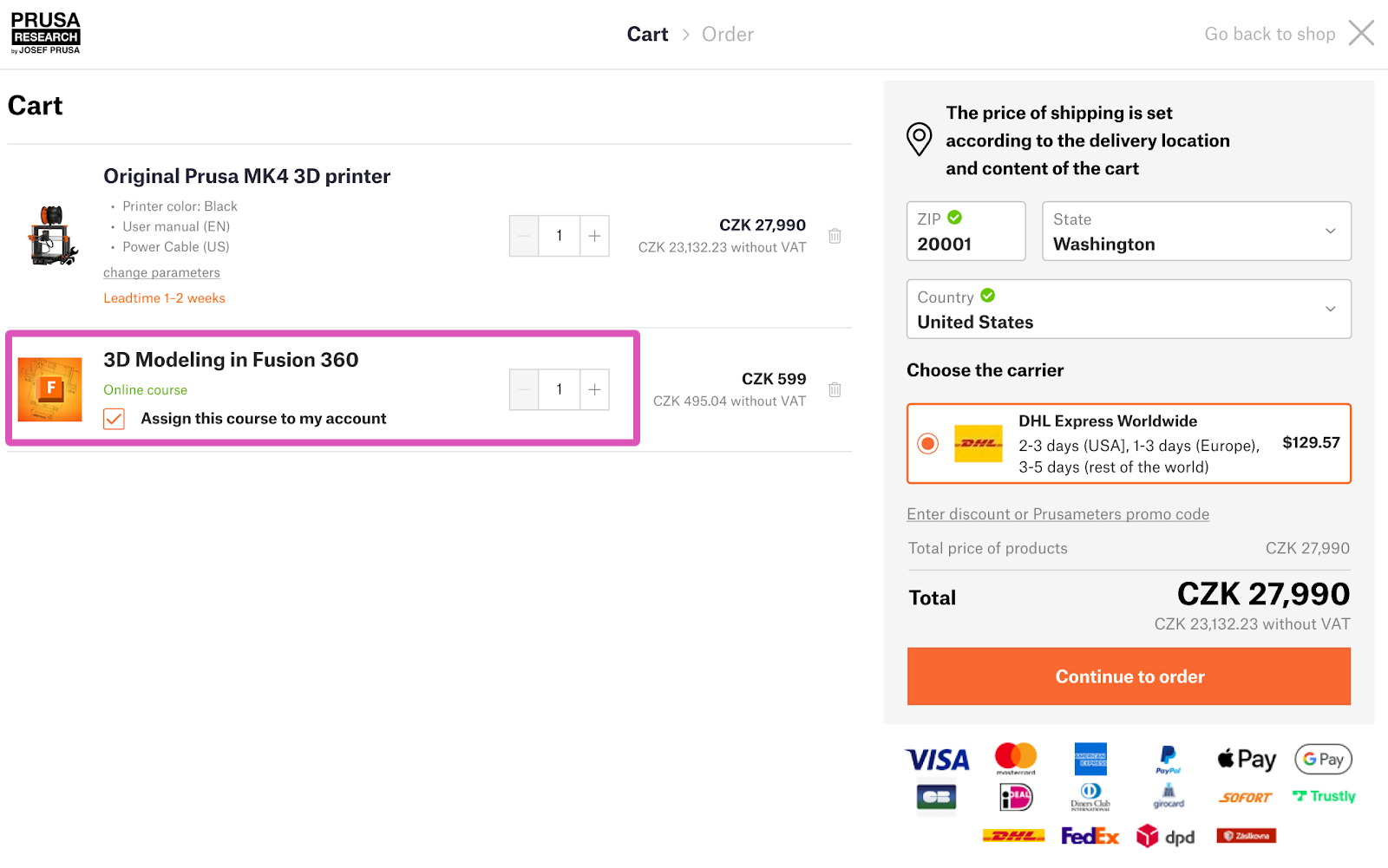
                  The order of an Academy course is created in the same way used for physical products. Add the products to the cart, and select the number of licenses. 

                  Follow this article for more details on creating an order on our e-shop. 

                  Purchasing one license

                  In case you purchase one license for a course, the default setting is for it to assign it to your account. In case you wish to assign it to a different account, you can uncheck the box. 
                   

                  Purchasing multiple licenses

                  In case you purchase multiple licenses of a course, all licenses are visible in the 'my courses' section on your account. This is valid also in case you wish to assign one of the licenses to yourself. 

                  Assigning licenses

                  To assign your purchased licenses, log in to our e-shop and navigate to 'my courses'. Then, scroll down to 'licenses management'. 
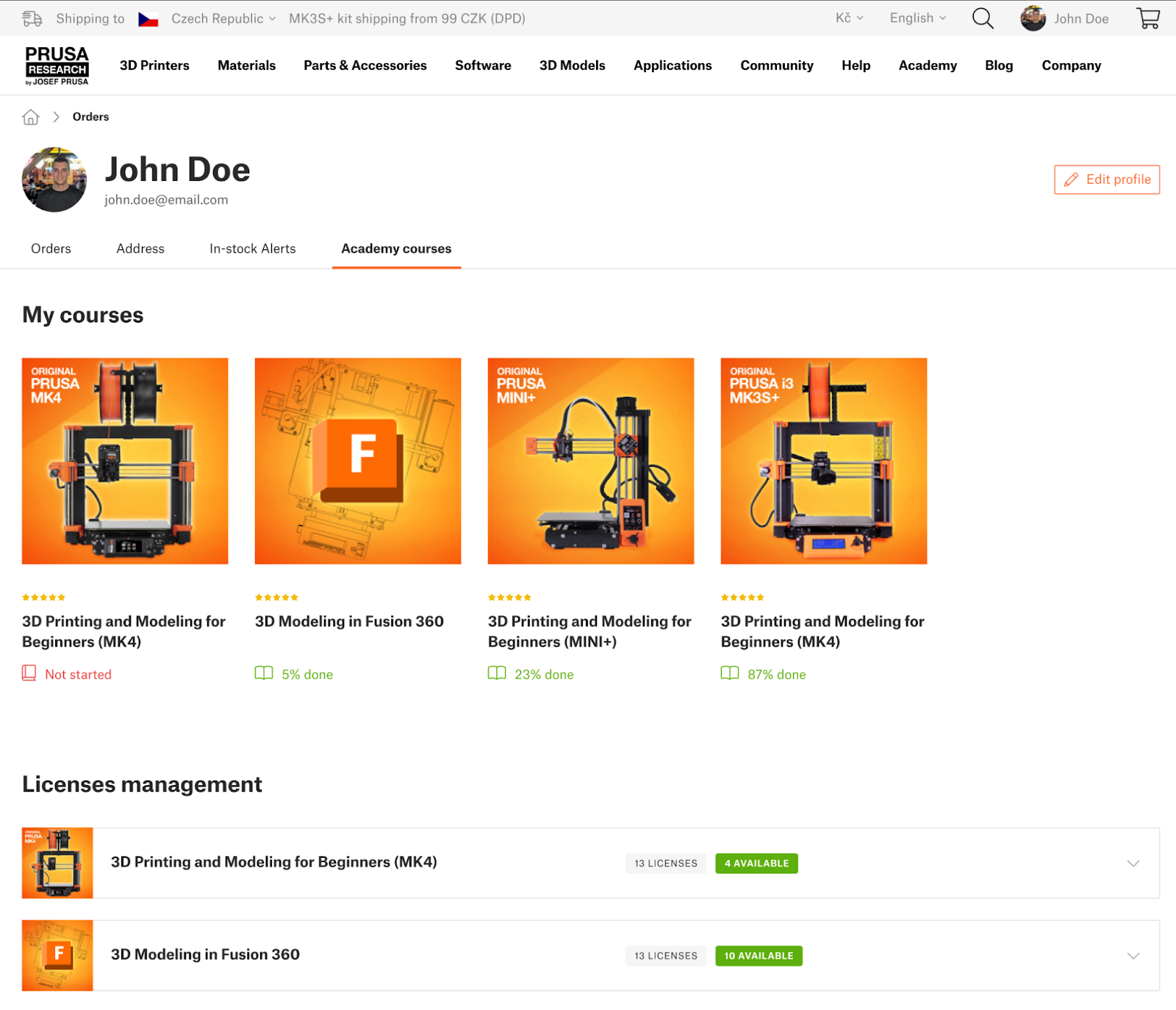
                  Licenses management

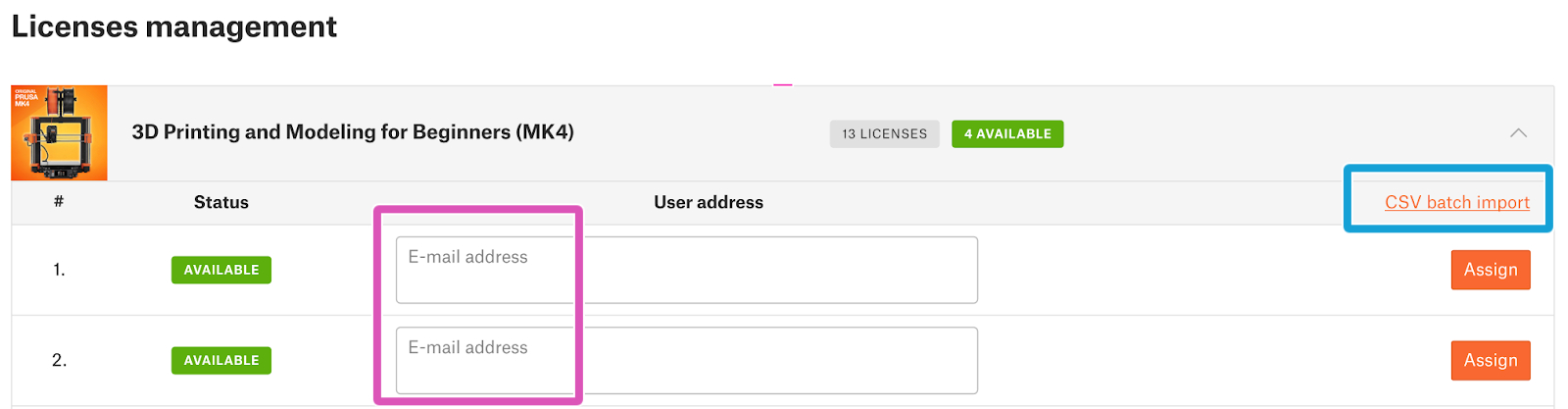
                  There are two ways to assign licenses:

                  1. Inserting and assigning each email separately. This method is suitable for a low number of licenses.
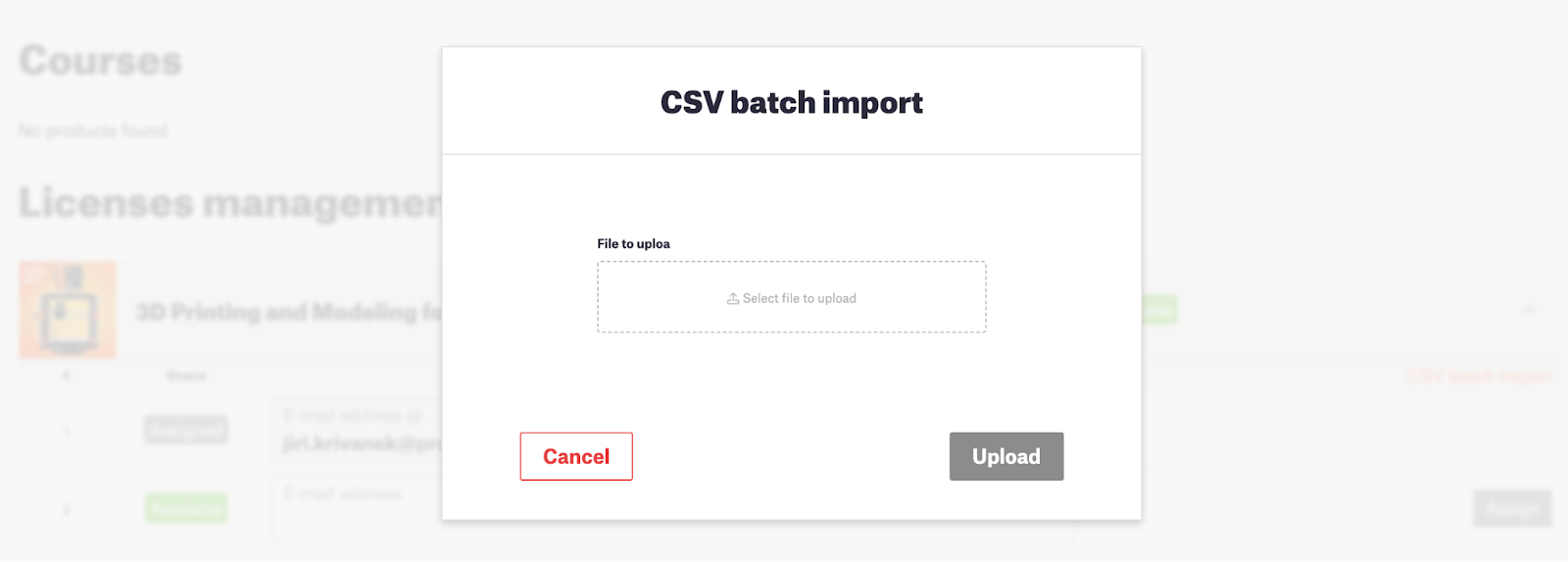
                  2. Importing a CSV file. The CSV file should contain one email address per each line. This method is suitable for assigning a large amount of licenses. 
                  In both cases, our system will check and validate the email format, and whether the account associated with the selected email address already owns the course. 

                  The following functions are also available from the licenses management section. 
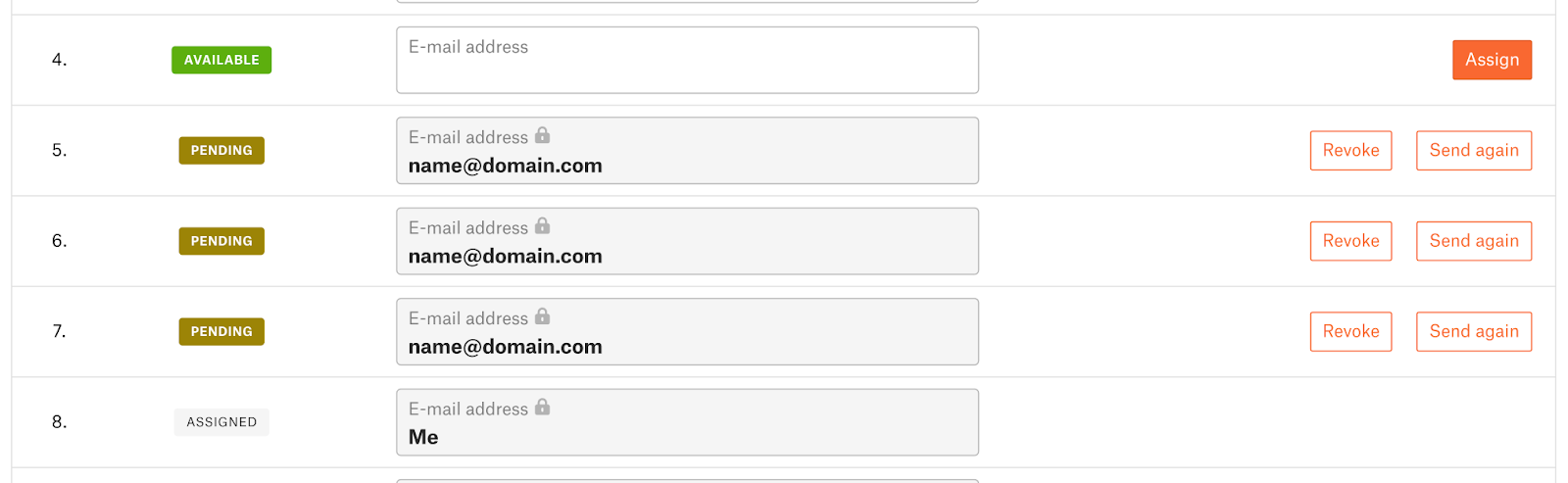
                  • You can see the assignment status, to verify if a license is assigned, or a request is still pending.
                  • Before the activation of a license, you can resend the activation email for each email or download the license assignment.
                  • You can check the number of available licenses. 

                  Licence status

                  Batch import

                  The license assignee does not have a Prusa Account

                  While a Prusa Account is required to access a course, there is no problem in assigning a course to an email address not associated with a Prusa Account. 

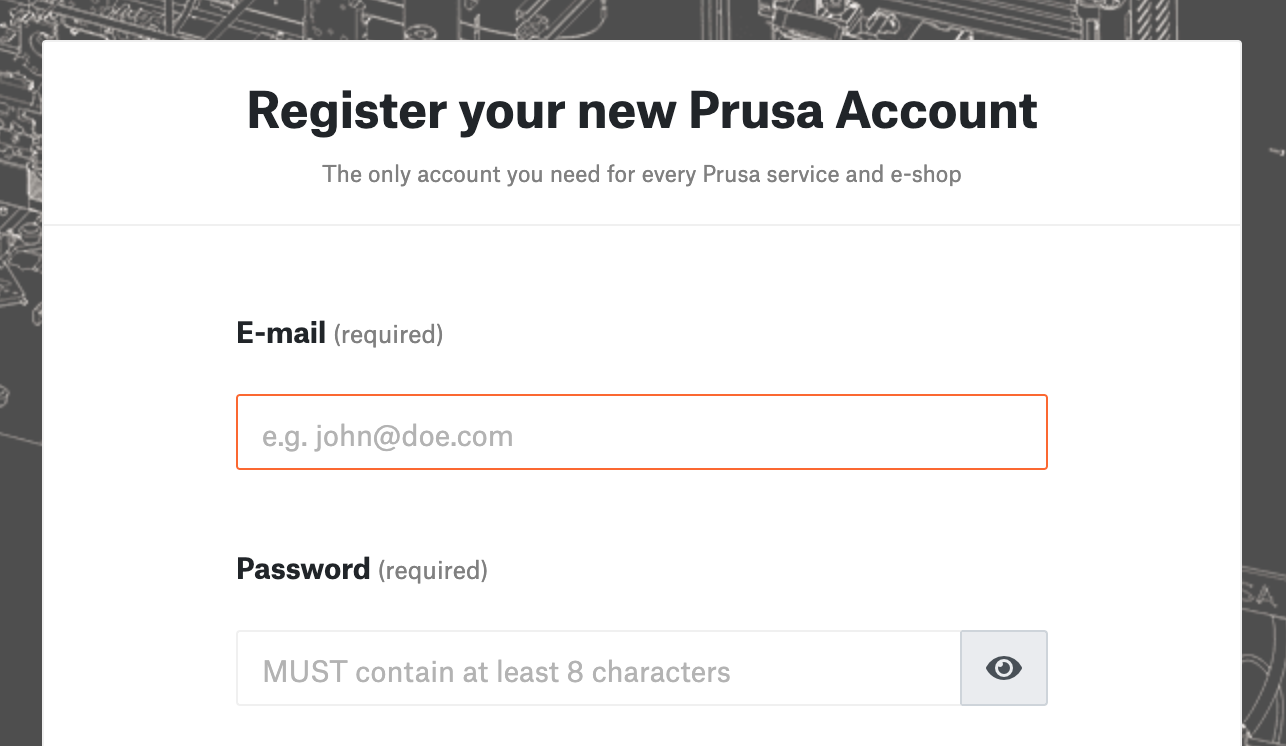
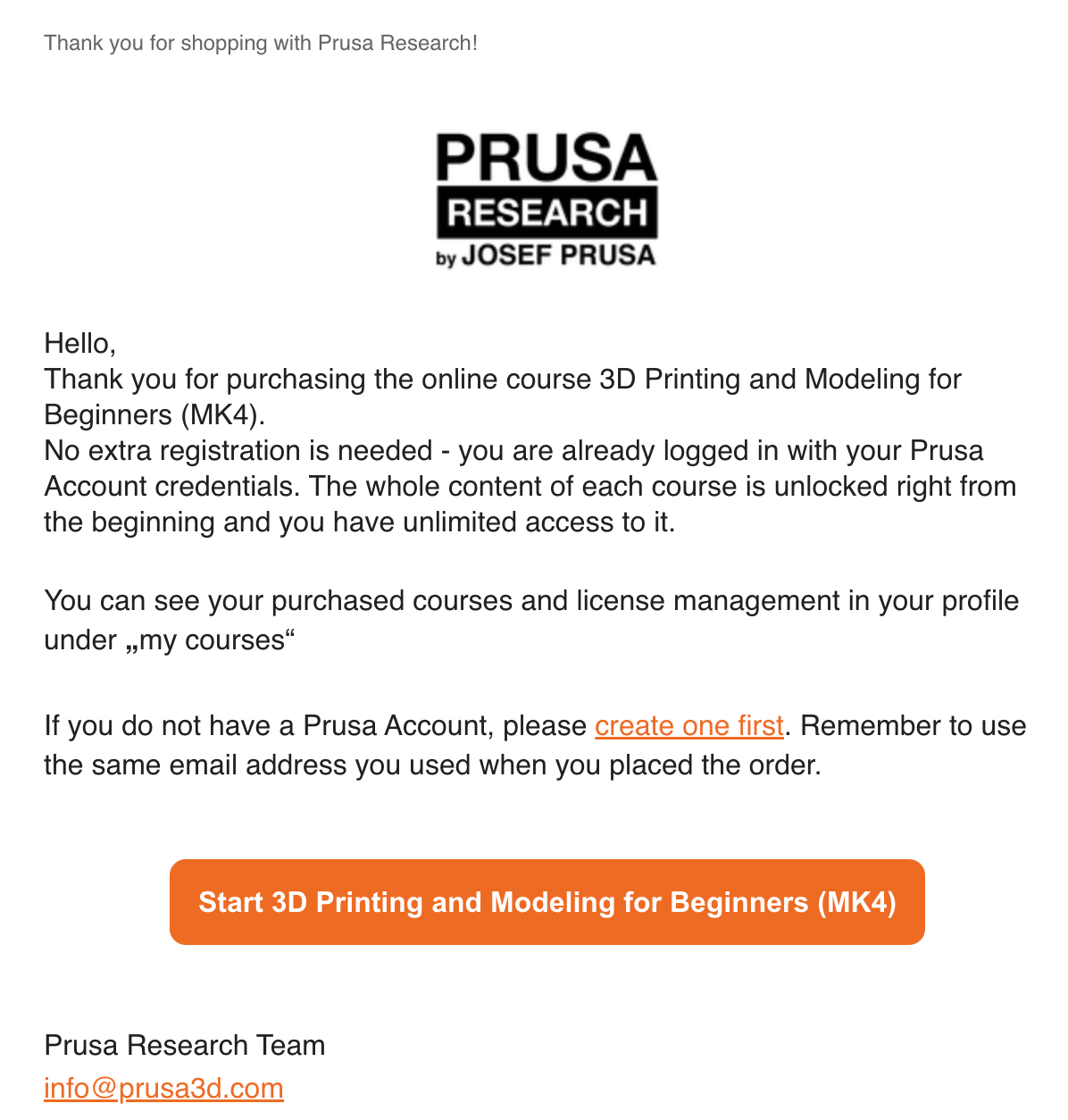
                  The course assignment information and an invitation to create a Prusa Account are sent via email. 

                  Follow this article to create a Prusa Account. 

                  Once the Prusa Account is created, the course license is automatically assigned. It is possible to cancel a course assignment before the assignee starts the course. 
                  この記事は役に立ちましたか?
                  この操作は登録ユーザーのみが利用できます。ログインしてください。
                  ログイン してコメントを投稿する
                  コメントなし

                  トピックス

                  • あなたのプリンターについて
                    • 一般情報
                      • VAT (付加価値税) および通関手数料
                      • FAQ - よくある質問
                      • 組立済 i3 プリンターを開梱する
                      • Prusaアカウント作成
                      • 組み立てガイド
                      • i3プリンター返送時の梱包について
                      • 返金・返品について
                      • カスタマーサポート
                      • 保証期間について
                      • 返品のためのSL1/CW1の梱包
                      • Prusa MINI返却時の梱包
                      • 写真・動画の撮影
                      • 食品に安全なFDMプリント
                      • プリンターの種類と違いについて
                      • よくある質問 - 拡張バイヤーズガイド
                      • プリンタハンドブック
                      • Glossary i3-Series
                      • Glossary MMU2S
                      • MINIの用語解説
                      • Original Prusa シリアル番号
                      • 支払い方法
                      • Packing Multi Material upgrade for return
                      • Orders to the UK
                      • i3 プリンタの返品 - お客様独自での梱包の仕方
                      • i3 プリンタの返品 - オリジナル梱包箱をご使用の場合
                      • UPS backup for your printer
                      • メーカー修理
                      • Order status
                      • Prusa Academy
                      • Original Prusa Enclosure
                      • How do Prusameters on Printables work?
                      • Enclosure guidepost
                      • E-shop order creation
                      • FAQ - Orders
                      • Supplemental Statements valid on Prusa websites
                      • Packing the Original Prusa MK4 for return - Original Packing Material
                      • Packing the Enclosure for return - Original Packing material
                      • Packing the Enclosure for return - Custom Packing material
                      • MMU3 Compatibility
                      • LoveBoardのLEDステータス (MK4)
                      • Printed Solid Service center USA
                      • Purchasing and managing licenses for Prusa Academy courses
                      • Payment error
                      • Prusaプリンタのアップグレード
                      • Printer repair centers
                      • Buddy3D ブランド
                      • Product certifications
                      • Global-e
                      • MK4S glossary
                      • Prusa USS Drybox
                      • MMU3 glossary
                      • 配送について
                      • MINIプリンタの返品 - お客様独自での梱包の仕方
                      • SDカード・USBメモリ
                    • プリンターの説明
                    • プリンターの機能