Prusa
  • SHOP
    • Learn more
    • All deals
    3D printers
    • CORE One+ (Gen2)
    • CORE One L+
    • XL+
    • MK4S
    • Mini+
    • HT90
    Consumables and Merch
    • Prusament
    • Resin
    • Buddy filament
    • Merch
    • Accessories
  • TIENDA
    • Últimos productos
    POR CATEGORÍA
    • Impresoras 3D
    • Upgrades
    • Materiales
    • Accesorios
    • Piezas de repuesto
    • Cursos
    • Merchandising
    • Sales inquiry & Price quote
    ENLACES RÁPIDOS
    • Shipping information
    • Refunds & returns
    • Payment options
    • Garantía
    • IVA y Tasas de aduana
    • Preguntas Frecuentes

    0 artículo en tu carritoartículos en tu carrito

    Tu carrito está vacío

    Ir al carritoComprar impresoras 3D

    Mi perfil

    Iniciar sesión para ver pedidos y artículos guardados

    Mi perfil

    Sesión iniciada como

    • Pedidos
    • Cerrar Sesión
  • Impresión 3D
    • Explorar la impresión 3D
    PARA PRINCIPIANTES
    • Impresión 3D 101
    • Types of printers (FDM/SLA)
    • How to choose a 3D Printer
    • Printables (3D models)
    POR USO
    • Prototipado rápido
    • Fabricación
    • Ingeniería
    • Investigación
    • Arte y diseño
    PROFUNDIZAR
    • Guía de materiales
    • Cursos
    • Webinars
    • Casos de estudio
    • Impresión 3D personalizada
  • IMPRESORAS 3D
    • Todas las impresoras 3D
    PARA
    • Casa o garajeAficionados, manitas e impresión doméstica
    • Shop or studioProducción interna para pequeños equipos
    • EmpresaFlotas, seguridad y escala
    • How to choose a 3D Printer
    COMPRAR Y NAVEGAR
    • CORE One+
    • CORE One+ INDX
    • CORE One L+
    • CORE One L+ INDX
    • XL+
    • MK4S
    • Prusa Pro HT90
    • Prusa Pro AFS
    • Prusa Pro SLX
    MÁS DE IMPRESORAS
    • Upgrades
    • Spare parts
    • Critical infrastructure
    • Casos de estudio
    • Signature Oak
    • Kits
  • MATERIALES
    • Todos los materiales
    POR USO
    • Uso diario y diseño
    • Ingeniería funcional
    • Compuestos
    • Especialidad profesional
    • Resinas SLA
    PRUSAMENT
    • PLA
    • PETG
    • ASA
    • PC
    • PA11
    • Flexible
    • TPU
    MÁS MATERIALES
    • Guía de materiales
    • Fabricamos material nosotros mismos
    • Sostenibilidad
    • Pedir en la tienda
  • SOFTWARE
    • Todo el software
    PREPARAR LA IMPRESIÓN
    • PrusaSlicer 3.0
    IMPRIMIR Y MONITORIZAR
    • PRUSA CONNECT
    • EasyPrint
    • Aplicación iOS y Android
    • Prusa Farm
    EMPEZAR
    • Descargar e instalar
    • Base de conocimientos
    MÁS SOFTWARE
    • Printables (3D models)
  • SOPORTE
    • Explorar soporte
    ENCONTRAR RESPUESTAS
    • Base de conocimientos
    • Resolución de problemas
    • Cursos
    • Webinars
    OBTENER AYUDA
    • Contacta con nosotros
    • Chat en vivo
    • Shipping information
    • Garantía
    • Refunds & returns
    • Spare parts
    • Factory repair
    COMUNIDAD
    • Foro
    • Reddit
    • Printables
  • CENTRO DE CONFIANZA
    • Resumen del Centro de confianza
    POR TEMA
    • RGPD
    • Certificados
    • Seguridad
    • Cumplimiento
    COMPROMISOS
    • Informe de sostenibilidad
    HABLA CON NOSOTROS
    • Contacta con el equipo de seguridad
  • EMPRESA
    • Acerca de Prusa
    CONÓCENOS
    • Nuestra historia
    • Cómo fabricamos impresoras
    • Código abierto
    • Kit de marca y medios
    NOTICIAS
    • Blog
    • Sala de prensa
    • Eventos
    CONFIANZA Y SOCIOS
    • Sostenibilidad
    • Distribuidores y revendedores
    • Programa de afiliados
    • Contacto
    • English
    • Čeština
    • Deutsch
    • Español
    • Français
    • Italiano
    • Polski
    • 日本語
  • Sesión iniciada como

    • Pedidos
    • Dirección
    • Alertas de Stock
    • Mis Cursos
    • Suscripción
    • Editar Cuenta
    • Cerrar Sesión

Iniciar sesión para ver pedidos y artículos guardados

Sesión iniciada como
  • Pedidos
  • Dirección
  • Alertas de Stock
  • Mis Cursos
  • Suscripción
  • Editar Cuenta
  • English
  • Čeština
  • Deutsch
  • Español
  • Français
  • Italiano
  • Polski
  • 日本語
Tienda

0 artículo en tu carritoartículos en tu carrito

Tu carrito está vacío

Ir al carritoComprar impresoras 3D

Mi perfil

Iniciar sesión para ver pedidos y artículos guardados

Mi perfil

Sesión iniciada como

  • Pedidos
  • Cerrar Sesión
TIENDA
  • Últimos productos
POR CATEGORÍA
  • Impresoras 3D
  • Upgrades
  • Materiales
  • Accesorios
  • Piezas de repuesto
  • Cursos
  • Merchandising
  • Sales inquiry & Price quote
ENLACES RÁPIDOS
  • Shipping information
  • Refunds & returns
  • Payment options
  • Garantía
  • IVA y Tasas de aduana
  • Preguntas Frecuentes

Productos destacados

    Categorías populares

      Búsquedas populares

        Artículos

          Blog

            Productos

              Categorías

                Búsquedas sugeridas

                  Buscando…
                  Sin resultados
                  Algo salió mal.
                  ↑↓ Seleccionar↵ AbrirEsc Cerrar búsqueda
                  1. Soporte
                  2. Características de la impresora
                  3. Custom print profiles (SL1/SL1S)
                   

                  Contenidos

                  • Area fill
                  • Parameters

                  Blog

                  • El HT Hotend 400°C HT está disponible! Además: Nuevos Materiales y Láminas HighTemp para la CORE One+/L+.
                  • Pellets de Prusament: Lotes de materia prima para la impresión 3D de gran formato o para la investigación y el desarrollo de polímeros a pequeña escala
                  • Imprime decoraciones de Halloween coloridas y brillantes con nuestra oferta espeluznante

                  Newsletter

                  Regístrate y obtén nuestro dosier mensual de información útil sobre nuevos firmwares, nuevas versiones de PrusaSlicer y consejos generales para proyectos de impresión 3D.

                  Al hacer clic, aceptas recibir nuestra newsletter.

                  Este sitio está protegido por reCAPTCHA Enterprise y se aplican la Política de Privacidad y los Condiciones del servicio de Google.

                  Heavy Duty Keyboard Holder (No Supports)
                  Tienda
                  • Impresoras 3D
                  • Mejoras de Impresoras
                  • Filamentos
                  • Accesorios
                  • Merchandising Prusa
                  Prusa

                  © Prusa Research a.s.

                  Printables
                  • Modelos 3D
                  • Store
                  • Clubs
                  • Concursos de Diseño 3D
                  • Brands
                  Comunidad
                  • Mapa Mundial
                  • Foro
                  • Grupos de Usuarios
                  • Eventos
                  Ayuda
                  • Ayuda Prusa
                  • Prusa Academy
                  • Calculadoras de Impresión 3D
                  Software
                  • PrusaSlicer
                  • Prusa.app
                  • Prusa Connect
                  • Drivers y Software
                  Empresa
                  • Sobre nosotros
                  • Blog
                  • Distribuidores Oficiales de Prusa
                  • Contacto
                  • Certificado conforme a las normas ISO 9001, ISO 14001 e ISO 45001
                  • Términos y Condiciones generales
                  • Términos Generales y Condiciones de Uso de los sitios Web PRUSA
                  • Política de privacidad
                  • Información sobre las cookies
                  • Política de Reclamaciones de los Clientes
                  • Página de Estado de los Sitios Web
                  • Configuración de las cookies
                  Prusa
                  • Términos y Condiciones generales
                  • Términos Generales y Condiciones de Uso de los sitios Web PRUSA
                  • Política de privacidad
                  • Información sobre las cookies
                  • Política de Reclamaciones de los Clientes
                  • Página de Estado de los Sitios Web
                  • Configuración de las cookies

                  © Prusa Research a.s.

                  JOSEF PRUSA®, PRUSA RESEARCH®, PRUSA POLYMERS®, PRUSA ORANGE®, PRUSA 3D ® Y PRUSAMENT® son marcas registradas de Prusa Development a.s. utilizadas por Prusa Research a.s. bajo licencia de Prusa Development a.s.

                  Custom print profiles

                  (SL1/SL1S)

                  Relevante para

                  SL1
                  SL1S SPEED
                  Artículo está también disponible en los siguientes idiomas
                  English
                  Čeština
                  Polski
                  Deutsch
                  Français
                  Español
                  Italiano
                  日本語

                  Starting firmware 1.8.0, the Original Prusa SL1 and SL1S SPEED have customizable profile parameters. This gives users the ability to customize and fine-tune the individual parameters that these profiles are built on, offering greater control and flexibility.

                  It is possible to choose the preselected values for Fast, Slow, and High Viscosity. However, should you need to make adjustments, it is possible to set values on specific parameters in each profile.

                  For the best experience when tweaking profiles, it is recommended to use PrusaSlicer version 2.9.1 or newer, which fully supports these changes. Older versions of PrusaSlicer retain backward compatibility, but they do not allow modification of individual print parameters. Below, you will find a description of individual features.
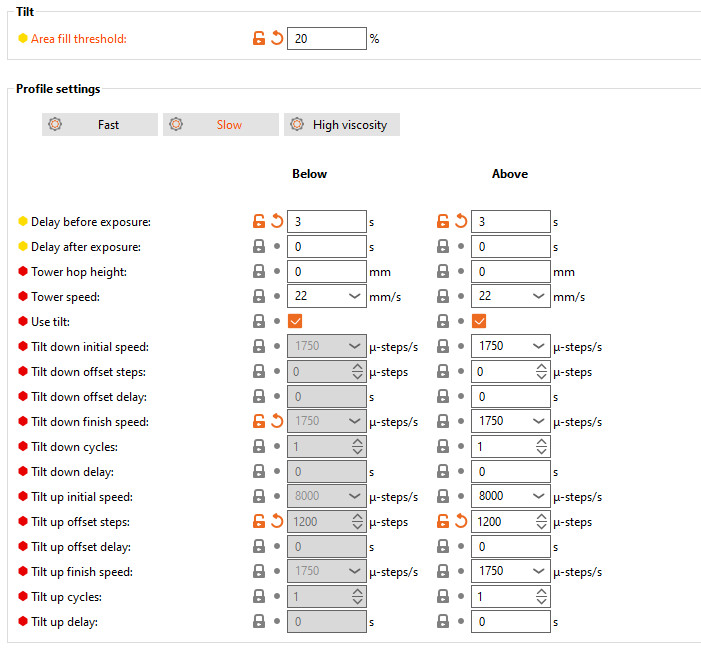
                  Area fill

                  The percentage of the bed area. This parameter is the threshold for each layer. If a layer of an object is below this percentage of the bed area, the Below area fill parameters will be used. If the layer is higher than that percentage of the heatbed, the Above area fill parameters will be used. The change between the above and below parameters is useful if a model has multiple geometries that must be printed at different speeds.

                  Parameters

                  Delay before exposure

                  After a layer is finished, the tilt goes down (if the tilt is disabled, the tower goes up) to separate the layer from the FEP foil. This parameter is the waiting time between platform/tilt returning to the printing position and exposure starting. Highly viscous resins may take some time to flow back under the platform, so use a higher time for them. This is the main parameter to change if you wish to use faster or slower tilt speeds.

                  Delay after exposure

                  Delay after exposure before layer separation. This may be used for resins that continue to react after the exposure.

                  The features below are advanced. The standard features work for most resins. Only change the values if you are an experienced user.

                  Tower hop height

                  This parameter sets a distance for the tower to raise in mm. It is recommended to use this setting when using high-viscosity resins. If the tilt is disabled, the slicing will only finish if the tower top height is above 0.

                  Tower speed

                  Speed used for the tower raise. The standard for fast and slow profiles is 22 mm/s, but for high-viscosity resins use 2 mm/s.

                  Use tilt

                  If this feature is enabled, tilt will be used to separate layers. Otherwise, the layer separation is made by the tower being lifted. Disabling this feature will ignore all of the parameters below, and the "Tower Hop Height" parameter must be set above 0 mm (5 mm recommended).

                  Tilt down initial speed

                  The tilt down movement is divided into two parts. The Tilt down initial speed is the speed of the initial part, where the layer separation happens.

                  Tilt down offset steps

                  The offset from the end of the initial tilt down position.

                  Tilt down offset delay

                  Delay after the tilt finishes the initial downward movement and before the second part of the tilt down.

                  Tilt down finish speed

                  Tilt speed is used for the final part of the tilt down movement.

                  Tilt down cycles

                  The last part of the tilt down is usually done at once. This setting can split a single tilt down into multiple movements if necessary.

                  Tilt down delay

                  If more than one cycle is selected for the tilt down, this setting adds a delay between the cycles.

                  Tilt up initial speed

                  The tilt up movement is divided into two parts. After the final phase, the tilt will return to the horizontal position to start another exposure. This is the speed of the first part of the tilt upward movement.

                  Tilt up offset steps

                  The value in this setting will be discounted from the tilt up position after the initial movement.

                  Tilt up offset delay

                  Delay after the tilt reaches the "tilt up offset steps" position before the last part of the tilt movement is done.

                  Tilt up finish speed

                  Tilt speed is used for the final phase of the tilt up. It is good practice to lower this value if you hear a bumping sound when the tilt is going up to the platform, especially when using a resin with higher viscosity.

                  Tilt up cycles

                  The last part of the tilt up is usually done at once. This setting can split a single tilt up into multiple movements if necessary.

                  Tilt up delay

                  If more than one cycle is selected for the last part of tilt up, this setting adds a delay between the cycles.

                  ¿Te resultó útil este artículo?
                  Esta acción está disponible solo para usuarios registrados. Por favor inicia sesión.
                  Inicia sesión  para publicar un comentario
                  Sin comentarios

                  Temas

                  • Sobre tu impresora
                    • Características de la impresora
                      • Verter resina y empezar a imprimir
                      • Conexión a Internet (SL1/SL1S)
                      • Calibración de la Resina (SL1/SL1S)
                      • Estadísticas de la impresora e información del sistema (SL1/SL1S)
                      • Impresión con un clic
                      • Ajuste de brillo (SL1)
                      • Notificaciones de la barra superior (SL1/SL1S)
                      • Estructura del menú (SL1/SL1S)
                      • Creación de un objeto de calibración de resina (SL1/SL1S)
                      • Limpieza Tanque de Resina (SL1/SL1S)
                      • Custom print profiles (SL1/SL1S)
                    • Descripción de la impresora
                    • Información general