Prusa
  • SHOP
    • Latest products
    BY CATEGORY
    • 3D printersnew
    • 3D printer upgradesnew
    • Materials
    • Accessories
    • Spare parts
    • Courses
    • Merch
    • Get a price quote
    QUICK LINKS
    • Shipping & delivery
    • Returns & refunds
    • Payment & financing
    • Warranty
    • VAT & Customs fees
    • FAQ

    0 item in your cartitems in your cart

    Your cart is empty

    Go to cartShop 3D printers

    My profile

    Log in to see orders, saved items

    My profile

    Signed in as

    • Orders
    • Logout
  • 3D PRINTING
    • Explore 3D printing
    FOR BEGINNERS
    • 3D printing 101
    • How FDM printing works
    • Buying your first printer
    • 3D model catalog
    BY APPLICATION
    • Rapid prototyping
    • Manufacturing
    • Engineering
    • Research
    • Arts & design
    GO DEEPER
    • Materials guide
    • Courses
    • Webinars
    • Case studies
    • Custom 3D printing
  • 3D PRINTERS
    • All 3D printers
    FOR
    • Home or garageHobbyists, tinkerers and home printing
    • BusinessIn-house production for small teams
    • EnterpriseFleets, security and scale
    • Which Prusa is right for me
    SHOP & BROWSE
    • CORE One+new
    • CORE One+ INDXnew
    • CORE One L+new
    • CORE One L+ INDXnew
    • XL+new
    • MK4S
    • Prusa Pro HT90
    • Prusa Pro AFS
    • Prusa Pro SLX
    MORE FROM PRINTERS
    • Parts & upgradesnew
    • Critical infrastructure
    • Case studies
    • Signature Oak
    • Kits
  • MATERIALS
    • All materials
    BY USE
    • Every-day & design
    • Functional engineering
    • Composites
    • Pro speciality
    • SLA resins
    PRUSAMENT
    • PLA
    • PETG
    • ASA
    • PC
    • PA11
    • Flex
    • TPU
    MORE FROM MATERIALS
    • Materials guide
    • We make material in house
    • Sustainability
    • Order on the store
  • SOFTWARE
    • All software
    PREPARE THE PRINT
    • PrusaSlicer 3.0New
    PRINT & MONITOR
    • Prusa Connect
    • EasyPrint
    • iOS & Android app
    • Prusa Farm
    GET STARTED
    • Download & install
    • Knowledge base
    MORE FROM SOFTWARE
    • 3D model catalog
  • SUPPORT
    • Explore support
    FIND ANSWERS
    • Knowledge base
    • Troubleshooting
    • Courses
    • Webinars
    GET HELP
    • Contact us
    • Livechat
    • Shipping & delivery
    • Warranty
    • Returns & refunds
    • Service & spare parts
    • Service & Repair
    COMMUNITY
    • Forum
    • Reddit
    • Printables
  • TRUST CENTER
    • Trust Center overview
    BY TOPIC
    • GDPR
    • Certificates
    • Security
    • Compliance
    COMMITMENTS
    • Sustainability report
    TALK TO US
    • Contact the security team
  • COMPANY
    • About Prusa
    GET TO KNOW US
    • Our story
    • How we make printers
    • Open source
    • Brand & media kit
    NEWS
    • Blog
    • Newsroom
    • Events
    TRUST & PARTNERS
    • Sustainability
    • Resellers & distributors
    • Affiliate program
    • Contact
    • English
    • Čeština
    • Deutsch
    • Español
    • Français
    • Italiano
    • Polski
    • 日本語
  • Signed in as

    • Orders
    • Address
    • In-stock Alerts
    • My Courses
    • Subscription
    • Edit Account
    • Logout

Log in to see orders, saved items

Signed in as
  • Orders
  • Address
  • In-stock Alerts
  • My Courses
  • Subscription
  • Edit Account
  • English
  • Čeština
  • Deutsch
  • Español
  • Français
  • Italiano
  • Polski
  • 日本語
Shop

0 item in your cartitems in your cart

Your cart is empty

Go to cartShop 3D printers

My profile

Log in to see orders, saved items

My profile

Signed in as

  • Orders
  • Logout
SHOP
  • Latest products
BY CATEGORY
  • 3D printersnew
  • 3D printer upgradesnew
  • Materials
  • Accessories
  • Spare parts
  • Courses
  • Merch
  • Get a price quote
QUICK LINKS
  • Shipping & delivery
  • Returns & refunds
  • Payment & financing
  • Warranty
  • VAT & Customs fees
  • FAQ

Featured products

    Popular categories

      Trending searches

        Articles

          Blog

            Products

              Categories

                Suggested searches

                  Searching…
                  No results
                  Something went wrong.
                  ↑↓ Select↵ OpenEsc Close search
                  1. Support
                  2. Print Quality Troubleshooting
                  3. Stringing and oozing
                   

                  Contents

                  • Stringing from material left on the nozzle
                  • PrusaSlicer settings
                  • Filament
                  • Hotend
                  • Enough settings, pass me my heat-gun!

                  Blog

                  • Print colorful and glowing Halloween decorations with our spooky offer
                  • Factorio Has Arrived on Printables
                  • Prusament PLA Lightweight: 65% lighter than regular PLA. Perfect choice for aircraft, cosplay, and more.

                  Newsletter

                  Signup and get our monthly squeeze on updates, blog, printables and much more.

                  By clicking, you agree to receive our newsletter.

                  This site is protected by reCAPTCHA Enterprise and the Google Privacy Policy and Terms of Service apply.

                  Factorio Transport Belts
                  E-shop
                  • 3D Printers
                  • Printer Upgrades
                  • Filaments
                  • Accessories
                  • Prusa Merchandise

                  © Prusa Research a.s.

                  Printables
                  • 3D Models
                  • Store
                  • Clubs
                  • 3D Design Contests
                  • Brands
                  Community
                  • World Map
                  • Forum
                  • User Groups
                  • Events
                  Help
                  • Prusa Help
                  • Prusa Academy
                  • 3D Printing Calculators
                  Software
                  • PrusaSlicer
                  • Prusa.app
                  • Prusa Connect
                  • Drivers and Software
                  Company
                  • About Us
                  • Blog
                  • Official Prusa Resellers
                  • Contact Us
                  • Certified for ISO 9001, ISO 14001, ISO 45001
                  • General Terms and Conditions
                  • General Terms and Conditions of Use of the PRUSA Websites
                  • Privacy Policy
                  • Information about cookies
                  • Customer Complaints Policy
                  • Status Page
                  • Do Not Sell or Share My Personal Information
                  • Supplemental Statements
                  • General Terms and Conditions
                  • General Terms and Conditions of Use of the PRUSA Websites
                  • Privacy Policy
                  • Information about cookies
                  • Customer Complaints Policy
                  • Status Page
                  • Do Not Sell or Share My Personal Information
                  • Supplemental Statements

                  © Prusa Research a.s.

                  JOSEF PRUSA®, PRUSA RESEARCH®, PRUSA POLYMERS®, PRUSA ORANGE®, PRUSA 3D ® AND PRUSAMENT® are registered trademarks of Prusa Development a.s. used by Prusa Research a.s. under licence from Prusa Development a.s.

                  Stringing and oozing

                  Relevant for

                  CORE One family
                  MK4 family
                  MMU family
                  PRO family
                  MK3 family
                  +
                  59 comments
                  Article is also available in following languages
                  English
                  Čeština
                  Polski
                  Deutsch
                  Français
                  Español
                  Italiano
                  日本語

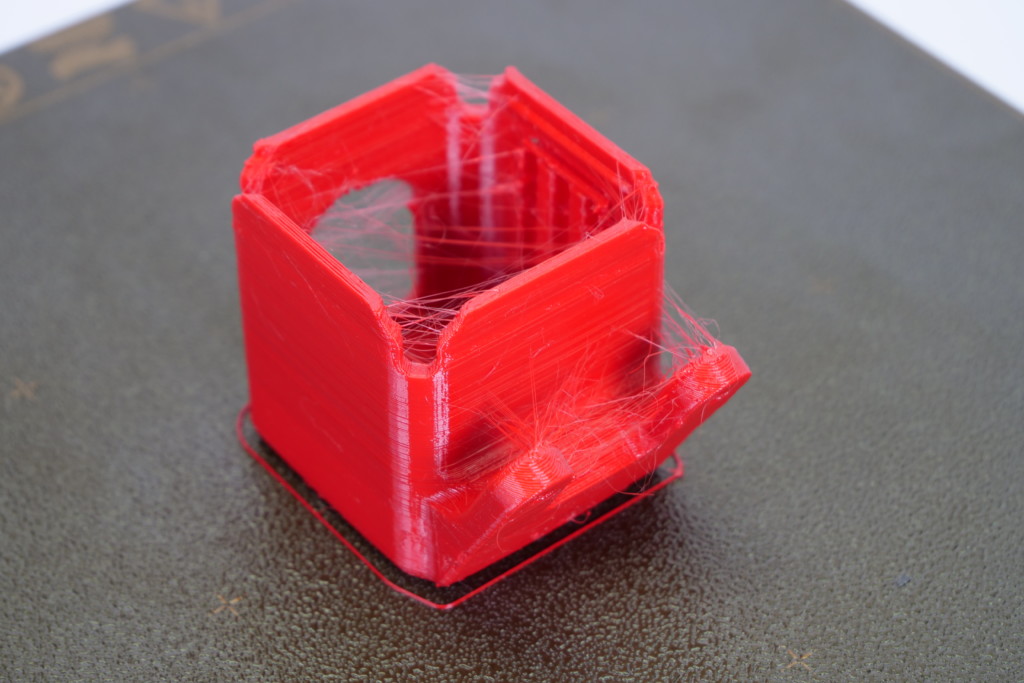
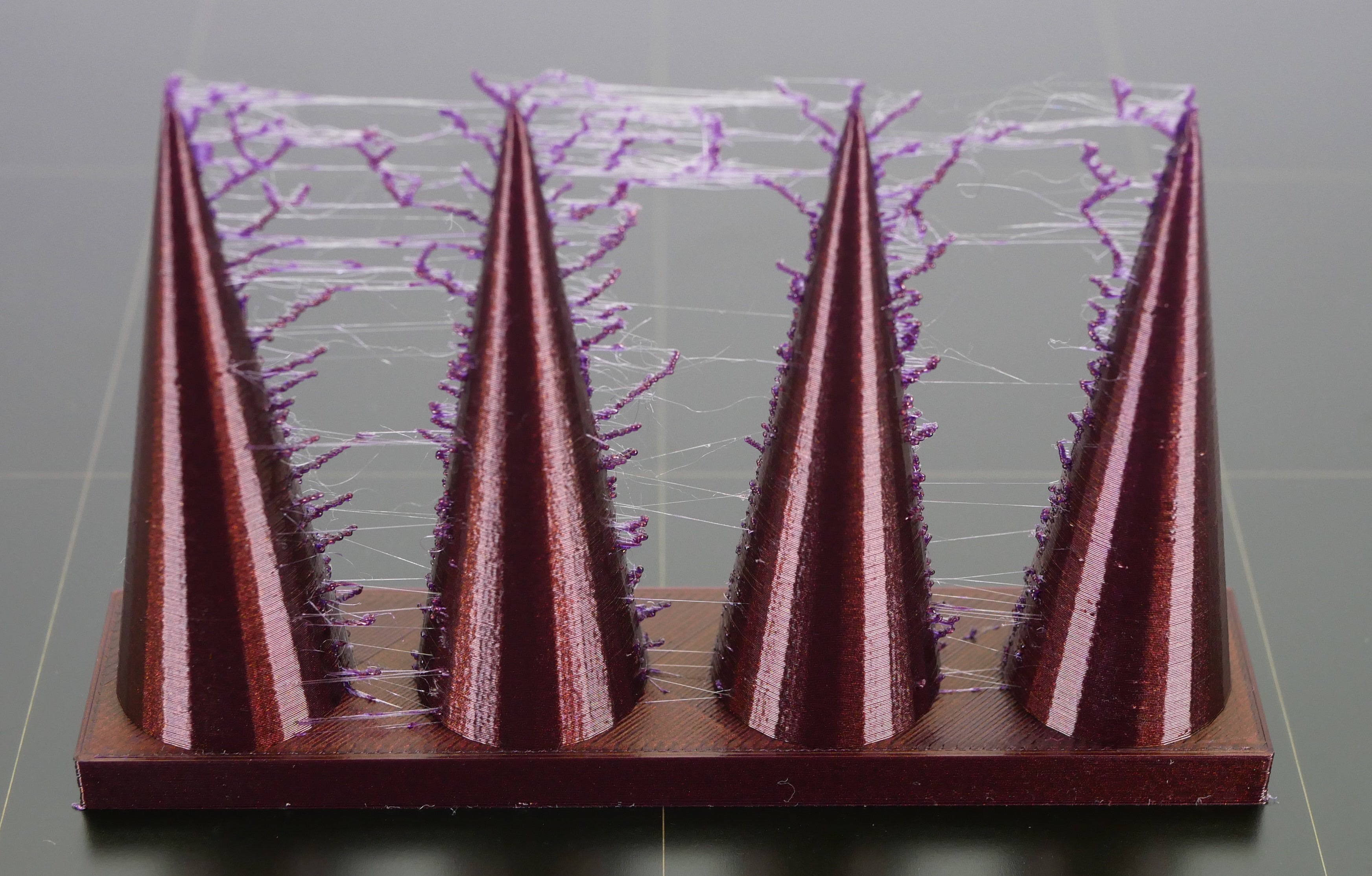
                  Stringing or oozing, also known as "hairy prints", is the name given for when small strings of filament are left on a printed model. This usually happens when the filament keeps flowing from the nozzle while the extruder is moving to another object. You can see this as a marginal line of filament left between the objects.

                  This issue is caused by very high printing temperatures and/or using incorrect retraction settings. This can be solved by changing a couple of settings in PrusaSlicer and checking your hardware.
                  Stringing from material left on the nozzle

                  If you print for a long time from a single type of filament, such as PET-G, the filament can create a thin layer in the nozzle. This can cause stringing as the strands of the filament stick to the surface of the print. Therefore, thoroughly clean the nozzle before printing and make sure that any dirt or remnants of previous filaments are removed from the nozzle.
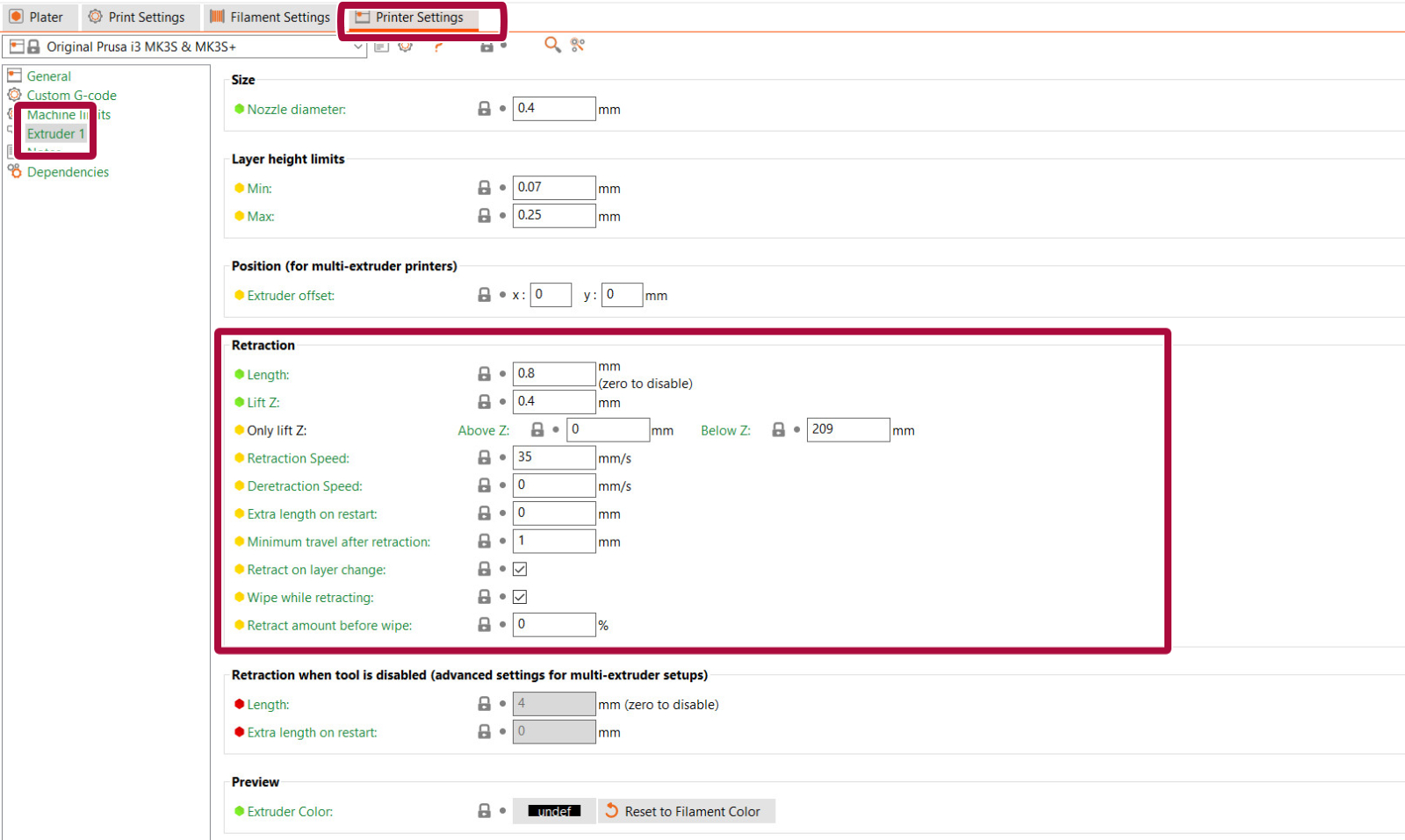
                  We highly recommend using our official (factory default) preset settings in PrusaSlicer. However, if you are printing with your own settings, make sure that you have the retraction settings configured correctly.

                  PrusaSlicer settings

                  You should start by checking a parameter known as Retraction. What does retraction do? When the extruder has finished printing one section/object of your g-code, the filament is pulled back into the nozzle. Once the extruder moves to the next location the printing process continues – the filament is pushed back out and it starts extruding from the nozzle again. Retraction settings can be found in PrusaSlicer in Printer Settings -> Extruder 1.

                  Flexible filaments usually need longer retractions, because the material stretches while being pulled back to the nozzle. Flexible materials are a special case and can need a lot of tweaking and tuning.

                  The retraction settings are:

                  • Retraction length: Amount that the filament is pulled back when a retraction is triggered. On the MK2.5/S and MK3/S/+, the retraction length should be a maximum of 2 mm.
                  Due to the Bowden extruder, the retraction length of the Original Prusa MINI/MINI+ presets are much longer (default 3.2 mm).
                  • Lift z: lifts the extruder during movement. Having this setting lower will improve stringing. Note that disabling this feature may cause the nozzle to hit the printed part.
                  • Retraction Speed: Extruder motor speed on retraction. A higher value improves stringing, but if it is too high it may skip steps in the motor.
                  • Minimum travel after retraction: Amount of move that will trigger a retraction (mm). The preset number in PrusaSlicer is 1 mm, which is a low amount. Having this number higher will get lower printing times, but increase oozing and stringing.
                  • Retract on layer change: Activates retraction when the layer changes to the next one. It is recommended to leave this option on.
                  • Wipe while retracting: Moves the nozzle (wipe) while the retraction is happening. It is recommended to leave this option on.
                  • Retract amount before wiping: This option does a quick retract before doing the wiping movement. More suitable for the Original Prusa MINI/MINI+.

                  Other settings that affect retraction:

                  • Only retract when crossing perimeters: (Print settings -> Infill -> Advanced): Disables retraction when the travel path does not exceed the upper layer's perimeter. Any oozing that happens will be within the walls and should be invisible.
                  • Avoid crossing perimeters: (Print settings -> Layers and perimeters -> Quality): Optimize travel moves in order to minimize the crossing of perimeters. This will lower the stringing amount, especially in the MINI/MINI+.
                  • Sequential printing: (Print settings -> Output options -> Sequential printing): Printing each object individually has a smaller chance of causing stringing between the parts. When using this feature, PrusaSlicer will warn you of any possibility of the extruder colliding with an already printed part, but follow the print closely.
                  • Nozzle temperature: (Filament settings -> Filament -> Nozzle): Lowering the temperature decreases the occurrence of strings. Try decreasing the nozzle temperature by 5 – 10°C and check whether there’s less stringing.

                  Filament

                  Try using a different spool than the one that is causing the stringing. The filament might have gathered moisture, which will cause a lot of stringing.

                  Hotend

                  Stringing in the nozzle might be caused by a heat dissipation issue in the nozzle. Try re-applying thermal paste on the threads between the heatbreak and the heatsink.

                  If you have recently changed any component in the hotend, it is also possible that some individual parts are not in place. Go over the assembly of the hotend and check for any parts that may be different from the instructions.

                  Enough settings, pass me my heat-gun!

                  If you don’t feel like tweaking any of the settings, well, then there is an alternative. You can get rid of the strings with a heat gun (or often with a lighter – but be very careful). Set your heat-gun to around 200 °C and aim at the strings for one or two seconds. This will melt the strings, and the printed object should remain undamaged. Do not leave the heat source on the printed model for longer than one or two seconds, as this may deform the part.

                  Was this article helpful?
                  This action is available only to registered users. Please log-in.

                  Topics

                  • Troubleshooting
                    • Print Quality Troubleshooting
                      • Ghosting
                      • Poor bridging
                      • Bad looking surface above supports
                      • First layer issues
                      • Stringing and oozing
                      • Layer separation and splitting FDM
                      • Failing supports
                      • Problems with infill
                      • Under-extrusion
                      • Warping
                      • Layer shifting
                      • Watertight prints
                      • The Benchy hull line
                    • Diagnostics
                    • QR Error codes
                    • Printer troubleshooting
                    • Print Error Messages

                  29 comments

                  Log in  to post a comment
                  juha.k3
                  •
                  WARNING: Modifying the settings in the red box will delete all your print settings.
                  Reply
                  Didrik A. Voss
                  •
                  "Having this number higher will get lower printing times, but increase oozing and stringing."

                  Should the word "increase" be changed to "decrease" in the above sentence? This is talking about the retraction amount.
                  Reply
                  Coltranne
                  •
                  No... You are talking about "Minimum travel after retraction:"

                  This is an skipping action. When you have a print with a lot of "mini islands" with small details like spikes, fine text, or single line infill. The extruder will retract A LOT in a small "time" (printing DISTANCE). This takes time and also, the start of the perimeter gets bad and you could get a heatcreep or stripping the filament

                  That's why you set this value. If the nozzle jumps into an "island" like a small single line infill, or spike, and the PRINTED perimeter is less than 1mm, it wont retract for the next jump, this concatenates with multiple islands, giving oozing/stringing

                  You should use the same or more than your retraction amount
                  Reply
                  lollo
                  •
                  Abbiamo una stampante Artillery X3 plus

                  Gli oggetti già impostati dalla stampante vengono bene (prima di iniziare il lavoro fa la pulizia dell'ugello in automatico)

                  Il problema è sia con quelli importati da Internet che con il progetto fatto da lui

                  In entrambi i casi perde un pò di filamento mentre si sposta sul centro del piatto e non va prima a fare la pulitura
                  X il suo modelo ha usato (come usano a scuola) sketch up poi abbiamo importato su prusa slicer
                  Fatto gcode e salvato sulla schedina in dotazione
                  Come faccio ad impostare la pulizia automatica?
                  Reply
                  Giuliano - Official Prusa CS
                  •
                  Salve. Sullo slicer è possibile estendere la linea di spurgo modificando i valori di X. Trovi dove riscrivere i valori sott Printers - Custom G-code - Start G-code.
                  Reply
                  Jaap
                  •
                  1) The article suggest to clean the nozzle, but there is no description or link on how to do this. 
                  A quick google shows several options, but not all of them seem to be related to stringing. What is the best way to clean the nozzle to reduce stringing?
                  2) Only the section on filement describes how to test for the issue. The other sections only describe how to solve the issue. Maybe not all causes can be tested, so I hope the suggestions are listed in the recommended order (cleaning the nozzle, then chaning slicer settings, etc.) Is this indeed the case? 
                  Reply
                  BID3D
                  •
                  I think this discussion of stringing needs to be expanded to include "Filament Settings Overides" I have multiple physical printer instances one for each nozzle size. I exclusive use PETG.
                  Filament Settings Overides are pertinent to this discussion topic.
                  Reply