English
Login

LCD menu

(CORE One INDX)

Relevant for

CORE One INDX
Article is also available in following languages
English
Čeština
Polski
Deutsch
Français
Español
Italiano
日本語

The Prusa CORE One with INDX upgrade is equipped with a color LCD screen that, among other things, supports G-code thumbnails and QR codes.

For the versions of the CORE One without INDX, go to LCD menu (CORE One/+).
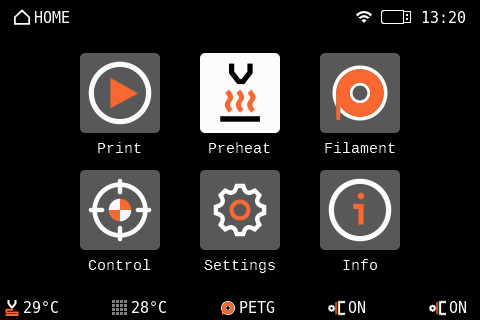
The footer of the main screen can be edited to show the features you wish to be shown on the main page.

Make sure to always have the latest latest firmware.
  • Print
  • Preheat
      • PLA
      • PETG
      • ASA
      • PC
      • PVB
      • ABS
      • HIPS
      • PP
      • FLEX
      • PA
      • Custom
          • Name
          • Nozzle temperature
          • Nozzle Preheat Temperature
          • Bed Temperature
          • Nominal Chamber Temperature
          • Minimum Chamber Temperature
          • Maximum Chamber Temperature
          • Is Abrasive
          • Requires Filtration
          • Confirm
      • Show All
      • Cooldown
  • Filament
      • Empty nozzle cleaner 
      • Load filament
      • Unload filament
      • Change filament
      • Purge filament
      • Change Filament in All Tools
      • Manage Filaments
          • Loaded filaments
          • Edit Filaments
          • Reorder Filaments
          • Enable Filaments
  • Control
      •  Pick/Park Tool
          • Park Current Tool
          • Pick Tool #
      • Move axis
          • Move X
          • Move Y
          • Move Z
          • Move E
          • Cooldown
      • Temperature
          • Nozzle # temperature
          • Heatbed temperature
          • Chamber temperature
          • Print fan speed
          • Dock fan
          • Chamber fans
          • Chamber fans limit
          • Filtration fan
          • Cooldown
      • Autohome
      • Set ready
      • Disable motors
      • Release stuck nozzle
      • Calibrations & Tests
          • 1 Door sensor
          • 2 X Axis Test
          • 3 Y Axis Test
          • 4 Z Alignment Calibration
          • 5 Belt tuning
          • 6 Homing Calibration
          • 7 Dock Calibration
          • 8 Loadcell Test
          • 9 Z Axis Test
          • 10 Fan Test
          • 11 Heater Test
          • 12 Tool Offset Calibration
          • 13 Nozzle Cleaner Calibration
          • 14 Filament Sensor Calibration
          • 15 Phase Stepping Calibration
          • 16 Input Shaper Calibration
  • Settings
      • Tools
          • Tool #
              • Nozzle Diameter
              • Nozzle Hardened
              • Nozzle High-flow
              • Pick/Park Tool
              • Nozzle Offset
              • Dock Position
          • Park Current Tool
      • Filament Sensors 
          • Filament Sensing
          • Filament Sensor 1
          • Filament Sensor 2
          • Filament Sensor 3
          • Filament Sensor 4
          • Filament Sensor 5
          • Filament Sensor 6
          • Filament Sensor 7
          • Filament Sensor 8
          • Restore Defaults
      • Auto-retract
      • Camera
      • Stealth Mode
      • Fan check
      • Verify Gcode
      • Nozzle Cleaner
      • Chamber Filtration
      • Input Shaper
          • Calibration
          • X-axis filter
          • X-axis frequency
          • Y-axis filter
          • Y-axis frequency
          • Restore Defaults
      • Phase Stepping
      • User Interface
          • Footer
              • Item 1 [None/Nozzle/Bed/Filament/FSensor/Speed/X/Y/Z/Z Height/Print fan/Heatbreak fan/Heatbreak/Current tool/All nozzles/FSensor side/Nozzle diameter/Nozzle PMW/Enclosure temperature]
              • Item 2
              • Item 3
              • Item 4
              • Item 5
          • Sort Files [Time/Name]
          • Print Progress Screen [OFF, 30 s - 200 s]
          • Menu Timeout
          • Sound Mode [Loud/Silent/Assist/Once]
          • For filament change, preheat [Nozzle/Noz&Bed]
          • RGB Status Bar
          • RGB Side Strip
          • RGB Side Strip Dimming
          • Tool Light
          • Touch
          • Touch Sig Workaround
      • Language & Time
          • Language
              • English
              • Čeština
              • Deutsch
              • Español
              • Français
              • Italiano
              • Polski
              • ニホンゴ
          • Time Zone Hour Offset
          • Time Zone Minute Offset
          • Time Zone Summertime
          • Time Format
      • Network
          • Active Interface [Eth/Wi-fi]
          • Network status
              • IPv4 Address
              • IPv4 Gateway
              • MAC Address
              • Hostname
              • DNS Server
              • Ping | Loss
                • Gateway
                • DNS server
          • Wi-Fi
              • Wi-Fi status
              • SSID
              • Wi-Fi Wizard
              • Protocol
              • LAN
              • IPv4 Address
              • IPv4 Netmask
              • IPv4 Gateway
              • Hostname
              • MAC Address
          • Ethernet
              • Protocol
              • LAN
              • IPv4 Address
              • IPv4 Netmask
              • IPv4 Gateway
              • Hostname
              • MAC Address
          • Prusa Connect
              • Enabled
              • Status
              • Error
              • Hostname
              • Add printer to Connect
              • Load Settings
          • Prusa Link
              • Enabled
              • User
              • Password
              • IPv4 address
              • Hostname
              • Generate Password
          • Metrics & Log
              • What is this?
              • Allow
              • Enable Stored on Startup
              • Stored configuration
                • Host
                • Metrics port
                • Log Port
              • Current configuration
                • Metrics Host
                • Metrics Port
                • Log Host
                • Log Port
      • Hardware
          • Tools
          • Filament Autoloading
          • Door Sensor
          • Chamber Vent Control
          • Nozzle Cleaning Retraction
          • G-code checks
              • Nozzle Diameter [Warn/Strict/None]
              • Printer Model [Warn/Strict/None]
              • Firmware Version [Warn/Strict/None]
              • G-code Level [Warn/Strict/None]
          • Display Refresh Speed [High/Low]
      • FW update
      • Manual Belt Tuning
      • System
          • Save Crash Dump
          • Save Logs To File
          • Device Hash in QR
          • Load Settings from File
          • Factory Reset
              • Reset Settings & Calibrations
              • Hard Reset (USB with FW needed)
  •  Info
      • Network Status
          • Wi-Fi Status
          • IPv4 Address
          • IPv4 Gateway
          • MAC Address
          • Hostname
          • DNS Server
          • Connect Host
          • Connect IP
          • Ping | Loss
            • Connect
            • Gateway
            • DNS Server
      • Sensor Info
          • Board Temperature
          • MCU Temperature
          • Bed Temperature
          • Chamber
          • Nozzle  Temperature
          • Head PCB Tempeature
          • Head MCU Tempearture
          • Head Ambient Temperature
          • Nozzle Raw Temperature
          • Nozzle Power
          • Loadcell Value
          • Door Sensor
          • Side Filament Sensor
          • Bed Voltage
          • Input Current
          • Fan Info
            • Print Fan
            • Heatbreak Fan
            • Chamber Fan 1
            • Chamber Fan 2
            • Filtration Fan
      • Version info
          • Firmware Version
          • Bootloader Version
          • Buddy Board
          • Serial Number
          • xLCD
      • Print Statistics
          • Fail Stats
              • Power Failures
              • Last Print Crashes on X Axis
              • Last Print Crashes on Y Axis
              • Crashes on X Axis
              • Crashes on Y Axis
          • Statistics
              • X-axis
              • Y-axis
              • Z -axis
              • Filament
                • Tool #
              • Tools changed
                • Tool #
          • Print Time
Was this article helpful?
This action is available only to registered users. Please log-in.
 
Log in  to post a comment
No comments