Prusa
  • SHOP
    • Learn more
    • All deals
    3D printers
    • CORE One+ (Gen2)
    • CORE One L+
    • XL+
    • MK4S
    • Mini+
    • HT90
    Consumables and Merch
    • Prusament
    • Resin
    • Buddy filament
    • Merch
    • Accessories
  • SHOP
    • Latest products
    BY CATEGORY
    • 3D printers
    • Upgrades
    • Materials
    • Accessories
    • Spare parts
    • Courses
    • Merch
    • Sales inquiry & Price quote
    QUICK LINKS
    • Shipping information
    • Refunds & returns
    • Payment options
    • Warranty
    • VAT & Customs fees
    • FAQ

    0 item in your cartitems in your cart

    Your cart is empty

    Go to cartShop 3D printers

    My profile

    Log in to see orders, saved items

    My profile

    Signed in as

    • Orders
    • Logout
  • 3D PRINTING
    • Explore 3D printing
    FOR BEGINNERS
    • 3D printing 101
    • Types of printers (FDM/SLA)
    • How to choose a 3D Printer
    • Printables (3D models)
    BY APPLICATION
    • Rapid prototyping
    • Manufacturing
    • Engineering
    • Research
    • Arts & design
    GO DEEPER
    • Materials guide
    • Courses
    • Webinars
    • Case studies
    • Custom 3D printing
  • 3D PRINTERS
    • All 3D printers
    FOR
    • Home or garageHobbyists, tinkerers and home printing
    • Shop or studioIn-house production for small teams
    • EnterpriseFleets, security and scale
    • How to choose a 3D Printer
    SHOP & BROWSE
    • CORE One+
    • CORE One+ INDX
    • CORE One L+
    • CORE One L+ INDX
    • XL+
    • MK4S
    • Prusa Pro HT90
    • Prusa Pro AFS
    • Prusa Pro SLX
    MORE FROM PRINTERS
    • Upgrades
    • Spare parts
    • Critical infrastructure
    • Case studies
    • Signature Oak
    • Kits
  • MATERIALS
    • All materials
    BY USE
    • Every-day & design
    • Functional engineering
    • Composites
    • Pro speciality
    • SLA resins
    PRUSAMENT
    • PLA
    • PETG
    • ASA
    • PC
    • PA11
    • Flex
    • TPU
    MORE FROM MATERIALS
    • Materials guide
    • We make material in house
    • Sustainability
    • Order on the store
  • SOFTWARE
    • All software
    PREPARE THE PRINT
    • PrusaSlicer
    PRINT & MONITOR
    • Prusa Connect
    • EasyPrint
    • iOS & Android app
    • Prusa Farm
    GET STARTED
    • Download & install
    • Knowledge base
    MORE FROM SOFTWARE
    • Printables (3D models)
  • SUPPORT
    • Explore support
    FIND ANSWERS
    • Knowledge base
    • Troubleshooting
    • Courses
    • Webinars
    GET HELP
    • Contact us
    • Livechat
    • Shipping information
    • Warranty
    • Refunds & returns
    • Spare parts
    • Factory repair
    COMMUNITY
    • Forum
    • Reddit
    • Printables
  • TRUST CENTER
    • Trust Center overview
    BY TOPIC
    • GDPR
    • Certificates
    • Security
    • Compliance
    COMMITMENTS
    • Sustainability report
    TALK TO US
    • Contact the security team
  • COMPANY
    • About Prusa
    GET TO KNOW US
    • Our story
    • How we make printers
    • Open source
    • Brand & media kit
    NEWS
    • Blog
    • Newsroom
    • Events
    TRUST & PARTNERS
    • Sustainability
    • Resellers & distributors
    • Affiliate program
    • Contact
    • English
    • Čeština
    • Deutsch
    • Español
    • Français
    • Italiano
    • Polski
    • 日本語
  • Signed in as

    • Orders
    • Address
    • In-stock Alerts
    • My Courses
    • Subscription
    • Edit Account
    • Logout

Log in to see orders, saved items

Signed in as
  • Orders
  • Address
  • In-stock Alerts
  • My Courses
  • Subscription
  • Edit Account
  • English
  • Čeština
  • Deutsch
  • Español
  • Français
  • Italiano
  • Polski
  • 日本語
Shop

0 item in your cartitems in your cart

Your cart is empty

Go to cartShop 3D printers

My profile

Log in to see orders, saved items

My profile

Signed in as

  • Orders
  • Logout
SHOP
  • Latest products
BY CATEGORY
  • 3D printers
  • Upgrades
  • Materials
  • Accessories
  • Spare parts
  • Courses
  • Merch
  • Sales inquiry & Price quote
QUICK LINKS
  • Shipping information
  • Refunds & returns
  • Payment options
  • Warranty
  • VAT & Customs fees
  • FAQ

Featured products

    Popular categories

      Trending searches

        Articles

          Blog

            Products

              Categories

                Suggested searches

                  Searching…
                  No results
                  Something went wrong.
                  ↑↓ Select↵ OpenEsc Close search
                  1. Support
                  2. Original Prusa MINI
                  3. Printer description
                  4. Info Screens (MINI/MINI+)
                   

                  Contents

                  • Network Status
                  • Sensor info
                  • Version info
                  • Statistics

                  Blog

                  • Prusa Black Friday 2026 Is Here! Grab the Biggest Deals of the Year
                  • 400°C HT Hotend is out! Plus: New Materials and HighTemp Sheets for CORE One+/L+.
                  • Blender for 3D Printing: The 5-Minute Guide to STL Editing

                  Newsletter

                  Signup and get our monthly squeeze on updates, blog, printables and much more.

                  By clicking, you agree to receive our newsletter.

                  This site is protected by reCAPTCHA Enterprise and the Google Privacy Policy and Terms of Service apply.

                  Heavy Duty Keyboard Holder (No Supports)
                  E-shop
                  • 3D Printers
                  • Printer Upgrades
                  • Filaments
                  • Accessories
                  • Prusa Merchandise
                  Prusa

                  © Prusa Research a.s.

                  Printables
                  • 3D Models
                  • Store
                  • Clubs
                  • 3D Design Contests
                  • Brands
                  Community
                  • World Map
                  • Forum
                  • User Groups
                  • Events
                  Help
                  • Prusa Help
                  • Prusa Academy
                  • 3D Printing Calculators
                  Software
                  • PrusaSlicer
                  • Prusa.app
                  • Prusa Connect
                  • Drivers and Software
                  Company
                  • About Us
                  • Blog
                  • Official Prusa Resellers
                  • Contact Us
                  • Certified for ISO 9001, ISO 14001, ISO 45001
                  • General Terms and Conditions
                  • General Terms and Conditions of Use of the PRUSA Websites
                  • Privacy Policy
                  • Information about cookies
                  • Customer Complaints Policy
                  • Status Page
                  • Do Not Sell or Share My Personal Information
                  • Supplemental Statements
                  Prusa
                  • General Terms and Conditions
                  • General Terms and Conditions of Use of the PRUSA Websites
                  • Privacy Policy
                  • Information about cookies
                  • Customer Complaints Policy
                  • Status Page
                  • Do Not Sell or Share My Personal Information
                  • Supplemental Statements

                  © Prusa Research a.s.

                  JOSEF PRUSA®, PRUSA RESEARCH®, PRUSA POLYMERS®, PRUSA ORANGE®, PRUSA 3D ® AND PRUSAMENT® are registered trademarks of Prusa Development a.s. used by Prusa Research a.s. under licence from Prusa Development a.s.

                  Info Screens

                  (MINI/MINI+)

                  Relevant for

                  MINI
                  MINI+
                  3 comments
                  Article is also available in following languages
                  English
                  Čeština
                  Polski
                  Deutsch
                  Français
                  Español
                  Italiano
                  日本語

                  In the Original Prusa MINI and MINI+ menu, you can see the option Info. Here you will find different information on your printer.

                  Within the Info menu, you have the following selection: 

                  • Network status
                  • Sensor info
                  • Version info
                  • Statistics

                  Network Status

                  Info on the network status, including IP address, MAC address, and Ping - Loss are included in this submenu. 

                  • Status
                  • IP
                  • Gateway
                  • MAC
                  • Hostname
                  • DNS
                  • PING | Loss
                  • Gateway
                  • DNS

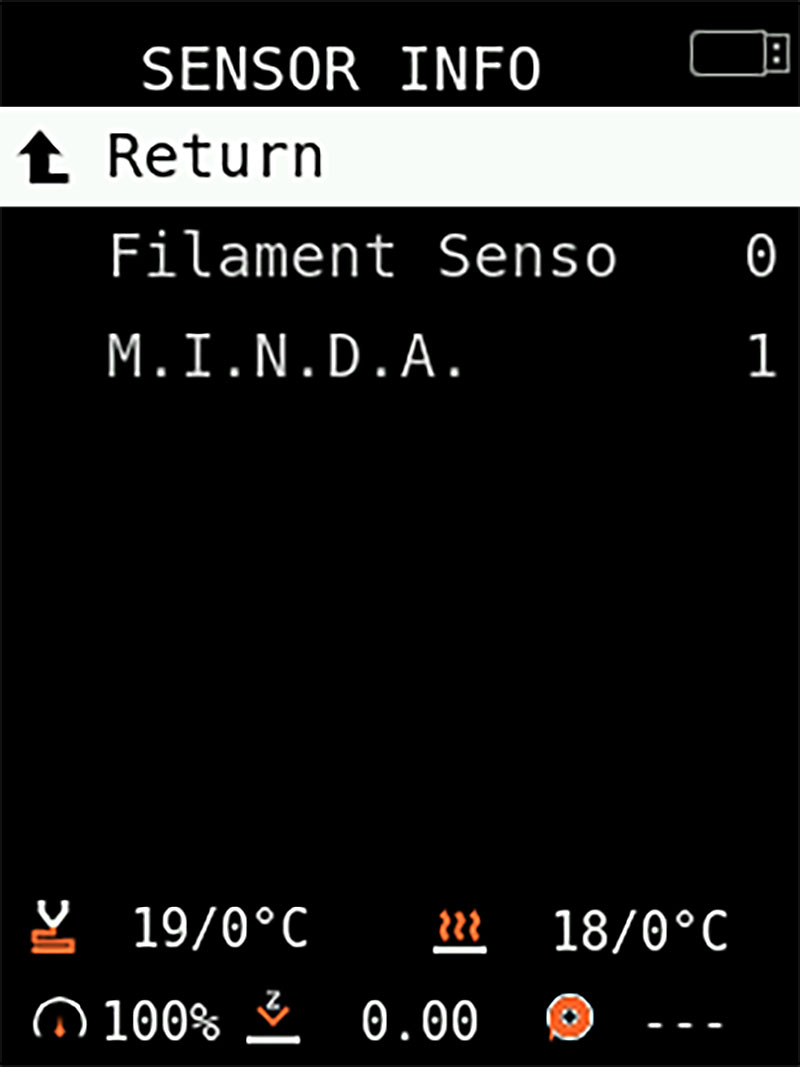
                  Sensor info

                  • Filament sensor: In case you have the optional filament sensor installed in your Mini, this entry will show 0 when the filament is not loaded on the sensor and 1 when the filament is loaded. If the Filament sensor is not installed it will show N/A.
                  • M.I.N.D.A.: The M.I.N.D.A. status will be 0 when it is not close to any metal, such as the heatbed. It will be at 1 when there is any metal directly under it, like when it is close to the heatbed.
                  • MCU Temp: Temperature detected by the thermistor of the Main Control Unit (MCU), the Buddy board. If it becomes overheated, a warning or an error message will be shown. 
                  The menu may show "M.I.N.D.A." even if you have the SuperPINDA installed.

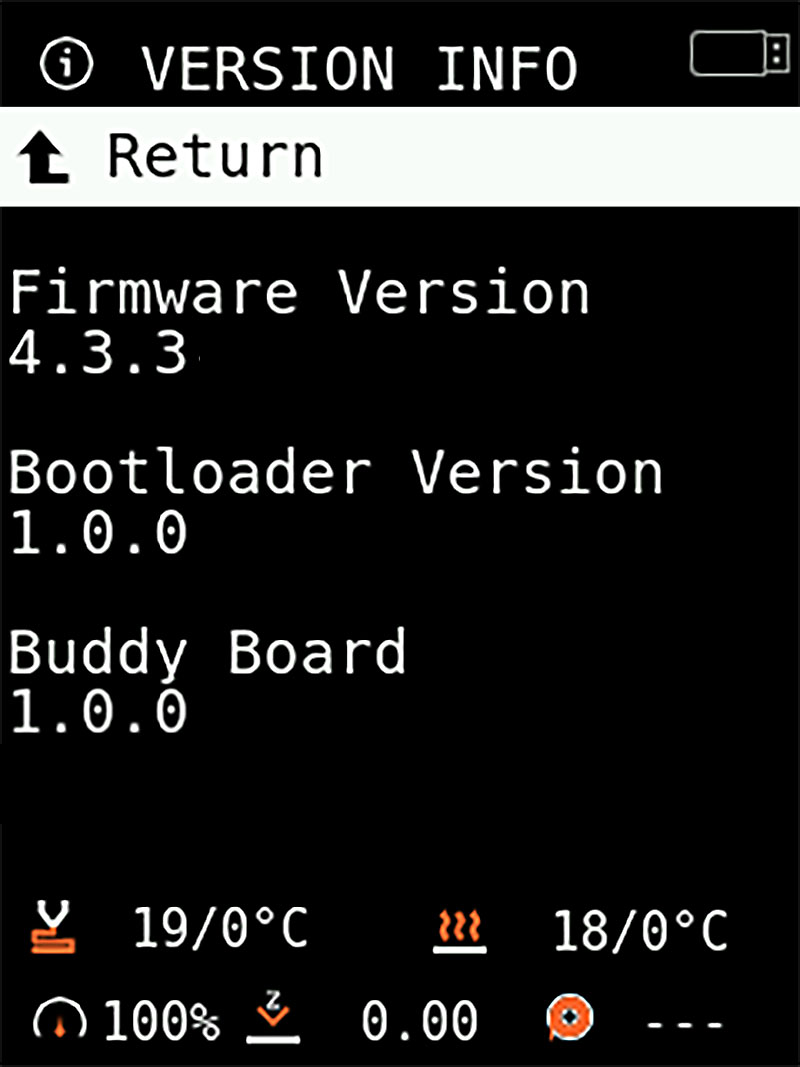
                  Version info

                  • Firmware version
                  • Bootloader version
                  • Buddy board revision

                  Statistics

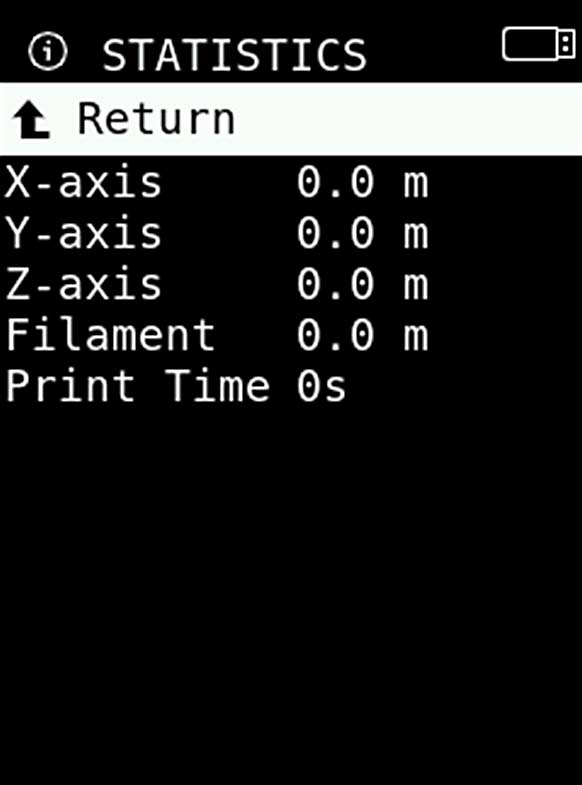
                  Starting firmware version 4.3.3, the printer stores information about the length of filament used and print time, as well as the distance traveled at each axis (X, Y, Z). This is displayed in meters.

                  All print data is stored in the EEPROM. To optimize the number of writes to the memory, only finished or stopped prints are saved. In the case of a watchdog reset mid-print, the data is not stored.

                  This feature can help you plan the maintenance of the printer. Once bearings or other components reach a certain threshold, you'll know when to clean, maintain or replace anything.

                  This data will be reset if you perform a factory reset.
                  The printer is capable of storing a print time of 9999 days 99 hours. The first user to reach this value without any tricks will become a grandmaster of 3D printing.
                  Was this article helpful?
                  This action is available only to registered users. Please log-in.

                  2 comments

                  Log in  to post a comment
                  Dutchess_Nicole
                  •
                  This page is extremely out of date and needs an update.

                  The Info page no longer contains System info, so this data is no longer available,
                  Network Status has been added, so it would be nice to have that mentioned
                  and Sensor info now also contains the MCU temperature, but does not contain the temperatures or fan speeds (which could also be considered sensors).

                  Additionally: the menu path Settings -> Temperature -> Fan does not exist anymore and there is no way to set the hotend fan speed at all. The only way to turn it on is to set the hotend temperature to > 50C
                  Reply
                  paulscott56
                  •
                  Hi, I would like to track these system info screens via telegraf (InfluxDB) and graph the stats in Grafana/InfluxDB flux dashboards. Is there an available way to do this? I would rather not install custom firmware over the Prusa supplied firmware. This is on a Prusa Mini+
                  Reply
                  William H. - Official Prusa
                  •

                  This is something you should direct to our Github and devs, as it is beyond the scope of this article (and in reality the whole KB platform).

                  Reply

                  Topics

                  • About your printer
                    • Printer description
                      • Flashing custom firmware (MINI/MINI+)
                      • 360 viewer
                      • Spool placement
                      • Info Screens (MINI/MINI+)
                      • LCD menu (MINI/MINI+)
                      • USB not detected (MINI/MINI+)
                      • How to check your Buddy board version
                    • Printer features
                    • General Information