AA

Featured products

    Popular categories

      Trending searches

        Articles

          Blog

            Products

              Categories

                Suggested searches

                  Searching…
                  No results
                  Something went wrong.
                  ↑↓ Select↵ OpenEsc Close search
                  • English
                  • Čeština
                  • Deutsch
                  • Español
                  • Français
                  • Italiano
                  • Polski
                  • 日本語
                  • Orders
                  • Address
                  • In-stock Alerts
                  • My Courses
                  • Subscription
                  • Edit Account
                  • 3D printers9+▾

                    3D printersnew

                    newPrusa CORE One L+Learn more
                    newPrusa CORE One+ (Gen 2)Learn more
                    newPrusa CORE One L+ INDX 8-ToolnewPrusa CORE One+ (Gen 2) INDX 8-ToolPrusa CORE One L+: Critical InfrastructureOriginal Prusa MK4SnewOriginal Prusa XL+Original Prusa XL+: Critical Infrastructure

                    Printer upgrades

                    newINDX Conversion KitsnewPrusa CORE One L to CORE One L+ upgradenewPrusa CORE One+ to Prusa CORE One+ (Gen 2)newPrusa XL to Prusa XL+ Upgrade
                    Prusa Reward ProgramLove your Prusa printer? Share your experience and earn $30 Prusa e-shop vouchers.
                    How to Choose a 3D Printer?We’ll walk you through the basics to find the exact machine for your space, budget, and ideas.
                    Free E-bookDownload a free e-book Basics of 3D Printing with Josef Prusa and make your first steps in 3D printing world
                    Original Prusa Printable PartsCollections of printable spare parts for Original Prusa 3D printers and upgrades.
                    Shipping informationRegularly updated info about the current manufacturing capacity and delivery times of our printers.
                    Custom 3D PrintingProfessional custom 3D printing from various materials according to your requirements.
                  • Materials▾

                    Filaments

                    PrusamentPLAPETGASA / ABSPC (Polycarbonate)PA (Nylon)FlexCompositesSpecialMaterials clearance sale

                    Resin

                    Prusament ResinResin Cleaner
                    Filament GuideCheck my Prusament Spool
                    Prusament.com
                  • Parts & Accessories▾

                    Accessories

                    EnclosuresNozzlesPrint SheetsEssential AccessoriesCameras & AddonsTools & CraftingAdhesives

                    Spare parts

                    Merchandise

                    Spare parts - All PrintersCORE OneMK4/S & MK3.9/SMK3/S/+XL
                    Merch
                  • For Business▾
                    Prusa Pro HT90Prusa Pro SLXPrusa Pro AFSPrusa Pro Medical OneOriginal Prusa XLOriginal Prusa XL: Critical Infrastructure
                    Prusa CORE One+Learn more
                    Prusa CORE One LLearn more
                    Prusa CORE One L: Critical Infrastructure Edition

                    3D Printing for

                    Manufacturing and R&DAutomotive IndustryHealthcareEducation and Academic ResearchArchitects and DesignersFilm IndustryCritical Infrastructure

                    3D Printing Stories

                    • How 3D printing started: About Rep-rap and open-source with Adrian Bowyer
                    • Teaching mathematics redefined with 3D printing at JKU Linz
                    • The story behind the LTT screwdriver
                    • Victoria Hand Project: Changing Prosthetic Care with 3D Printing
                    Official Prusa Resellers
                    Sustainability
                    Prusa Education
                    Contact and Inquiry
                    Custom 3D Printing
                    ISO Certified
                  • Software▾
                    PrusaSlicer

                    PrusaSlicerPrusaSlicer

                    PrusaSlicer is an open-source, feature-rich, frequently updated tool that contains everything you need to export the perfect print files for your 3D printer.

                    WindowsMacOSLinux
                    Prusa Connect

                    Prusa Connect

                    Prusa Connect is a cloud service enabling remote control and monitoring of your 3D printers, offering secure data handling, easy setup, and support for managing multiple printers from anywhere.

                    Log in to Connect
                    Prusa.app

                    Prusa.app

                    Control your printer/s remotely from anywhere using the Prusa Connect technology behind. Prusa.app brings a new level of Prusa printer experience to Android and iOS phones.

                    Try it now!
                    Drivers & FirmwareDownload the latest firmware and drivers for your 3D printer.
                    PrusaSlicer Support
                    Prusa Connect Support
                  • 3D Models▾
                    3D PrintersArt & DesignHobby & MakersHouseholdTabletop MiniaturesToys & GamesPrintables Store

                    Popular 3D models

                    • Strong garden hose holder
                    • Prusa Spool Bot
                    • Build Tray — Modular Organizer for Assembly, Disassembly and Maintenance
                    • Broom Holder
                    • Octagon Fabric
                    • Prusa CORE One ? (Mimic Skin)

                    Design Contests

                    • Du prototype au produit : Accessoires pour appareils photo et caméra8/1/2026 – 9/14/2026
                    • Rentrée scolaire 20268/21/2026 – 9/6/2026
                  • Community▾

                    Upcoming Events

                    • Maker Faire Tokyo 20269/5/2026 – 9/6/2026 · Tokyo, Japan · Prusa Team
                    • IFA 20269/4/2026 – 9/8/2026 · Berlin, Germany · Prusa Team
                    • 3D Printopia 20269/26/2026 – 9/27/2026 · Pennsylvania, United States · Prusa Team
                    • Maker Faire Bay Area9/25/2026 – 9/27/2026 · Kalifornie, United States · Prusa Team

                    Prusa Forum

                    • INDX calibrations...
                    • Core One L to Core One L+ (aka Gen2) Discussion
                    • FW 6.10.1+16383 Y-axis homing failure
                    Prusa World MapPrusa World MapFind local 3D printing users and explore the community around you.
                  • Help▾
                    Guides & TutorialsPrusaSlicerPrusa ConnectMaterials

                    Printer Model

                    CORE One INDXCORE One LCORE One+CORE One

                    Hardware Troubleshooting

                    • Selftest failed (CORE One/+)
                    • Clogged nozzle (CORE One, CORE One L, XL, MK4/S, MK3.9/S)
                    • Adjusting belt tension (CORE One/+, CORE One INDX, CORE One L/+)
                    • Prusa Connect and PrusaLink explained

                    Drivers & Firmware

                    INDX familyCORE One familyMK4 familyXL familyMMU familyPRO family
                  • Courses▾

                    Become an expert in 3D printing

                    Prusa Academy offers online courses on various 3D printing related topics. Each course features:

                    • easy-to-read text with many pictures and short videos
                    • links for inspiration and further study
                    • quizzes for testing your knowledge along the way
                    • certificate of completion
                    Browse all coursesMy courses library
                    • 3D Modeling in Autodesk Fusion
                    • PrusaSlicer Masterclass – Beginner to Advanced
                    • Complete Guide to 3D Print Postprocessing, Painting, and Detailing
                    • Airbrush Your 3D Prints: From Basics to Advanced Tricks
                  • Blog▾
                    • PrusaSlicer 3.0 Preview – Built for the Future of 3D Printing
                    • Prusa CORE One+ (Gen 2) INDX, Shipping Has Started, Complete Printers Open for Orders
                    • Better Prints, Easier Use: Prusa XL+, CORE One L+ and CORE One+ (Gen 2), Our Big Product Upgrade
                    E-Book: Basics of 3D Printing
                  • Company▾

                    About Prusa Research

                    We are the largest maker of 3D printers in Europe and the United States.

                    Founded as a one-man startup in 2012 by Josef Prusa, a Czech hobbyist, maker, and inventor. In just 15 years, we've grown into a company of more than 1,200 people. Every month, we design, build, and ship over 10,000 innovative and secure 3D printers from our headquarters in Prague, Czech Republic, and Delaware, USA, to users in more than 160 countries.

                    Watch a video and find out how Prusa Research was born and what we achieved within only 10 years!

                    About UsTimelineSustainabilityOpen-source
                    About Us
                    Contact Us
                    Logo and Photos
                    ISO Certified
                  1. Support
                  2. Material guide
                  3. Flexible materials
                   

                  Contents

                  • Basic info
                  • Description
                  • Best use
                  • Important rules for successful printing with flexible filaments
                  • Tips for successful printing
                  • XL
                  • CORE One+ and CORE One L
                  • Sample prints

                  Blog

                  • PrusaSlicer 3.0 Preview – Built for the Future of 3D Printing
                  • Prusa CORE One+ (Gen 2) INDX, Shipping Has Started, Complete Printers Open for Orders
                  • Better Prints, Easier Use: Prusa XL+, CORE One L+ and CORE One+ (Gen 2), Our Big Product Upgrade

                  Newsletter

                  Signup and get our monthly squeeze on updates, blog, printables and much more.

                  By clicking, you agree to receive our newsletter.

                  This site is protected by reCAPTCHA Enterprise and the Google Privacy Policy and Terms of Service apply.

                  Strong garden hose holder
                  E-shop
                  • 3D Printers
                  • Printer Upgrades
                  • Filaments
                  • Accessories
                  • Prusa Merchandise

                  © Prusa Research a.s.

                  Printables
                  • 3D Models
                  • Store
                  • Clubs
                  • 3D Design Contests
                  • Brands
                  Community
                  • World Map
                  • Forum
                  • User Groups
                  • Events
                  Help
                  • Prusa Help
                  • Prusa Academy
                  • 3D Printing Calculators
                  Software
                  • PrusaSlicer
                  • Prusa.app
                  • Prusa Connect
                  • Drivers and Software
                  Company
                  • About Us
                  • Blog
                  • Official Prusa Resellers
                  • Contact Us
                  • Certified for ISO 9001, ISO 14001, ISO 45001
                  • General Terms and Conditions
                  • General Terms and Conditions of Use of the PRUSA Websites
                  • Privacy Policy
                  • Information about cookies
                  • Customer Complaints Policy
                  • Status Page
                  • Do Not Sell or Share My Personal Information
                  • Supplemental Statements
                  • General Terms and Conditions
                  • General Terms and Conditions of Use of the PRUSA Websites
                  • Privacy Policy
                  • Information about cookies
                  • Customer Complaints Policy
                  • Status Page
                  • Do Not Sell or Share My Personal Information
                  • Supplemental Statements

                  © Prusa Research a.s.

                  JOSEF PRUSA®, PRUSA RESEARCH®, PRUSA POLYMERS®, PRUSA ORANGE®, PRUSA 3D ® AND PRUSAMENT® are registered trademarks of Prusa Development a.s. used by Prusa Research a.s. under licence from Prusa Development a.s.

                  Flexible materials

                  Relevant for

                  MK4 family
                  XL family
                  MINI family
                  MK3 family
                  MK3.5 family
                  +
                  39 comments
                  Article is also available in following languages
                  English
                  Čeština
                  Polski
                  Deutsch
                  Français
                  Español
                  Italiano
                  日本語

                  Basic info

                  Flexible materials are characterized by their excellent flexibility, tenacity, and chemical resistance. These materials are relatively uncommon, expensive, and suitable mostly for advanced users due to high print difficulty.
                   
                  Recommended nozzle temperature: 230 °C - 245 °C (Depending on hardness and brand).
                   
                  Recommended bed temperature: 60 °C - 75 °C (Depending on the size of the object, bigger objects tend to need higher bed temperature).

                  Description

                  Flexible filaments are chemically and mechanically resistant materials. Individual layers hold strongly together and there is a great print surface adhesion (applies only for TPU and TPEE). Due to these qualities, it is necessary to print on a powder-coated sheet or use a special separator on the print surface (glue stick or Kapton tape). Flexible filaments are TPE (thermoplastic elastomer) material, however, they are distributed under various names, such as TPU, TPEE, etc. For example, TPU is basically a subtype of TPE material and the main difference between TPU and TPE is its shore hardness. TPU is usually around 60A-90A on the shore hardness scale. Generally speaking, the softer the filament is, the harder it is to print.
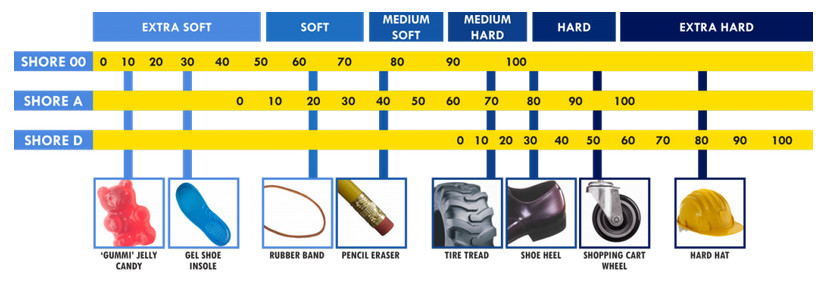
                  Shore hardness scale, source: smooth-on.com

                  Flexible filaments are usually very resistant to wear (scratching), stay flexible even in cold environments, and show great resistance against various solvents. Dimensions are stable, there is little to no shrinking or warping. Their tenacity and tensile strength are excellent: 3D-printed parts can withstand great stress before breaking. These properties make it suitable for printing spacing washers and other high-stress parts. With proper print settings, you could print stamps, RC tires, shoe soles, belts, etc.

                  Some very soft flex materials can bond to the bed too much and require the use of glue stick on the bed as a separator to prevent PEI damage. A good alternative is the Textured Spring-steel sheet.

                  Printing with flexible filaments is recommended only for experienced makers, considering various challenges during printing. We’re talking about frequent nozzle clogging, poor bridging and overhang characteristics, filament tangling into extruder gears, stringing, and oozing.

                  To compare supported material properties, see our material table.

                  Pros

                  Cons

                  ✔ Flexibility & tenacity

                  ✖ High print difficulty

                  ✔ Dimensional stability (low shrinkage)

                  ✖ Low printing speed

                  ✔ Good layer adhesion

                  ✖ Very bad bridging and overhangs

                  ✔ High mechanical and chemical resistance

                  ✖ Difficult support removal


                  ✖ Stringing


                  ✖ Hygroscopic material (absorbs moisture)

                  Best use

                  The best use of flexible filament is for printing spacing washers and other high-stress parts. With proper print settings, you could print stamps, RC tires, shoe soles, belts, etc.

                  Important rules for successful printing with flexible filaments

                  1. Make sure the nozzle is unobstructed. If you’re not sure, do a cold pull to clean it completely.  
                  2. Loosen the idler so the gears push the filament through only very gently. If they press too hard, the filament might get entangled in the gears.
                  3. If you print on a smooth or satin sheet, apply a separation layer on it (glue stick or Kapton tape should work). The powder-coated TXT sheet does not need any separation layer - the print will stick just fine and can be easily removed without damaging the surface.
                  4. Print slowly. The slower, the better. A typical speed for flexible filaments is usually 20 mm/s, the maximal recommended speed is somewhere between 30 and 40 mm/s. With higher speeds, you risk clogging the nozzle or tangling filament into the gears. For Original Prusa printers, we recommend using the “Semiflex or Flexfill 98A” or “Filatech FilaFlex40” profiles that have proper speed settings.
                  5. Increase the nozzle temperature by 5 °C, this will lower filament resistance. Keep print cooling turned off.
                  6. Keep the filament dry. Flexible filaments tend to absorb moisture and can be hard to print when wet.

                  Tips for successful printing

                  Flexibility and slicer settings

                  Do you need better mechanical resistance? Set more infill and perimeters in PrusaSlicer. But if you need to retain the material flexibility, try to lower the number of perimeters and top/bottom layers. However, keep in mind that flexible filaments are not good at bridging and overhangs. A combination of thin layers and poor bridging can lead to ugly holes and protrusions.

                  Retractions

                  If you use a different program than PrusaSlicer, try to adjust retractions a little bit. With lower retractions, there is a lower risk of clogging the nozzle or filament tangling. It’s alright to turn the retractions off completely and then try to raise them and watch the results. 

                  Printing supports

                  Supports may need more space in Z-axis. Try to increase it to 0,3 mm. Supports that are closer to your model might stick to it too strongly and might be difficult to remove. Increase 'XY separation between an object and its support to at least 100%.

                  Filament sensor

                  Remember that automatic filament change might not work properly with flexible filaments.

                  Do you want to know more about printing with flexible filaments? Check our blog article.

                  XL

                  The Original Prusa XL has a long path from the loading to the extruder nozzle. Due to its softness, Flexible filaments need special attention when being loaded in this printer. You can print the flex filament bypass, and follow the instructions in the video below:

                  CORE One+ and CORE One L

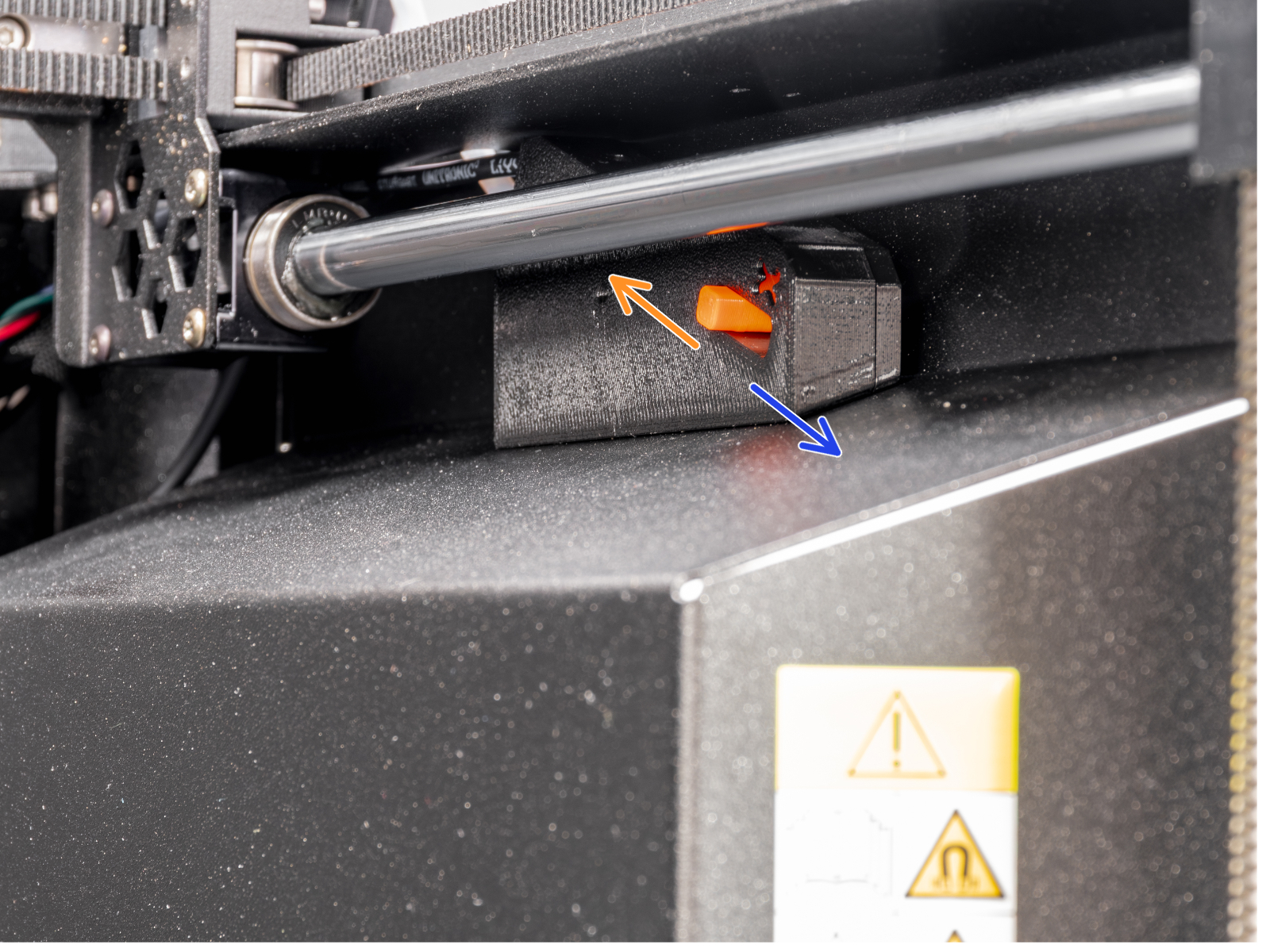
                  The CORE One+ and CORE One L have a hardware switch on the side filament sensor case that allows the filament sensor lever to be looser, allowing for easier loading of flexible filaments to the extruder.

                  Moving the latch to the front, the side with the x, will loosen the lever, allowing you to load the flexible filament. Moving the latch to the back will tighten the lever.
                  Sample prints

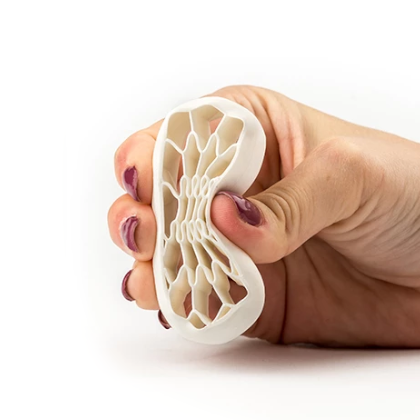
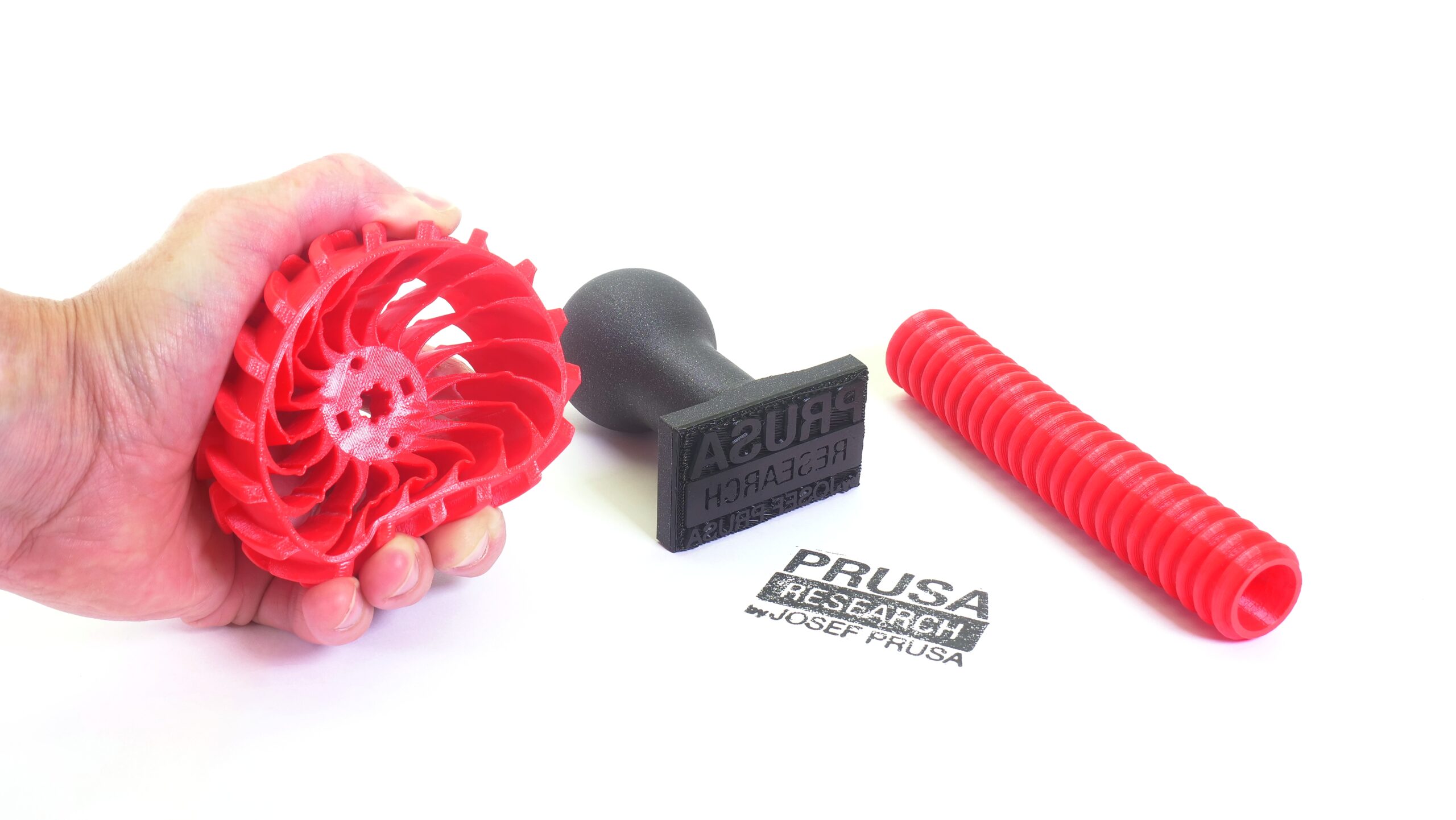
                  Stamps, hoses, and tiresExample of filament flexibility
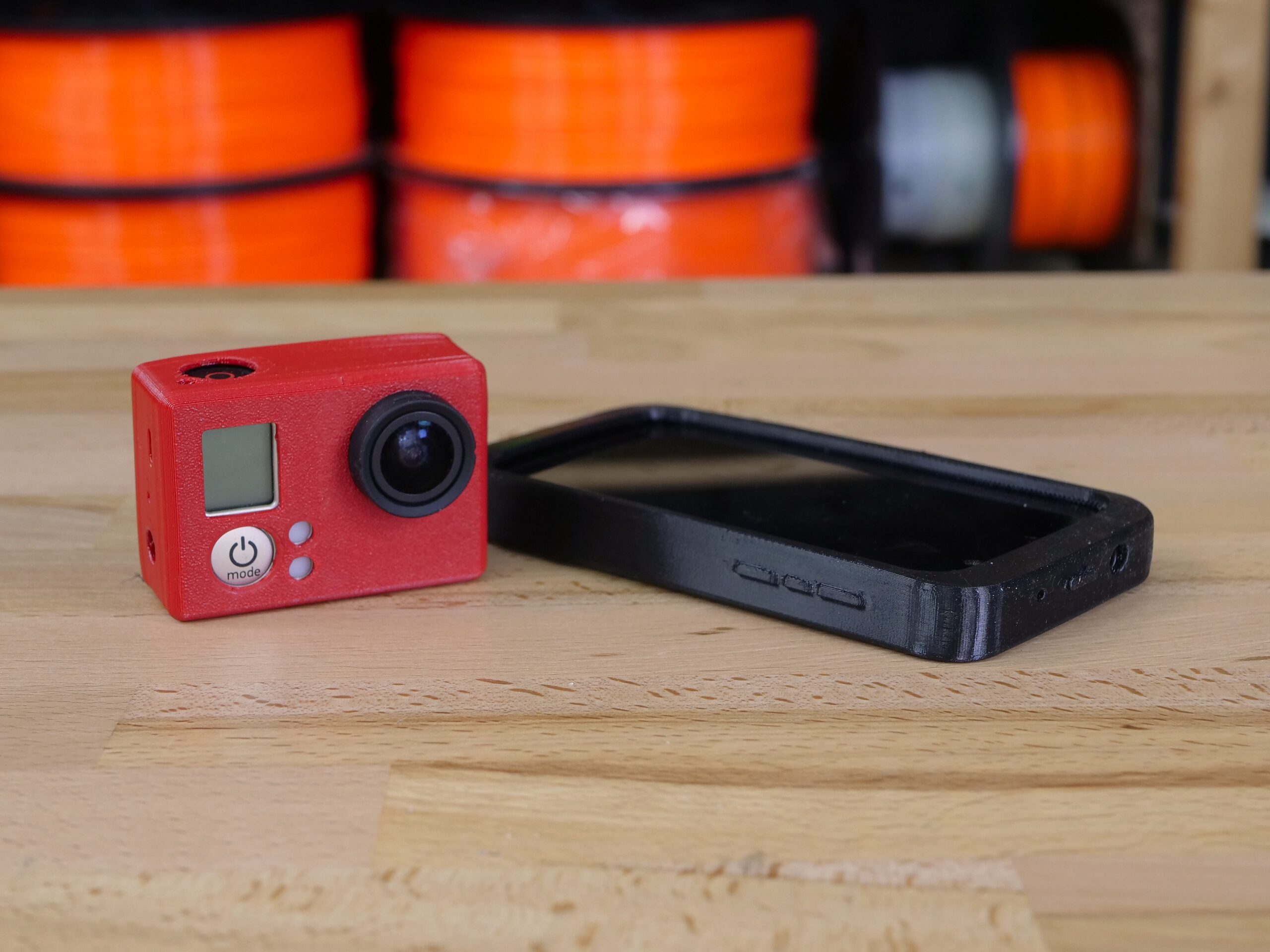
                  RC tiresGoPro and phone protection sleeve
                  Was this article helpful?
                  This action is available only to registered users. Please log-in.

                  Topics

                  • Using the printer
                    • Material guide
                      • ASA
                      • Flexible materials
                      • ABS
                      • PETG
                      • PLA
                      • Polycarbonate (PC)
                      • Composite materials (with metal or wood particles)
                      • CPE
                      • Water soluble (BVOH/PVA)
                      • HIPS
                      • Polypropylene (PP)
                      • NGEN
                      • Polyamide (Nylon)
                      • Composite materials (filled with carbon, kevlar or glass)
                      • PVB
                      • LW PLA
                      • Drying filament
                      • How to use Prusament refill 1kg
                      • HueForge filament transparency values and HexCodes
                      • Prusament TPU 95A material guide
                      • Prusament PETG Ultraglow troubleshooting
                      • Prusament Woodfill
                    • 3D models
                    • Slicing
                    • Printer maintenance
                    • Prusa Connect & PrusaLink

                  19 comments

                  Log in  to post a comment
                  maker
                  •
                  It would be nice if it included hyperlink for things such as loosening the idler with images. Is this the correct page on how to loosen the idler? https://help.prusa3d.com/article/idler-screw-tension_177367
                  Reply
                  Šimon Vltavský
                  •
                  Nedaří se mi, neustále se tpu filament v podavači zasekává s tiskárnou mini+ povoloval jsem ho utahova a nic.Doufám že mini+ je i na TPU nebo to že jsem filament koupil z Alzy.
                  Reply
                  Jan Kratochvíl
                  •
                  Dobrý den. Tisk z TPU na MINI+ je trošku ošemetná záležitost. Jelikož jde o bowdenový systém podávání filamentu, je potřeba mít velice přesně nastavený přítlak idleru a je potřeba použít tvrdší TPU, jelikož měkčí budou mít větší tendenci se kroutit a zasekavát v PTFE trubičce mezi extruderem a hotendem. Navíc u bowdenů se doporučuje vypnout nebo minimalizovat retrakci. Výtisk bude stringovat, ale zvýšíte spolehlivost tisku. Tisk je tedy náročný, ale ne nemožný.
                  Reply
                  KentO
                  •
                  This mod solves problems related to printing flexible materials. It works on MK4S and Core One. It prints hard and soft filaments including Filaflex 60A Pro.
                  https://www.printables.com/model/1072020-mk4s-bogie-idler-main-plate
                  Depending on the softness of the filament, you will also need to modify the filament sensor. This is one option.
                  https://www.printables.com/model/1263406-nextruder-filament-sensor-magnet-mod
                  Reply
                  Gaius Pupus
                  •
                  I successful print up to 60A (Recreus Filalex 60A PRO) with the standard "Generic FLEX@XL" profile. Just using an filament tube (PTFE) bypass for flex materials:
                  https://www.printables.com/model/1066178-prusa-xl-soft-tpu-printing-modification-metal-ball
                  Reply
                  bryn51
                  •
                  Is TPU Food Safe ?Can TPU be cleaned in the dishwasher (normal cycle). ?
                  Reply
                  haens_daempf
                  •
                  My guess is that it is generally 'food safe' but due to the texture of the print (layer lines etc.) there are plenty of crevices where bacteria and dirty may accumulate.
                  Reply
                  Mattchu
                  •
                  It's not terribly food safe. Polypropylene(PP) is awesome, as it is BPA free, food safe, and dishwasher safe. Just make sure to get "pure" polypropylene...the prusa CF filled is awesome, but NOT food safe.
                  Reply