Prusa
  • SHOP
    • Learn more
    • All deals
    3D printers
    • CORE One+ (Gen2)
    • CORE One L+
    • XL+
    • MK4S
    • Mini+
    • HT90
    Consumables and Merch
    • Prusament
    • Resin
    • Buddy filament
    • Merch
    • Accessories
  • ショップ
    • 最新製品
    カテゴリー別
    • 3Dプリンター
    • Upgrades
    • 材料
    • アクセサリー
    • スペアパーツ
    • コース
    • グッズ
    • Sales inquiry & Price quote
    クイックリンク
    • Shipping information
    • Refunds & returns
    • Payment options
    • 保証
    • VATと関税
    • よくある質問

    0 点の商品がカートに入っています点の商品がカートに入っています

    カートは空です

    カートを見る3Dプリンターを購入

    マイプロフィール

    ログイン すると注文や保存した商品を確認できます

    マイプロフィール

    ログイン中:

    • 注文
    • ログアウト
  • 3Dプリント
    • 3Dプリントを探る
    初心者向け
    • 3Dプリントの基礎
    • Types of printers (FDM/SLA)
    • How to choose a 3D Printer
    • Printables (3D models)
    用途別
    • ラピッドプロトタイピング
    • 製造
    • エンジニアリング
    • 研究
    • アートとデザイン
    さらに深く
    • 材料ガイド
    • コース
    • ウェビナー
    • 導入事例
    • カスタム3Dプリンティング
  • 3Dプリンター
    • すべての3Dプリンター
    用途
    • 自宅またはガレージ愛好家、改造愛好家、ホームプリンティング
    • Shop or studio小規模チーム向けの社内生産
    • エンタープライズフリート、セキュリティ、大規模生産
    • How to choose a 3D Printer
    ショップと閲覧
    • CORE One+
    • CORE One+ INDX
    • CORE One L+
    • CORE One L+ INDX
    • XL+
    • MK4S
    • Prusa Pro HT90
    • Prusa Pro AFS
    • Prusa Pro SLX
    プリンターからさらに
    • Upgrades
    • Spare parts
    • 重要インフラ
    • 導入事例
    • シグネチャーオーク
    • キット
  • 材料
    • すべての材料
    用途別
    • 日常とデザイン
    • 機能工学
    • 複合材料
    • プロフェッショナル向け特殊材料
    • SLAレジン
    Prusament
    • PLA
    • PETG
    • ASA
    • PC
    • PA11
    • Flex
    • TPU
    材料からさらに
    • 材料ガイド
    • 自社製材料
    • サステナビリティ
    • ストアで注文
  • ソフトウェア
    • すべてのソフトウェア
    印刷の準備
    • PrusaSlicer 3.0
    印刷と監視
    • Prusa Connect
    • EasyPrint
    • iOS & Androidアプリ
    • Prusaファーム
    始める
    • ダウンロードとインストール
    • ナレッジベース
    その他のソフトウェア
    • Printables (3D models)
  • サポート
    • サポートを探す
    回答を探す
    • ナレッジベース
    • トラブルシューティング
    • コース
    • ウェビナー
    ヘルプ
    • お問い合わせ
    • ライブチャット
    • Shipping information
    • 保証
    • Refunds & returns
    • Spare parts
    • Factory repair
    コミュニティ
    • フォーラム
    • Reddit
    • Printables
  • トラストセンター
    • トラストセンター概要
    トピック別
    • GDPR
    • 証明書
    • セキュリティ
    • コンプライアンス
    コミットメント
    • サステナビリティレポート
    お問い合わせ
    • セキュリティチームに連絡
  • 会社
    • Prusaについて
    私たちについて
    • 私たちのストーリー
    • プリンターの製造方法
    • オープンソース
    • ブランド&メディアキット
    ニュース
    • ブログ
    • ニュースルーム
    • イベント
    信頼とパートナー
    • サステナビリティ
    • 再販業者と販売代理店
    • アフィリエイトプログラム
    • お問い合わせ
    • English
    • Čeština
    • Deutsch
    • Español
    • Français
    • Italiano
    • Polski
    • 日本語
  • ログイン中:

    • 注文
    • 住所
    • 在庫アラート
    • マイコース
    • サブスクリプション
    • アカウントを編集
    • ログアウト

ログイン すると注文や保存した商品を確認できます

ログイン中:
  • 注文
  • 住所
  • 在庫アラート
  • マイコース
  • サブスクリプション
  • アカウントを編集
  • English
  • Čeština
  • Deutsch
  • Español
  • Français
  • Italiano
  • Polski
  • 日本語
ショップ

0 点の商品がカートに入っています点の商品がカートに入っています

カートは空です

カートを見る3Dプリンターを購入

マイプロフィール

ログイン すると注文や保存した商品を確認できます

マイプロフィール

ログイン中:

  • 注文
  • ログアウト
ショップ
  • 最新製品
カテゴリー別
  • 3Dプリンター
  • Upgrades
  • 材料
  • アクセサリー
  • スペアパーツ
  • コース
  • グッズ
  • Sales inquiry & Price quote
クイックリンク
  • Shipping information
  • Refunds & returns
  • Payment options
  • 保証
  • VATと関税
  • よくある質問

おすすめ製品

    人気のカテゴリー

      急上昇ワード

        記事

          ブログ

            製品

              カテゴリー

                検索候補

                  検索中…
                  結果がありません
                  エラーが発生しました。
                  ↑↓ 選択↵ 開くEsc 検索を閉じる
                  1. サポート
                  2. Original Prusa i3 MK3S+
                  3. プリンターの機能
                  4. Experimental menu (MK3/S/+)
                   

                  内容

                  • Altfan detection
                  • E-cool mode
                  • Fake serial number

                  ブログ

                  • Prusament PLA ColorMix:わずか5巻のフィラメントで45色以上をプリント
                  • PrusaSlicer 3.0プレビュー版 — 3Dプリントの未来を見据えた仕様
                  • より高品質なプリントを、もっと簡単に:Prusa XL+、CORE One L+、CORE One+(Gen 2)― 大規模製品アップグレード

                  ニュースレター

                  ご登録いただくと、毎月 新しいファームウェア、PrusaSlicerの新バージョン、3Dプリントプロジェクトの一般的なヒントなど、役立つ情報をお届けします。

                  クリックして、ニュースレターを受け取る。

                  このサイトはreCAPTCHA Enterpriseによって保護されており、Googleのプライバシーポリシーと利用規約が適用されます。

                  Heavy Duty Keyboard Holder (No Supports)
                  E-shop
                  • 3Dプリンター
                  • プリンターのアップグレード
                  • フィラメント
                  • アクセサリー
                  • Prusa 商品
                  Prusa

                  © Prusa Research a.s.

                  Printables
                  • 3Dモデル
                  • Store
                  • Clubs
                  • 3Dデザインコンテスト
                  • Brands
                  コミュニティ
                  • ワールドマップ
                  • フォーラム
                  • ユーザーグループ
                  • イベント
                  ヘルプ
                  • Prusa ヘルプ
                  • Prusa アカデミー
                  • 3Dプリンティング計算機
                  ソフトウェア
                  • PrusaSlicer
                  • Prusa.app
                  • Prusa Connect
                  • ドライバーとソフトウェア
                  会社概要
                  • 私たちについて
                  • Blog
                  • プルサ正規販売代理店
                  • お問い合わせ
                  • ISO 9001・ISO 14001・ISO 45001 認証取得済み
                  • 一般利用規約
                  • PRUSAウェブサイト利用のための一般利用規約
                  • プライバシーポリシー
                  • クッキーに関する情報
                  • お客様の苦情対応に関する方針
                  • Webサイトのステータスページ
                  • Cookie 設定
                  Prusa
                  • 一般利用規約
                  • PRUSAウェブサイト利用のための一般利用規約
                  • プライバシーポリシー
                  • クッキーに関する情報
                  • お客様の苦情対応に関する方針
                  • Webサイトのステータスページ
                  • Cookie 設定

                  © Prusa Research a.s.

                  JOSEF PRUSA®、PRUSA RESEARCH®、PRUSA POLYMERS®、PRUSA ORANGE®、PRUSA 3D ® および PRUSAMENT® は、Prusa Development a.s. の登録商標であり、Prusa Research a.s. が Prusa Development a.s. からのライセンスに基づき使用しています。

                  Experimental menu

                  (MK3/S/+)

                  関連するもの

                  MK3
                  MK3S
                  MK3S+
                  記事 他の言語でもご覧になれます。
                  English
                  Čeština
                  Polski
                  Deutsch
                  Français
                  Español
                  Italiano
                  日本語

                  The components installed on your printer rely on firmware configuration. To facilitate the use of components sourced from third-party vendors, firmware version 3.9.1 introduced an "Experimental menu". Because different hardware has different specifications, the firmware is now capable of adjusting the defining parameters of some components.
                  The experimental menu is for advanced users. For a printer with stock parts, there are no changes to the firmware parameters, and no user interaction is needed.

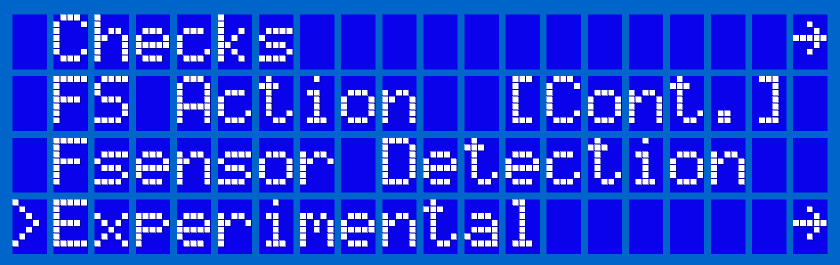
                  To activate the experimental menu, navigate to LCD menu -> Settings -> HW Setup, then scroll to any menu item and hold the knob for 2-3 seconds. After a “click” sound, the menu list will have a new option at the bottom, named 'Experimental' (left picture).

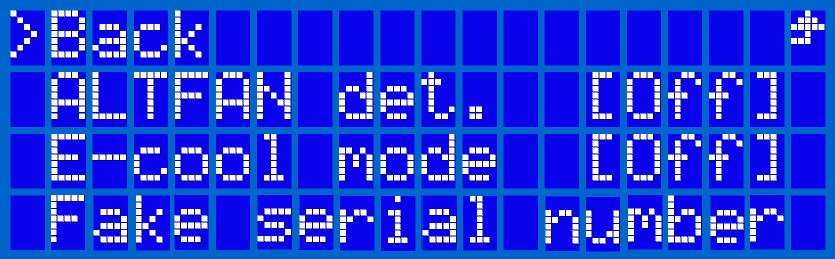
                  Within 'Experimental' you find the following options:

                  • “Altfan detection” (Altfan det.) [On/Off]
                  • E-cool mode [On/Off]
                  • Fake serial number

                  Altfan detection

                  This is an option if you are using an alternative fan to the Noctua hotend fan. The firmware is capable of adjusting the parameters of pulse-width modulation (PWM) for the hotend fan. This is a way to control electrical current, by taking the full voltage and current and turning it on and off very fast at a specific rate, instead of a steady flow of energy. Some fans will require a lower amount of power to run at optimal speed while others need a 100% flow of power.

                  For a printer with stock parts, there are no changes to the firmware parameters, and no user interaction is needed. When a printer is run for the first time after the assembly, or a full factory reset, the firmware will automatically detect the fan and set the appropriate PWM value. This value is stored permanently in the EEPROM memory and remains even after a firmware update. It can be only deleted by performing a full factory reset.

                  For modded printers not using the stock fans, the user has to intervene only if the factory reset is performed, because the printer might not be able to set a correct PWM value for a given third party fan. By turning the Altfan detection off, the printer will run the fan at 100% power.

                  Setting a specific custom PWM value is currently not possible.

                  E-cool mode

                  Our developers have discovered that using StealthChop without the “current feedback” feature of the TMC2130 stepper drivers positively affects the extruder motor's temperature. Multiple tests on our farm have shown that the temperature can be lowered by up to 10° C. This configuration is called E-cool mode and will work in both Normal and Stealth power-mode.

                  This feature was tested only for the motors provided by Prusa Research! We cannot guarantee that this current amplification can be applied to other 3rd party motors as they might get damaged due to a current spike. For this very reason, the feature is disabled for all printers and has to be manually enabled at the user's risk.

                  Fake serial number

                  From firmware version 3.11.0 a motherboard serial number check has been added. This is related to remote printing services like PrusaConnect/Link, Repetier, or Octoprint.

                  Einsy RAMBo boards that do not come from Prusa Research will not have a serial number burned in. This includes boards purchased directly from Ultimachine or 3rd party clone boards.

                  To pass a serial number check, this functionality will write a ‘fake’ serial number to the board’s EEPROM so it's not blank. Without it, you can run into a timeout issue when connecting to these services.

                  Do not use this function if you are running a genuine Prusa Einsy board! It can affect the printer’s ability to use certain remote printing services.

                  If you activate this function unintentionally, you can perform a factory reset to load the original serial number to the Einsy EEPROM again.

                  この記事は役に立ちましたか?
                  この操作は登録ユーザーのみが利用できます。ログインしてください。
                  ログイン してコメントを投稿する
                  コメントなし

                  トピックス

                  • あなたのプリンターについて
                    • プリンターの機能
                      • ハードウェアセットアップ (MK2.5/S & MK3/S/+)
                      • スチールシートプロファイル
                      • 衝突検知
                      • Filament sensor MK3 (non-S)
                      • 柔軟性のあるスチールシート(ガイドポスト)
                      • プリンタの統計情報
                      • パワーモード
                      • SDカードのデータのソート
                      • PronterfaceとUSBケーブル
                      • Prusa-固有の G-コード
                      • IR フィラメントセンサー (MK2.5S, MK3S/+, MK3.5/S))
                      • LCD brightness adjustment (MK3S)
                      • チューニングメニュー
                      • LCD screen contrast adjustment (i3)
                      • IRフィラメントセンサーの検出(MK3S)
                      • Experimental menu (MK3/S/+)
                      • Support menu (MK3/S/+)
                      • Dump memory (MK3/S/+ and MK2.5/S)
                      • クラッシュダンプ
                      • 温度管理機能のキャリブレーション
                    • プリンターの説明
                    • 一般情報