Prusa
  • ショップ
    • 最新製品
    カテゴリー別
    • 3Dプリンター新着
    • Upgrades新着
    • 材料
    • アクセサリー
    • スペアパーツ
    • コース
    • グッズ
    • Sales inquiry & Price quote
    クイックリンク
    • Shipping information
    • Refunds & returns
    • Payment options
    • 保証
    • VATと関税
    • よくある質問

    0 点の商品がカートに入っています点の商品がカートに入っています

    カートは空です

    カートを見る3Dプリンターを購入

    マイプロフィール

    ログイン すると注文や保存した商品を確認できます

    マイプロフィール

    ログイン中:

    • 注文
    • ログアウト
  • 3Dプリント
    • 3Dプリントを探る
    初心者向け
    • 3Dプリントの基礎
    • Types of printers (FDM/SLA)
    • How to choose a 3D Printer
    • Printables (3D models)
    用途別
    • ラピッドプロトタイピング
    • 製造
    • エンジニアリング
    • 研究
    • アートとデザイン
    さらに深く
    • 材料ガイド
    • コース
    • ウェビナー
    • 導入事例
    • カスタム3Dプリンティング
  • 3Dプリンター
    • すべての3Dプリンター
    用途
    • 自宅またはガレージ愛好家、改造愛好家、ホームプリンティング
    • Shop or studio小規模チーム向けの社内生産
    • エンタープライズフリート、セキュリティ、大規模生産
    • How to choose a 3D Printer
    ショップと閲覧
    • CORE One+新着
    • CORE One+ INDX新着
    • CORE One L+新着
    • CORE One L+ INDX新着
    • XL+新着
    • MK4S
    • Prusa Pro HT90
    • Prusa Pro AFS
    • Prusa Pro SLX
    プリンターからさらに
    • Upgrades新着
    • Spare parts
    • 重要インフラ
    • 導入事例
    • シグネチャーオーク
    • キット
  • 材料
    • すべての材料
    用途別
    • 日常とデザイン
    • 機能工学
    • 複合材料
    • プロフェッショナル向け特殊材料
    • SLAレジン
    Prusament
    • PLA
    • PETG
    • ASA
    • PC
    • PA11
    • Flex
    • TPU
    材料からさらに
    • 材料ガイド
    • 自社製材料
    • サステナビリティ
    • ストアで注文
  • ソフトウェア
    • すべてのソフトウェア
    印刷の準備
    • PrusaSlicer 3.0新着
    印刷と監視
    • Prusa Connect
    • EasyPrint
    • iOS & Androidアプリ
    • Prusaファーム
    始める
    • ダウンロードとインストール
    • ナレッジベース
    その他のソフトウェア
    • Printables (3D models)
  • サポート
    • サポートを探す
    回答を探す
    • ナレッジベース
    • トラブルシューティング
    • コース
    • ウェビナー
    ヘルプ
    • お問い合わせ
    • ライブチャット
    • Shipping information
    • 保証
    • Refunds & returns
    • Spare parts
    • Factory repair
    コミュニティ
    • フォーラム
    • Reddit
    • Printables
  • トラストセンター
    • トラストセンター概要
    トピック別
    • GDPR
    • 証明書
    • セキュリティ
    • コンプライアンス
    コミットメント
    • サステナビリティレポート
    お問い合わせ
    • セキュリティチームに連絡
  • 会社
    • Prusaについて
    私たちについて
    • 私たちのストーリー
    • プリンターの製造方法
    • オープンソース
    • ブランド&メディアキット
    ニュース
    • ブログ
    • ニュースルーム
    • イベント
    信頼とパートナー
    • サステナビリティ
    • 再販業者と販売代理店
    • アフィリエイトプログラム
    • お問い合わせ
    • English
    • Čeština
    • Deutsch
    • Español
    • Français
    • Italiano
    • Polski
    • 日本語
  • ログイン中:

    • 注文
    • 住所
    • 在庫アラート
    • マイコース
    • サブスクリプション
    • アカウントを編集
    • ログアウト

ログイン すると注文や保存した商品を確認できます

ログイン中:
  • 注文
  • 住所
  • 在庫アラート
  • マイコース
  • サブスクリプション
  • アカウントを編集
  • English
  • Čeština
  • Deutsch
  • Español
  • Français
  • Italiano
  • Polski
  • 日本語
ショップ

0 点の商品がカートに入っています点の商品がカートに入っています

カートは空です

カートを見る3Dプリンターを購入

マイプロフィール

ログイン すると注文や保存した商品を確認できます

マイプロフィール

ログイン中:

  • 注文
  • ログアウト
ショップ
  • 最新製品
カテゴリー別
  • 3Dプリンター新着
  • Upgrades新着
  • 材料
  • アクセサリー
  • スペアパーツ
  • コース
  • グッズ
  • Sales inquiry & Price quote
クイックリンク
  • Shipping information
  • Refunds & returns
  • Payment options
  • 保証
  • VATと関税
  • よくある質問

おすすめ製品

    人気のカテゴリー

      急上昇ワード

        記事

          ブログ

            製品

              カテゴリー

                検索候補

                  検索中…
                  結果がありません
                  エラーが発生しました。
                  ↑↓ 選択↵ 開くEsc 検索を閉じる
                  1. サポート
                  2. Prusa Pro HT90
                  3. 材料ガイド
                  4. How to print with PEI 1010
                   

                  内容

                  • Necessary hardware
                  • Step-by-step successful printing process
                  • Choosing the right model
                  • Most common errors

                  ブログ

                  • Prusament PLA ColorMix:わずか5巻のフィラメントで45色以上をプリント
                  • PrusaSlicer 3.0プレビュー版 — 3Dプリントの未来を見据えた仕様
                  • より高品質なプリントを、もっと簡単に:Prusa XL+、CORE One L+、CORE One+(Gen 2)― 大規模製品アップグレード

                  ニュースレター

                  ご登録いただくと、毎月 新しいファームウェア、PrusaSlicerの新バージョン、3Dプリントプロジェクトの一般的なヒントなど、役立つ情報をお届けします。

                  クリックして、ニュースレターを受け取る。

                  このサイトはreCAPTCHA Enterpriseによって保護されており、Googleのプライバシーポリシーと利用規約が適用されます。

                  Heavy Duty Keyboard Holder (No Supports)
                  E-shop
                  • 3Dプリンター
                  • プリンターのアップグレード
                  • フィラメント
                  • アクセサリー
                  • Prusa 商品
                  Prusa

                  © Prusa Research a.s.

                  Printables
                  • 3Dモデル
                  • Store
                  • Clubs
                  • 3Dデザインコンテスト
                  • Brands
                  コミュニティ
                  • ワールドマップ
                  • フォーラム
                  • ユーザーグループ
                  • イベント
                  ヘルプ
                  • Prusa ヘルプ
                  • Prusa アカデミー
                  • 3Dプリンティング計算機
                  ソフトウェア
                  • PrusaSlicer
                  • Prusa.app
                  • Prusa Connect
                  • ドライバーとソフトウェア
                  会社概要
                  • 私たちについて
                  • Blog
                  • プルサ正規販売代理店
                  • お問い合わせ
                  • ISO 9001・ISO 14001・ISO 45001 認証取得済み
                  • 一般利用規約
                  • PRUSAウェブサイト利用のための一般利用規約
                  • プライバシーポリシー
                  • クッキーに関する情報
                  • お客様の苦情対応に関する方針
                  • Webサイトのステータスページ
                  • Cookie 設定
                  Prusa
                  • 一般利用規約
                  • PRUSAウェブサイト利用のための一般利用規約
                  • プライバシーポリシー
                  • クッキーに関する情報
                  • お客様の苦情対応に関する方針
                  • Webサイトのステータスページ
                  • Cookie 設定

                  © Prusa Research a.s.

                  JOSEF PRUSA®、PRUSA RESEARCH®、PRUSA POLYMERS®、PRUSA ORANGE®、PRUSA 3D ® および PRUSAMENT® は、Prusa Development a.s. の登録商標であり、Prusa Research a.s. が Prusa Development a.s. からのライセンスに基づき使用しています。

                  How to print with PEI 1010

                  関連するもの

                  HT90
                  記事 他の言語でもご覧になれます。
                  English
                  Čeština
                  Polski
                  Deutsch
                  Français
                  Español
                  Italiano
                  日本語

                  You’ve probably guessed it already but the PEI 1010 isn’t exactly a “plug and print” material like our basic Prusaments (PLA, PETG…). Although we do our best to make our filaments as easy to print as possible, there are still certain physical limitations.

                  Necessary hardware

                  The melting point of this material is very high and so is the printing temperature, so you need an enclosed and actively heated 3D printer like the Prusa Pro HT90.

                  The moisture absorption is extremely fast and difficult to undo - you’ll need a professional dryer (oven) and a suitable dry box, or a dryer that can be connected directly to a printer. The spool placed outside without a dry box absorbs moisture in dozens of minutes. In a passive dry box (with silica gel only) the difference is noticeable after half a day or so and after several days the filament gets practically unprintable.

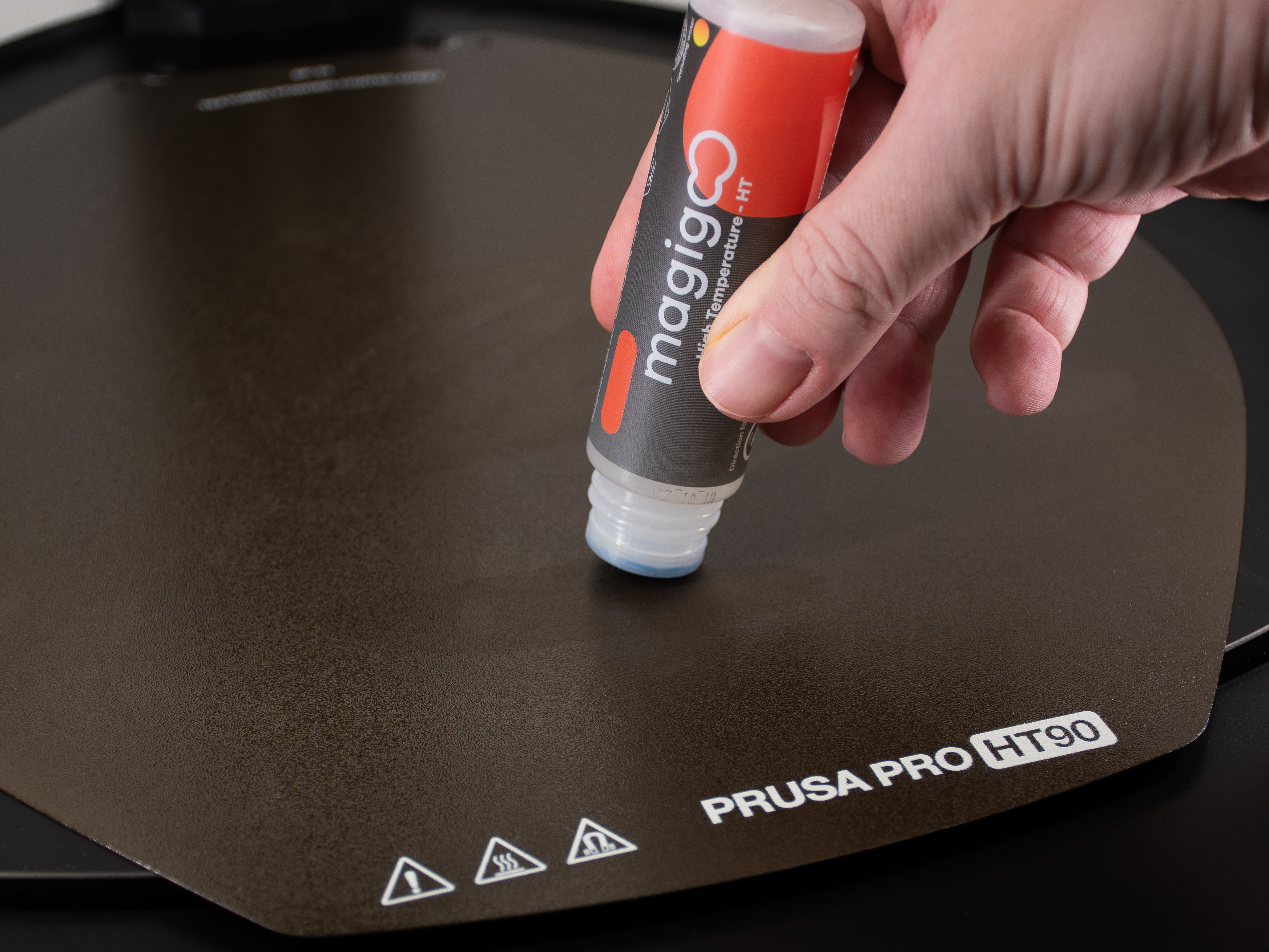
                  Finally, the print surface adhesion is also very high - here you’ll need a special separation layer like the MagiGoo HT. To ensure good printability we designed and chose the following hardware that should work perfectly but you may use other equipment with similar properties too:

                  • Prusa Pro HT90 with HT hot end - Printer capable of working at 410 °C for the nozzle, 150 °C for the heatbed, and at least 90 °C for the enclosure
                  • Memmert UF30 Filament Dryer capable of holding stable temperature 150 °C for 6-8 hours
                  • Prusa Pro Filament Drybox capable of being connected to the 3D printer while printing
                  • HT90 Textured Powder-coated Steel Sheet or HT90 PA Nylon Powder-coated Steel Sheet
                  • MagiGoo HT - specialized high-temperature resistant separation layer applied on the print surface before printing (necessary for textured sheet only)

                  Step-by-step successful printing process

                  Now, here’s a process you should do to print with Prusament PEI 1010 successfully:

                  1. Preheat the dryer (oven) to 150 °C and insert PEI 1010 spool. Dry the filament at 150 °C for 6-8 hours.
                  2. Prepare the dry box: the desiccant inside should not be depleted (see the desiccant color). If it’s depleted, replace it with fresh desiccant.
                  3. After drying the filament, move it immediately to the dry box. This is crucial, as the PEI may absorb moisture after dozens of minutes!
                  4. Prepare the HT90 printer. The printer should have an HT print head mounted - replace the printhead if the high-flow is mounted. Check the print sheet - PEI 1010 should be printed on the Textured powder-coated print sheet and PA Nylon print sheet only.
                  5. If you print in the Textured powder-coated print sheet, spread a thin even layer of the MagiGoo HT on the print surface. It is not necessary to apply the MagiGoo on the PA Nylon print sheet.
                  6. Preheat the HT90 (Nozzle: 410 °C, Heatbed: 150 °C, Chamber: 90 °C) and load the filament. Note that the filament should remain closed in the dry box. It should only be connected to the printer through the PTFE tube.
                  7. Slice the model with the original PrusaSlicer profile. Other profiles may not work properly.
                  8. Print it!

                  Only a thin layer of MagiGoo HT is necessary

                  If everything is done correctly, the print should have a nice glossy transparent amber look with no stringing and oozing.
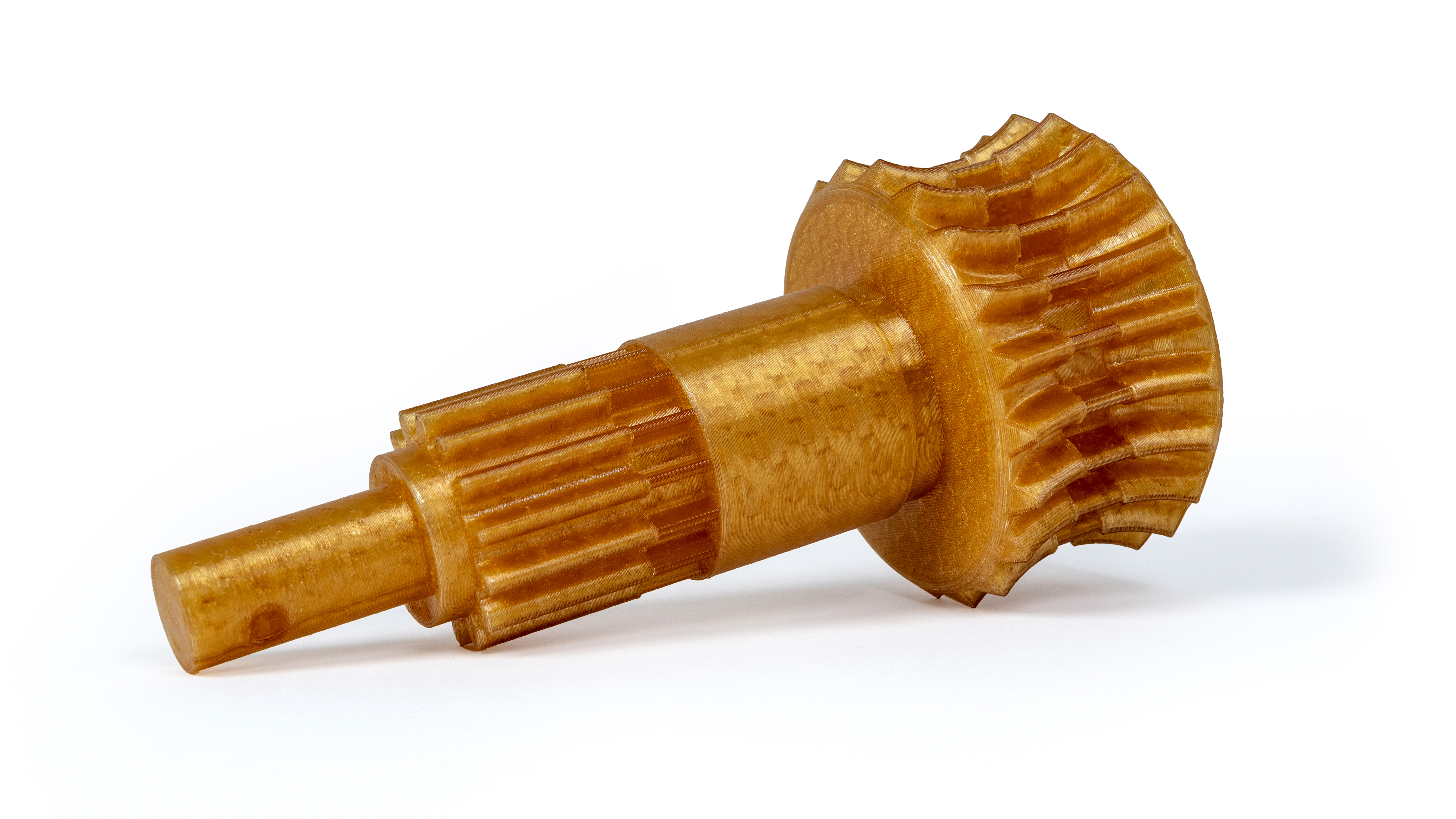
                  Example of a nice PEI 3D-printed part with no obvious errors.

                  Choosing the right model

                  Finally, you should know that the Prusament PEI 1010 tends to warp a lot during printing. This does not mean that you should print only the tiniest parts possible but it’s something you might want to consider when designing and slicing the models. We did our best to make the filament as easy to print as possible but still, working with such filaments requires some experience and knowledge. As for the latter, here are a few tips to make the best of it:

                  • Consider the printed object size. The warping is most significant in the largest prints. This means that printing an object that has full-bed dimensions may not be the best choice. We recommend printing small to medium-sized parts for the best results.
                  • Print bases with narrow angles, such as square shapes (or narrower ones) tend to warp much more than round ones. The best model is the one that has a flat circular base placed on the print surface. Don’t forget to consider it when designing and slicing a model.
                  • No matter the size, we always recommend printing the PEI 1010 with a brim. This significantly reduces the warping issue.

                  Most common errors

                  Finally, let's show some of the most common errors visible on the following 3D printed part:
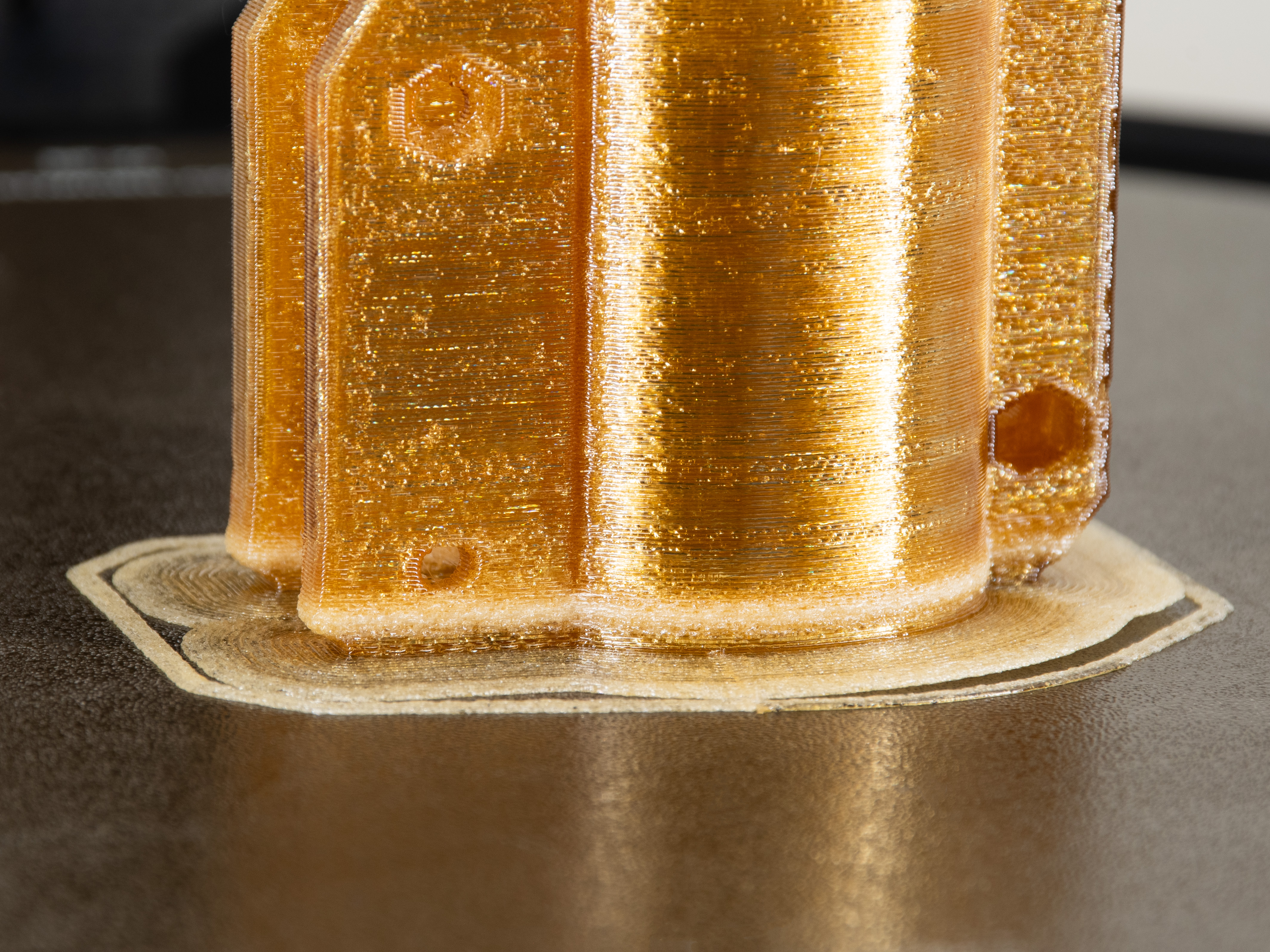
                  1. The filament is not dry - this is mostly noticeable at the bottom part, where the extruded material has a "foamy" structure, the model loses its desired dimensional properties and mechanical resistance too.
                  2. This model was printed with other than the recommended PrusaSlicer profile. This is why the model is full of cavities (bubbles) noticeable in every layer, which significantly affect the model's mechanical properties.
                  3. This model was also full of strings (not visible in the photo above) due to the errors mentioned above.
                  4. Notice the warping: the model peeled off the print sheet even with the brim. This was caused by three reasons. First, the model is not exactly round and compact. The shape is not ideal but a larger brim might help. Second, the wet filament tends to warp more and stick less to the print surface than the dry one. Finally, we applied too much MagiGoo HT on the surface.

                  この記事は役に立ちましたか?
                  この操作は登録ユーザーのみが利用できます。ログインしてください。
                  ログイン してコメントを投稿する
                  コメントなし

                  トピックス

                  • このプリンターを使用
                    • 材料ガイド
                      • フィラメントの除湿
                      • PEI (Ultem)
                      • PEEK-CF (Polyetheretherketone)
                      • PEKK-CF (Polyetherketoneketone)
                      • PPS (Polyphenylene sulfide)
                      • PSU (Polysulfone)
                      • PPSU (Polyphenylsulfone)
                      • How to print with PEI 1010
                    • 3Dモデル
                    • スライス処理
                    • プリンターメンテナンス
                    • Prusa Connect [進行中の翻訳]