Prusa
  • SHOP
    • Latest products
    BY CATEGORY
    • 3D printersnew
    • 3D printer upgradesnew
    • Materials
    • Accessories
    • Spare parts
    • Courses
    • Merch
    • Get a price quote
    QUICK LINKS
    • Shipping & delivery
    • Returns & refunds
    • Payment & financing
    • Warranty
    • VAT & Customs fees
    • FAQ

    0 item in your cartitems in your cart

    Your cart is empty

    Go to cartShop 3D printers

    My profile

    Log in to see orders, saved items

    My profile

    Signed in as

    • Orders
    • Logout
  • 3D PRINTING
    • Explore 3D printing
    FOR BEGINNERS
    • 3D printing 101
    • How FDM printing works
    • Buying your first printer
    • 3D model catalog
    BY APPLICATION
    • Rapid prototyping
    • Manufacturing
    • Engineering
    • Research
    • Arts & design
    GO DEEPER
    • Materials guide
    • Courses
    • Webinars
    • Case studies
    • Custom 3D printing
  • 3D PRINTERS
    • All 3D printers
    FOR
    • Home or garageHobbyists, tinkerers and home printing
    • BusinessIn-house production for small teams
    • EnterpriseFleets, security and scale
    • Which Prusa is right for me
    SHOP & BROWSE
    • CORE One+new
    • CORE One+ INDXnew
    • CORE One L+new
    • CORE One L+ INDXnew
    • XL+new
    • MK4S
    • Prusa Pro HT90
    • Prusa Pro AFS
    • Prusa Pro SLX
    MORE FROM PRINTERS
    • Parts & upgradesnew
    • Critical infrastructure
    • Case studies
    • Signature Oak
    • Kits
  • MATERIALS
    • All materials
    BY USE
    • Every-day & design
    • Functional engineering
    • Composites
    • Pro speciality
    • SLA resins
    PRUSAMENT
    • PLA
    • PETG
    • ASA
    • PC
    • PA11
    • Flex
    • TPU
    MORE FROM MATERIALS
    • Materials guide
    • We make material in house
    • Sustainability
    • Order on the store
  • SOFTWARE
    • All software
    PREPARE THE PRINT
    • PrusaSlicer 3.0New
    PRINT & MONITOR
    • Prusa Connect
    • EasyPrint
    • iOS & Android app
    • Prusa Farm
    GET STARTED
    • Download & install
    • Knowledge base
    MORE FROM SOFTWARE
    • 3D model catalog
  • SUPPORT
    • Explore support
    FIND ANSWERS
    • Knowledge base
    • Troubleshooting
    • Courses
    • Webinars
    GET HELP
    • Contact us
    • Livechat
    • Shipping & delivery
    • Warranty
    • Returns & refunds
    • Service & spare parts
    • Service & Repair
    COMMUNITY
    • Forum
    • Reddit
    • Printables
  • TRUST CENTER
    • Trust Center overview
    BY TOPIC
    • GDPR
    • Certificates
    • Security
    • Compliance
    COMMITMENTS
    • Sustainability report
    TALK TO US
    • Contact the security team
  • COMPANY
    • About Prusa
    GET TO KNOW US
    • Our story
    • How we make printers
    • Open source
    • Brand & media kit
    NEWS
    • Blog
    • Newsroom
    • Events
    TRUST & PARTNERS
    • Sustainability
    • Resellers & distributors
    • Affiliate program
    • Contact
    • English
    • Čeština
    • Deutsch
    • Español
    • Français
    • Italiano
    • Polski
    • 日本語
  • Signed in as

    • Orders
    • Address
    • In-stock Alerts
    • My Courses
    • Subscription
    • Edit Account
    • Logout

Log in to see orders, saved items

Signed in as
  • Orders
  • Address
  • In-stock Alerts
  • My Courses
  • Subscription
  • Edit Account
  • English
  • Čeština
  • Deutsch
  • Español
  • Français
  • Italiano
  • Polski
  • 日本語
Shop

0 item in your cartitems in your cart

Your cart is empty

Go to cartShop 3D printers

My profile

Log in to see orders, saved items

My profile

Signed in as

  • Orders
  • Logout
SHOP
  • Latest products
BY CATEGORY
  • 3D printersnew
  • 3D printer upgradesnew
  • Materials
  • Accessories
  • Spare parts
  • Courses
  • Merch
  • Get a price quote
QUICK LINKS
  • Shipping & delivery
  • Returns & refunds
  • Payment & financing
  • Warranty
  • VAT & Customs fees
  • FAQ

Featured products

    Popular categories

      Trending searches

        Articles

          Blog

            Products

              Categories

                Suggested searches

                  Searching…
                  No results
                  Something went wrong.
                  ↑↓ Select↵ OpenEsc Close search
                  1. Support
                  2. Original Prusa MK3.9S
                  3. Print Quality Troubleshooting
                  4. The Benchy hull line
                   

                  Contents

                  • A hardware problem?
                  • The culprit
                  • Why can’t the slicer automatically detect and correct for this?
                  • How did we modify the G-code to eliminate it?

                  Blog

                  • Print colorful and glowing Halloween decorations with our spooky offer
                  • Factorio Has Arrived on Printables
                  • Prusament PLA Lightweight: 65% lighter than regular PLA. Perfect choice for aircraft, cosplay, and more.

                  Newsletter

                  Signup and get our monthly squeeze on updates, blog, printables and much more.

                  By clicking, you agree to receive our newsletter.

                  This site is protected by reCAPTCHA Enterprise and the Google Privacy Policy and Terms of Service apply.

                  Factorio Transport Belts
                  E-shop
                  • 3D Printers
                  • Printer Upgrades
                  • Filaments
                  • Accessories
                  • Prusa Merchandise

                  © Prusa Research a.s.

                  Printables
                  • 3D Models
                  • Store
                  • Clubs
                  • 3D Design Contests
                  • Brands
                  Community
                  • World Map
                  • Forum
                  • User Groups
                  • Events
                  Help
                  • Prusa Help
                  • Prusa Academy
                  • 3D Printing Calculators
                  Software
                  • PrusaSlicer
                  • Prusa.app
                  • Prusa Connect
                  • Drivers and Software
                  Company
                  • About Us
                  • Blog
                  • Official Prusa Resellers
                  • Contact Us
                  • Certified for ISO 9001, ISO 14001, ISO 45001
                  • General Terms and Conditions
                  • General Terms and Conditions of Use of the PRUSA Websites
                  • Privacy Policy
                  • Information about cookies
                  • Customer Complaints Policy
                  • Status Page
                  • Do Not Sell or Share My Personal Information
                  • Supplemental Statements
                  • General Terms and Conditions
                  • General Terms and Conditions of Use of the PRUSA Websites
                  • Privacy Policy
                  • Information about cookies
                  • Customer Complaints Policy
                  • Status Page
                  • Do Not Sell or Share My Personal Information
                  • Supplemental Statements

                  © Prusa Research a.s.

                  JOSEF PRUSA®, PRUSA RESEARCH®, PRUSA POLYMERS®, PRUSA ORANGE®, PRUSA 3D ® AND PRUSAMENT® are registered trademarks of Prusa Development a.s. used by Prusa Research a.s. under licence from Prusa Development a.s.

                  The Benchy hull line

                  Relevant for

                  CORE One family
                  MK4 family
                  MMU family
                  PRO family
                  MINI family
                  +
                  20 comments
                  Article is also available in following languages
                  English
                  Čeština
                  Polski
                  Deutsch
                  Français
                  Español
                  Italiano
                  日本語

                  The 3DBenchy is a 3D model designed by CreativeTools specifically for testing and benchmarking 3D printers. And everyone wants to know, how to print a perfect Benchy. Ever since it’s release, one specific problem seems to be present, in varying degrees of severity, in all of its prints - the infamous Benchy hull line.
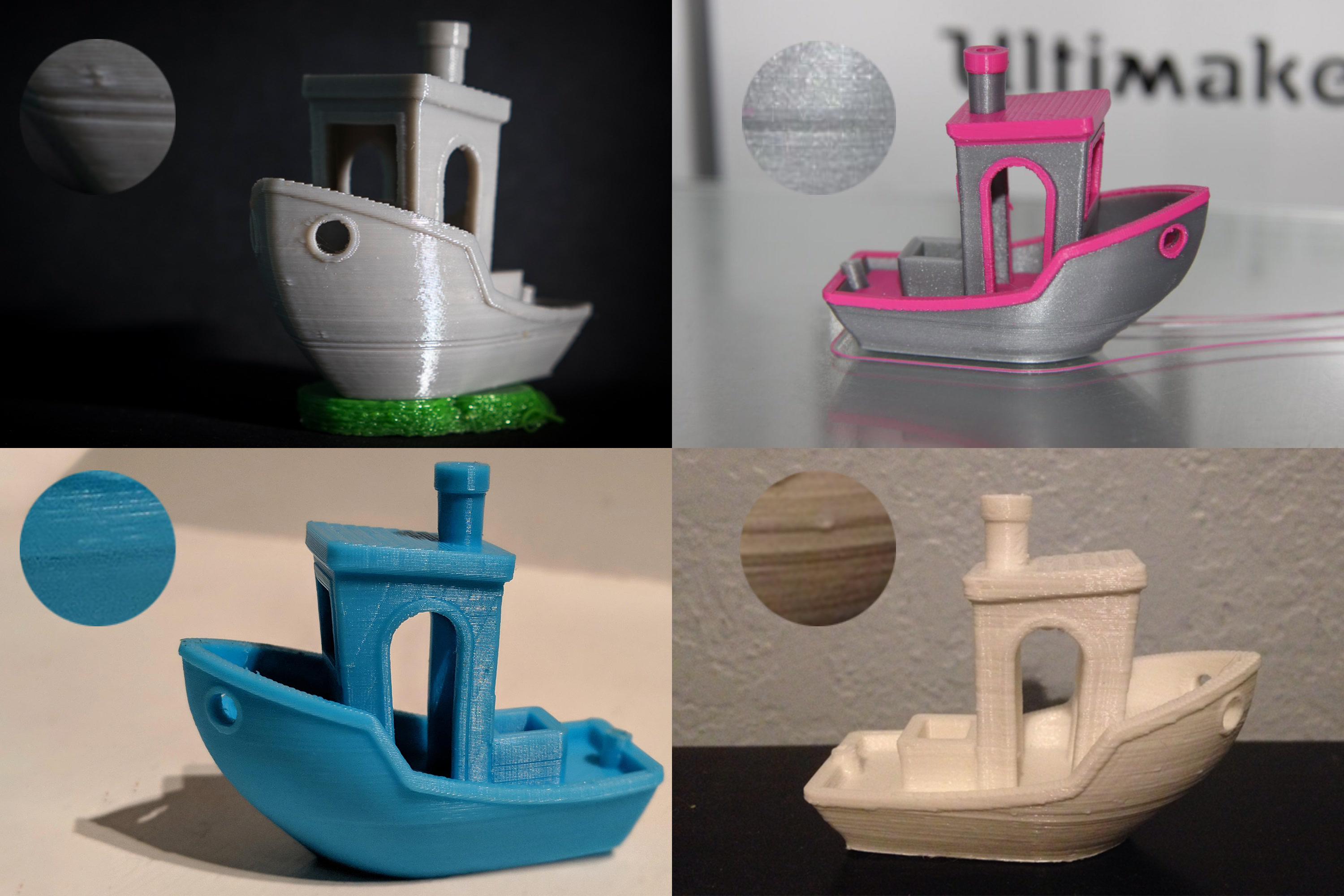

                  It’s visible on prints from all FFF printers on the market, cheap or expensive. It’s visible no matter the slicing software. It’s visible when printing from any material. It’s visible even in the Benchy release video from 2015. Again, in varying degrees of severity - with some combinations of printer, slicer, and material, it can be almost invisible. Other times, it’s clearly defined, leaving the user disappointed and confused. But once you see it, you’ll be able to find it on essentially all of its prints.

                  The good news is that we managed to mostly eliminate the Benchy hull line in our sample G-codes (not in 100% cases though, more on that later). You can download the G-code here.

                  The bad news is that the fix isn’t universal.And we’re not even sure if such universal fix is physically possible to exist.
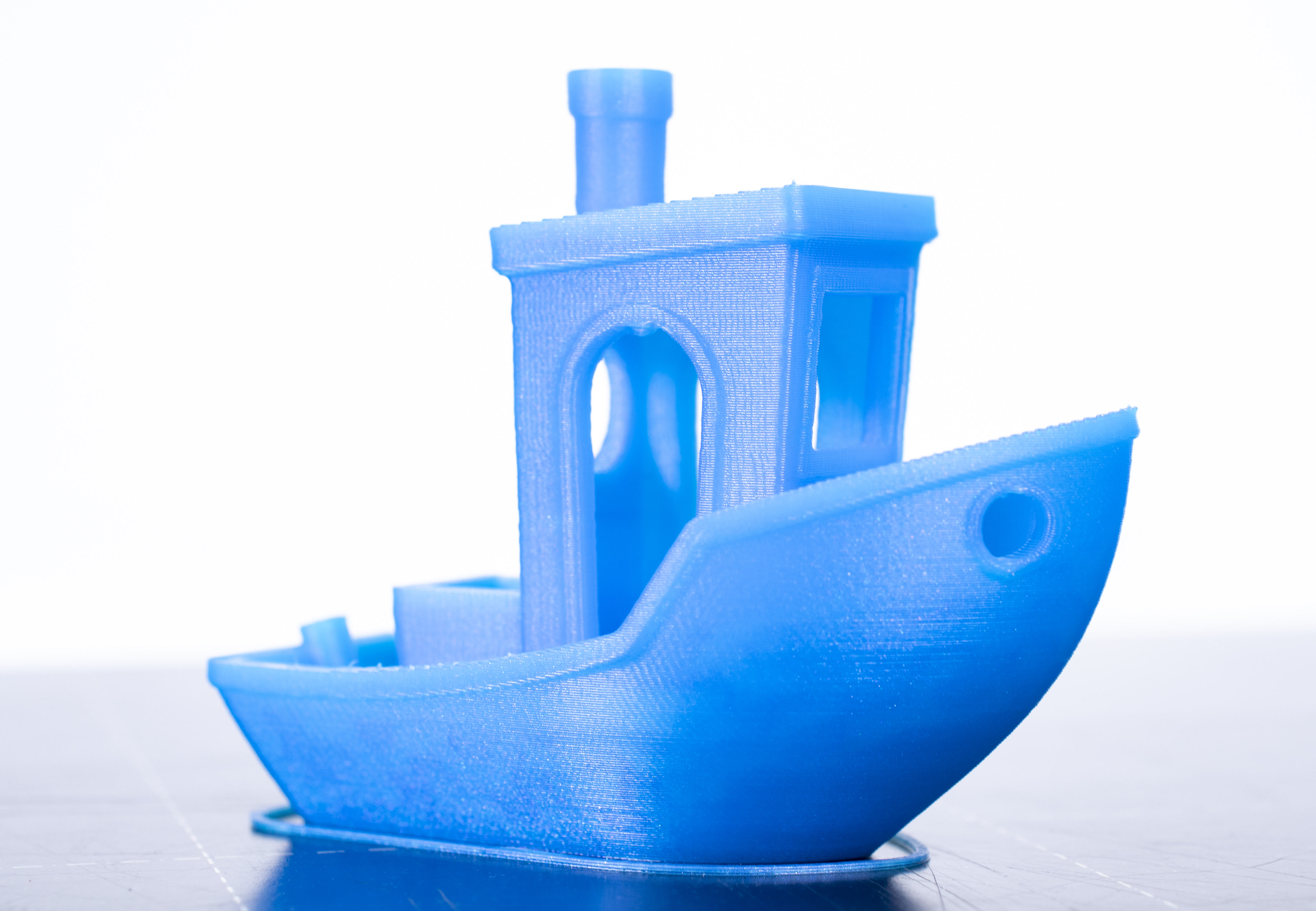
                  New Benchy sample G-code printed on the MK3S

                  A hardware problem?

                  When you search for the problem online, you’ll often get an (incorrect) suggestion, that it might be a hardware problem. To give you an example, here are some of the suggestions we found online:

                  • loose belts
                  • bent Z-axis rods
                  • irregularity in your z-axis lead screw at that height
                  If the problem is one thicker line or two thin lines at height of the Benchy’s deck, it’s most likely not a hardware problem with your printer. On the other hand, if you get uneven layers from top to bottom, it is most likely a hardware problem (which we’ll not discuss here).

                  The culprit

                  We believe that the main culprit is the sudden transition from sparse infill into full top layers around the 8 mm height (may vary a bit depending on your layer height and number of top layers). 

                  At this point, there is an abrupt difference in the time a layer takes to print.

                  And a few layers later, another sudden change happens. When the deck is finished it’s no longer an almost solid layer, but just a few perimeters again.

                  Here are the factors that influence the severity of the Benchy hull line

                  • Filament material thermal expansion coefficient
                  • Print cooling
                  • Print environment
                  • Other filament properties - dryness, composition

                  A seemingly similar, yet partly different problem is when printing boxes. They also tend to have a line at the height where the bottom solid layers transition into walls. This has more to do with thin walls, extrusion width, and the material has nowhere to go, but outside. Our slicer team knows about this problem and it's something that will likely improve in the future.

                  Why can’t the slicer automatically detect and correct for this?

                  It’s physics. Plastics, if extruded first from pellets into a filament, and then from filament into a very thin rectangular extrusion, will behave neither as a liquid nor as a solid. The stretching of the plastic will align the long molecular chains of the polymer, introducing internal stresses to the extrusion. This internal stress will pull the extrusion together if not cooled quickly enough. For example, on the MK2 the 3D Benchy has the line more pronounced on the side away from the cooling fan. 

                  It depends on the environment too. Indeed, as many of you found out, in a cool basement the effects are more pronounced. The same G-code printed on the same printer with the same filament can have a Benchy hull line in one room and not in the other. It’s very difficult to automatically compensate for that.

                  And to compensate for the internal stresses and cooling effects of the filament. One of the reasons being the viscoelastic behavior of the molten plastics, and the dependence of the plastic behavior on its composition, temperature, hydrolysis of the polymer molecular chains. If the filament is not 100% dry (polyesters - PLA & PET are sensitive to hydrolysis, hydrolyzed filament contains shorter polymer chains, thus being less viscous), the effectivity of the cooling, reflections of the cooling air from the already printed objects, etc.

                  How did we modify the G-code to eliminate it?

                  Something that helps, is to make a modifier mesh in the shape of the deck. When aligned at the problematic spot, it can be used to split the hull and the deck. They are then printed separately, plus the infill doesn’t fill the entire area all the way to the hull perimeters.
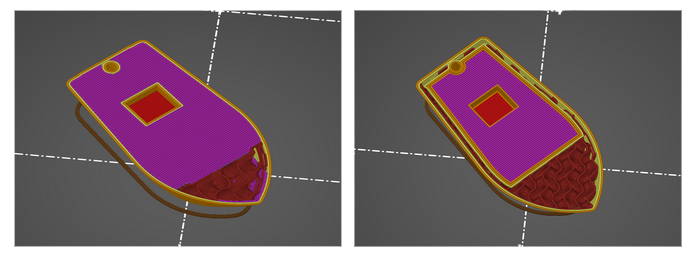
                  Then there’s the order of elements inside a layer. For some reason, we got better results when always printing the deck perimeters first, then infill of the deck and then the rest of the layer. We manually edited this order using a text editor.

                  We’re not sure if it ended up helping, but we also manually edited the G-code in order to slightly lower the flow of solid infill, except for the very top layer (of the deck).

                  Another thing is to print the perimeters as continuously as possible. Rather than printing perimeters, then infill and then transitioning to the next layer it’s better to print two (or more) layers of perimeters one right after another. The printer then can go back and print the infill, again two layers at a time.

                  We most likely haven’t discovered all factors and in precisely what ratios they influence the severity of the Benchy hull line. Still, we wanted to share our findings. If you make your own research and tests, let us know of your findings.

                  Was this article helpful?
                  This action is available only to registered users. Please log-in.

                  Topics

                  • Troubleshooting
                    • Print Quality Troubleshooting
                      • Ghosting
                      • Poor bridging
                      • Bad looking surface above supports
                      • Stringing and oozing
                      • Layer separation and splitting FDM
                      • Failing supports
                      • Problems with infill
                      • Under-extrusion
                      • Warping
                      • Layer shifting
                      • Watertight prints
                      • The Benchy hull line
                    • Diagnostics
                    • QR Error codes
                    • Printer troubleshooting
                    • Print Error Messages

                  16 comments

                  Log in  to post a comment
                  Voltage4life
                  •
                  I've fixed this on different models part in the design and part in the slicing. Design wise i will take sharp corners and chamfer them so that the transition becomes gradual. I also change the infill at layer height. I use gyroid or hilbert since it pulls less and then switch to grid higher up with varying density to see if it shrinks more to match up. It improves it significantly but not completely
                  Reply
                  perry cnn
                  •
                  this happens whenever you go from sparse to 'shell' like objects at the layer line. if you print a simple flower pot you can see the issue more defined


                  enclosed units compensate a bit for this but doesnt negate the issue. adjust travel speeds and flow rate accordingly and it smooths out. also changing order of wall prints can help depending on the model's geometry. for example bambu studio defaults to inner/outer. forcing outer/inner will let the outer perimeter cool down better and keep its accuracy
                  Reply
                  Michael
                  •
                  It seems that there are two layers with the same geometry on top of each other. Maybe the slicer has a bug in which a flat top does not change the edge geometry.
                  Reply
                  Fanchito
                  •
                  Je pense que s'il était possible de modifier le débit de remplissage plein indépendament du débit général nous pourrions palier ce problème, c'est possible avec Cura slicer et c'est fonctionel, peut être s'en inspirer serait bénéfique.
                  Reply
                  Felipe
                  •
                  Hello, I came to the same conclusion last year and I went from really (really!) severe hull printing problems to a fairly unnoticeable tiny line, just by setting the fan to 100% all the way. On TPU the line is easier to spot (down here: https://www.printables.com/fr/model/3161-3d-benchy/comments/604544), I may try increasing the infill, as I read here, makes a lot of sense. Happy printing!
                  Reply