Prusa
  • SHOP
    • Latest products
    BY CATEGORY
    • 3D printersnew
    • 3D printer upgradesnew
    • Materials
    • Accessories
    • Spare parts
    • Courses
    • Merch
    • Get a price quote
    QUICK LINKS
    • Shipping & delivery
    • Returns & refunds
    • Payment & financing
    • Warranty
    • VAT & Customs fees
    • FAQ

    0 item in your cartitems in your cart

    Your cart is empty

    Go to cartShop 3D printers

    My profile

    Log in to see orders, saved items

    My profile

    Signed in as

    • Orders
    • Logout
  • 3D PRINTING
    • Explore 3D printing
    FOR BEGINNERS
    • 3D printing 101
    • How FDM printing works
    • Buying your first printer
    • 3D model catalog
    BY APPLICATION
    • Rapid prototyping
    • Manufacturing
    • Engineering
    • Research
    • Arts & design
    GO DEEPER
    • Materials guide
    • Courses
    • Webinars
    • Case studies
    • Custom 3D printing
  • 3D PRINTERS
    • All 3D printers
    FOR
    • Home or garageHobbyists, tinkerers and home printing
    • BusinessIn-house production for small teams
    • EnterpriseFleets, security and scale
    • Which Prusa is right for me
    SHOP & BROWSE
    • CORE One+new
    • CORE One+ INDXnew
    • CORE One L+new
    • CORE One L+ INDXnew
    • XL+new
    • MK4S
    • Prusa Pro HT90
    • Prusa Pro AFS
    • Prusa Pro SLX
    MORE FROM PRINTERS
    • Parts & upgradesnew
    • Critical infrastructure
    • Case studies
    • Signature Oak
    • Kits
  • MATERIALS
    • All materials
    BY USE
    • Every-day & design
    • Functional engineering
    • Composites
    • Pro speciality
    • SLA resins
    PRUSAMENT
    • PLA
    • PETG
    • ASA
    • PC
    • PA11
    • Flex
    • TPU
    MORE FROM MATERIALS
    • Materials guide
    • We make material in house
    • Sustainability
    • Order on the store
  • SOFTWARE
    • All software
    PREPARE THE PRINT
    • PrusaSlicer 3.0New
    PRINT & MONITOR
    • Prusa Connect
    • EasyPrint
    • iOS & Android app
    • Prusa Farm
    GET STARTED
    • Download & install
    • Knowledge base
    MORE FROM SOFTWARE
    • 3D model catalog
  • SUPPORT
    • Explore support
    FIND ANSWERS
    • Knowledge base
    • Troubleshooting
    • Courses
    • Webinars
    GET HELP
    • Contact us
    • Livechat
    • Shipping & delivery
    • Warranty
    • Returns & refunds
    • Service & spare parts
    • Service & Repair
    COMMUNITY
    • Forum
    • Reddit
    • Printables
  • TRUST CENTER
    • Trust Center overview
    BY TOPIC
    • GDPR
    • Certificates
    • Security
    • Compliance
    COMMITMENTS
    • Sustainability report
    TALK TO US
    • Contact the security team
  • COMPANY
    • About Prusa
    GET TO KNOW US
    • Our story
    • How we make printers
    • Open source
    • Brand & media kit
    NEWS
    • Blog
    • Newsroom
    • Events
    TRUST & PARTNERS
    • Sustainability
    • Resellers & distributors
    • Affiliate program
    • Contact
    • English
    • Čeština
    • Deutsch
    • Español
    • Français
    • Italiano
    • Polski
    • 日本語
  • Signed in as

    • Orders
    • Address
    • In-stock Alerts
    • My Courses
    • Subscription
    • Edit Account
    • Logout

Log in to see orders, saved items

Signed in as
  • Orders
  • Address
  • In-stock Alerts
  • My Courses
  • Subscription
  • Edit Account
  • English
  • Čeština
  • Deutsch
  • Español
  • Français
  • Italiano
  • Polski
  • 日本語
Shop

0 item in your cartitems in your cart

Your cart is empty

Go to cartShop 3D printers

My profile

Log in to see orders, saved items

My profile

Signed in as

  • Orders
  • Logout
SHOP
  • Latest products
BY CATEGORY
  • 3D printersnew
  • 3D printer upgradesnew
  • Materials
  • Accessories
  • Spare parts
  • Courses
  • Merch
  • Get a price quote
QUICK LINKS
  • Shipping & delivery
  • Returns & refunds
  • Payment & financing
  • Warranty
  • VAT & Customs fees
  • FAQ

Featured products

    Popular categories

      Trending searches

        Articles

          Blog

            Products

              Categories

                Suggested searches

                  Searching…
                  No results
                  Something went wrong.
                  ↑↓ Select↵ OpenEsc Close search
                  1. Support
                  2. Original Prusa MK3.9S
                  3. Print Quality Troubleshooting
                  4. Poor bridging
                   

                  Contents

                  • How to fix it

                  Blog

                  • Print colorful and glowing Halloween decorations with our spooky offer
                  • Factorio Has Arrived on Printables
                  • Prusament PLA Lightweight: 65% lighter than regular PLA. Perfect choice for aircraft, cosplay, and more.

                  Newsletter

                  Signup and get our monthly squeeze on updates, blog, printables and much more.

                  By clicking, you agree to receive our newsletter.

                  This site is protected by reCAPTCHA Enterprise and the Google Privacy Policy and Terms of Service apply.

                  Factorio Transport Belts
                  E-shop
                  • 3D Printers
                  • Printer Upgrades
                  • Filaments
                  • Accessories
                  • Prusa Merchandise

                  © Prusa Research a.s.

                  Printables
                  • 3D Models
                  • Store
                  • Clubs
                  • 3D Design Contests
                  • Brands
                  Community
                  • World Map
                  • Forum
                  • User Groups
                  • Events
                  Help
                  • Prusa Help
                  • Prusa Academy
                  • 3D Printing Calculators
                  Software
                  • PrusaSlicer
                  • Prusa.app
                  • Prusa Connect
                  • Drivers and Software
                  Company
                  • About Us
                  • Blog
                  • Official Prusa Resellers
                  • Contact Us
                  • Certified for ISO 9001, ISO 14001, ISO 45001
                  • General Terms and Conditions
                  • General Terms and Conditions of Use of the PRUSA Websites
                  • Privacy Policy
                  • Information about cookies
                  • Customer Complaints Policy
                  • Status Page
                  • Do Not Sell or Share My Personal Information
                  • Supplemental Statements
                  • General Terms and Conditions
                  • General Terms and Conditions of Use of the PRUSA Websites
                  • Privacy Policy
                  • Information about cookies
                  • Customer Complaints Policy
                  • Status Page
                  • Do Not Sell or Share My Personal Information
                  • Supplemental Statements

                  © Prusa Research a.s.

                  JOSEF PRUSA®, PRUSA RESEARCH®, PRUSA POLYMERS®, PRUSA ORANGE®, PRUSA 3D ® AND PRUSAMENT® are registered trademarks of Prusa Development a.s. used by Prusa Research a.s. under licence from Prusa Development a.s.

                  Poor bridging

                  Relevant for

                  CORE One family
                  MK4 family
                  XL family
                  MMU family
                  PRO family
                  +
                  15 comments
                  Article is also available in following languages
                  English
                  Čeština
                  Polski
                  Deutsch
                  Français
                  Español
                  Italiano
                  日本語

                  Bridging is a term for printing layers over thin air without the use of supports. It may sound like an impossible feat, but with our printers, it’s not that difficult. Keep in mind that the best results are achieved only over short distances because the printer’s fans need to cool the extruded plastic mid-air in order to create a solid connection. There are three key settings for printing good looking bridged layers: PrusaSlicer settings, speed, and cooling.
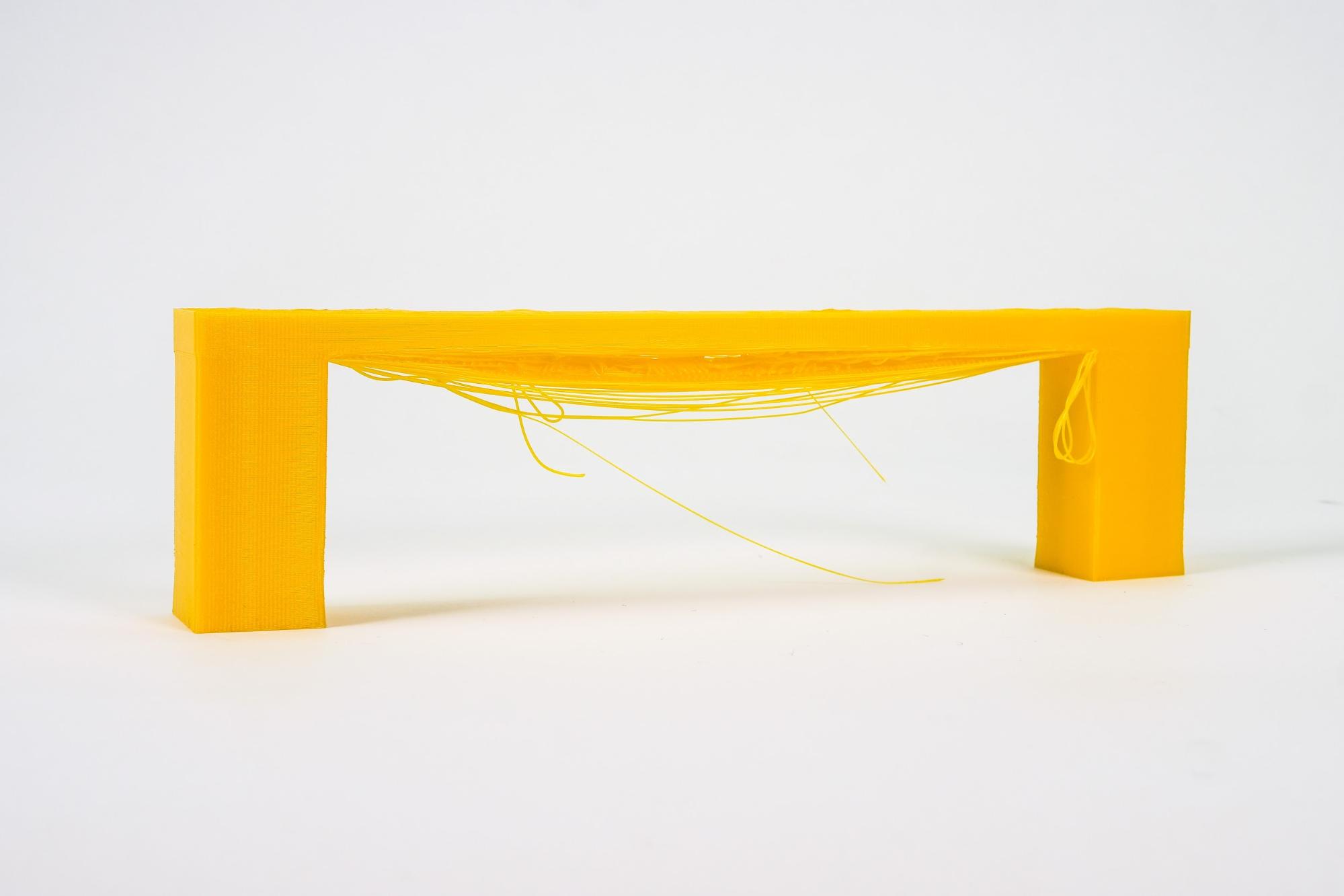
                  The typical problem of bridging layers is sagging or drooping as seen in the photo above.

                  How to fix it

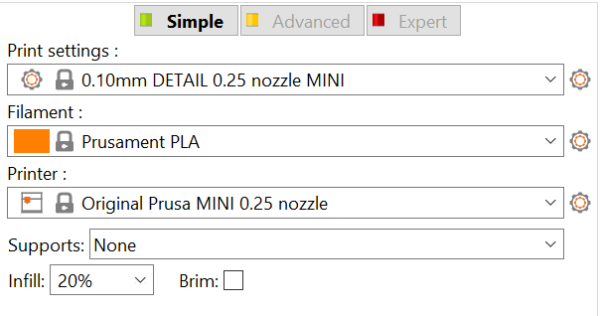
                  To access some settings/parameters in PrusaSlicer, you must be in 'Advanced' or 'Expert' mode. You can switch to a different mode using the buttons in the right panel or by going to Configuration -> Mode -> Simple/Advanced/Expert. For more information please see Simple, Advanced, Expert modes.
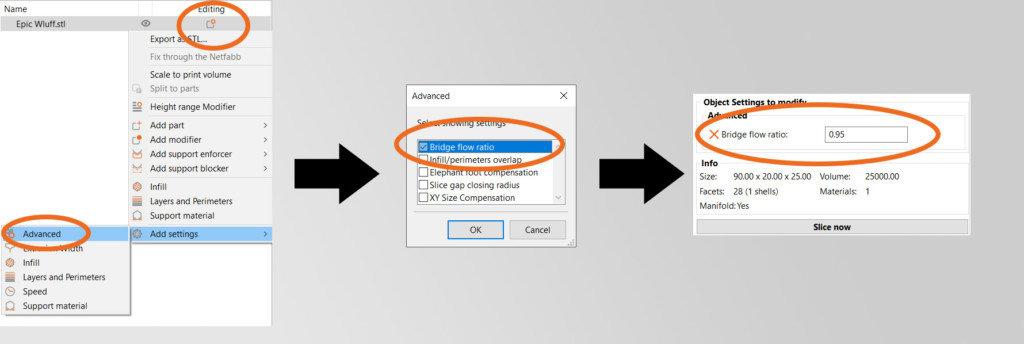
                  Bridging flow

                  The best way to prevent the layers from breaking in bridging mode is to change the “Bridging flow” setting in the PrusaSlicer. The first bridging layer should be done with a lower flow of the material. Open the settings in PrusaSlicer by right-clicking the model, then go to Object settings – Advanced – Bridge flow ratio. We recommend using lower speed for printing bridges and also lower bridging flow. The idea is to “pull” the string of extruded filament behind the nozzle, so it drops less. The ideal approach is to download bridging test models, for example, this one, put it in the slicer several times, and set up a different flow for every model. This should be a relatively quick way how to find correct settings for your printer/material without the need to perform many test prints.
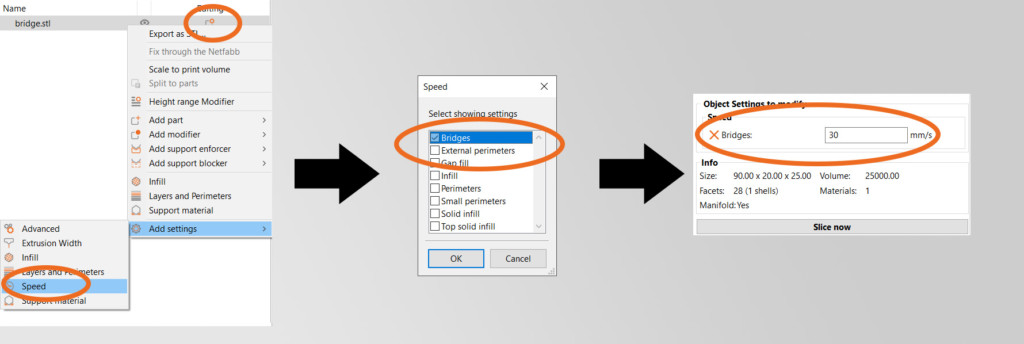
                  Tweak the speeds in PrusaSlicer

                  Right-click the object in the 3D view or click on the Editing icon in the Object list to open the context menu. Then select Add settings - Speed - Bridges and tweak the speed for printing bridges.
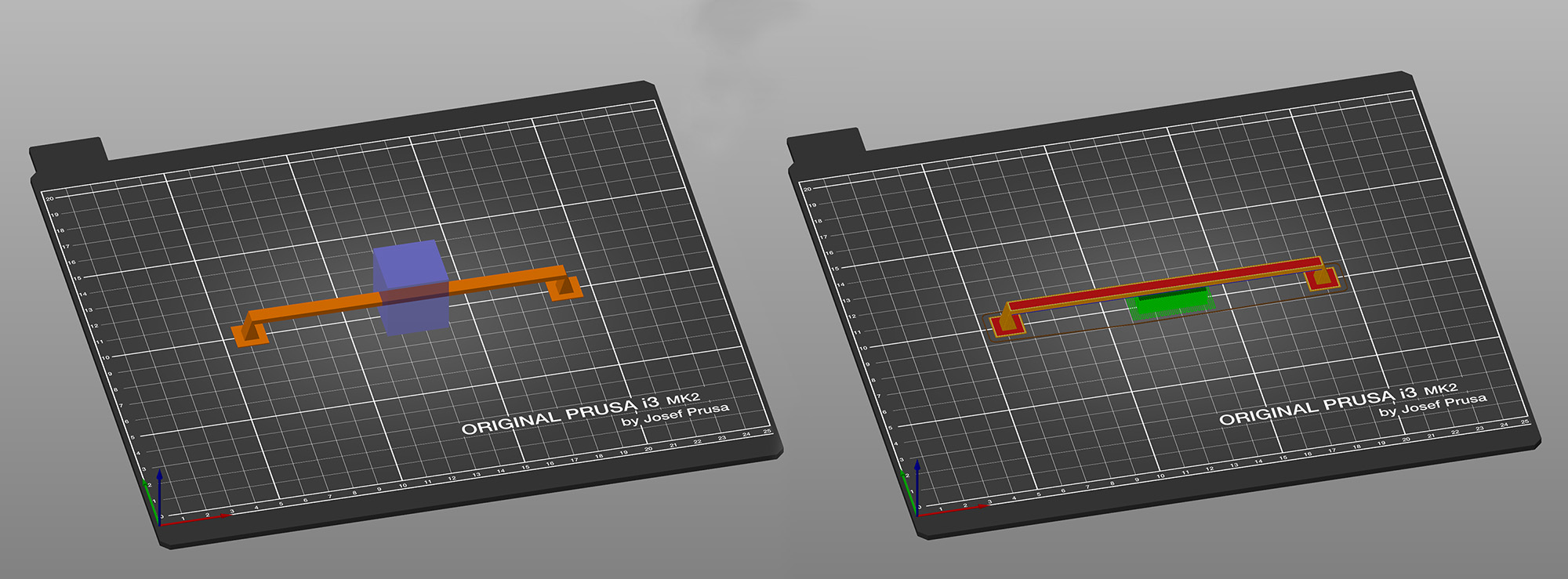
                  Enforce supports half-way through the bridge

                  If the bridge is very long, you can use support enforcers to create a support island half-way through. Right-click on the model in the 3D view and select Add support enforcer - Box. Then transform the box using the move, rotate and scale tools.
                  Change the orientation of the object

                  The best solution is to change the orientation of the object (rotate it) until you get rid of the bridges completely and you don’t have to worry about bridges or supports. It won’t be possible in many cases, but the rule of thumb here is to try to avoid bridges and supports completely.

                  Was this article helpful?
                  This action is available only to registered users. Please log-in.

                  Topics

                  • Troubleshooting
                    • Print Quality Troubleshooting
                      • Ghosting
                      • Poor bridging
                      • Bad looking surface above supports
                      • Stringing and oozing
                      • Layer separation and splitting FDM
                      • Failing supports
                      • Problems with infill
                      • Under-extrusion
                      • Warping
                      • Layer shifting
                      • Watertight prints
                      • The Benchy hull line
                    • Diagnostics
                    • QR Error codes
                    • Printer troubleshooting
                    • Print Error Messages

                  6 comments

                  Log in  to post a comment
                  nurp
                  •
                  Are you suggesting we use .25mm nozzle also? I want to print a double sided coin and underneath is a carved pattern. Will these settings be enough?
                  Reply
                  bryn51
                  •
                  My Issue is with poor bridging performance of Prusament PETG-CF filament.  I print a temp tower and EVERY bridge is sagging in the middle, having already tweaked bridging print speed and cooling.  So, from this article I will be trying Bridge flow ratio.Really, I cannot beleive that this filament is so poor I cannot trust it to perform simple bridging over a distance of 30 mm on standard temp tower. PS 2.6.0.  Printer MK3S+, Steel Nozzle, Satin Bed, Inside Prusa Enclosure
                  Reply
                  David B.
                  •

                  Hi! Unfortunately, even other brands of PETG-CF behave similarly. You can partly improve the bridging performance by increasing the bridging speed and overal cooling.

                  Reply
                  sfleischman
                  •
                  hi. Perhaps  you can point me the right direction. I can't seem to find anything this specific on the forums. 
                  I am printing a circular candle holder that has christmas trees cut in it. The bridging works find as the extrusion comes around counter clockwise and does the bridging on the left side BUT all of the right side trees are not working at all. Confirmed level plate, tried dif filament and tried various settings from above comments on bridging. 
                   
                  *Prusa Mini+
                  *ABS filament
                  Reply
                  Same Old Shane
                  •
                  these sections are mostly used to comment on the guides, articles or instructions. For cases like this you can either make a post in the forums at forum.prusa3d.com or contact support via email at [email protected] and you can provide photos so they can see exactly what you are seeing. 
                  Reply
                  DanielM
                  •
                  Hello, I have a print with a rectangle which is a bridge, slicer 2.5.0 RC1 does create the bridge on the longer side of the rectangle instead of the shortest side where bridges will be easier. Rotation with 45 or 90 degrees do not help, bridges are always on the long side of the rectangle. Any suggestion?       
                  Reply
                  Dale
                  •
                  I have a similar issue. I have two magnets I am pausing to drop in that are long and narrow. On one side the slicer covers the gap the short direction, but the other one goes the long direction. The long one always ends up gunking up and looking terrible, but the short side always turns out great. I want to be able to control this, or the slicer should automatically pick the shorter dimension to bridge.
                  Reply
                  Per M
                  •
                  I also have this problem. On a part with a bridge that is 2 mm long and 150 mm wide, the slicer (2.6.0) creates a few 150 mm long bridge infills (which will look terrible) instead of lots of 2 mm long bridges that will work without a problem. Orientation of the part does not change this. I also have not found any setting to fix this.
                  Reply
                  Alessandro Pantaleo
                  •

                  Hello, sorry for the late response. If this is still an issue, the bridging angle can be changed through this menu >print settings >infill >advanced >bridging angle. If that setting is not visible in the submenu, ensure that you are running PrusaSlicer in either the 'advanced' or the 'expert' mode. 

                  Reply
                  Arie
                  •
                  Hi Alessandro,
                  I tried this solution in an small square  "tunnel" shaped print 5*3*150 mm but no matter the bridging angle it keeps trying to bridge over the 150mm instead op the 3mm. (running 2.6.1 win64) Is there a setting that affects the angle of (the first layer) a bridge (other than the one u mentioned, as it is in the "infill" section it might not nesseseraly be about the actual bridging)?
                  Reply
                  Arie
                  •
                  I discovered why this happened it is not recongnised as an area to bridge but it is build up as Overhang perimeter, this was due to the no. of perimiter layers when reduced to an apropriate no. the problem was solved
                  Reply
                  Maksim
                  •
                  I know this is old but having just recently encountered this issue I found that there is a glitch with the bridging angle. If you set it to zero and it's bridging in the wrong orientation and you desire 90 degrees it does nothing. I found setting it to one degree changed it to about 90 degrees! Settings in between are random and not predictable.

                  This is good enough if you only need bridging in one orientation but if you need two or more directions the best option I found to have fine control of the bridging was to apply an object modifier over the areas I needed the bridging and then add settings > Infill > Bridging Angle.

                  I should add I'm on Prusa Slicer 2.9.4
                  Reply
                  franckou
                  •
                  I think there is a mistake in this article. There is a title called "Tweak the fan speeds in PrusaSlicer" but the following paragraph refers to the printing speed for bridges.
                  Reply
                  William H. - Official Prusa
                  •
                  Nice catch. Just a small typo. With a slower speed you will increase the cooling.
                  Reply