Prusa
  • SHOP
    • Latest products
    BY CATEGORY
    • 3D printersnew
    • Upgradesnew
    • Materials
    • Accessories
    • Spare parts
    • Courses
    • Merch
    • Sales inquiry & Price quote
    QUICK LINKS
    • Shipping information
    • Refunds & returns
    • Payment options
    • Warranty
    • VAT & Customs fees
    • FAQ

    0 item in your cartitems in your cart

    Your cart is empty

    Go to cartShop 3D printers

    My profile

    Log in to see orders, saved items

    My profile

    Signed in as

    • Orders
    • Logout
  • 3D PRINTING
    • Explore 3D printing
    FOR BEGINNERS
    • 3D printing 101
    • Types of printers (FDM/SLA)
    • How to choose a 3D Printer
    • Printables (3D models)
    BY APPLICATION
    • Rapid prototyping
    • Manufacturing
    • Engineering
    • Research
    • Arts & design
    GO DEEPER
    • Materials guide
    • Courses
    • Webinars
    • Case studies
    • Custom 3D printing
  • 3D PRINTERS
    • All 3D printers
    FOR
    • Home or garageHobbyists, tinkerers and home printing
    • Shop or studioIn-house production for small teams
    • EnterpriseFleets, security and scale
    • How to choose a 3D Printer
    SHOP & BROWSE
    • CORE One+new
    • CORE One+ INDXnew
    • CORE One L+new
    • CORE One L+ INDXnew
    • XL+new
    • MK4S
    • Prusa Pro HT90
    • Prusa Pro AFS
    • Prusa Pro SLX
    MORE FROM PRINTERS
    • Upgradesnew
    • Spare parts
    • Critical infrastructure
    • Case studies
    • Signature Oak
    • Kits
  • MATERIALS
    • All materials
    BY USE
    • Every-day & design
    • Functional engineering
    • Composites
    • Pro speciality
    • SLA resins
    PRUSAMENT
    • PLA
    • PETG
    • ASA
    • PC
    • PA11
    • Flex
    • TPU
    MORE FROM MATERIALS
    • Materials guide
    • We make material in house
    • Sustainability
    • Order on the store
  • SOFTWARE
    • All software
    PREPARE THE PRINT
    • PrusaSlicer 3.0New
    PRINT & MONITOR
    • Prusa Connect
    • EasyPrint
    • iOS & Android app
    • Prusa Farm
    GET STARTED
    • Download & install
    • Knowledge base
    MORE FROM SOFTWARE
    • Printables (3D models)
  • SUPPORT
    • Explore support
    FIND ANSWERS
    • Knowledge base
    • Troubleshooting
    • Courses
    • Webinars
    GET HELP
    • Contact us
    • Livechat
    • Shipping information
    • Warranty
    • Refunds & returns
    • Spare parts
    • Factory repair
    COMMUNITY
    • Forum
    • Reddit
    • Printables
  • TRUST CENTER
    • Trust Center overview
    BY TOPIC
    • GDPR
    • Certificates
    • Security
    • Compliance
    COMMITMENTS
    • Sustainability report
    TALK TO US
    • Contact the security team
  • COMPANY
    • About Prusa
    GET TO KNOW US
    • Our story
    • How we make printers
    • Open source
    • Brand & media kit
    NEWS
    • Blog
    • Newsroom
    • Events
    TRUST & PARTNERS
    • Sustainability
    • Resellers & distributors
    • Affiliate program
    • Contact
    • English
    • Čeština
    • Deutsch
    • Español
    • Français
    • Italiano
    • Polski
    • 日本語
  • Signed in as

    • Orders
    • Address
    • In-stock Alerts
    • My Courses
    • Subscription
    • Edit Account
    • Logout

Log in to see orders, saved items

Signed in as
  • Orders
  • Address
  • In-stock Alerts
  • My Courses
  • Subscription
  • Edit Account
  • English
  • Čeština
  • Deutsch
  • Español
  • Français
  • Italiano
  • Polski
  • 日本語
Shop

0 item in your cartitems in your cart

Your cart is empty

Go to cartShop 3D printers

My profile

Log in to see orders, saved items

My profile

Signed in as

  • Orders
  • Logout
SHOP
  • Latest products
BY CATEGORY
  • 3D printersnew
  • Upgradesnew
  • Materials
  • Accessories
  • Spare parts
  • Courses
  • Merch
  • Sales inquiry & Price quote
QUICK LINKS
  • Shipping information
  • Refunds & returns
  • Payment options
  • Warranty
  • VAT & Customs fees
  • FAQ

Featured products

    Popular categories

      Trending searches

        Articles

          Blog

            Products

              Categories

                Suggested searches

                  Searching…
                  No results
                  Something went wrong.
                  ↑↓ Select↵ OpenEsc Close search
                  1. Support
                  2. Original Prusa MINI+
                  3. Prusa Connect & PrusaLink
                  4. Prusa Connect Local (MINI)
                   

                  Contents

                  • How to connect
                  • Save/Load Settings
                  • Troubleshooting

                  Blog

                  • 400°C HT Hotend is out! Plus: New Materials and HighTemp Sheets for CORE One+/L+.
                  • Blender for 3D Printing: The 5-Minute Guide to STL Editing
                  • Prusament Pellets: Raw material batches for large-format 3D printing or small-scale polymer research & development

                  Newsletter

                  Signup and get our monthly squeeze on updates, blog, printables and much more.

                  By clicking, you agree to receive our newsletter.

                  This site is protected by reCAPTCHA Enterprise and the Google Privacy Policy and Terms of Service apply.

                  Heavy Duty Keyboard Holder (No Supports)
                  E-shop
                  • 3D Printers
                  • Printer Upgrades
                  • Filaments
                  • Accessories
                  • Prusa Merchandise
                  Prusa

                  © Prusa Research a.s.

                  Printables
                  • 3D Models
                  • Store
                  • Clubs
                  • 3D Design Contests
                  • Brands
                  Community
                  • World Map
                  • Forum
                  • User Groups
                  • Events
                  Help
                  • Prusa Help
                  • Prusa Academy
                  • 3D Printing Calculators
                  Software
                  • PrusaSlicer
                  • Prusa.app
                  • Prusa Connect
                  • Drivers and Software
                  Company
                  • About Us
                  • Blog
                  • Official Prusa Resellers
                  • Contact Us
                  • Certified for ISO 9001, ISO 14001, ISO 45001
                  • General Terms and Conditions
                  • General Terms and Conditions of Use of the PRUSA Websites
                  • Privacy Policy
                  • Information about cookies
                  • Customer Complaints Policy
                  • Status Page
                  • Do Not Sell or Share My Personal Information
                  • Supplemental Statements
                  Prusa
                  • General Terms and Conditions
                  • General Terms and Conditions of Use of the PRUSA Websites
                  • Privacy Policy
                  • Information about cookies
                  • Customer Complaints Policy
                  • Status Page
                  • Do Not Sell or Share My Personal Information
                  • Supplemental Statements

                  © Prusa Research a.s.

                  JOSEF PRUSA®, PRUSA RESEARCH®, PRUSA POLYMERS®, PRUSA ORANGE®, PRUSA 3D ® AND PRUSAMENT® are registered trademarks of Prusa Development a.s. used by Prusa Research a.s. under licence from Prusa Development a.s.

                  Prusa Connect Local (MINI)

                  Relevant for

                  MINI
                  MINI+
                  64 comments
                  Article is also available in following languages
                  English
                  Čeština
                  Polski
                  Deutsch
                  Français
                  Español
                  Italiano
                  日本語
                  ATTENTION: This article is obsolete and no longer maintained. Please update your MINI/MINI+ to the latest available firmware and then use newer web user interface PrusaLink.


                  Starting the firmware 4.0.5, you can monitor your Original Prusa MINI over your local network via the web interface called Prusa Connect Local. Prusa Connect Local is still in development and is an initial release of Prusa Connect.
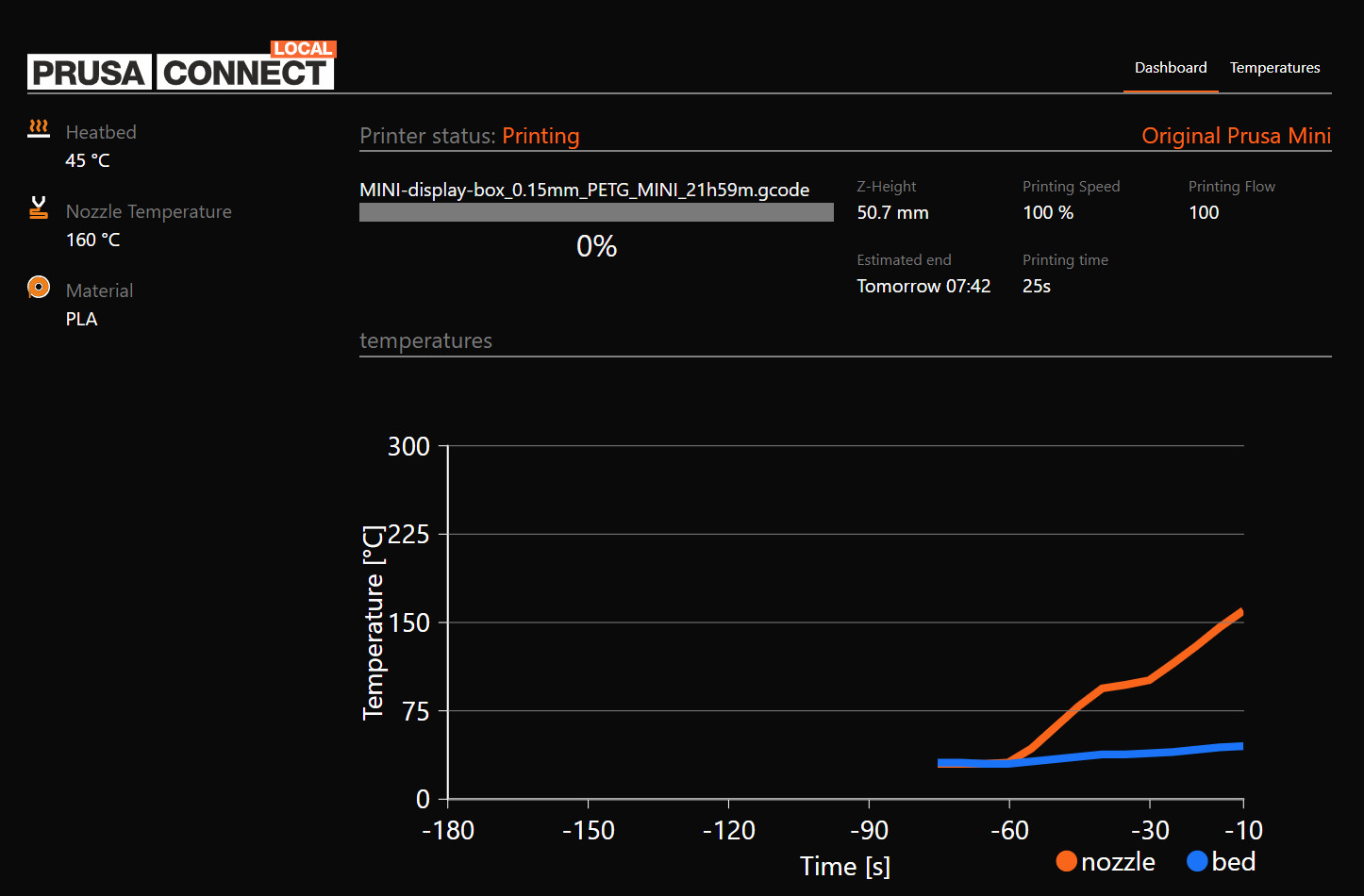
                  Screenshot from an internet browser where the printer's IP address is entered as URL.

                  It is a platform for full remote control of your printer, much like Octoprint. However, it can currently only provide a live view of your ongoing print's progression, give an estimated completion-time by connecting to an NTP Server (MINI) and your machine's temperatures. Full control of your printer will be added in future releases.

                  Check out our Blog, page for Firmware, Drivers, and Apps or social media profiles, where we publish information regarding updates.

                  How to connect

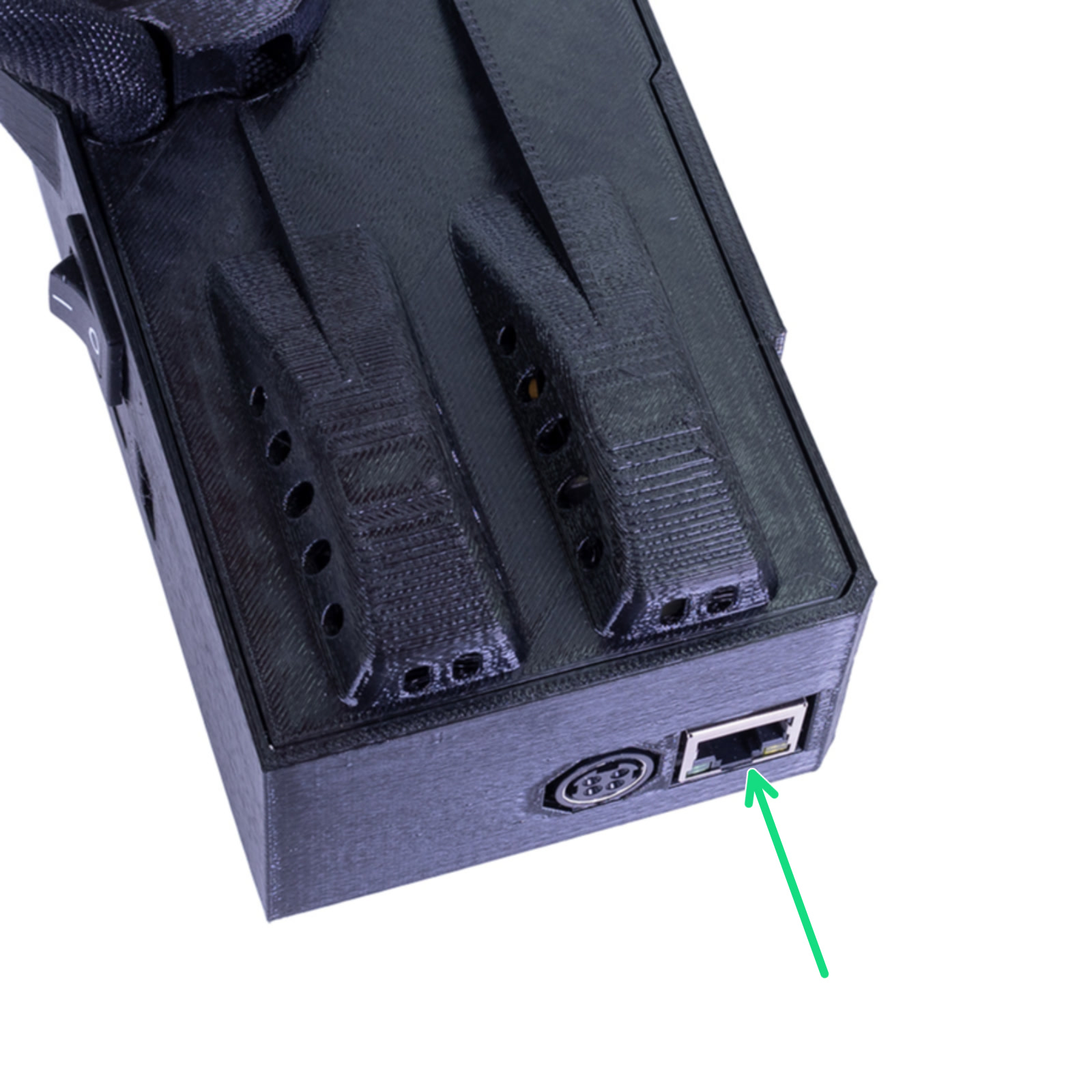
                  Connect the printer to your network using a LAN cable. The Ethernet connector (RJ45) is situated in the back of the electronics box (green arrow).
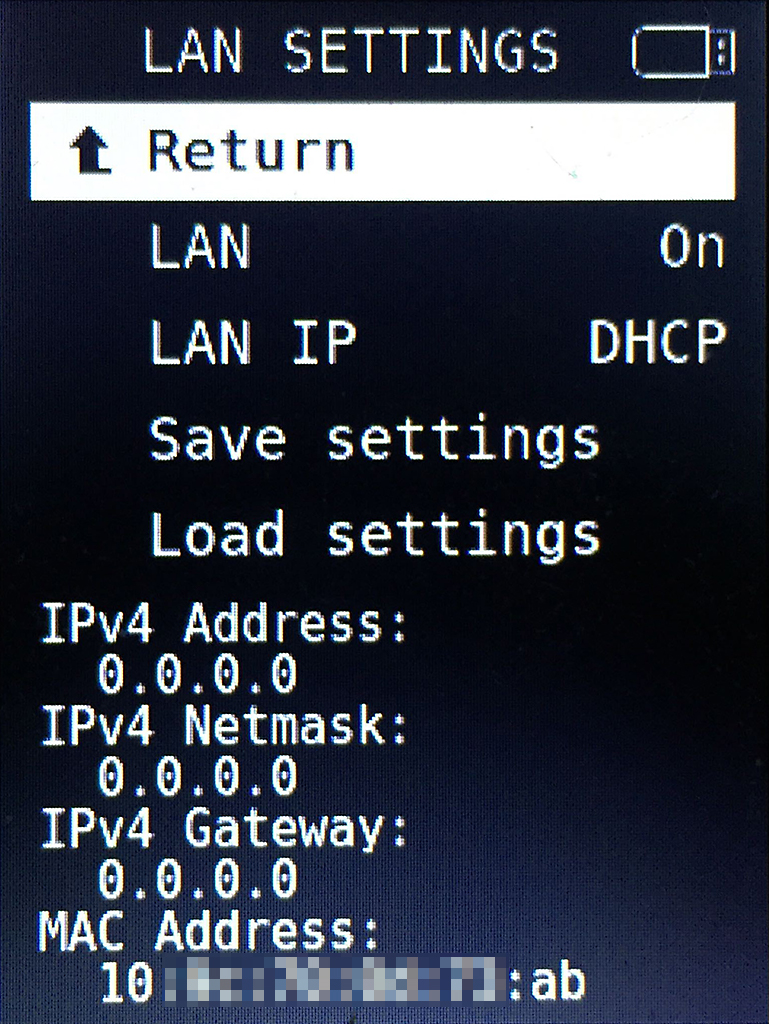
                  The printer has DHCP turned on by default. Go to LCD Menu - Settings - LAN Settings and check whether the IP address has been assigned correctly. Common IP-ranges are 192.168.0.X or 10.0.0.X. Since it is connected by cable directly to your router, you do not need any password as you would with WiFi.
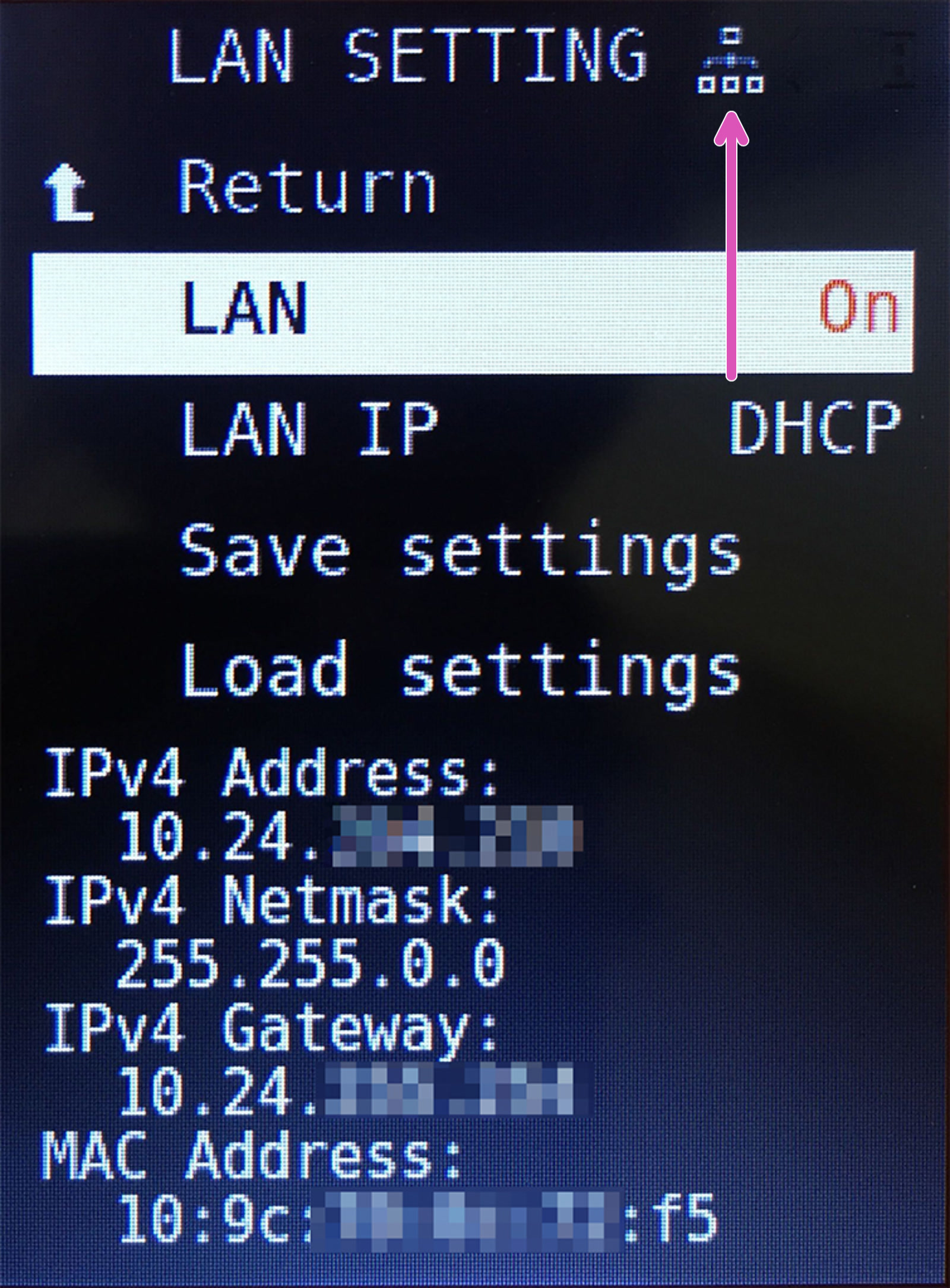
                  Depending on your network, connecting to it can take up to ~30 seconds after you turn on the printer. An icon will appear in the top-right (Right picture - purple arrow) once it has a connection.
                  The IP Address within Lan settings may not update automatically. Exit Lan settings and return, or select save or load settings to force the IP fields to update.
                  Not connectedConnected
                  If IP "0.0.0.0" is shown and there is not a network icon in the top-right, an IP address has not been assigned and you are not connected.

                  On your PC or smartphone, open a web browser of your choice, enter the 'IPv4 Address' into the address field then hit Enter. It will now load the Prusa Connect Local web interface.

                  If you can't see the interface, confirm that the IP is correct and also try a different browser.

                  Save/Load Settings

                  Save Settings options will create an INI-file on the USB drive containing your IPv4 address, netmask, gateway, and MAC address. It can be edited from your computer using a text editor, should you have the need, for instance, if you are setting up a static IP address for your printer. This file can be loaded to any Original Prusa MINI, using the option Load Settings.

                  If any item in the INI file contains an incorrect IP address, the item is ignored. All items are optional.

                  Troubleshooting

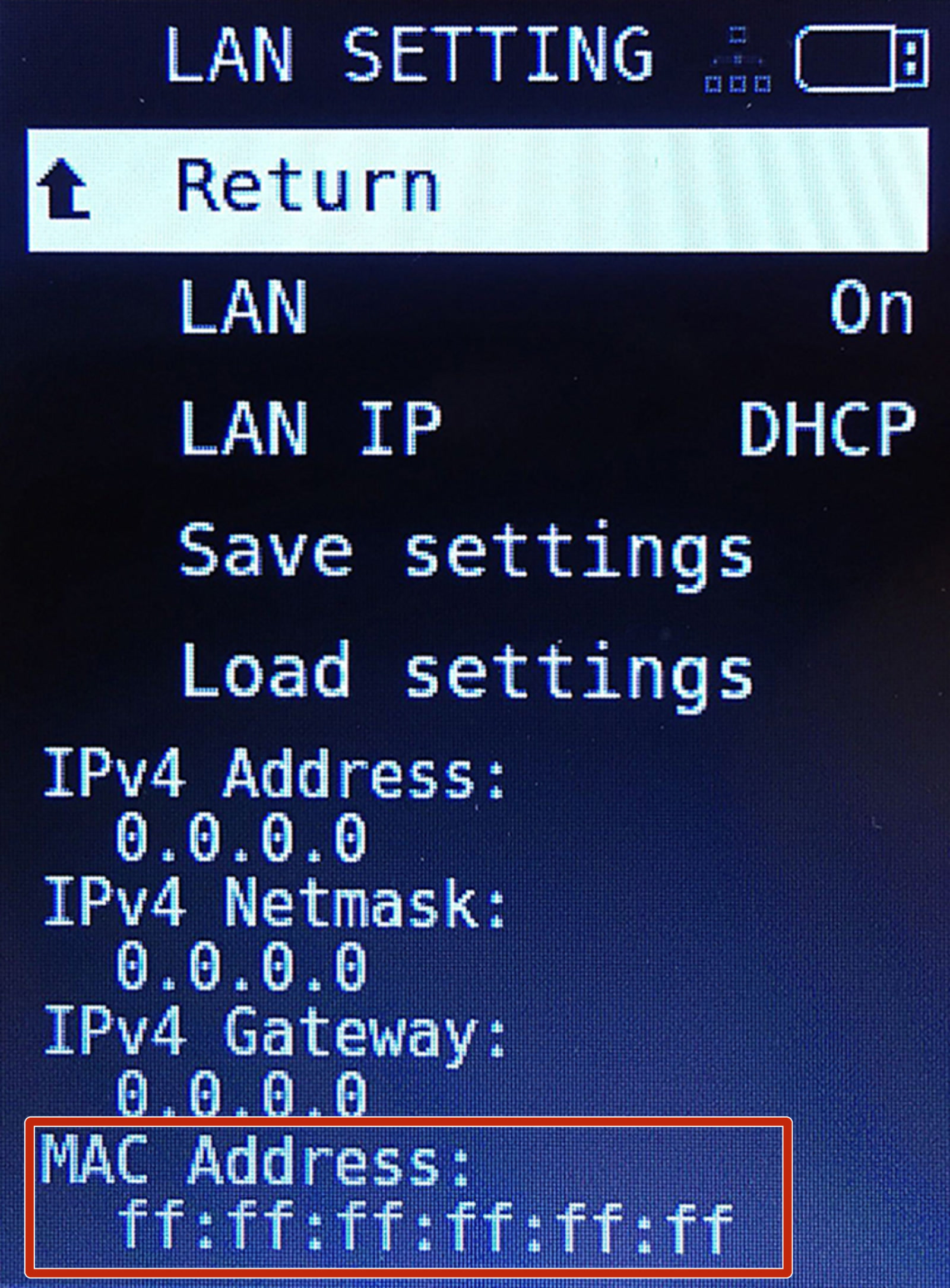
                  As routers and networks have different configurations, it is hard to provide support in this respect. Please check the documentation of your network to whether you need to grant access for the printer or similar. However, if the MAC Address, within 'LAN Settings', is displayed as "ff:ff:ff:ff:ff:ff" (red square picture below), it may indicate an issue with the Buddy mainboard. If this is the case, please contact Customer support.
                  Was this article helpful?
                  This action is available only to registered users. Please log-in.

                  Topics

                  • Using the printer
                    • Prusa Connect & PrusaLink
                      • Prusa Connect Local (MINI)
                      • Buddy3D Camera
                      • Prusa Mobile App
                      • Wi-Fi and Prusa Connect/Link setup (CORE One, MK4/S, MK3.9, MK3.5, XL, MINI/+)
                      • Adding the printer to Prusa Connect (CORE One, MK4/S, MK3.9/S, MK3.5/S, XL, MINI/+)
                      • Camera setup for PrusaLink / Prusa Connect
                      • Prusa Connect - Telegram notifications setup
                      • Prusa Connect - Discord notifications setup
                      • Prusa Connect - Slack notifications setup
                      • Prusa Connect - Camera API
                      • Connect Registration Failed
                      • Connect Registration Failed #12401 (MINI)
                      • How to set a Static IP Address
                      • Prusa Connect and PrusaLink explained
                      • ESP Camera for Prusa Connect
                    • 3D models
                    • Material guide
                    • Slicing
                    • Printer maintenance

                  30 comments

                  Log in  to post a comment
                  Frank Torres
                  •
                  It is on the network, but how do I pull up the QR code to register into it so I can create a username and password?
                  Reply
                  Frank Torres
                  •
                  I do not want to re-set it, as it is already calibrated. I do not want to do that again.
                  Reply
                  Georg
                  •
                  Today, my mini+ got another IP from DHCP. I would like to change the mini+, using a static IP for Ethernet, but i do not have the Save Setting Option for ethernet. (4.4.1) How can i set the mini+ to a static IP?
                  Reply
                  inmyTEEPEEitsme
                  •
                  It would be best to do this via your Router.  Just set a static IP address by MAC address.
                  Reply
                  Georg
                  •
                  Nice and handy feature. I have two questions:1.) Why do i often have to enter the API key on the webinterface?2.) Is it possible to POST the API in an URL Parameter?
                  Reply
                  Wiesbaden RoboWarriors
                  •
                  I am trying to set a static ip address on my mini, firmware 4.4.1. I do not have the ability to set a static ip on the router. I do not have an option to load or save lan settings in the menu. I have created a lan_settings.ini file with the required information:
                  [lan_ip4]
                  type=STATIC
                  hostname=PrusaMINI
                  address=192.168.100.52
                  mask=255.255.255.0
                  gateway=192.168.100.1
                  There are no extra lines or spaces after the gateway. The information is not loaded on boot up and no static ip is set. Can anyone assist?Oh, and WOW I love being able to send G-Code remotely to the minis. We have 8 at our school and the kids dont have to touch the memory sticks any more!!!!
                  Reply
                  Jakub Dolezal
                  •

                  Hi, in the menu "Settings" there is an option "Load settings from File". This should load the network settings as well. Let me know, if it worked.

                  Reply
                  JoeySkills
                  •
                  (Resolved) After struggling with the Ethernet lit up (connected) but no IP, 0.0.0.0, was able to get this to work.  In my initial set up had it connected as such:
                  Prusa MINI - switch - router - modem/router
                  I changed it to 
                  Prusa MINI - modem/router
                  This immediately resolved the dhcp request.  I have no idea why my regular router network that has 50+ wireless and wired devices would not resolve dhcp.  I also had problems with wireless via esp on this network. 
                  It may be worth noting for anyone with similar struggles that the network I bypassed was a Google Nest Wifi.  This is a pretty basic consumer product that does not allow for things like dhcp reservations. Perhaps there is something particular to Google mesh or Nest wifi that caused my issues. 
                   
                  Reply