Prusa
  • SHOP
    • Latest products
    BY CATEGORY
    • 3D printersnew
    • 3D printer upgradesnew
    • Materials
    • Accessories
    • Spare parts
    • Courses
    • Merch
    • Get a price quote
    QUICK LINKS
    • Shipping & delivery
    • Returns & refunds
    • Payment & financing
    • Warranty
    • VAT & Customs fees
    • FAQ

    0 item in your cartitems in your cart

    Your cart is empty

    Go to cartShop 3D printers

    My profile

    Log in to see orders, saved items

    My profile

    Signed in as

    • Orders
    • Logout
  • 3D PRINTING
    • Explore 3D printing
    FOR BEGINNERS
    • 3D printing 101
    • How FDM printing works
    • Buying your first printer
    • 3D model catalog
    BY APPLICATION
    • Rapid prototyping
    • Manufacturing
    • Engineering
    • Research
    • Arts & design
    GO DEEPER
    • Materials guide
    • Courses
    • Webinars
    • Case studies
    • Custom 3D printing
  • 3D PRINTERS
    • All 3D printers
    FOR
    • Home or garageHobbyists, tinkerers and home printing
    • BusinessIn-house production for small teams
    • EnterpriseFleets, security and scale
    • Which Prusa is right for me
    SHOP & BROWSE
    • CORE One+new
    • CORE One+ INDXnew
    • CORE One L+new
    • CORE One L+ INDXnew
    • XL+new
    • MK4S
    • Prusa Pro HT90
    • Prusa Pro AFS
    • Prusa Pro SLX
    MORE FROM PRINTERS
    • Parts & upgradesnew
    • Spare parts
    • Critical infrastructure
    • Case studies
    • Signature Oak
    • Kits
  • MATERIALS
    • All materials
    BY USE
    • Every-day & design
    • Functional engineering
    • Composites
    • Pro speciality
    • SLA resins
    PRUSAMENT
    • PLA
    • PETG
    • ASA
    • PC
    • PA11
    • Flex
    • TPU
    MORE FROM MATERIALS
    • Materials guide
    • We make material in house
    • Sustainability
    • Order on the store
  • SOFTWARE
    • All software
    PREPARE THE PRINT
    • PrusaSlicer 3.0New
    PRINT & MONITOR
    • Prusa Connect
    • EasyPrint
    • iOS & Android app
    • Prusa Farm
    GET STARTED
    • Download & install
    • Knowledge base
    MORE FROM SOFTWARE
    • 3D model catalog
  • SUPPORT
    • Explore support
    FIND ANSWERS
    • Knowledge base
    • Troubleshooting
    • Courses
    • Webinars
    GET HELP
    • Contact us
    • Livechat
    • Shipping & delivery
    • Warranty
    • Returns & refunds
    • Service & spare parts
    • Service & Repair
    COMMUNITY
    • Forum
    • Reddit
    • Printables
  • TRUST CENTER
    • Trust Center overview
    BY TOPIC
    • GDPR
    • Certificates
    • Security
    • Compliance
    COMMITMENTS
    • Sustainability report
    TALK TO US
    • Contact the security team
  • COMPANY
    • About Prusa
    GET TO KNOW US
    • Our story
    • How we make printers
    • Open source
    • Brand & media kit
    NEWS
    • Blog
    • Newsroom
    • Events
    TRUST & PARTNERS
    • Sustainability
    • Resellers & distributors
    • Affiliate program
    • Contact
    • English
    • Čeština
    • Deutsch
    • Español
    • Français
    • Italiano
    • Polski
    • 日本語
  • Signed in as

    • Orders
    • Address
    • In-stock Alerts
    • My Courses
    • Subscription
    • Edit Account
    • Logout

Log in to see orders, saved items

Signed in as
  • Orders
  • Address
  • In-stock Alerts
  • My Courses
  • Subscription
  • Edit Account
  • English
  • Čeština
  • Deutsch
  • Español
  • Français
  • Italiano
  • Polski
  • 日本語
Shop

0 item in your cartitems in your cart

Your cart is empty

Go to cartShop 3D printers

My profile

Log in to see orders, saved items

My profile

Signed in as

  • Orders
  • Logout
SHOP
  • Latest products
BY CATEGORY
  • 3D printersnew
  • 3D printer upgradesnew
  • Materials
  • Accessories
  • Spare parts
  • Courses
  • Merch
  • Get a price quote
QUICK LINKS
  • Shipping & delivery
  • Returns & refunds
  • Payment & financing
  • Warranty
  • VAT & Customs fees
  • FAQ

Featured products

    Popular categories

      Trending searches

        Articles

          Blog

            Products

              Categories

                Suggested searches

                  Searching…
                  No results
                  Something went wrong.
                  ↑↓ Select↵ OpenEsc Close search
                  1. Support
                  2. Printer description
                  3. Combining materials (XL/+)
                   

                  Contents

                  • Preliminary info
                  • Prime tower settings
                  • PLA + PETG
                  • Flexible filament
                  • Other PrusaSlicer settings

                  Blog

                  • Prusament Pellets: Raw material batches for large-format 3D printing or small-scale polymer research & development
                  • Print colorful and glowing Halloween decorations with our spooky offer
                  • Factorio Has Arrived on Printables

                  Newsletter

                  Signup and get our monthly squeeze on updates, blog, printables and much more.

                  By clicking, you agree to receive our newsletter.

                  This site is protected by reCAPTCHA Enterprise and the Google Privacy Policy and Terms of Service apply.

                  Heavy Duty Keyboard Holder (No Supports)
                  E-shop
                  • 3D Printers
                  • Printer Upgrades
                  • Filaments
                  • Accessories
                  • Prusa Merchandise
                  Prusa

                  © Prusa Research a.s.

                  Printables
                  • 3D Models
                  • Store
                  • Clubs
                  • 3D Design Contests
                  • Brands
                  Community
                  • World Map
                  • Forum
                  • User Groups
                  • Events
                  Help
                  • Prusa Help
                  • Prusa Academy
                  • 3D Printing Calculators
                  Software
                  • PrusaSlicer
                  • Prusa.app
                  • Prusa Connect
                  • Drivers and Software
                  Company
                  • About Us
                  • Blog
                  • Official Prusa Resellers
                  • Contact Us
                  • Certified for ISO 9001, ISO 14001, ISO 45001
                  • General Terms and Conditions
                  • General Terms and Conditions of Use of the PRUSA Websites
                  • Privacy Policy
                  • Information about cookies
                  • Customer Complaints Policy
                  • Status Page
                  • Do Not Sell or Share My Personal Information
                  • Supplemental Statements
                  Prusa
                  • General Terms and Conditions
                  • General Terms and Conditions of Use of the PRUSA Websites
                  • Privacy Policy
                  • Information about cookies
                  • Customer Complaints Policy
                  • Status Page
                  • Do Not Sell or Share My Personal Information
                  • Supplemental Statements

                  © Prusa Research a.s.

                  JOSEF PRUSA®, PRUSA RESEARCH®, PRUSA POLYMERS®, PRUSA ORANGE®, PRUSA 3D ® AND PRUSAMENT® are registered trademarks of Prusa Development a.s. used by Prusa Research a.s. under licence from Prusa Development a.s.

                  Combining materials (XL/+)

                  Relevant for

                  XL
                  XL+
                  20 comments
                  Article is also available in following languages
                  English
                  Čeština
                  Polski
                  Deutsch
                  Français
                  Español
                  Italiano
                  日本語

                  On the Original Prusa XL multi-tool, it is possible to combine different materials within the same print. The following aspects and considerations have to be kept in mind for a successful print. 

                  Preliminary info

                  When an extruder is parked, the nozzle installed on that extruder cools down.

                  High temperatures without printing can cause a loaded filament to degrade and can cause the pressure in the melt zone to raise. While an extruder is idle, cooling down the nozzle helps counteract this process, especially for an extended docked time.

                  At any time the nozzle temperature is high, any moisture absorbed by the filament will have to escape somewhere. This generally leads to increased pressure in the nozzle, typically leading to oozing. The oozed filament is deposed on the prime tower, possibly creating a blob. 

                  These effects will be worse the more moisture is present in the filament.

                  To limit these negative effects, it is crucial to keep the filament dry. Some filament settings might need to be fine-tuned, and it is fundamental that the Nozzle Seal is set to the correct position for all tools. The scale of these effects also depends on the specific filament material.

                  If you decide to use flexible filament check out our video guide on how to load flexible filament into the Original Prusa XL.

                  Prime tower settings

                  Minimal purge on wipe tower

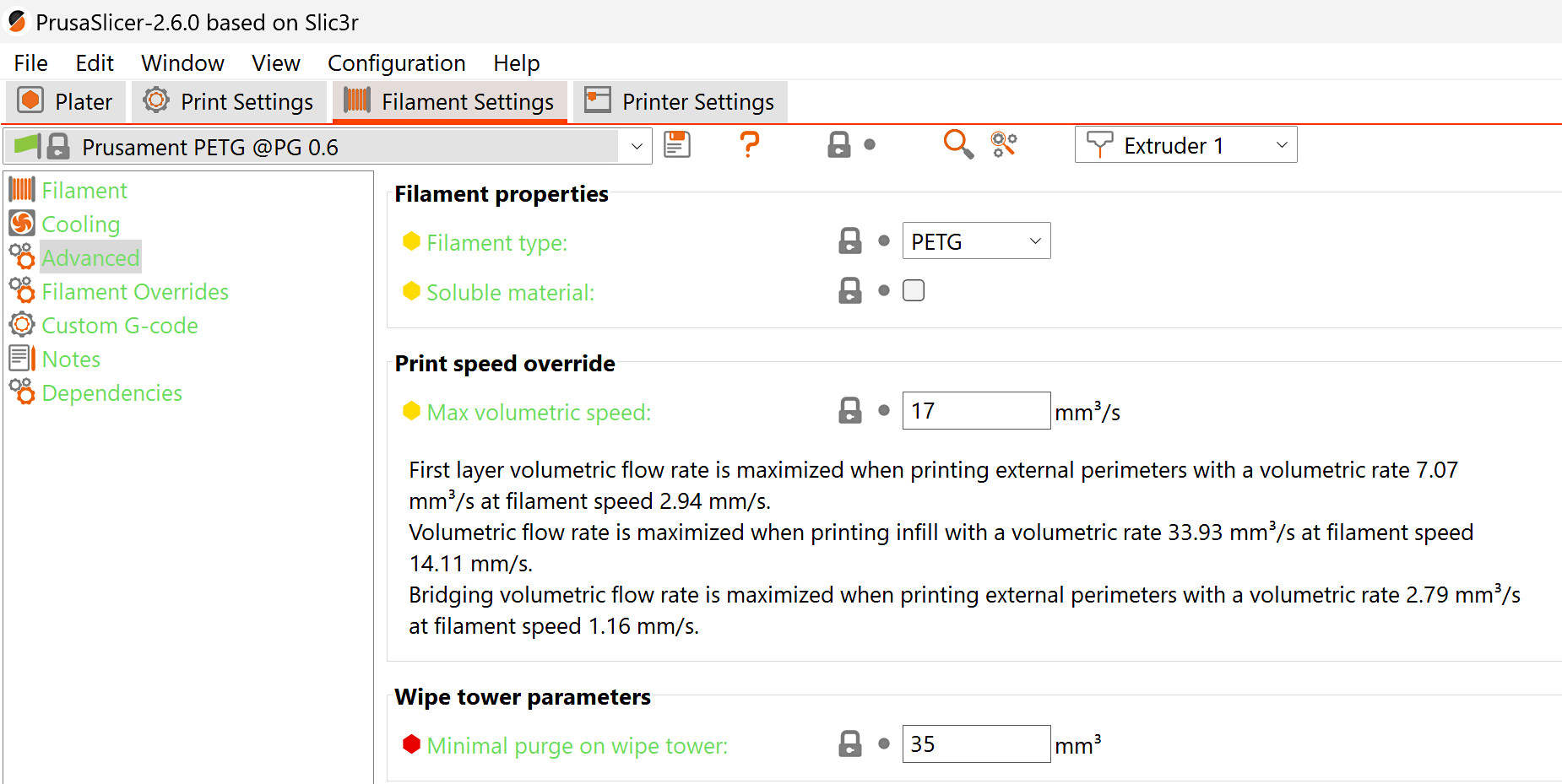
                  The minimal purge on wipe tower sets the minimum amount of material to prime into the prime tower. Its value can be adjusted in Filament settings -> Advanced. The oozing that happens when the tool is picked causes material loss. Increasing this volume will decrease the chance this causing under-extrusion at the start of the print.

                  For PLA prints, the default and recommended value for this setting is 15mm³. For any other material, the default value is 35mm³. We also recommend setting the value at 35mm³ for each extruder for a print with a combination of PLA and another material. 

                  TPU is very prone to stringing due to it absorbing a high amount of moisture. While it has been tested with the minimal purge on wipe tower at 35mm³, in case of issues with stringing and oozing, we recommend further increasing this value, even up to 70mm³. TPE is a good alternative flexible material, as it generally absorbs less moisture than TPU, but note that TPE has a poor bed adhesion.

                  When printing rigid filaments on top of TPE or TPU, the lower TPE or TPU layers can be moved around by the rigid filament printing on top of them. This can also be counteracted by increasing the minimal purge on wipe tower. 
                  Wipe tower extruder

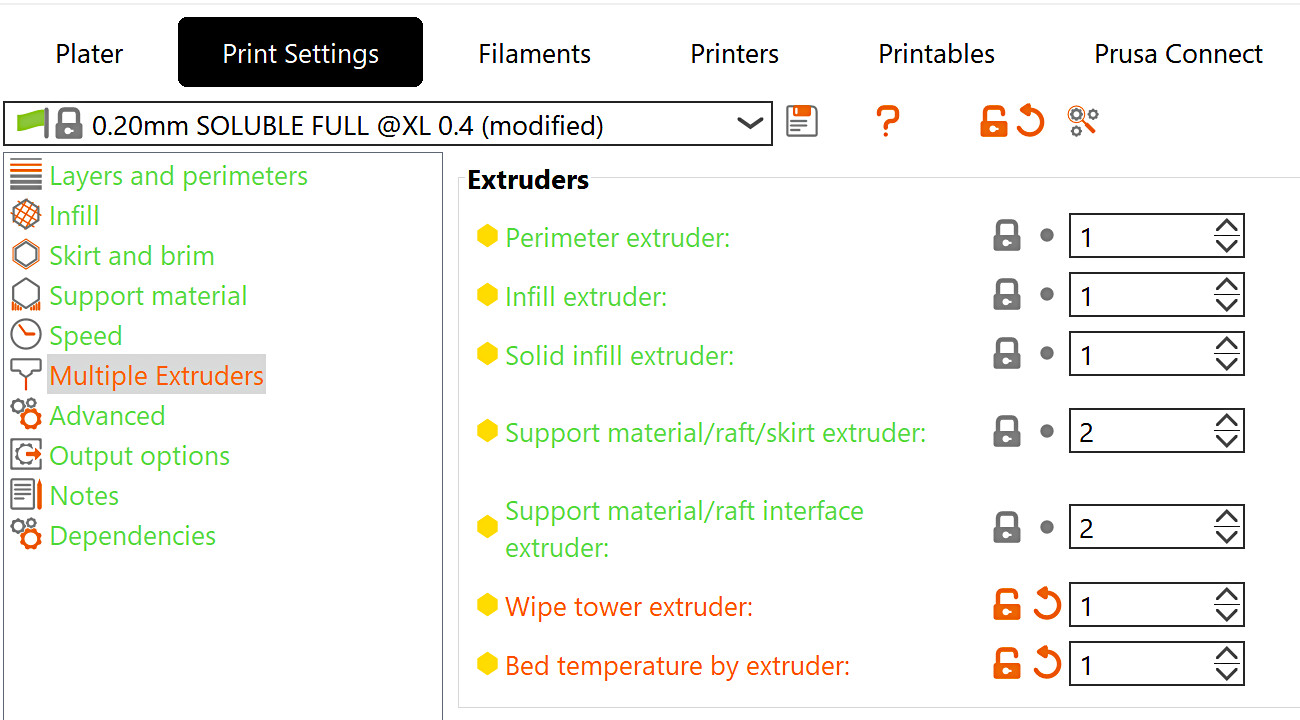
                  On the prime tower, the filaments might not stick to each other. This can cause the tower to break and cause crashes on the print. To prevent that, go to Print settings -> Multiple Extruders -> Wipe tower extruder, and select an extruder for the prime tower. This will cause one of the extruders with a specific filament to act on all tower layers, even if it is not used in the print, making the tower more stable. Leaving the value at 0 will use the tool that is available, which is the last one used in that layer. This saves time but, when printing with more than one type of material, makes the prime tower less reliable.
                  Stabilization cone apex angle

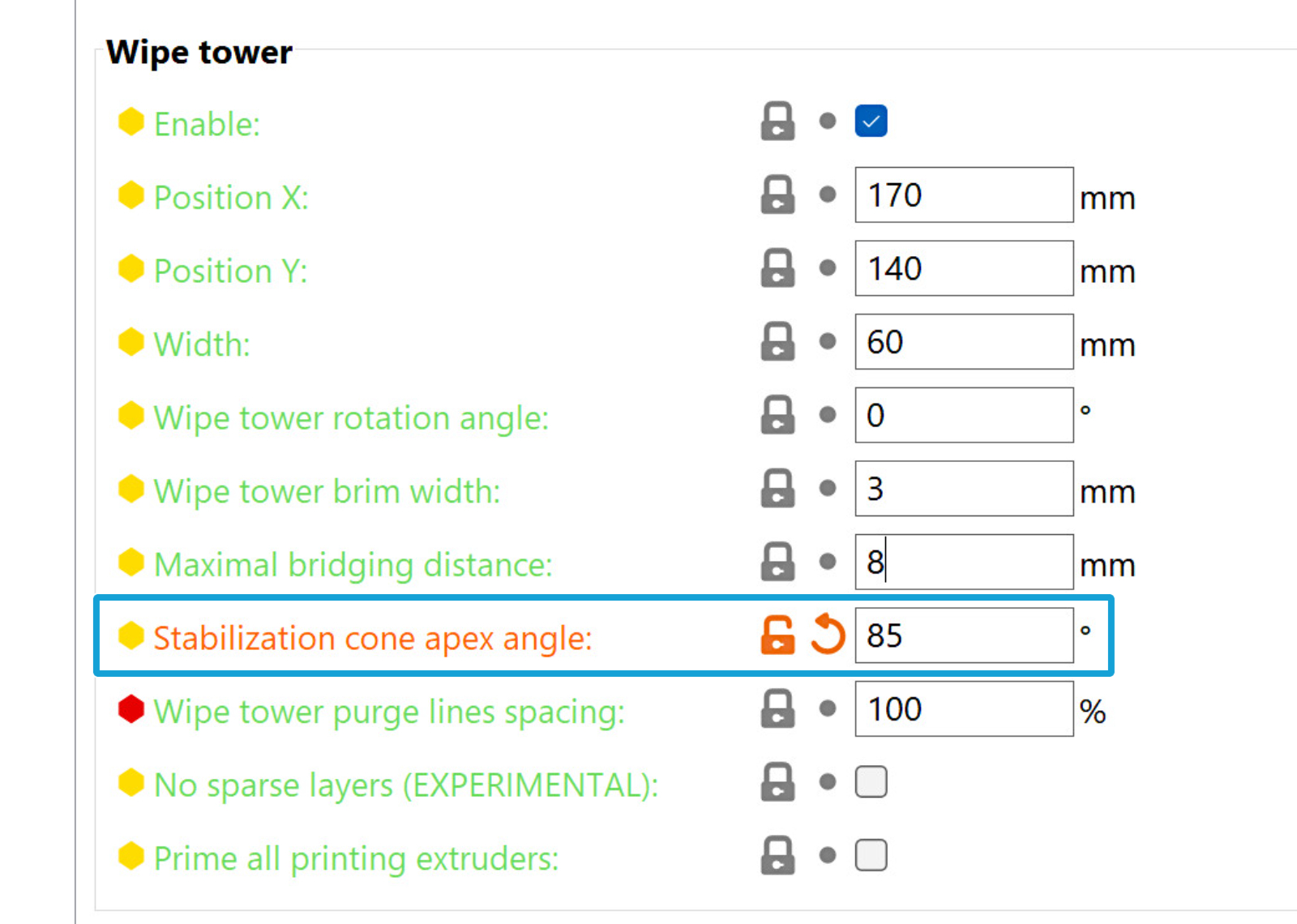
                  To increase the stability and bottom area of the prime tower, it is possible to add a conical shape that would combine with the prime tower shape. The apex angle of this cone can be set between 0 and 90 degrees, in Print settings -> Multiple Extruders, with a larger angle meaning that the cone base is larger and the prime tower more stable. 
                  PLA + PETG 

                  PETG has been tested with PLA supports with success, as well as PLA with PETG supports. For that, the PrusaSlicer print setting needs to be soluble full.
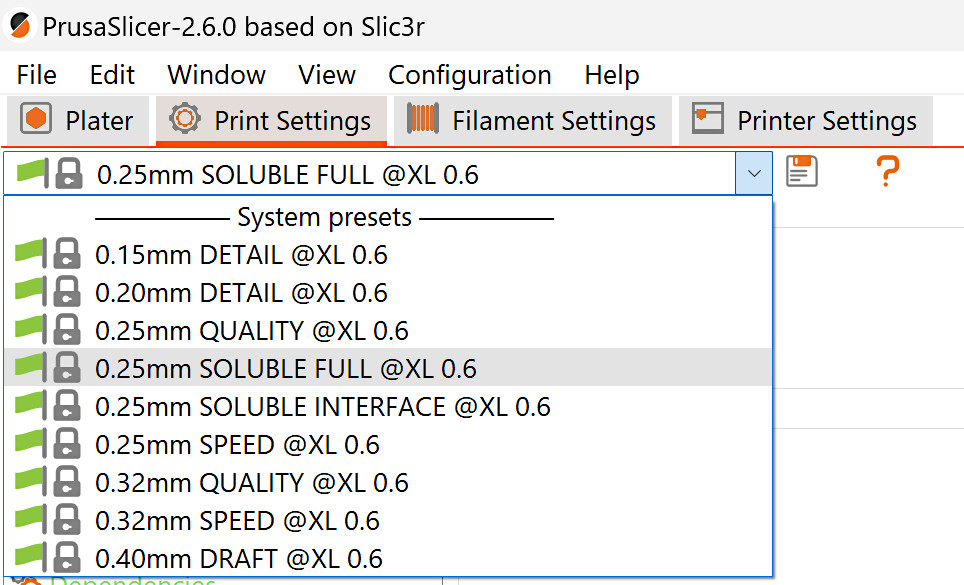
                  By default, a solid sheath (one perimeter wall) will be generated around the supports set as soluble, making it very difficult to remove them. We recommend unselecting this setting, in Print Settings -> Support Material. 
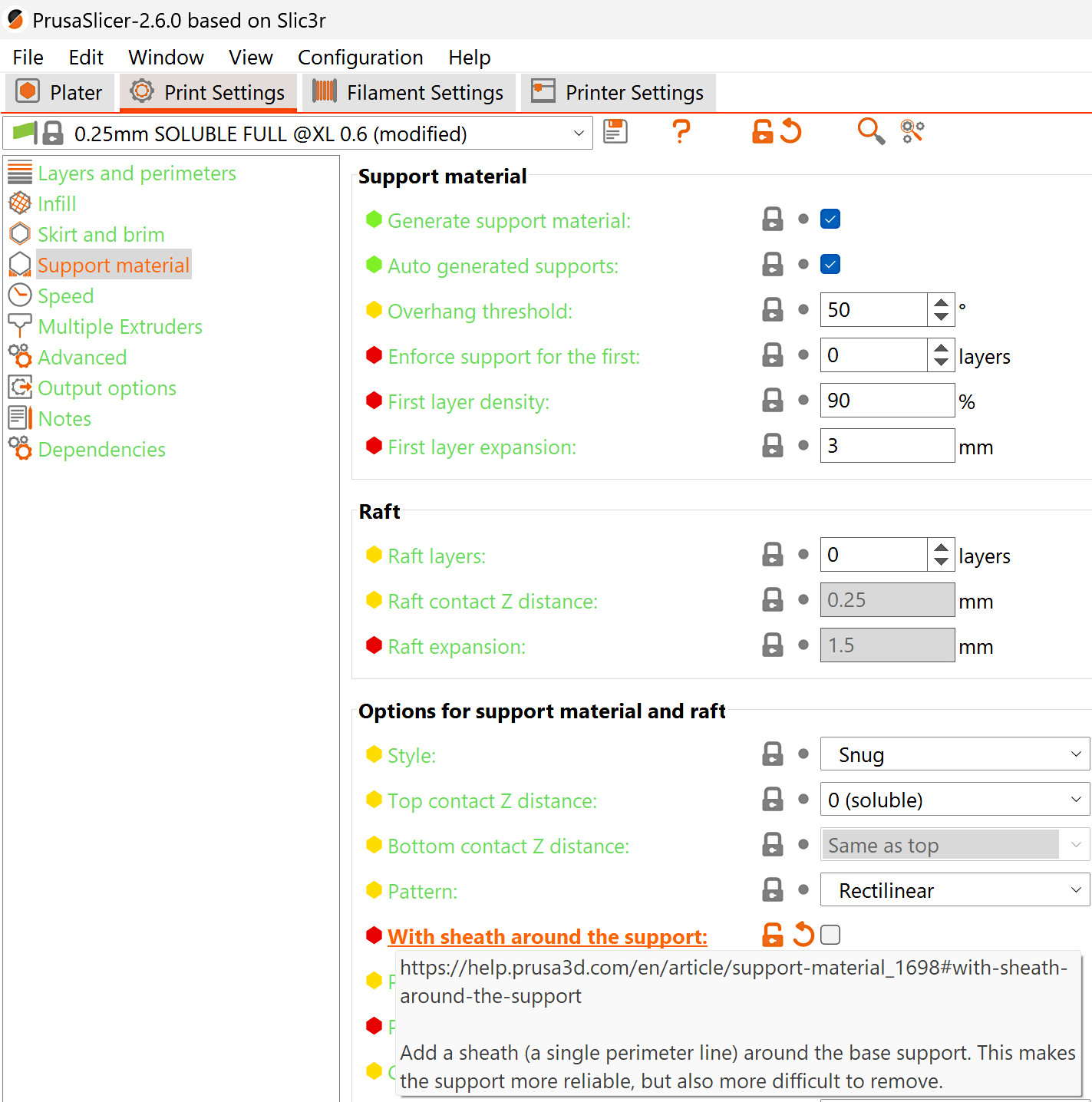
                  By default, the support material is set to be on Extruder 2. If needed, you can change this by selecting the support material/raft/skirt extruder and the support material/raft/interface extruder in Print Settings -> Multiple Extruders.

                  This feature can only be used with Organic Supports when using a Wipe tower. Changing the support extruder with any other support style than Organic will disable the wipe tower.
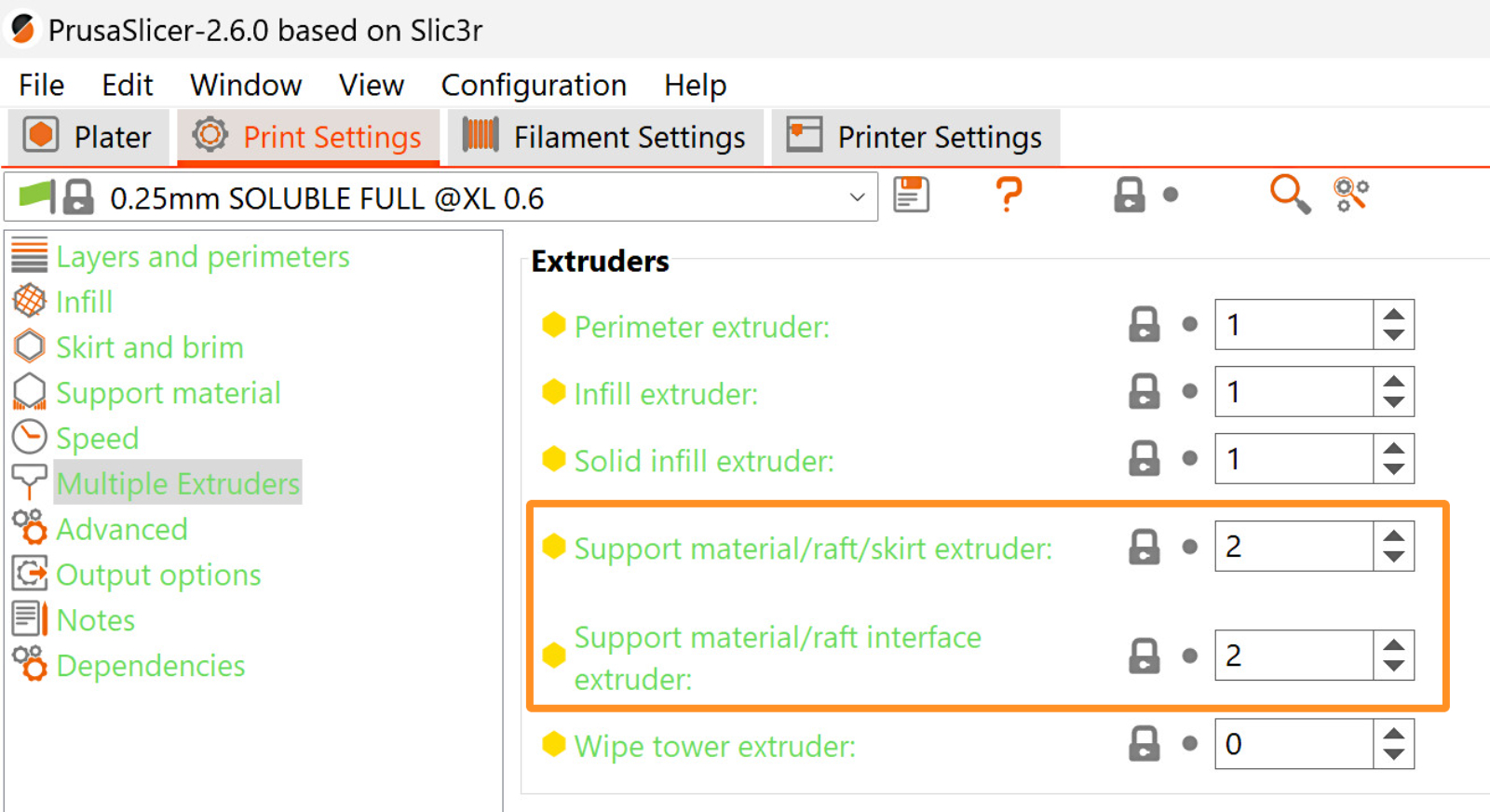
                  Flexible filament

                  Due to its softness, Flexible filaments need special attention when being loaded. If you decide to use a flexible filament, follow the instructions in the video below:

                  Other PrusaSlicer settings

                  Heatbed temperature

                  By default, on the first layer, the heatbed temperature is based on the first material loaded in the print; from the second layer onwards, it is based on the first filament that is loaded on the second layer. Depending on the filament combination, this can generate issues, such as a lack of adhesion. 

                  PrusaSlicer shows a warning in case the heatbed temperatures significantly differ. 
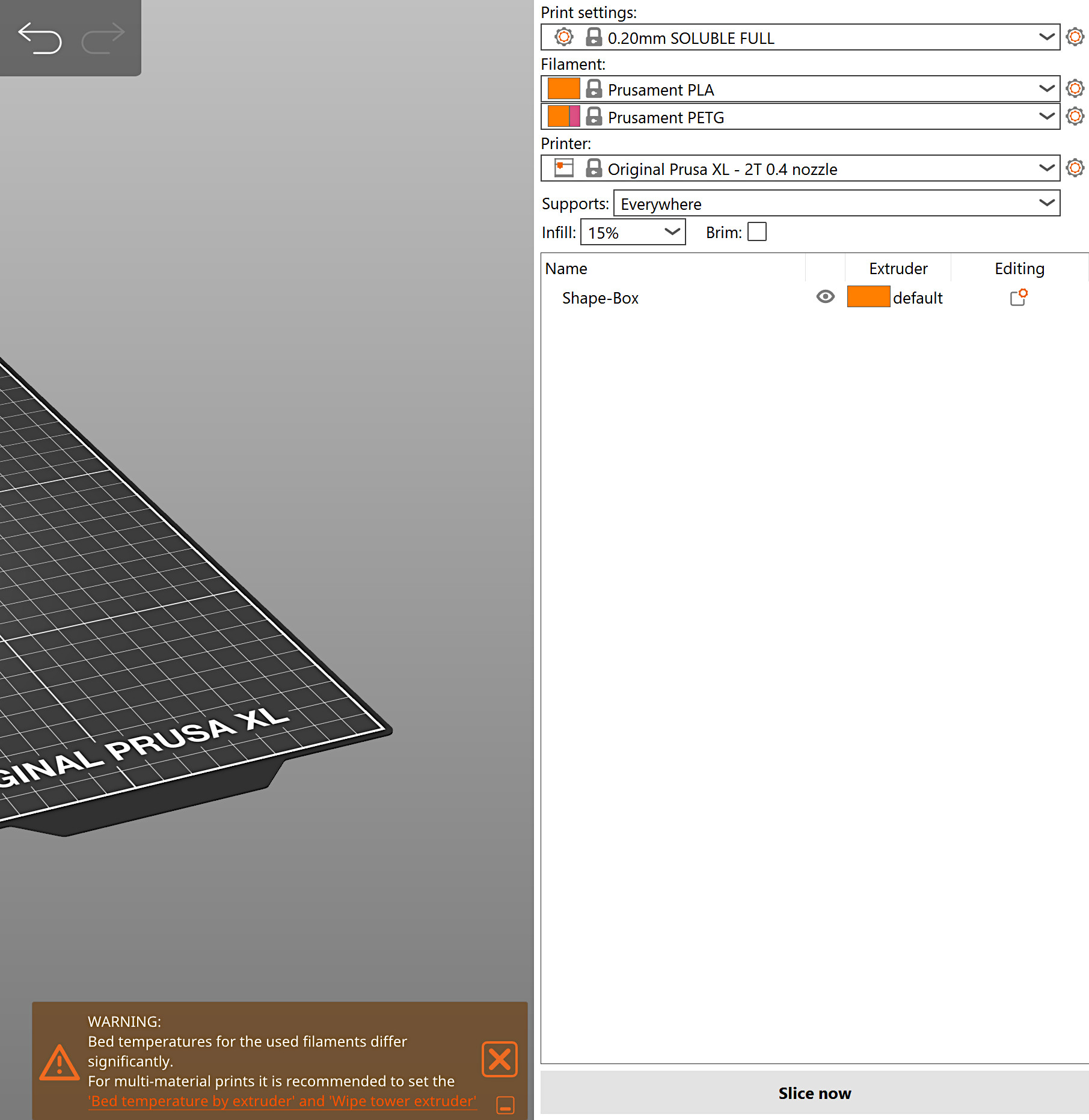
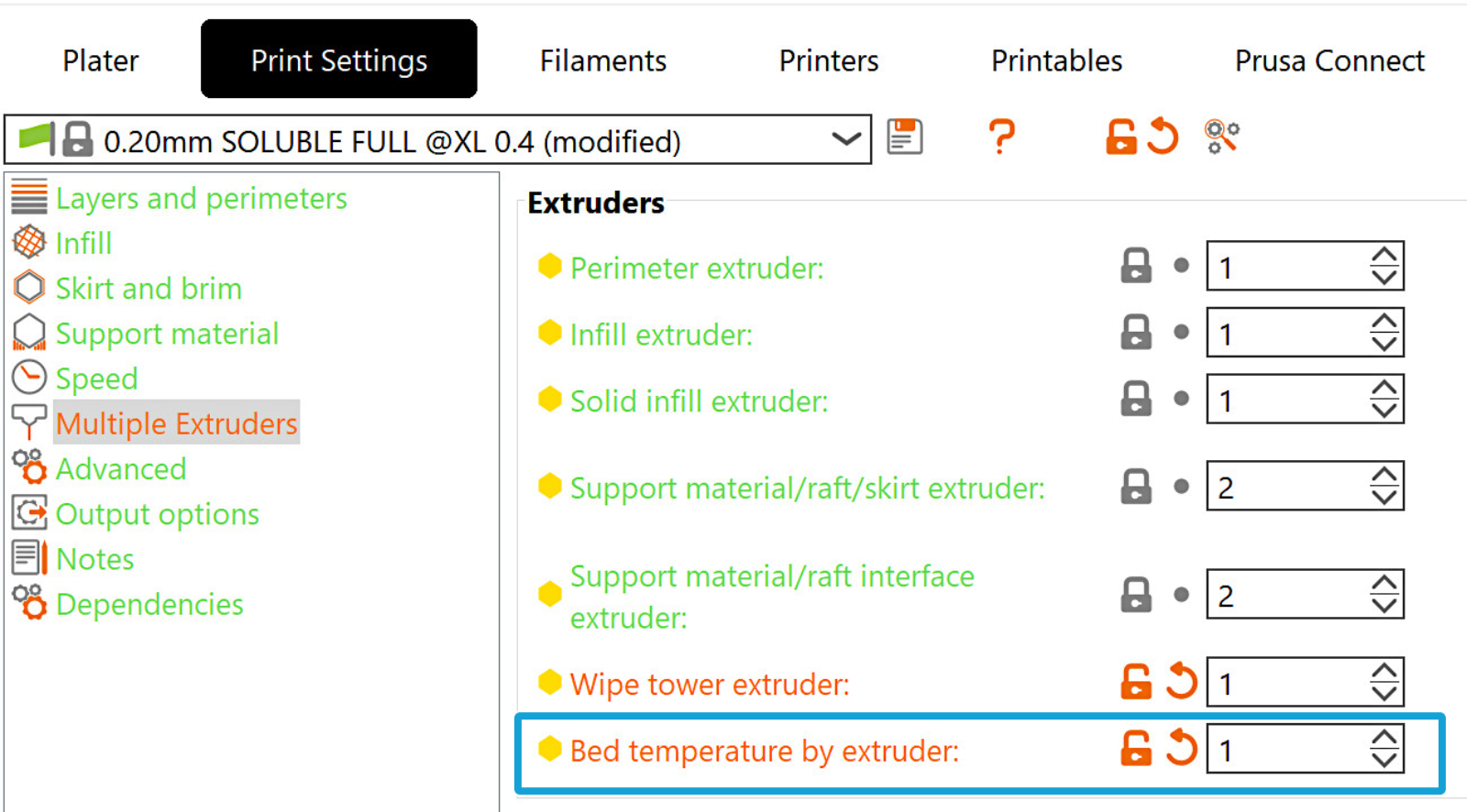
                  To modify this setting, navigate to the option in Print Settings -> Multiple Extruders -> Extruders -> Bed temperature by extruder.

                  The setting specifies the extruder to take the bed temperature from. Setting it to zero uses the default logic that the first layer temperature is always taken from the first printing extruder, and all other layers' bed temperature is taken from the first extruder that prints the second layer. 
                  Ooze prevention

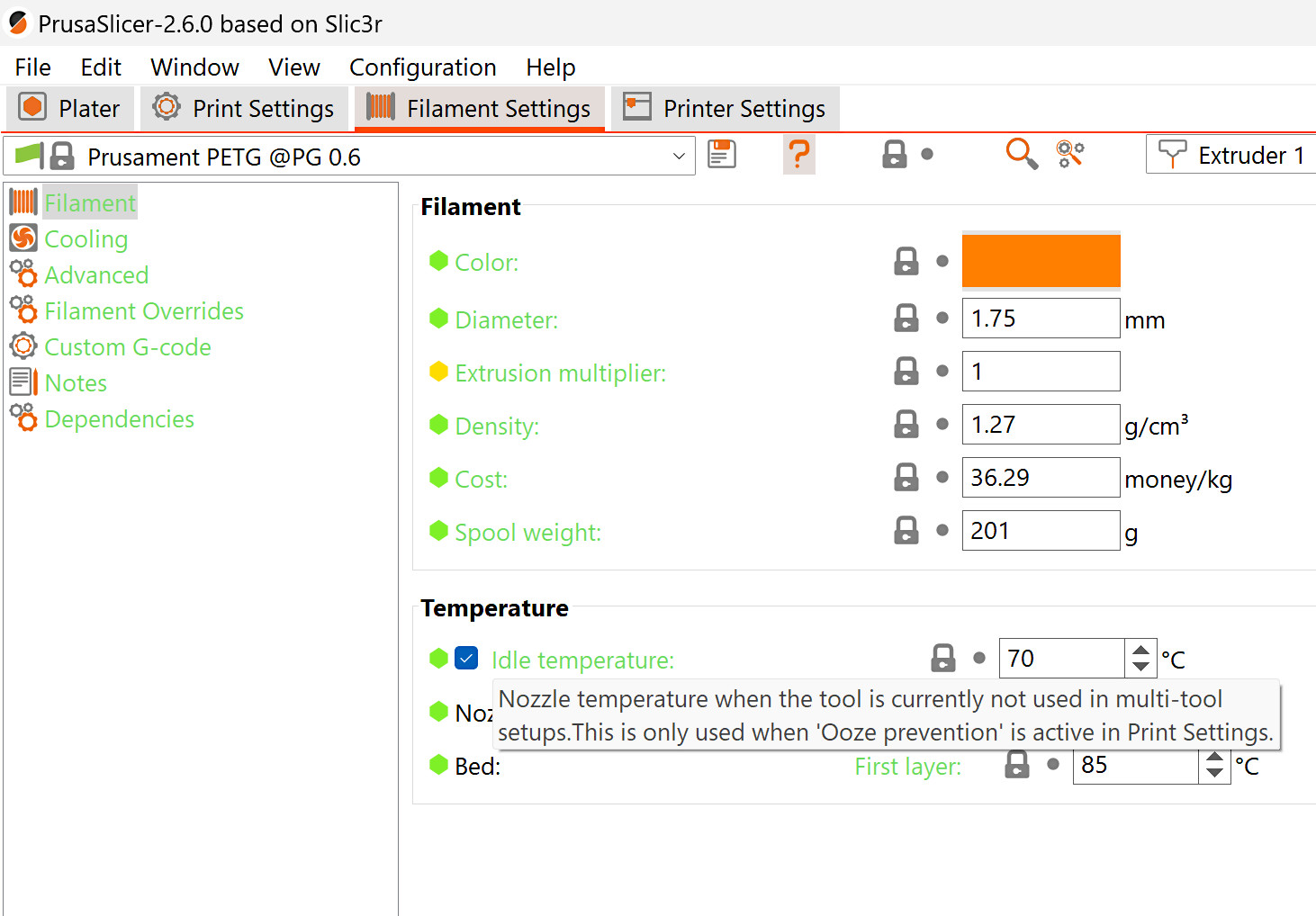
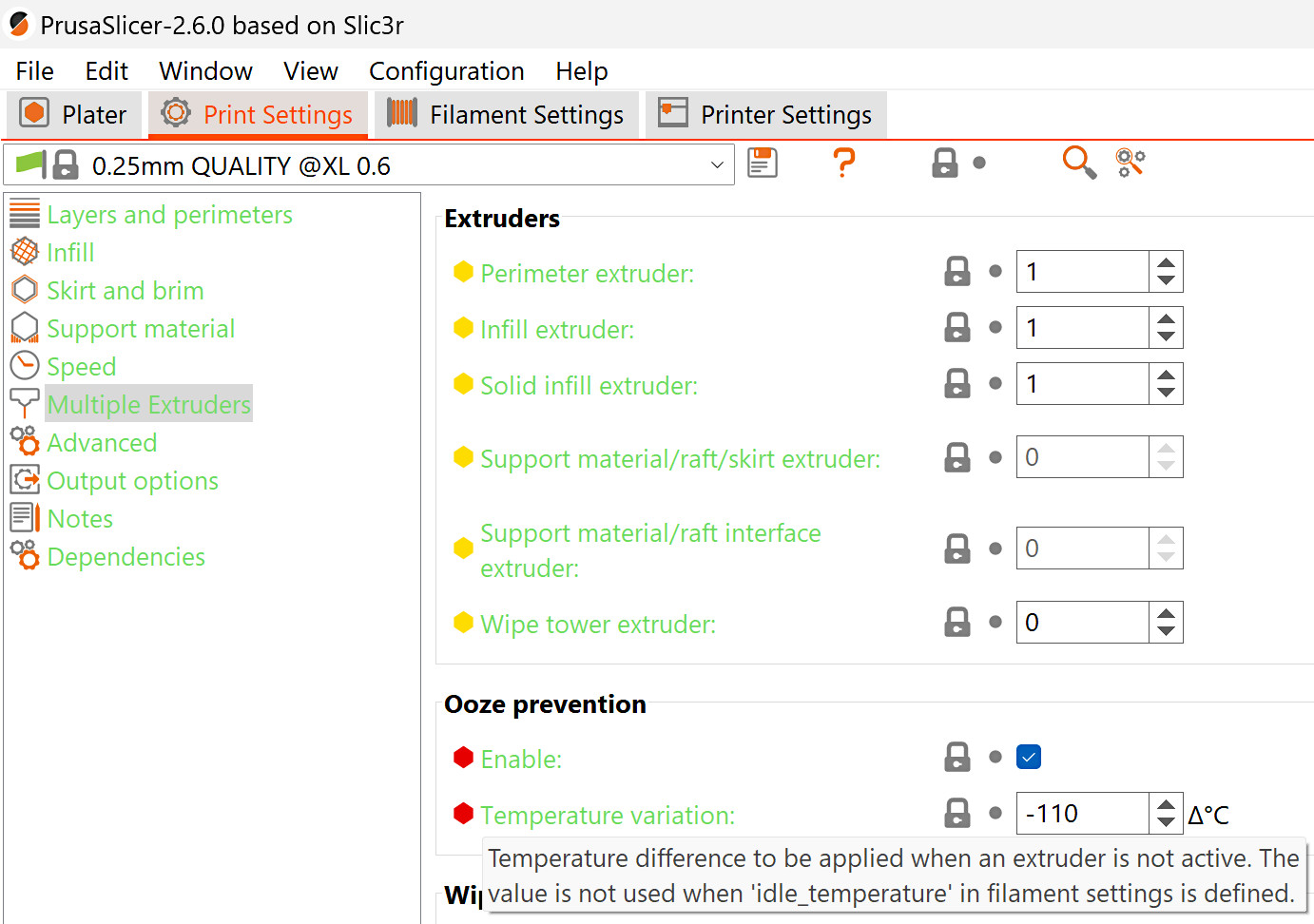
                  In PrusaSlicer, in Print Settings -> Multiple extruders, leave ooze prevention enabled. This will allow the idle temperature in Filament settings -> Filament -> Idle temperature to stay at the best idle temperature for the specific filament. The temperature in the idle temperature setting has priority over the temperature variation in the ooze prevention setting. 

                  If ooze prevention is disabled, all the extruders will stay at their print temperature during the whole print. This leads to significant oozing, material degradation in the melt zone, and possibly nozzle clogging. 
                  Considerations on support styles

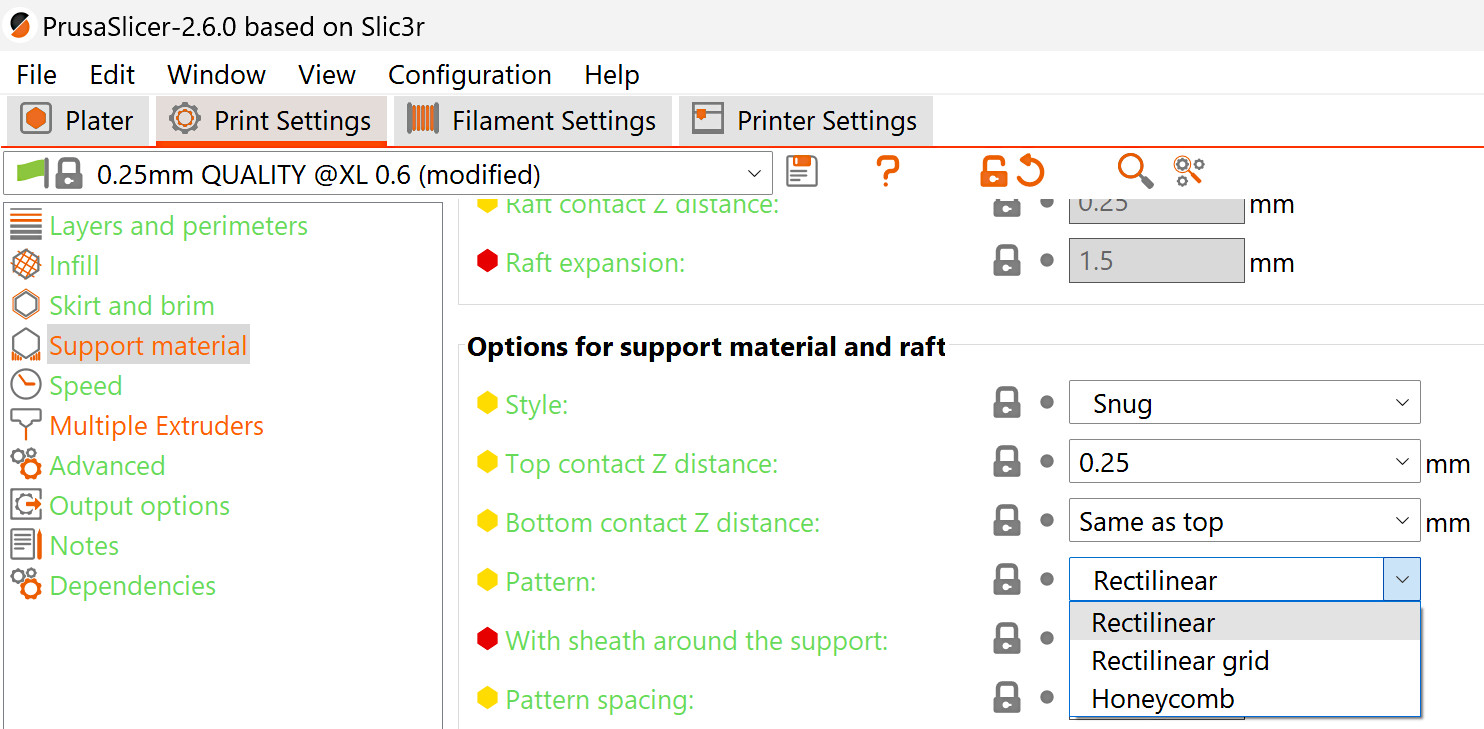
                  When using snug supports, check in the sliced object for parts of the support material that might be very tall and thin, as these might fall or break in the middle of the print. If you notice them in your sliced object, we recommend changing the support pattern, and/or changing the support style to grid. 
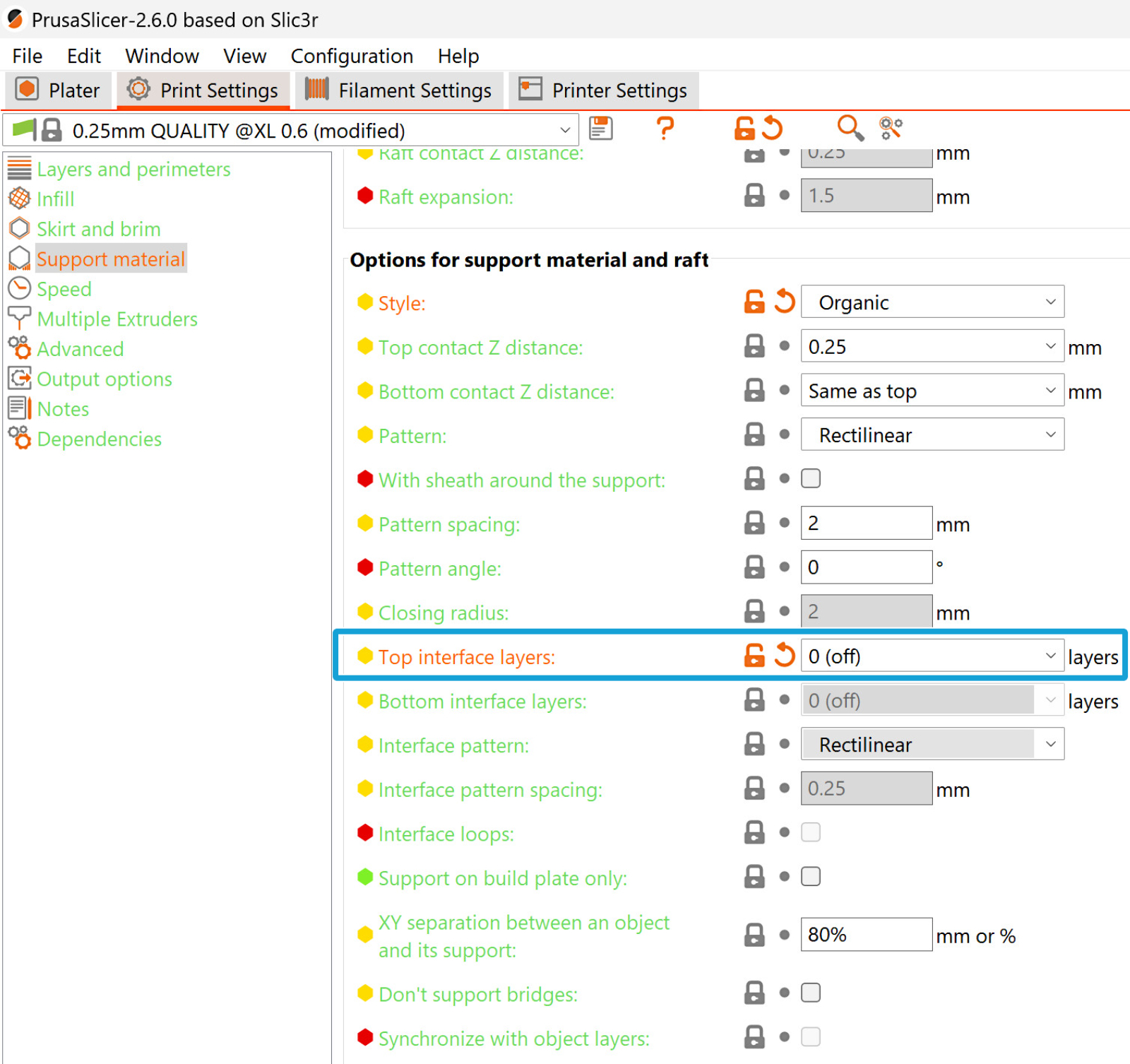
                  When using organic supports, don't use interface layers, or they will create unprintable artifacts.
                  Was this article helpful?
                  This action is available only to registered users. Please log-in.

                  Topics

                  • About your printer
                    • Printer description
                      • Tune menu (XL)
                      • LCD menu (XL/+ Single Tool)
                      • Combining materials (XL/+)
                      • LCD menu (XL/+ Multi Tool)
                      • Original Prusa XL/+ electronics
                      • Toolhead status LED explained (XL)
                    • Printer features
                    • General Information

                  12 comments

                  Log in  to post a comment
                  Geekware
                  •
                  Can you recommend TPU + PLA Supports. I am finding that TPU sticks nicely to PLA and if concerned about too much TPU adhesion to the bed, using the PLA as a raft works really well. However, I want to print PLA supports later in the print on top of the TPU and the first layer does not stick that well and sometimes ruins the support when it is only 3 layers high. Another thing, when PrusaSlicer slices, it sometimes start at the outer edge of the support than the middle, and the outer extends one extrusion width beyond the TPU layer below it, which also causes the support to fail. Can this overhange be altered? Any suggestion?
                  Reply
                  suhas alkunte
                  •
                  Hi Geekware:

                  Did you get any leads?
                  Reply
                  Kurt Gluck
                  •
                  For your "Wipe tower extruder" section, you say to pick an extruder for the "structure" of the wipe tower. As an alternative you can pick an extruder NOT to be used for the structure of the wipe tower. You do this by marking that extruders fillament "Soluble" fillaments->whichone->advanced->soluble material CHECK
                  Reply
                  Gene
                  •
                  I am confused by the "Bed Temperature" section. It says that when set to zero, the default temp will be the bed temp for the first extruder used. It briefly mentions different combinations of material can create issues. Maybe a short discussion of different material combinations can be included to help illustrate those issues.

                  Then in the next paragraph it goes on to repeat the first. :/

                  Questions
                  1) What I really want to know is if I am using PETG support material for PLA print, should I then set the bed temp to that of PETG?
                  2) What is the consequence for the PLA material? Does that mean the model may not adhere to the bed properly?

                  You can probably replace the 2nd section (which is a repeat of the first paragraph) with answer to the above questions.

                  Comments and complaints aside, you guys do a great job overall with support. I hope my comments and replies above help others, as well. Thanks!
                  Reply
                  gaaZolee
                  •
                  I print organic support with interface layers. I use Polymakers PolySupport for PLA for them. Despite the last note in this doc it works nicely and very simple to detach the supports. I am using Heavy (3) to interface layers and to z contact layer 0 as it was soluble.
                  Reply
                  BMK
                  •
                  I am printing Prusament PETG and NinjaTek Chinchilla 75A TPE together, and the TPE needs a slower print speed. I know about the max volumetric speed override, but how does the mm^3/s translate to speed per mm/s? How can I set i.e 15mm/s print speed on the TPE alone?
                  Reply