This article describes the menu introduced with firmware 3.13.0 for the Original Prusa i3 MK3S.
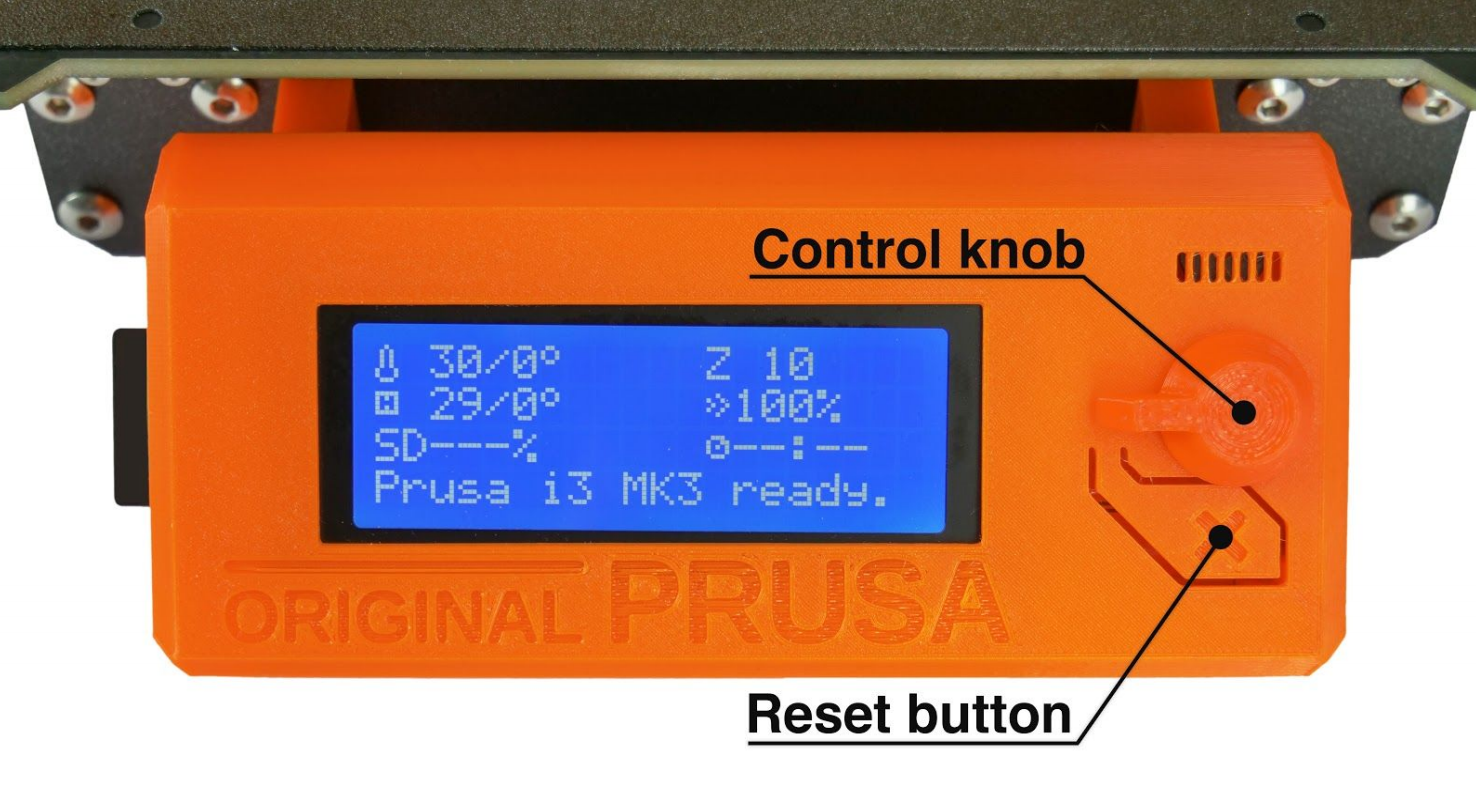
Controlling the LCD screen is done by a single control element: a rotational knob that you press to confirm the selection. By single pressing the control button on the information screen, you enter the main menu.
The reset button is placed directly under the control knob. Pressing the reset button equates to quickly toggling the power switch (hard reset). It is useful when the printer exhibits weird behavior or you see a failed print that requires immediate cancellation.
Shortcut: Quick access to Move Z-axis function - While on the Info-screen and not printing, press and hold the Control knob for 3 seconds. While printing, the same action will let you Live adjust Z for the first two millimeters.
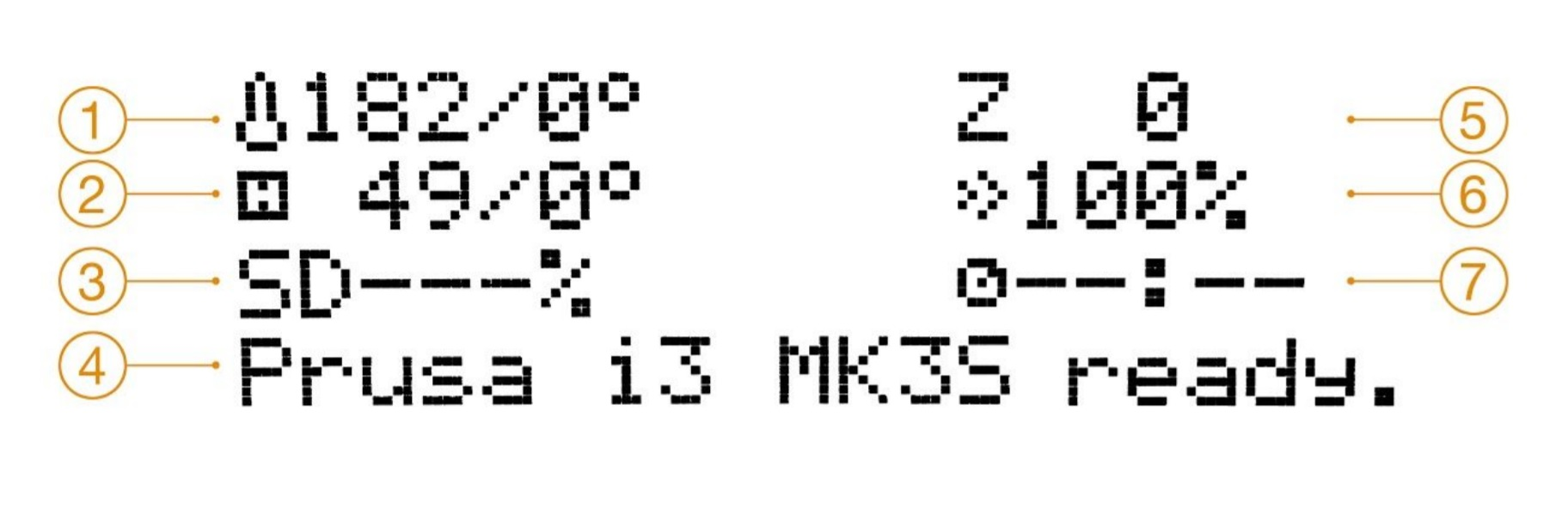
Nozzle temperature (actual / target temperature)
Heatbed temperature (actual / target temperature)
Progress of printing in % - shown only during the printing
Status bar (Prusa i3 MK3S ready. / Heating / file_name.gcode, etc.)
Z-axis position
Printing speed (default 100 %)
Remaining time estimation
Shortcut: Quick access to change Printing speed - While on the Info-screen, spin the knob either direction, more than one rotation, and see the percentage change.
Hierarchy of the LCD-menu
Info screen (Main info-screen)
Preheat
PLA - 215/60
PET - 230/85
ASA - 260/105
PC - 275/110
PVB - 215/75
PA - 275/90
ABS - 255/100
HIPS - 220/100
PP - 254/100
FLEX - 230/50
Cooldown
Live adjust Z (during the printing process only)
Tune (during the printing process only)
Speed
Nozzle
Bed
Fan speed
Flow
Change filament
Fil. sensor
Fil. sensor [On/Off]
Fans check - On / Off
Mode - Normal / Stealth
Crash detection - On / Off
Sound - Loud / Once / Silent / Assist
Brightness (only printers manufactured Q3/2019 and newer, Einsy 1.1a)
Level Bright - default 130 (50 - 255)
Level Dimmed - default 50 (0 - 130)
Mode - Auto / Bright / Dim
Timeout - default 10 (1 - 999)
Pause print (during the printing process only)
Stop print (during the printing process only)
Print from SD
Preload to MMU (Only available when the MMU is installed)
Load all
Load Filament 1
Load Filament 2
Load Filament 3
Load Filament 4
Load Filament 5
Load to Nozzle (Only available when the MMU is installed)
Load filament
Unload filament
Eject from MMU (Only available when the MMU is installed)
Eject from MMU 1
Eject from MMU 2
Eject from MMU 3
Eject from MMU 4
Eject from MMU 5
Cut Filament (Only available when the MMU is installed)
Cut Filament 1
Cut Filament 2
Cut Filament 3
Cut Filament 4
Cut Filament 5
Settings
Temperature
Nozzle
Bed
Fan speed
Move axis
Move X
Move Y
Move Z
Extruder
Disable steppers
Filament sensor
Fil. sensor - On / Off
F. runout - On / Off
F. autoload - On / Off
FS action - Cont. / Pause
MMU - On / Off
Reset MMU (Only available when the MMU is installed)
Spooljoin - On / Off (Only available when the MMU is installed)
Cutter - On / Off (Only available when the MMU is installed)
MMU mode [Normal/Stealth]
Fans check - On / Off
Mode - Normal / Stealth
Crash detection - On / Off
HW setup
Steel sheets
Nozzle d. - 0.25 / 0.40 / 0.60 / 0.80
Nozzle change
Checks
Nozzle - warn / strict / none
Model - warn / strict / none
Firmware - warn / strict / none
FS Action - Pause / Continue
Fsensor detection
Experimental (Within HW setup, hold the selector knob for 2-3 seconds to unlock)
ALTFAN det. - On / Off
E-cool mode - On / Off
Fake serial number
Mesh bed leveling
Mesh 3x3 / 7x7
Z-probe nr. 1 / 3 / 5
Magnets comp. - On / Off
Lin. correction
PINDA cal. - On / Off (only if the printer has the P.I.N.D.A. V2, not SuperPINDA)
RPi port - On / Off
Live adjust Z
Select language
SD card - Normal / FlashAir
Sort - Time / Alphabet / None
Sound - Loud / Once / Silent / Assist
Brightness (only printers manufactured Q3/2019 and newer, Einsy 1.1a)
Level Bright - default 130 (50 - 255)
Level Dimmed - default 50 (0 - 130)
Mode - Auto / Bright / Dim
Timeout - default 10 (1 - 999)
HBed on load - Yes / No
Calibration
Wizard
First layer calibration
Auto home
Belt test
Selftest
Calibrate XYZ
Calibrate Z
Mesh Bed Leveling
Bed level correction
PID Calibration
Reset XYZ calibration
PINDA cal.
Thermal Model cal.
Statistics
Fail stats
Last print
Total
Fail Stats MMU (Only available when the MMU is installed)
Last Print
Total
Material Changes
Support
Firmware version
Fil. sensor v.
XYZ calibration detail
Extruder info
Sensor info
Belt status
Temperatures
Voltages
Dump memory
Was this article helpful?
This action is available only to registered users. Please log-in.