Prusa
  • SHOP
    • Latest products
    BY CATEGORY
    • 3D printersnew
    • 3D printer upgradesnew
    • Materials
    • Accessories
    • Spare parts
    • Courses
    • Merch
    • Get a price quote
    QUICK LINKS
    • Shipping & delivery
    • Returns & refunds
    • Payment & financing
    • Warranty
    • VAT & Customs fees
    • FAQ

    0 item in your cartitems in your cart

    Your cart is empty

    Go to cartShop 3D printers

    My profile

    Log in to see orders, saved items

    My profile

    Signed in as

    • Orders
    • Logout
  • 3D PRINTING
    • Explore 3D printing
    FOR BEGINNERS
    • 3D printing 101
    • How FDM printing works
    • Buying your first printer
    • 3D model catalog
    BY APPLICATION
    • Rapid prototyping
    • Manufacturing
    • Engineering
    • Research
    • Arts & design
    GO DEEPER
    • Materials guide
    • Courses
    • Webinars
    • Case studies
    • Custom 3D printing
  • 3D PRINTERS
    • All 3D printers
    FOR
    • Home or garageHobbyists, tinkerers and home printing
    • BusinessIn-house production for small teams
    • EnterpriseFleets, security and scale
    • Which Prusa is right for me
    SHOP & BROWSE
    • CORE One+new
    • CORE One+ INDXnew
    • CORE One L+new
    • CORE One L+ INDXnew
    • XL+new
    • MK4S
    • Prusa Pro HT90
    • Prusa Pro AFS
    • Prusa Pro SLX
    MORE FROM PRINTERS
    • Parts & upgradesnew
    • Critical infrastructure
    • Case studies
    • Signature Oak
    • Kits
  • MATERIALS
    • All materials
    BY USE
    • Every-day & design
    • Functional engineering
    • Composites
    • Pro speciality
    • SLA resins
    PRUSAMENT
    • PLA
    • PETG
    • ASA
    • PC
    • PA11
    • Flex
    • TPU
    MORE FROM MATERIALS
    • Materials guide
    • We make material in house
    • Sustainability
    • Order on the store
  • SOFTWARE
    • All software
    PREPARE THE PRINT
    • PrusaSlicer 3.0New
    PRINT & MONITOR
    • Prusa Connect
    • EasyPrint
    • iOS & Android app
    • Prusa Farm
    GET STARTED
    • Download & install
    • Knowledge base
    MORE FROM SOFTWARE
    • 3D model catalog
  • SUPPORT
    • Explore support
    FIND ANSWERS
    • Knowledge base
    • Troubleshooting
    • Courses
    • Webinars
    GET HELP
    • Contact us
    • Livechat
    • Shipping & delivery
    • Warranty
    • Returns & refunds
    • Service & spare parts
    • Service & Repair
    COMMUNITY
    • Forum
    • Reddit
    • Printables
  • TRUST CENTER
    • Trust Center overview
    BY TOPIC
    • GDPR
    • Certificates
    • Security
    • Compliance
    COMMITMENTS
    • Sustainability report
    TALK TO US
    • Contact the security team
  • COMPANY
    • About Prusa
    GET TO KNOW US
    • Our story
    • How we make printers
    • Open source
    • Brand & media kit
    NEWS
    • Blog
    • Newsroom
    • Events
    TRUST & PARTNERS
    • Sustainability
    • Resellers & distributors
    • Affiliate program
    • Contact
    • English
    • Čeština
    • Deutsch
    • Español
    • Français
    • Italiano
    • Polski
    • 日本語
  • Signed in as

    • Orders
    • Address
    • In-stock Alerts
    • My Courses
    • Subscription
    • Edit Account
    • Logout

Log in to see orders, saved items

Signed in as
  • Orders
  • Address
  • In-stock Alerts
  • My Courses
  • Subscription
  • Edit Account
  • English
  • Čeština
  • Deutsch
  • Español
  • Français
  • Italiano
  • Polski
  • 日本語
Shop

0 item in your cartitems in your cart

Your cart is empty

Go to cartShop 3D printers

My profile

Log in to see orders, saved items

My profile

Signed in as

  • Orders
  • Logout
SHOP
  • Latest products
BY CATEGORY
  • 3D printersnew
  • 3D printer upgradesnew
  • Materials
  • Accessories
  • Spare parts
  • Courses
  • Merch
  • Get a price quote
QUICK LINKS
  • Shipping & delivery
  • Returns & refunds
  • Payment & financing
  • Warranty
  • VAT & Customs fees
  • FAQ

Featured products

    Popular categories

      Trending searches

        Articles

          Blog

            Products

              Categories

                Suggested searches

                  Searching…
                  No results
                  Something went wrong.
                  ↑↓ Select↵ OpenEsc Close search
                  1. Support
                  2. Prusa CORE One L+
                  3. Basic calibration
                  4. Gearbox alignment (CORE One L, CORE One, XL, MK4/S, MK3.9/S)
                   

                  Blog

                  • Print colorful and glowing Halloween decorations with our spooky offer
                  • Factorio Has Arrived on Printables
                  • Prusament PLA Lightweight: 65% lighter than regular PLA. Perfect choice for aircraft, cosplay, and more.

                  Newsletter

                  Signup and get our monthly squeeze on updates, blog, printables and much more.

                  By clicking, you agree to receive our newsletter.

                  This site is protected by reCAPTCHA Enterprise and the Google Privacy Policy and Terms of Service apply.

                  Factorio Transport Belts
                  E-shop
                  • 3D Printers
                  • Printer Upgrades
                  • Filaments
                  • Accessories
                  • Prusa Merchandise

                  © Prusa Research a.s.

                  Printables
                  • 3D Models
                  • Store
                  • Clubs
                  • 3D Design Contests
                  • Brands
                  Community
                  • World Map
                  • Forum
                  • User Groups
                  • Events
                  Help
                  • Prusa Help
                  • Prusa Academy
                  • 3D Printing Calculators
                  Software
                  • PrusaSlicer
                  • Prusa.app
                  • Prusa Connect
                  • Drivers and Software
                  Company
                  • About Us
                  • Blog
                  • Official Prusa Resellers
                  • Contact Us
                  • Certified for ISO 9001, ISO 14001, ISO 45001
                  • General Terms and Conditions
                  • General Terms and Conditions of Use of the PRUSA Websites
                  • Privacy Policy
                  • Information about cookies
                  • Customer Complaints Policy
                  • Status Page
                  • Do Not Sell or Share My Personal Information
                  • Supplemental Statements
                  • General Terms and Conditions
                  • General Terms and Conditions of Use of the PRUSA Websites
                  • Privacy Policy
                  • Information about cookies
                  • Customer Complaints Policy
                  • Status Page
                  • Do Not Sell or Share My Personal Information
                  • Supplemental Statements

                  © Prusa Research a.s.

                  JOSEF PRUSA®, PRUSA RESEARCH®, PRUSA POLYMERS®, PRUSA ORANGE®, PRUSA 3D ® AND PRUSAMENT® are registered trademarks of Prusa Development a.s. used by Prusa Research a.s. under licence from Prusa Development a.s.

                  Gearbox alignment

                  (CORE One L, CORE One, XL, MK4/S, MK3.9/S)

                  Relevant for

                  CORE One family
                  MK4 family
                  XL family
                  MK3.9 family
                  9 comments
                  Article is also available in following languages
                  English
                  Čeština
                  Polski
                  Deutsch
                  Français
                  Español
                  Italiano
                  日本語

                  On the Prusa CORE One L, CORE One, Original Prusa MK4/S, MK3.9/S, and XL, a gearbox alignment is necessary for user-assembled or serviced gearboxes. This procedure is part of the Selftest or can be initiated from LCD menu -> Control -> Calibrations & tests -> Gears Calibration.

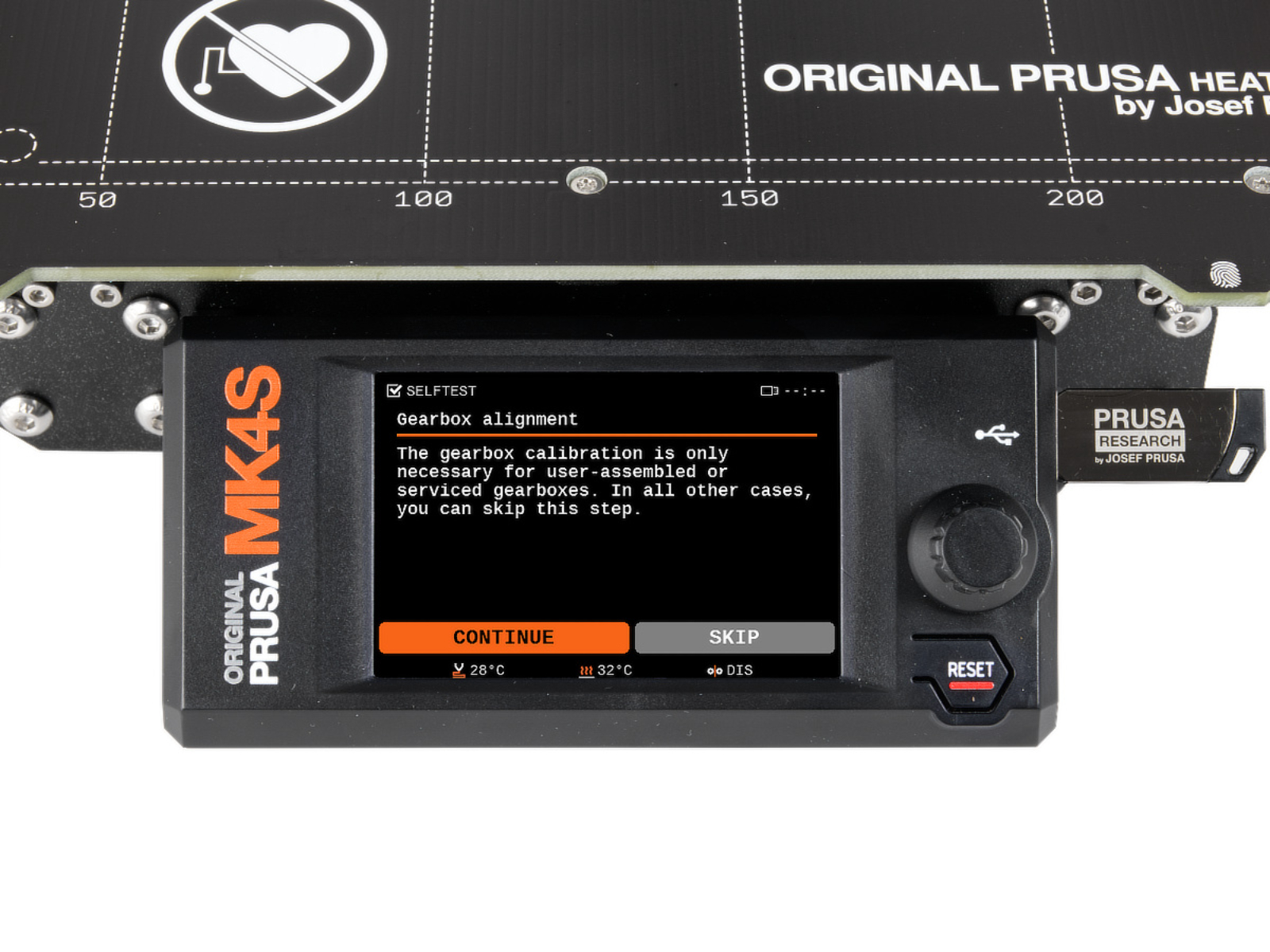
                  Once the procedure is initiated, the printer will prompt for the calibration to start. Press "Continue".

                  The CORE One L and XL do not need to go through the gear calibration on arrival, as it is pre-assembled, only if the extruder is disassembled and reassembled. The process is the same as for the CORE One and MK4/S, MK3.9/S pictured below.

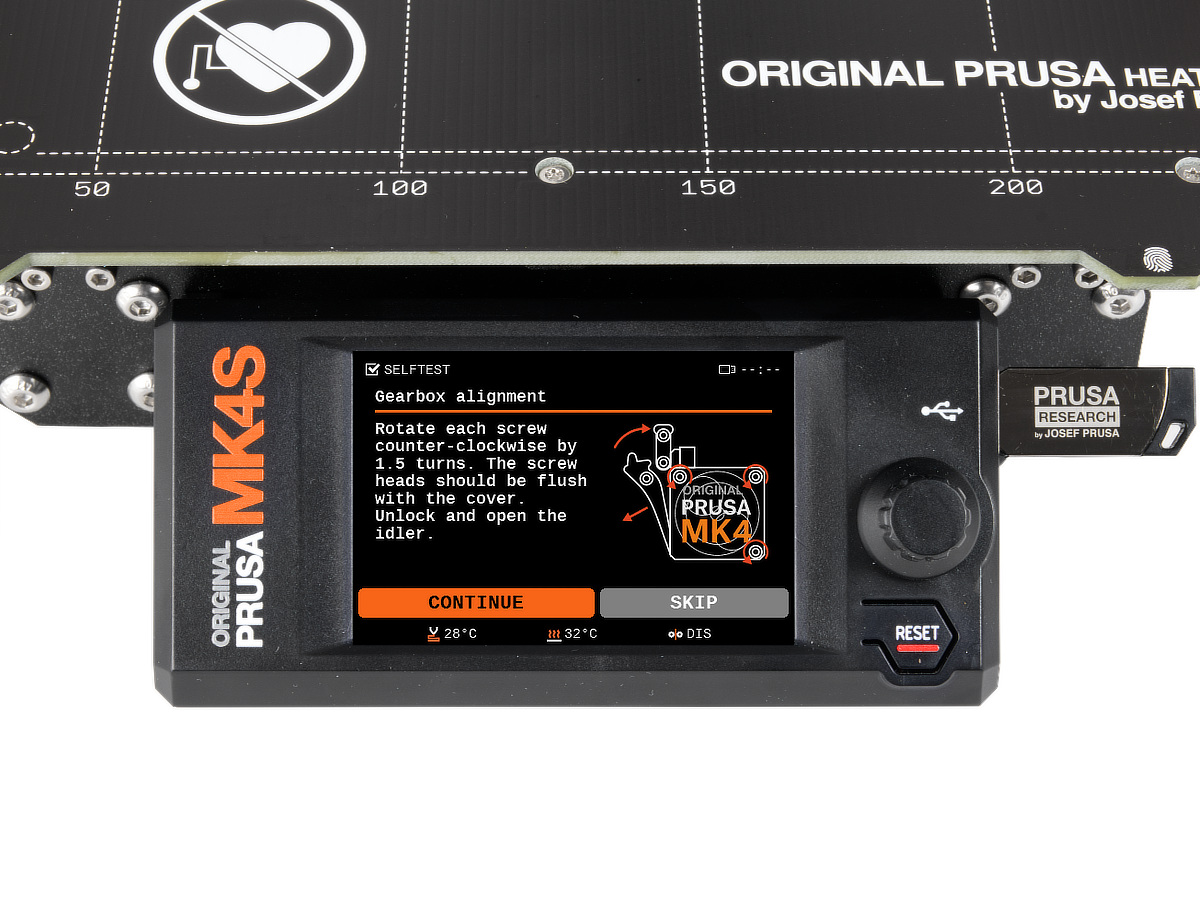
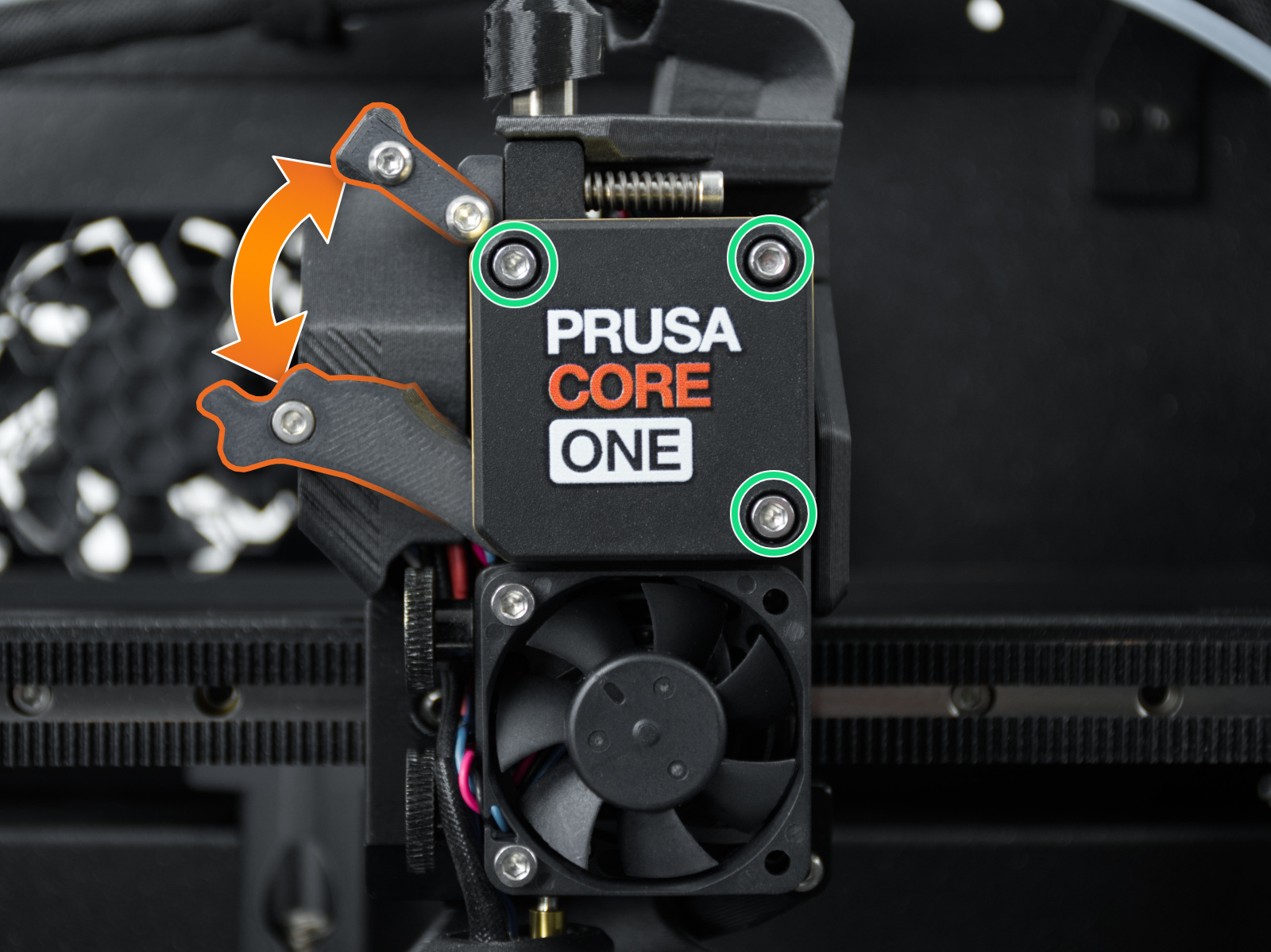
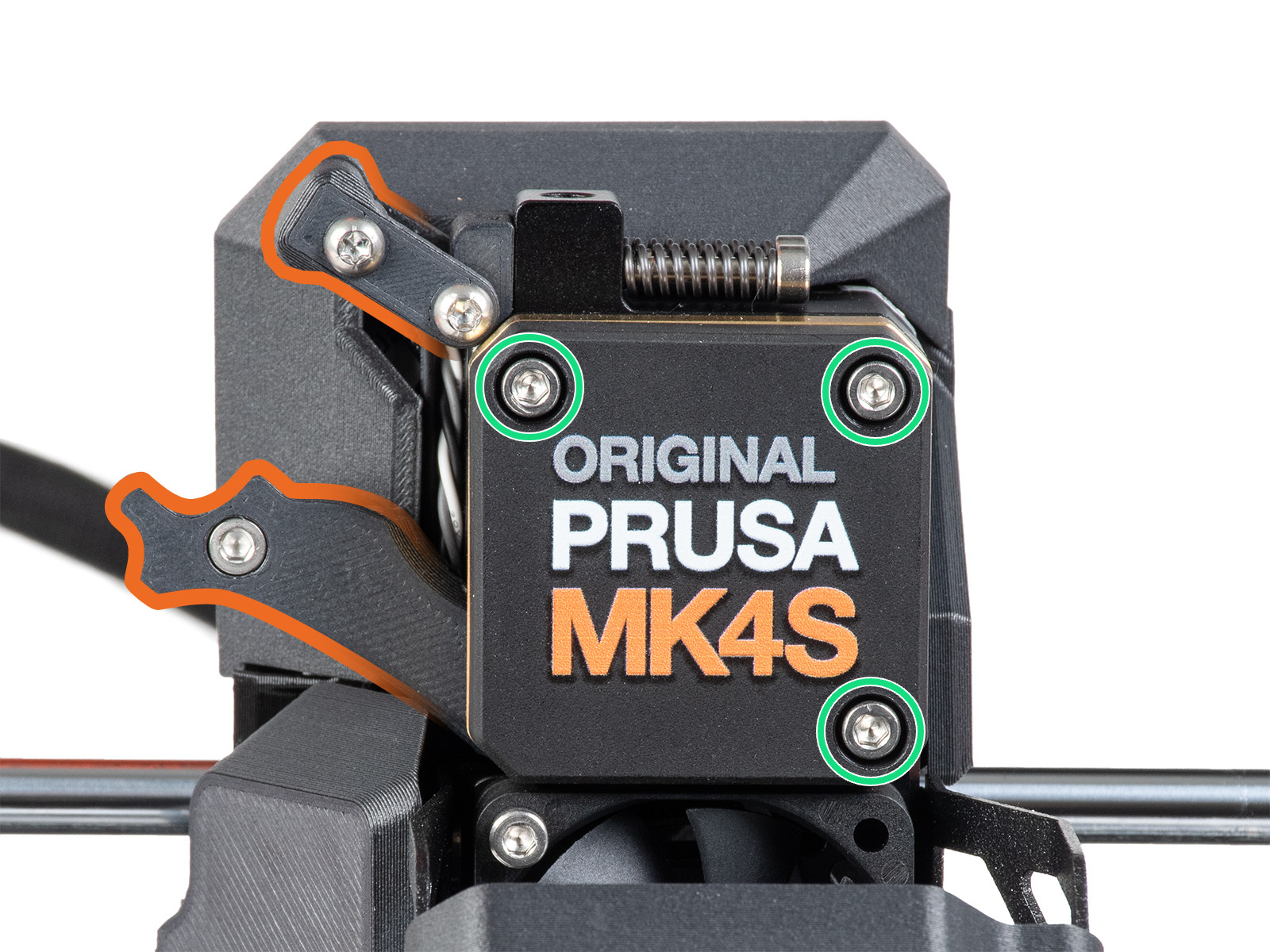
                  Slightly loosen the three bolts on the gearbox cover, by one turn and a half, then unlock and open the idler. When done, press "Continue". 
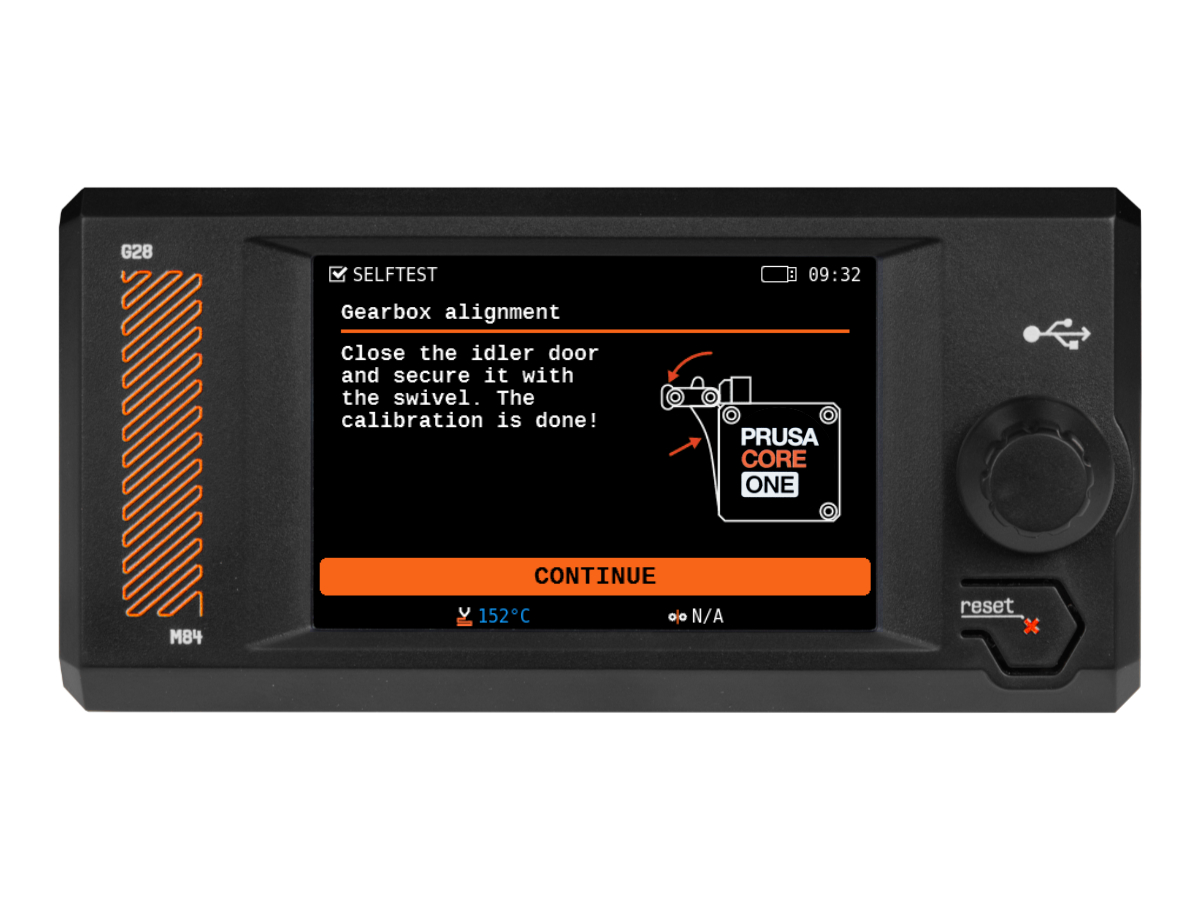
                  The printer will go through the automatic gearbox alignment. This process can’t be seen from the outside. Once prompted, tighten the three screws in the pattern indicated on the screen, and close the idler. 

                  Was this article helpful?
                  This action is available only to registered users. Please log-in.

                  Topics

                  • Calibration
                    • Basic calibration
                      • Mesh bed leveling
                      • Idler screw tension
                      • Selftest Failed (MK4/S, MK3.9/S)
                      • Gearbox alignment (CORE One L, CORE One, XL, MK4/S, MK3.9/S)
                      • Multi-tool manual calibration (XL)
                      • Door sensor calibration (CORE One, CORE One L)
                    • Advanced calibration
                    • Calibration Error Messages

                  6 comments

                  Log in  to post a comment
                  nmar
                  •
                  Note that the gearbox alignment on the Prusa XL is only available from FW 6.4.1 onwards, which is in pre-release still.
                  Reply
                  rwiggum
                  •
                  I really wish there was a video of this online -- this is _very noisy_ for me and I can't tell if it's a reasonable amount of noise or not. I have been debugging an issue with my Extruder motor, and already received a replacement for that, but the issue persists.
                  Reply
                  rrrrrkai
                  •
                  6.4.0 for XL has really bad layer shift and is not available anymore.
                  There is no gearbox alignment option for XL at the moment.
                  Reply
                  Sven Weidenmann
                  •
                  Used Ninja Flex and could not unload. Used Ninja flex before couple of times. Excellent support, guided me through this first time experiance not working of unload. In my case, i had to fully remove nextruder with gear. Did use the gear allignement tool (E1) which came with the MK4S upgrade Kit and makes the critical adjustment much easier. I did trust the 1.5 turn instruction and final adjustment did work. Using my MK4 since 2 years with lot of prints, upgraded 1 year ago to MK4s. I had a situation where i felt the 3 screws does not fit anymore perfect. Thats was solved once i did remove the hole assemebly and re-assembled it back.
                  Reply
                  ljhms
                  •
                  As someone noted in the comments of the Core One assembly kit: When the on-screen instructions tell you to "lightly" tighten the screws, they should still be snug. That is, they shouldn't be so loose that there is any play or that they work themselves out over time due to vibrations. Not doing it correctly was one source of random Z-banding/uneven layers on my machine that got worse over time, as the screws loosened. The point is that you shouldn't over-tighten anything. Not sure if the calibration detects it and warns you if you cause the mechanics to bind up or not, but finger-tight (using the small end of the allen key as a handle, putting only the lightest tension you can on the handle) seems enough.

                  One thing that isn't immediately obvious is that these screws are the only thing that fix the E-motor and gearbox assembly in space, relative to the extruder carriage and nozzle, so if there is any play in it, it could put uneven pressure on the filament, giving small variations in the extrusion.

                  I agree with the others about the directions on screen being contradictory when loosening them as well. Does it mean the top of the screw head should be flush with the cover plate, or the bottom? If it's the top, that's not possible, since unscrewing them 1.5 turns makes it poke out more than that (about half a millimeter, maybe). And making the bottom of the head flush would require significantly more turns. What I did was to follow the "1.5 turns" instruction and trust that. Maybe they mean you should pull out the (now loose) cover to make it flush with the screw heads?

                  In any case, after tightening them down again, the top of the screw heads are slightly below the surface of the cover. Not much, but half a millimeter at most.
                  Reply
                  sallyedge
                  •
                  It means that after you loosen the screws exactly 1.5 turns each, then pull the lid outwards so that the screw tops are flush. This gives the gears room to realign/center themselves.
                  Reply