AA

Featured products

    Popular categories

      Trending searches

        Articles

          Blog

            Products

              Categories

                Suggested searches

                  Searching…
                  No results
                  Something went wrong.
                  ↑↓ Select↵ OpenEsc Close search
                  • English
                  • Čeština
                  • Deutsch
                  • Español
                  • Français
                  • Italiano
                  • Polski
                  • 日本語
                  • Orders
                  • Address
                  • In-stock Alerts
                  • My Courses
                  • Subscription
                  • Edit Account
                  • 3D printers9+▾

                    3D printersnew

                    newPrusa CORE One L+Learn more
                    newPrusa CORE One+ (Gen 2)Learn more
                    newPrusa CORE One L+ INDX 8-ToolnewPrusa CORE One+ (Gen 2) INDX 8-ToolPrusa CORE One L+: Critical InfrastructureOriginal Prusa MK4SnewOriginal Prusa XL+Original Prusa XL+: Critical Infrastructure

                    Printer upgrades

                    newINDX Conversion KitsnewPrusa CORE One L to CORE One L+ upgradenewPrusa CORE One+ to Prusa CORE One+ (Gen 2)newPrusa XL to Prusa XL+ Upgrade
                    Prusa Reward ProgramLove your Prusa printer? Share your experience and earn $30 Prusa e-shop vouchers.
                    How to Choose a 3D Printer?We’ll walk you through the basics to find the exact machine for your space, budget, and ideas.
                    Free E-bookDownload a free e-book Basics of 3D Printing with Josef Prusa and make your first steps in 3D printing world
                    Original Prusa Printable PartsCollections of printable spare parts for Original Prusa 3D printers and upgrades.
                    Shipping informationRegularly updated info about the current manufacturing capacity and delivery times of our printers.
                    Custom 3D PrintingProfessional custom 3D printing from various materials according to your requirements.
                  • Materials▾

                    Filaments

                    PrusamentPLAPETGASA / ABSPC (Polycarbonate)PA (Nylon)FlexCompositesSpecialMaterials clearance sale

                    Resin

                    Prusament ResinResin Cleaner
                    Filament GuideCheck my Prusament Spool
                    Prusament.com
                  • Parts & Accessories▾

                    Accessories

                    EnclosuresNozzlesPrint SheetsEssential AccessoriesCameras & AddonsTools & CraftingAdhesives

                    Spare parts

                    Merchandise

                    Spare parts - All PrintersCORE OneMK4/S & MK3.9/SMK3/S/+XL
                    Merch
                  • For Business▾
                    Prusa Pro HT90Prusa Pro SLXPrusa Pro AFSPrusa Pro Medical OneOriginal Prusa XLOriginal Prusa XL: Critical Infrastructure
                    Prusa CORE One+Learn more
                    Prusa CORE One LLearn more
                    Prusa CORE One L: Critical Infrastructure Edition

                    3D Printing for

                    Manufacturing and R&DAutomotive IndustryHealthcareEducation and Academic ResearchArchitects and DesignersFilm IndustryCritical Infrastructure

                    3D Printing Stories

                    • How 3D printing started: About Rep-rap and open-source with Adrian Bowyer
                    • Teaching mathematics redefined with 3D printing at JKU Linz
                    • The story behind the LTT screwdriver
                    • Victoria Hand Project: Changing Prosthetic Care with 3D Printing
                    Official Prusa Resellers
                    Sustainability
                    Prusa Education
                    Contact and Inquiry
                    Custom 3D Printing
                    ISO Certified
                  • Software▾
                    PrusaSlicer

                    PrusaSlicerPrusaSlicer

                    PrusaSlicer is an open-source, feature-rich, frequently updated tool that contains everything you need to export the perfect print files for your 3D printer.

                    WindowsMacOSLinux
                    Prusa Connect

                    Prusa Connect

                    Prusa Connect is a cloud service enabling remote control and monitoring of your 3D printers, offering secure data handling, easy setup, and support for managing multiple printers from anywhere.

                    Log in to Connect
                    Prusa.app

                    Prusa.app

                    Control your printer/s remotely from anywhere using the Prusa Connect technology behind. Prusa.app brings a new level of Prusa printer experience to Android and iOS phones.

                    Try it now!
                    Drivers & FirmwareDownload the latest firmware and drivers for your 3D printer.
                    PrusaSlicer Support
                    Prusa Connect Support
                  • 3D Models▾
                    3D PrintersArt & DesignHobby & MakersHouseholdTabletop MiniaturesToys & GamesPrintables Store

                    Popular 3D models

                    • Strong garden hose holder
                    • Prusa Spool Bot
                    • Build Tray — Modular Organizer for Assembly, Disassembly and Maintenance
                    • Broom Holder
                    • Octagon Fabric
                    • Prusa CORE One ? (Mimic Skin)

                    Design Contests

                    • Framework Laptop 12 Mainboard Wiederverwendung9/1/2026 – 9/30/2026
                    • 🏆 Designer Herausforderung: Zaubertricks!9/1/2026 – 9/22/2026
                    • Make-up Aufbewahrungslösungen9/4/2026 – 9/20/2026
                  • Community▾

                    Upcoming Events

                    • IFA 20269/4/2026 – 9/8/2026 · Berlin, Germany · Prusa Team
                    • Maker Faire Bay Area9/25/2026 – 9/27/2026 · Kalifornie, United States · Prusa Team
                    • 3D Printopia 20269/26/2026 – 9/27/2026 · Pennsylvania, United States · Prusa Team
                    • Hobby Messe10/2/2026 – 10/4/2026 · Sachsen, Germany · Prusa Team

                    Prusa Forum

                    • Index Layer Shifts?
                    • firmware error - screen freeze
                    • Nozzle stuck with filament
                    Prusa World MapPrusa World MapFind local 3D printing users and explore the community around you.
                  • Help▾
                    Guides & TutorialsPrusaSlicerPrusa ConnectMaterials

                    Printer Model

                    CORE One INDXCORE One LCORE One+CORE One

                    Hardware Troubleshooting

                    • Selftest failed (CORE One/+)
                    • Clogged nozzle (CORE One, CORE One L, XL, MK4/S, MK3.9/S)
                    • Adjusting belt tension (CORE One/+, CORE One INDX, CORE One L/+)
                    • Prusa Connect and PrusaLink explained

                    Drivers & Firmware

                    INDX familyCORE One familyMK4 familyXL familyMMU familyPRO family
                  • Courses▾

                    Become an expert in 3D printing

                    Prusa Academy offers online courses on various 3D printing related topics. Each course features:

                    • easy-to-read text with many pictures and short videos
                    • links for inspiration and further study
                    • quizzes for testing your knowledge along the way
                    • certificate of completion
                    Browse all coursesMy courses library
                    • 3D Modeling in Autodesk Fusion
                    • PrusaSlicer Masterclass – Beginner to Advanced
                    • Complete Guide to 3D Print Postprocessing, Painting, and Detailing
                    • Airbrush Your 3D Prints: From Basics to Advanced Tricks
                  • Blog▾
                    • Prusament PLA ColorMix: Print 45 color shades using just five filament spools (and more)
                    • Back-to-School 2026 Deals Are Here!
                    • PrusaSlicer 3.0 Preview – Built for the Future of 3D Printing
                    E-Book: Basics of 3D Printing
                  • Company▾

                    About Prusa Research

                    We are the largest maker of 3D printers in Europe and the United States.

                    Founded as a one-man startup in 2012 by Josef Prusa, a Czech hobbyist, maker, and inventor. In just 15 years, we've grown into a company of more than 1,200 people. Every month, we design, build, and ship over 10,000 innovative and secure 3D printers from our headquarters in Prague, Czech Republic, and Delaware, USA, to users in more than 160 countries.

                    Watch a video and find out how Prusa Research was born and what we achieved within only 10 years!

                    About UsTimelineSustainabilityOpen-source
                    About Us
                    Contact Us
                    Logo and Photos
                    ISO Certified
                  1. Support
                  2. Basic calibration
                  3. Selftest Failed (MK4/S, MK3.9/S)
                   

                  Contents

                  • What it tests
                  • Troubleshooting

                  Blog

                  • Prusament PLA ColorMix: Print 45 color shades using just five filament spools (and more)
                  • Back-to-School 2026 Deals Are Here!
                  • PrusaSlicer 3.0 Preview – Built for the Future of 3D Printing

                  Newsletter

                  Signup and get our monthly squeeze on updates, blog, printables and much more.

                  By clicking, you agree to receive our newsletter.

                  This site is protected by reCAPTCHA Enterprise and the Google Privacy Policy and Terms of Service apply.

                  Strong garden hose holder
                  E-shop
                  • 3D Printers
                  • Printer Upgrades
                  • Filaments
                  • Accessories
                  • Prusa Merchandise

                  © Prusa Research a.s.

                  Printables
                  • 3D Models
                  • Store
                  • Clubs
                  • 3D Design Contests
                  • Brands
                  Community
                  • World Map
                  • Forum
                  • User Groups
                  • Events
                  Help
                  • Prusa Help
                  • Prusa Academy
                  • 3D Printing Calculators
                  Software
                  • PrusaSlicer
                  • Prusa.app
                  • Prusa Connect
                  • Drivers and Software
                  Company
                  • About Us
                  • Blog
                  • Official Prusa Resellers
                  • Contact Us
                  • Certified for ISO 9001, ISO 14001, ISO 45001
                  • General Terms and Conditions
                  • General Terms and Conditions of Use of the PRUSA Websites
                  • Privacy Policy
                  • Information about cookies
                  • Customer Complaints Policy
                  • Status Page
                  • Do Not Sell or Share My Personal Information
                  • Supplemental Statements
                  • General Terms and Conditions
                  • General Terms and Conditions of Use of the PRUSA Websites
                  • Privacy Policy
                  • Information about cookies
                  • Customer Complaints Policy
                  • Status Page
                  • Do Not Sell or Share My Personal Information
                  • Supplemental Statements

                  © Prusa Research a.s.

                  JOSEF PRUSA®, PRUSA RESEARCH®, PRUSA POLYMERS®, PRUSA ORANGE®, PRUSA 3D ® AND PRUSAMENT® are registered trademarks of Prusa Development a.s. used by Prusa Research a.s. under licence from Prusa Development a.s.

                  Selftest Failed

                  (MK4/S, MK3.9/S)

                  Relevant for

                  MK4
                  MK3.9
                  MK4S
                  MK3.9S
                  40 comments
                  Article is also available in following languages
                  English
                  Čeština
                  Polski
                  Deutsch
                  Français
                  Español
                  Italiano
                  日本語

                  When you first turn on your Original Prusa MK4/S, MK3.9/S printer, it will start a selftest to verify the most common components of the printer. 

                  Make sure that your Firmware is always up to date in our Downloads page

                  What it tests

                  The printer goes through the following procedures:

                  • Hotend fan check
                  • Print fan check
                  • Switched fans check
                  • Loadcell test
                  • X-axis check
                  • Y-axis check
                  • Z-axis check
                  • Nozzle heater check
                  • Heatbed heater check
                  • Gearbox alignment
                  • Filament sensor test

                  The Loadcell test, Gearbox alignment, and Filament sensor test need user input, so stay near the printer for these parts of the selftest.

                  Troubleshooting

                  Fans

                  During the fans test, the RPM of each fan is shown on the bottom of the screen. Check and take note of the values. The expected maximum values are in the range of 7500-8000 RPM for the heatsink fan, and 5500-5900 RPM for the print fan. 

                  In case one of the fans fails the selftest, verify if there is nothing blocking the rotation of the fans, as debris might get between the blades. Bigger parts can be cleared with tweezers, and dust can be cleared with a computer cleaner spray.

                  Hold the fan with your hand while using the compressed air. Otherwise, you might damage the blades.
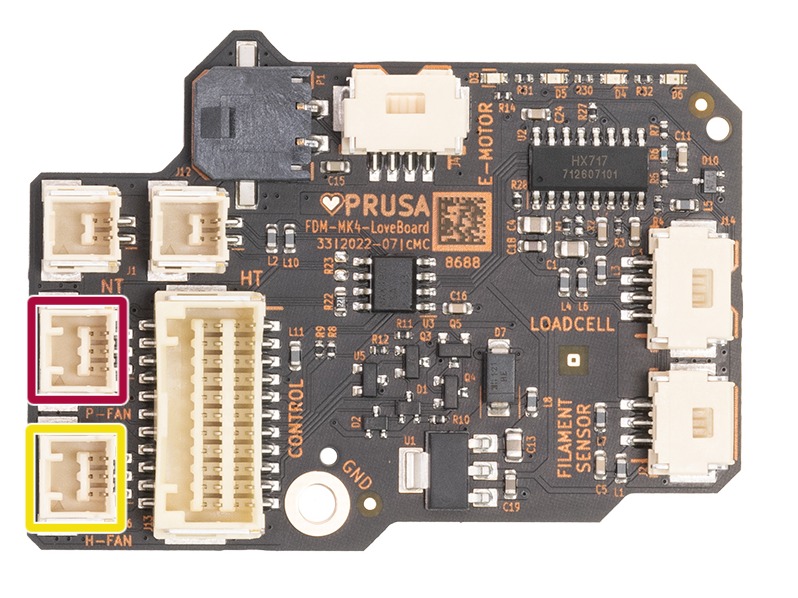
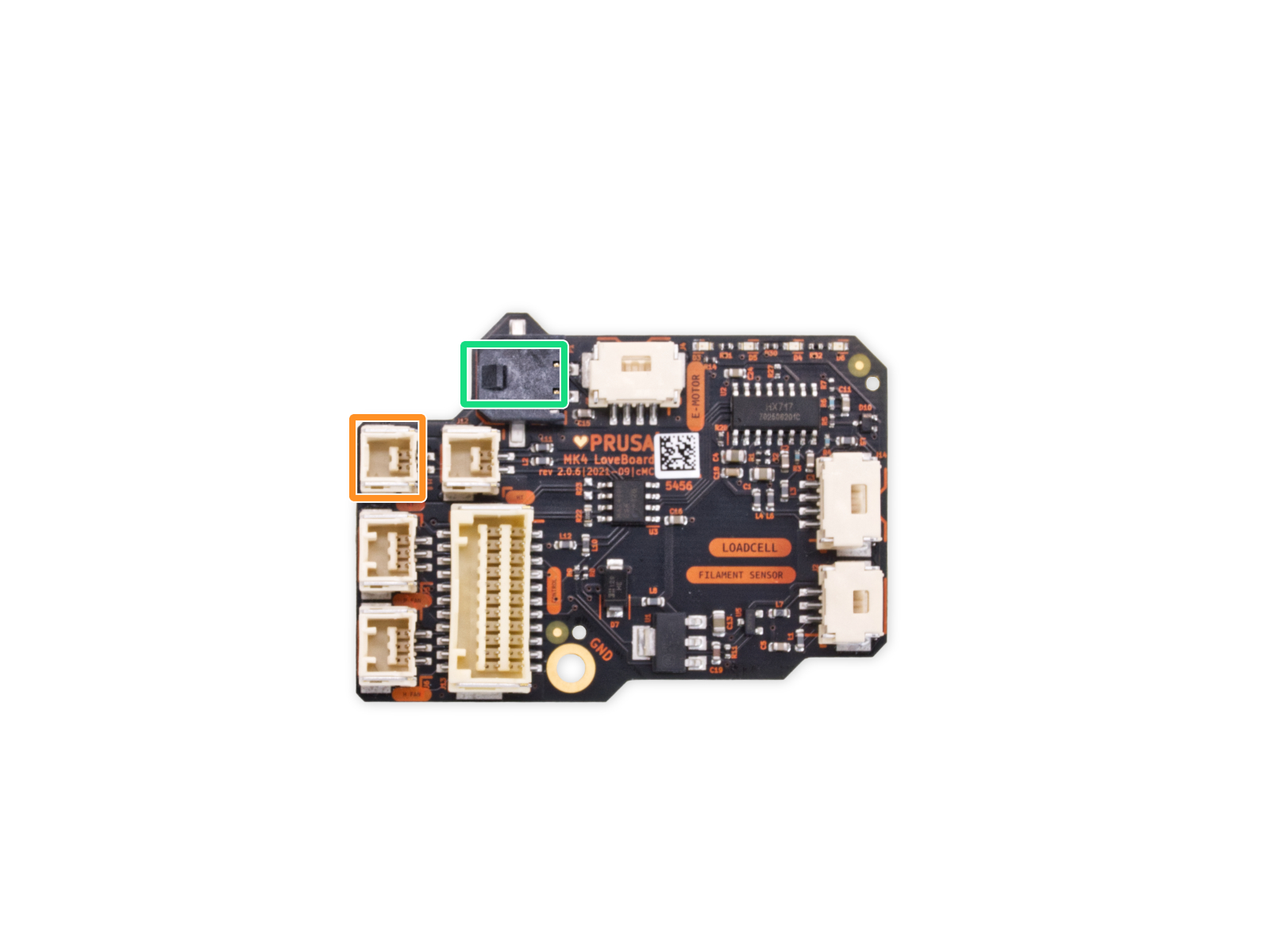
                  In case the fan is clean and the issue persists, open the LoveBoard cover and the fan door, and check the connection print fan or the heatsink fan. Make sure that they are in the correct slot.
                   

                  Loadcell

                  Before proceeding further, make sure that the printer is FULLY COOLED DOWN AT ROOM TEMPERATURE, and switched OFF! 

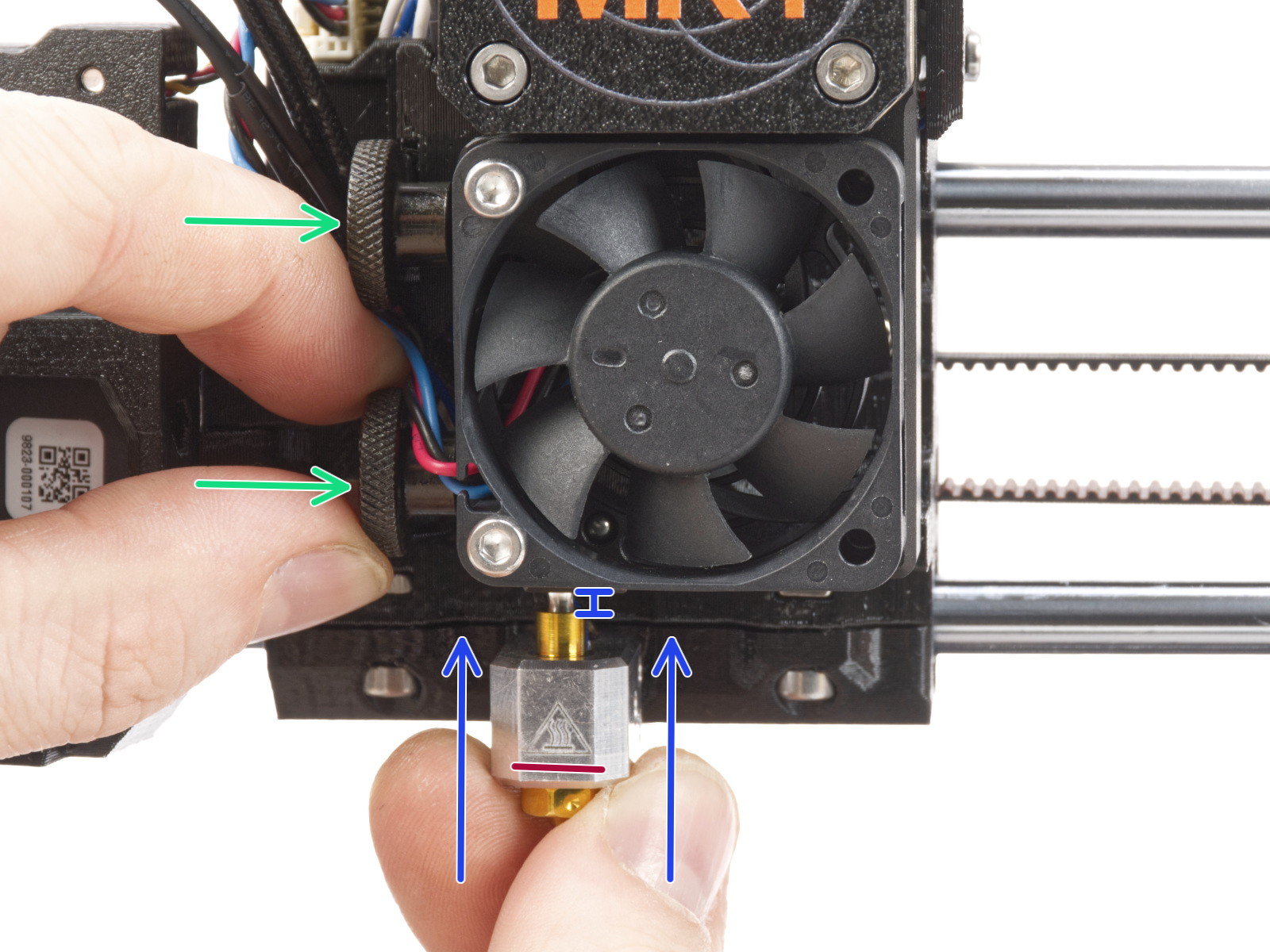
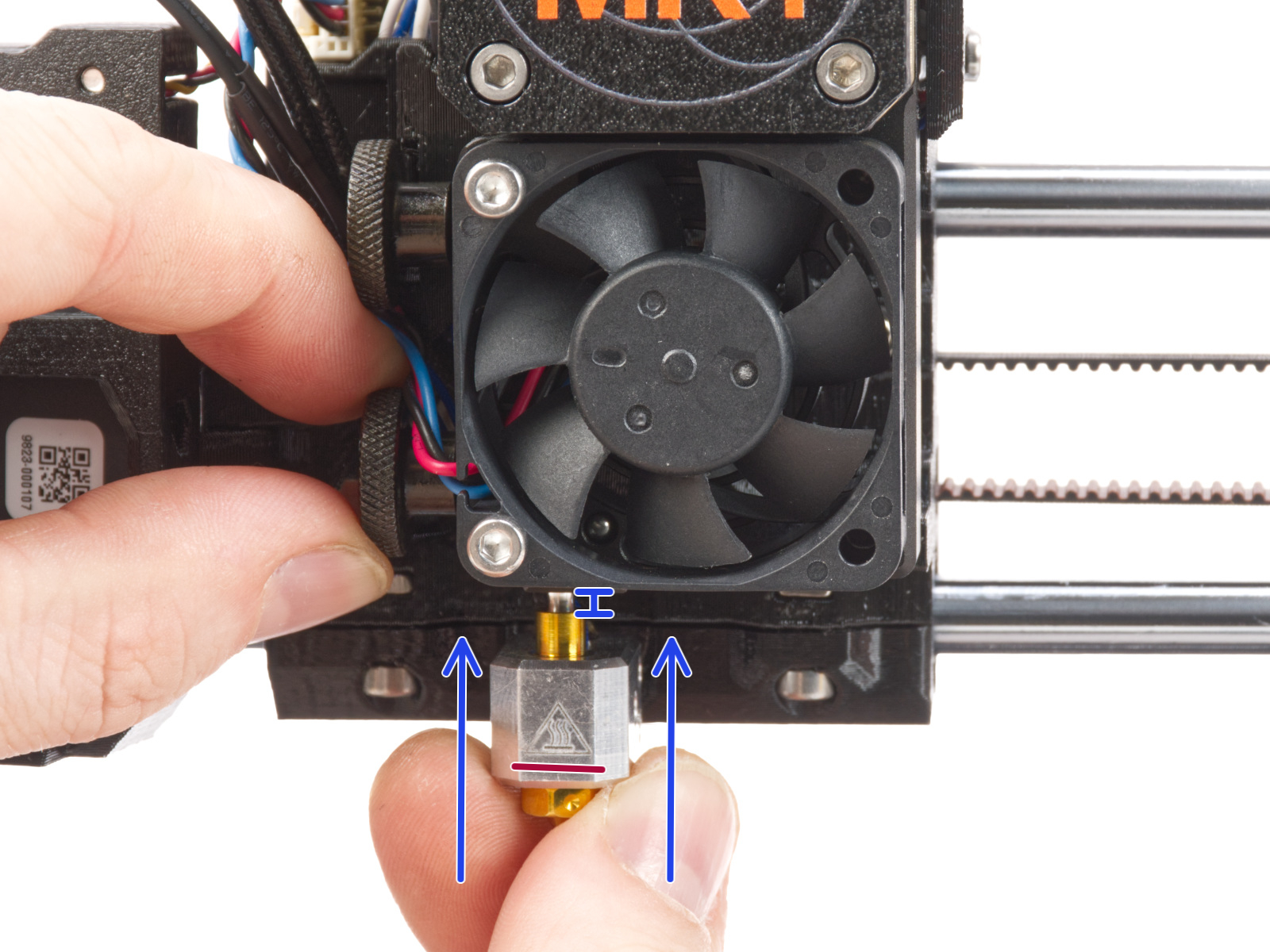
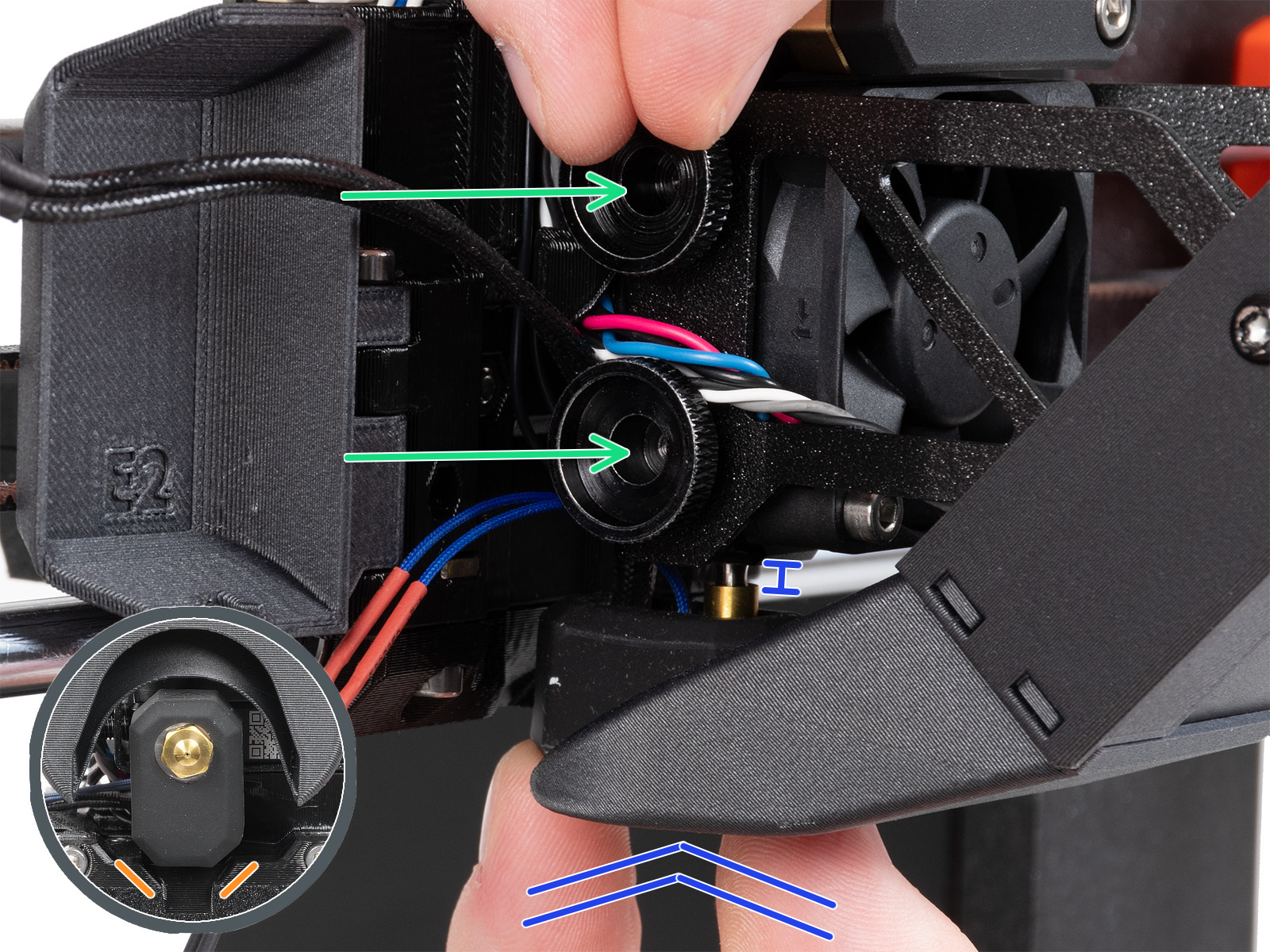
                  The nozzle on the Nextruder has to be at the correct height and tightened. To check this aspect, loosen the thumb screws (do not completely remove the screws, a few turns are enough) on the side of the heatbreak, and push the nozzle up. Tighten the thumb screws just by hand, do not use any tools. 

                  If you have a Nozzle Adapter, check the installation again to make sure that the nozzle has not been lowered or loosened with the installation of the adapter. 
                  Original Prusa MK4SOriginal Prusa MK4, MK3.9

                  On the Original Prusa MK4 and MK3.9, some of the Nextruder bolts, if too tight, might generate extra forces that can be sensed by the loadcell, skewing its readings, hence potentially causing an error. Check if slightly loosening the following bolts, while having the parts still tight and secured in place, can solve the issue: 
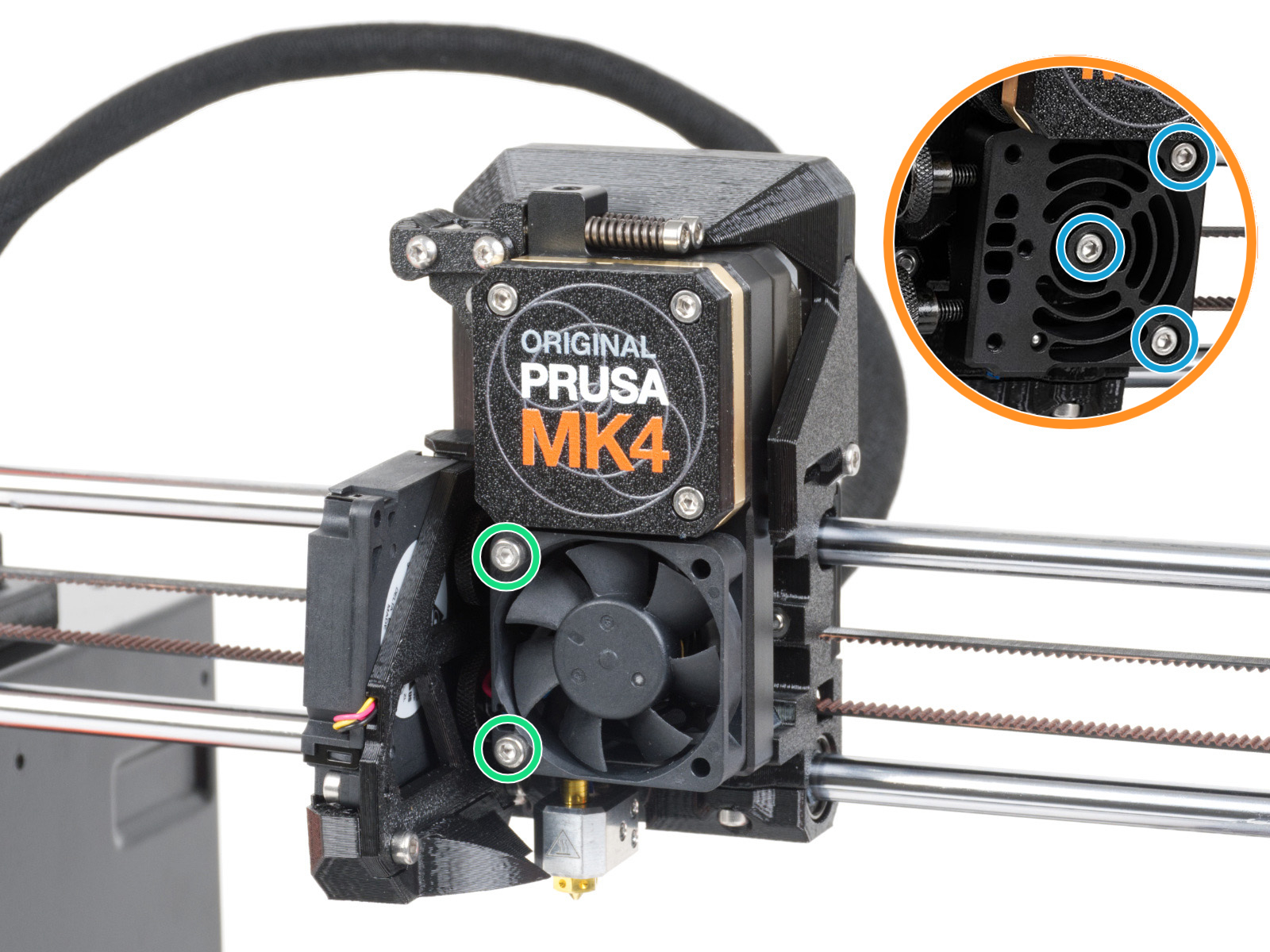
                  1. Slightly loosen the two bolts holding the hotend fan. If this doesn't solve the issue, proceed to the next step. 
                  2. Temporarily remove the hotend fan by removing the previously adjusted bolts. This will expose the heatsink/loadcell. Then, loosen very slightly the three bolts that hold the heatsink/loadcell in place. 


                  During the Loadcell test, you will be asked to tap the nozzle at a specific time. In case you do not tap the nozzle, the printer will restart the loadcell test.

                  If the Loadcell is being triggered too soon, make sure that you are not touching any other part of the extruder other than the nozzle. 

                  Only touch the nozzle when the selftest requires you to. Touching it at other times may cause burns.

                  X/Y Axes

                  In case of a failure in the X or Y axis, check the following: 
                  • Make sure that nothing is blocking the axis path. 
                  • Turn off the printer and move the axis by hand. It should be moved easily.
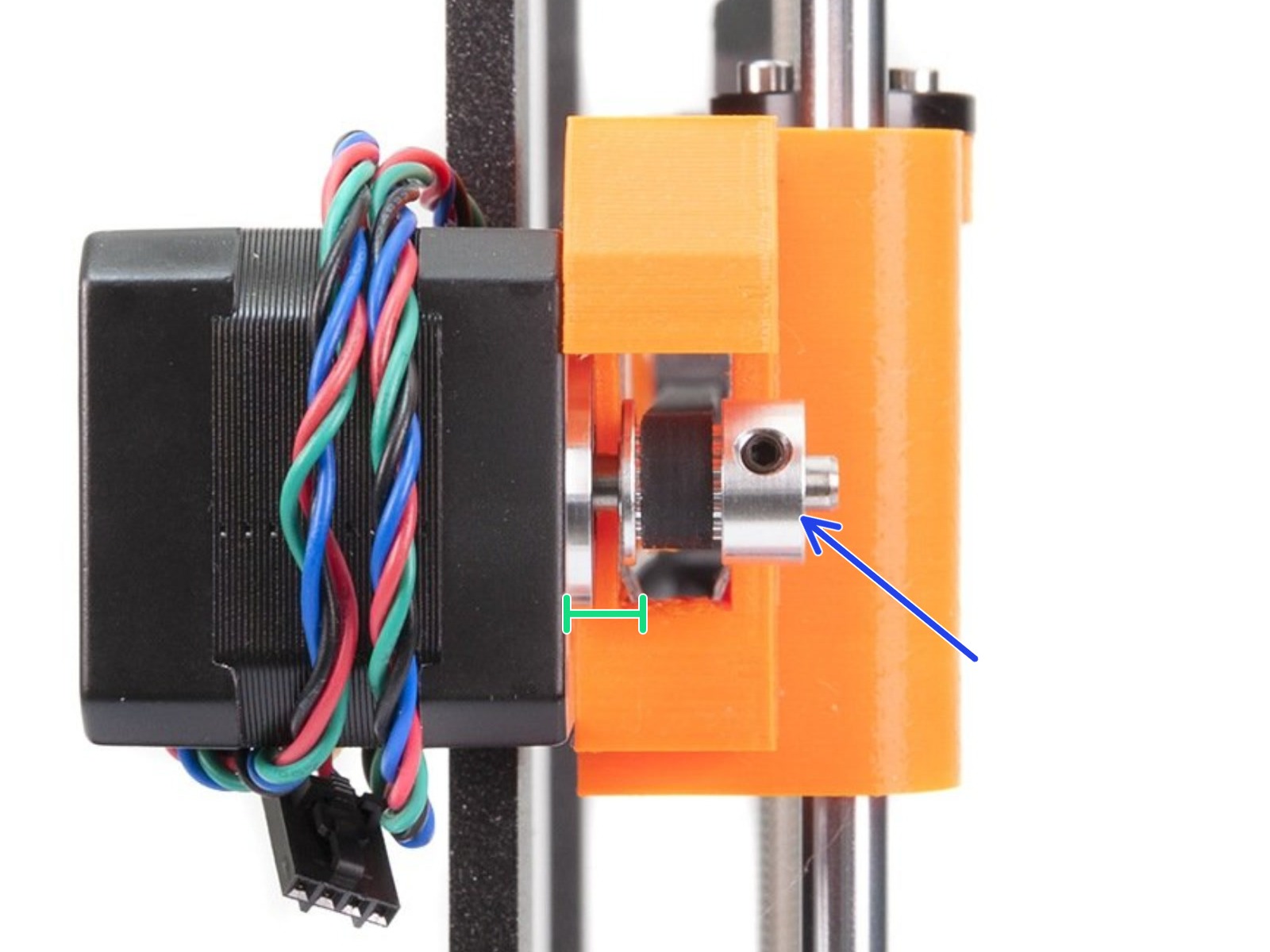
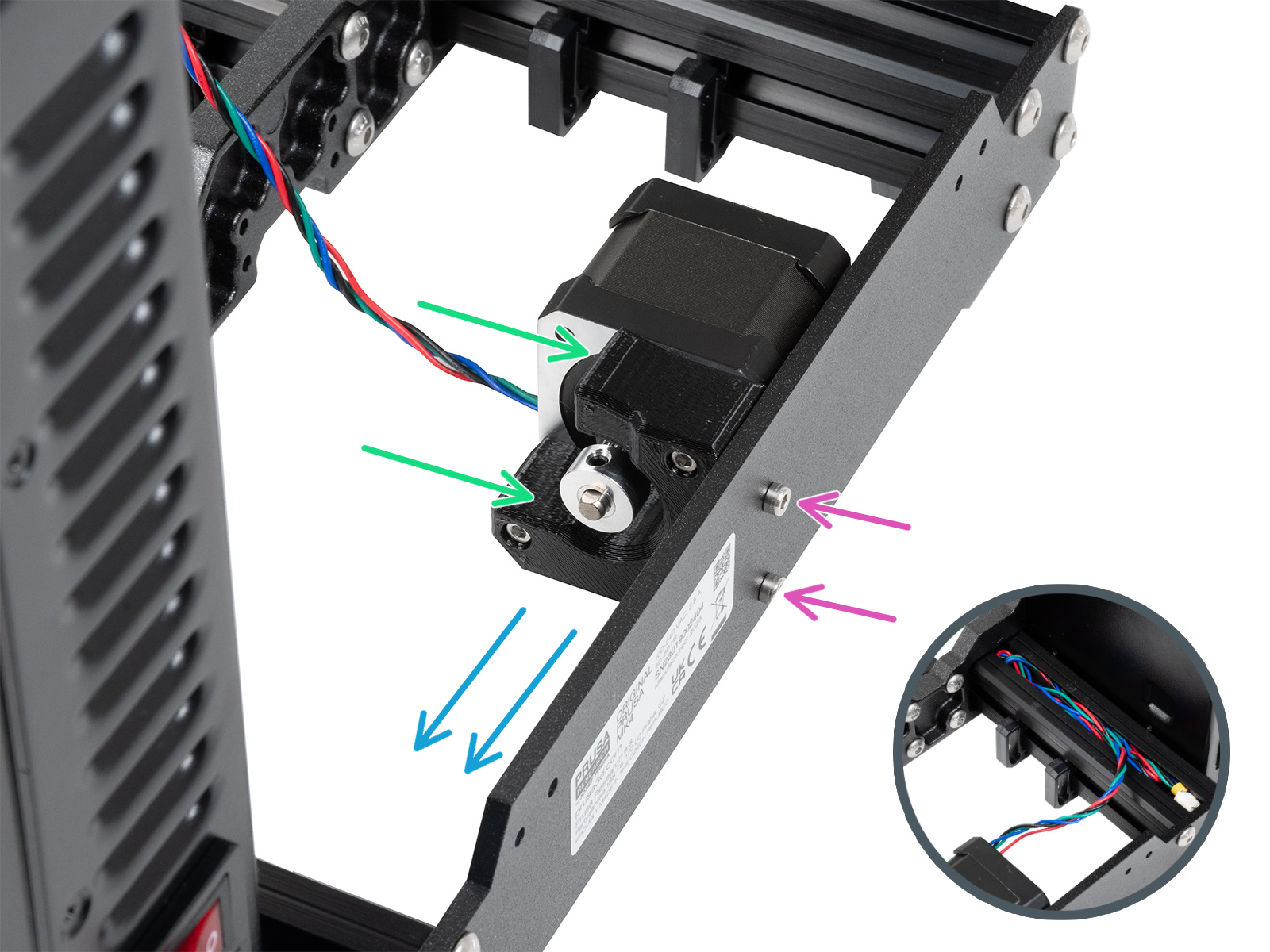
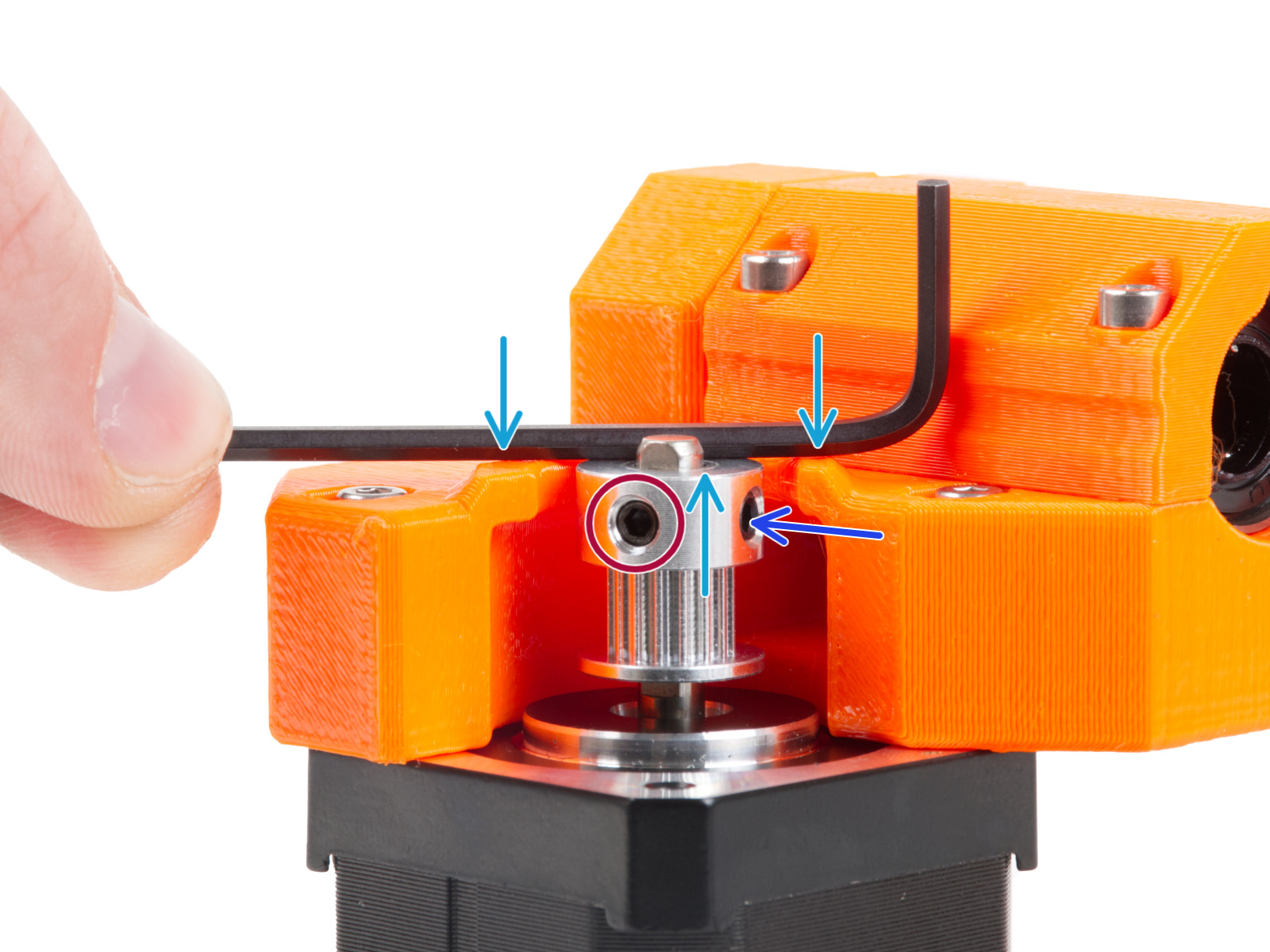
                  • Check the belt pulleys on the X and Y motor shafts. One of the set screws must be firmly tightened over the flat part of the motor shaft, there should be a small gap between the motor and the pulley, and they need to be in the correct orientation and position.
                  Correct X-axis pulley orientation and position.Correct X-axis pulley orientation and position.
                  Correct Y-axis pulley orientation and position.Correct Y-axis pulley orientation and position.
                  • Check if the belts aren't loose or too tight, as they might skip on the teeth of the belt pulley.
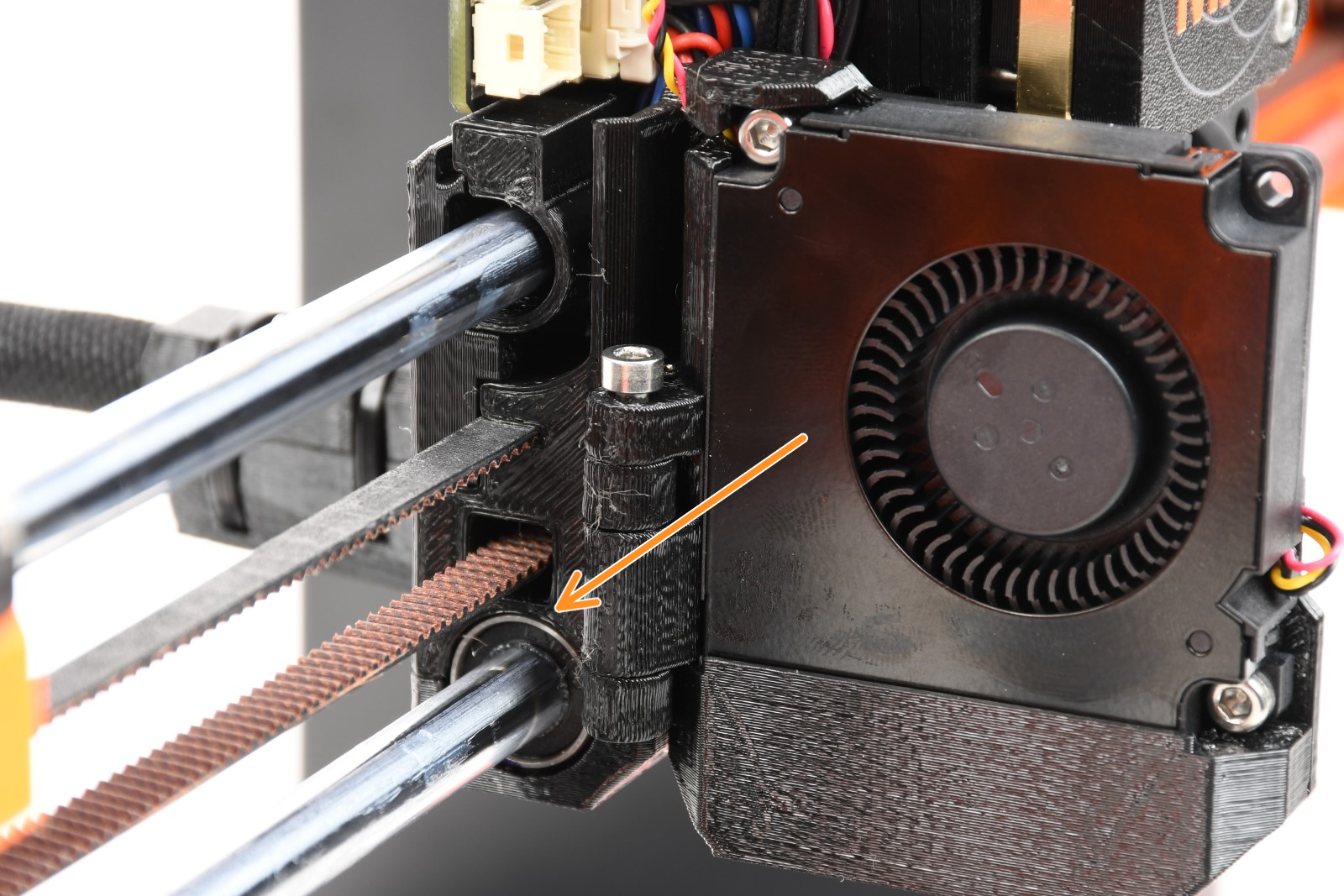
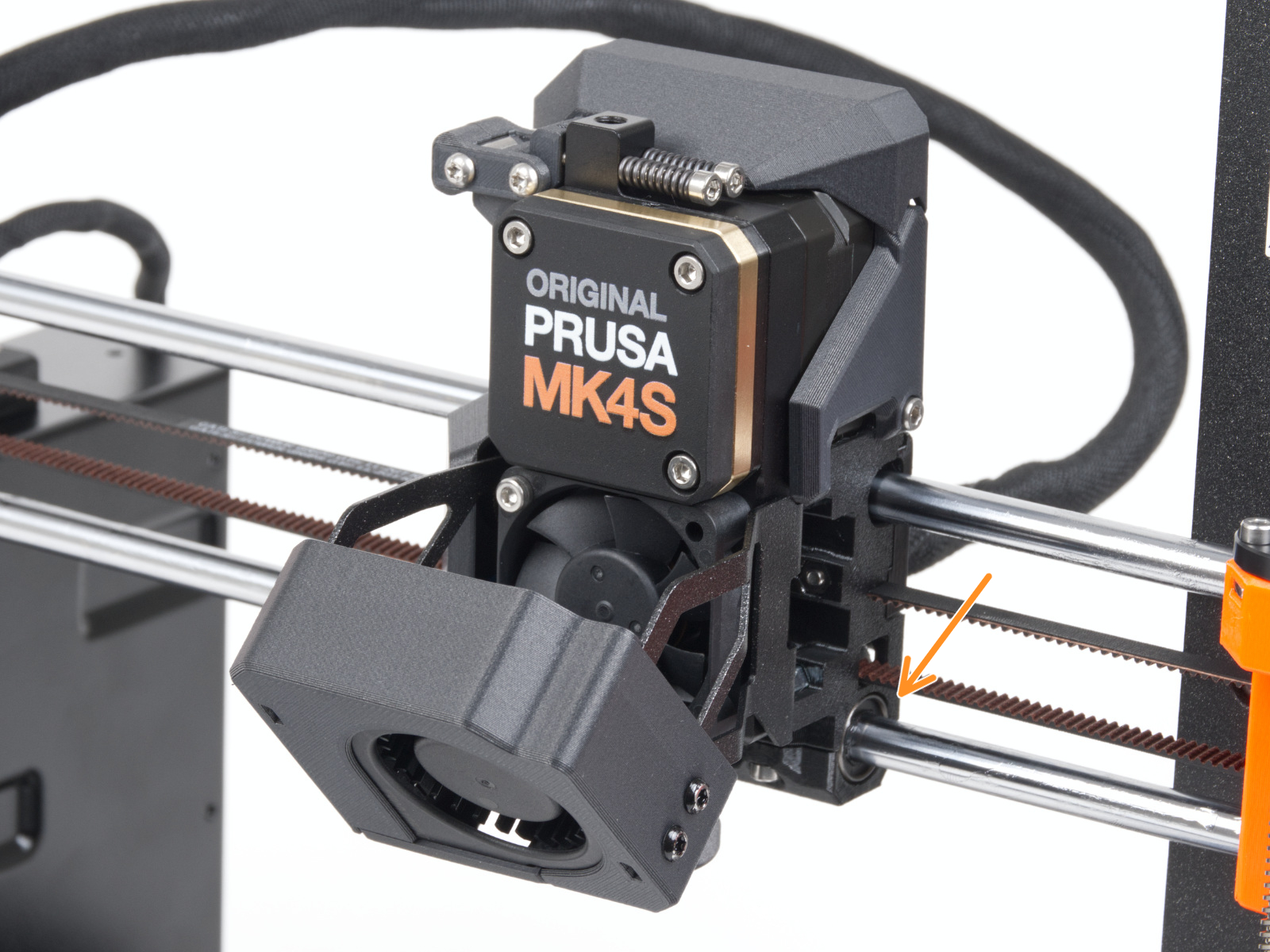
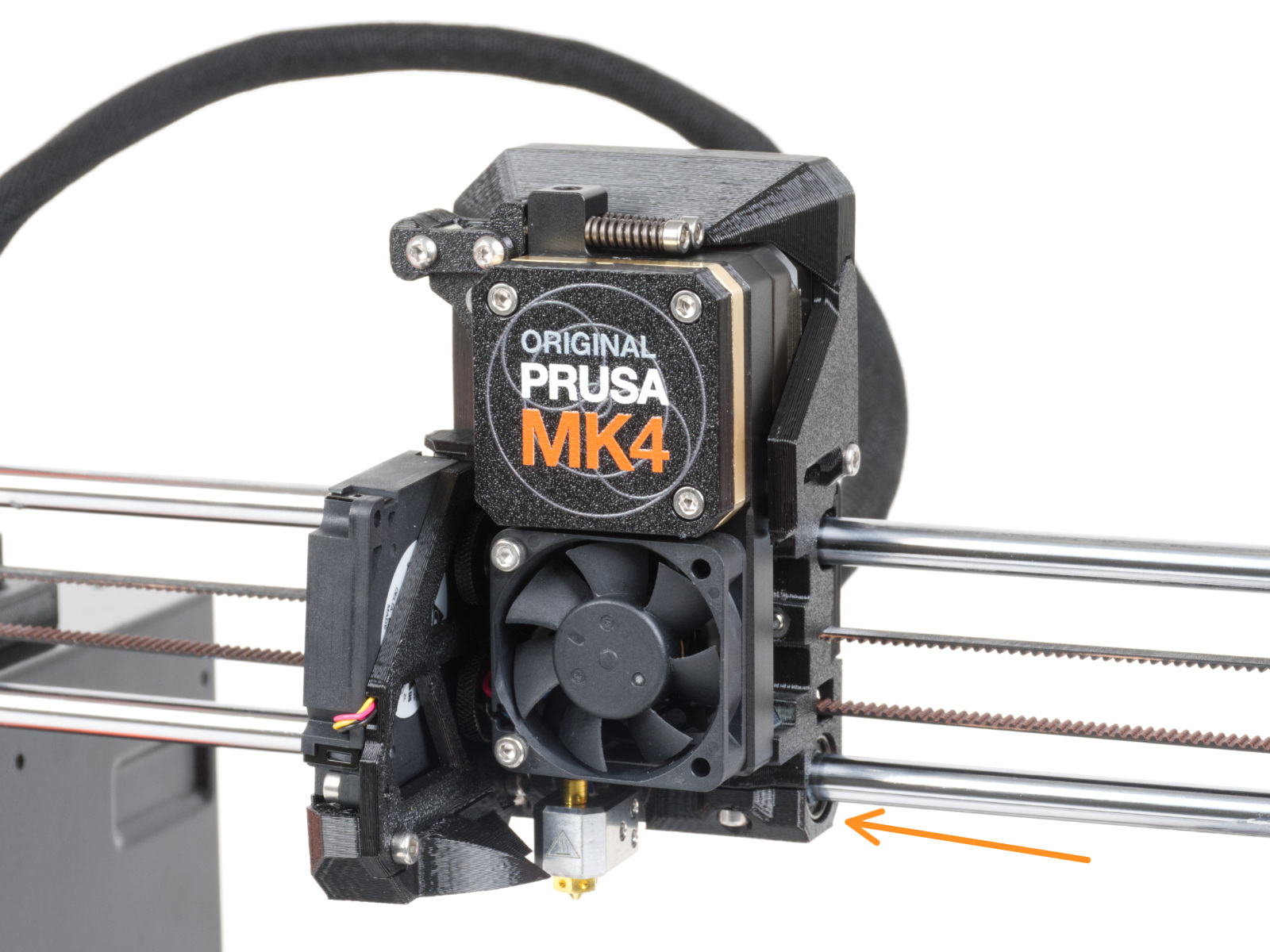
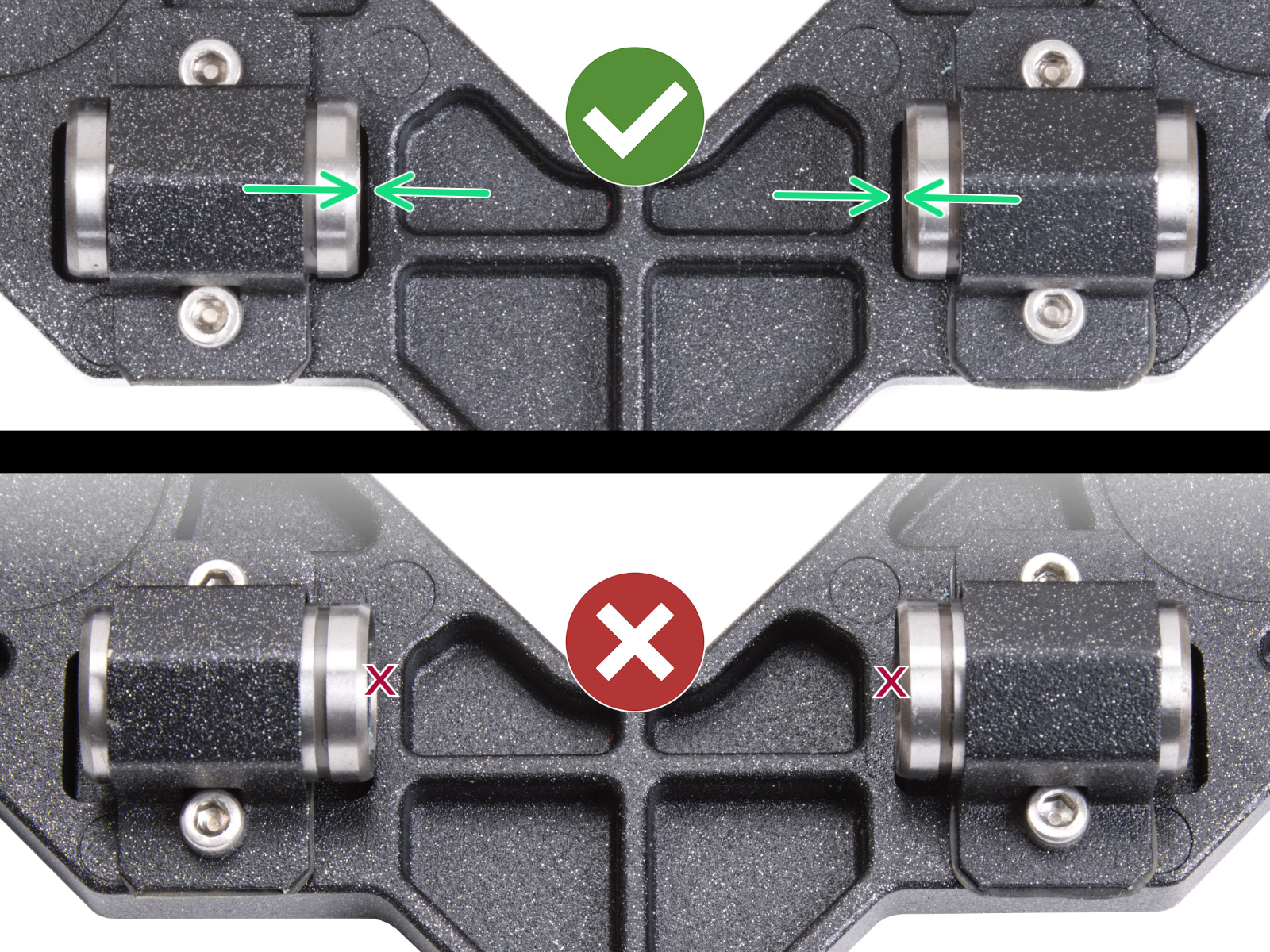
                  • Check the position of the linear bearings.
                    • X-axis, check the position of the bottom bearings. 
                  Left bearing, MK4SLeft bearing, MK4 and MK3.9


                  Right bearing, MK4SRight bearing, MK4 and MK3.9
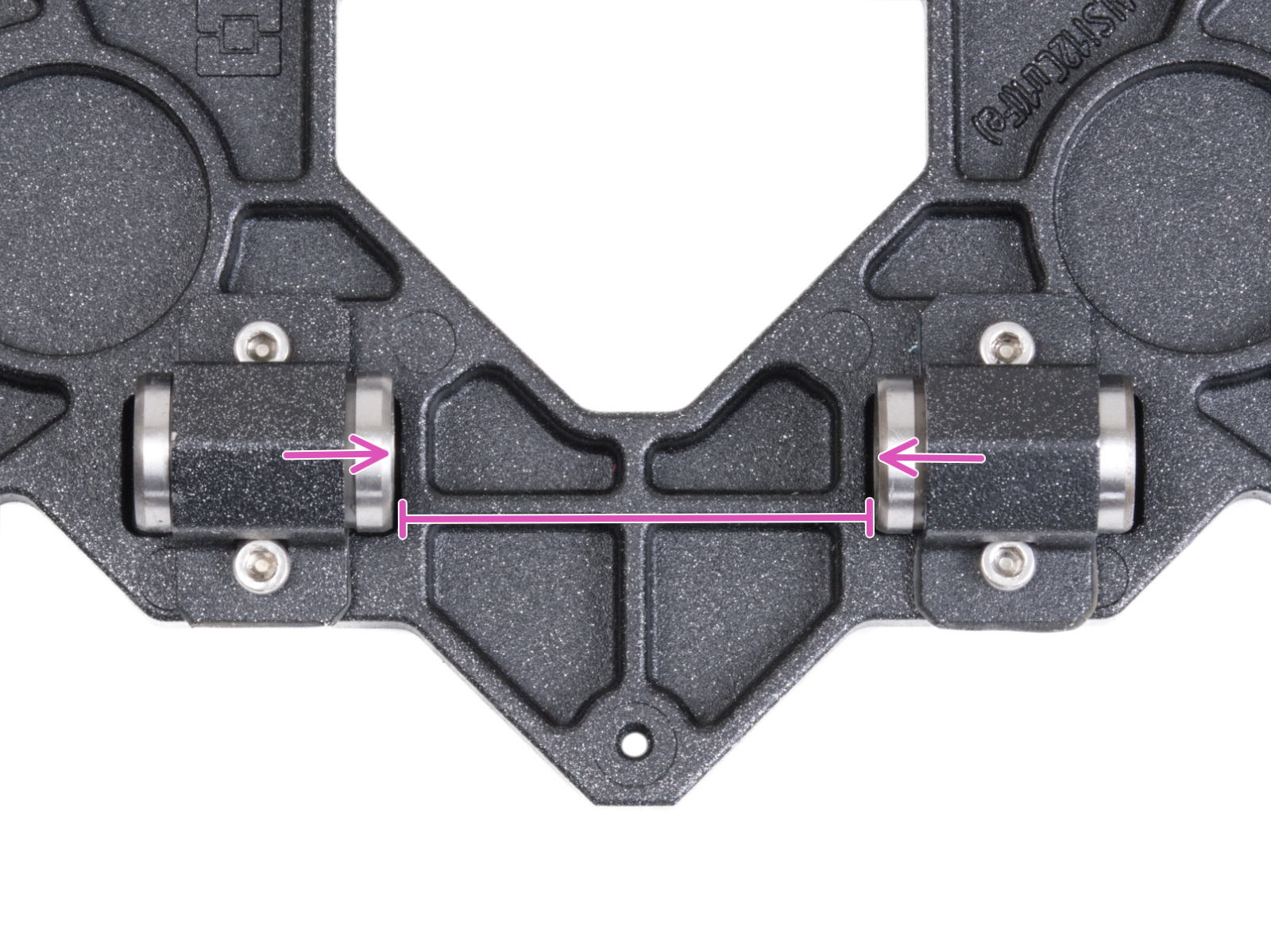
                    • Y-axis, check the position of the bearings in the Y-carriage, and that the distance between the bearings is 46.5mm. 
                  • Clean and lubricate the smooth rods, using moderate quantities of Prusa Lubricant (lithium-based grease). 
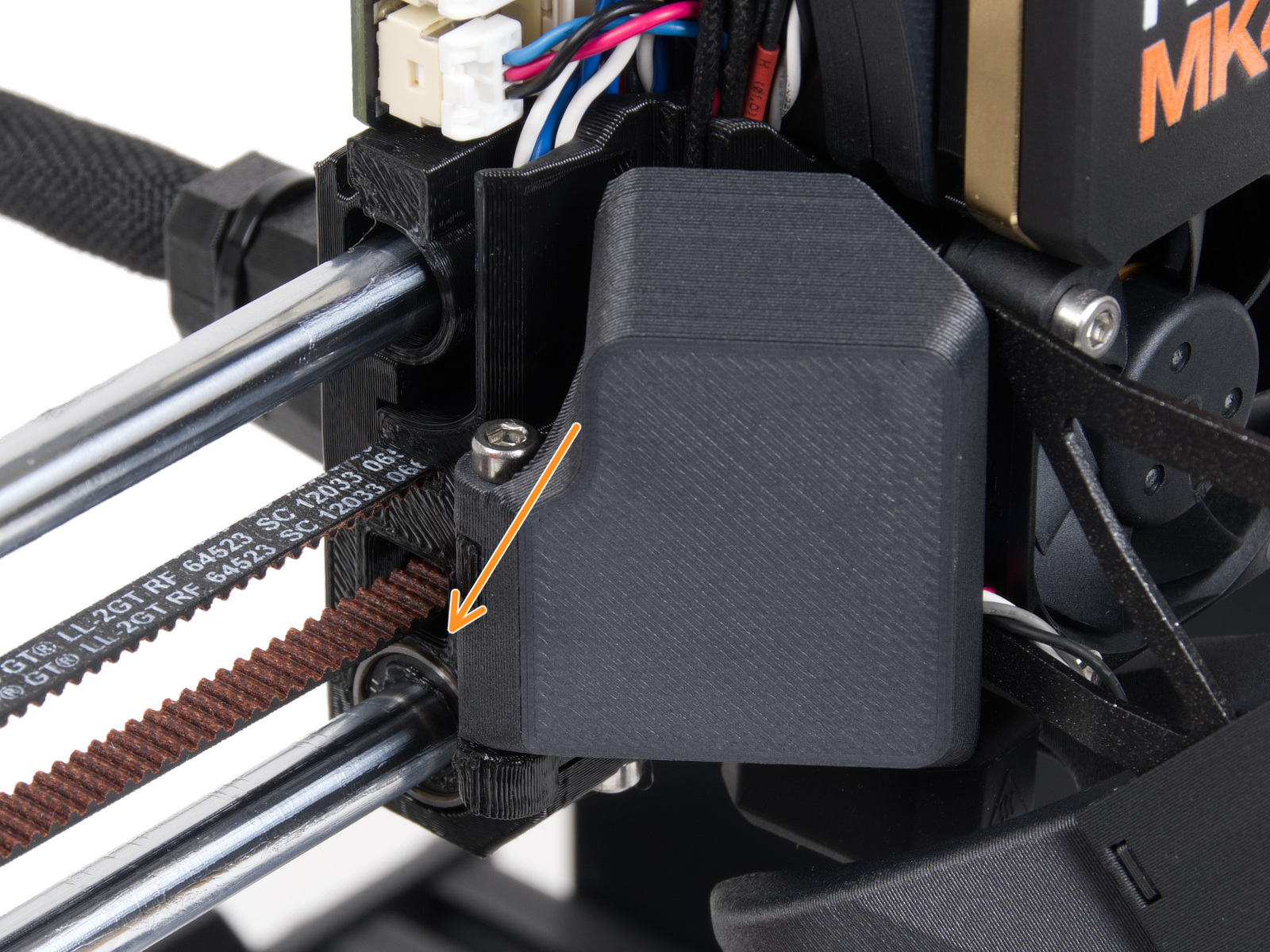
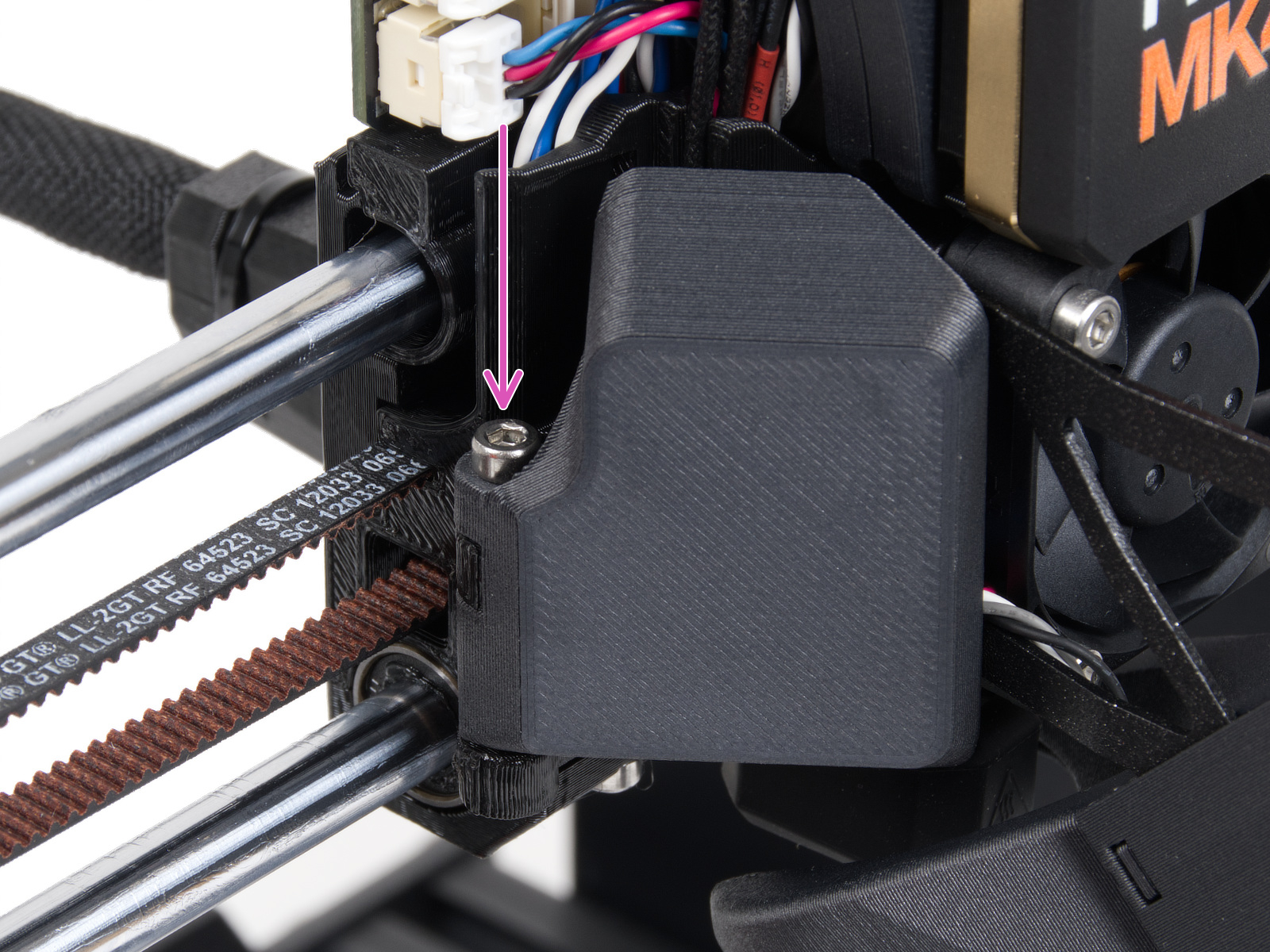
                  • Check if the M3x30 screw that holds the fan door cover (MK4S), or fan door (MK4) is firmly tightened. 
                    Original Prusa MK4SOriginal Prusa MK4

                  Z-axis

                  The printer will not perform the Z-axis test if the Loadcell test is skipped.

                  In case the Z-axis test does not pass, check the direction of the trapezoid nut. Make sure that the hotend is properly positioned in the Nextruder.
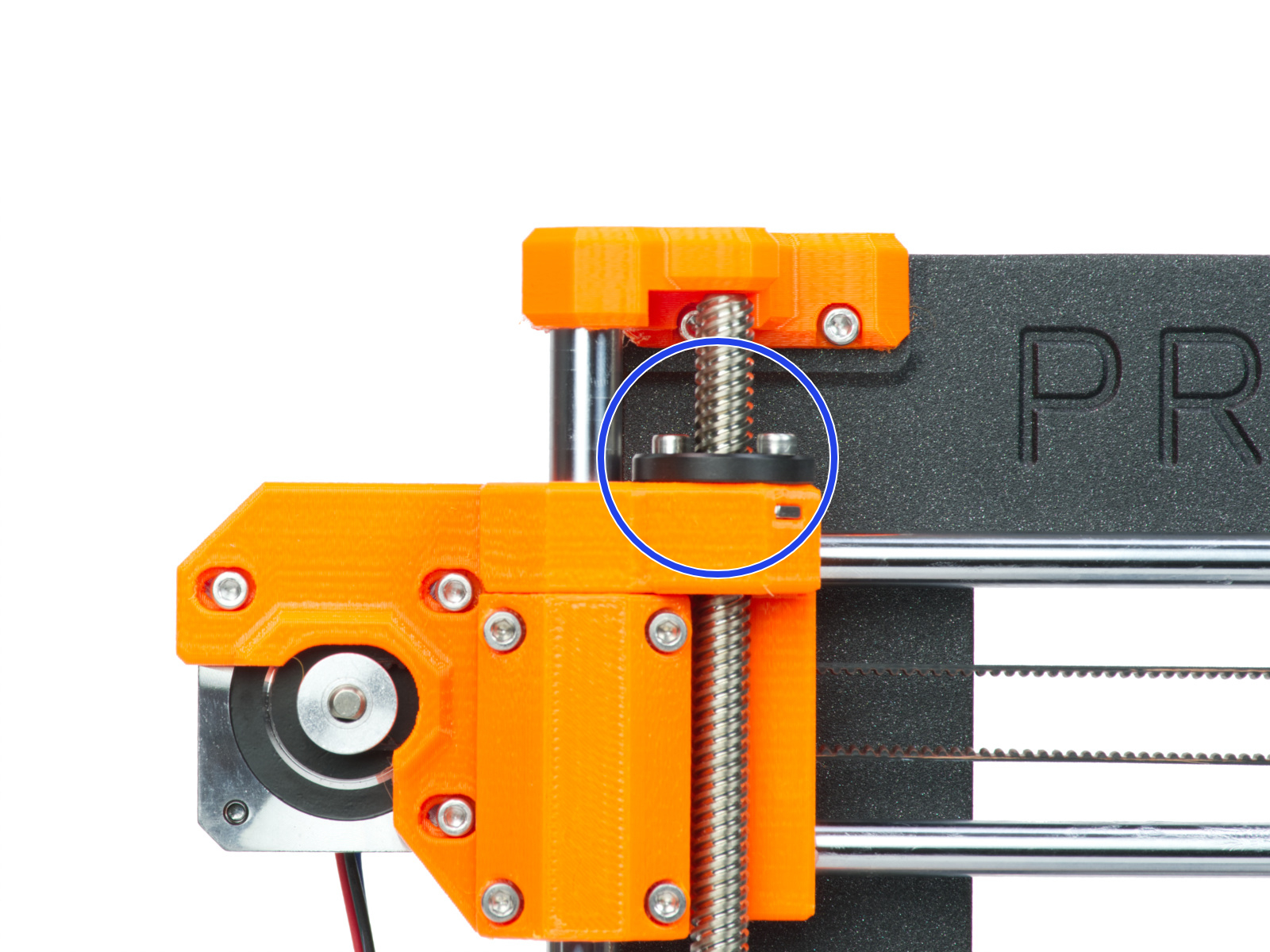
                  Original Prusa MK4SOriginal Prusa MK4 and MK3.9

                  Nozzle heater

                  In case the test results in a QR code error, scan the QR code shown on the screen, or search for the corresponding article on this platform. 

                  Inspect the hotend heater cable. Check the path between the hotend heater and the LoveBoard, and see if there are any parts that are broken or pinched. 

                  In case there is no damage, check the cable connection to the LoveBoard board. Try reconnecting the cable to its connector.
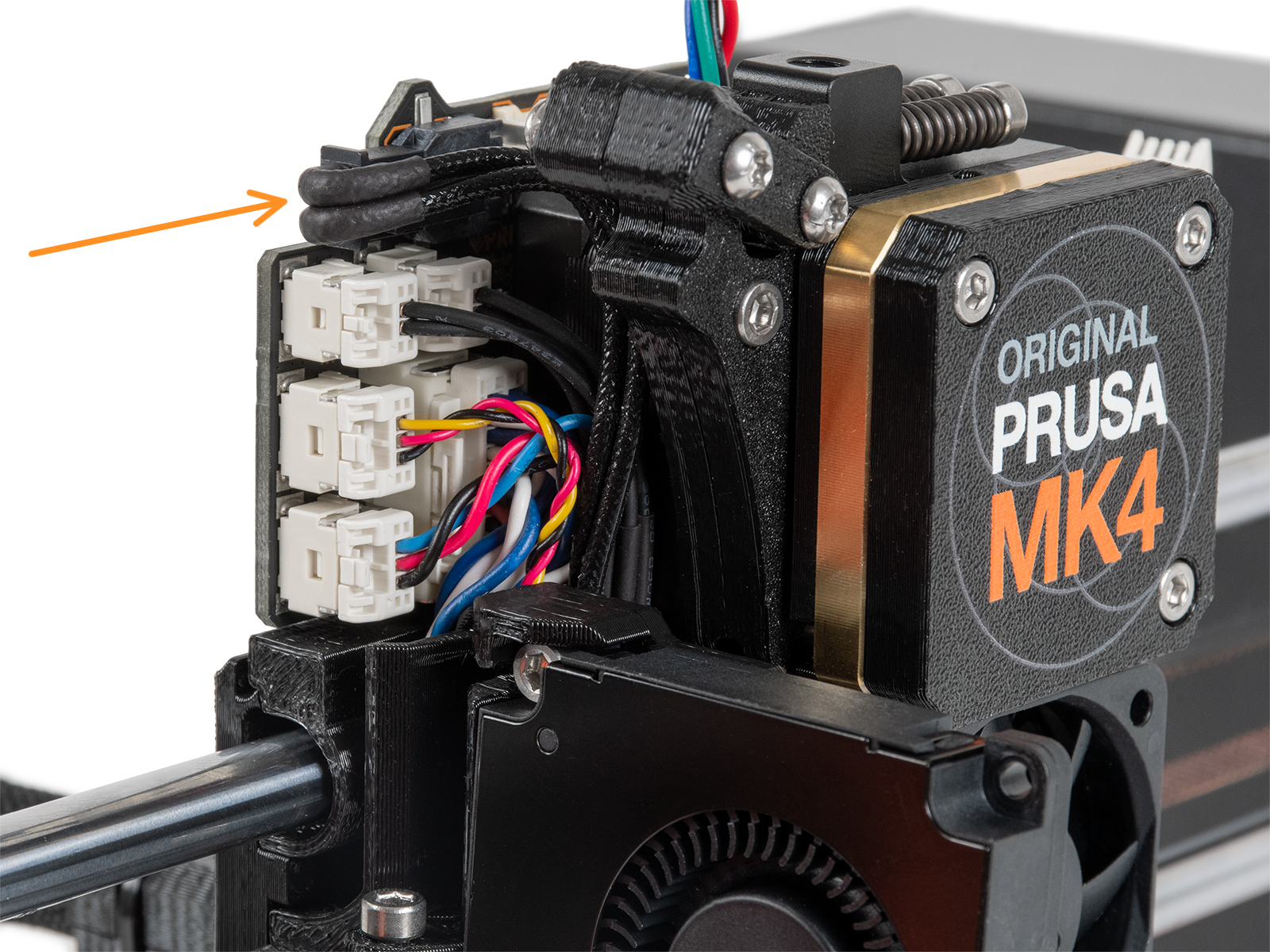
                  In case you have a Nextruder silicone sock, go in the printer menu to Settings -> Hardware -> Nextruder silicone sock, and toggle it ON. 

                  Heatbed heater

                  The steel sheet needs to be on the heatbed for this test. 

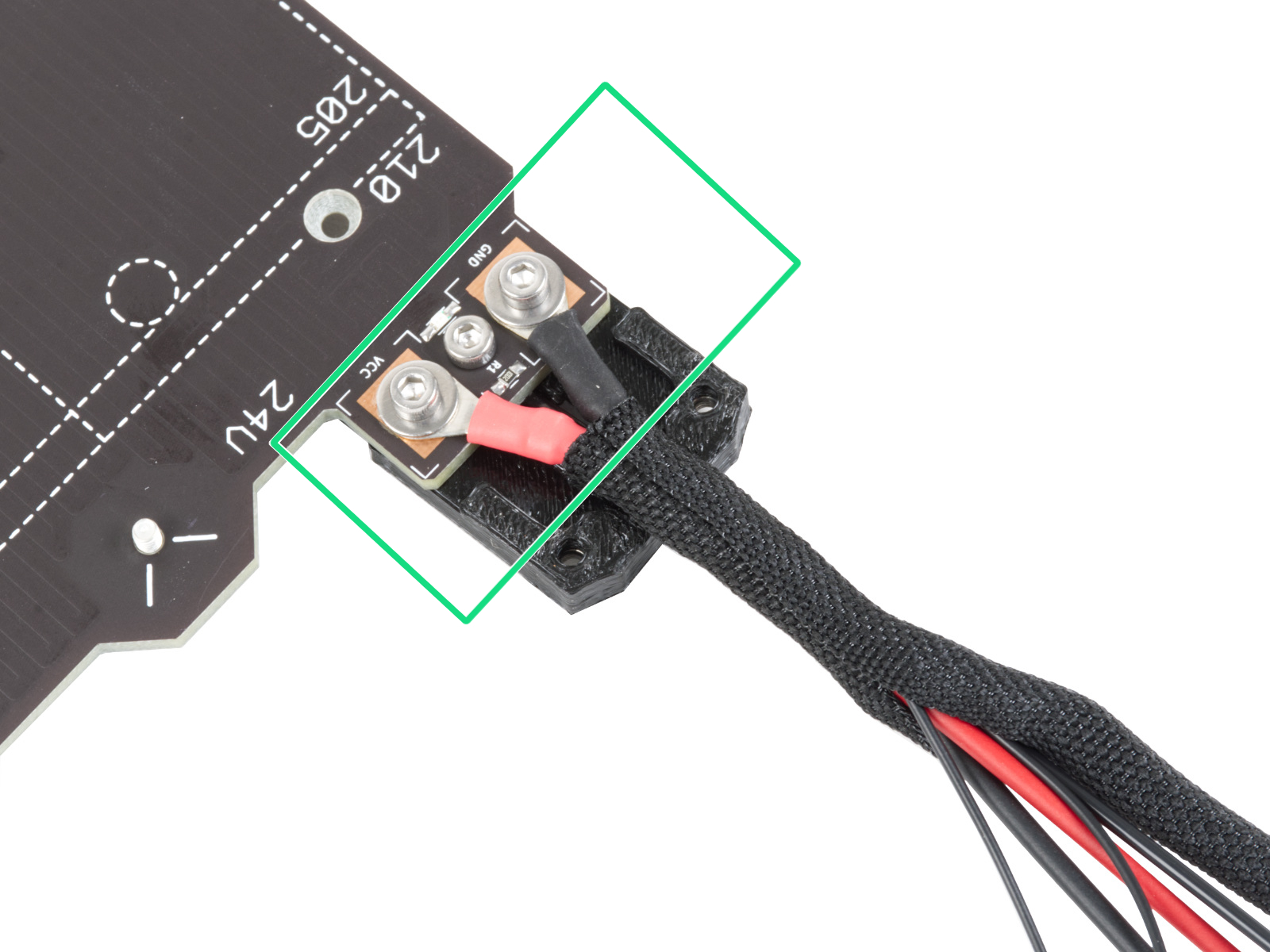
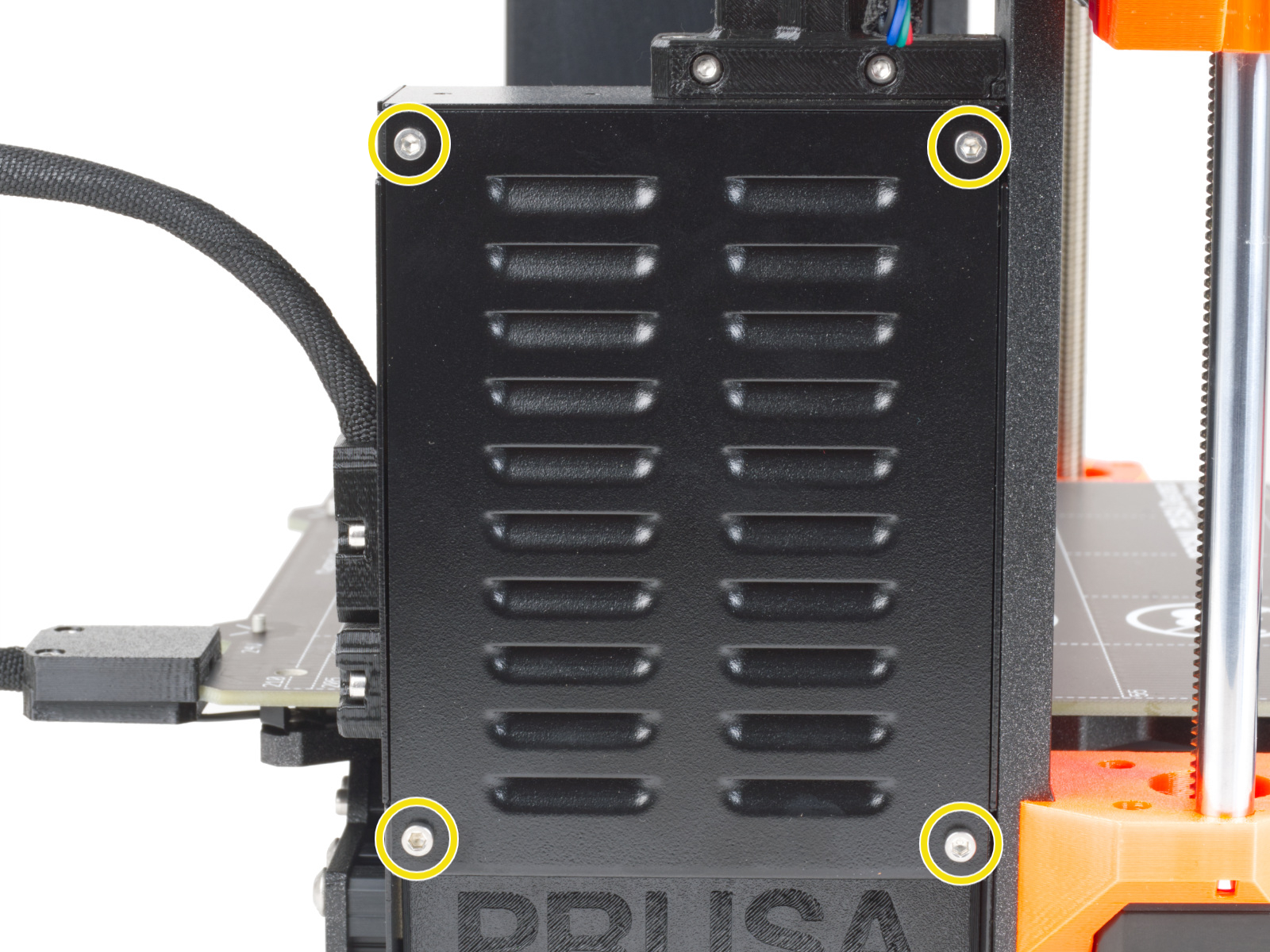
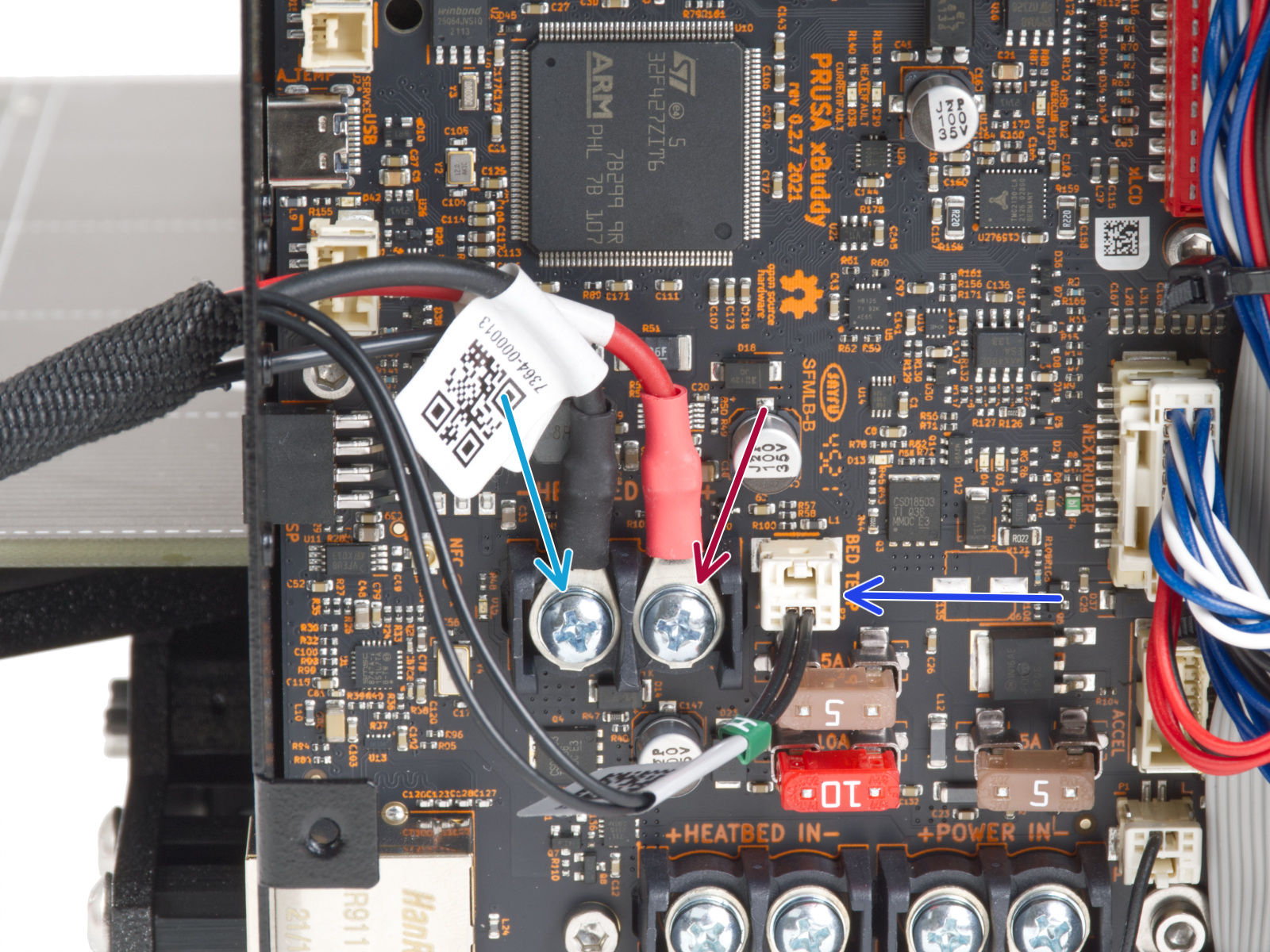
                  In case of a test fail, with the printer cold and off, check the screw-attached connectors on the heatbed side after removing its cover. Review the correct polarity, the correct position, and that they are fully tightened. 

                  On the xBuddy board side, perform a similar check, after opening its case. 
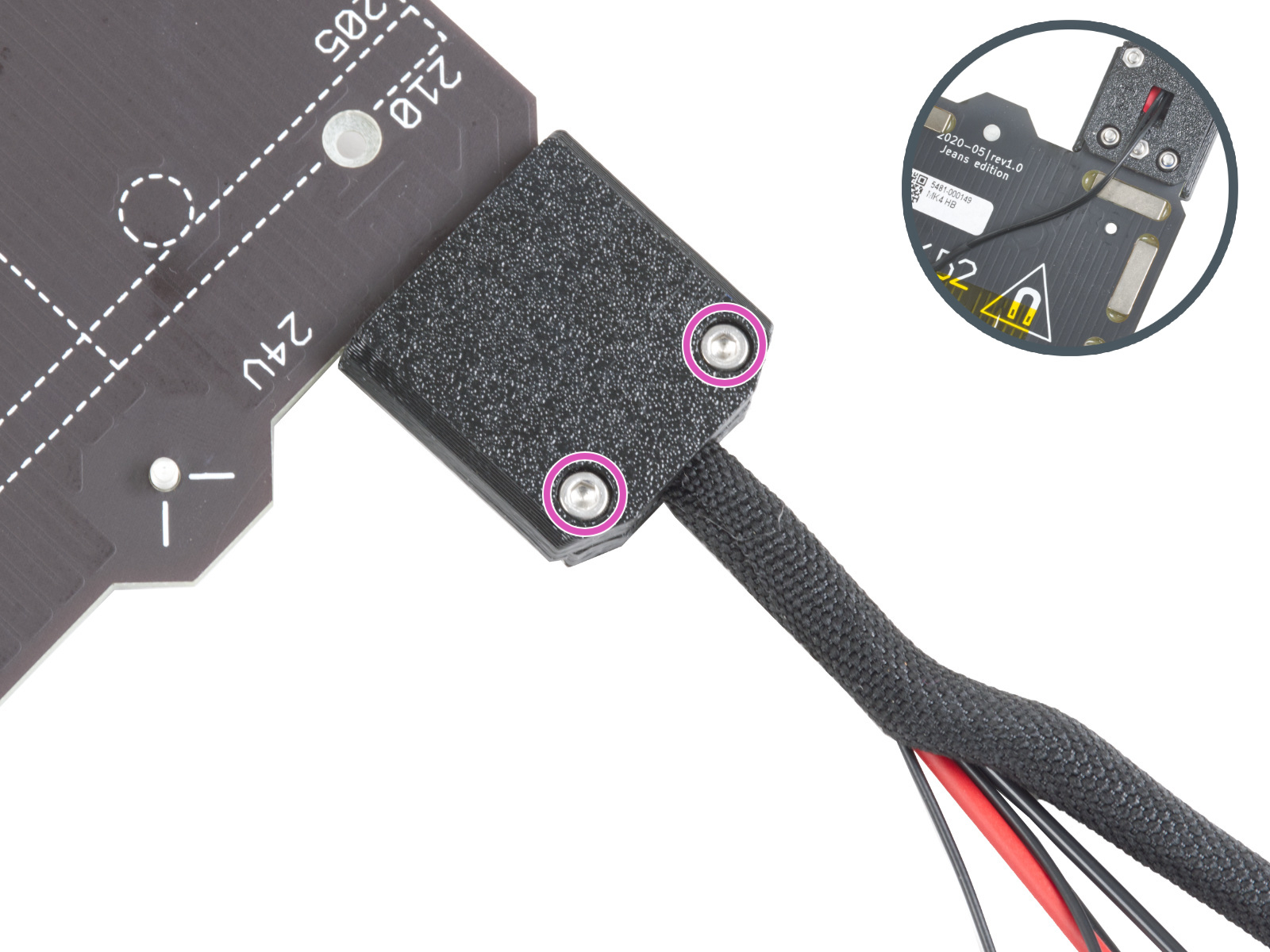
                  Filament sensor

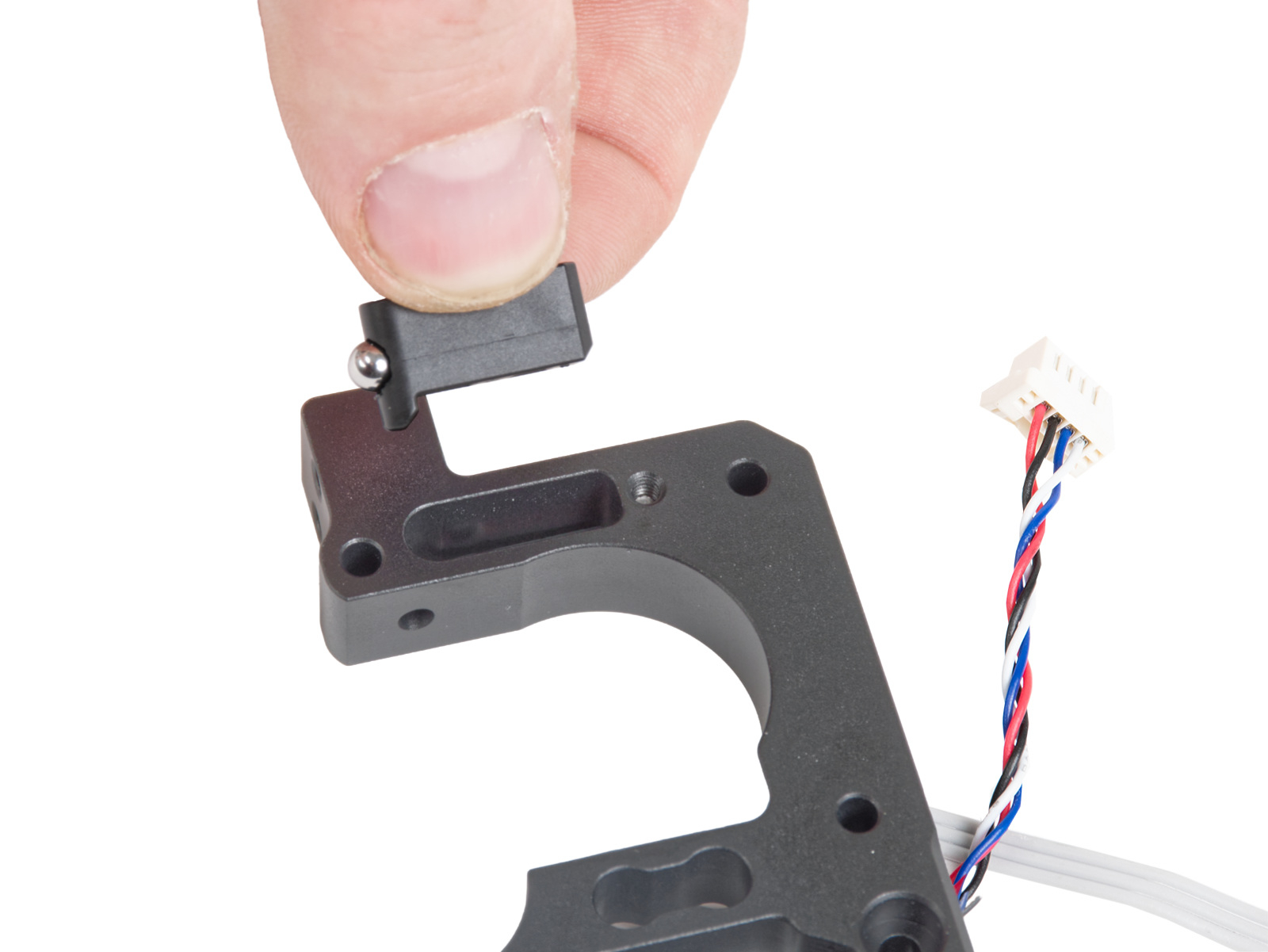
                  If the filament sensor does not detect the filament during the selftest, check the LoveBoard to see if the cable is properly connected. Also, follow the dedicated article on cleaning the filament sensor to make sure that there is no debris in the Prusa ball holder. 

                  It is possible to skip this part of the selftest, but in this case, the features that depend on the filament sensor might not work. 

                  If you open the filament sensor mechanism in the hotend, note that there are very small parts in it that may be lost! 
                  Was this article helpful?
                  This action is available only to registered users. Please log-in.

                  Topics

                  • Calibration
                    • Basic calibration
                      • Mesh bed leveling
                      • Idler screw tension
                      • Selftest Failed (MK4/S, MK3.9/S)
                      • Gearbox alignment (CORE One L, CORE One, XL, MK4/S, MK3.9/S)
                    • Advanced calibration
                    • Calibration Error Messages

                  19 comments

                  Log in  to post a comment
                  ildiabolik
                  •
                  I just assembled my MK4s and ran the calibration, everything was hunky dory. I add the MMU, and just added the new firmware update (MK4_MK4S_MK3.9_MK3.9S_firmware_6.4.0.bbf). It wouldn't take, so I did a factory reset and left the USB stick in, then it autoloaded the bbq file and turned on. Yay. I went to recalibrate, and now it fails the Y axis with:
                  "Attention, the test has failed. This could have been caused by a wrong configuration. do you want to revise your printer configuration?"
                  I clicked Adjust and changed the head to a non-high flow head, as that was replaced when installing the MMU (I think it is still 0.4mm). I ran again and encountered the same error. I made sure the carriage moves unimpeded, no cables hanging, even power cycled a few times. I can't get it to pass the Y axis now.
                  Any tips? Sorry, I haven't printed once yet, so I'm an absolute noob
                  Reply
                  feesta
                  •
                  The Nozzle Heater section has a bad link on the words "this platform":
                  https://help.prusa3d.com/admin/article/help.prusa3d.com
                  Reply
                  Otis
                  •
                  Due to me turning the printer of to fix a error with the cables I couldnt run a self test with the instructions on the little screen of the printer itself. How would i run these selftests manually
                  Reply
                  Johntordj06
                  •
                  Jai en défaut sur l 'auto test de ma Prusa M4S (X=-1 et Y=-4) Jai fait toutes les vérifications possible et inimaginable . Je reconnais maintenant l 'erreur après avoir choisi cette imprimante en kit mon bute été justement d'apprendre mais Jai pris aucun plaisir que des mots de tête terrible il faudrait faire du ménage MR Joseph Prusa et changer les éditeurs de montage de PDF sans compter les défaut d'impressions que Jai eu du grand n'importe quoi!!!!! 45 a 50h perdu a monter ça
                  Reply
                  Anabella Ojeda - Prusa Research
                  •
                  Je suis désolé que vous ayez rencontré ce problème.
                  Veuillez contacter notre équipe d'assistance technique pour obtenir de l'aide afin de résoudre ce problème.
                  https://help.prusa3d.com/fr/article/support-client_2287
                  Reply
                  DaDDy72
                  •
                  I got my MK4S assembled and when running calibration, X axis failed. I checked the Belt tension, the pulley position on the motor side, tightened properly as shown in the pictures recommended by manufacturer. Despite that, the extruder was hard to move manually on the x axis. When contacting the Tech Support, I have been advised to unscrew the back of the extruder and release one end of the belt, then check if the pulley is spinning. It felts that the pulley was misaligned with the pin and it did not spin as expected, so I shook the pulley with the belt until it started to not feel “jammed”. From there, when I started to move the extruder manually on the x axis, it feels different, as if it’s back to normal. I have zero experience but it just feels right. Upon assembly and belt properly tensioned, X axis finally passed the calibration ! Yay ! Thanks to Nelson from Tech Support Team !
                  Reply