AA

Polecane produkty

    Popularne kategorie

      Popularne wyszukiwania

        Artykuły

          Blog

            Produkty

              Kategorie

                Sugerowane wyszukiwania

                  Wyszukiwanie…
                  Brak wyników
                  Coś poszło nie tak.
                  ↑↓ Wybierz↵ OtwórzEsc Zamknij wyszukiwanie
                  • English
                  • Čeština
                  • Deutsch
                  • Español
                  • Français
                  • Italiano
                  • Polski
                  • 日本語
                  • Zamówienia
                  • Adres
                  • Powiadomienia o dostępności
                  • Kursy
                  • Subskrypcja
                  • Edytuj konto
                  • Drukarki 3D9+▾

                    Drukarki 3Dnowość

                    nowośćPrusa CORE One L+Więcej
                    nowośćPrusa CORE One+ (Gen 2)Więcej
                    nowośćPrusa CORE One L+ INDX 8-ToolnowośćPrusa CORE One+ (Gen 2) INDX 8-narzędziowaPrusa CORE One L+: Critical InfrastructureOriginal Prusa MK4SnowośćOriginal Prusa XL+Original Prusa XL+: Critical Infrastructure

                    Aktualizacje drukarek

                    nowośćCORE One/+ INDX Conversion KitnowośćModernizacja Prusa CORE One L do CORE One L+nowośćPrusa CORE One+ do Prusa CORE One+ (Gen 2)nowośćModernizacja Prusa XL do Prusa XL+
                    Program lojalnościowy Prusa Reward ProgramUdostępniaj. Polecaj. Zarabiaj.
                    Jak wybrać drukarkę 3D?Omówimy podstawowe kwestie, żeby pomóc Ci znaleźć urządzenie idealnie dopasowane do Twojej przestrzeni, budżetu i pomysłów.
                    Darmowy E-bookPobierz darmowy e-book Podstawy Druku 3D z Josefem Prusą i postaw pierwsze kroki w świecie druku 3D.
                    Części Drukowane Original PrusaKolekcje drukowalnych części zamiennych do drukarek 3D Original Prusa oraz modernizacji.
                    Informacje o wysyłkachRegularnie aktualizowane informacje o aktualnej wydajności produkcji i terminach dostaw naszych drukarek.
                    Druk 3D na zamówienieProfesjonalny druk 3D na zamówienie z różnych materiałów zgodnie z Twoimi wymaganiami.
                  • Materiały▾

                    Filamenty

                    PrusamentPLAPETGASA / ABSPC BlendPA (Nylon)FlexCompositesSpecialWyprzedaż materiałów

                    Żywice

                    Prusament ResinResin Cleaner
                    Przewodnik po filamentachSprawdź swoją szpulę Prusamentu
                    Prusament.com
                  • Części i akcesoria▾

                    Akcesoria

                    ObudowyDyszePłyty drukarskieNiezbędne akcesoriaKamery i dodatkiNarzędzia i rzemiosłoŚrodki adhezyjne

                    Części zamienne

                    Gadżety z logo

                    Części zamienne do wszystkich drukarekCORE OneMK4/S & MK3.9/SMK3/MK3S/MK3S+XL
                    Merch
                  • Dla biznesu▾
                    Prusa Pro HT90Prusa Pro SLXPrusa Pro AFSPrusa Pro Medical OneOriginal Prusa XLOriginal Prusa XL: Critical Infrastructure
                    Prusa CORE One+Więcej
                    Prusa CORE One LWięcej
                    Prusa CORE One L: Critical Infrastructure Edition

                    Druk 3D dla

                    Produkcja i rozwójPrzemysł motoryzacyjnySłużba zdrowiaEdukacja i badania naukoweArchitekci i projektanciBranża filmowaInfrastruktury Krytycznej

                    Historie z drukiem 3D

                    • Jak powstało drukowanie 3D: o Rep-rap i open source z Adrianem Bowyerem
                    • Nauczanie matematyki na nowo z wykorzystaniem druku 3D na JKU w Linzu
                    • Historia śrubokręta LTT
                    • Victoria Hand Project: rewolucja w opiece protetycznej dzięki drukowaniu 3D
                    Oficjalni dystrybutorzy Prusa
                    Zrównoważony rozwój
                    Prusa Education
                    Kontakt i zapytanie
                    Druk 3D na zamówienie
                    Certyfikat ISO
                  • Oprogramowanie▾
                    PrusaSlicer

                    PrusaSlicerPrusaSlicer

                    PrusaSlicer is an open-source, feature-rich, frequently updated tool that contains everything you need to export the perfect print files for your 3D printer.

                    WindowsMacOSLinux
                    Prusa Connect

                    Prusa Connect

                    Prusa Connect is a cloud service enabling remote control and monitoring of your 3D printers, offering secure data handling, easy setup, and support for managing multiple printers from anywhere.

                    Zaloguj się do Connect
                    Prusa.app

                    Prusa.app

                    Control your printer/s remotely from anywhere using the Prusa Connect technology behind. Prusa.app brings a new level of Prusa printer experience to Android and iOS phones.

                    Wypróbuj!
                    Sterowniki i firmwarePobierz najnowsze wersje firmware i sterowniki dla swojej drukarki 3D.
                    Wsparcie dla PrusaSlicera
                    Wsparcie dla Prusa Connect
                  • Modele 3D▾
                    Drukarki 3DSztuka i designHobby i majsterkowanieGospodarstwo domoweFigurki do planszówekZabawki i gryPrintables Store

                    Popularne modele 3D

                    • Strong garden hose holder
                    • Prusa Spool Bot
                    • Build Tray — Modular Organizer for Assembly, Disassembly and Maintenance
                    • Broom Holder
                    • Octagon Fabric
                    • Prusa CORE One ? (Mimic Skin)

                    Konkursy projektowe

                    • Framework Laptop 12 Mainboard Re-Use1.09.2026 – 30.09.2026
                    • 🏆 Designer Challenge: Magic tricks!1.09.2026 – 22.09.2026
                    • Makeup Organizers4.09.2026 – 20.09.2026
                  • Społeczność▾

                    Nadchodzące wydarzenia

                    • 3D Printopia 202626.09.2026 – 27.09.2026 · Pennsylvania, United States · Prusa Team
                    • Maker Faire Bay Area25.09.2026 – 27.09.2026 · Kalifornie, United States · Prusa Team
                    • Hobby Messe2.10.2026 – 4.10.2026 · Sachsen, Germany · Prusa Team
                    • Mezinárodní strojírenský veletrh6.10.2026 – 9.10.2026 · Jihomoravský kraj, Czechia · Prusa Team

                    Forum Prusa

                    • Gdy Prusa Connect i chat 24h/7 są nie dostępne...
                    • Wiązka przewodów opada i blokuje się za karetką
                    • Problem z wydrukiem po 20 minutach druku
                    Mapa świata PrusaMapa świata PrusaFind local 3D printing users and explore the community around you.
                  • Pomoc▾
                    Instrukcje i tutorialePrusaSlicerPrusa ConnectMateriały

                    Model drukarki

                    CORE One INDXCORE One LCORE One+CORE One

                    Rozwiązywanie problemów sprzętowych

                    • Selftest nieudany (CORE One/+)
                    • Zatkana dysza (CORE One, CORE One L, XL, MK4/S, MK3.9/S)
                    • Regulacja naciągnięcia pasków (CORE One/+, CORE One INDX, CORE One L/+)
                    • Różnice między Prusa Connect i PrusaLink

                    Sterowniki i firmware

                    INDX familyCORE One familyMK4 familyXL familyMMU familyPRO family
                  • Kursy▾

                    Zostań ekspertem od druku 3D

                    Prusa Academy offers online courses on various 3D printing related topics. Each course features:

                    • easy-to-read text with many pictures and short videos
                    • links for inspiration and further study
                    • quizzes for testing your knowledge along the way
                    • certificate of completion
                    Przeglądaj wszystkie kursyMoja biblioteka kursów
                    • Modelowanie 3D w Fusion
                    • PrusaSlicer Masterclass - dla początkujących i zaawansowanych
                    • Complete Guide to 3D Print Postprocessing, Painting, and Detailing
                    • Airbrush Your 3D Prints: From Basics to Advanced Tricks
                  • Blog▾
                    • Prusament PLA ColorMix: 45 odcieni z zaledwie pięciu szpul filamentu (i nie tylko)
                    • Promocje Powrót do Szkoły 2026!
                    • PrusaSlicer 3.0 Preview – stworzony z myślą o przyszłości druku 3D
                    E-book: Podstawy Druku 3D
                  • Firma▾

                    O Prusa Research

                    We are the largest maker of 3D printers in Europe and the United States.

                    Founded as a one-man startup in 2012 by Josef Prusa, a Czech hobbyist, maker, and inventor. In just 15 years, we've grown into a company of more than 1,200 people. Every month, we design, build, and ship over 10,000 innovative and secure 3D printers from our headquarters in Prague, Czech Republic, and Delaware, USA, to users in more than 160 countries.

                    Watch a video and find out how Prusa Research was born and what we achieved within only 10 years!

                    O nasOś czasuZrównoważony rozwójOpen-source
                    O nas
                    Skontaktuj się z nami
                    Logo i zdjęcia
                    Certyfikat ISO
                  1. Wsparcie
                  2. Printables Clubs
                  3. For Creators
                   

                  Spis treści

                  • Set up process
                  • Welcome email
                  • Members list
                  • Mass messages
                  • Earnings
                  • User profile page of the Creator
                  • Your exclusive content for supporters
                  • Exclusive models
                  • Club only Posts and Polls
                  • Tiers and Benefits
                  • Create your new tier(s)
                  • Edit tier
                  • Delete the tier
                  • Benefits
                  • Payments and Getting paid
                  • Fees
                  • How Do I Get Paid?
                  • Taxes
                  • Billing Cycle
                  • Discount codes
                  • How to export information about incoming payments?

                  Blog

                  • Prusament PLA ColorMix: 45 odcieni z zaledwie pięciu szpul filamentu (i nie tylko)
                  • Promocje Powrót do Szkoły 2026!
                  • PrusaSlicer 3.0 Preview – stworzony z myślą o przyszłości druku 3D

                  Newsletter

                  Zapisz się i otrzymuj nasz miesięczny newsletter zawierający przydatne informacje o nowym firmware, nowych wersjach PrusaSlicer i ogólne wskazówki dotyczące projektów do druku 3D.

                  Klikając, zgadzasz się na otrzymywanie naszego newslettera.

                  Ta strona jest chroniona przez reCAPTCHA Enterprise i obowiązują na niej zasady Polityki prywatności Google oraz Warunkami korzystania z usług.

                  Strong garden hose holder
                  Sklep internetowy
                  • Drukarki 3D
                  • Modernizacje drukarek
                  • Filamenty
                  • Akcesoria
                  • Gadżety Prusa

                  © Prusa Research a.s.

                  Printables
                  • Modele 3D
                  • Store
                  • Clubs
                  • Konkursy na projekty 3D
                  • Brands
                  Społeczność
                  • Mapa świata
                  • Forum
                  • Grupy użytkowników
                  • Wydarzenia
                  Pomoc
                  • Pomoc Prusa
                  • Prusa Academy
                  • Kalkulatory druku 3D
                  Oprogramowanie
                  • PrusaSlicer
                  • Prusa.app
                  • Prusa Connect
                  • Sterowniki i oprogramowanie
                  Firma
                  • O nas
                  • Blog
                  • Oficjalni dystrybutorzy Prusa
                  • Kontakt
                  • Certyfikowane zgodnie z normami ISO 9001, ISO 14001 i ISO 45001.
                  • Ogólne warunki i zasady
                  • Ogólne warunki i zasady korzystania z witryn internetowych PRUSA
                  • Polityka Prywatności
                  • Informacja o plikach Cookie
                  • Polityka Reklamacji
                  • Status witryn
                  • Ustawienia plików cookie
                  • Ogólne warunki i zasady
                  • Ogólne warunki i zasady korzystania z witryn internetowych PRUSA
                  • Polityka Prywatności
                  • Informacja o plikach Cookie
                  • Polityka Reklamacji
                  • Status witryn
                  • Ustawienia plików cookie

                  © Prusa Research a.s.

                  JOSEF PRUSA®, PRUSA RESEARCH®, PRUSA POLYMERS®, PRUSA ORANGE®, PRUSA 3D ® ORAZ PRUSAMENT® są zastrzeżonymi znakami towarowymi firmy Prusa Development a.s. używanymi przez Prusa Research a.s. na podstawie licencji firmy Prusa Development a.s.

                  For Creators

                  Dotyczy

                  Printables
                  Artykuł jest dostępny również w językach:
                  English
                  Čeština
                  Polski
                  Deutsch
                  Français
                  Español
                  Italiano
                  日本語

                  Set up process

                  Entry into the Club program is limited to users with a profile level of 18 and higher, as well as a follower count of 150 or more. This helps to maintain high-quality standards of exclusive models. If you're interested in setting up your Club but are on a lower level, please fill out the request form and add a link to your portfolio. We will evaluate your application for program entry on an individual basis.

                  If you want to set up your Club, go to the settings, which will guide you through the entire process.

                  1. While you are logged in, click on your avatar in the top right corner
                  2. Click on Settings
                  3. Click on Set up my Club

                  You have to fill your personal information, set up tiers and submit it for verification.

                  By submitting your Club to our approval, you get unlocked the possibility to start creating Exclusive models for your supporters.

                  Once we've approved your request, it's up to you to publish your Club.

                  Welcome email

                  You can customize the email to welcome your new Club members. 
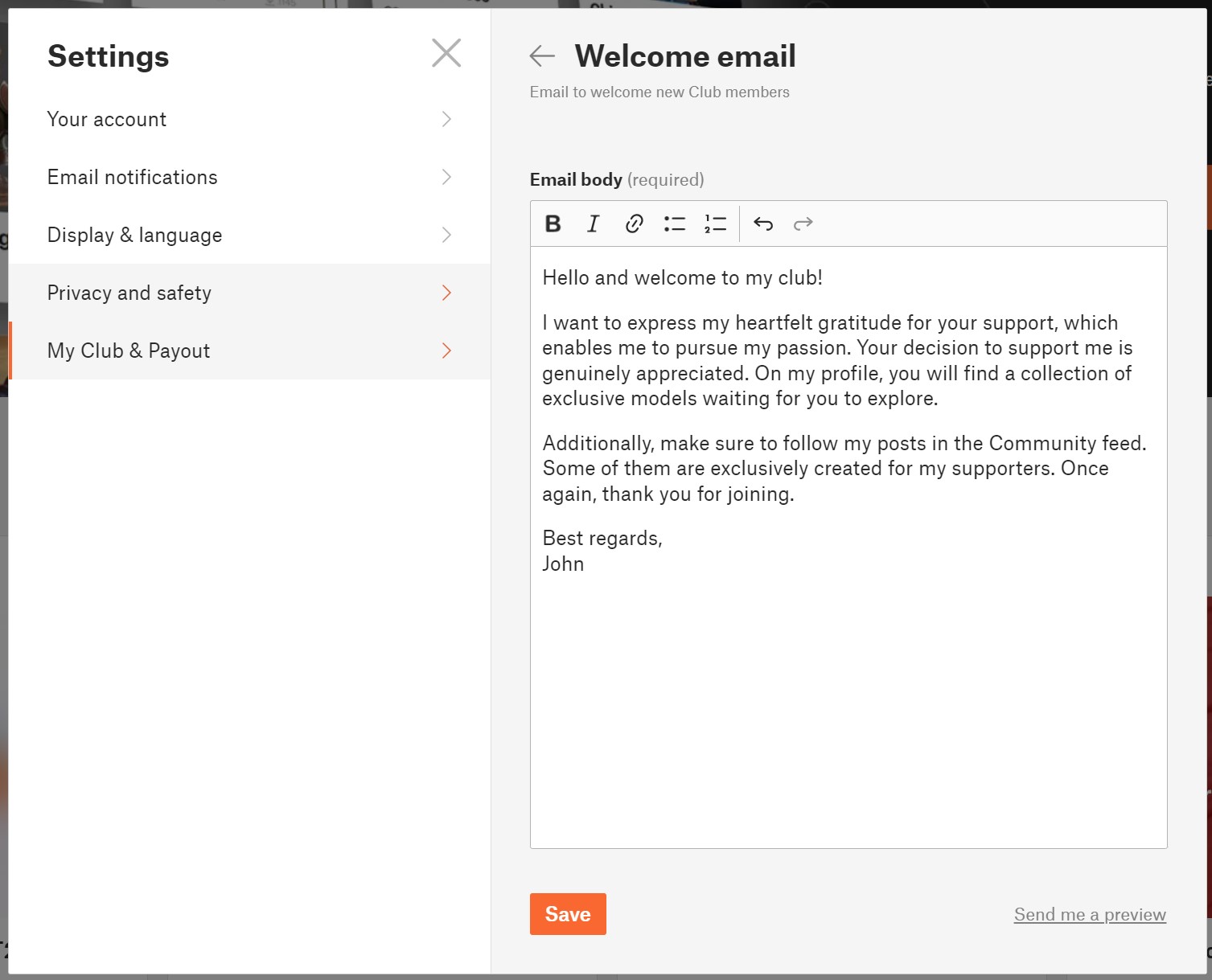
                  1. While you are logged in, and your Club is approved by us, click on your avatar in the top right corner
                  2. Click on Settings
                  3. Click on My Club & Payout
                  4. Click on Welcome email


                  If you want to review your final welcome email, you can have it sent to your email by clicking on "Send me a preview."

                  Members list

                  For an overview of your supporters, the Club Members table is provided. You will find information about the tier each user has purchased, the total amount of money they have given to you, and the date when the user first joined your Club. Clicking on the column headers allows you to sort the data.

                  To track your members across tiers over time, a graph is also available.

                  Mass messages

                  If you need to communicate something important to your supporters, you can use a mass message function.

                  1. While you are logged in, click on “My Club” in the top menu
                  2. Click on Members
                  3. Click on button Message members
                  4. Select which tiers you want to message
                  5. Click Continue and you will be redirected to the messenger, where you create the standard message and post it.

                  Note, that message will be sent to all selected supporters as a standard Message to the conversation thread.

                  Earnings

                  To monitor your monthly earnings, you have access to an earnings graph and a table displaying data categorized by months and tiers.

                  1. While logged in, navigate to “My Club” in the top menu.
                  2. Select "Earnings."

                  For more comprehensive information regarding payments and fees, please visit your Stripe Dashboard.


                  User profile page of the Creator

                  The creator's profile page is distinguished from a regular user profile by these elements:

                  • Club banner
                  • Exclusive model highlights section - where you can promote your top Exclusive models
                  • Support & Join Club button
                  • List of Club members (visible when there are 5 or more club members)

                  Your exclusive content for supporters

                  Exclusive models

                  Exclusive models are available for download only to the members of your Club, regardless of their tier. Exclusive models are one of the possible, but not necessary, benefits you can offer to your supporters.

                  Creating exclusive models is done the same way as creating a regular public model. You simply check the option "Exclusive model for my supporters only" during the model editing. 

                  Additionally, you have the option to set the model to automatically change from an exclusive model to a public model in the future. This way, you can increase your exposure and make it easier for users to find and support you.

                  You have the option to exclude this model from these benefits: Commercial use and Custom defined license terms. The restriction will be indicated on the model's detail page.

                  For users who are not members of your Club, the model details will be displayed in a limited range. They will see the first preview image, the model's name, and description. They won't be able to download the model, comment on it, or read the model comments.

                  Exclusive models must be your own designs. Reuploaded models cannot be published as exclusive models.
                  We do not provide Prusameters rewards for Exclusive models. Therefore, carefully consider which models you make publicly available and which ones you designate as exclusive. Many users will surely support you even if you publish all your models publicly, and you will also earn Prusameters for them.
                  Exclusive models will be listed in the market and in the search results only for your supporters.

                  Club only Posts and Polls

                  For your supporters, you can create unique content in the form of exclusive posts in the Community feed. It's great for sharing behind-the-scenes information about what you're currently working on, your future plans, and more.

                  You can also prepare polls specifically for your supporters, allowing them to vote exclusively. This is perfect when you want to give your supporters the opportunity to decide on the next model you will create.


                  Tiers and Benefits

                  Create your new tier(s)

                  1. While you are logged in, click on your avatar in the top right corner
                  2. Click on Settings
                  3. Click on My Club & Payout
                  4. Click on Edit tiers
                  5. Click on the “+ Add a tier”

                  You can create up to 5 tiers with different prices and benefits. For each tier, you can define a unique set of benefits to distinguish them from each other.

                  The minimum price for a tier is $3 USD. The maximum price for a tier is $100 USD. 

                  Edit tier

                  Please remember that you cannot edit the price of a tier when it has active supporters. However, you have the freedom to make changes to everything else.

                  1. While you are logged in, click on your avatar in the top right corner
                  2. Click on Settings
                  3. Click on My Club & Payout
                  4. Click on Edit tiers
                  5. Click on the tier you want to update

                  You have the flexibility to modify the tier name, description, and benefits. If there are no supporters in a tier, you can also adjust its price. However, once supporters have joined a tier, the price cannot be changed.

                  Delete the tier

                  If you want to delete a tier, go to the Settings, Edit tier and click on the "Delete tier" option.

                  If the tier has no user members, it will be deleted immediately.
                  If the tier has any active members, it will continue to exist until the end of the current month. No new users will be able to join the tier, but current members will retain access until the end of the month for which they have paid. Users who were joined to the tier that has been terminated will be notified via email about this situation. It will be up to them whether they choose another tier or decide not to continue their support.

                  Benefits

                  Each tier consists of a set of benefits. Benefits are the rewards for your supporters. The two mentioned benefits below are fixed for every tier, and you can add other benefits according to your needs.

                  Loyalty badges next to member usernames in comments (Comments from the supporters will be highlighted with the badge)
                  Access to exclusive models (Access to all of the creator's models in the Exclusive models section.)

                  So note that all members from all tiers have access to the same collection of Exclusive models. You can differentiate the tiers with other benefits and by different licensing terms.

                  Optional benefits

                  Models for commercial usage - allow your supporters to use models for commercial purposes. It means that supporters can sell printed 3D models. Redistribution of the 3D model files is not permited.

                  Members only posts -If you decide to create posts and/or polls in the Community feed that are exclusively for your supporters, mention it as one of the benefits. Supporters get access to exclusive posts in the Community feed and the ability to vote in your members-only polls.

                  Custom licensing terms - You can define completely your own licensing terms and conditions. 

                  Custom benefit - define it yourself - If you want to offer any other advantage to your supporters, here you have the opportunity to describe it and add it among the benefits of the tier.

                  Payments and Getting paid

                  Payments are processed by Stripe payment processor. Users can pay using their credit/debit card.
                  The money goes directly from the supporter to the creator Stripe account.

                  Fees

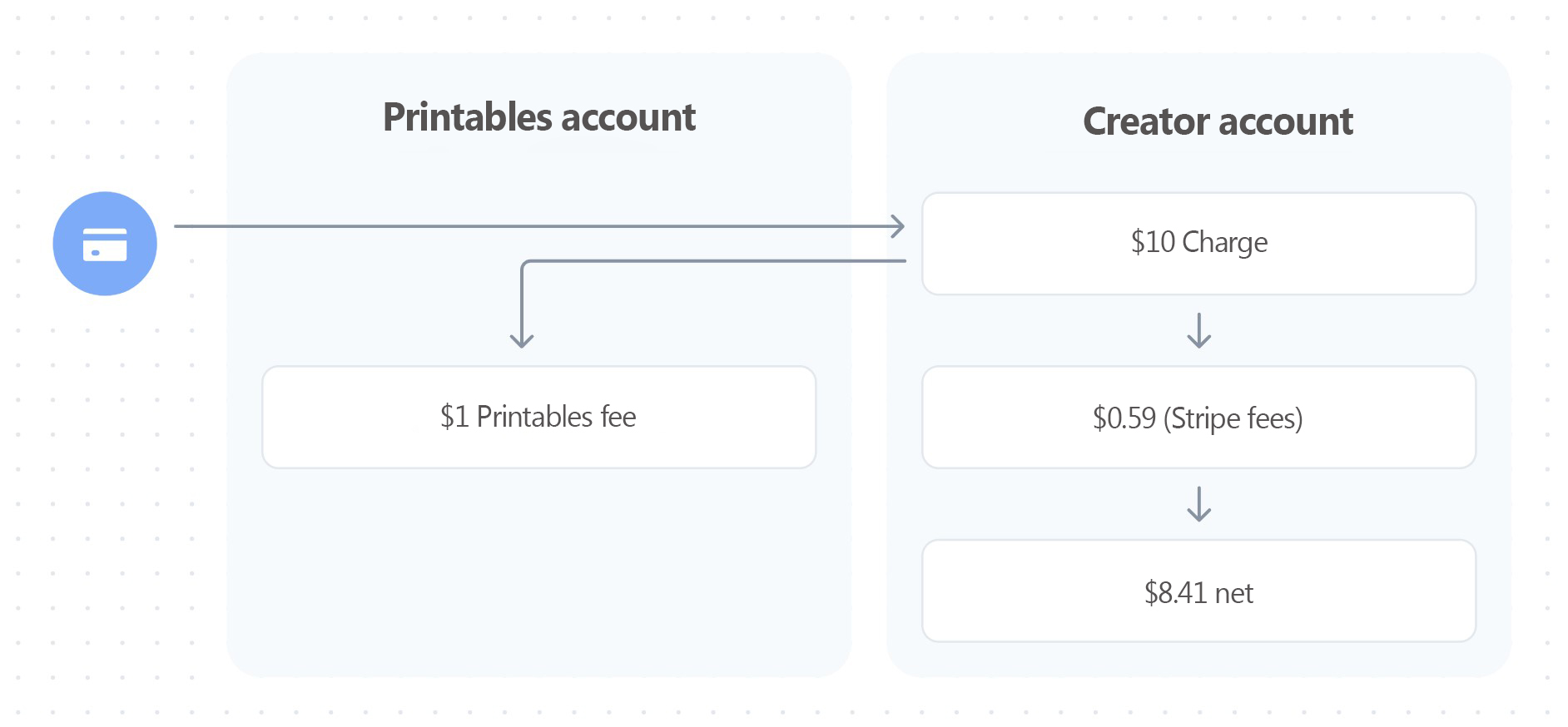
                  Printables takes 10 % fee from transactions, which will be used to help cover the costs of servers, maintenance, and development. The payment from the supporter to the creator is also subject to normal processing fees outside of our control, such as currency conversions or the Stripe payment fee based on Stripe rates.

                  For instance, if a supporter decides to pay for a $10 tier, the Printables fee will be $1 (10%). This $1 is then transferred to the Printables platform account. The net amount credited to the creator's account is $8.41 ($10 - $0.59 - $1), assuming standard US Stripe fees.
                  How Do I Get Paid?

                  Receiving payments on Printables is incredibly simple. All you need to do is connect you Stripe account to Printables Club. When someone supports you, the funds are immediately and directly transferred to your Stripe account and then sent to your bank account according to your Stripe account settings.

                  There's no minimum amount to withdraw or predefined payout schedule.

                  Taxes

                  In most situations, the money you make from Printables Club is considered income and needs to be reported for tax purposes, just like any other source of income. Right now, Printables doesn't have built-in tools to automatically include sales tax (GST) or value-added tax (VAT) when someone supports you. So, it's up to you to figure out and pay any necessary sales tax or VAT.

                  It's important to note that Printables doesn't provide advice on taxes. Tax rules can be different depending on where you live or operate. We suggest you get advice from a professional about your specific tax responsibilities before you start using Printables Clubs.

                  Billing Cycle

                  Memberships are on a monthly basis, and the recurring payment is charged at the beginning of each month.

                  If a new member joins in the middle of the month, they can choose to pay the full membership fee for the remaining part of the month or a proportional amount for the current month plus the following month. We are particularly proud of this solution, as creators expressed their frustration with people joining near the end of the month and the confusion that came with the two payments close to each other.

                  Discount codes

                  Printables supports the use of discount codes during checkout. Coupons (discount codes) are created by the creator in the Stripe account.
                  Coupons have a wide range of settings and parameters. However, Printables is not compatible with all these parameters. Therefore, it is necessary to follow the recommendations below to ensure that the coupons work as expected. Otherwise, the discount code will not function properly.
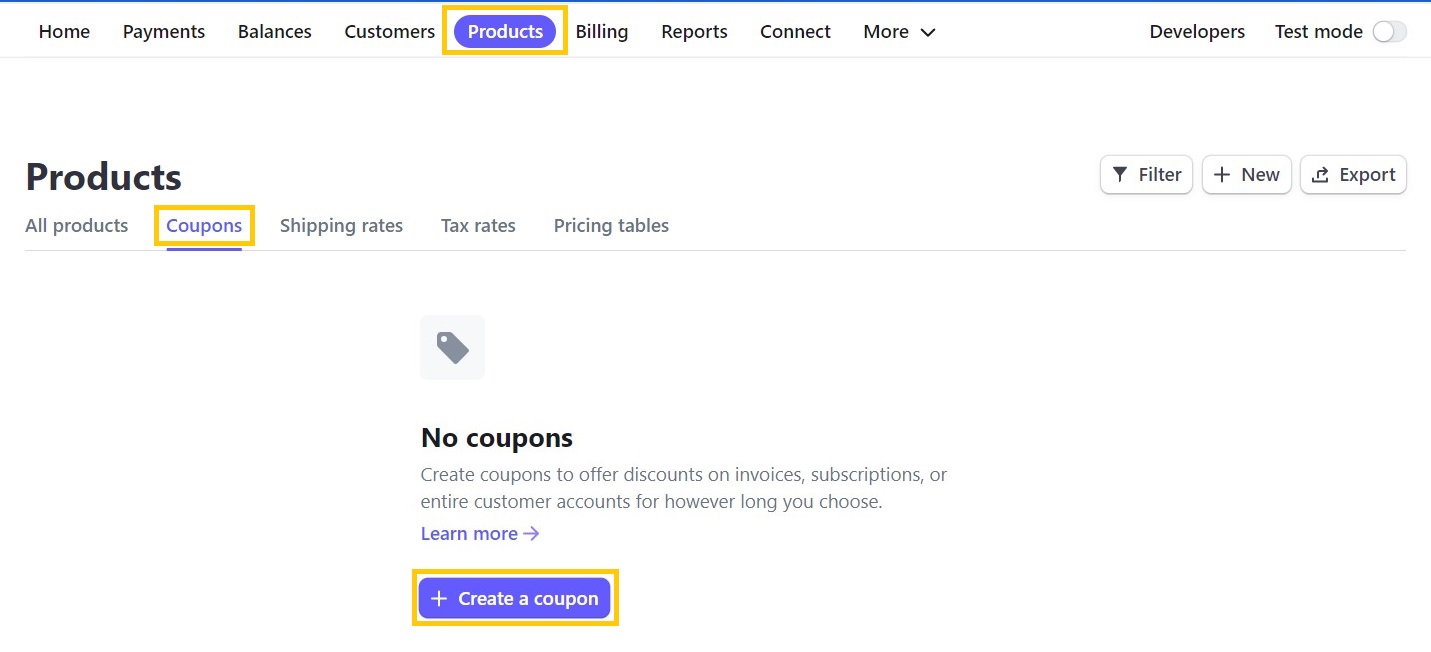
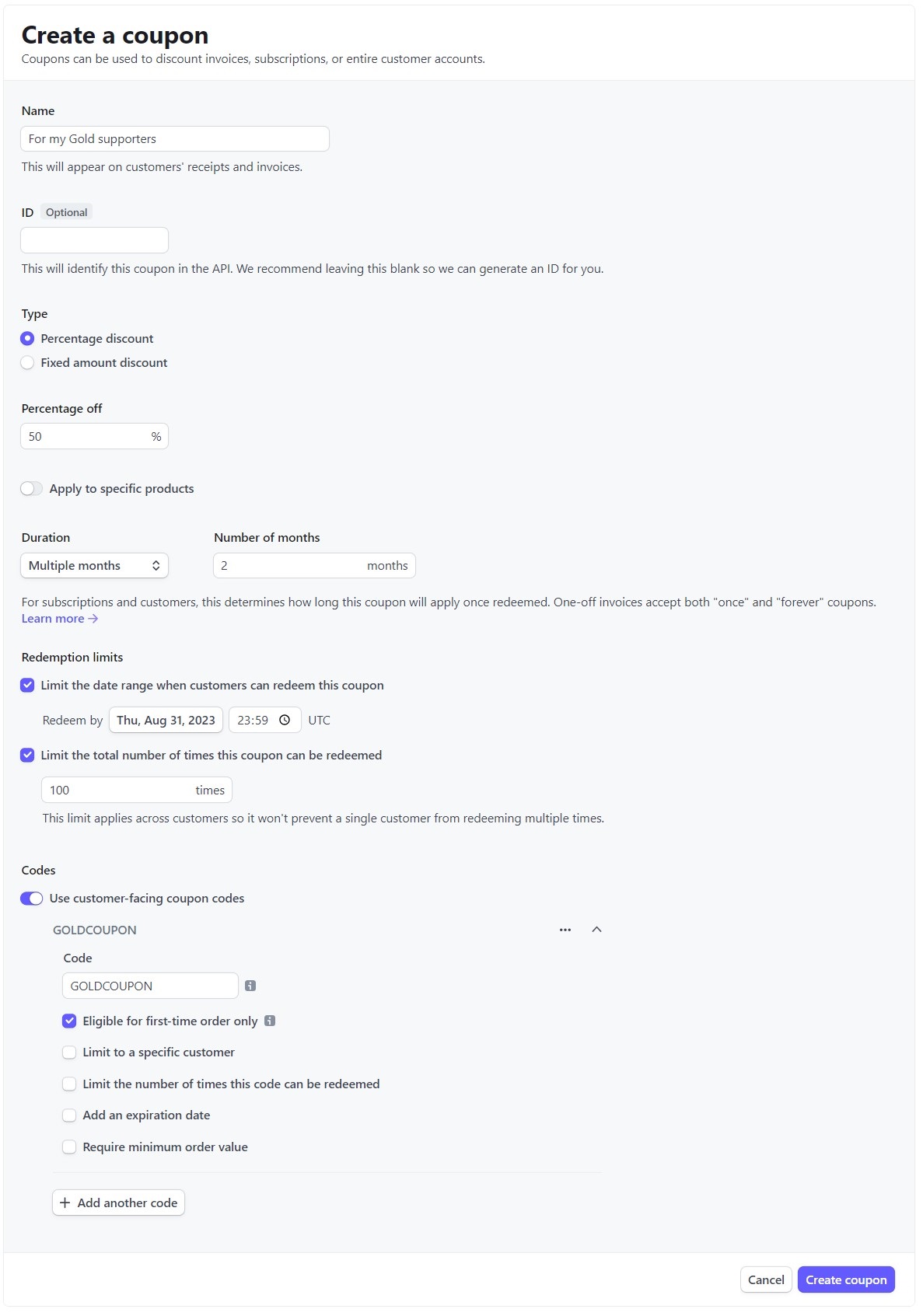
                  Creating a Coupon and Setting Parameters

                  1. Log in to your Stripe Dashboard at https://dashboard.stripe.com/
                  2. In the top bar, click on Products
                  3. Click on Coupons
                  4. Click on Create a coupon

                    Name - any name for the coupon
                    ID - do not fill in
                    Type - you can use either of the two options provided
                    Type -> Percentage discount - any value; the minimum payment amount at checkout must be $0.50 (more)
                    Type -> Fixed amount discount - you have to select USD; the minimum payment amount at checkout must be $0.50 (more)
                    Apply to specific product - do not use, as it is not compatible with Printables Clubs
                    Duration - Forever / Once / Multiple months - all three options can be used
                    Limit the date range when customers can redeem this coupon - can be used if necessary
                    Limit the total number of times this coupon can be redeemed - can be used if necessary

                    Use customer-facing coupon codes - switch it on
                    Code - any unique discount code
                    Eligible for first-time orders only - can be used if necessary
                    Limit to a specific customer - not recommended to use (must be existing customer)
                    Limit the number of times this code can be redeemed - can be used if necessary
                    Add an expiry date - can be used if necessary
                    Require minimum order value - do not use

                  Where to enter the discount code?

                  The discount code is used to provide a discount from creators to their supporters. The code is entered by clicking on "Add promotion code" on the Stripe checkout page. After entering the code, the code is validated and the discount is applied immediately.
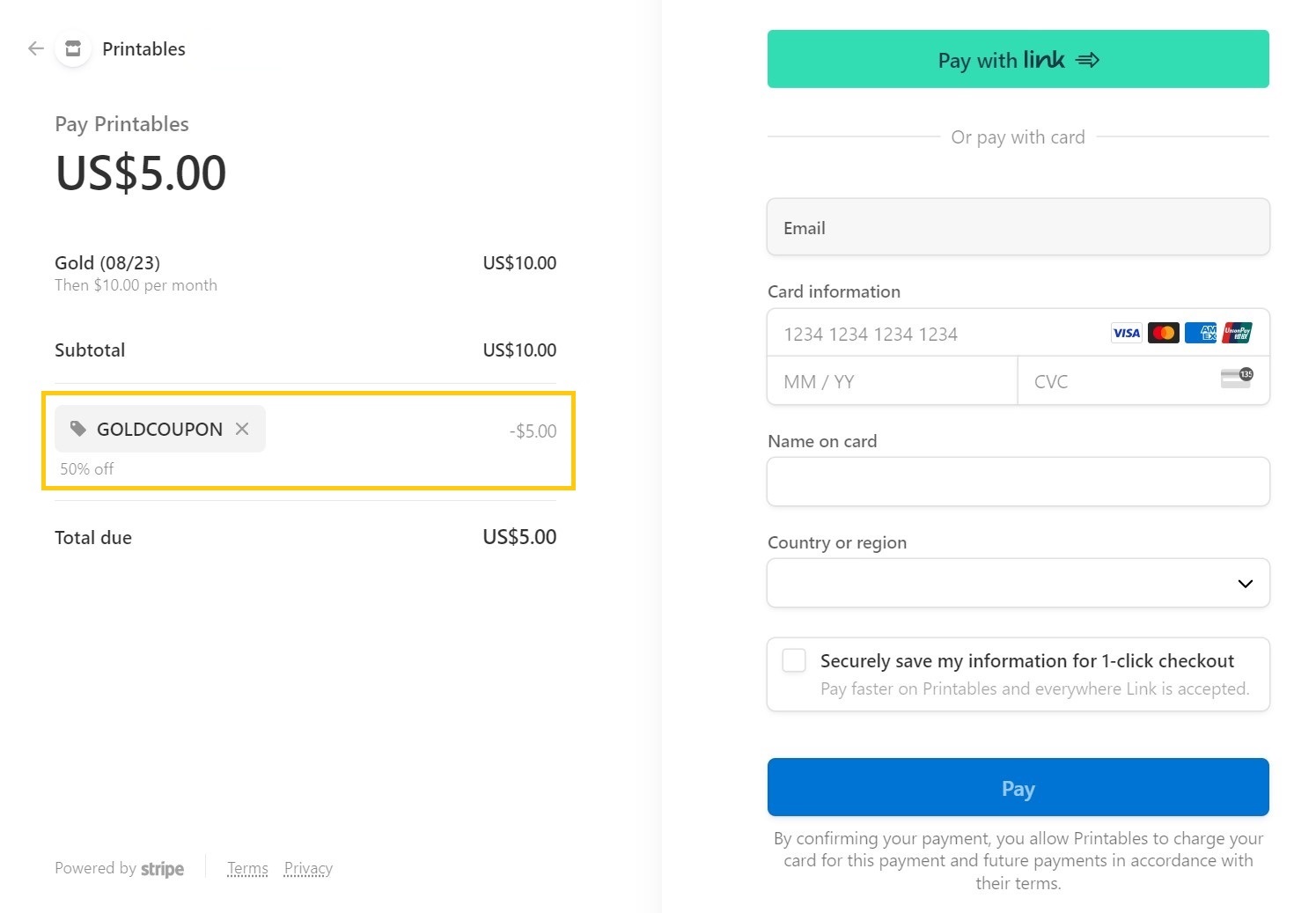
                  Both the Stripe fee and the Printables fee are calculated based on the original price without the discount code.

                  Sample Use Case

                  1. The creator has their supporters on another platform.
                  2. The creator has decided to share Exclusive content for their supporters in their Club.
                  3. The creator wants to take advantage of a unique opportunity to double their earnings as part of a bonus promotion.

                  The Creator want to motivate their supporters to the platform, so they decide to offer them a discount code in the form of XY% off the first two payments.
                  How to export information about incoming payments?

                  If you need the list of payments for tax purposes regarding all incoming payments for the sale of models and payments from Club supporters, you can export them directly from your Stripe Dashboard in .CSV format.
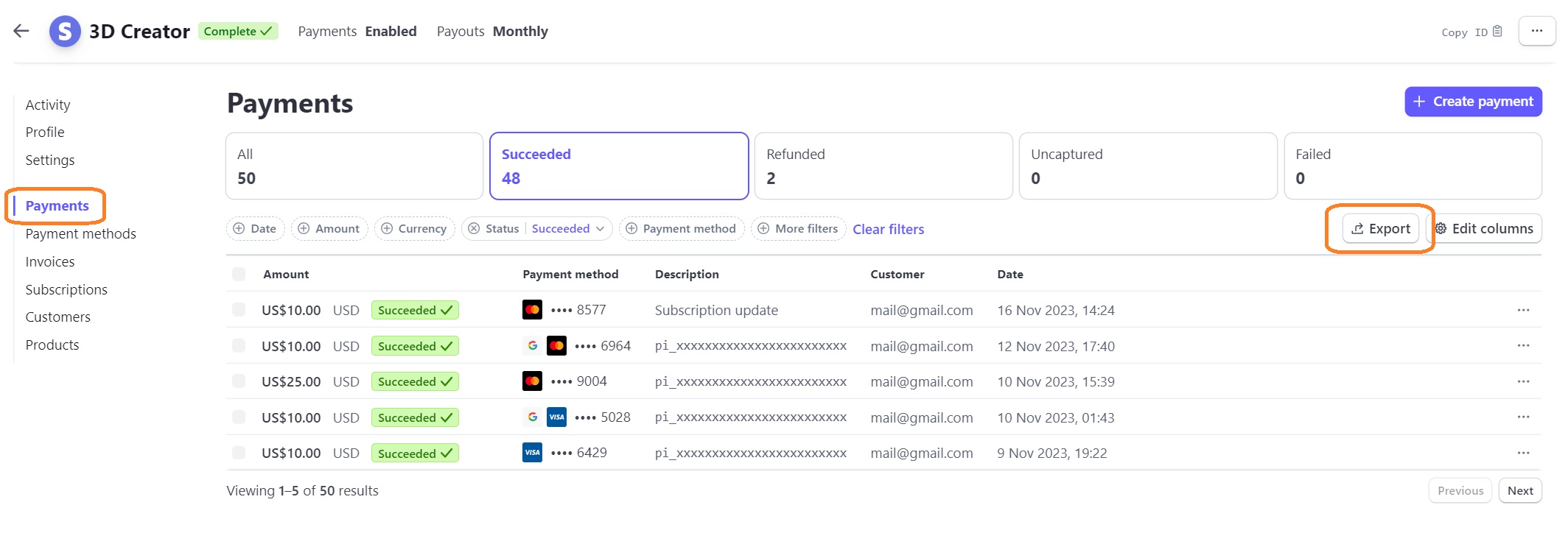
                  1. Go to https://dashboard.stripe.com/ and log in,
                  2. in the left menu, select "Payments",
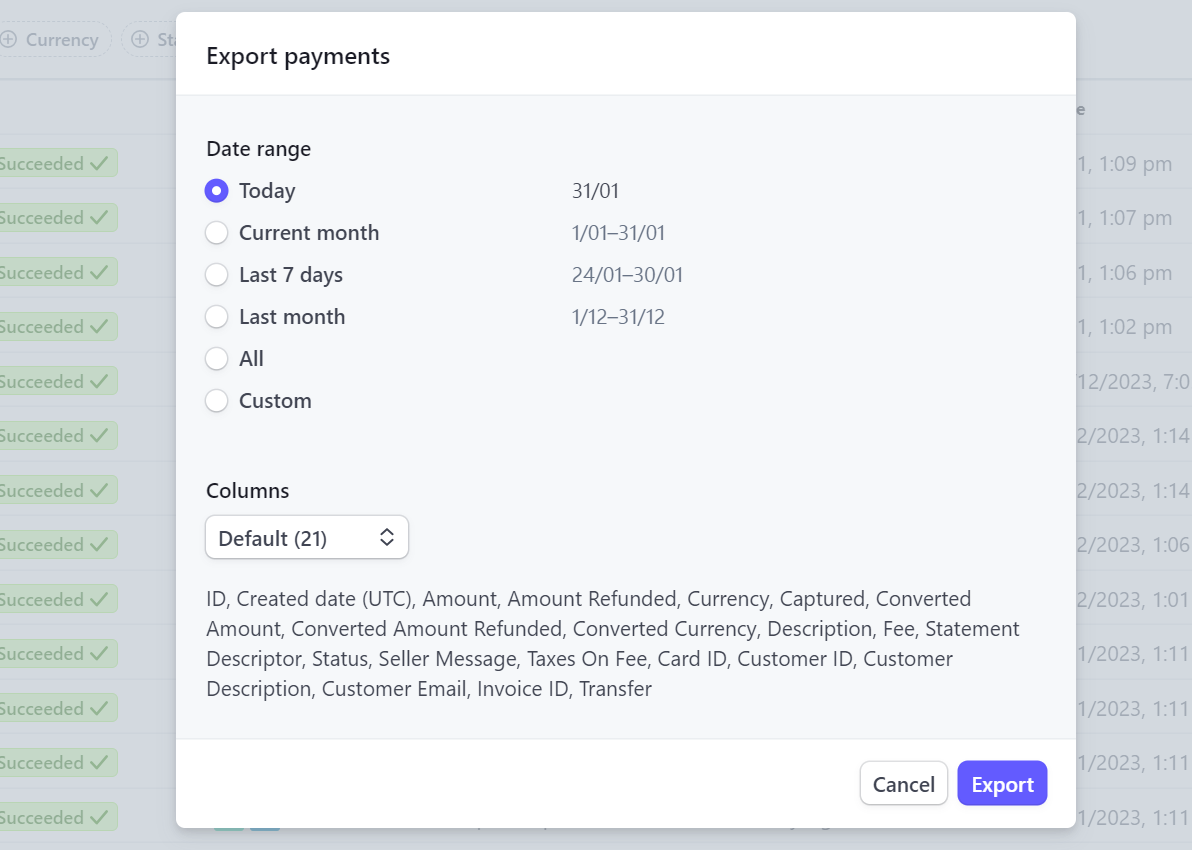
                  3. click on "Export" button and choose the specific columns and time period you wish to export,
                  4. click the "Export" button and wait for the output.

                  Czy ten artykuł był przydatny?
                  Ta akcja jest dostępna tylko dla zarejestrowanych użytkowników. Proszę zaloguj się.
                  Zaloguj się , aby dodać komentarz
                  Brak komentarzy

                  Tematy

                  • Printables
                    • Printables Clubs
                      • About
                      • For Creators
                      • For Supporters
                    • Program P2P