No items yet.
PrusaSlicer is an open-source, feature-rich, frequently updated tool that contains everything you need to export the perfect print files for your 3D printer.
Prusa Connect is a cloud service enabling remote control and monitoring of your 3D printers, offering secure data handling, easy setup, and support for managing multiple printers from anywhere.
Control your printer/s remotely from anywhere using the Prusa Connect technology behind. Prusa.app brings a new level of Prusa printer experience to Android and iOS phones.
Prusa Academy offers online courses on various 3D printing related topics. Each course features:
We are the largest maker of 3D printers in Europe and the United States.
Founded as a one-man startup in 2012 by Josef Prusa, a Czech hobbyist, maker, and inventor. In just 15 years, we've grown into a company of more than 1,200 people. Every month, we design, build, and ship over 10,000 innovative and secure 3D printers from our headquarters in Prague, Czech Republic, and Delaware, USA, to users in more than 160 countries.
Watch a video and find out how Prusa Research was born and what we achieved within only 10 years!
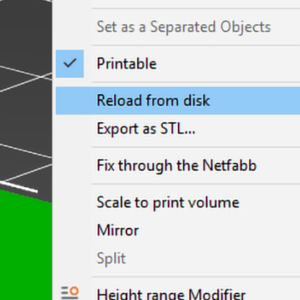
この機能は、新しいバージョンのモデルを作成し、カスタムサポートやモディファイアメッシュなどの設定をやり直すことなく、PrusaSlicerで古いバージョンを置き換える場合に最適です。 3Dビューでモデルを右クリックし、コンテキストメニューから「ディスクから再読み込み」を選択します。 または、オブジェクトリスト(右側)にある編集アイコンをクリックすることもできます。ディスクからの再読み込みは、エキスパートモードで追加できるカスタムモディファイアメッシュでも機能します。 ディスクからの再読み込み機能への2つのアクセス方法 3MFファイルでのディスクからの再読み込み 3MFプロジェクトファイルを再度開く際にも、任意のモデルの再読み込みを選択することができます。 デフォルトでは、3MFプロジェクトファイルは、ソースモデルへのフルパスを保存しないように設定されています。これは、このようなファイルを共有する際にセキュリティリスクをもたらす可能性があるためです。フルパスが保存されず、ディスクからの再読み込みが要求された場合、PrusaSlicerはソースファイルの場所を尋ねます。 なぜ、フルパスの保存がデフォルトでオフになっているのですか?3MFは基本的にZIPアーカイブで、人間が読めるXMLファイル、サムネイル画像、いくつかの雑多なファイルを含んでいます。XMLファイルが人間が読めるということは、3MFファイルフォーマットの利点の1つです。しかし、場合によっては、モデルファイルの場所を明らかにしたくないこともあります:C:MyCompanyNameMySecretProjectNamefriend_name_gift.stl…