0 点の商品がカートに入っています点の商品がカートに入っています
カートは空です
マイプロフィール
ログイン すると注文や保存した商品を確認できます
ログイン中:
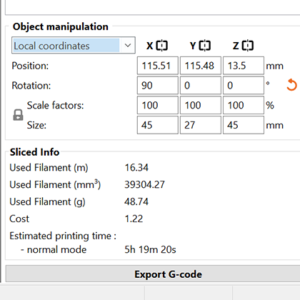
1つ以上のオブジェクトを選択しているときは、必ず右のパネルにオブジェクト操作パネルが表示されます。 テキスト入力を使って、素早く修正することができます: 位置 回転 スケール要素 サイズ 各軸に1つずつ、3つのクイックミラーボタンが用意されています。回転は元に戻すことができ、それぞれのオレンジ色のリセット矢印ボタンを使って、ワンクリックでスケールを100%に戻すことができます。 モディファイアや複数のパーツで構成されるモデルの一部を変形している場合、選択したオブジェクトがプリントベッドの上または下にあるときはいつでも、プリントベッド上の便利な場所ボタンが表示されます。 ローカル座標とワールド座標 アドバンスモードとエキスパートモードでは、オブジェクト座標とワールド座標の切り替えが可能になります。 ローカル座標系は、オブジェクトに対して一定である。ワールド座標は、プリントベッドに対して一定です。つまり、オブジェクトのサイズは、例えばZ軸を中心に回転させるとワールド座標で変化します。ローカル座標でのサイズは、どの軸の周りに回転しても一定です。 ローカル座標…
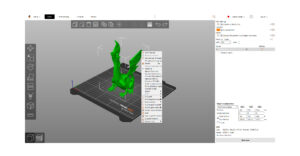
PrusaSlicerは、かなりシンプルなユーザーインターフェイスを採用しています。画面の大部分は3Dビューに充てられており、3Dモデルの操作に使用されます。 上部のツールバー(1,2)は、オブジェクトの追加や削除に使用します。左のツールバー(4)には、拡大縮小や回転ツールなど、3Dモデルで操作するためのツールがあります。右側のパネルは、主にプリント、フィラメント、プリンタープロファイルの選択(6,7,8)、サポート…
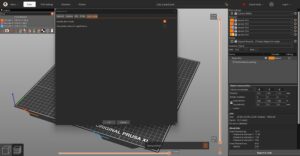
MacOSとLinux PrusaSlicerはMacOSとLinuxでネイティブにダークモードをサポートしています。システム設定でダークモードを有効にしている場合、PrusaSlicerも自動的にダークモードで起動するはずです。 Windows ダークモードは、「環境設定」-「GUI」-「ダークカラーモードを使用する(実験的)」から手動で有効にすることができます。 Windowsにダークモードを実装するのは、予想以上に手間がかかりました。MacOSやLinuxとは異なり、Windowsには、私たちのマルチプラットフォームGUIライブラリ(wxWidgets)が使用するWin32コントロール用の公式ダークモードがありません。そこで私たちは、自分たちでそれを実装するようにしました。既存のWin32コンポーネントのスキニングを開始し、スキニングできないコンポーネントの代替品を実装しました。幸運なことに、私たちはNotepad++を発見しました!私たちが知る限り、Notepad++は、ダークモードを合理的に実装した唯一のWin32オープンソースアプリケーションです。私たちは結局、Notepad++のソースコードの一部を、このプロジェクトに基づく未発表のダークモードAPIとのインターフェイスに使用することにしました。