Prusa
  • ショップ
    • 最新製品
    カテゴリー別
    • 3Dプリンター新着
    • 3Dプリンターアップグレード新着
    • 材料
    • アクセサリー
    • スペアパーツ
    • コース
    • グッズ
    • 見積もりを取得
    クイックリンク
    • 配送と配達
    • 返品と返金
    • 支払いと融資
    • 保証
    • VATと関税
    • よくある質問

    0 点の商品がカートに入っています点の商品がカートに入っています

    カートは空です

    カートを見る3Dプリンターを購入

    マイプロフィール

    ログイン すると注文や保存した商品を確認できます

    マイプロフィール

    ログイン中:

    • 注文
    • ログアウト
  • 3Dプリント
    • 3Dプリントを探る
    初心者向け
    • 3Dプリントの基礎
    • FDM印刷の仕組み
    • 初めてのプリンターを購入する
    • 3Dモデルカタログ
    用途別
    • ラピッドプロトタイピング
    • 製造
    • エンジニアリング
    • 研究
    • アートとデザイン
    さらに深く
    • 材料ガイド
    • コース
    • ウェビナー
    • 導入事例
    • カスタム3Dプリンティング
  • 3Dプリンター
    • すべての3Dプリンター
    用途
    • 自宅またはガレージ愛好家、改造愛好家、ホームプリンティング
    • ビジネス小規模チーム向けの社内生産
    • エンタープライズフリート、セキュリティ、大規模生産
    • どのPrusaが私に適していますか
    ショップと閲覧
    • CORE One+新着
    • CORE One+ INDX新着
    • CORE One L+新着
    • CORE One L+ INDX新着
    • XL+新着
    • MK4S
    • Prusa Pro HT90
    • Prusa Pro AFS
    • Prusa Pro SLX
    プリンターからさらに
    • 部品とアップグレード新着
    • Spare parts
    • 重要インフラ
    • 導入事例
    • シグネチャーオーク
    • キット
  • 材料
    • すべての材料
    用途別
    • 日常とデザイン
    • 機能工学
    • 複合材料
    • プロフェッショナル向け特殊材料
    • SLAレジン
    Prusament
    • PLA
    • PETG
    • ASA
    • PC
    • PA11
    • Flex
    • TPU
    材料からさらに
    • 材料ガイド
    • 自社製材料
    • サステナビリティ
    • ストアで注文
  • ソフトウェア
    • すべてのソフトウェア
    印刷の準備
    • PrusaSlicer 3.0新着
    印刷と監視
    • Prusa Connect
    • EasyPrint
    • iOS & Androidアプリ
    • Prusaファーム
    始める
    • ダウンロードとインストール
    • ナレッジベース
    その他のソフトウェア
    • 3Dモデルカタログ
  • サポート
    • サポートを探す
    回答を探す
    • ナレッジベース
    • トラブルシューティング
    • コース
    • ウェビナー
    ヘルプ
    • お問い合わせ
    • ライブチャット
    • 配送と配達
    • 保証
    • 返品と返金
    • サービスとスペアパーツ
    • サービスと修理
    コミュニティ
    • フォーラム
    • Reddit
    • Printables
  • トラストセンター
    • トラストセンター概要
    トピック別
    • GDPR
    • 証明書
    • セキュリティ
    • コンプライアンス
    コミットメント
    • サステナビリティレポート
    お問い合わせ
    • セキュリティチームに連絡
  • 会社
    • Prusaについて
    私たちについて
    • 私たちのストーリー
    • プリンターの製造方法
    • オープンソース
    • ブランド&メディアキット
    ニュース
    • ブログ
    • ニュースルーム
    • イベント
    信頼とパートナー
    • サステナビリティ
    • 再販業者と販売代理店
    • アフィリエイトプログラム
    • お問い合わせ
    • English
    • Čeština
    • Deutsch
    • Español
    • Français
    • Italiano
    • Polski
    • 日本語
  • ログイン中:

    • 注文
    • 住所
    • 在庫アラート
    • マイコース
    • サブスクリプション
    • アカウントを編集
    • ログアウト

ログイン すると注文や保存した商品を確認できます

ログイン中:
  • 注文
  • 住所
  • 在庫アラート
  • マイコース
  • サブスクリプション
  • アカウントを編集
  • English
  • Čeština
  • Deutsch
  • Español
  • Français
  • Italiano
  • Polski
  • 日本語
ショップ

0 点の商品がカートに入っています点の商品がカートに入っています

カートは空です

カートを見る3Dプリンターを購入

マイプロフィール

ログイン すると注文や保存した商品を確認できます

マイプロフィール

ログイン中:

  • 注文
  • ログアウト
ショップ
  • 最新製品
カテゴリー別
  • 3Dプリンター新着
  • 3Dプリンターアップグレード新着
  • 材料
  • アクセサリー
  • スペアパーツ
  • コース
  • グッズ
  • 見積もりを取得
クイックリンク
  • 配送と配達
  • 返品と返金
  • 支払いと融資
  • 保証
  • VATと関税
  • よくある質問

おすすめ製品

    人気のカテゴリー

      急上昇ワード

        記事

          ブログ

            製品

              カテゴリー

                検索候補

                  検索中…
                  結果がありません
                  エラーが発生しました。
                  ↑↓ 選択↵ 開くEsc 検索を閉じる
                  1. サポート
                  2. プリンターの機能
                  3. MMU3 for CORE One L
                   

                  内容

                  • Buffer
                  • MMU Connection
                  • MMU3 Final Resurrection
                  • Shopping List

                  ブログ

                  • Prusament PLA ColorMix:わずか5巻のフィラメントで45色以上をプリント
                  • PrusaSlicer 3.0プレビュー版 — 3Dプリントの未来を見据えた仕様
                  • より高品質なプリントを、もっと簡単に:Prusa XL+、CORE One L+、CORE One+(Gen 2)― 大規模製品アップグレード

                  ニュースレター

                  ご登録いただくと、毎月 新しいファームウェア、PrusaSlicerの新バージョン、3Dプリントプロジェクトの一般的なヒントなど、役立つ情報をお届けします。

                  クリックして、ニュースレターを受け取る。

                  このサイトはreCAPTCHA Enterpriseによって保護されており、Googleのプライバシーポリシーと利用規約が適用されます。

                  Heavy Duty Keyboard Holder (No Supports)
                  E-shop
                  • 3Dプリンター
                  • プリンターのアップグレード
                  • フィラメント
                  • アクセサリー
                  • Prusa 商品
                  Prusa

                  © Prusa Research a.s.

                  Printables
                  • 3Dモデル
                  • Store
                  • Clubs
                  • 3Dデザインコンテスト
                  • Brands
                  コミュニティ
                  • ワールドマップ
                  • フォーラム
                  • ユーザーグループ
                  • イベント
                  ヘルプ
                  • Prusa ヘルプ
                  • Prusa アカデミー
                  • 3Dプリンティング計算機
                  ソフトウェア
                  • PrusaSlicer
                  • Prusa.app
                  • Prusa Connect
                  • ドライバーとソフトウェア
                  会社概要
                  • 私たちについて
                  • Blog
                  • プルサ正規販売代理店
                  • お問い合わせ
                  • ISO 9001・ISO 14001・ISO 45001 認証取得済み
                  • 一般利用規約
                  • PRUSAウェブサイト利用のための一般利用規約
                  • プライバシーポリシー
                  • クッキーに関する情報
                  • お客様の苦情対応に関する方針
                  • Webサイトのステータスページ
                  • Cookie 設定
                  Prusa
                  • 一般利用規約
                  • PRUSAウェブサイト利用のための一般利用規約
                  • プライバシーポリシー
                  • クッキーに関する情報
                  • お客様の苦情対応に関する方針
                  • Webサイトのステータスページ
                  • Cookie 設定

                  © Prusa Research a.s.

                  JOSEF PRUSA®、PRUSA RESEARCH®、PRUSA POLYMERS®、PRUSA ORANGE®、PRUSA 3D ® および PRUSAMENT® は、Prusa Development a.s. の登録商標であり、Prusa Research a.s. が Prusa Development a.s. からのライセンスに基づき使用しています。

                  MMU3 for CORE One L

                  関連するもの

                  MMU3
                  CORE One L
                  記事 他の言語でもご覧になれます。
                  English
                  Čeština
                  Polski
                  Deutsch
                  Français
                  Español
                  Italiano
                  日本語

                  Although INDX is the go-to multi-material option for most CORE One L users, the MMU3 remains as a community-supported alternative for those preferring an efficient, classic multi-color system requiring fewer printer modifications.

                  Because the CORE One L is very similar to its smaller sibling, CORE One+, you can use the MMU3 Lite kit for CORE One+ and install it on the CORE One L.
                  Complete chapters 1–11 of the MMU3 Assembly guide (including the Nextruder rebuild!), incorporating the additional adjustments below.


                  Buffer

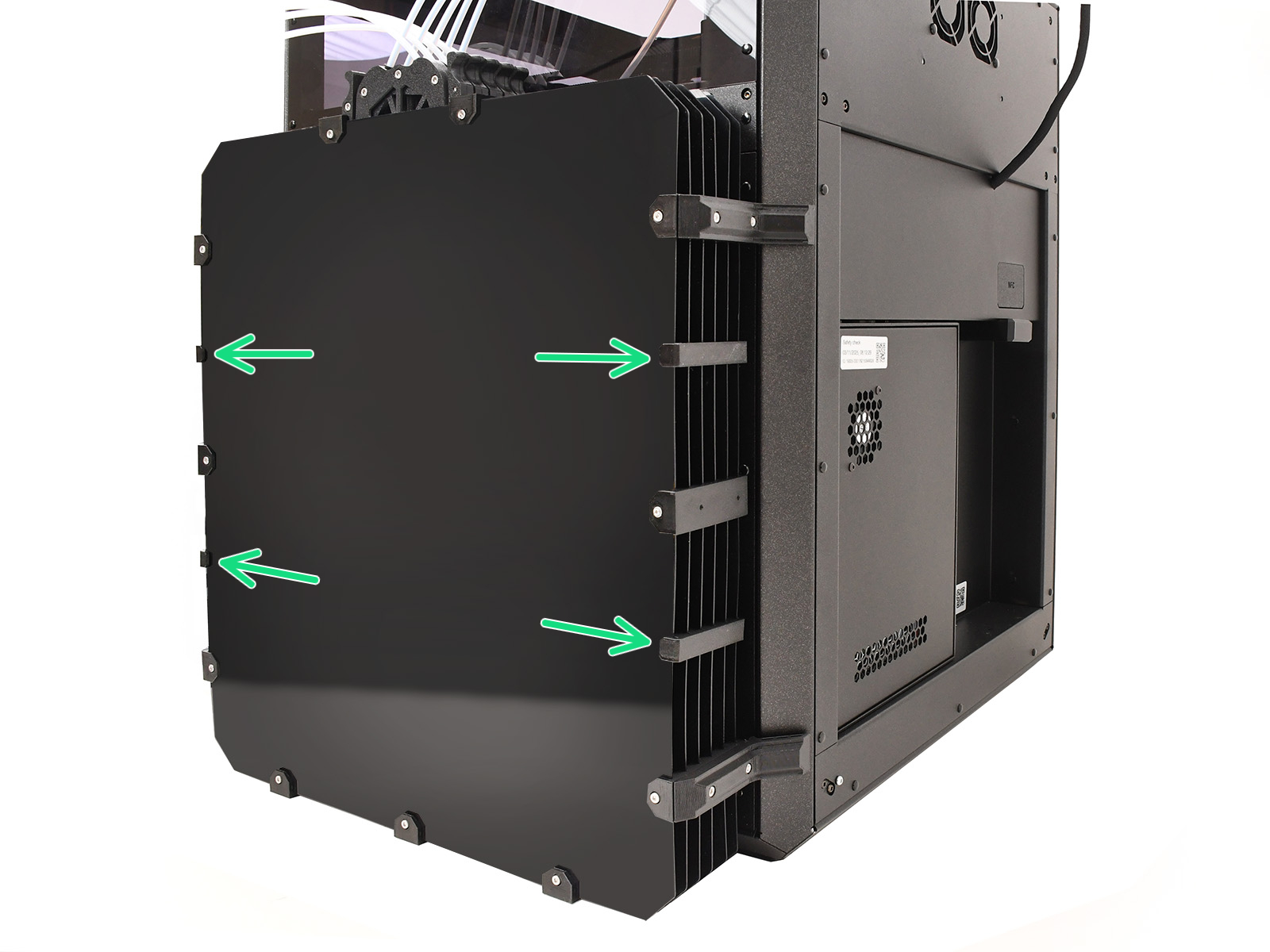
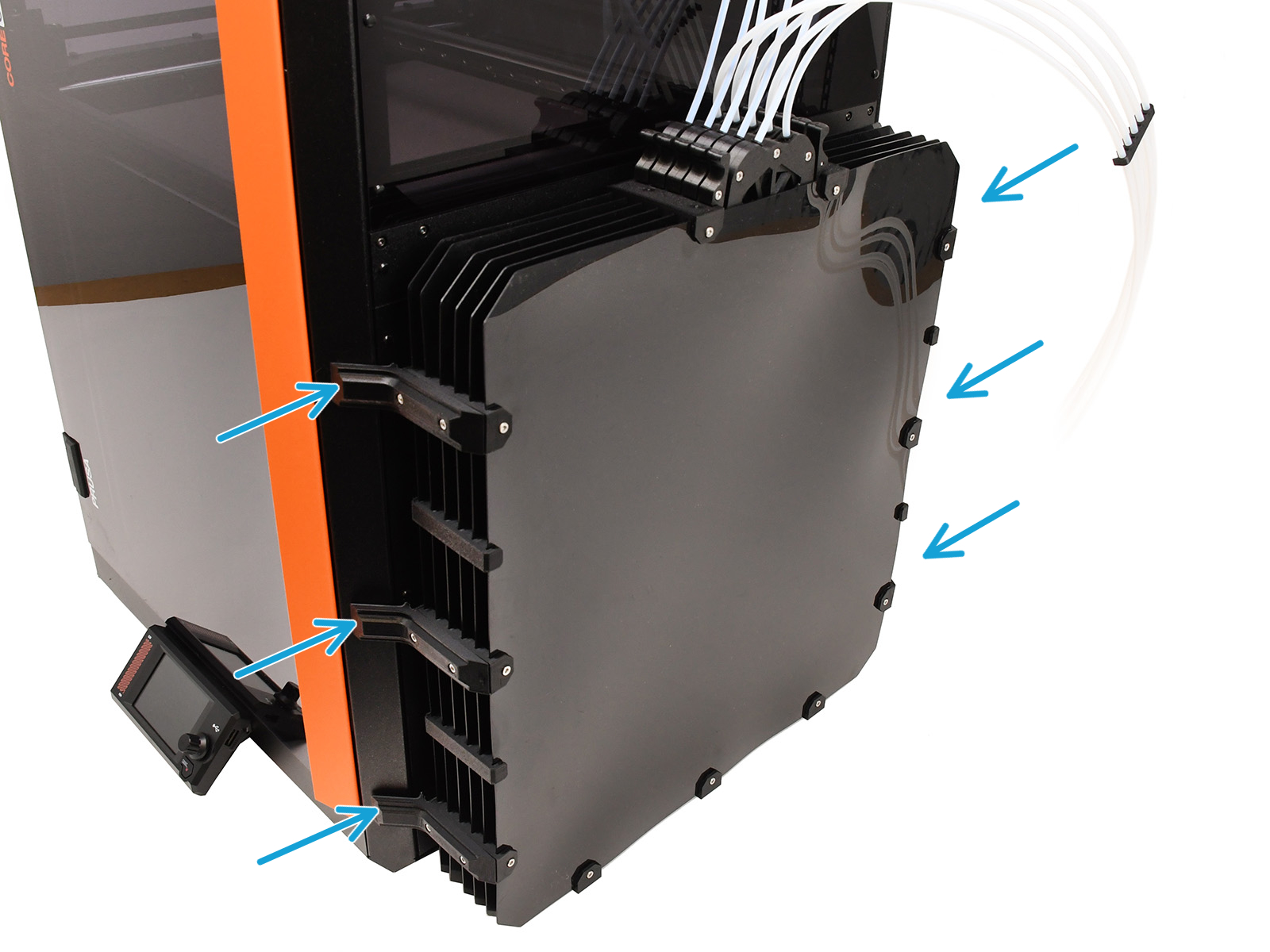
                  The biggest difference from the standard CORE One+ setup is the buffer. The larger CORE One L should use a longer MMU→Extruder PTFE tube, necessitating the use of a larger buffer body consisting of:

                  ⬢ Specific printed parts. (Available from respective Printables page).
                  ⬢ Additional fasteners. (22x M3x30, 22x M3nS nuts, and 12x M3x8).
                  ⬢ The large buffer plates. These may be manufactured individually by cutting from a 1mm thick PETG/ABS/HIPS plastic sheet. (DXF file resources on Printables) This is achievable for example via online laser-cutting services.
                  ⬢ The longer PTFE tubes. (4x2.5x710mm between the MMU and the Buffer. 4x2.5x940mm tubes between the spool holders and the buffer) All PTFE tubes must be cut to length individually. 
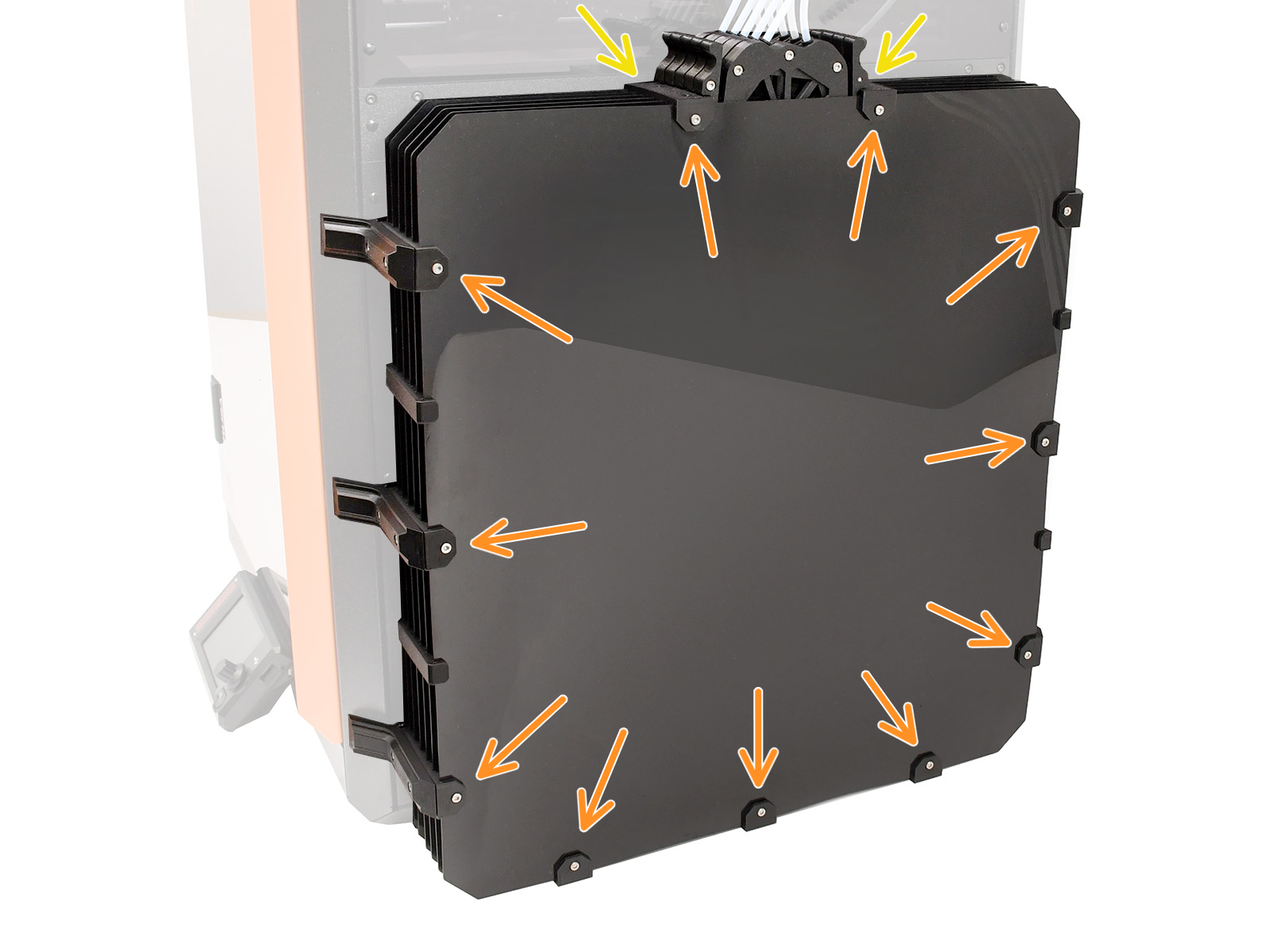
                  The full shopping list is available below!

                  ⬢ Start from the bottom: secure 3 plates to the holders, attach the remaining 3, then fix them into the upper holders and finally install the side holders.
                  ⬢ Insert 22 M3nS nuts into the big plate holders.
                  ⬢ Attach the 11 big plate holders onto the plates using the 22 M3x30 screws.
                  ⬢ Attach the four smaller plate holders.
                  ⬢ Insert the magnets into the profile holders.
                  ⬢ Attach the profile holders using the 12 M3x8 screws.
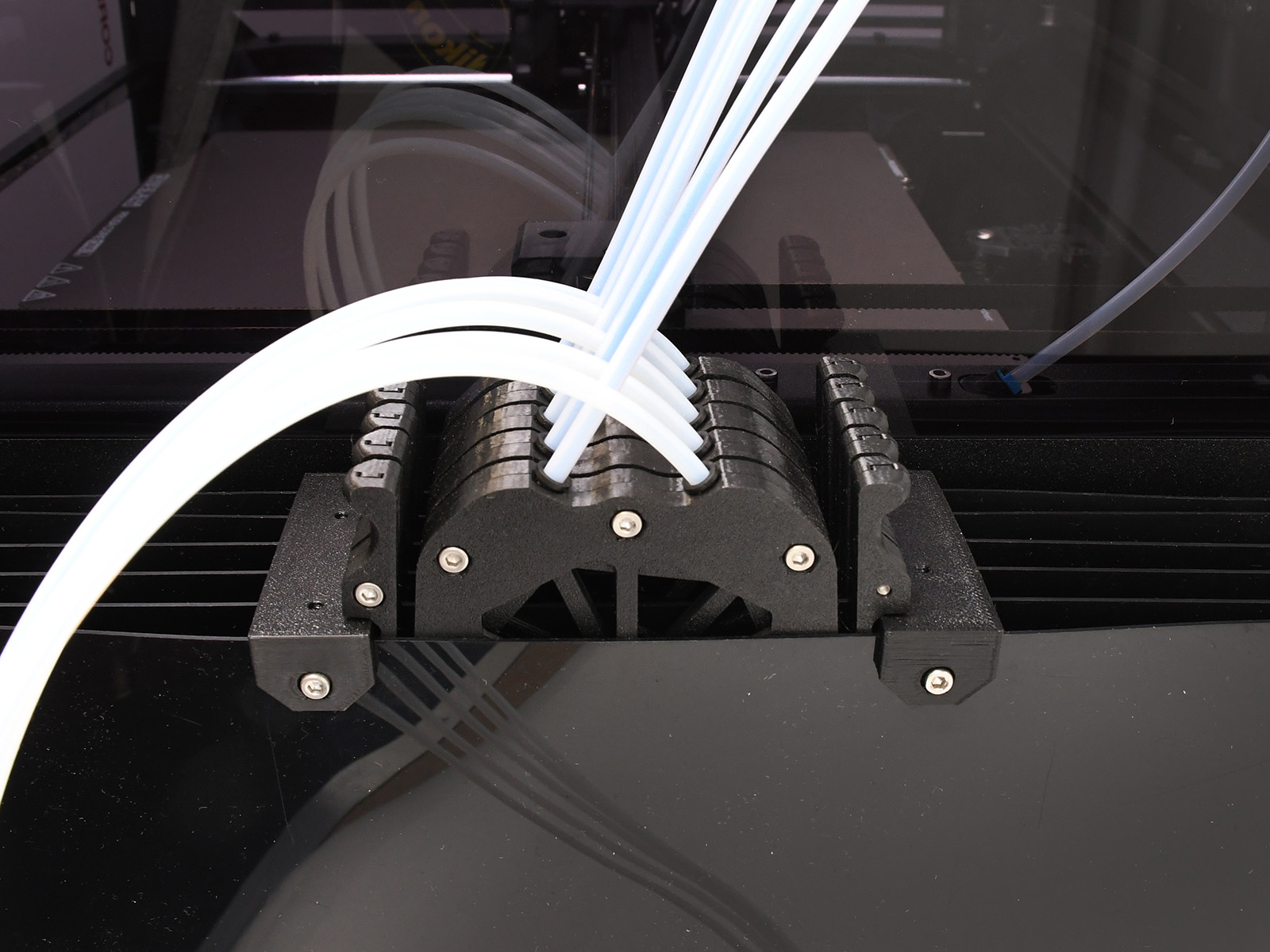
                  ⬢ The large buffer accommodates the standard Prusa buffer cassettes.


                  MMU Connection

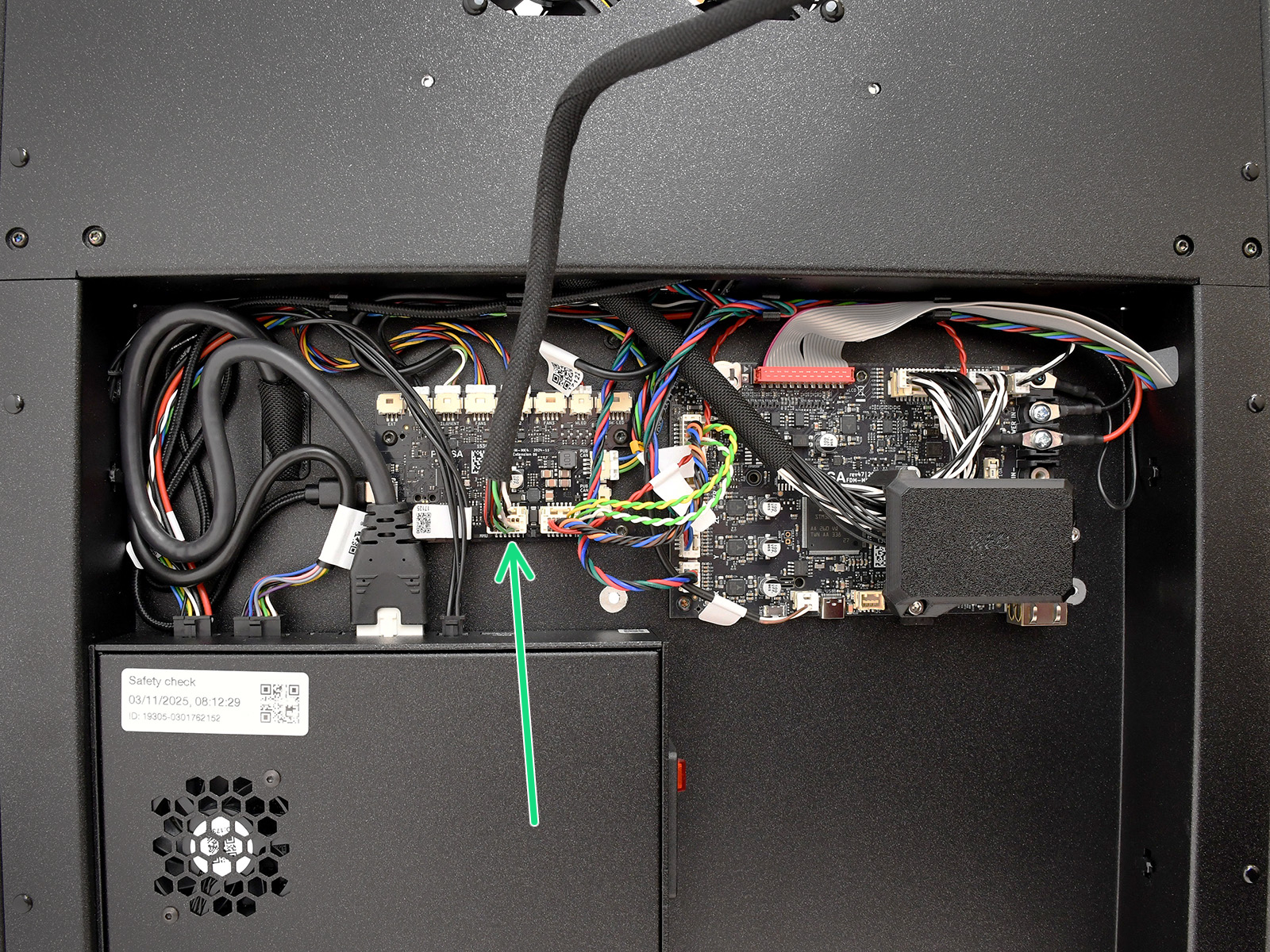
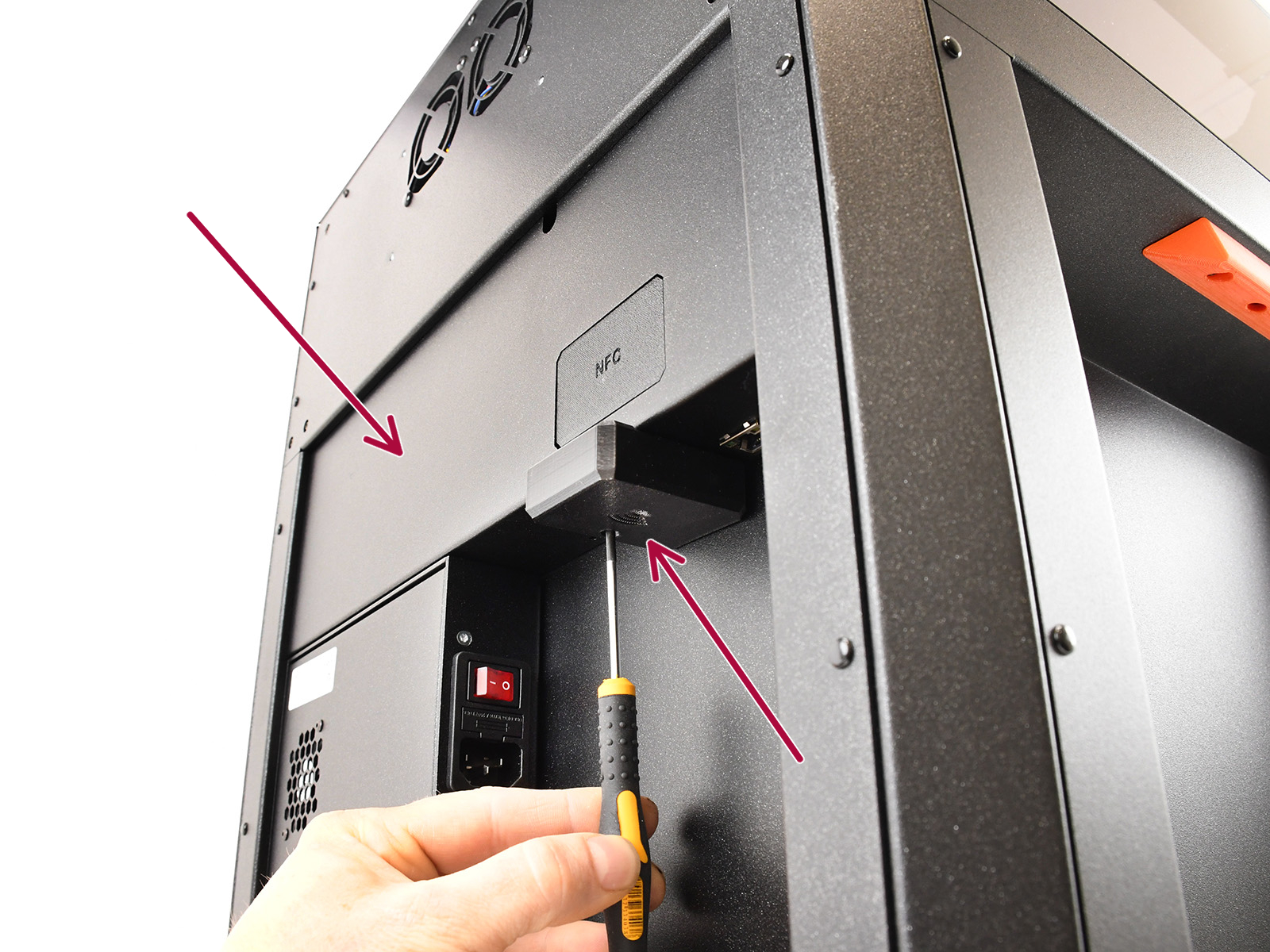
                  The MMU3 unit connects into the dedicated port on the xBuddy Extension board. The access to it differs slightly to the CORE One+.
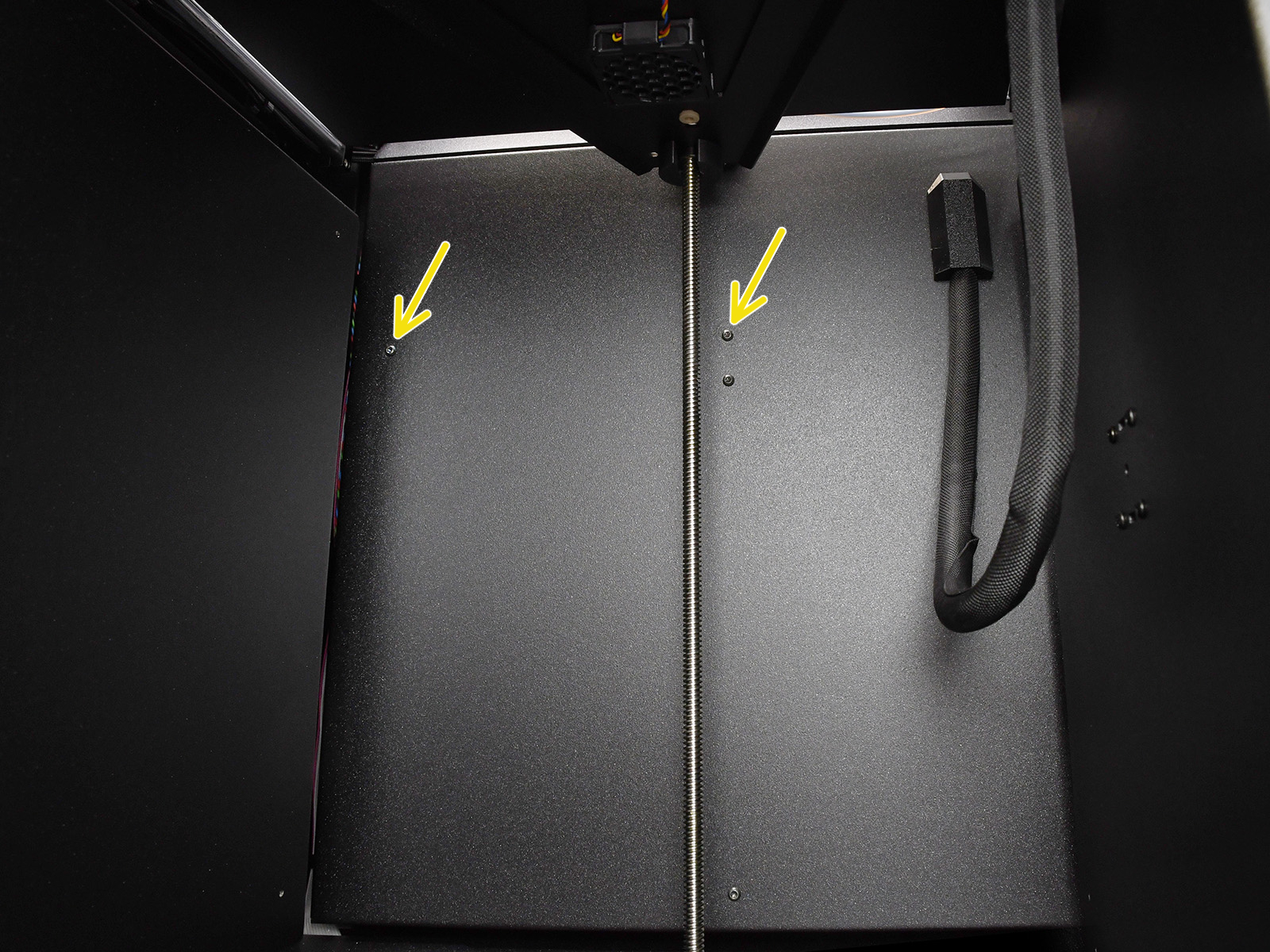
                  ⬢ Remove the two marked M3x4bT screws inside the printer.
                  ⬢ Remove the Wi-Fi module and the rear cover.
                  ⬢ Connect the MMU into the dedicated port.
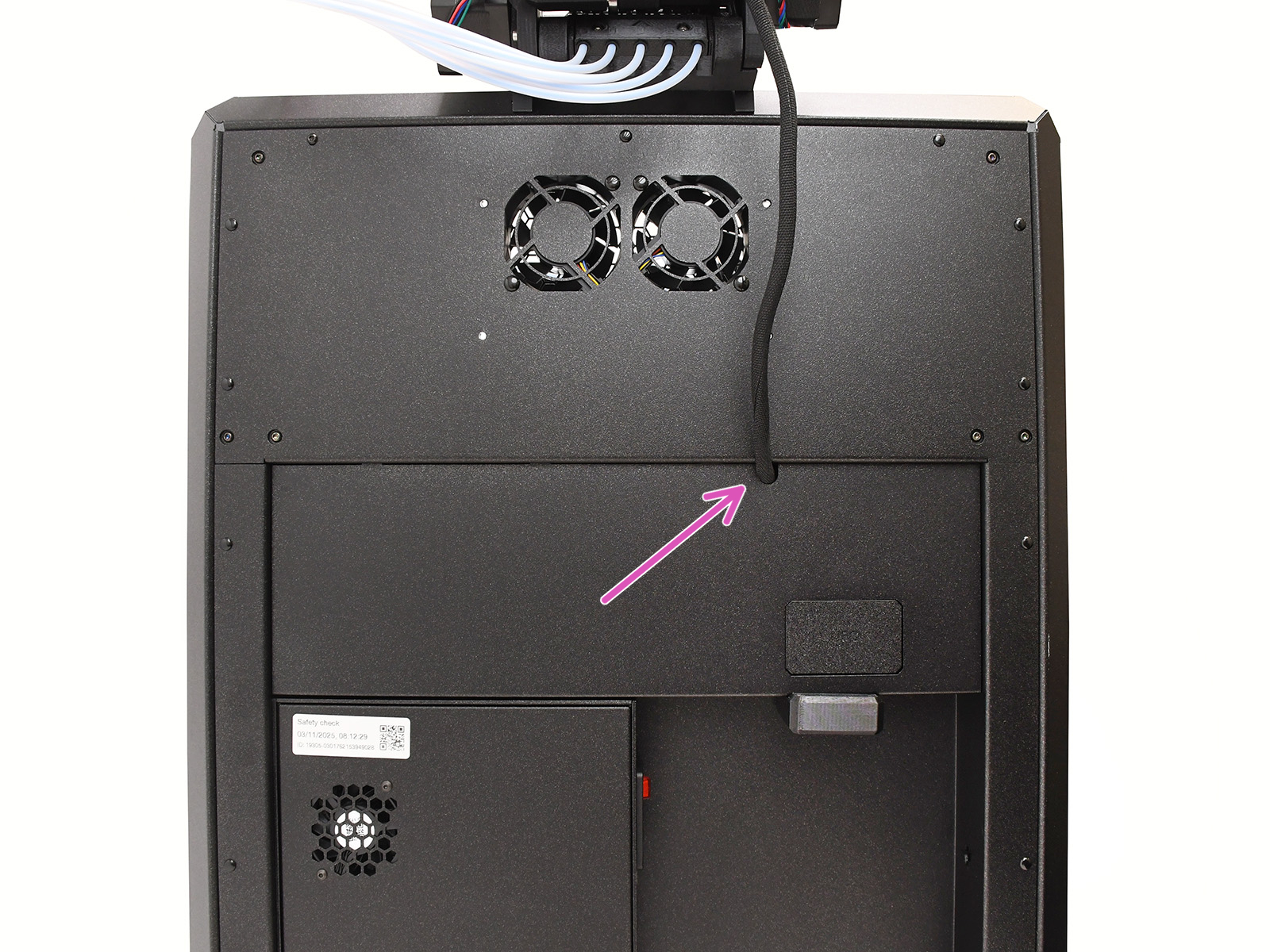
                  ⬢ Guide the cable through the mouse hole opening and re-assemble the printer.
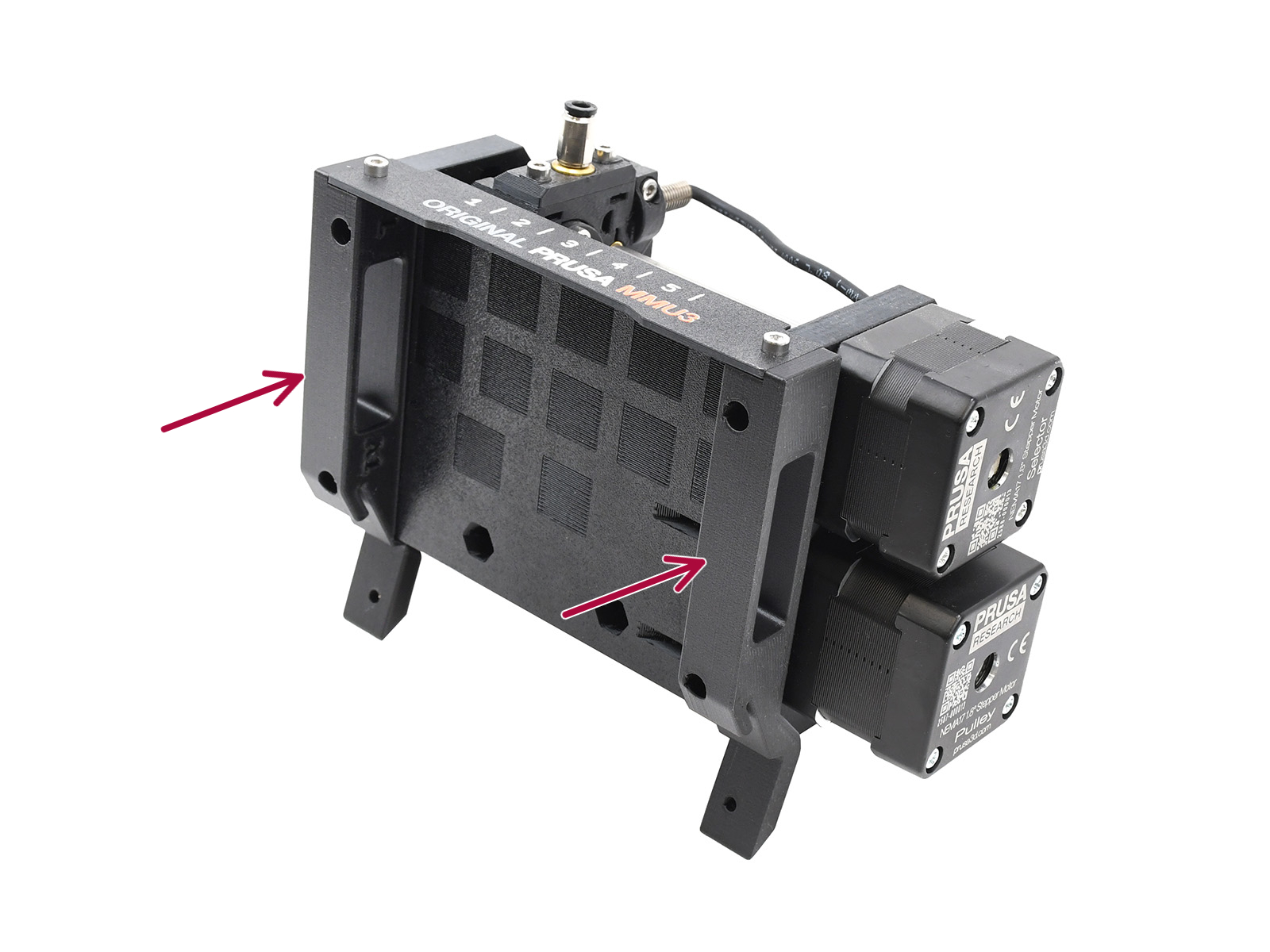
                  MMU3 CORE L holdersMMU3 Unit Installation on CORE LMMU3 CORE L PTFE Installation

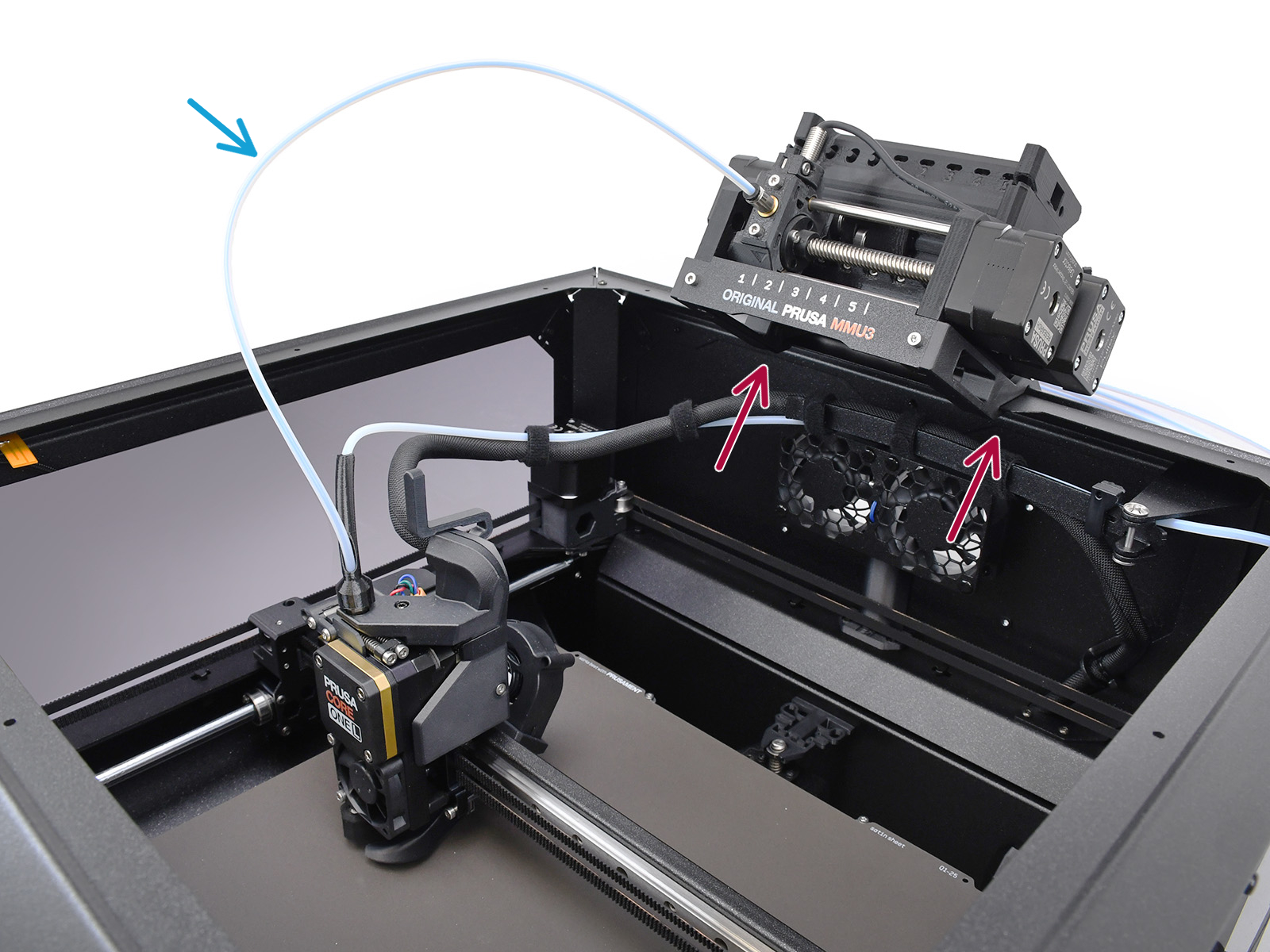
                  ⬢ The MMU unit attaches to the top profile using the CORE L-specific holders and two M3x10 screws.
                  ⬢
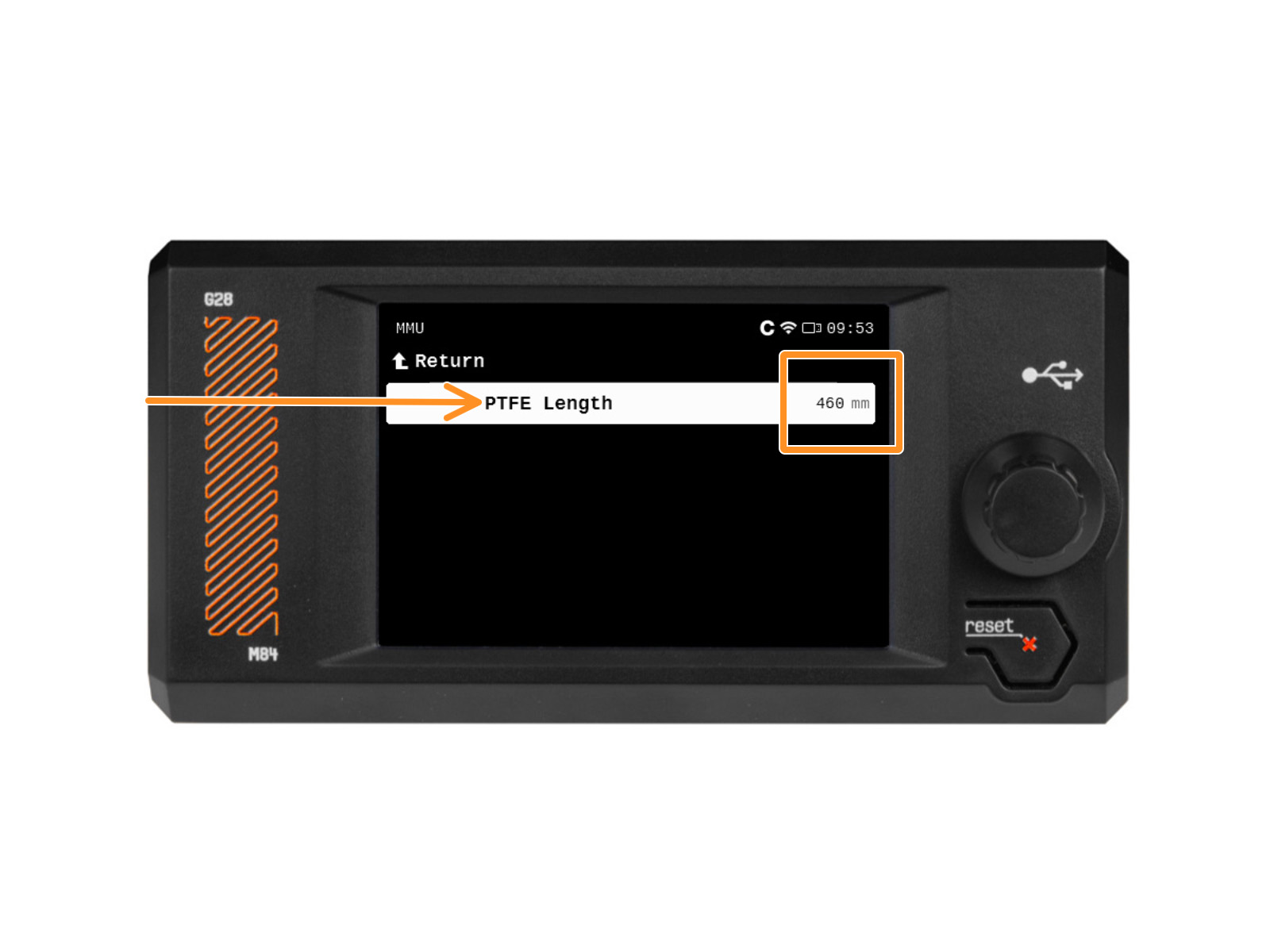
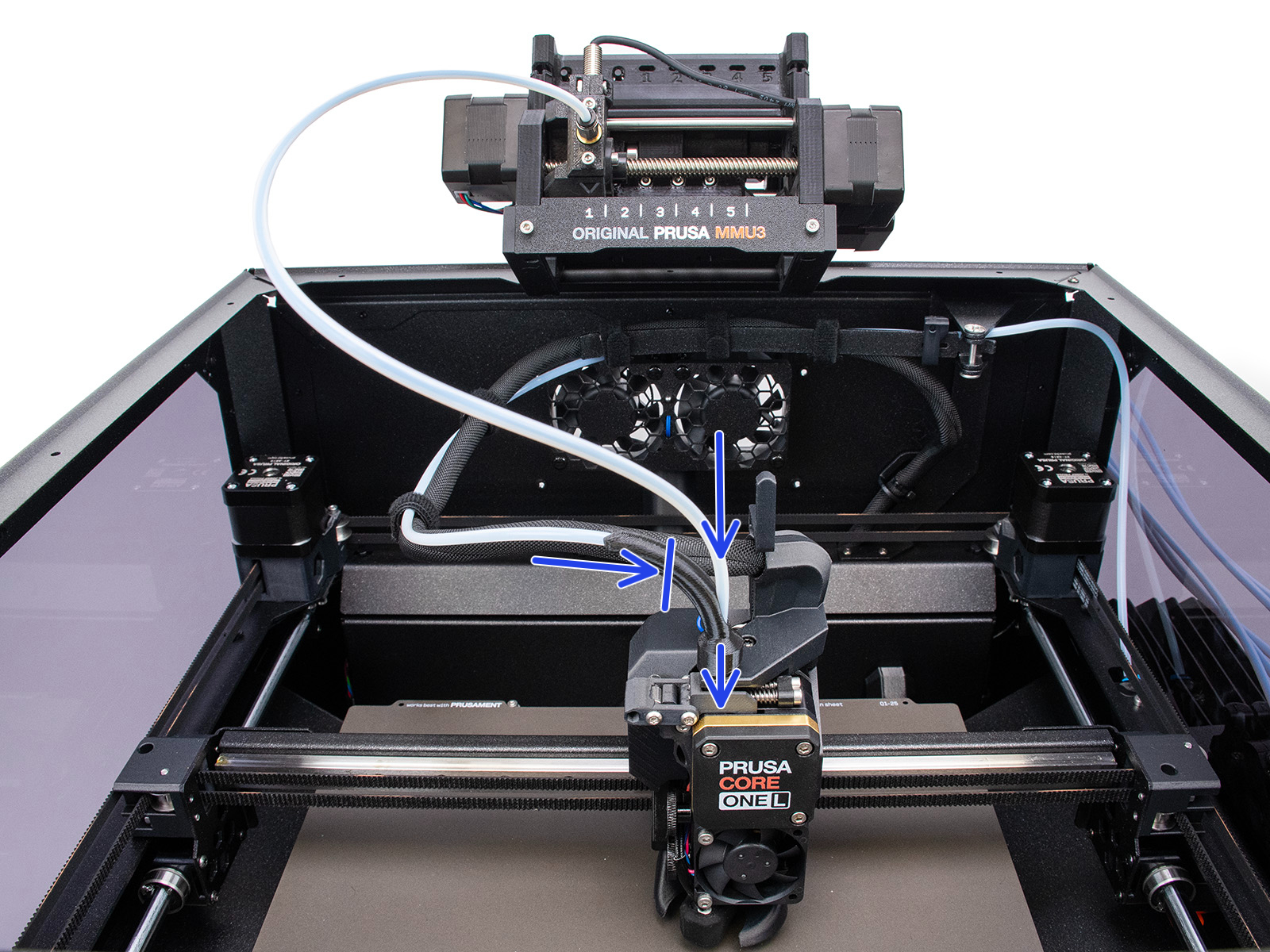
                  The required MMU to Extruder PTFE tube should be a tad longer (4x2,5x460mm, may be manufactured from the 650mm tubes available in the kit).
                  ⬢ The PTFE tube length used has to be later set in the printer’s menu.
                  ⬢ The original single-material PTFE tube and the MMU PTFE tube are joined in the "Bowden Bend" part, while only the MMU PTFE continues to the extruder.


                  MMU3 Final Resurrection

                  Despite minor visual differences, the remaining requirements match the MMU3 for CORE One+ installation guide.
                  Required Firmware combination is the printer FW 6.5.3 or newer and the MMU FW 3.0.4 or newer.

                  For more details, refer to the MMU3 Compatibility article.

                  Shopping List

                  ⬢ MMU3 Kit for CORE One/+ Lite (Contains the majority of parts also used for CORE L)
                  ⬢ CORE L - specific printed parts (Printables)
                  ⬢ CORE L - specific Buffer Plates (Printables)
                  ⬢ 16x M3x30 screws (Used 22x in Buffer)
                  ⬢ 16x M3nS nuts (Used 22x in Buffer)
                  ⬢ 12x M3x8 screws
                  ⬢ 6x Magnet 20x6x2 (Used 18x in Buffer)
                  ⬢ 1x 4x2.5x460mm PTFE tube (MMU→Extruder) (May be adapted from the included 650mm PTFE)
                  ⬢ 5x 4x2.5x710mm PTFE tube (Buffer→MMU)
                  ⬢ 5x 4x2.5x940mm PTFE tube (Spool holder→Buffer) (Alternatively, adapt the 1275mm PTFE)

                  Enclosed version 

                  While both the Lite and Enclosed MMU3 versions for the CORE One are technically achievable the CORE One L too, the lack of an official kit means the Enclosed setup is strictly for experienced makers, as it necessitates manufacturing the intricate parts, such as the larger vacuum-formed top cover and the bent & threaded aluminum sheet metal plate. For the tech-savvy makers requiring an enclosed setup, the necessary parts are included as STEP files on Printables.

                  この記事は役に立ちましたか?
                  この操作は登録ユーザーのみが利用できます。ログインしてください。
                  ログイン してコメントを投稿する
                  コメントなし

                  トピックス

                  • あなたのプリンターについて
                    • プリンターの機能
                      • ハードウェアセットアップ (MK2.5/S & MK3/S/+)
                      • プリンタの統計情報
                      • Prusa-固有の G-コード
                      • IR フィラメントセンサー (MK2.5S, MK3S/+, MK3.5/S))
                      • チューニングメニュー
                      • Water-soluble materials (PVA/BVOH)
                      • Nextruder フィラメントセンサー (CORE One, MK4/S, MK3.9/S, XL)
                      • サンプルGコード
                      • Buddy firmware-specific G-code commands
                      • Nextruder silicone sock (CORE One/+, CORE One L/+, XL/+, MK4/S, MK3.9/S)
                      • ツールマッピングとフィラメントマッピング (XL, MMU3)
                      • MMU3における PrusaノズルとCHTノズル
                      • MMU2SからMMU3へのアップグレード用パーツリスト
                      • MMU3 for CORE One L
                    • プリンターの説明
                    • 一般情報