AA

Empfohlene Produkte

    Beliebte Kategorien

      Beliebte Suchanfragen

        Artikel

          Blog

            Produkte

              Kategorien

                Suchvorschläge

                  Suche läuft…
                  Keine Ergebnisse
                  Etwas ist schiefgelaufen.
                  ↑↓ Auswählen↵ ÖffnenEsc Suche schließen
                  • English
                  • Čeština
                  • Deutsch
                  • Español
                  • Français
                  • Italiano
                  • Polski
                  • 日本語
                  • Bestellungen
                  • Adresse
                  • Auf Lager-Benachrichtigungen
                  • Kurse
                  • Abonnement
                  • Konto bearbeiten
                  • 3D-Drucker9+▾

                    3D-Druckerneu

                    neuPrusa CORE One L+Mehr erfahren
                    neuPrusa CORE One+ (Gen 2)Mehr erfahren
                    neuPrusa CORE One L+ INDX 8-ToolneuPrusa CORE One+ (Gen 2) INDX 8-WerkzeugPrusa CORE One L+: Critical InfrastructureOriginal Prusa MK4SneuOriginal Prusa XL+Original Prusa XL+: Critical Infrastructure

                    Drucker-Upgrades

                    neuCORE One/+ INDX Conversion KitneuPrusa CORE One L zu CORE One L+ UpgradeneuPrusa CORE One+ zu Prusa CORE One+ (Gen 2)neuPrusa XL zu Prusa XL+ Upgrade
                    Prusa Reward ProgrammTeilen. Empfehlen. Verdienen.
                    Wie wählt man einen 3D-Drucker aus?Wir führen Sie durch die Grundlagen, damit Sie genau das richtige Gerät für Ihre Räumlichkeiten, Ihr Budget und Ihre Vorstellungen finden.
                    Gratis-E-BookLaden Sie ein kostenloses E-Book Grundlagen des 3D-Drucks mit Josef Prusa herunter und machen Sie Ihre ersten Schritte in der Welt des 3D-Drucks
                    Original Prusa Gedruckte TeileSammlungen von druckbaren Ersatzteilen für Original Prusa 3D-Drucker und Upgrades.
                    VersandinformationenRegelmäßig aktualisierte Informationen über die aktuellen Produktionskapazitäten und Lieferzeiten unserer Drucker.
                    3D-Druck auf BestellungProfessioneller 3D-Druck auf Bestellung aus verschiedenen Materialien nach Ihren Anforderungen.
                  • Materialien▾

                    Filamente

                    PrusamentPLAPETGASA / ABSPC BlendPA (Nylon)FlexCompositesSpecialLagerabverkauf Materialien

                    Harze

                    Prusament ResinEngineering
                    FilamentführerMeine Prusament Spule checken
                    Prusament.com
                  • Teile & Zubehör▾

                    Zubehör

                    EnclosureDüsenStahlblecheWichtiges ZubehörKameras & ErweiterungenWerkzeuge & HandwerklichesKlebstoffe

                    Ersatzteile

                    Fan-Artikel

                    Ersatzteile - Alle DruckerCORE OneMK4/S & MK3.9/SMK3/MK3S/MK3S+XL
                    Merch
                  • Für Unternehmen▾
                    Prusa Pro HT90Prusa Pro SLXPrusa Pro AFSPrusa Pro Medical OneOriginal Prusa XLOriginal Prusa XL: Critical Infrastructure
                    Prusa CORE One+Mehr erfahren
                    Prusa CORE One LMehr erfahren
                    Prusa CORE One L: Critical Infrastructure Edition

                    3D-Drucken für

                    Produktion und F&EAutomobilindustrieGesundheitswesenBildung und akademische ForschungArchitekten und DesignerFilmindustrieKritische Infrastruktur

                    3D-Druck Geschichten

                    • Wie der 3D-Druck begann: Über Rep-rap und Open-Source mit Adrian Bowyer
                    • Mathematikunterricht neu definiert mit 3D-Druck an der JKU Linz
                    • Die Geschichte hinter dem LTT Schraubendreher
                    • Victoria Hand Project: Prothesenversorgung mit 3D-Druck verändern
                    Offizielle Prusa-Vertriebspartner
                    Nachhaltigkeit
                    Prusa Education
                    Kontakt und Anfragen
                    3D-Druck auf Bestellung
                    ISO-zertifiziert
                  • Software▾
                    PrusaSlicer

                    PrusaSlicerPrusaSlicer

                    PrusaSlicer ist ein quelloffenes, funktionsreiches und häufig aktualisiertes Tool, das alles enthält, was Sie brauchen, um die perfekten Druckdateien für Ihren 3D-Drucker zu generieren.

                    WindowsMacOSLinux
                    Prusa Connect

                    Prusa Connect

                    Prusa Connect ist ein Cloud-Service, der die Fernsteuerung und Überwachung Ihrer 3D-Drucker ermöglicht. Er bietet eine sichere Datenverarbeitung, eine einfache Einrichtung und Unterstützung für die Verwaltung mehrerer Drucker von überall aus.

                    Bei Connect anmelden
                    Prusa.app

                    Prusa.app

                    Steuern Sie Ihre Drucker von überall aus mit der Prusa Connect-Technologie. Die Prusa.app bringt eine neue Dimension der Prusa-Druckererfahrung auf Android- und iOS-Handys.

                    Jetzt ausprobieren!
                    Treiber und FirmwareLaden Sie die neueste Firmware und Treiber für Ihren 3D-Drucker herunter.
                    PrusaSlicer Support
                    Prusa Connect Support
                  • 3D Modelle▾
                    3D-DruckerKunst & DesignHobby & MakerHaushaltTabletop MiniaturenSpielzeug & SpielePrintables Store

                    Beliebte 3D-Modelle

                    • SQUATCHEE-SPIN
                    • The Over-engineered Backpack Wall Mount V2
                    • Black Hole Lamp
                    • Strong garden hose holder
                    • Prusa Spool Bot
                    • Build Tray — Modular Organizer for Assembly, Disassembly and Maintenance

                    Design-Wettbewerbe

                    • Framework Laptop 12 Mainboard Re-Use1.9.2026 – 30.9.2026
                    • 🏆 Designer Challenge: Magic tricks!1.9.2026 – 22.9.2026
                    • Makeup Organizers4.9.2026 – 20.9.2026
                  • Community▾

                    Kommende Veranstaltungen

                    • 3D Printopia 202626.9.2026 – 27.9.2026 · Pennsylvania, United States · Prusa Team
                    • Maker Faire Bay Area25.9.2026 – 27.9.2026 · Kalifornie, United States · Prusa Team
                    • Hobby Messe2.10.2026 – 4.10.2026 · Sachsen, Germany · Prusa Team
                    • Mezinárodní strojírenský veletrh6.10.2026 – 9.10.2026 · Jihomoravský kraj, Czechia · Prusa Team

                    Prusa Forum

                    • Core One L auf + Upgraden Riemen Fehlschlag
                    • Slizer nicht vollständig
                    • Umbau auf Core One Gen2 10mm Lager sind rauh
                    Prusa WeltkartePrusa WeltkarteFinden Sie 3D-Druck-Nutzer in Ihrer Nähe und entdecken Sie die Community in Ihrer Umgebung.
                  • Hilfe▾
                    Leitfäden & AnleitungenPrusaSlicerPrusa ConnectMaterialien

                    Druckermodell

                    CORE One INDXCORE One LCORE One+CORE One

                    Hardware-Fehlerbehebung

                    • Selbsttest fehlgeschlagen (CORE One/+)
                    • Verstopftes Hotend (MK4)
                    • Anpassung der Riemenspannung (CORE One/+, CORE One INDX, CORE One L/+)
                    • Prusa Connect und PrusaLink erklärt

                    Driver & Firmware

                    INDX familyCORE One familyMK4 familyXL familyMMU familyPRO family
                  • Kurse▾

                    Werden Sie ein Experte im 3D-Druck

                    Die Prusa Academy bietet Online-Kurse zu verschiedenen Themen rund um den 3D-Druck an. Jeder Kurs bietet:

                    • Leicht zu lesender Text mit vielen Bildern und kurzen Videos
                    • Links zur Inspiration und zum weiteren Studium
                    • Quizfragen zum Testen Ihres Wissens im Lauf des Kurses
                    • Zertifikat zum Abschluss
                    Alle Kurse durchsuchenMeine Kursbibliothek
                    • 3D Modellierung in Autodesk Fusion
                    • PrusaSlicer Masterclass - Einsteiger bis Fortgeschrittene
                    • Umfassender Leitfaden für die Nachbearbeitung, Bemalung und Detaillierung von 3D-Drucken
                    • Beginner's Guide to Blender for 3D Printing: Edit and Remix STLs
                  • Blog▾
                    • Prusament PLA ColorMix: Drucken Sie 45 Farbtöne mit nur fünf Filament-Spulen (und mehr)
                    • Die Back-to-School-Angebote 2026 sind da!
                    • PrusaSlicer 3.0 Preview – Entwickelt für die Zukunft des 3D-Drucks
                    E-Book: Grundlagen des 3D-Drucks
                  • Unternehmen▾

                    Über Prusa Research

                    Wir sind der größte Hersteller von 3D-Druckern in Europa und den Vereinigten Staaten. Gegründet als Ein-Mann-Startup im Jahr 2012 von Josef Prusa, einem tschechischen Bastler, Maker und Erfinder. In nur 15 Jahren haben wir uns zu einem Unternehmen mit mehr als 1.200 Mitarbeitern entwickelt. Jeden Monat entwickeln, bauen und versenden wir über 10.000 innovative und sichere 3D-Drucker von unseren Hauptsitzen in Prag, Tschechien, und Delaware, USA, an Nutzer in mehr als 160 Ländern.

                    Sehen Sie sich ein Video an und erfahren Sie, wie Prusa Research entstanden ist und was wir in nur 10 Jahren erreicht haben!

                    Über unsZeitleisteNachhaltigkeitOpen-source
                    Über uns
                    Kontakt
                    Logo und Fotos
                    ISO-zertifiziert
                  1. Support
                  2. Printables Clubs
                  3. For Creators
                   

                  Inhalt

                  • Set up process
                  • Welcome email
                  • Members list
                  • Mass messages
                  • Earnings
                  • User profile page of the Creator
                  • Your exclusive content for supporters
                  • Exclusive models
                  • Club only Posts and Polls
                  • Tiers and Benefits
                  • Create your new tier(s)
                  • Edit tier
                  • Delete the tier
                  • Benefits
                  • Payments and Getting paid
                  • Fees
                  • How Do I Get Paid?
                  • Taxes
                  • Billing Cycle
                  • Discount codes
                  • How to export information about incoming payments?

                  Blog

                  • Prusament PLA ColorMix: Drucken Sie 45 Farbtöne mit nur fünf Filament-Spulen (und mehr)
                  • Die Back-to-School-Angebote 2026 sind da!
                  • PrusaSlicer 3.0 Preview – Entwickelt für die Zukunft des 3D-Drucks

                  Newsletter

                  Melden Sie sich an und erhalten Sie unseren monatlichen Schwung an nützlichen Informationen über neue Firmware, neue PrusaSlicer-Versionen und allgemeine Tipps für 3D-Druckprojekte.

                  Durch Anklicken erklären Sie sich damit einverstanden, unseren Newsletter zu erhalten.

                  Diese Website ist durch reCAPTCHA Enterprise geschützt und es gelten die Google Datenschutzbestimmungen und Dienstleistungsbedingungen.

                  SQUATCHEE-SPIN
                  E-Shop
                  • 3D Drucker
                  • Drucker Upgrades
                  • Filamente
                  • Zubehör
                  • Prusa Fanartikel

                  © Prusa Research a.s.

                  Printables
                  • 3D-Modelle
                  • Store
                  • Clubs
                  • 3D-Design-Wettbewerbe
                  • Brands
                  Community
                  • Weltkarte
                  • Forum
                  • Nutzergruppen
                  • Veranstaltungen
                  Hilfe
                  • Prusa Hilfe
                  • Prusa Academy
                  • 3D-Druck Rechner
                  Software
                  • PrusaSlicer
                  • Prusa.app
                  • Prusa Connect
                  • Treiber und Software
                  Unternehmen
                  • Über uns
                  • Blog
                  • Offizielle Prusa-Vertriebspartner
                  • Kontakt
                  • Zertifiziert nach den Normen ISO 9001, ISO 14001 und ISO 45001
                  • Allgemeine Geschäftsbedingungen
                  • Allgemeine Geschäfts- und Nutzungsbedingungen für die PRUSA-Websites
                  • Datenschutzerklärung
                  • Informationen über Cookies
                  • Richtlinie für Kundenbeschwerden
                  • Webseiten Status Seite
                  • Cookie Einstellungen
                  • Allgemeine Geschäftsbedingungen
                  • Allgemeine Geschäfts- und Nutzungsbedingungen für die PRUSA-Websites
                  • Datenschutzerklärung
                  • Informationen über Cookies
                  • Richtlinie für Kundenbeschwerden
                  • Webseiten Status Seite
                  • Cookie Einstellungen

                  © Prusa Research a.s.

                  JOSEF PRUSA®, PRUSA RESEARCH®, PRUSA POLYMERS®, PRUSA ORANGE®, PRUSA 3D ® UND PRUSAMENT® sind eingetragene Marken von Prusa Development a.s., die von Prusa Research a.s. unter Lizenz von Prusa Development a.s. verwendet werden.

                  For Creators

                  Relevant für

                  Printables
                  Artikel ist auch in folgenden Sprachen verfügbar
                  English
                  Čeština
                  Polski
                  Deutsch
                  Français
                  Español
                  Italiano
                  日本語

                  Set up process

                  Entry into the Club program is limited to users with a profile level of 18 and higher, as well as a follower count of 150 or more. This helps to maintain high-quality standards of exclusive models. If you're interested in setting up your Club but are on a lower level, please fill out the request form and add a link to your portfolio. We will evaluate your application for program entry on an individual basis.

                  If you want to set up your Club, go to the settings, which will guide you through the entire process.

                  1. While you are logged in, click on your avatar in the top right corner
                  2. Click on Settings
                  3. Click on Set up my Club

                  You have to fill your personal information, set up tiers and submit it for verification.

                  By submitting your Club to our approval, you get unlocked the possibility to start creating Exclusive models for your supporters.

                  Once we've approved your request, it's up to you to publish your Club.

                  Welcome email

                  You can customize the email to welcome your new Club members. 
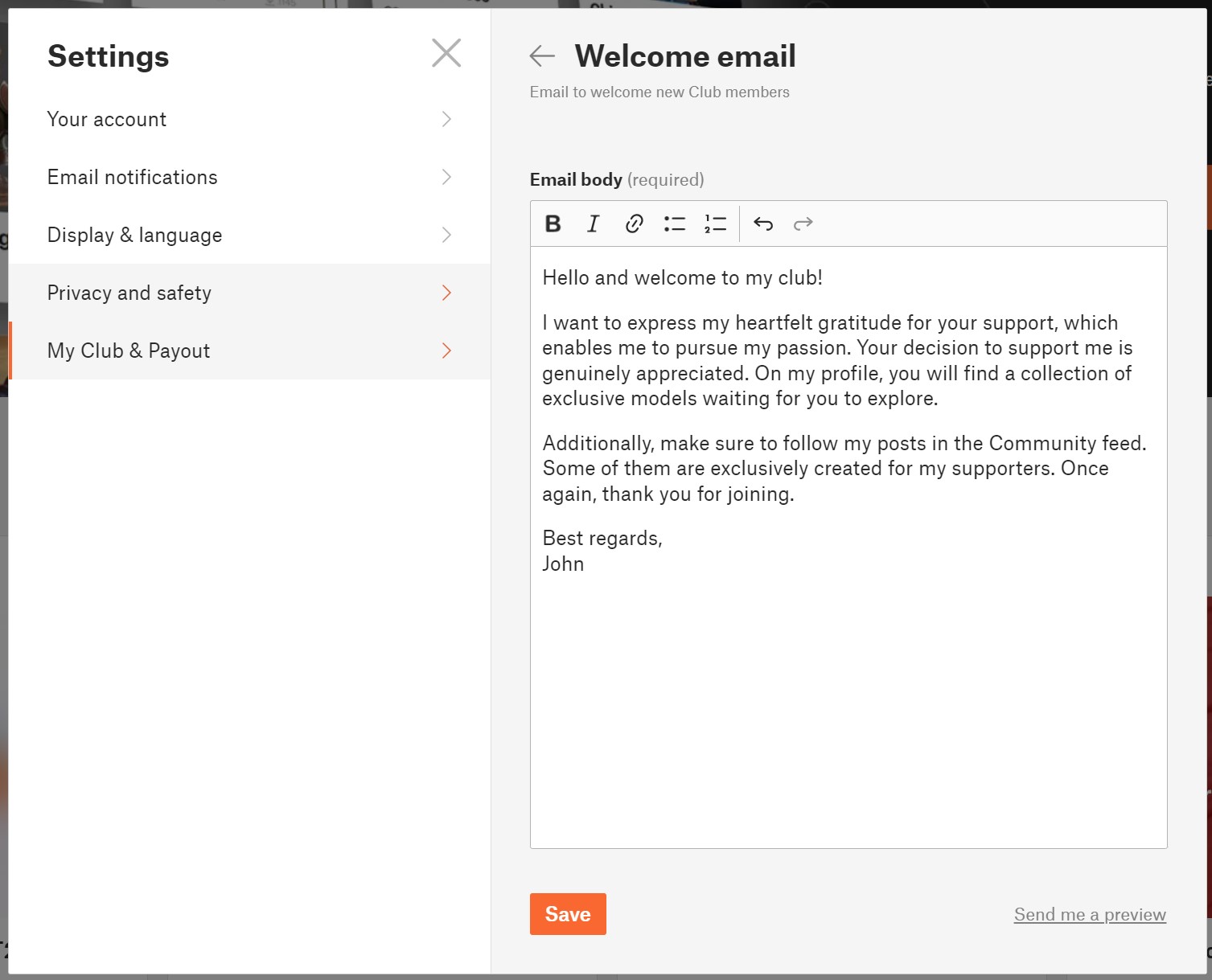
                  1. While you are logged in, and your Club is approved by us, click on your avatar in the top right corner
                  2. Click on Settings
                  3. Click on My Club & Payout
                  4. Click on Welcome email


                  If you want to review your final welcome email, you can have it sent to your email by clicking on "Send me a preview."

                  Members list

                  For an overview of your supporters, the Club Members table is provided. You will find information about the tier each user has purchased, the total amount of money they have given to you, and the date when the user first joined your Club. Clicking on the column headers allows you to sort the data.

                  To track your members across tiers over time, a graph is also available.

                  Mass messages

                  If you need to communicate something important to your supporters, you can use a mass message function.

                  1. While you are logged in, click on “My Club” in the top menu
                  2. Click on Members
                  3. Click on button Message members
                  4. Select which tiers you want to message
                  5. Click Continue and you will be redirected to the messenger, where you create the standard message and post it.

                  Note, that message will be sent to all selected supporters as a standard Message to the conversation thread.

                  Earnings

                  To monitor your monthly earnings, you have access to an earnings graph and a table displaying data categorized by months and tiers.

                  1. While logged in, navigate to “My Club” in the top menu.
                  2. Select "Earnings."

                  For more comprehensive information regarding payments and fees, please visit your Stripe Dashboard.


                  User profile page of the Creator

                  The creator's profile page is distinguished from a regular user profile by these elements:

                  • Club banner
                  • Exclusive model highlights section - where you can promote your top Exclusive models
                  • Support & Join Club button
                  • List of Club members (visible when there are 5 or more club members)

                  Your exclusive content for supporters

                  Exclusive models

                  Exclusive models are available for download only to the members of your Club, regardless of their tier. Exclusive models are one of the possible, but not necessary, benefits you can offer to your supporters.

                  Creating exclusive models is done the same way as creating a regular public model. You simply check the option "Exclusive model for my supporters only" during the model editing. 

                  Additionally, you have the option to set the model to automatically change from an exclusive model to a public model in the future. This way, you can increase your exposure and make it easier for users to find and support you.

                  You have the option to exclude this model from these benefits: Commercial use and Custom defined license terms. The restriction will be indicated on the model's detail page.

                  For users who are not members of your Club, the model details will be displayed in a limited range. They will see the first preview image, the model's name, and description. They won't be able to download the model, comment on it, or read the model comments.

                  Exclusive models must be your own designs. Reuploaded models cannot be published as exclusive models.
                  We do not provide Prusameters rewards for Exclusive models. Therefore, carefully consider which models you make publicly available and which ones you designate as exclusive. Many users will surely support you even if you publish all your models publicly, and you will also earn Prusameters for them.
                  Exclusive models will be listed in the market and in the search results only for your supporters.

                  Club only Posts and Polls

                  For your supporters, you can create unique content in the form of exclusive posts in the Community feed. It's great for sharing behind-the-scenes information about what you're currently working on, your future plans, and more.

                  You can also prepare polls specifically for your supporters, allowing them to vote exclusively. This is perfect when you want to give your supporters the opportunity to decide on the next model you will create.


                  Tiers and Benefits

                  Create your new tier(s)

                  1. While you are logged in, click on your avatar in the top right corner
                  2. Click on Settings
                  3. Click on My Club & Payout
                  4. Click on Edit tiers
                  5. Click on the “+ Add a tier”

                  You can create up to 5 tiers with different prices and benefits. For each tier, you can define a unique set of benefits to distinguish them from each other.

                  The minimum price for a tier is $3 USD. The maximum price for a tier is $100 USD. 

                  Edit tier

                  Please remember that you cannot edit the price of a tier when it has active supporters. However, you have the freedom to make changes to everything else.

                  1. While you are logged in, click on your avatar in the top right corner
                  2. Click on Settings
                  3. Click on My Club & Payout
                  4. Click on Edit tiers
                  5. Click on the tier you want to update

                  You have the flexibility to modify the tier name, description, and benefits. If there are no supporters in a tier, you can also adjust its price. However, once supporters have joined a tier, the price cannot be changed.

                  Delete the tier

                  If you want to delete a tier, go to the Settings, Edit tier and click on the "Delete tier" option.

                  If the tier has no user members, it will be deleted immediately.
                  If the tier has any active members, it will continue to exist until the end of the current month. No new users will be able to join the tier, but current members will retain access until the end of the month for which they have paid. Users who were joined to the tier that has been terminated will be notified via email about this situation. It will be up to them whether they choose another tier or decide not to continue their support.

                  Benefits

                  Each tier consists of a set of benefits. Benefits are the rewards for your supporters. The two mentioned benefits below are fixed for every tier, and you can add other benefits according to your needs.

                  Loyalty badges next to member usernames in comments (Comments from the supporters will be highlighted with the badge)
                  Access to exclusive models (Access to all of the creator's models in the Exclusive models section.)

                  So note that all members from all tiers have access to the same collection of Exclusive models. You can differentiate the tiers with other benefits and by different licensing terms.

                  Optional benefits

                  Models for commercial usage - allow your supporters to use models for commercial purposes. It means that supporters can sell printed 3D models. Redistribution of the 3D model files is not permited.

                  Members only posts -If you decide to create posts and/or polls in the Community feed that are exclusively for your supporters, mention it as one of the benefits. Supporters get access to exclusive posts in the Community feed and the ability to vote in your members-only polls.

                  Custom licensing terms - You can define completely your own licensing terms and conditions. 

                  Custom benefit - define it yourself - If you want to offer any other advantage to your supporters, here you have the opportunity to describe it and add it among the benefits of the tier.

                  Payments and Getting paid

                  Payments are processed by Stripe payment processor. Users can pay using their credit/debit card.
                  The money goes directly from the supporter to the creator Stripe account.

                  Fees

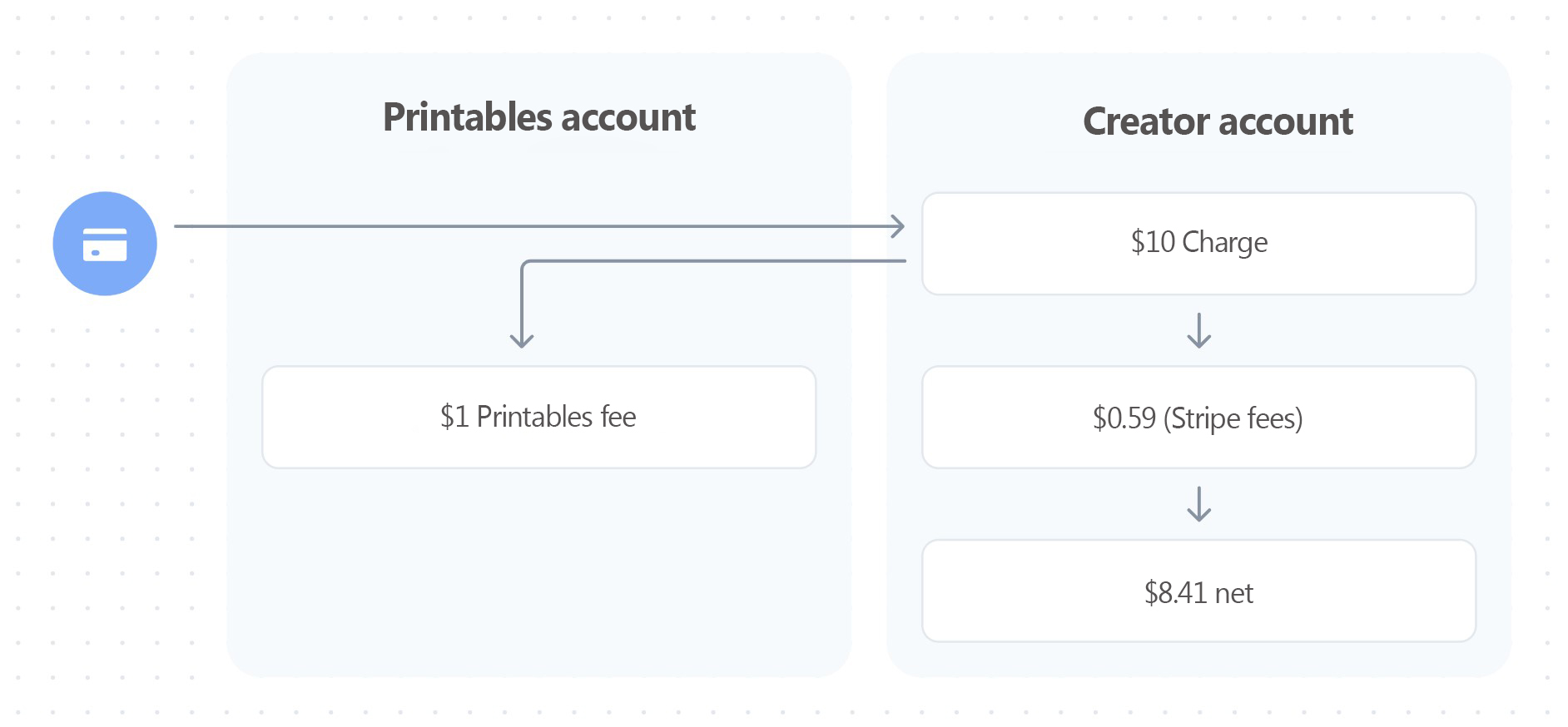
                  Printables takes 10 % fee from transactions, which will be used to help cover the costs of servers, maintenance, and development. The payment from the supporter to the creator is also subject to normal processing fees outside of our control, such as currency conversions or the Stripe payment fee based on Stripe rates.

                  For instance, if a supporter decides to pay for a $10 tier, the Printables fee will be $1 (10%). This $1 is then transferred to the Printables platform account. The net amount credited to the creator's account is $8.41 ($10 - $0.59 - $1), assuming standard US Stripe fees.
                  How Do I Get Paid?

                  Receiving payments on Printables is incredibly simple. All you need to do is connect you Stripe account to Printables Club. When someone supports you, the funds are immediately and directly transferred to your Stripe account and then sent to your bank account according to your Stripe account settings.

                  There's no minimum amount to withdraw or predefined payout schedule.

                  Taxes

                  In most situations, the money you make from Printables Club is considered income and needs to be reported for tax purposes, just like any other source of income. Right now, Printables doesn't have built-in tools to automatically include sales tax (GST) or value-added tax (VAT) when someone supports you. So, it's up to you to figure out and pay any necessary sales tax or VAT.

                  It's important to note that Printables doesn't provide advice on taxes. Tax rules can be different depending on where you live or operate. We suggest you get advice from a professional about your specific tax responsibilities before you start using Printables Clubs.

                  Billing Cycle

                  Memberships are on a monthly basis, and the recurring payment is charged at the beginning of each month.

                  If a new member joins in the middle of the month, they can choose to pay the full membership fee for the remaining part of the month or a proportional amount for the current month plus the following month. We are particularly proud of this solution, as creators expressed their frustration with people joining near the end of the month and the confusion that came with the two payments close to each other.

                  Discount codes

                  Printables supports the use of discount codes during checkout. Coupons (discount codes) are created by the creator in the Stripe account.
                  Coupons have a wide range of settings and parameters. However, Printables is not compatible with all these parameters. Therefore, it is necessary to follow the recommendations below to ensure that the coupons work as expected. Otherwise, the discount code will not function properly.
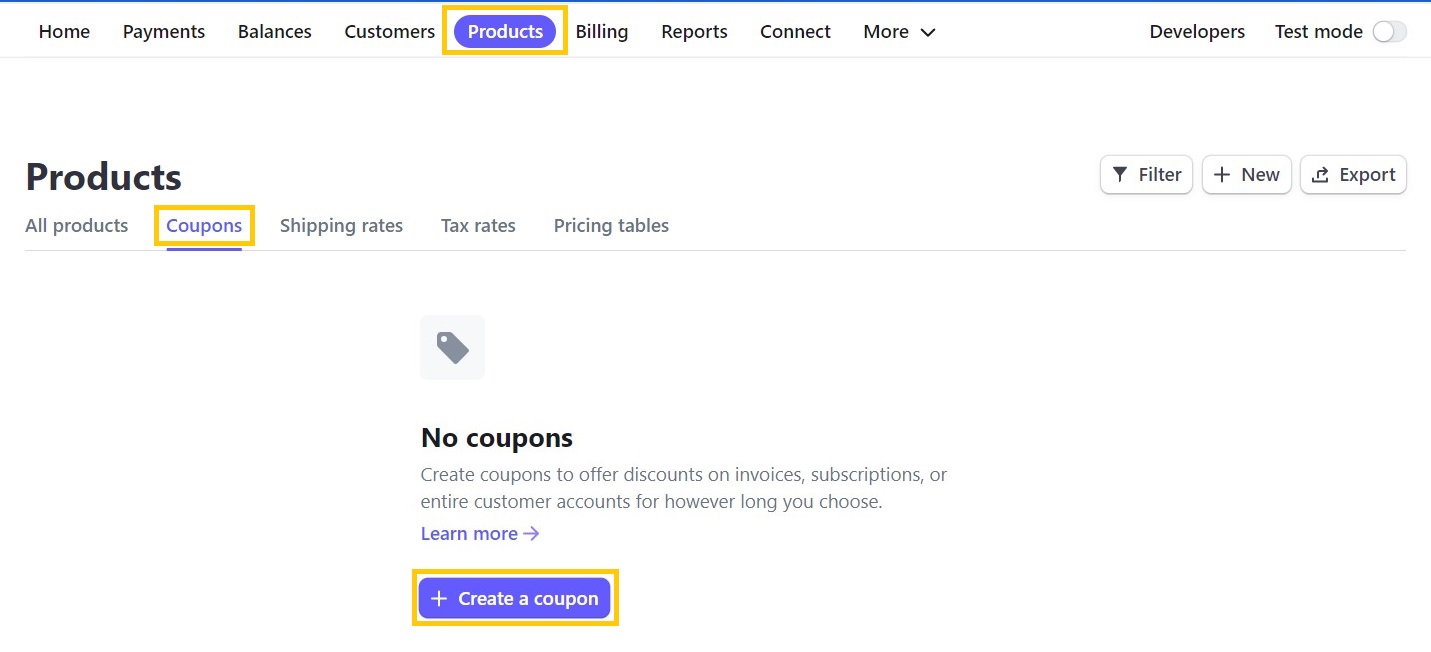
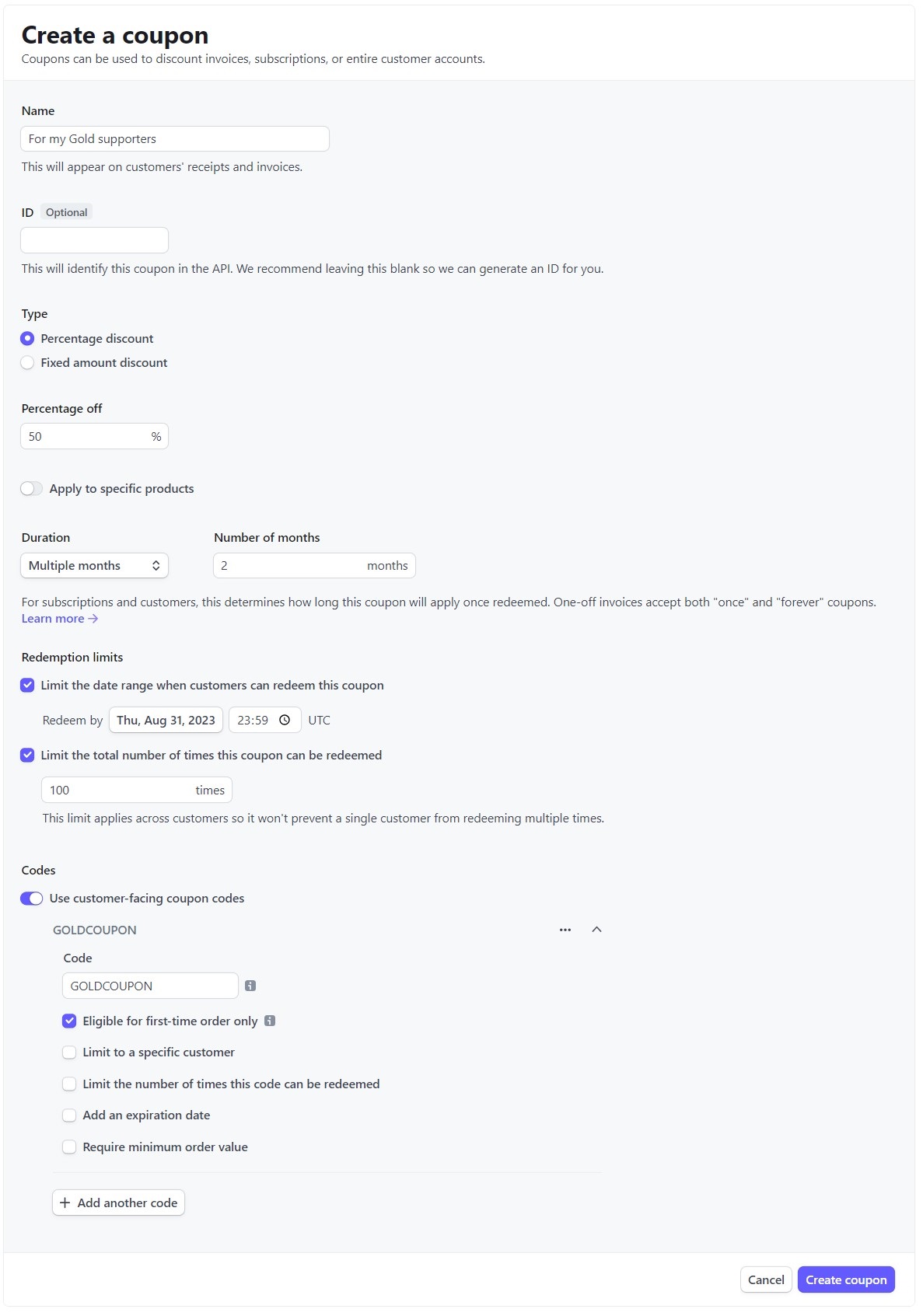
                  Creating a Coupon and Setting Parameters

                  1. Log in to your Stripe Dashboard at https://dashboard.stripe.com/
                  2. In the top bar, click on Products
                  3. Click on Coupons
                  4. Click on Create a coupon

                    Name - any name for the coupon
                    ID - do not fill in
                    Type - you can use either of the two options provided
                    Type -> Percentage discount - any value; the minimum payment amount at checkout must be $0.50 (more)
                    Type -> Fixed amount discount - you have to select USD; the minimum payment amount at checkout must be $0.50 (more)
                    Apply to specific product - do not use, as it is not compatible with Printables Clubs
                    Duration - Forever / Once / Multiple months - all three options can be used
                    Limit the date range when customers can redeem this coupon - can be used if necessary
                    Limit the total number of times this coupon can be redeemed - can be used if necessary

                    Use customer-facing coupon codes - switch it on
                    Code - any unique discount code
                    Eligible for first-time orders only - can be used if necessary
                    Limit to a specific customer - not recommended to use (must be existing customer)
                    Limit the number of times this code can be redeemed - can be used if necessary
                    Add an expiry date - can be used if necessary
                    Require minimum order value - do not use

                  Where to enter the discount code?

                  The discount code is used to provide a discount from creators to their supporters. The code is entered by clicking on "Add promotion code" on the Stripe checkout page. After entering the code, the code is validated and the discount is applied immediately.
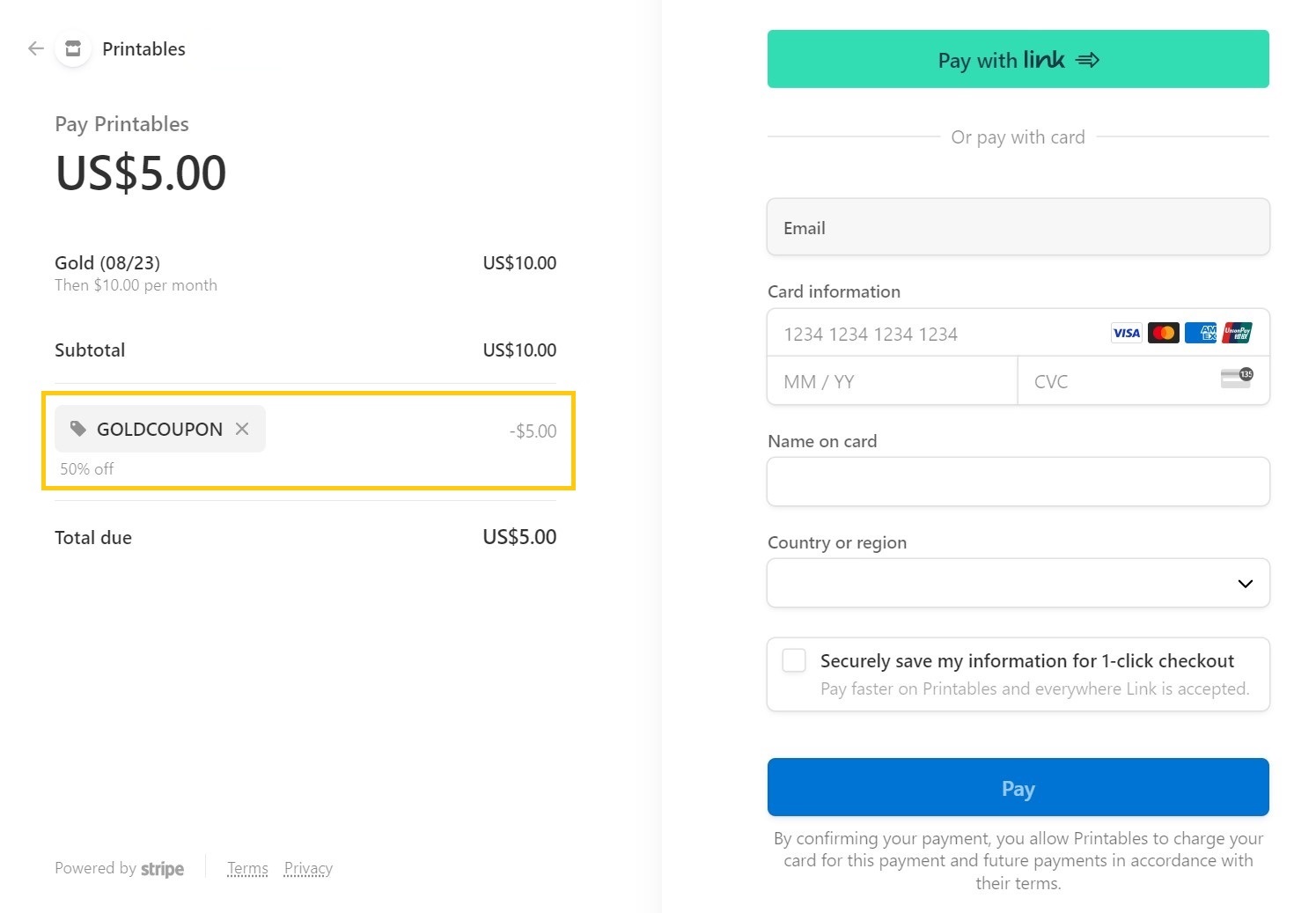
                  Both the Stripe fee and the Printables fee are calculated based on the original price without the discount code.

                  Sample Use Case

                  1. The creator has their supporters on another platform.
                  2. The creator has decided to share Exclusive content for their supporters in their Club.
                  3. The creator wants to take advantage of a unique opportunity to double their earnings as part of a bonus promotion.

                  The Creator want to motivate their supporters to the platform, so they decide to offer them a discount code in the form of XY% off the first two payments.
                  How to export information about incoming payments?

                  If you need the list of payments for tax purposes regarding all incoming payments for the sale of models and payments from Club supporters, you can export them directly from your Stripe Dashboard in .CSV format.
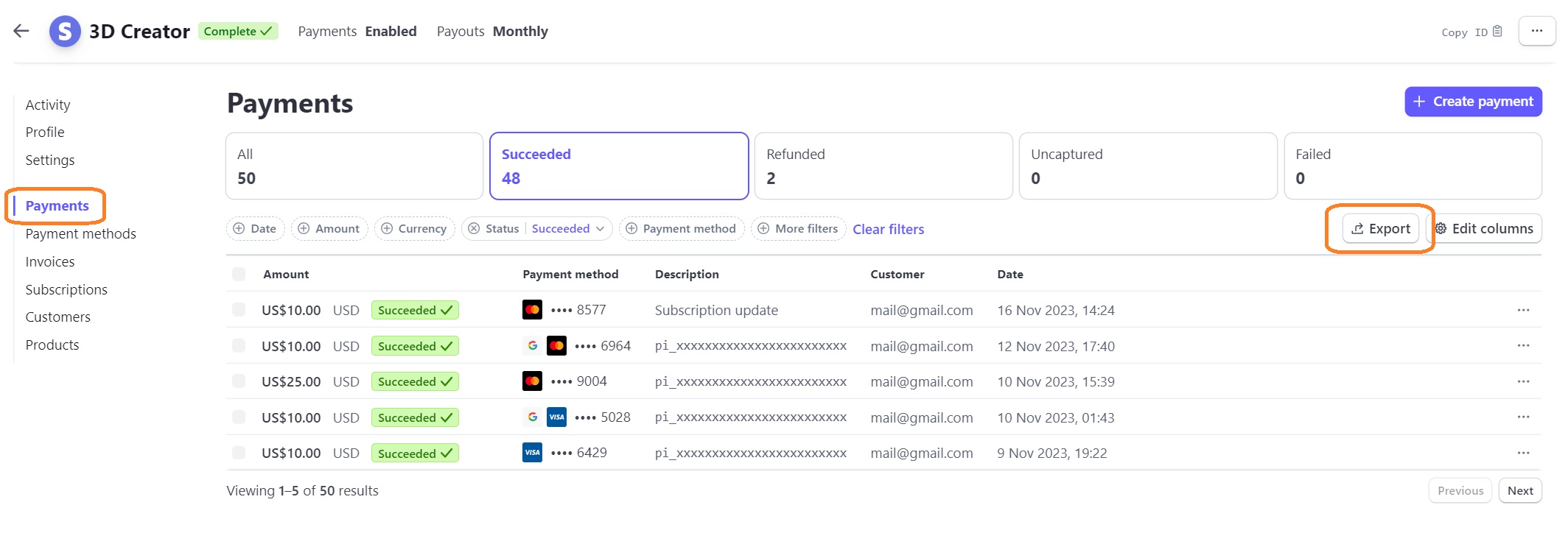
                  1. Go to https://dashboard.stripe.com/ and log in,
                  2. in the left menu, select "Payments",
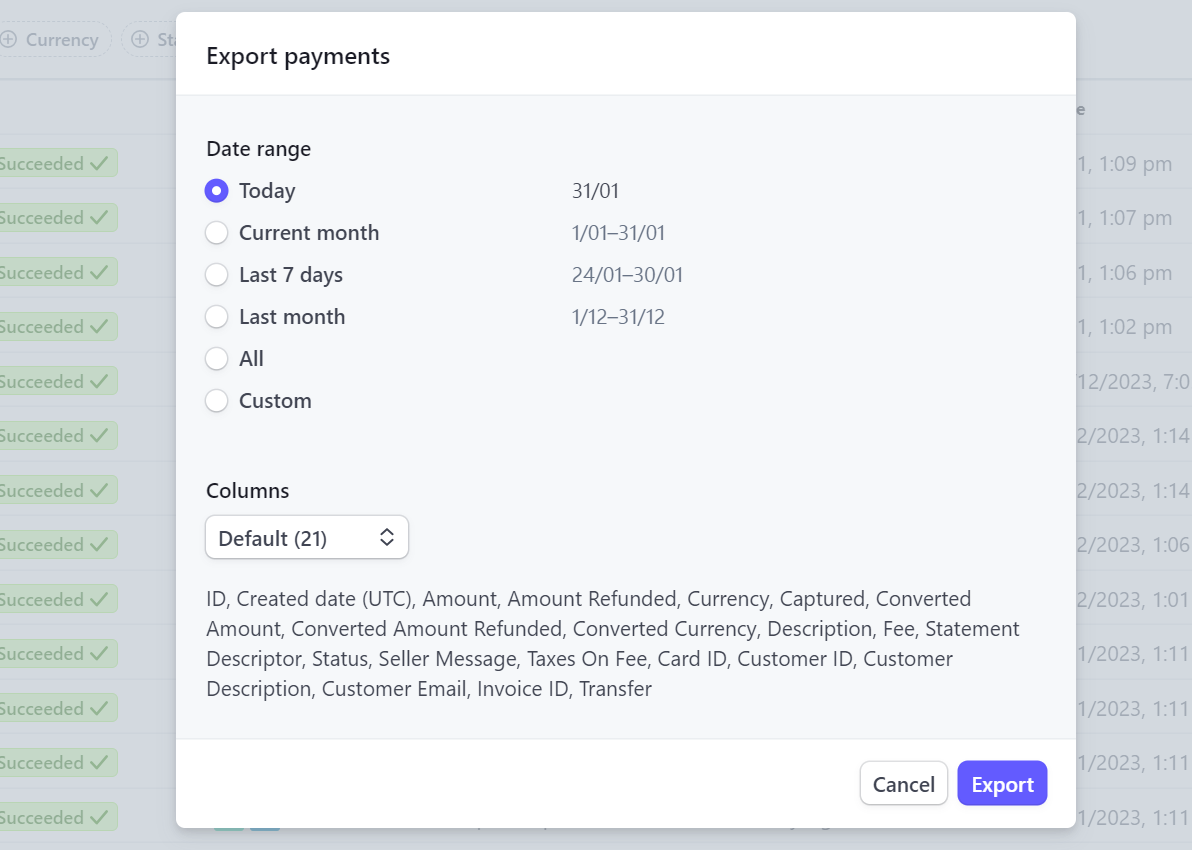
                  3. click on "Export" button and choose the specific columns and time period you wish to export,
                  4. click the "Export" button and wait for the output.

                  War dieser Artikel hilfreich?
                  Diese Aktion ist nur für registrierte Benutzer verfügbar. Bitte anmelden.
                  Einloggen  um einen Kommentar zu schreiben
                  Keine Kommentare

                  Themen

                  • Printables
                    • Printables Clubs
                      • About
                      • For Creators
                      • For Supporters
                    • P2P Programm