AA

Doporučené produkty

    Oblíbené kategorie

      Populární vyhledávání

        Články

          Blog

            Produkty

              Kategorie

                Navrhovaná hledání

                  Vyhledávám…
                  Žádné výsledky
                  Něco se pokazilo.
                  ↑↓ Vybrat↵ OtevřítEsc Zavřít hledání
                  • English
                  • Čeština
                  • Deutsch
                  • Español
                  • Français
                  • Italiano
                  • Polski
                  • 日本語
                  • Objednávky
                  • Adresa
                  • Skladové upozornění
                  • Kurzy
                  • Předplatné
                  • Upravit účet
                  • 3D tiskárny9+▾

                    3D tiskárnynovinka

                    novinkaPrusa CORE One L+Zjistit více
                    novinkaPrusa CORE One+ (Gen 2)Zjistit více
                    newPrusa CORE One L+ INDX 8-ToolnovinkaPrusa CORE One+ (Gen 2) INDX 8-ToolPrusa CORE One L+: Critical InfrastructureOriginal Prusa MK4SnovinkaOriginal Prusa XL+Original Prusa XL+: Critical Infrastructure

                    Upgrady tiskáren

                    newCORE One/+ INDX Conversion KitnovinkaCORE One L+ upgradenovinkaPrusa CORE One+ to Prusa CORE One+ (Gen 2)novinkaPrusa XL to Prusa XL+ Upgrade
                    Věrnostní program PrusaDoporučte nás a získejte odměnu
                    Jak si vybrat 3D tiskárnu?Provede vás základy, abychom společně našli tiskárnu, která odpovídá vašemu prostoru, rozpočtu i nápadům.
                    Elektronická kniha zdarmaStáhněte si zdarma elektronickou knihu Základy 3D tisku s Josefem Průšou a vykročte do světa 3D tisku.
                    Tisknutelné části tiskáren Original PrusaKolekce tisknutelných náhradních dílů pro tiskárny Original Prusa a jejich upgrady.
                    Informace o dodacích lhůtáchPravidelně aktualizované informace o výrobních kapacitách a dodacích lhůtách našich tiskáren.
                    Zakázkový 3D tiskProfesionální zakázkový 3D tisk z různých materiálů dle vašich požadavků.
                  • Materiály▾

                    Filamenty

                    PrusamentPLAPETGASA / ABSPC (Polykarbonát)PA (Nylon)FlexKompozitní materiálySpeciální materiályVýprodej Materiálů

                    Resiny

                    ResinResin Cleaner
                    Průvodce filamentyZkontroluj svou cívku Prusamentu
                    Prusament.com
                  • Díly & příslušenství▾

                    Příslušenství

                    EnclosureTryskyTiskové plátyZákladní příslušenstvíKamery a doplňkyNářadí a CraftingLepidla

                    Náhradní díly

                    Merch

                    Náhradní díly - všechny tiskárnyCORE OneMK4/S a MK3.9/SMK3/MK3S/MK3S+XL
                    Merch
                  • Pro firmy▾
                    Prusa Pro HT90Prusa Pro SLXPrusa Pro AFSPrusa Pro Medical OneOriginal Prusa XLOriginal Prusa XL: Critical Infrastructure
                    Prusa CORE One+Zjistit více
                    Prusa CORE One LZjistit více
                    Prusa CORE One L: Critical Infrastructure Edition

                    Využití 3D tisku

                    Výroba a vývojAutomobilový průmyslZdravotnictvíVzdělávání a výzkumArchitektura a designFilmový průmyslKritická Infrastruktura

                    3D tiskařské příběhy

                    • Jak začal 3D tisk: o RepRapu a open-source s Adrianem Bowyerem
                    • Jak 3D tisk mění výuku matematiky na univerzitě v rakouském Linci
                    • Jak pomocí 3D tisku vznikal šroubovák LTT
                    • Victoria Hand Project: Jak 3D tisk mění protetiku
                    Oficiální prodejci Prusa
                    Udržitelnost
                    Prusa Education
                    Kontakt a poptávky
                    Zakázkový 3D tisk
                    Certifikace ISO
                  • Software▾
                    PrusaSlicer

                    PrusaSlicerPrusaSlicer

                    PrusaSlicer je open-source software plný užitečných funkcí s častými aktualizacemi. Obsahuje vše, co potřebujete k exportu dokonalých tiskových souborů pro vaši 3D tiskárnu.

                    WindowsMacOSLinux
                    Prusa Connect

                    Prusa Connect

                    Prusa Connect je snadno nastavitelná cloudová služba pro vzdálené ovládání a monitorování vašich 3D tiskáren, která umožňuje bezpečné nakládání s daty a správu více tiskáren, ať už jste kdekoliv.

                    Přihlásit se do Connectu
                    Aplikace Prusa

                    Aplikace Prusa

                    Ovládejte svou tiskárnu vzdáleně odkudkoliv pomocí technologie Prusa Connect běžící na pozadí. Aplikace Prusa přináší novou úroveň zážitku z tiskáren Prusa na mobilních zařízeních s operačními systémy Android a iOS.

                    Vyzkoušet!
                    Ovladače a firmwareStáhněte si nejnovější firmware a ovladače pro svou 3D tiskárnu.
                    Podpora k PrusaSliceru
                    Podpora k Prusa Connectu
                  • 3D modely▾
                    3D tiskárnyUmění & designKutilství & koníčkyDomácnostMiniatury do stolních herHry & hračkyObchod na Printables

                    Oblíbené 3D modely

                    • Strong garden hose holder
                    • Prusa Spool Bot
                    • Build Tray — Modular Organizer for Assembly, Disassembly and Maintenance
                    • Broom Holder
                    • Octagon Fabric
                    • Prusa CORE One ? (Mimic Skin)

                    Designové soutěže

                    • Framework Laptop 12 Mainboard Wiederverwendung1. 9. 2026 – 30. 9. 2026
                    • 🏆 Designer Herausforderung: Zaubertricks!1. 9. 2026 – 22. 9. 2026
                    • Make-up Aufbewahrungslösungen4. 9. 2026 – 20. 9. 2026
                  • Komunita▾

                    Nadcházející akce

                    • IFA 20264. 9. 2026 – 8. 9. 2026 · Berlin, Germany · Prusa Team
                    • Maker Faire Bay Area25. 9. 2026 – 27. 9. 2026 · Kalifornie, United States · Prusa Team
                    • 3D Printopia 202626. 9. 2026 – 27. 9. 2026 · Pennsylvania, United States · Prusa Team
                    • Hobby Messe2. 10. 2026 – 4. 10. 2026 · Sachsen, Germany · Prusa Team

                    Prusa Forum

                    • zasekávání PP v podávacím kolečku Core One
                    • PrusaSlicer 3.0 problém po odistalaci
                    • 6.8.1 Zamrzání obrazovky
                    Mapa Prusa WorldMapa Prusa WorldVyhledejte lokální uživatele 3D tiskáren a prozkoumejte komunitu kolem sebe
                  • Podpora▾
                    Manuály & návodyPrusaSlicerPrusa ConnectMateriály

                    Model tiskárny

                    CORE One INDXCORE One LCORE One+CORE One

                    Řešení problémů s hardwarem

                    • Selftest selhal (CORE One/+)
                    • Ucpaná tryska (CORE One, CORE One L, XL, MK4/S, MK3.9/S)
                    • Úprava napnutí řemenů (CORE One/+, CORE One INDX, CORE One L/+)
                    • Co jsou PrusaLink a PrusaConnect

                    Ovladače a firmware

                    Rodina INDXRodina CORE OneRodina MK4Rodina XLRodina MMURodina PRO
                  • Kurzy▾

                    Staňte se expertem na 3D tisk

                    Prusa Academy nabízí online kurzy na nejrůznější témata týkající se 3D tisku. Každý kurz obsahuje:

                    • srozumitelný text s mnoha obrázky a krátkými videi
                    • odkazy pro inspiraci a další studium
                    • kvízy pro ověření vašich znalostí
                    • certifikát o dokončení
                    Procházet všechny kurzy"Moje knihovna kurzů
                    • 3D modelování v Autodesk Fusion
                    • PrusaSlicer Masterclass – Pro začátečníky až pokročilé
                    • Kompletní průvodce postprocesováním a barvením 3D výtisků
                    • Airbrush Your 3D Prints: From Basics to Advanced Tricks
                  • Blog▾
                    • Prusament PLA ColorMix: Tiskněte ve 45 barevných odstínech jen díky pěti cívkám filamentu
                    • Akce Zpátky do školy 2026 je tady!
                    • PrusaSlicer 3.0 Preview – Vše je připraveno na budoucnost 3D tisku
                    E-book Základy 3D tisku
                  • O nás▾

                    Volná místa

                    • Operátor/ka expedice filamentů
                    • Obsluha elektroerozivního obráběcího stroje - hloubičky - PD Tool
                    • Operátor/ka výroby průmyslových 3D tiskáren v Hradci Králové
                    • Programátor CAM - Prusa Tools

                    O Prusa Research

                    Jsme největším výrobcem 3D tiskáren v Evropě a Spojených státech. Společnost byla založena v roce 2012 nadšencem, kutilem a vynálezcem Josefem Průšou. Během pouhých 15 let jsme vyrostli ve společnost s více než 1200 zaměstnanci. Každý měsíc navrhujeme, vyrábíme a odesíláme přes 10 000 inovativních a zabezpečených 3D tiskáren z naší centrály v Praze a pobočky v americkém Delaware do více než 160 zemí světa. Podívejte se na video, ve kterém se dozvíte, jak firma Prusa Research vznikla a čeho jsme dosáhli během pouhých 10 let!

                    O násČasová osaUdržitelnostOpen-source
                    O nás
                    Kontaktujte nás
                    Logo a fotografie
                    Průša pro školy
                    Volná místa
                    Certifikace ISO
                  1. Podpora
                  2. Řešení potíží s tiskárnou
                  3. Selftest selhal (CORE One L)
                   

                  Obsah

                  • Selftest procedure checks
                  • Selftest results
                  • Fan testing
                  • Door sensor calibration
                  • Y and X axes test
                  • Z Alignment Calibration
                  • Loadcell test
                  • Heaters test
                  • Filament sensor

                  Blog

                  • Prusament PLA ColorMix: Tiskněte ve 45 barevných odstínech jen díky pěti cívkám filamentu
                  • Akce Zpátky do školy 2026 je tady!
                  • PrusaSlicer 3.0 Preview – Vše je připraveno na budoucnost 3D tisku

                  Novinky e-mailem

                  Přihlaste se k odběru našeho měsíčního přehledu užitečných informací o novém firmware, nových verzích PrusaSliceru a zajímavých tipů na 3D tiskařské projekty.

                  Kliknutím udělujete souhlas se zasíláním newsletteru.

                  Tato stránka je chráněna pomocí reCAPTCHA Enterprise a uplatňuje tedy Ochranu osobních údajů a Podmínky použití společnosti Google.

                  Strong garden hose holder
                  E-shop
                  • 3D tiskárny
                  • Upgrady tiskáren
                  • Filamenty
                  • Příslušenství
                  • Prusa Merch

                  © Prusa Research a.s.

                  Printables
                  • 3D modely
                  • Store
                  • Clubs
                  • Designerské soutěže
                  • Brands
                  Komunita
                  • Mapa světa
                  • Fórum
                  • Uživatelské skupiny
                  • Výstavy a akce
                  Podpora
                  • Prusa Help
                  • Prusa Academy
                  • Kalkulačky
                  Software
                  • PrusaSlicer
                  • Prusa.app
                  • Prusa Connect
                  • Ovladače a software
                  Firma
                  • O nás
                  • Blog
                  • Oficiální prodejci Prusa
                  • Kontakty
                  • Certifikováno podle norem ISO 9001, ISO 14001 a ISO 45001
                  • Volná místa
                  • Všeobecné obchodní podmínky
                  • Obecné podmínky používání internetových stránek PRUSA
                  • Zásady ochrany soukromí
                  • Informace o cookies
                  • Proces řešení stížností zákazníků
                  • Stavová stránka webu
                  • Nastavení cookies
                  • Recyklace 3D tiskárny
                  • Všeobecné obchodní podmínky
                  • Obecné podmínky používání internetových stránek PRUSA
                  • Zásady ochrany soukromí
                  • Informace o cookies
                  • Proces řešení stížností zákazníků
                  • Stavová stránka webu
                  • Nastavení cookies
                  • Recyklace 3D tiskárny

                  © Prusa Research a.s.

                  JOSEF PRUSA®, PRUSA RESEARCH®, PRUSA POLYMERS®, PRUSA ORANGE®, PRUSA 3D ® A PRUSAMENT® jsou registrované ochranné známky společnosti Prusa Development a.s., které používá společnost Prusa Research a.s. na základě licence od společnosti Prusa Development a.s.

                  Selftest selhal

                  (CORE One L)

                  Relevantní pro

                  CORE One L
                  Článek Tento článek je také dostupný v následujících jazycích:
                  English
                  Čeština
                  Polski
                  Deutsch
                  Français
                  Español
                  Italiano
                  日本語

                  On the Prusa CORE One L, the selftest checks for issues in the printer's assembly, wiring, and electronic components. It is the Calibration Wizard, done during production before being shipped, but it can also be found on the printer menu in Control -> Calibrations & tests. It is also prompted automatically after a factory reset.

                  Note that if the printer is placed on an unstable surface or if there is another running 3D printer next to it, it may negatively affect the calibration. The printer should be placed on a stable surface.

                  During the selftest, do not manipulate or touch the printer, unless the printer prompts an action with instructions on the display.

                  Selftest procedure checks

                  • Fan Test
                  • Door Sensor
                  • Y Axis Test
                  • X Axis Test
                  • Z Alignment Calibration
                  • Loadcell test
                  • Z Axis Test
                  • Heater Test
                  • Gears Calibration (non-mandatory, meant for kits)
                  • Filament Sensor Calibration
                  • Phase Stepping Calibration

                  Selftest results

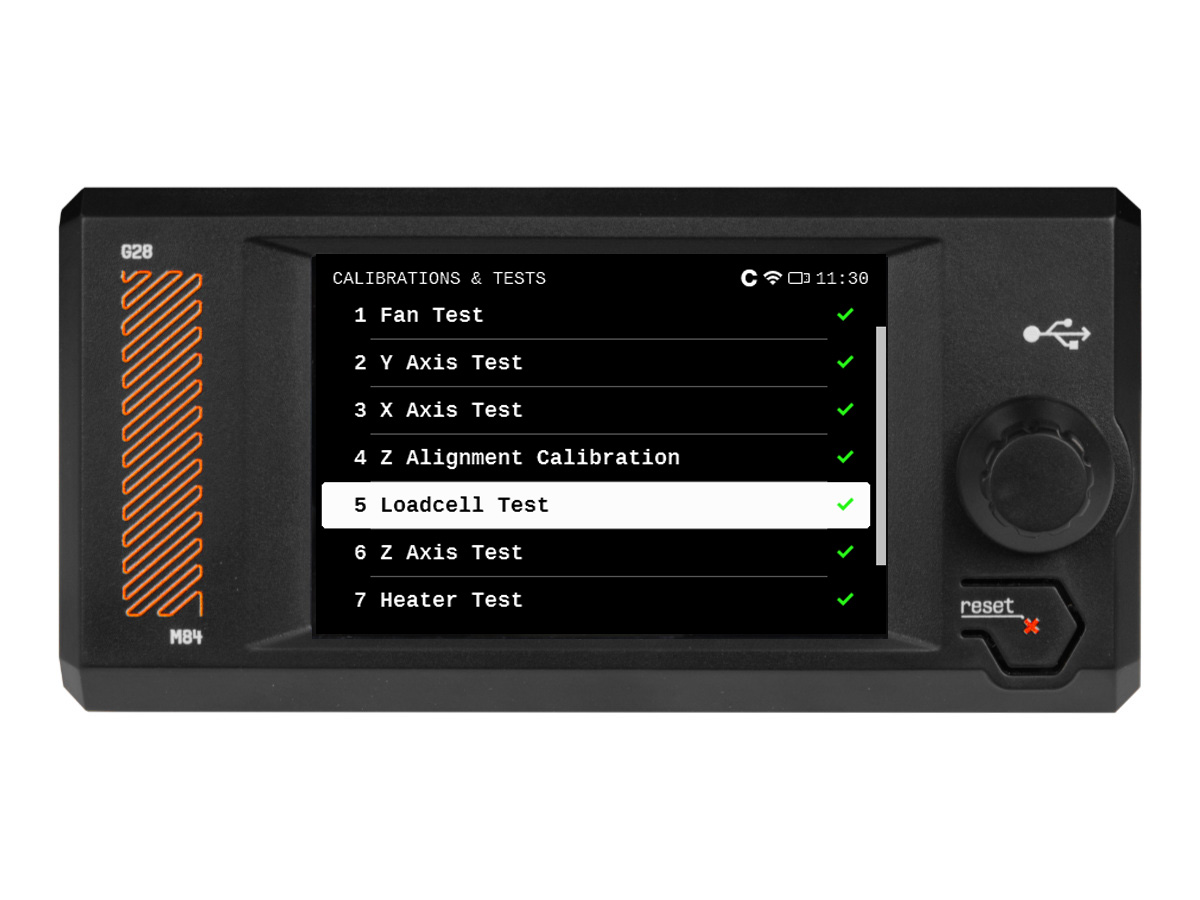
                  During the selftest, its results are shown on the screen, indicating success or failure for each point.
                  Fan testing

                  The selftest procedure will test the hotend fan, the print fan, and the chamber fans. If this issue shows, check:

                  • Check for any obstruction that could prevent the fan from spinning.
                  • Ensure that the fans are correctly connected to the LoveBoard or the xBuddy extension board.
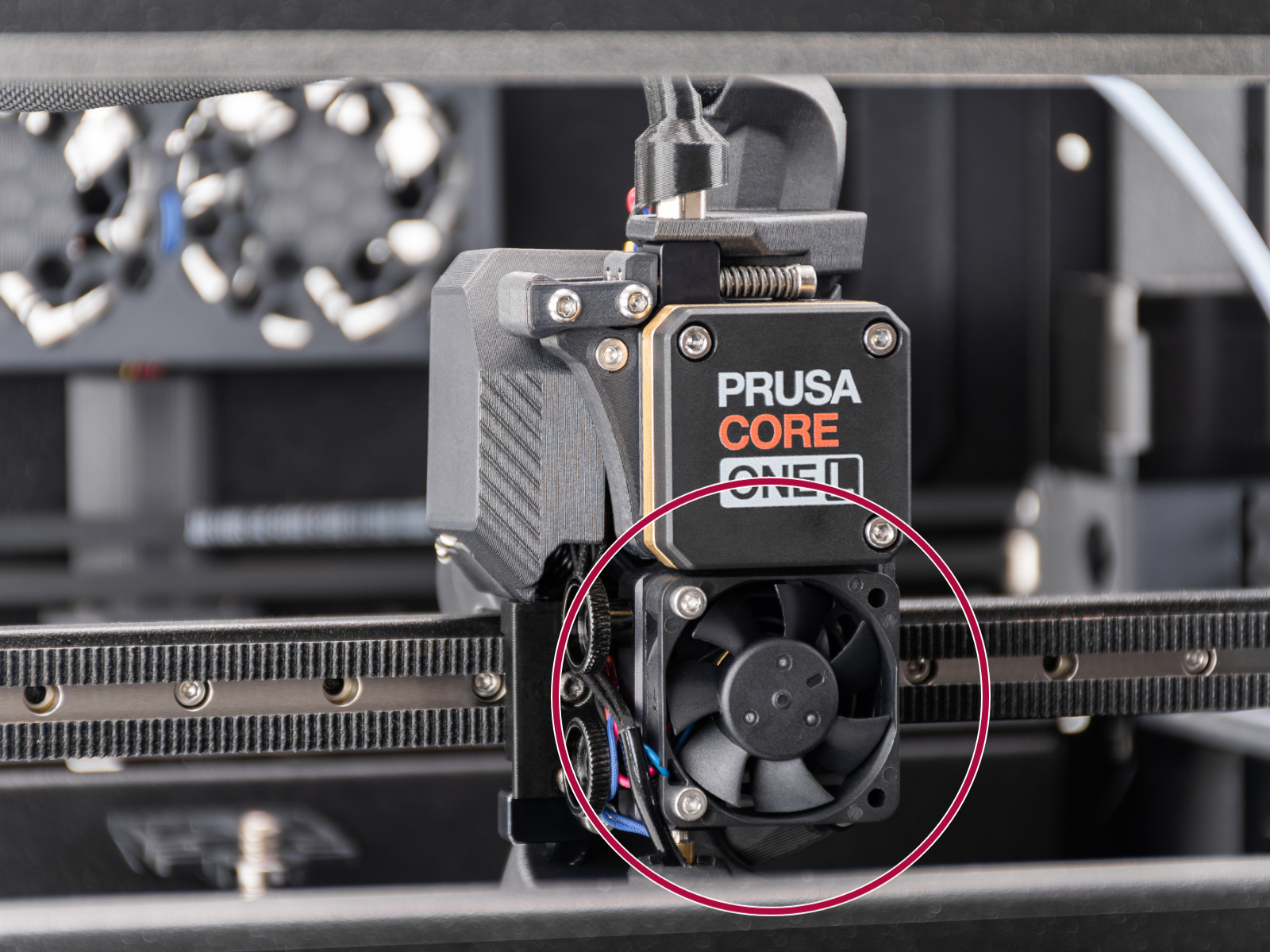
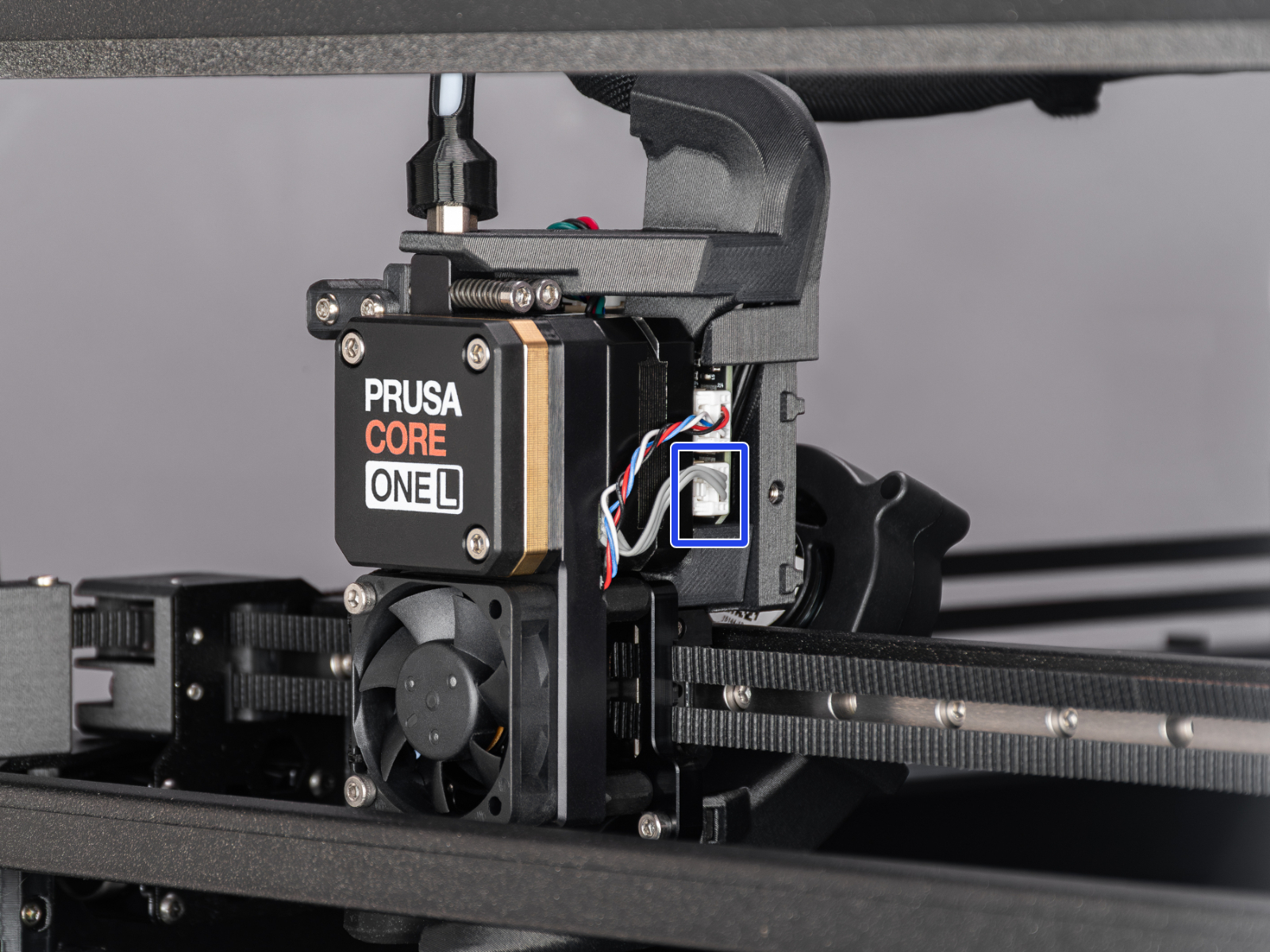
                  • If the error is on the hotend fan, make sure that it is installed in the correct position and orientation as shown in the image below.
                  • For the print fan and chamber fans, go to the printer menu to Control -> Temperature, and set the fan to be tested to 100%. See if the fan spins or if it shows any errors.

                  The printer might show the message "Fan not spinning" instead of a failed selftest. This can also be considered a failed selftest.
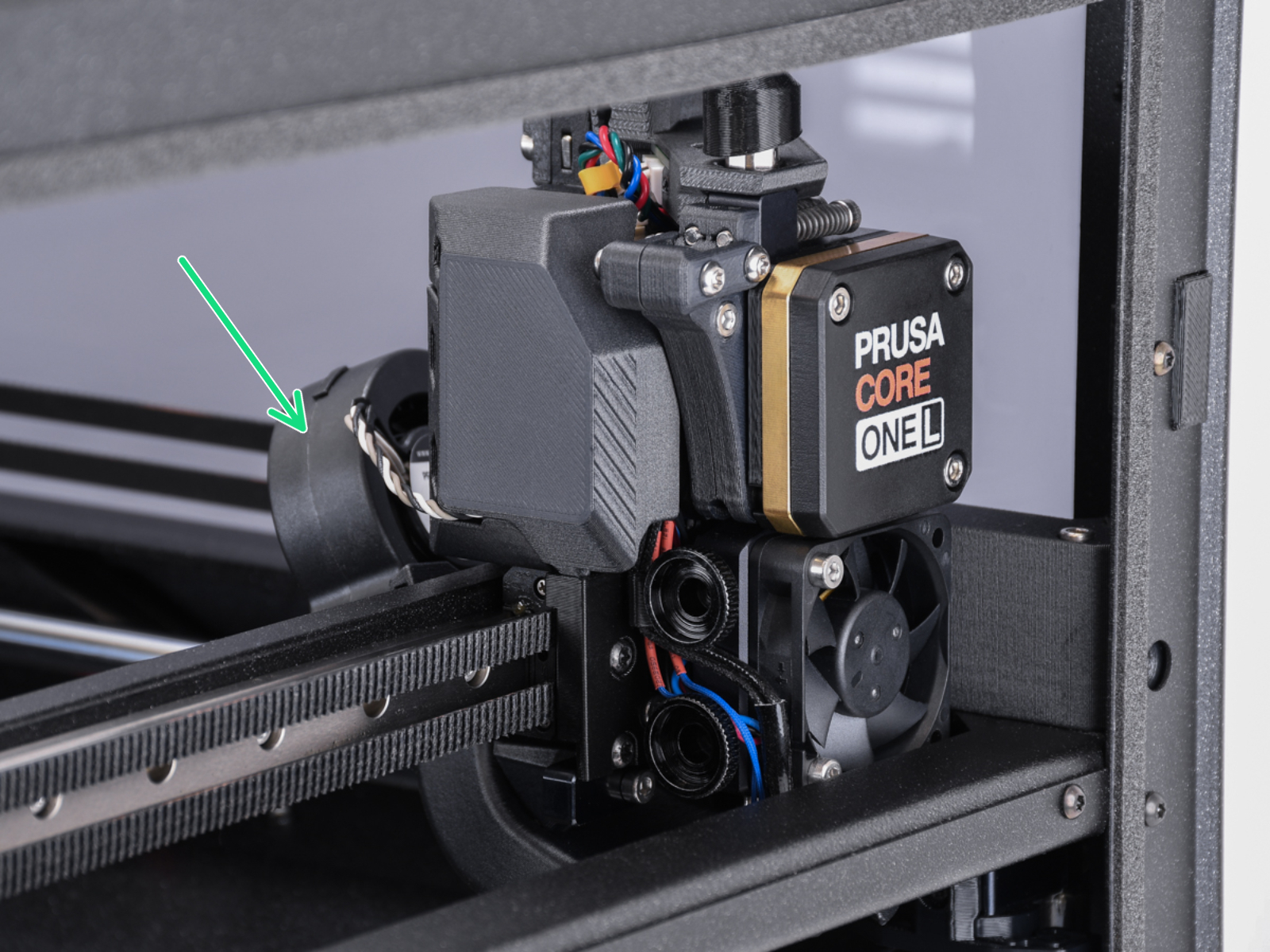
                  Print fanHotend fan

                  Door sensor calibration

                  In case the sensor behaves differently from what is expected in the door sensor calibration, it is necessary to check if the sensor is working. Go to the printer menu to Info -> Sensor Info -> Door sensor. Then, try opening and closing the door and see if the sensor is triggered. If the door does not trigger the sensor, try pressing the latch with your finger and see if the printer will recognise it.

                  If the sensor shows the correct status, go back to the calibration by going to Control -> Calibrations & tests -> Door sensor, and follow the instructions to tighten or loosen the screws.

                  In the last part of the calibration, the printer prompts you to place your fingers between the door and the frame. This is meant to prevent injury. If there is an issue with this test, you can keep the door completely open to pass the test.

                  If the door sensor does not work, check the cable length and connection.

                  Y and X axes test

                  The printer can determine if the components are moving correctly along each axis.

                  In case of an issue on the X-axis or the Y-axis, make sure that there is no obstacle to the movement, and readjust the belt tension.

                  Also, test the printer movement with the stepper motors temporarily disabled (LCD Menu -> Control -> Disable Motors), moving along both XY diagonals.

                  Move the X-axis to the front of the CoreXY, and check if both sides are touching the front at the same time. If the sides are not aligned but the belts have the correct tension, do the following procedure:

                  1. Loosen the belts completely. Be careful so that the square nuts do not fall off the plastic parts when removed.
                  2. Check which side sits against the front end (tight side) and which one has to be pushed towards it to touch it (loose side).
                  3. Put a universal wrench or anything with a similar thickness between the tight side and the front end. Slightly pull the loose side to correct the skew.
                  4. Check the alignment again and repeat if needed. In case the tight and loose sides are switched, repeat the process from the other side, but apply a smaller amount of pressure.
                  5. Tighten the belts again.
                  6. For Y-axis errors, check if the side filament sensor cable is not blocking the axis movement.

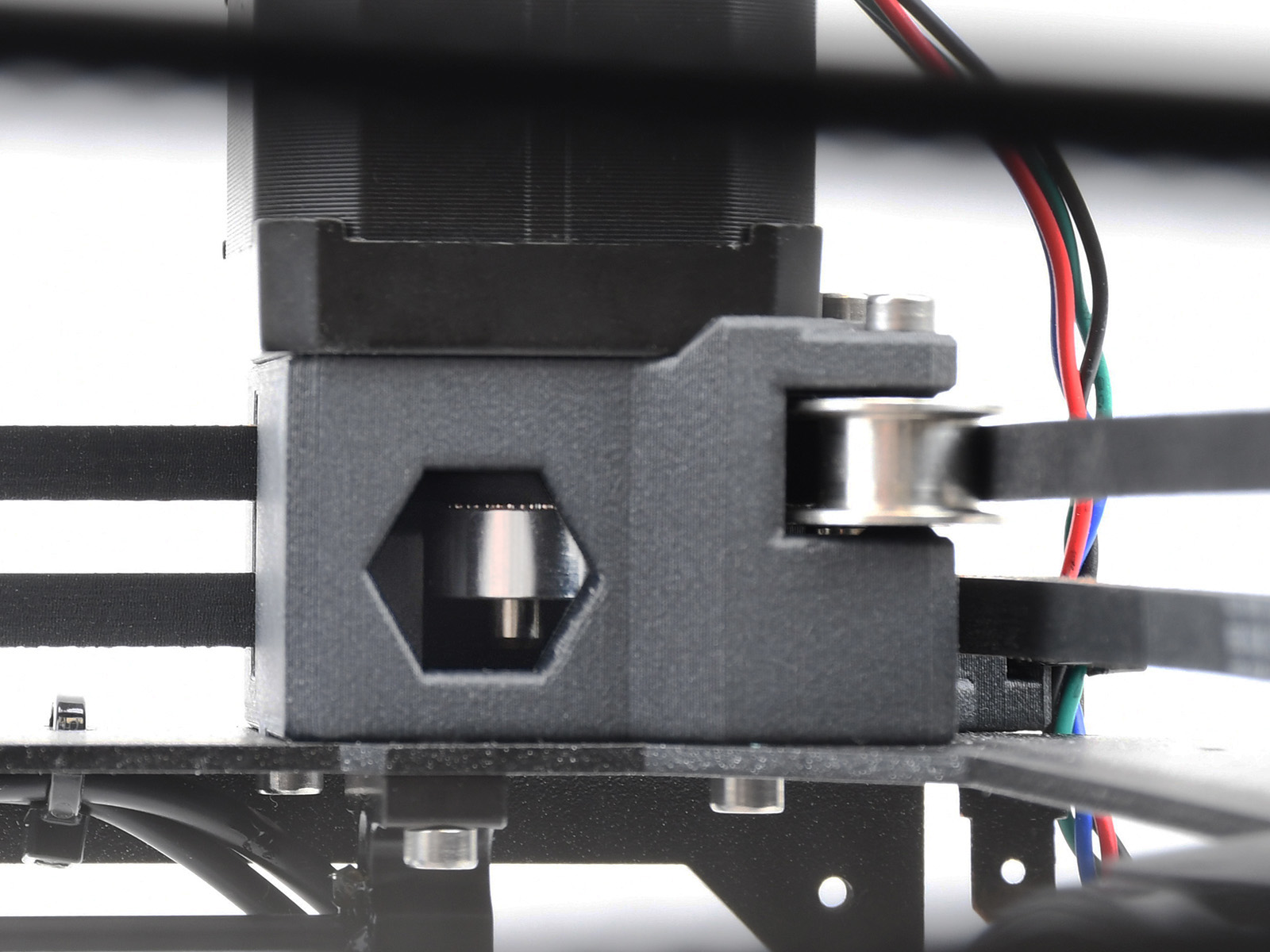
                  If the issue persists, look through the openings on the plastic parts under the CoreXY motors. You will be able to see the motor pulleys. Make sure that they are in the correct orientation, that both set screws are firmly tightened, and that one of them is tightened over the flat part of the motor shaft.
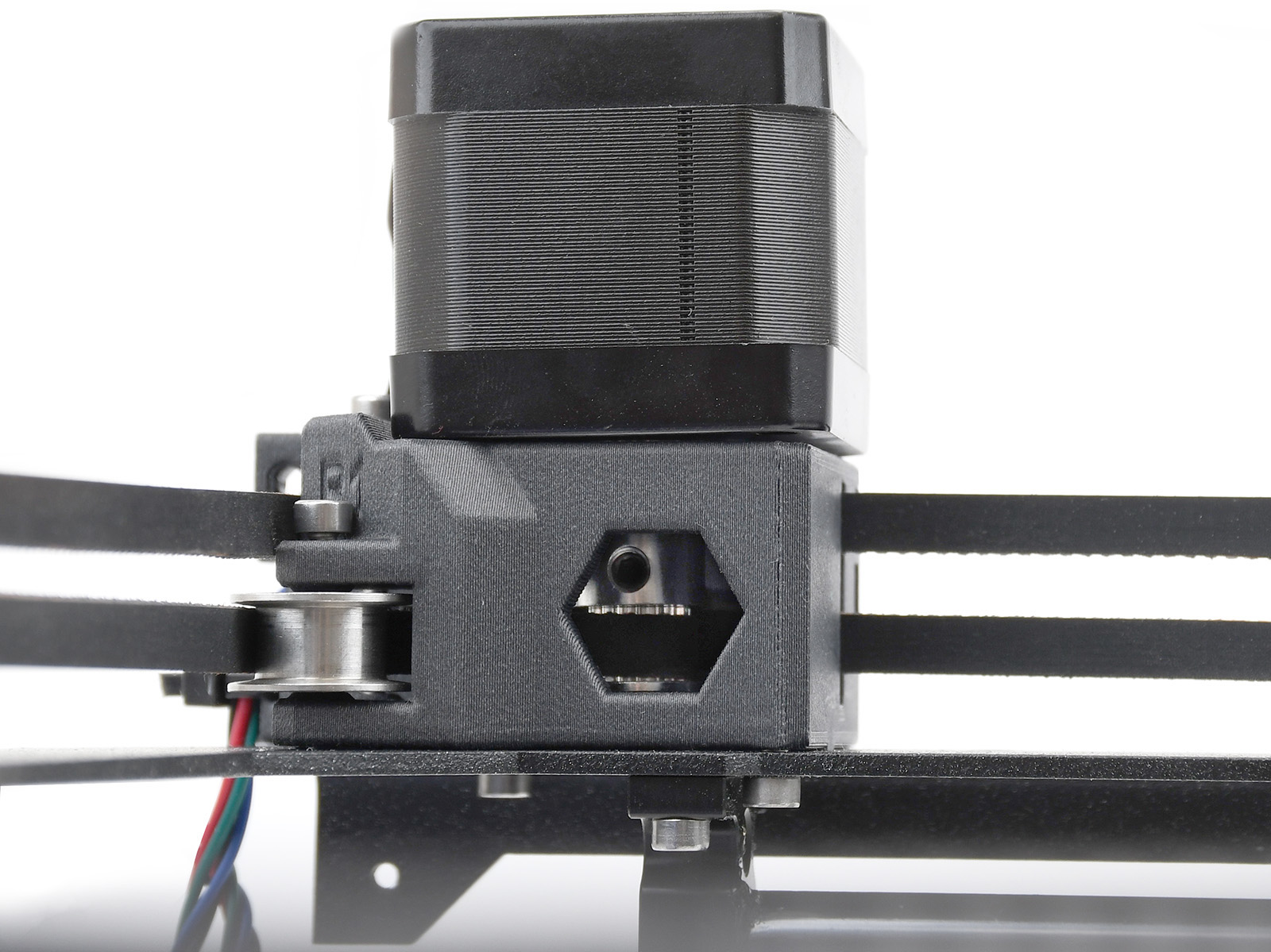
                  Y-motor pulleyX-motor pulley

                  If none of the items mentioned help, loosen the six screws holding the X-axis linear rails slightly (one to two turns), let the rail drop down, and tighten them again in the order shown on the image below.
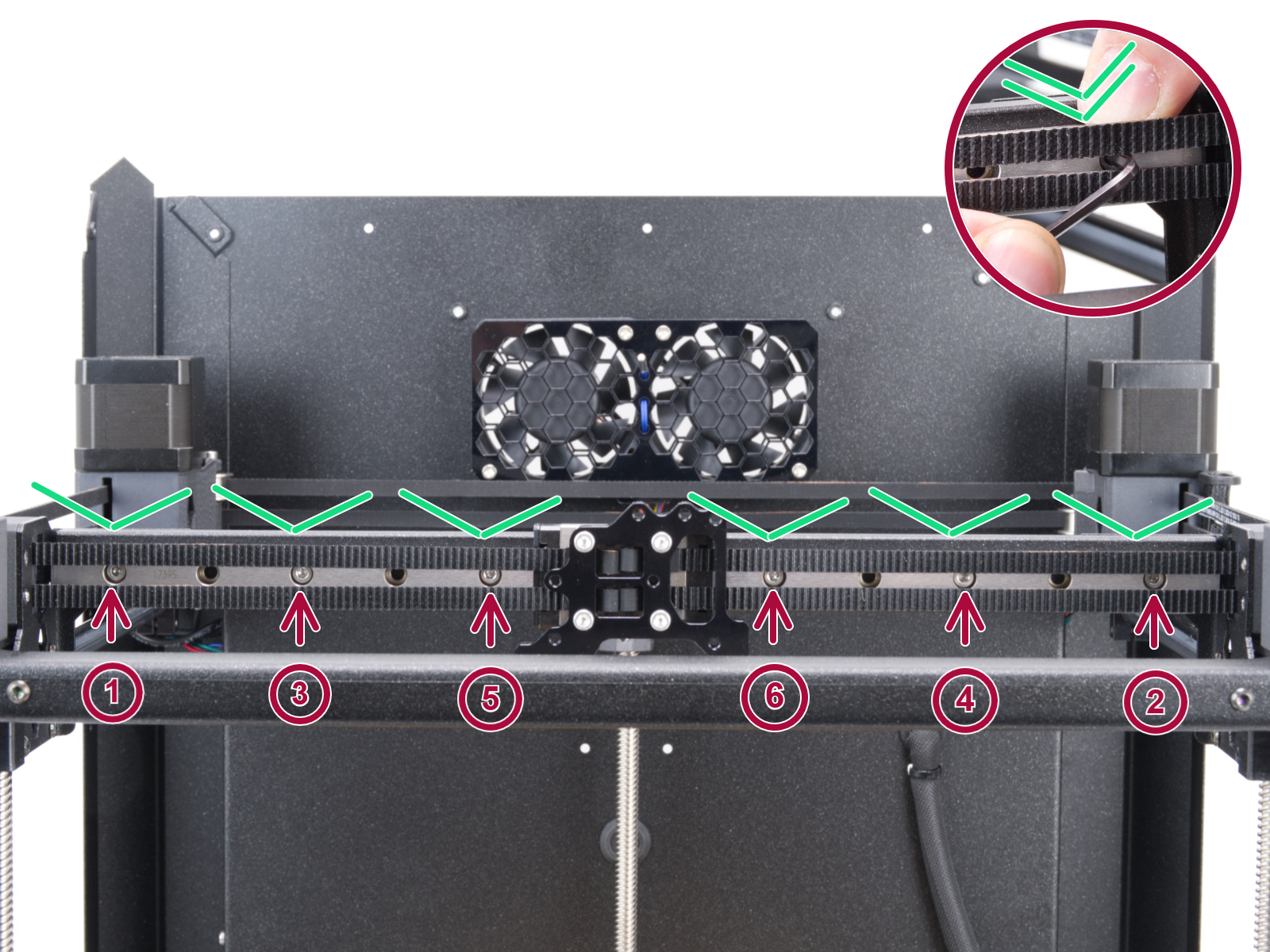
                  Z Alignment Calibration

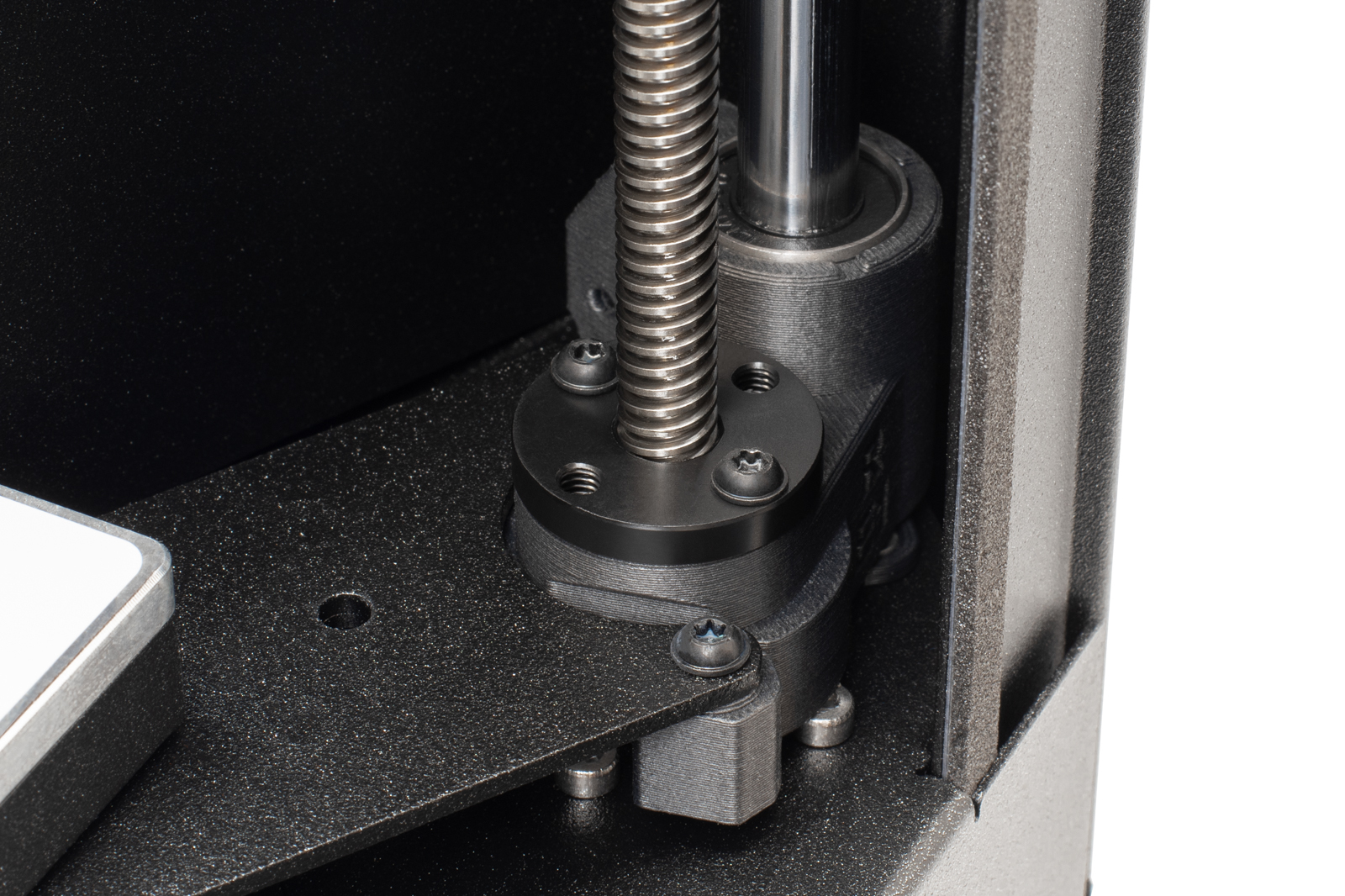
                  This part of the calibration will move to align the three motors on the Z axis so that the heatbed is level. In case of any errors on this test, check the trapezoidal nuts on the motor threaded rods. For that, move the bed all the way down either by the menu in Control -> Move axis -> Move Z, or by turning the threaded rods on the Z motors. Unscrew and remove the screws indicated in the image below. Move the nut along the threaded rod and see if the movement is smooth or not. When the trapezoid nut is still loose, try moving the motor threaded rod by hand (the printer needs to be powered off for that), and see if it turns easily.
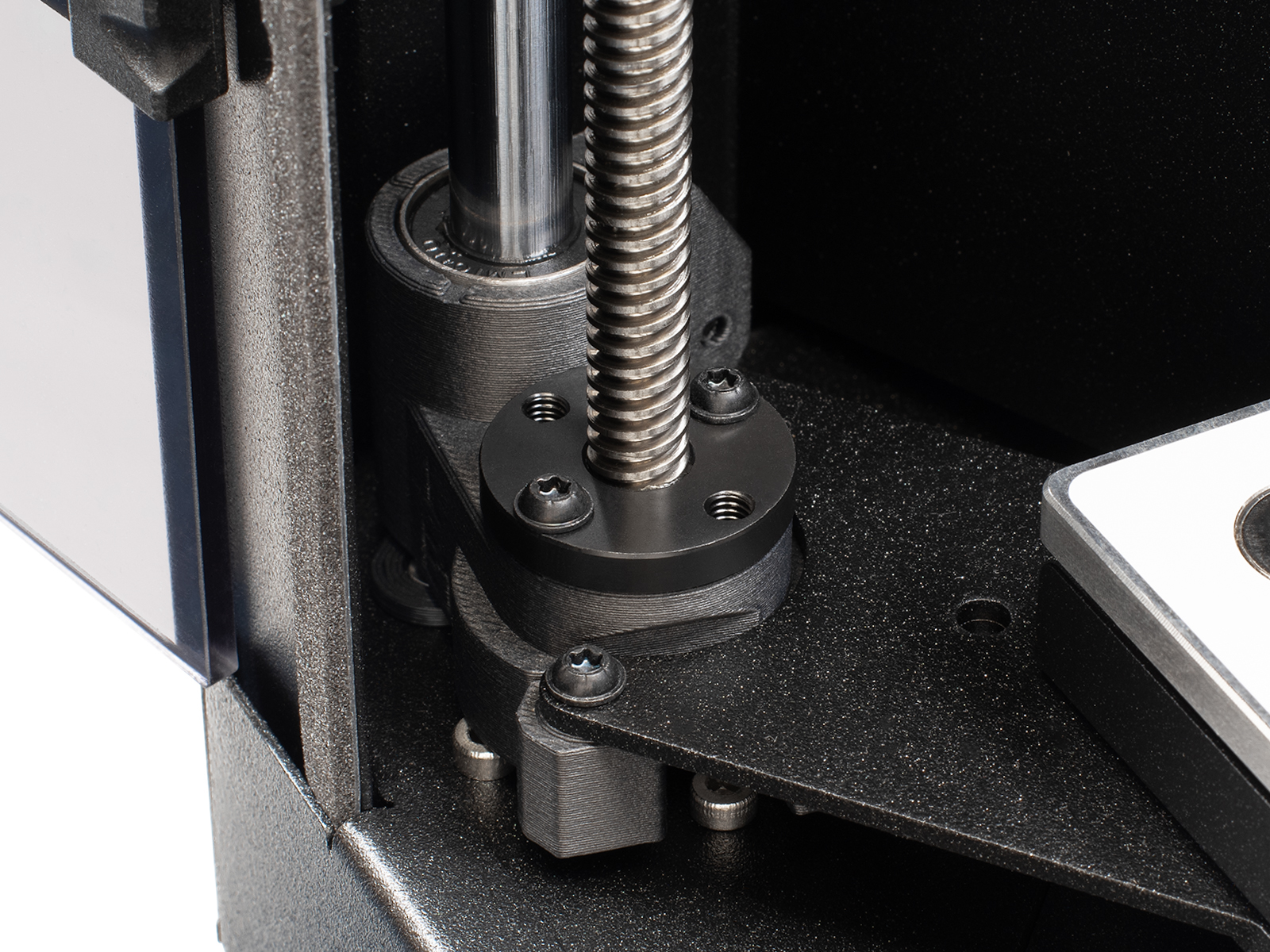
                  Left side trapezoidal nutRear motor trapezoidal nutRight side trapezoidal nut

                  Loadcell test

                  A functioning loadcell is fundamental for the Prusa CORE One L to detect that the nozzle is close enough to the steel sheet for printing, and to avoid damage that would be caused by the nozzle digging into the steel sheet.
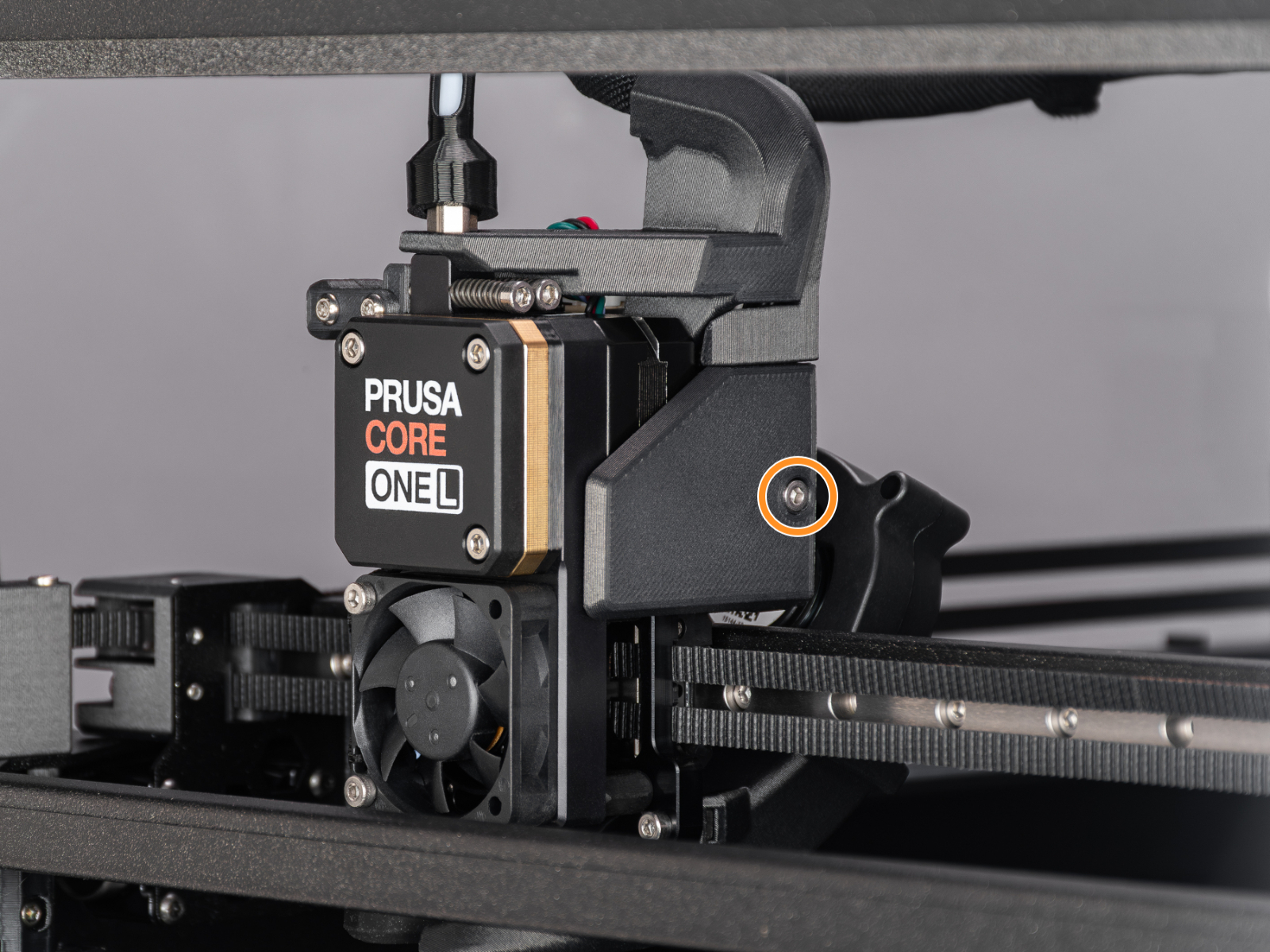
                  • Make sure that the loadcell is correctly connected to the LoveBoard.
                  • Make sure that the surface the printer is on is as stable as possible: any form of vibration propagated to the surface under the printer, or a not fully stable surface under the printer, might cause a false reading on the loadcell, causing it to fail the selftest.
                  • Check if the hotend is not moving and is fully inserted all the way.

                  Heaters test

                  The selftest can determine a fault during the heating of a component, and the affected component.

                  Heat the affected component under LCD Menu -> Control -> Temperature, heat up the part that failed the selftest, and see if any error appears. If it does, the error should have a QR code that redirects to the article that describes how to troubleshoot that particular error.

                  Filament sensor

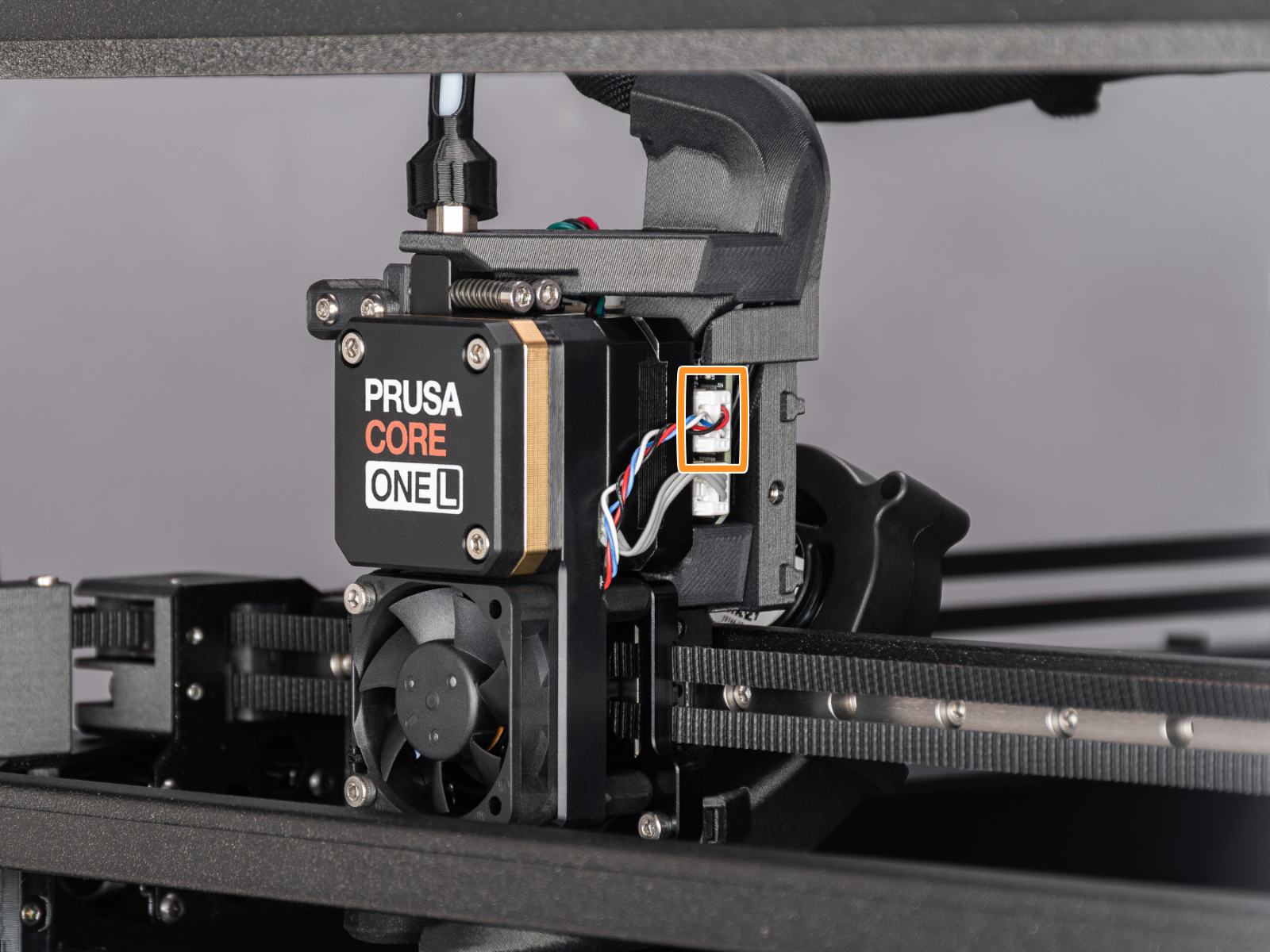
                  The Prusa CORE One L is equipped with two filament sensors: the first one is located on the side, close to the input of the PTFE tube, where you feed the filament. The second one is located in the Nextruder.

                  Both filament sensors are necessary for the correct filament retraction. When the sensor on the side detects that the filament has run out, the filament will be retracted in time.

                  To show the sensor status on the bottom of the screen during normal use, go to Settings -> User Interface -> Footer.

                  The printer prompts you to load the filament into the extruder to test the sensors. During the selftest, the two sensors are shown at the bottom of the screen. In case either of the sensors is not triggered:
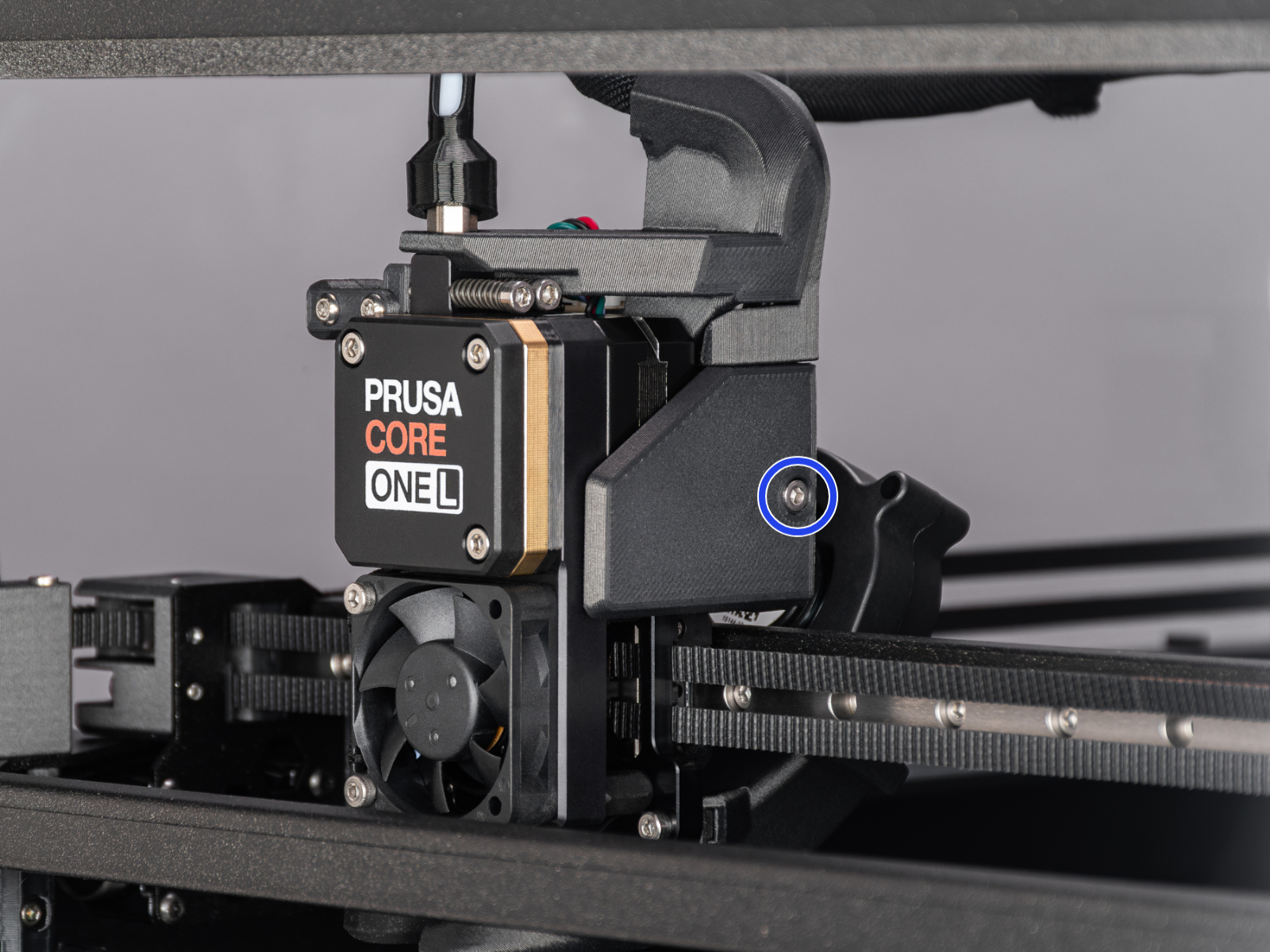
                  • Make sure that the extruder filament sensor is correctly connected to the LoveBoard.
                  • Make sure that the side filament sensor is not on the X position.

                  Byl tento článek užitečný?
                  Tato akce je dostupná pouze registrovaným uživatelům. Prosím přihlaste se.
                  Pro přidání kometáře se prosím přihlaste 
                  Zatím žádné komentáře

                  Témata

                  • Řešení potíží
                    • Řešení potíží s tiskárnou
                      • Chyba předehřevu #31201 (CORE One) #35201 (CORE One L) #36201 (CORE One INDX) #26201 (MK4S) #13201 (MK4) #27201 (MK3.9S) #21201 (MK3.9) #28201 (MK3.5S) #23201 (MK3.5)
                      • Chyba předehřevu hotendu #31202 (CORE One) #35202 (CORE One L) #26202 (MK4S) #13202 (MK4) #27202 (MK3.9S) #21202 (MK3.9)
                      • Bed thermal runaway #31203 (CORE One) #35203 (CORE One L) #36203 (CORE One INDX) #26203 (MK4S) #13203 (MK4) #27203 (MK3.9S) #21203 (MK3.9) #28203 (MK3.5S) #23203 (MK3.5)
                      • Hotend thermal runaway #31204 (CORE One) #35204 (CORE One L) #26204 (MK4S) #13204 (MK4) #27204 (MK3.9S) #21204 (MK3.9)
                      • Chyba Hotendu mintemp #31208 (CORE One) #35208 (CORE One L) #26208 (MK4S) #13208 (MK4) #27208 (MK3.9S) #21208 (MK3.9)
                      • Chyba hotendu maxtemp #31206 (CORE One) #35206 (CORE One L) #26206 (MK4S) #13206 (MK4) #27206 (MK3.9S) #21206 (MK3.9) #28206 (MK3.5S) #23206 (MK3.5)
                      • Bed mintemp error #31207 (CORE One) #35207 (CORE One L) #36207 (CORE One INDX) #26207 (MK4S) #13207 (MK4) #27207 (MK3.9S) #21207 (MK3.9) #28207 (MK3.5S) #23207 (MK3.5)
                      • Bed maxtemp error #31205 (CORE One) #35205 (CORE One L) #36205 (CORE One INDX) #26205 (MK4S) #13205 (MK4) #27201 (MK3.9S) #21201 (MK3.9) #28201 (MK3.5S) #23201 (MK3.5)
                      • I2C odesílání selhalo #31311 (CORE One) #35311 (CORE One L) #36311 (CORE One INDX) #26311 (MK4S) #13311 (MK4) #27311 (MK3.9S) #21311 (MK3.9) #28311 (MK3.5S) #23311 (MK3.5) #12311 (MINI/+)
                      • Loadcell není zkalibrován #31523 (CORE One) #35223 (CORE One L) #26523 (MK4S) #13523 (MK4) #27523 (MK3.9S) #21523 (MK3.9)
                      • Chyba tárování loadcellu #31524 (CORE One) #35524 (CORE One L) #26524 (MK4S) #13524 (MK4) #27524 (MK3.9S) #21524 (MK3.9)
                      • Chyba tárování loadcellu #31525 (CORE One) #35525 (CORE One L) #26525 (MK4S) #13525 (MK4) #27525 (MK3.9S) #21525 (MK3.9)
                      • Špatná konfigurace loadcell #31527 (CORE One) #35527 (CORE One L) #36527 (CORE One INDX) #26527 (MK4S) #13527 (MK4) #27527 (MK3.9S) #21527 (MK3.9)
                      • Loadcell Timeout #31528 (CORE One) #35528 (CORE One L) #26528 (MK4S) #36528 (CORE One INDX) #13528 (MK4) #27528 (MK3.9S) #21528 (MK3.9)
                      • Chyba Heatbreaku MAXTEMP Error #31212 (CORE One) #35212 (CORE One L) #26212 (MK4S) #13212 (MK4) #27212 (MK3.9S) #21212 (MK3.9)
                      • Senzor filamentu na Nextruderu (CORE One, CORE One L, MK4/S, MK3.9/S, XL)
                      • Modrá obrazovka smrti (BSOD) #31538 (CORE One) #35538 (CORE One L) #36538 (CORE One INDX) #26538 (MK4S) #13538 (MK4) #27538 (MK3.9S) #17538 (XL) #21538 (MK3.9) #28538 (MK3.5S) #23538 (MK3.5) #12538 (MINI)
                      • Detekce zaseklého filamentu #31101 (CORE One) #35101 (CORE One L) #26101 (MK4S) #13101 (MK4) #27101 (MK3.9S) #21101 (MK3.9) #17108 (XL)
                      • Teplota hotendu neodpovídá #31210 (CORE One) #35210 (CORE One L) #26210 (MK4S) #13210 (MK4) #27210 (MK3.9S) #21210 (MK3.9)
                      • Nedostačující extruze (Nextruder tiskárny)
                      • Vypršení časového limitu trysky #31819 (CORE One) #35819 (CORE One L) #26819 (MK4S) #13819 (MK4) #27819 (MK3.9S) #21819 (MK3.9) #28819 (MK3.5S) #23819 (MK3.5) #17819 (XL) #12819 (MINI)
                      • Nerovná podložka #31111 (CORE One) #35111 (CORE One L) #36111 (CORE One INDX)
                      • Zaseklý senzor filamentu #31113 (CORE One) #35113 (CORE One L) #36113 (CORE One INDX) #17113 (XL) #26113 (MK4S) #13113 (MK4) #27113 (MK3.9S) #21113 (MK3.9) #28113 (MK3.5S) #23113 (MK3.5) #12113 (MINI/+)
                      • Chyba MAXTEMP komory #31214 (CORE One) #35214 (CORE One L) #36214 (CORE One INDX)
                      • Puppy error #31511 (CORE One) #35511 (CORE One L) #36511 (CORE One INDX)
                      • Puppy error #31513 (CORE One) #35513 (CORE One L)
                      • Chyba Mintemp komory #31215 (CORE One) #35215 (CORE One L) #36215 (CORE One INDX)
                      • Obnovení po selhání návratu do výchozí polohy #31812 (CORE One) #35812 (CORE One L) #26812 (MK4S) #13812 (MK4) #27812 (MK3.9S) #21812 (MK3.9) #28812 (MK3.5S) #23812 (MK3.5) #17812 (XL) #12812 (MINI)
                      • Překážka při zavádění #31119 (CORE One) #35119 (CORE One L) #17119 (XL)
                      • Je nutná kalibrace návratu do výchozí polohy (homing) #31118 (CORE One) #35118 (CORE One L) #36118 (CORE One INDX) #17118 (XL)
                      • Calibrate homing from menu #31120 (CORE One) #35120 (CORE One L) #36120 (CORE One INDX) #17120 (XL)
                      • Přehřátí MCU #35270
                      • Přehřátí PCB #35271
                      • Časový limit pro data vypršel #35330
                      • Porucha řadiče střídavého proudu #35273
                      • Porucha řadiče střídavého proudu #35333 (CORE One L)
                      • Porucha řadiče střídavého proudu #35335 (CORE One L)
                      • Porucha řadiče střídavého proudu #35336 (CORE One L)
                      • Selftest selhal (CORE One L)
                      • Ventilátor podložky se netočí #35849 (CORE One L)
                      • Ventilátor zdroje se netočí #35850 (CORE One)
                      • Úprava napnutí řemenů (CORE One/+, CORE One INDX, CORE One L/+)
                    • Řešení potíží při tisku
                    • Chybové QR kódy
                    • Chybová hlášení při tisku