Prusa
  • SHOP
    • Latest products
    BY CATEGORY
    • 3D printersnew
    • 3D printer upgradesnew
    • Materials
    • Accessories
    • Spare parts
    • Courses
    • Merch
    • Get a price quote
    QUICK LINKS
    • Shipping & delivery
    • Returns & refunds
    • Payment & financing
    • Warranty
    • VAT & Customs fees
    • FAQ

    0 item in your cartitems in your cart

    Your cart is empty

    Go to cartShop 3D printers

    My profile

    Log in to see orders, saved items

    My profile

    Signed in as

    • Orders
    • Logout
  • 3D PRINTING
    • Explore 3D printing
    FOR BEGINNERS
    • 3D printing 101
    • How FDM printing works
    • Buying your first printer
    • 3D model catalog
    BY APPLICATION
    • Rapid prototyping
    • Manufacturing
    • Engineering
    • Research
    • Arts & design
    GO DEEPER
    • Materials guide
    • Courses
    • Webinars
    • Case studies
    • Custom 3D printing
  • 3D PRINTERS
    • All 3D printers
    FOR
    • Home or garageHobbyists, tinkerers and home printing
    • BusinessIn-house production for small teams
    • EnterpriseFleets, security and scale
    • Which Prusa is right for me
    SHOP & BROWSE
    • CORE One+new
    • CORE One+ INDXnew
    • CORE One L+new
    • CORE One L+ INDXnew
    • XL+new
    • MK4S
    • Prusa Pro HT90
    • Prusa Pro AFS
    • Prusa Pro SLX
    MORE FROM PRINTERS
    • Parts & upgradesnew
    • Critical infrastructure
    • Case studies
    • Signature Oak
    • Kits
  • MATERIALS
    • All materials
    BY USE
    • Every-day & design
    • Functional engineering
    • Composites
    • Pro speciality
    • SLA resins
    PRUSAMENT
    • PLA
    • PETG
    • ASA
    • PC
    • PA11
    • Flex
    • TPU
    MORE FROM MATERIALS
    • Materials guide
    • We make material in house
    • Sustainability
    • Order on the store
  • SOFTWARE
    • All software
    PREPARE THE PRINT
    • PrusaSlicer 3.0New
    PRINT & MONITOR
    • Prusa Connect
    • EasyPrint
    • iOS & Android app
    • Prusa Farm
    GET STARTED
    • Download & install
    • Knowledge base
    MORE FROM SOFTWARE
    • 3D model catalog
  • SUPPORT
    • Explore support
    FIND ANSWERS
    • Knowledge base
    • Troubleshooting
    • Courses
    • Webinars
    GET HELP
    • Contact us
    • Livechat
    • Shipping & delivery
    • Warranty
    • Returns & refunds
    • Service & spare parts
    • Service & Repair
    COMMUNITY
    • Forum
    • Reddit
    • Printables
  • TRUST CENTER
    • Trust Center overview
    BY TOPIC
    • GDPR
    • Certificates
    • Security
    • Compliance
    COMMITMENTS
    • Sustainability report
    TALK TO US
    • Contact the security team
  • COMPANY
    • About Prusa
    GET TO KNOW US
    • Our story
    • How we make printers
    • Open source
    • Brand & media kit
    NEWS
    • Blog
    • Newsroom
    • Events
    TRUST & PARTNERS
    • Sustainability
    • Resellers & distributors
    • Affiliate program
    • Contact
    • English
    • Čeština
    • Deutsch
    • Español
    • Français
    • Italiano
    • Polski
    • 日本語
  • Signed in as

    • Orders
    • Address
    • In-stock Alerts
    • My Courses
    • Subscription
    • Edit Account
    • Logout

Log in to see orders, saved items

Signed in as
  • Orders
  • Address
  • In-stock Alerts
  • My Courses
  • Subscription
  • Edit Account
  • English
  • Čeština
  • Deutsch
  • Español
  • Français
  • Italiano
  • Polski
  • 日本語
Shop

0 item in your cartitems in your cart

Your cart is empty

Go to cartShop 3D printers

My profile

Log in to see orders, saved items

My profile

Signed in as

  • Orders
  • Logout
SHOP
  • Latest products
BY CATEGORY
  • 3D printersnew
  • 3D printer upgradesnew
  • Materials
  • Accessories
  • Spare parts
  • Courses
  • Merch
  • Get a price quote
QUICK LINKS
  • Shipping & delivery
  • Returns & refunds
  • Payment & financing
  • Warranty
  • VAT & Customs fees
  • FAQ

Featured products

    Popular categories

      Trending searches

        Articles

          Blog

            Products

              Categories

                Suggested searches

                  Searching…
                  No results
                  Something went wrong.
                  ↑↓ Select↵ OpenEsc Close search
                  1. Support
                  2. Prusa CORE One/+ INDX
                  3. Print Quality Troubleshooting
                  4. First print troubleshooting (CORE One INDX)
                   

                  Contents

                  • Belt tuning
                  • First layer quality & Tool offset calibration
                  • Nozzle cleaner calibration
                  • Sheet cleanliness
                  • Mechanical precision

                  Blog

                  • Print colorful and glowing Halloween decorations with our spooky offer
                  • Factorio Has Arrived on Printables
                  • Prusament PLA Lightweight: 65% lighter than regular PLA. Perfect choice for aircraft, cosplay, and more.

                  Newsletter

                  Signup and get our monthly squeeze on updates, blog, printables and much more.

                  By clicking, you agree to receive our newsletter.

                  This site is protected by reCAPTCHA Enterprise and the Google Privacy Policy and Terms of Service apply.

                  Factorio Transport Belts
                  E-shop
                  • 3D Printers
                  • Printer Upgrades
                  • Filaments
                  • Accessories
                  • Prusa Merchandise

                  © Prusa Research a.s.

                  Printables
                  • 3D Models
                  • Store
                  • Clubs
                  • 3D Design Contests
                  • Brands
                  Community
                  • World Map
                  • Forum
                  • User Groups
                  • Events
                  Help
                  • Prusa Help
                  • Prusa Academy
                  • 3D Printing Calculators
                  Software
                  • PrusaSlicer
                  • Prusa.app
                  • Prusa Connect
                  • Drivers and Software
                  Company
                  • About Us
                  • Blog
                  • Official Prusa Resellers
                  • Contact Us
                  • Certified for ISO 9001, ISO 14001, ISO 45001
                  • General Terms and Conditions
                  • General Terms and Conditions of Use of the PRUSA Websites
                  • Privacy Policy
                  • Information about cookies
                  • Customer Complaints Policy
                  • Status Page
                  • Do Not Sell or Share My Personal Information
                  • Supplemental Statements
                  • General Terms and Conditions
                  • General Terms and Conditions of Use of the PRUSA Websites
                  • Privacy Policy
                  • Information about cookies
                  • Customer Complaints Policy
                  • Status Page
                  • Do Not Sell or Share My Personal Information
                  • Supplemental Statements

                  © Prusa Research a.s.

                  JOSEF PRUSA®, PRUSA RESEARCH®, PRUSA POLYMERS®, PRUSA ORANGE®, PRUSA 3D ® AND PRUSAMENT® are registered trademarks of Prusa Development a.s. used by Prusa Research a.s. under licence from Prusa Development a.s.

                  First print troubleshooting

                  (CORE One INDX)

                  Relevant for

                  CORE One INDX
                  4 comments
                  Article is also available in following languages
                  English
                  Čeština
                  Polski
                  Deutsch
                  Français
                  Español
                  Italiano
                  日本語

                  When you finish building the INDX conversion kit, your CORE One+ becomes the CORE One+ INDX. You switch on the printer for the first time and run all the calibrations. They are very important on the converted printer because you build the INDX from parts, like you would build the kit version of our printers. 

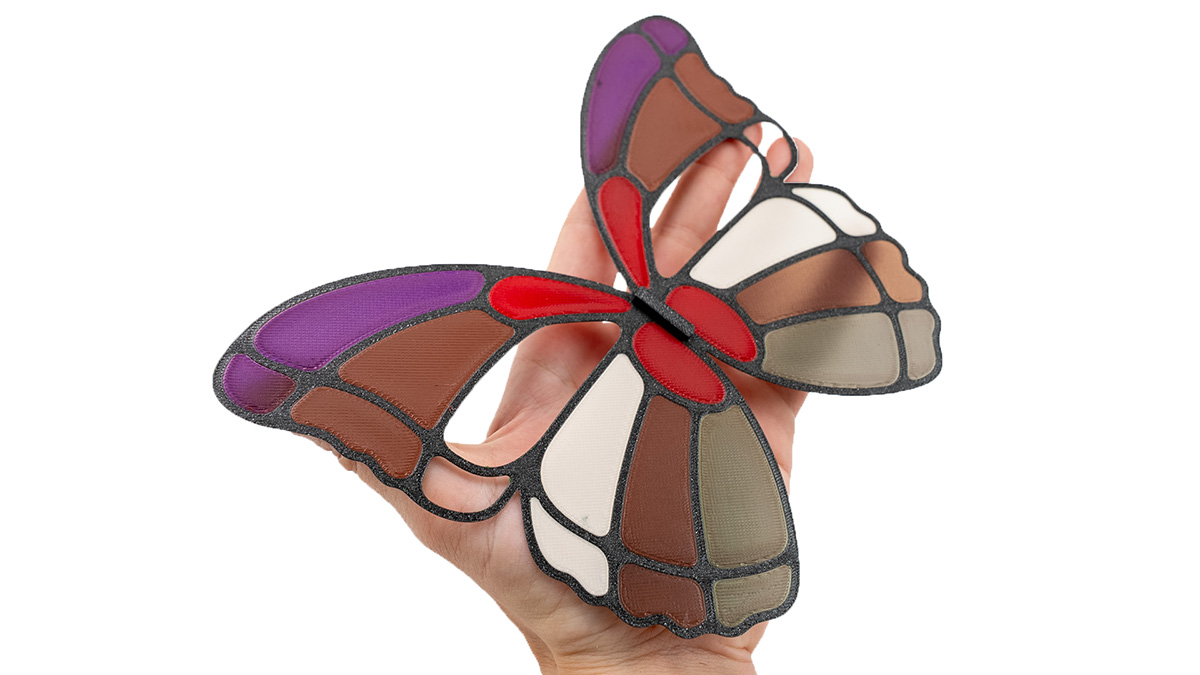
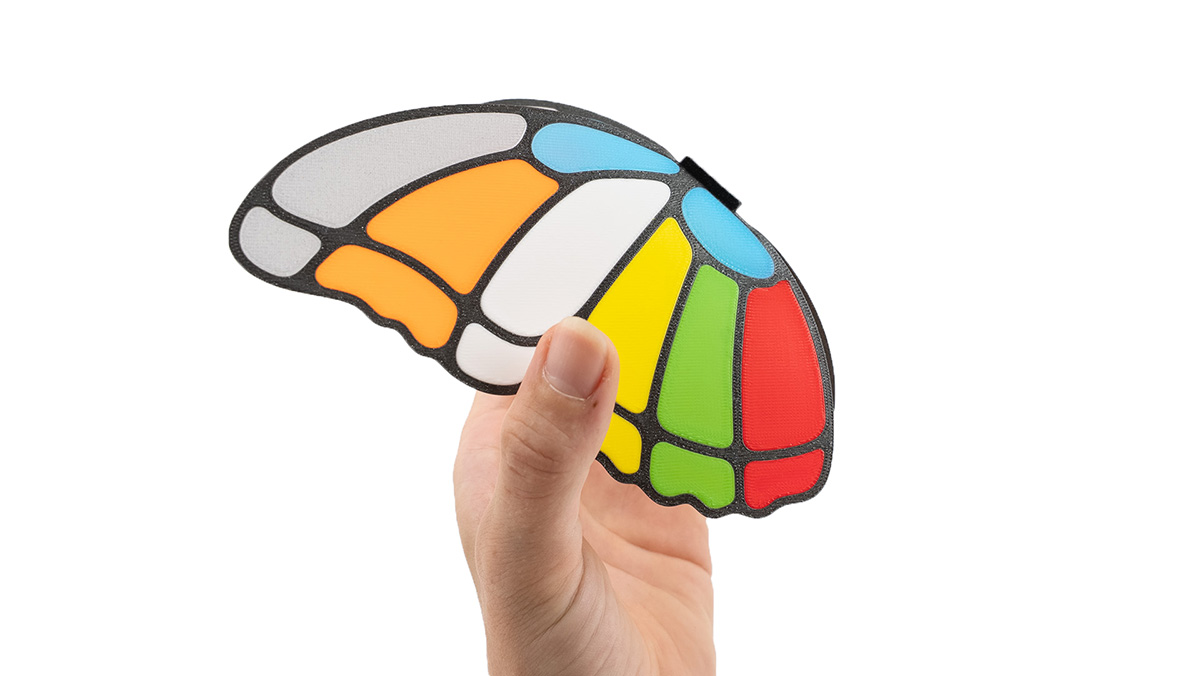
                  As a first print, we recommend Otto, the calibration butterfly. It takes only 1h12m on an 8-toolhead printer or 1h10m on a 4-toolhead one, and it helps you assess the quality of the calibrations. 

                  Print the model that matches the number of tools on your printer using PLA and then inspect the following parts: 

                  Belt tuning 

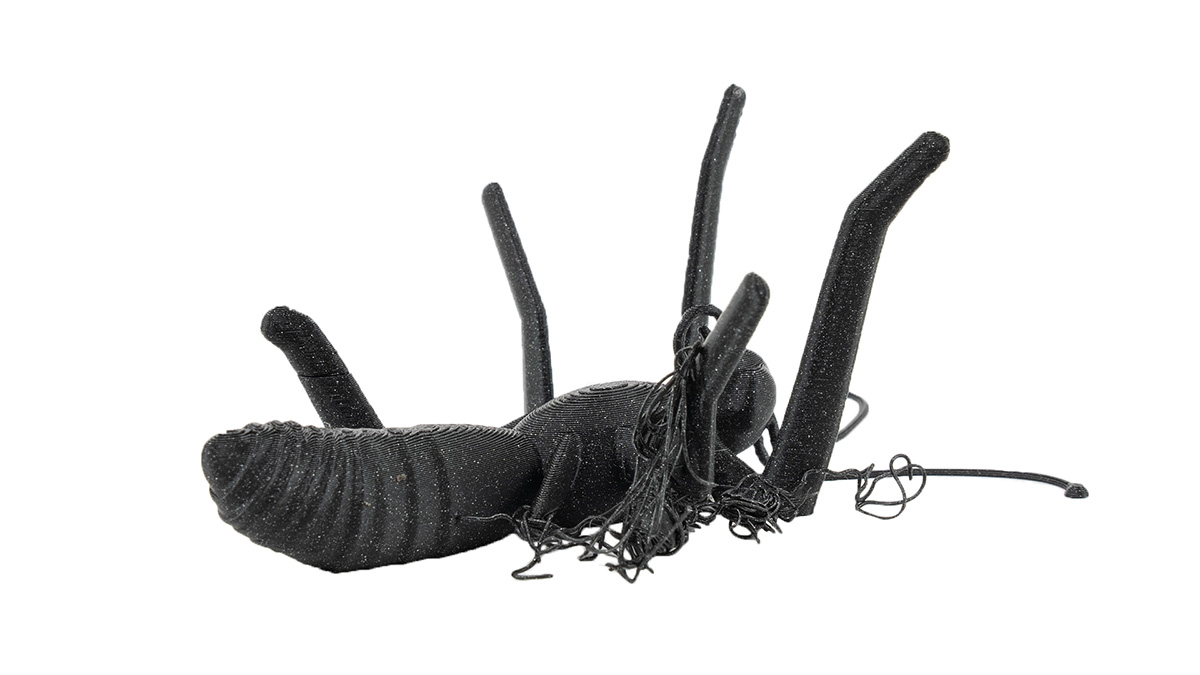
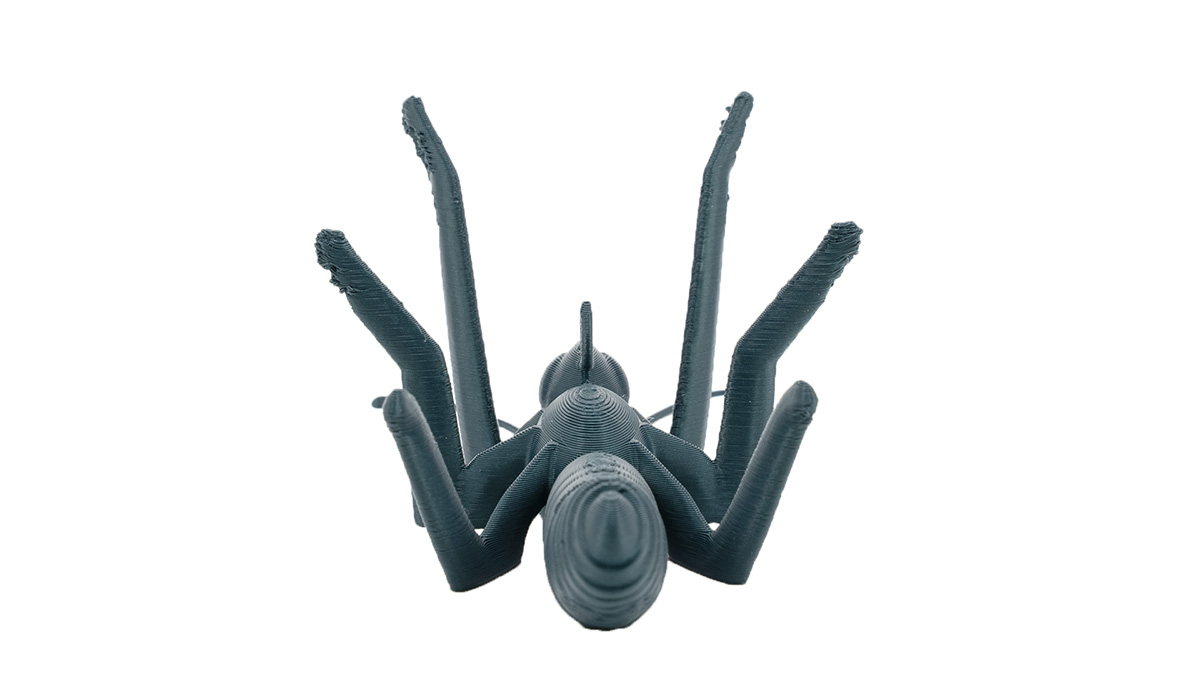
                  Observe the legs of the butterfly. If their ends, the ones that are the furthest from the body, look like in the pictures below, it means that the belts are not optimally tuned. A well-done belt tuning calibration is crucial for smooth printing with the INDX upgrade. 
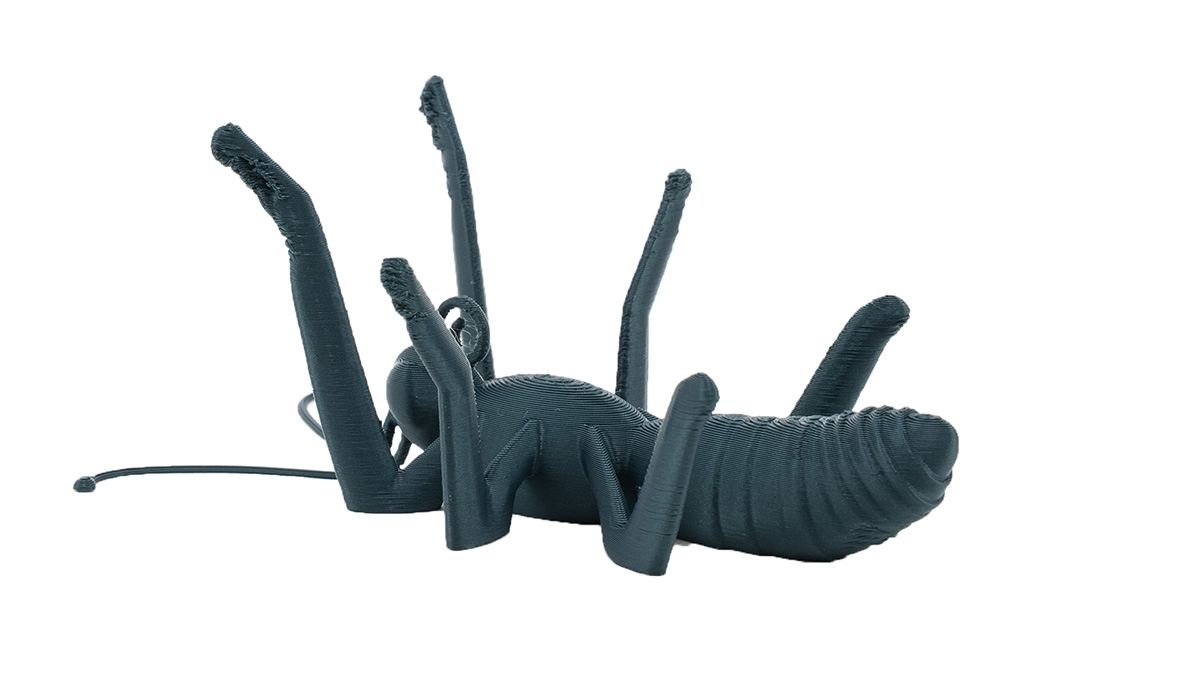
                  The more mistuned the belts are, the more affected are the legs. Here we see that the front ones look very bad, the middle ones are pretty bad, and even the hind legs don't have a nice surface. 
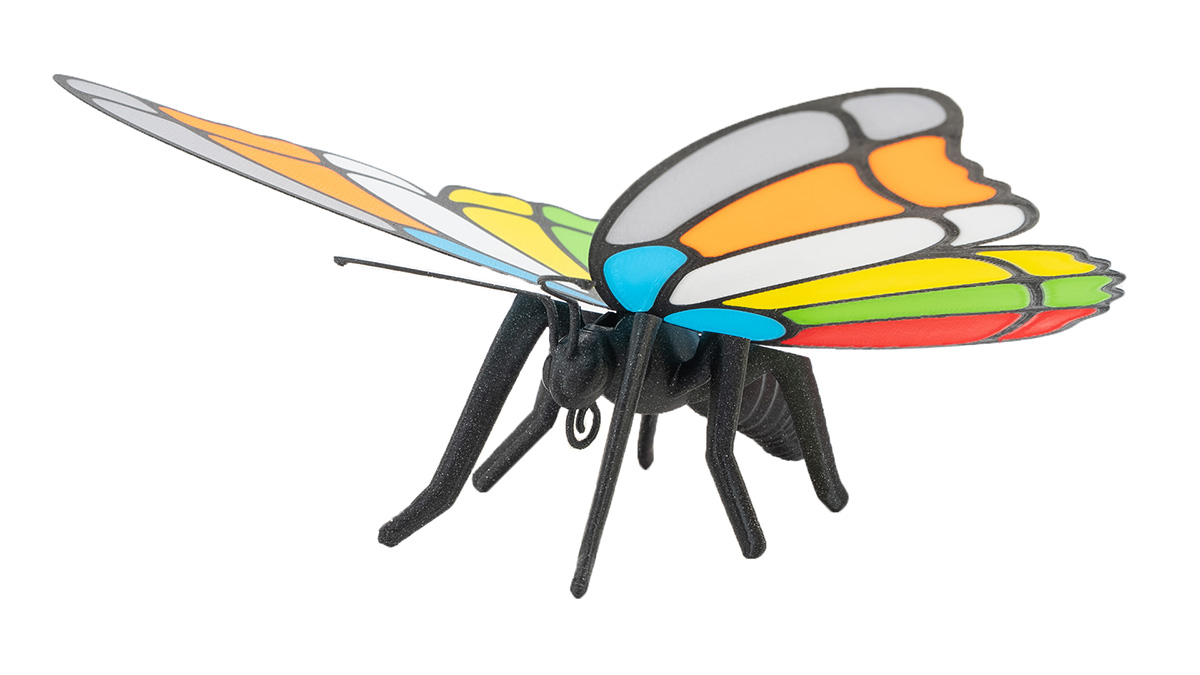
                  When the belts are well-tuned (picture below), you can see a slightly crumbly surface on the front legs (this is close to the limits of FFF 3D printing), but the rest is flawless. 
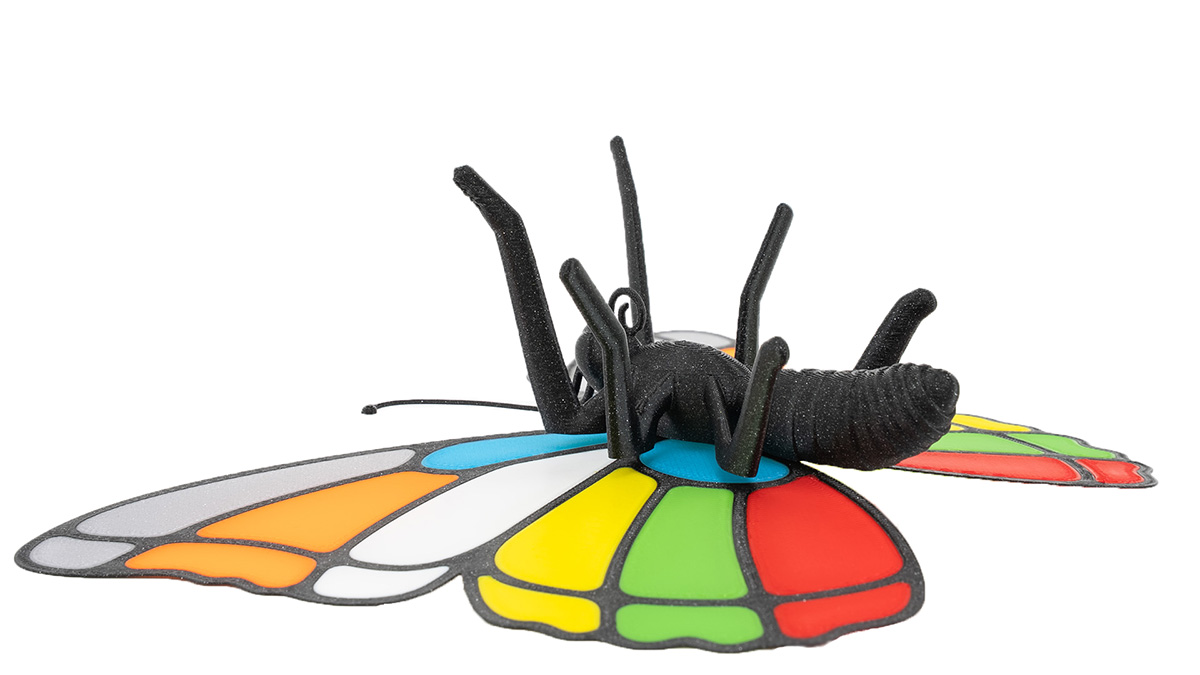
                  What to do: Run the Belt tuning calibration again and ensure the squareness of the gantry. In this case, try to tune the upper belt to 95.0 Hz or have the belts rather tight - on the higher frequency tail of the range. After changing the belt tuning, it is necessary to redo the dock calibration, homing calibration, tool offset calibration, and nozzle cleaner calibration. 

                  Suboptimal belt tuning is the most common cause of imperfect prints on the CORE One INDX. It's often the underlying issue of other calibrations failing. On the upgraded home-built printer, it is very important to ensure the gantry squareness and fine-tuning of the belts. 

                  First layer quality & Tool offset calibration 

                  Observe the wings closely. Their surface should be without print errors on both sides. The colored part should not break out like in the pictures below. 
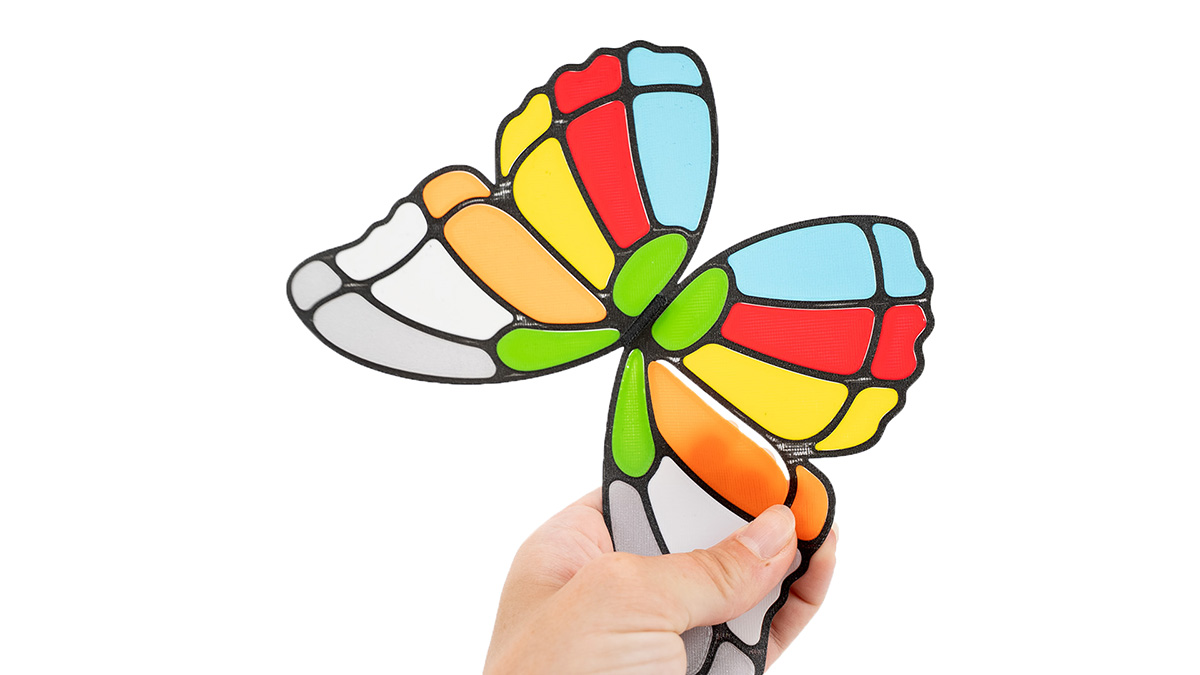
                  What to do: This might happen in combination with the belt tuning issues above. When this is fixed, a re-run of homing and tool offset calibration will ensure the correct offset. 

                  Nozzle cleaner calibration 

                  If you observe stringing and filament debris "baked into" the print, it can be partially caused by the nozzle cleaner calibration. However, it's also important to use dry filaments that are stored in proper conditions. 

                  When the nozzle cleaner is optimally calibrated, it reduces the mess that can accumulate around the waste bin. It also reduces the size of the waste and, with that, increases the capacity of the waste bin. 
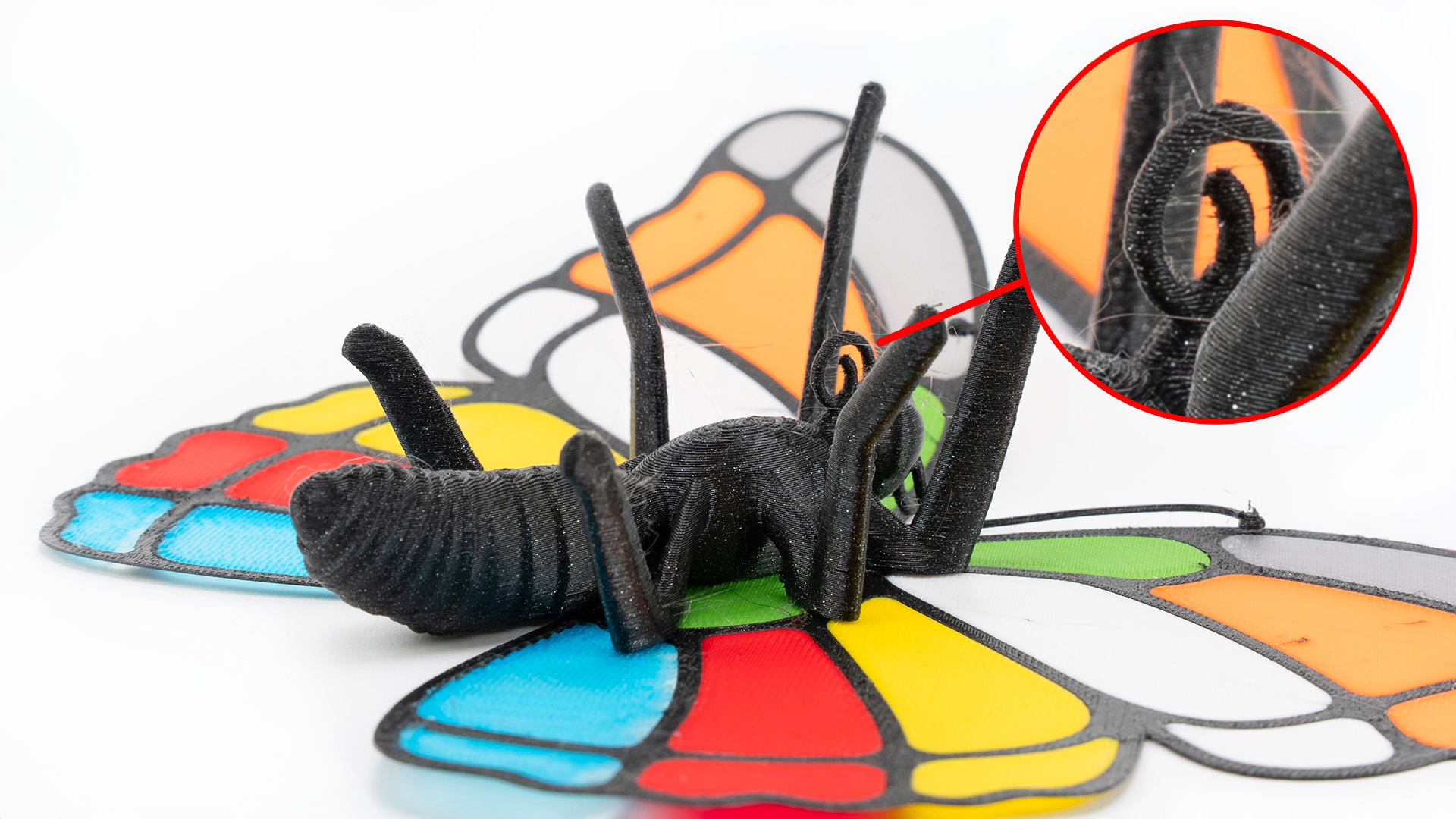
                  What to do: If the belt tuning was also not okay, it is likely a result of miscalibrations of all the abovementioned steps. The step that needs special attention here is the Z-axis calibration of the nozzle cleaner. Make sure that the nozzle cleaner is not too low below the nozzle. 

                  Sheet cleanliness 

                  If the butterfly is missing a leg or two, it's because its joint detached during printing. The first layer of these joints is intentionally small and likely to detach if the sheet is greasy and not properly clean. 
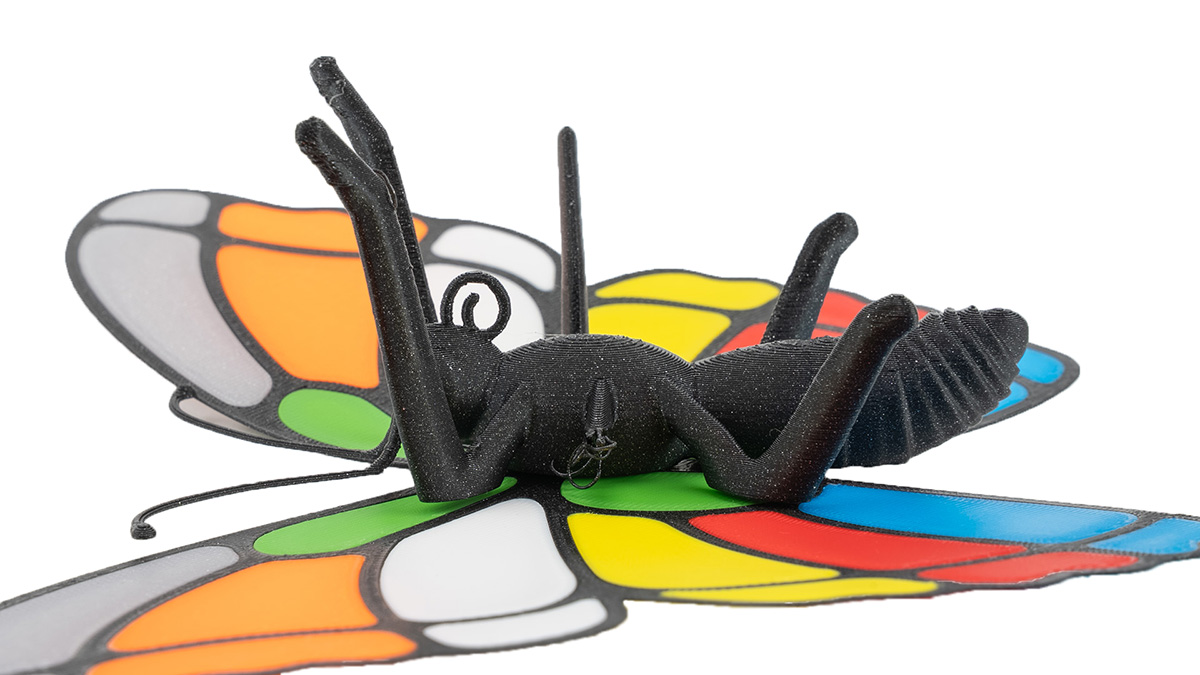
                  What to do: Always make sure the print sheet is properly cleaned with IPA. When printing small objects or models with small contact areas, consider using a brim. Keep in mind that the satin sheet, while it's a jack-of-all-trades for most materials, has a lower adhesion to PLA than the smooth sheet. 


                  Mechanical precision 

                  When you print the butterfly successfully, assemble it by sliding the tab on the wings into the slot on the butterfly's back. Be careful not to break the antennae. With all of the above calibrations well-tuned, this will need a little force, the parts will fit well, and a slight play is okay. 
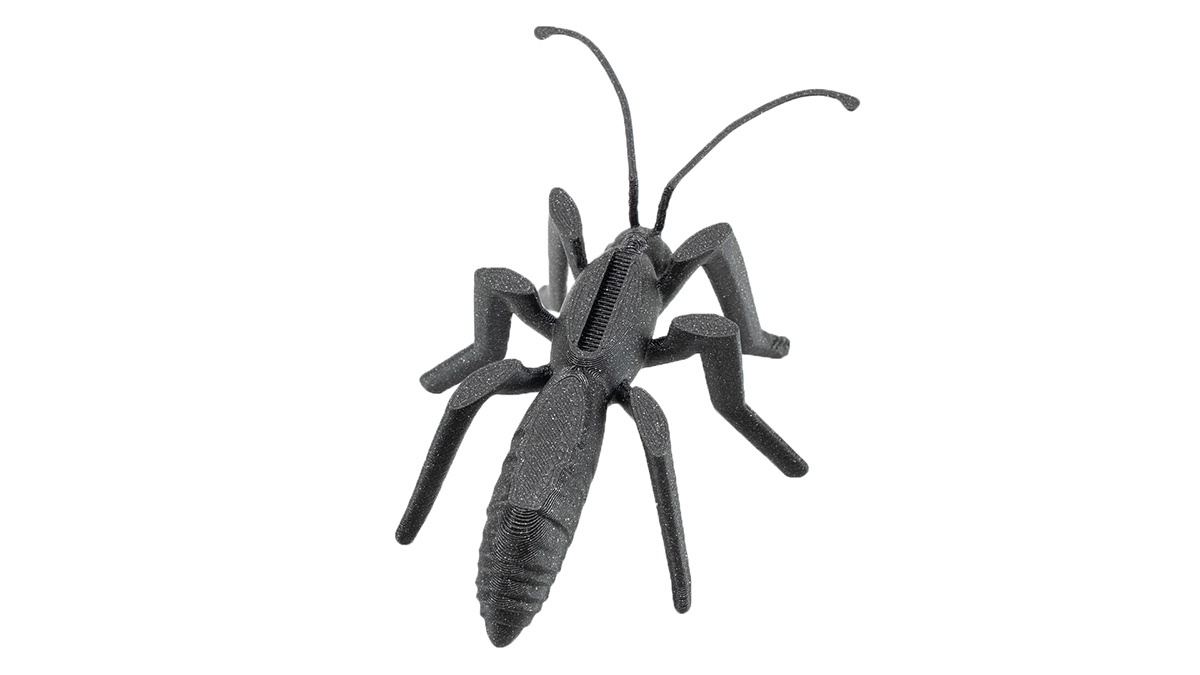
                  In the future, when you print or design your own models that require mechanical precision, consider looking into the elephant foot compensation. 

                  When you don’t find any error on the butterfly, your Prusa CORE One+ INDX is properly calibrated. 

                  Was this article helpful?
                  This action is available only to registered users. Please log-in.

                  3 comments

                  Log in  to post a comment
                  MBCook
                  •
                  > When the belts are well-tuned (picture below), you can see a slightly crumbly surface on the front legs (this is close to the limits of FFF 3D printing)

                  It is? It’s an overhang but not that steep. The feet on the back legs are steeper.

                  On my first try the front legs are basically perfect. Way better than the picture. So that can’t possibly be from the printer being at its limit.

                  Heck if it those legs were near the limit the massive overhang base model that shipped with the core one would be totally impossible.
                  Reply
                  Lord Nibbler
                  •
                  Yes, I absolutely agree with Crocmagnon. We need better instructions for nozzle wiper calibration. Unfortunately, it's very unclear exactly how the nozzle needs to be positioned on the silicone in the Y position.
                  Reply
                  Crocmagnon
                  •
                  Please add a detailed guide for nozzle wiper calibration. My purge poop are stringy and I don't know what to do.
                  Reply
                  MatchstickMan
                  •
                  +1
                  I've seen some people able to clear the stringing in prints with nozzle calibration, but I'm having a tough time with getting it right
                  Reply

                  Topics

                  • Troubleshooting
                    • Print Quality Troubleshooting
                      • First print troubleshooting (CORE One INDX)
                    • Diagnostics
                    • QR Error codes
                    • Printer troubleshooting
                    • Print Error Messages