English
Login

Filament not loading

(MK4/S, MK3.9/S)

Relevant for

MK4
MK3.9
MK4S
MK3.9S
4 comments
Article is also available in following languages
English
Čeština
Polski
Deutsch
Français
Español
Italiano
日本語

If the filament is not loaded into the extruder, yet the printer is trying to pull the filament inside, there might be a hardware problem in some of the extruder components: we will examine the causes and fixes in this article. 

Filament tip

Ensure that the filament tip is cut at an approximate 45 degrees angle. The printer might struggle to load filament otherwise. 

Retry procedure

After an attempt at loading filament, the printer will prompt a screen, where it is asked if the filament color is correct. If the filament is not oozing from the nozzle at this stage, push the filament towards the extruder, and after that, select "retry". 

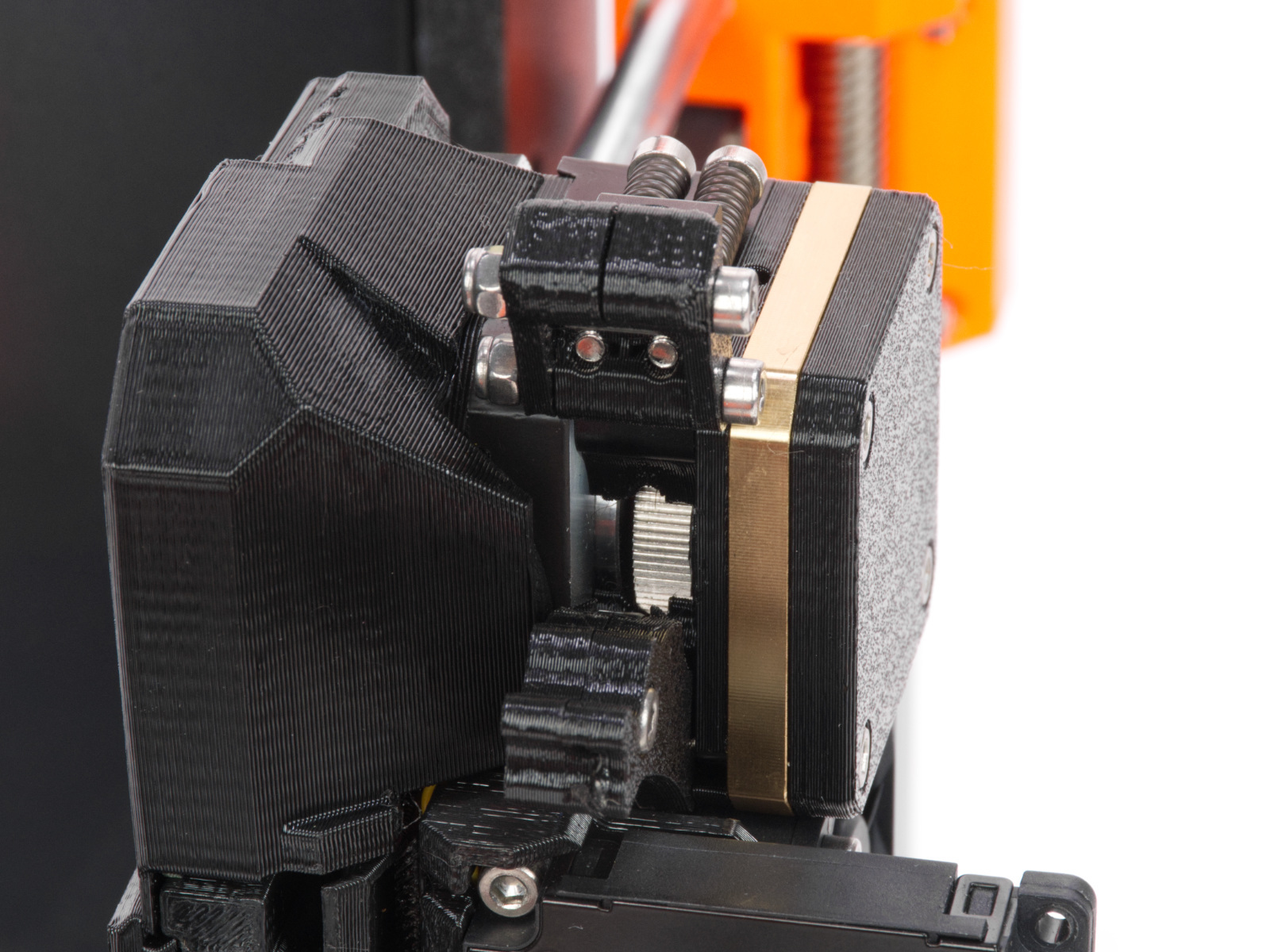
Idler tension screws

The extruder includes two idler tension screws, to set the correct distance between the drive gear and the two driven gears. These are set to the optimal position at the factory. In case of an intervention on that component, it will be necessary to adjust the idler tension screws to their optimal position: the tips of the screws must be aligned with the front surface of the Idler Nut. After that, close the Idler Block.
Clogged hotend

Follow the instructions on the dedicated article on how to spot and fix a clogged hotend

Are you still having issues? Contact our support team and let them know that you tried to fix the issue with these instructions. We will take it from there.
Was this article helpful?
This action is available only to registered users. Please log-in.
 

4 comments

Log in  to post a comment
RMS
I have a mk4s with the MMU3. When switching between colors I get the filament no loading error when the tool is during the priming for the new colored filament. I do the unload and re-load, and the material comes out OK, but now you have the purged material to contend with. It does not happen with every filament change. I was wondering if the purge procedure is part of the object recipe/g-code or is the purge/filament change time fixed. It almost appears like the time was not long enough to get material to the tip. Not actually sure what the tool senses post the filament change to say the material is stuck as I do nothing except say it is unloaded and loaded and it works. I build the unit myself and the tension screws were set where the image shows.
werner
Filament (PLA or ABS) is not fully loaded. Hardly any filament comes out of the nozzle. Extruding filament has no effect. Unloading filament does not work.
However, when I use “cleaning filament”, everything looks completely normal. Filament comes out of the nozzle; cleaning or extruding works properly. Filament can also be unloaded.
Mozah Alyammahi
I tried all option but still the filament is detected by the sensor but not inserting to inside the extruder. What I can do !!! The nozzle is clean and the filament is cutted to 45 degree
AlaskainFlight
In my case, the idler levers (both) became weak and snapped off at the screw. I think they were printed in the recommended PETg but the replacements will be printed in PC-CF.
The printer has been in service for about 4 months and primarily printing PETg.