No items yet.
PrusaSlicer is an open-source, feature-rich, frequently updated tool that contains everything you need to export the perfect print files for your 3D printer.
Prusa Connect is a cloud service enabling remote control and monitoring of your 3D printers, offering secure data handling, easy setup, and support for managing multiple printers from anywhere.
Control your printer/s remotely from anywhere using the Prusa Connect technology behind. Prusa.app brings a new level of Prusa printer experience to Android and iOS phones.
Prusa Academy offers online courses on various 3D printing related topics. Each course features:
We are the largest maker of 3D printers in Europe and the United States.
Founded as a one-man startup in 2012 by Josef Prusa, a Czech hobbyist, maker, and inventor. In just 15 years, we've grown into a company of more than 1,200 people. Every month, we design, build, and ship over 10,000 innovative and secure 3D printers from our headquarters in Prague, Czech Republic, and Delaware, USA, to users in more than 160 countries.
Watch a video and find out how Prusa Research was born and what we achieved within only 10 years!
If you have the Original Prusa MMU2S or MMU3 installed in the MK3S/+ or MK3.5, the IR filament sensor needs to be calibrated before first use, in order to work properly. The calibration…
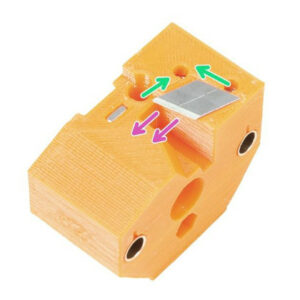
If the selector of your MMU2S upgrade is not moving smoothly, or if it cannot reach a certain position, the cause is usually one of the following issues: The selector blade is…
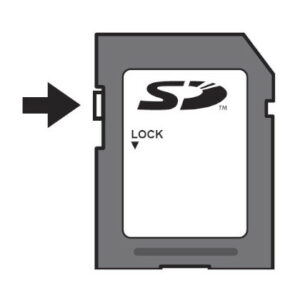
リモートでファイルを転送し、プリントをスタートする方法があるように、SDカードやUSBフラッシュメモリは、最も一般的で信頼性の高い方法です。一般的で便利ではありますが、フラッシュメモリーはそれ自体最も信頼できるものではなく、ストレージが破損したり、明らかな兆候なしに容量がいっぱいになってしまうことがあります。そこで、Original Prusaプリンタ用のメモリーのメンテナンス、フォーマット、購入の方法について、ガイドをまとめました。 SDカードがロックされていないか確認しましょう SDカードの側面には、ラッチが付いています。SDカードを使用する前に、ラッチが「ロック」の位置になっていないことを確認してください。ロックされている場合、カードにファイルを保存することができず、プリンタもSDカードを開くことができません。 32GBを超える容量の場合 対応する記憶媒体の容量に上限はありませんが、Windows内蔵のフォーマットツールは、32GB以上の記憶媒体をFAT32にフォーマットすることはサポートしていません。弊社プリンタでは現在サポートしていないexFATのオプションが提供されるのみです。Apple社のOSxの各バージョンでも同様の制限があり、正しくフォーマットするためにはサードパーティーのアプリケーションを使用する必要があります。 このようなドライブをフォーマットするには、Rufus、FAT32フォーマット、またはEaseUS…