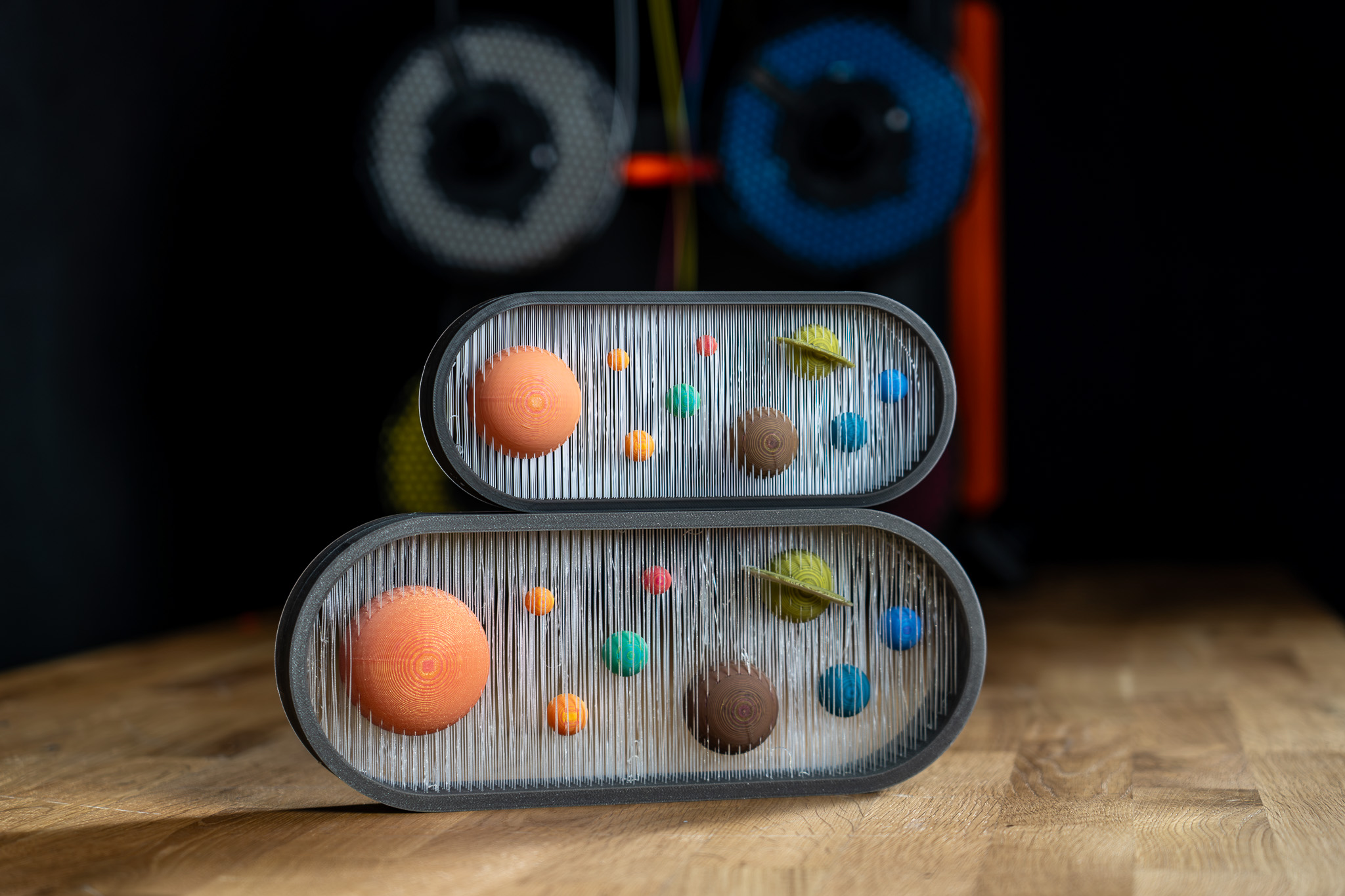
AA

Productos destacados

    Categorías populares

      Búsquedas populares

        Artículos

          Blog

            Productos

              Categorías

                Búsquedas sugeridas

                  Buscando…
                  Sin resultados
                  Algo salió mal.
                  ↑↓ Seleccionar↵ AbrirEsc Cerrar búsqueda
                  • English
                  • Čeština
                  • Deutsch
                  • Español
                  • Français
                  • Italiano
                  • Polski
                  • 日本語
                  • Pedidos
                  • Dirección
                  • Alertas de Stock
                  • Cursos
                  • Subscripción
                  • Editar Cuenta
                  • Impresoras 3D9▾

                    Impresoras 3D

                    nuevaPrusa CORE One L+Conoce más
                    nuevaPrusa CORE One+ (Gen 2)Conoce más
                    nuevaPrusa CORE One L+ INDX 8-ToolPrusa CORE One+ (Gen 2) INDX 8 HerramientasPrusa CORE One L+: Critical InfrastructureOriginal Prusa MK4SnewPrusa CORE One L+ (HighTemp Hotend)nuevaOriginal Prusa XL+Original Prusa XL+: Critical Infrastructure

                    Actualizaciones de impresoras

                    Kit de Conversión CORE One/+ INDXnuevaActualizació Prusa CORE One L a CORE One L+nuevaPrusa CORE One+ a Prusa CORE One+ (Gen 2)nuevaActualización Prusa XL a Prusa XL+newHT Hotend Upgrade
                    Programa de Recompensas PrusaComparte. Recomienda. Gana.
                    ¿Cómo Elegir Una Impresora 3D?Te guiaremos paso a paso por los aspectos básicos para que encuentres la máquina ideal para tu espacio, presupuesto e ideas.
                    Libro electrónico gratuitoDescarga gratis el libro electrónico Fundamentos de la Impresión 3D con Josef Prusa y da tus primeros pasos en el mundo de la impresión 3D
                    Piezas Imprimibles Original PrusaColecciones de piezas de repuesto imprimibles para impresoras 3D Original Prusa y mejoras.
                    Información de envíoInformación actualizada periódicamente sobre la capacidad de fabricación actual y los plazos de entrega de nuestras impresoras.
                    Impresión 3D PersonalizadaImpresión 3D personalizada profesional con diversos materiales según sus requisitos.
                  • Materiales▾

                    Filamentos

                    PrusamentPLAPETGASA / ABSPC BlendPA (Nylon)FlexCompositesEspecialLiquidación de materiales

                    Resinas

                    ResinaLimpiador Resina
                    Guía de FilamentoComprobar Mi Bobina Prusament
                    Prusament.com
                  • Piezas y Accesorios▾

                    Accesorios

                    EnclosureBoquillasLáminas de ImpresiónAccesorios EsencialesCámaras y ComplementosHerramientas y ManualidadesAdhesivos

                    Piezas de recambio

                    Merchandising

                    Piezas de recambio - Todas las ImpresorasCORE OneMK4/S y MK3.9/SMK3/MK3S/MK3S+XL
                    Merch
                  • Para Empresas▾
                    Prusa Pro HT90Prusa Pro SLXPrusa Pro AFSPrusa Pro Medical OneOriginal Prusa XLOriginal Prusa XL: Critical Infrastructure
                    Prusa CORE One+Conoce más
                    Prusa CORE One LConoce más
                    Prusa CORE One L: Critical Infrastructure Edition

                    Impresión 3D para

                    Fabricación e I+DIndustria AutomotrizSanidadEducación e Investigación AcadémicaArquitectos y DiseñadoresIndustria del CineInfraestructuras Críticas

                    Stories de Impresión 3D

                    • Cómo comenzó la impresión 3D: Sobre Rep-rap y el código abierto con Adrian Bowyer
                    • La enseñanza de las matemáticas redefinida con la impresión 3D en JKU Linz
                    • La historia detrás del destornillador de LTT
                    • Victoria Hand Project: Cambiando la Atención Protésica con la Impresión 3D
                    Distribuidores Oficiales de Prusa
                    Sostenibilidad
                    Prusa Education
                    Contactar y Consultar
                    Impresión 3D personalizada
                    Certificado ISO
                  • Software▾
                    PrusaSlicer

                    PrusaSlicerPrusaSlicer

                    PrusaSlicer es una herramienta de código abierto, con numerosas funciones y que se actualiza con frecuencia, que incluye todo lo necesario para exportar los archivos de impresión perfectos para tu impresora 3D.

                    WindowsMacOSLinux
                    Prusa Connect

                    Prusa Connect

                    Prusa Connect es un servicio en la nube que permite controlar y supervisar de forma remota tus impresoras 3D, y que ofrece un tratamiento seguro de los datos, una configuración sencilla y la posibilidad de gestionar varias impresoras desde cualquier lugar.

                    Inicia Sesión en Connect
                    Prusa.app

                    Prusa.app

                    Controla tu(s) impresora(s) de forma remota desde cualquier lugar gracias a la tecnología Prusa Connect. Prusa.app ofrece una experiencia totalmente nueva con las impresoras Prusa en teléfonos Android e iOS.

                    ¡Pruébalo ya!
                    Controladores y firmwareDescarga el firmware y los controladores más recientes para tu impresora 3D.
                    Soporte para PrusaSlicer
                    Soporte para Prusa Connect
                  • Modelos 3D▾
                    Impresoras 3DArte y DiseñoHobby y MakersHogarMiniaturas de EscritorioJuguetes y JuegosTienda de Printables

                    Modelos 3D populares

                    • Factorio Transport Belts
                    • Parametric Laptop Stand
                    • Official MX Keyboard CAD Templates
                    • Vertical PS5 Tentacle Holder (xbox, switch pro and 8bit do)
                    • Top tether hook
                    • SQUATCHEE-SPIN

                    Concursos de Diseño

                    • Modules complémentaires adaptatifs pour le Logitech MX Keyboard20/9/2026 – 19/10/2026
                    • Bouchons de support de bobine personnalisés18/9/2026 – 4/10/2026
                    • Réutilisation de la carte mère Framework Laptop 121/9/2026 – 30/9/2026
                  • Comunidad▾

                    Próximos eventos

                    • Hobby Messe2/10/2026 – 4/10/2026 · Sachsen, Germany · Prusa Team
                    • Mezinárodní strojírenský veletrh6/10/2026 – 9/10/2026 · Jihomoravský kraj, Czechia · Prusa Team
                    • Maker Faire Brno17/10/2026 – 18/10/2026 · Jihomoravský kraj, Czechia · Prusa Team
                    • Maker Faire Rome23/10/2026 – 25/10/2026 · Lazio, Italy · Prusa Team

                    Prusa Forum

                    • Perfil para prusaslicer de MK4 con MMU3 y boquilla de 0,25 para cuando?
                    • Casi convencido de pulsar sobre comprar... convenceme
                    • Core One+: Fallo en calibración del sensor de filamento (Valores ADC fuera de rango / Error 2147483647)
                    Mapamundi de PrusaMapamundi de PrusaEncuentra usuarios de impresión 3D de tu zona y descubre la comunidad que te rodea.
                  • Ayuda▾
                    Guías y TutorialesPrusaSlicerPrusa ConnectMateriales

                    Modelo de Impresora

                    CORE One INDXCORE One LCORE One+CORE One

                    Resolución de Problemas de Hardware

                    • Fallo Selftest (CORE One/+)
                    • Hotend atascado (MK4)
                    • Ajustando la tensión de la correa (CORE One L, CORE One)
                    • Prusa Connect y PrusaLink explicado

                    Drivers & Firmware

                    Familia INDXFamilia CORE OneFamilia MK4Familia XLFamilia MMUFamilia PRO
                  • Cursos▾

                    Conviértete en un experto en impresión 3D

                    Prusa Academy ofrece cursos en línea sobre diversos temas relacionados con la impresión 3D. Cada curso incluye: textos fáciles de leer con numerosas imágenes y vídeos breves; enlaces para inspirarse y profundizar en el tema; cuestionarios para poner a prueba tus conocimientos a lo largo del curso; y un certificado de finalización.

                    Ver todos los cursosMi biblioteca de cursos
                    • Modelado 3D en Autodesk Fusion
                    • Masterclass de PrusaSlicer – De Principiante a Experto
                    • Complete Guide to 3D Print Postprocessing, Painting, and Detailing
                    • Beginners' Guide to Blender for 3D Printing: Edit and Remix STLs
                  • Blog▾
                    • Factorio Ha Llegado a Printables
                    • Prusament PLA Lightweight: un 65 % más ligero que el PLA normal. Perfecto para aviones, cosplay y mucho más.
                    • Prusament PLA ColorMix: Imprime 45 tonos de color con solo cinco bobinas de filamento (y más)
                    E-Book: Fundamentos de la impresión 3D
                  • Empresa▾

                    Sobre Prusa Research

                    Somos el mayor fabricante de impresoras 3D de Europa y Estados Unidos. La empresa fue fundada en 2012 como una startup unipersonal por Josef Prusa, un aficionado, creador e inventor checo. En solo 15 años, hemos crecido hasta convertirnos en una empresa con más de 1.200 empleados. Cada mes, diseñamos, fabricamos y enviamos más de 10000 impresoras 3D innovadoras y seguras desde nuestras sedes de Praga (República Checa) y Delaware (EE. UU.) a usuarios de más de 160 países. ¡Mira el vídeo y descubre cómo nació Prusa Research y lo que hemos logrado en tan solo 10 años!

                    Sobre NosotrosLínea temporalSostenibilidadOpen-source
                    Sobre nosotros
                    Contacta con Nosotros
                    Logo e Imágenes
                    Certificado ISO
                  1. Soporte
                  2. Laminado multimaterial
                  3. ColorMix
                   

                  Contenidos

                  • Compatibility
                  • ColorMix painting in PrusaSlicer
                  • Physical extruders preset
                  • Setting up virtual extruders
                  • Assigning (virtual) colors and painting
                  • Print settings
                  • Opening a ColorMix model
                  • Practical tips
                  • Examples of ColorMix models
                  • References

                  Blog

                  • Factorio Ha Llegado a Printables
                  • Prusament PLA Lightweight: un 65 % más ligero que el PLA normal. Perfecto para aviones, cosplay y mucho más.
                  • Prusament PLA ColorMix: Imprime 45 tonos de color con solo cinco bobinas de filamento (y más)

                  Newsletter

                  Regístrate y obtén nuestro dosier mensual de información útil sobre nuevos firmwares, nuevas versiones de PrusaSlicer y consejos generales para proyectos de impresión 3D.

                  Al hacer clic, aceptas recibir nuestra newsletter.

                  Este sitio está protegido por reCAPTCHA Enterprise y se aplican la Política de Privacidad y los Condiciones del servicio de Google.

                  Factorio Transport Belts
                  Tienda
                  • Impresoras 3D
                  • Mejoras de Impresoras
                  • Filamentos
                  • Accesorios
                  • Merchandising Prusa

                  © Prusa Research a.s.

                  Printables
                  • Modelos 3D
                  • Store
                  • Clubs
                  • Concursos de Diseño 3D
                  • Brands
                  Comunidad
                  • Mapa Mundial
                  • Foro
                  • Grupos de Usuarios
                  • Eventos
                  Ayuda
                  • Ayuda Prusa
                  • Prusa Academy
                  • Calculadoras de Impresión 3D
                  Software
                  • PrusaSlicer
                  • Prusa.app
                  • Prusa Connect
                  • Drivers y Software
                  Empresa
                  • Sobre nosotros
                  • Blog
                  • Distribuidores Oficiales de Prusa
                  • Contacto
                  • Certificado conforme a las normas ISO 9001, ISO 14001 e ISO 45001
                  • Términos y Condiciones generales
                  • Términos Generales y Condiciones de Uso de los sitios Web PRUSA
                  • Política de privacidad
                  • Información sobre las cookies
                  • Política de Reclamaciones de los Clientes
                  • Página de Estado de los Sitios Web
                  • Configuración de las cookies
                  • Términos y Condiciones generales
                  • Términos Generales y Condiciones de Uso de los sitios Web PRUSA
                  • Política de privacidad
                  • Información sobre las cookies
                  • Política de Reclamaciones de los Clientes
                  • Página de Estado de los Sitios Web
                  • Configuración de las cookies

                  © Prusa Research a.s.

                  JOSEF PRUSA®, PRUSA RESEARCH®, PRUSA POLYMERS®, PRUSA ORANGE®, PRUSA 3D ® Y PRUSAMENT® son marcas registradas de Prusa Development a.s. utilizadas por Prusa Research a.s. bajo licencia de Prusa Development a.s.

                  ColorMix

                  Relevante para

                  XL family
                  MMU family
                  PrusaSlicer
                  INDX family
                  Artículo está también disponible en los siguientes idiomas
                  English
                  Čeština
                  Polski
                  Deutsch
                  Français
                  Español
                  Italiano
                  日本語

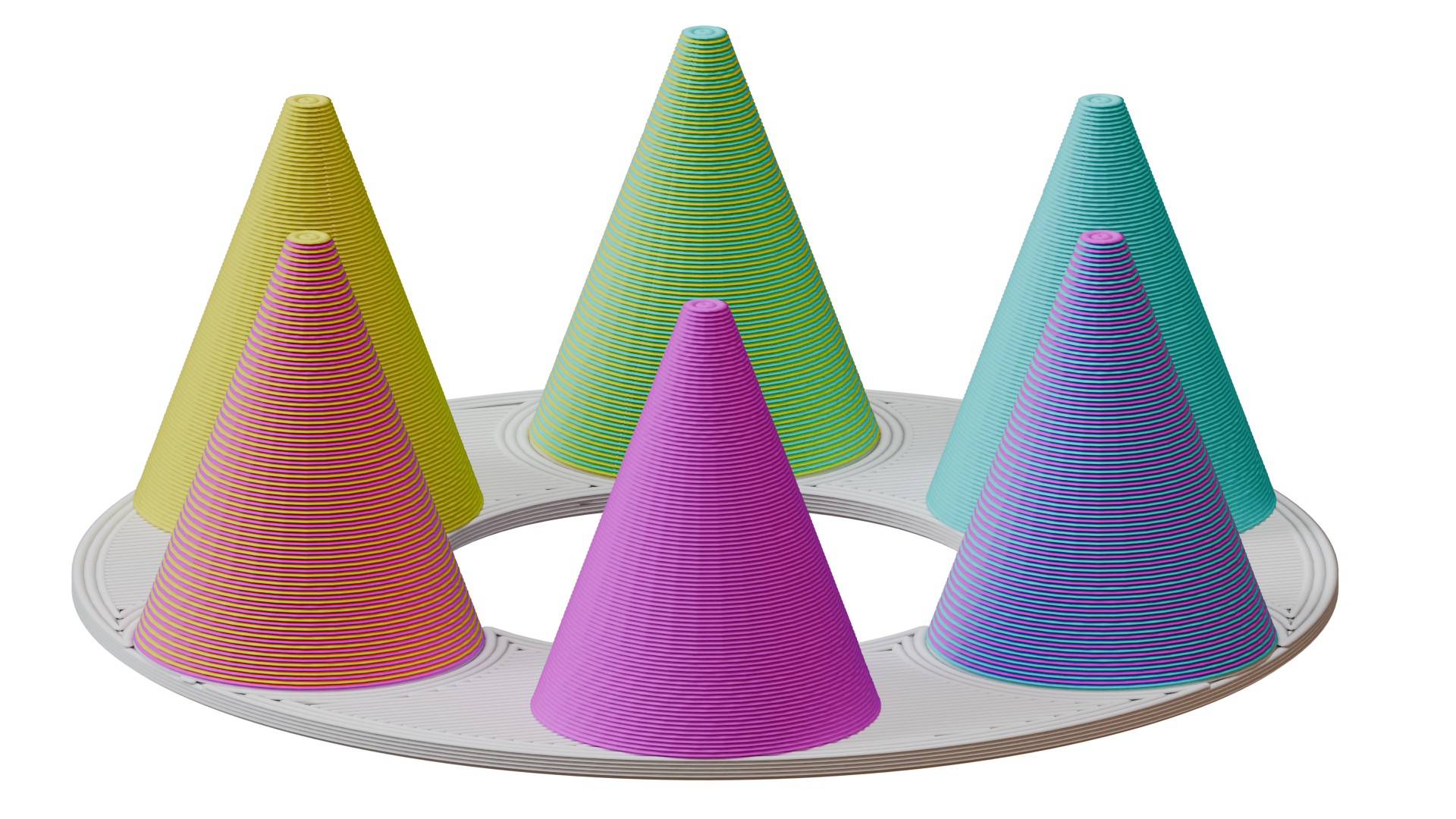
                  The ColorMix is as a feature in PrusaSlicer and  EasyPrint. Using any multi-color printer, it allows you to create additional color tones from the loaded filaments. It works similarly to inkjet 2D printing. There, thanks to a method called Halftoning, all colors are printed from just Cyan, Magenta, Yellow, and Black (CMYK) ink in a varying pattern of dots. 

                  In 3D printing, the colors alternate by layers. For example, a 50% cyan, 50% yellow combination creates green when viewed from a normal viewing distance. 

                  This article explains how to set it up in PrusaSlicer and use it to color and print ColorMix models. 
                  Compatibility 

                  ColorMix printing is possible on any multi-color 3D printer: any printer equipped with the MMU, XL/+ in a 2T or 5T version, CORE One+/L with the INDX upgrade, or any other multi-filament system available on the market. 

                  Because the mixed colors require many tool changes, these prints produce more waste than classical colored models. It is significantly more efficient to print them using the INDX toolchanger. 

                  The slicer feature is available in EasyPrint and in PrusaSlicer from version 2.9.6. 

                  We demonstrate the feature with the Prusament ColorMix PLA bundle, but it is not dependent on these colors nor on PLA as a material. Any colors of any material can be combined in this way, and even different materials can be combined if they are printable together. 

                  ColorMix painting in PrusaSlicer 

                  Physical extruders preset 

                  Open PrusaSlicer and select your multi-color printer. Change the preview colors of the filaments to match your spools. You can change the color assigned to an extruder by clicking on the color box next to the profile name in the Filament profile selection. 
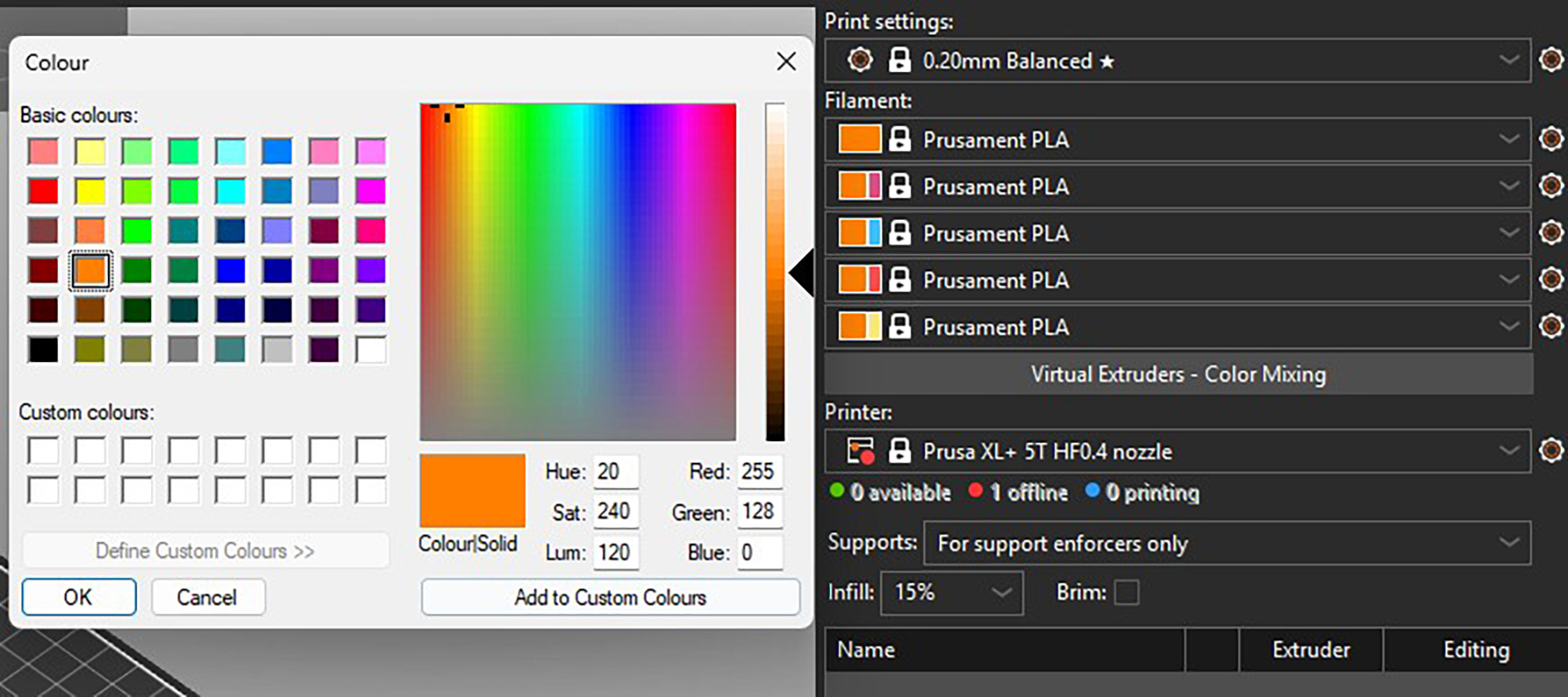
                  Recommended: All the models designed for the ColorMix filament that we share have them loaded in the following order: Cyan, Magenta, Yellow, White, Black, Gold, and Silver. The order is the same whether the printer has four, five, or eight tools. You can set this in PrusaSlicer and save it as a preset. Always sticking to the same order helps to avoid remapping the G-code extruders before every print.  

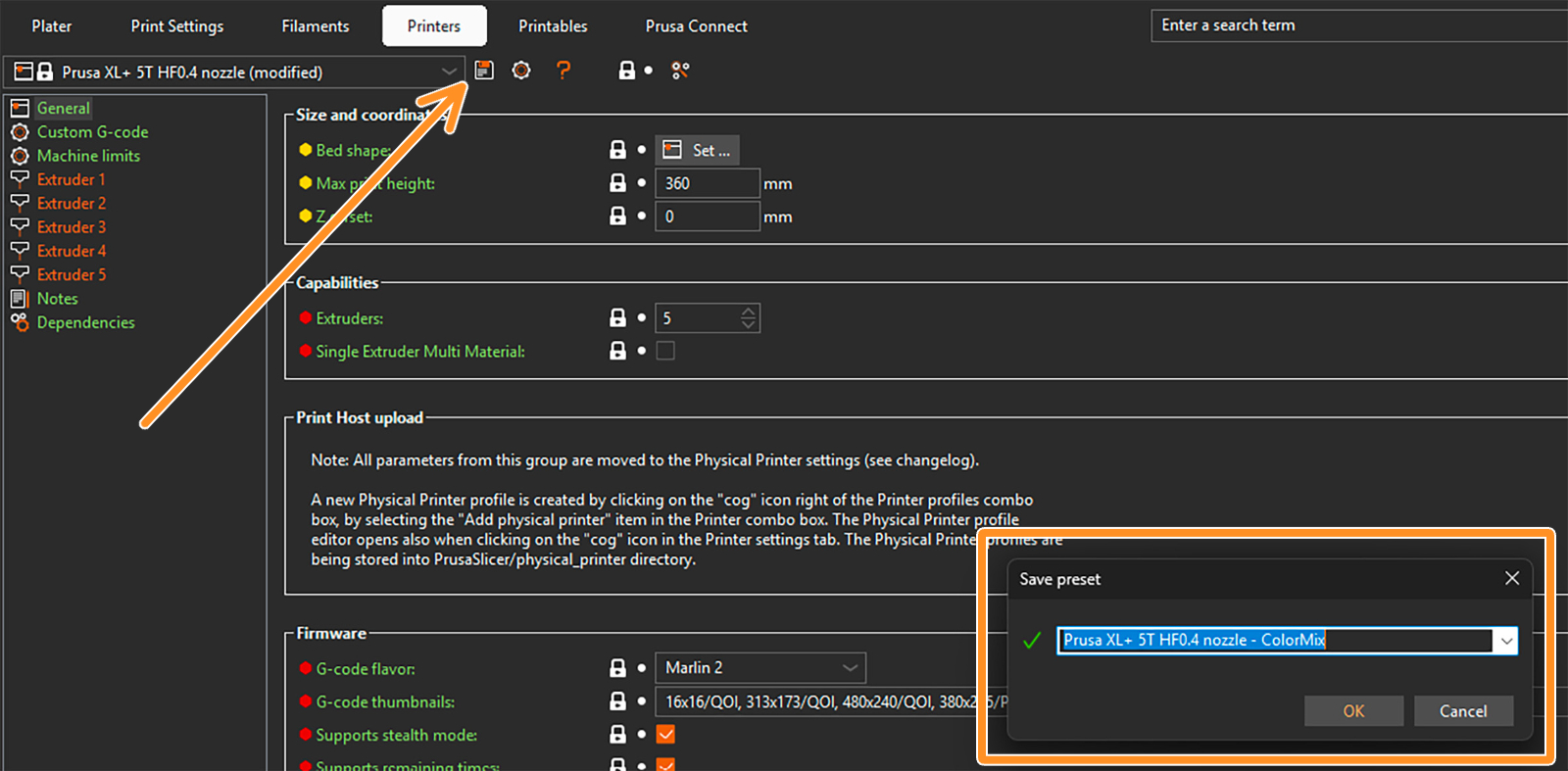
                  To save a preset, click on the gear next to the printer profile and select Edit preset. Then click on the Save preset icon (orange arrow), and in the pop-up window, save the preset with the word "ColorMix" in the name. 
                  Setting up virtual extruders 

                  The ColorMix colors are represented by so-called virtual extruders. You can set them up under the filament profiles. The following window opens. 
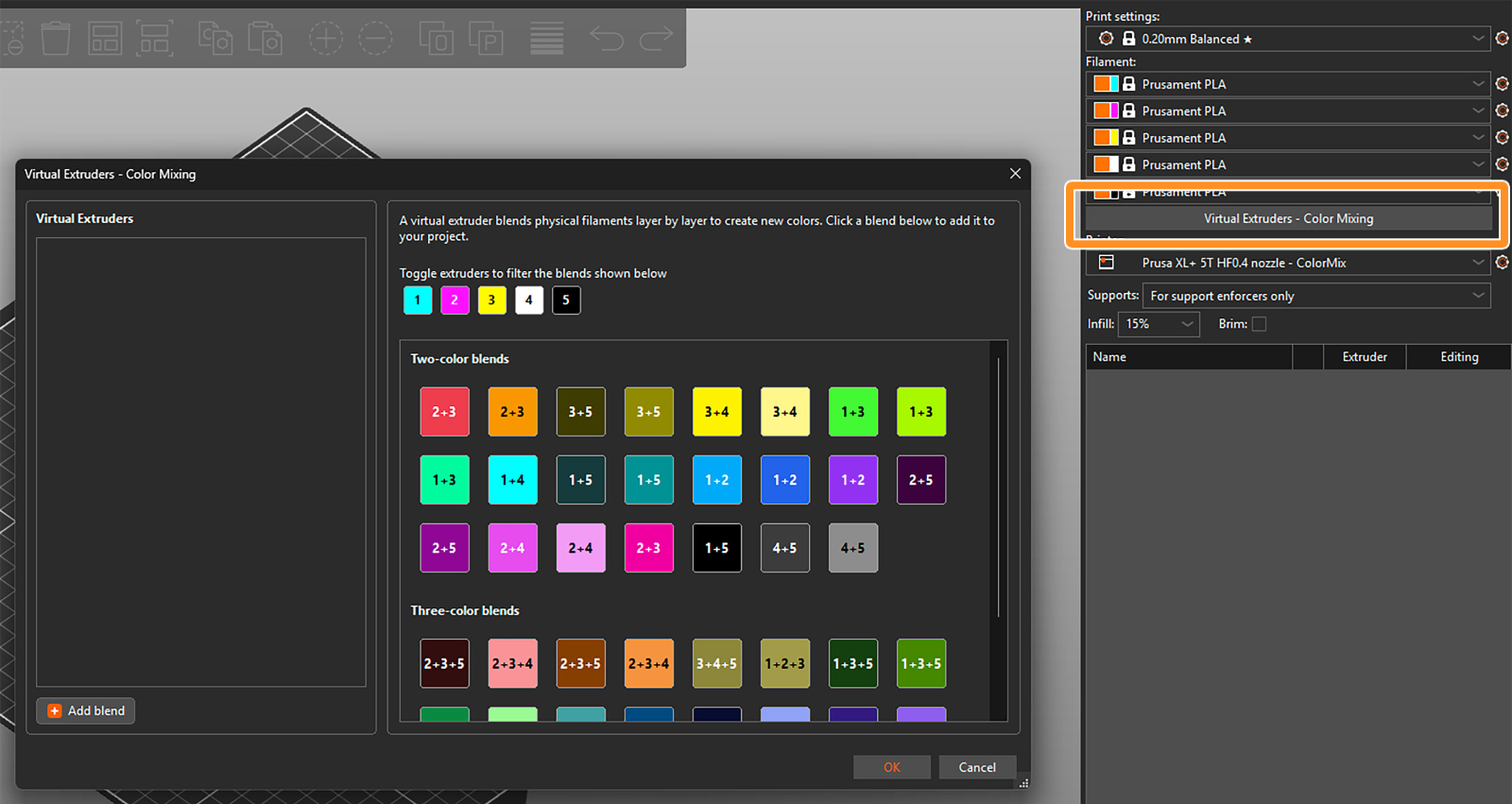
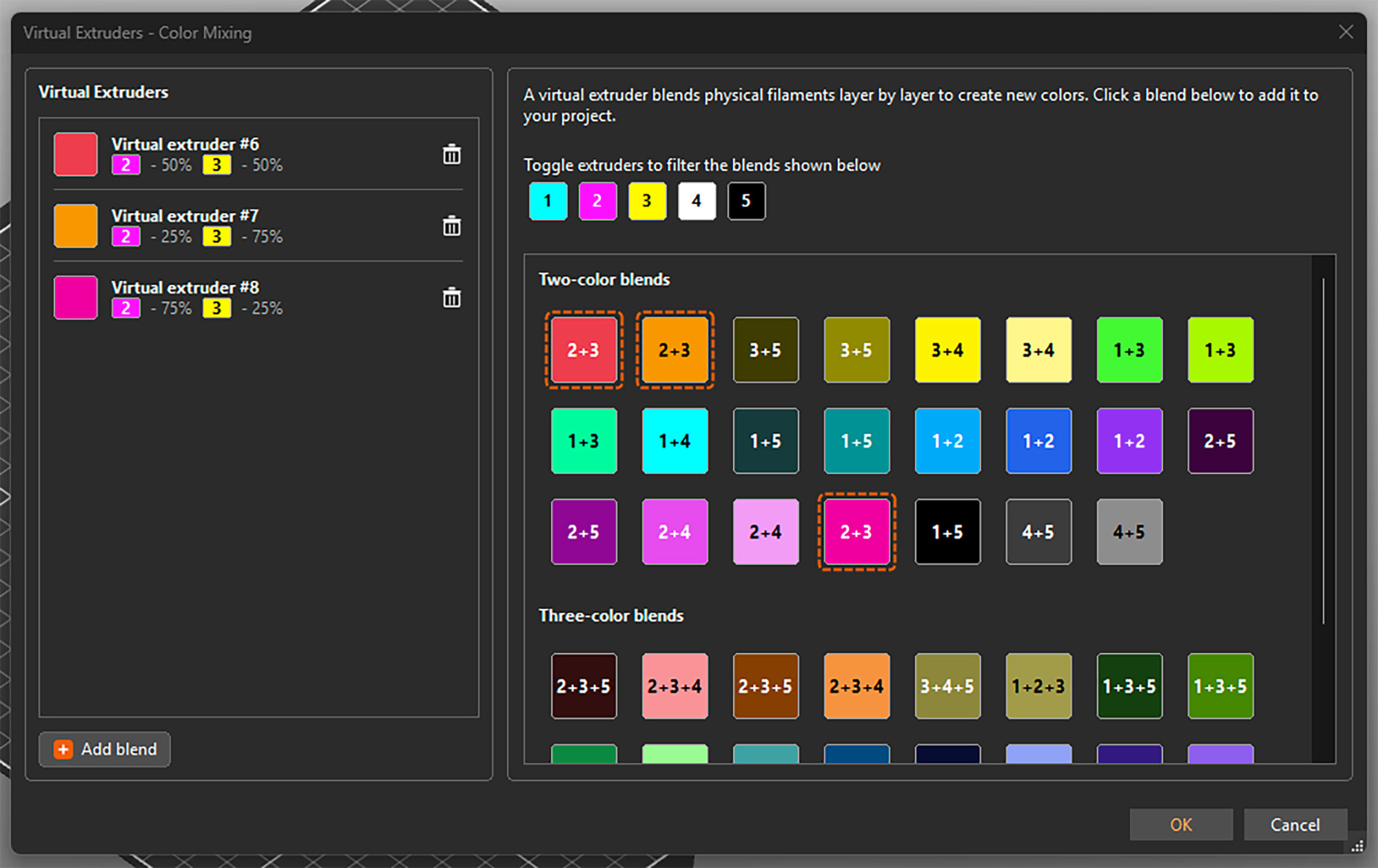
                  There are two ways to assign the virtual extruders. Firstly, you can select them from the blends available on the right side of the widow. The selected ones appear in the list of virtual extruders on the left side. 

                  Toggle the available extruders and filter the blends shown in the section. 
                  Alternatively, you can add them by clicking Add blend in the bottom left corner and manually setting up the ratio of the colors. This adds the virtual extruder to the list and also directly opens its settings on the right side. 
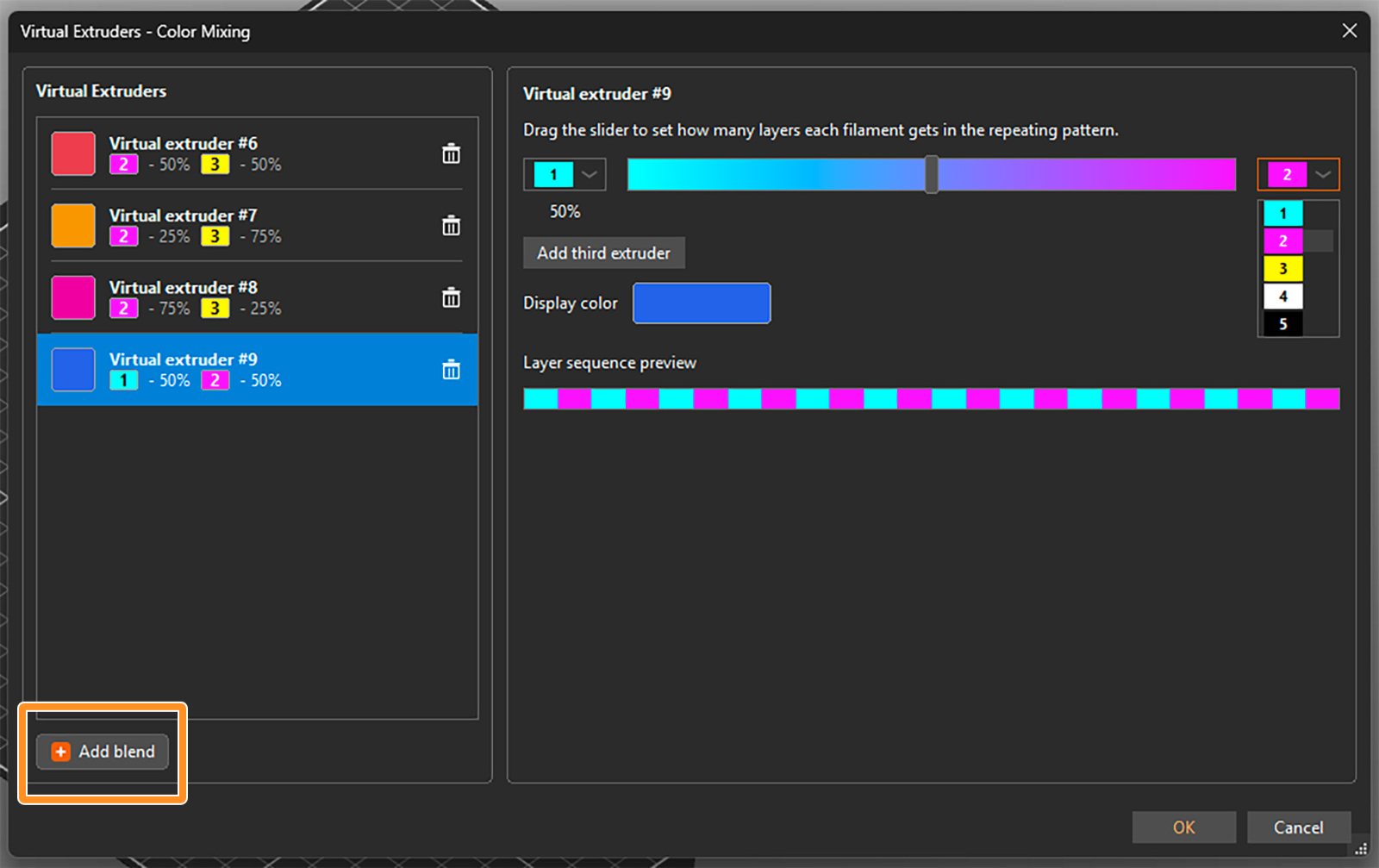
                  You can select the two filaments to be mixed from drop-down menus and set their ratio using a slider. An estimated display color is shown, but you can click on it and change it if you need. The layer sequence shows how the filaments are alternated to appear as the virtual color. 

                  For a three-color blend, click on Add third extruder. Then you can again select the extruders from the drop-down menus and change their relative ratio by dragging the grey circle inside the color triangle. 
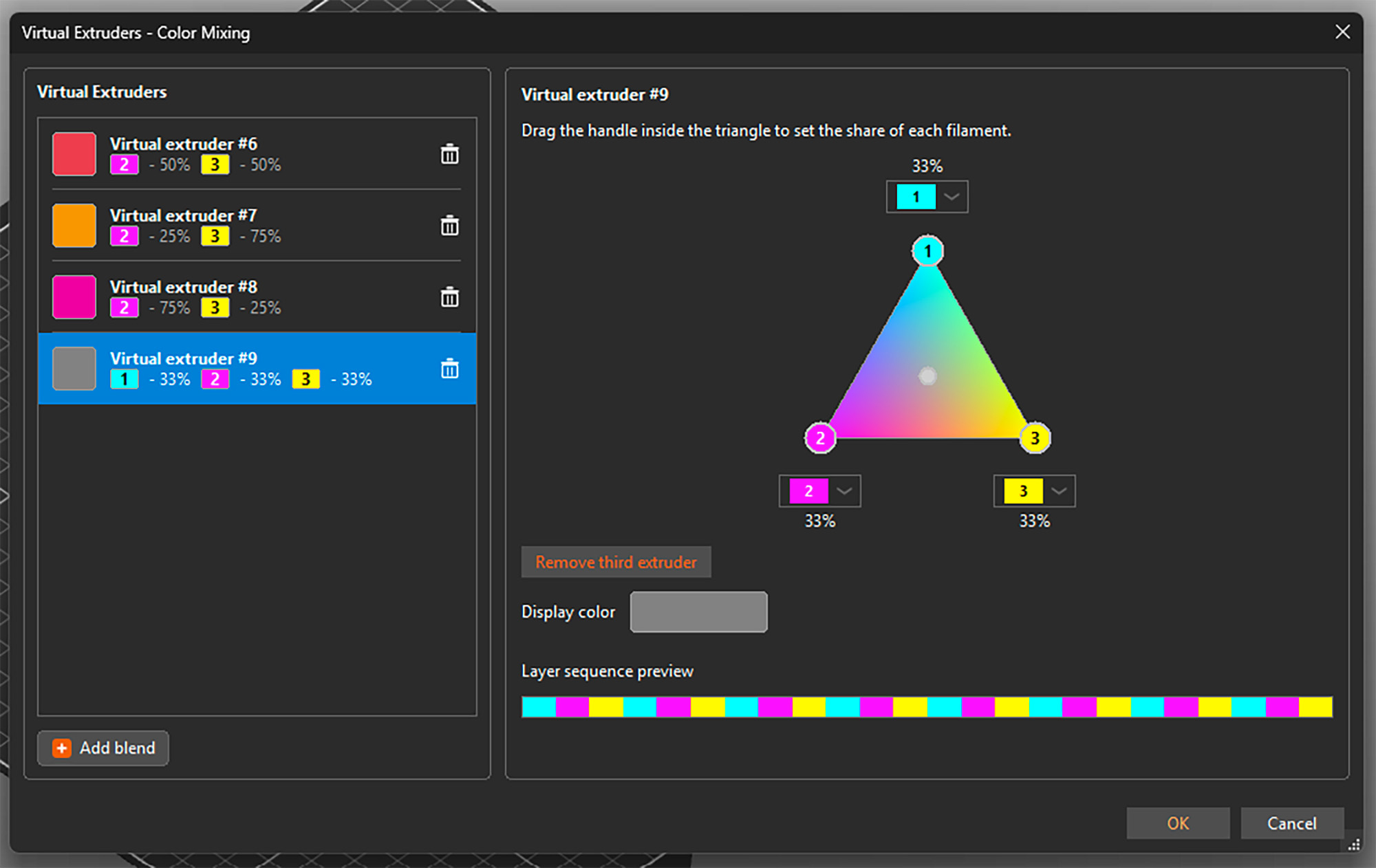
                  You can open the setting by selecting any virtual extruder on the left side and adjust its properties. You can also delete any of them by clicking the trashcan icon. See that besides a display color, each virtual extruder is assigned a number 

                  Once you're all set, confirm all virtual extruders and close the window by clicking OK in the bottom right corner. You can reopen it and add or change extruders at any point, even if they are already used for painting the model. 

                  Important: The tested and reasonable ratios for two-color blends are 25% : 75%, 50% : 50%, and 75% : 25%. For three-color blends, the optimal mix is 33% : 33% : 33%. 

                  Assigning (virtual) colors and painting

                  When the virtual extruders are set up as shown above, PrusaSlicer works with them just the same as with the physical ones. This means you can assign colors to different models and their parts and use all multi-material painting tools, such as brushes or Smart fill. 

                  The only difference is that the virtual extruders appear with a [V] in the drop-down menus. 
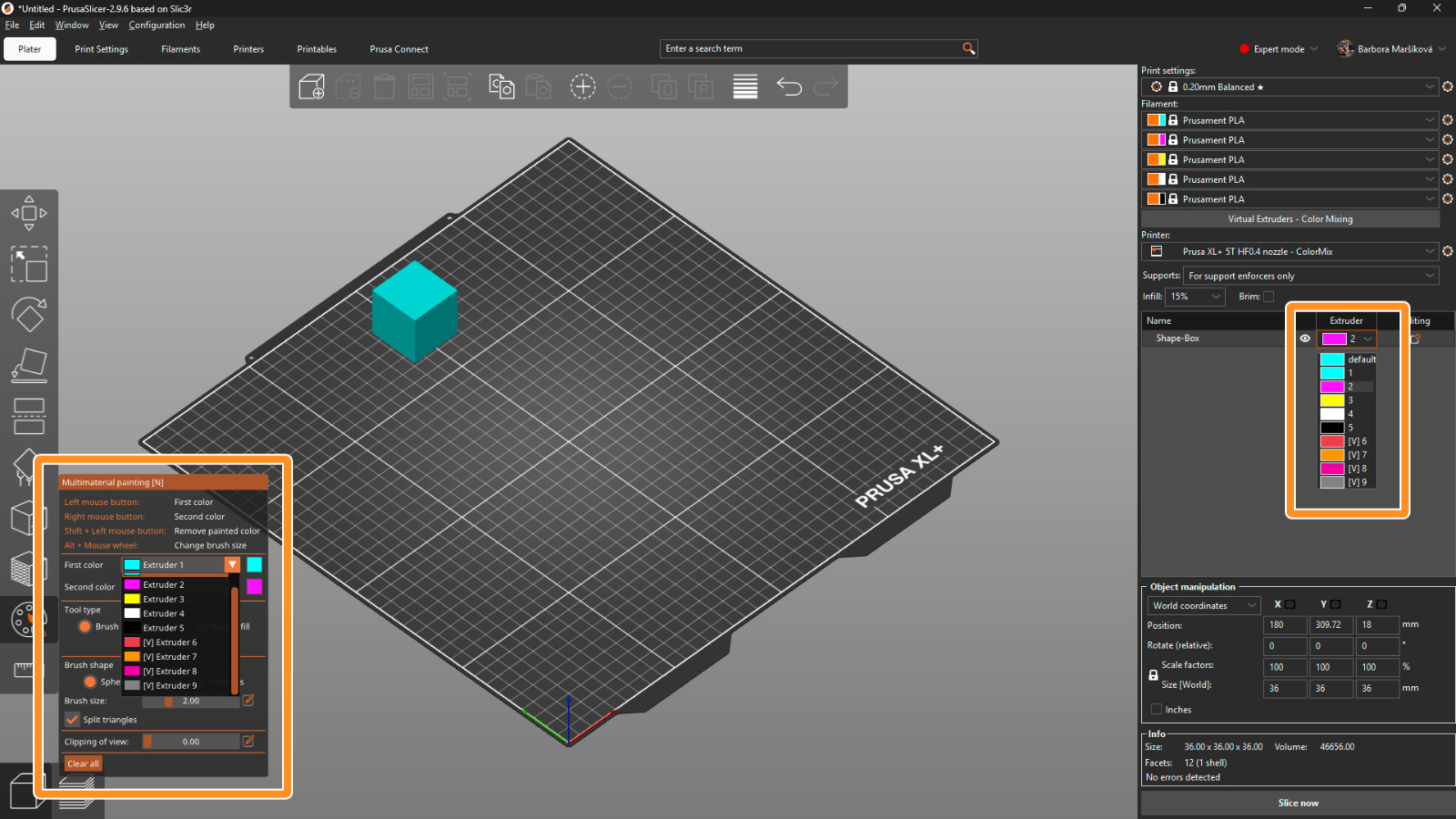
                  Print settings 

                  For optimal results, use a layer height of a maximum of 0.15 mm. For a perfect outcome, 0.1 mm layer height would be even better, but it adds a lot of printing time, and usually it’s not necessary.

                  The recommended infill type is gyroid with 5-10% density, depending on the model’s geometry. Because of the translucency, the infill might sometimes be visible, and this way the structure is uniform. 

                  The mixing itself is done by PrusaSlicer automatically whenever you use a virtual extruder. Simply slice the model, upload the G-code to the printer, and make sure that the correct extruder colors are assigned with respect to the loaded filaments. 

                  Opening a ColorMix model 

                  To open a model that was colored using the virtual extruders, always use File → Open Project (Ctrl + O). If you use Import, all virtual extruders will be merged into the last physical one. 
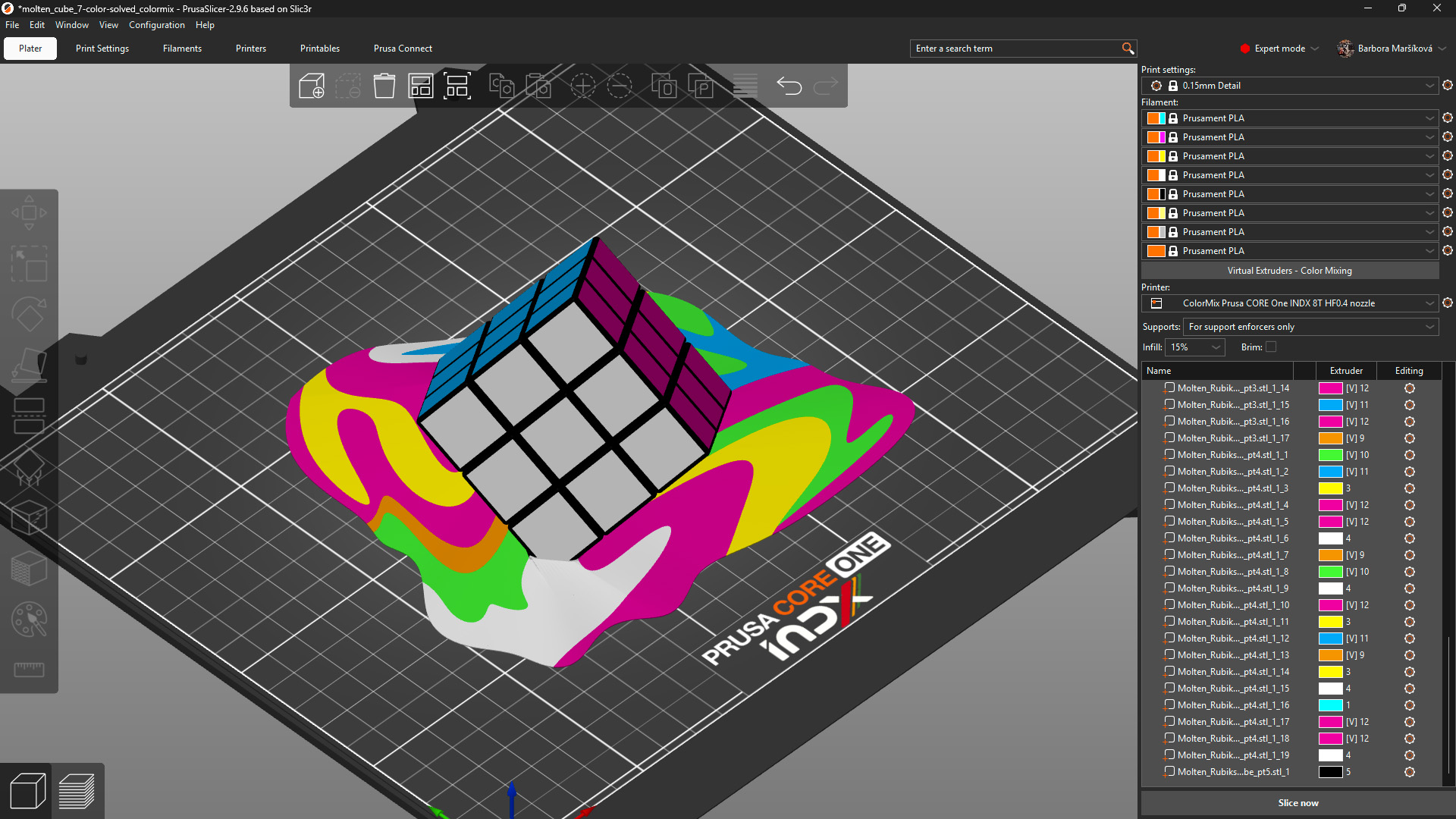
                  Model: Solved ColorMix Rubik's cube by MrFlippant. 

                  Practical tips 

                  Even with the semi-translucent Prusament PLA ColorMix, the mixing effect works the best on vertical and almost vertical surfaces.

                  See the printed molten cube below. The parts on the cube itself, which are printed under a steep angle, appear in a mixed color with only a slightly stripy pattern. The melting colors visibly show the different layers printed from different filaments. 
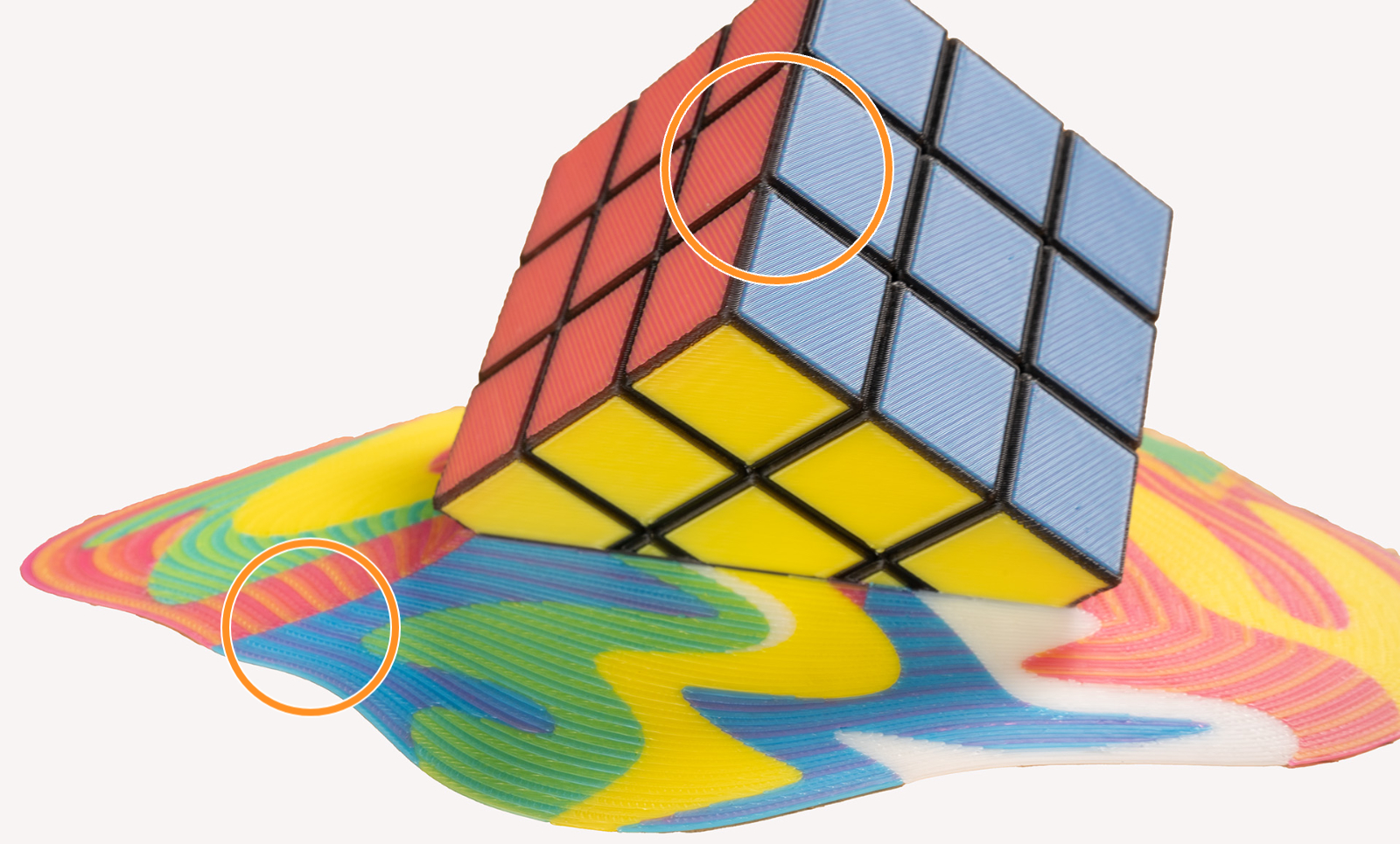
                  This effect is even more visible when using filament of highly saturated colors. It is a physical limitation of the method itself, not a printing error. Consider this when painting and printing your models. 

                  To visualize the colors, you can print a test model such as the ColorMix Calibration Cones or this ColorMix Test palette. 
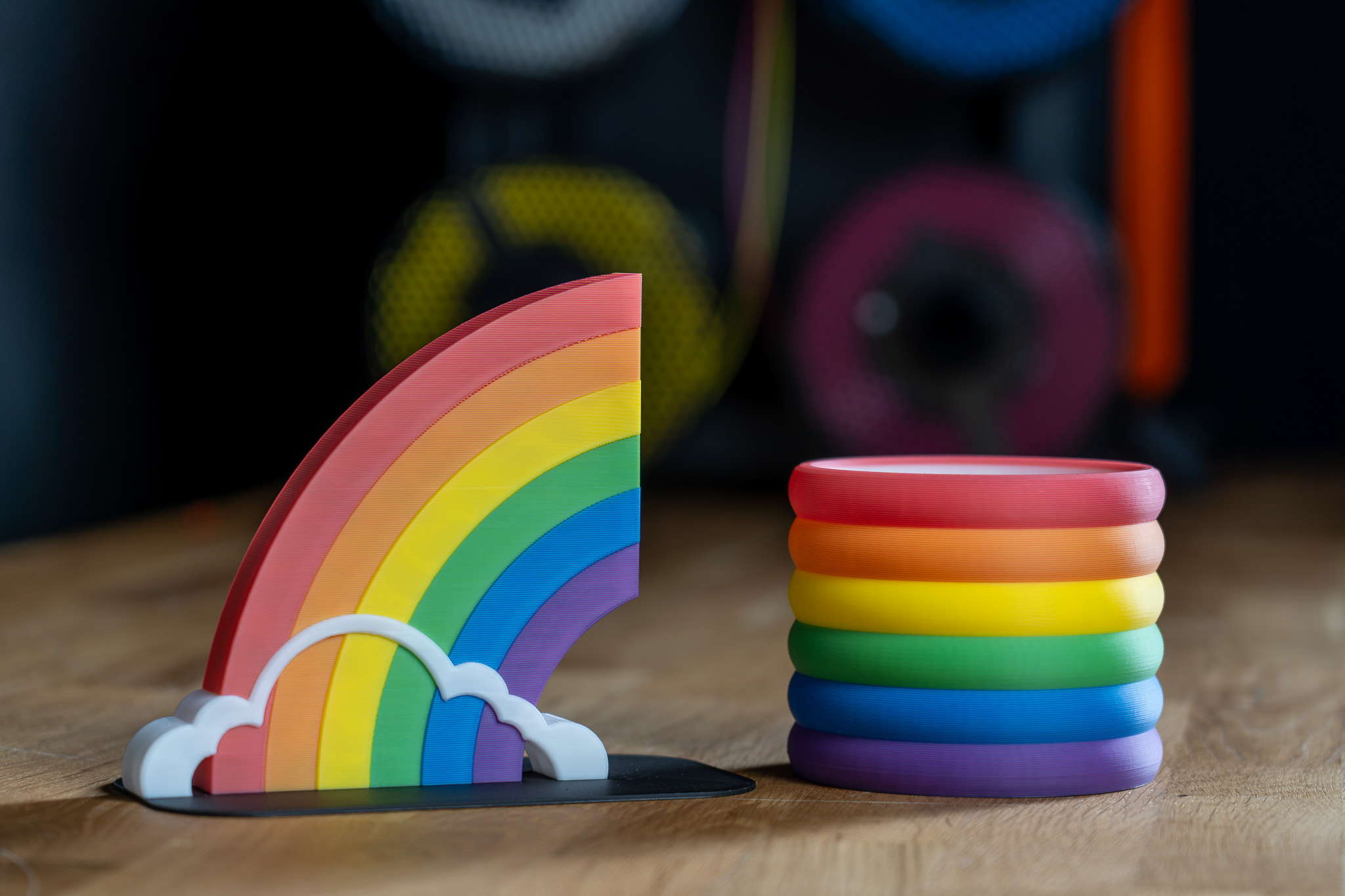
                  Examples of ColorMix models 

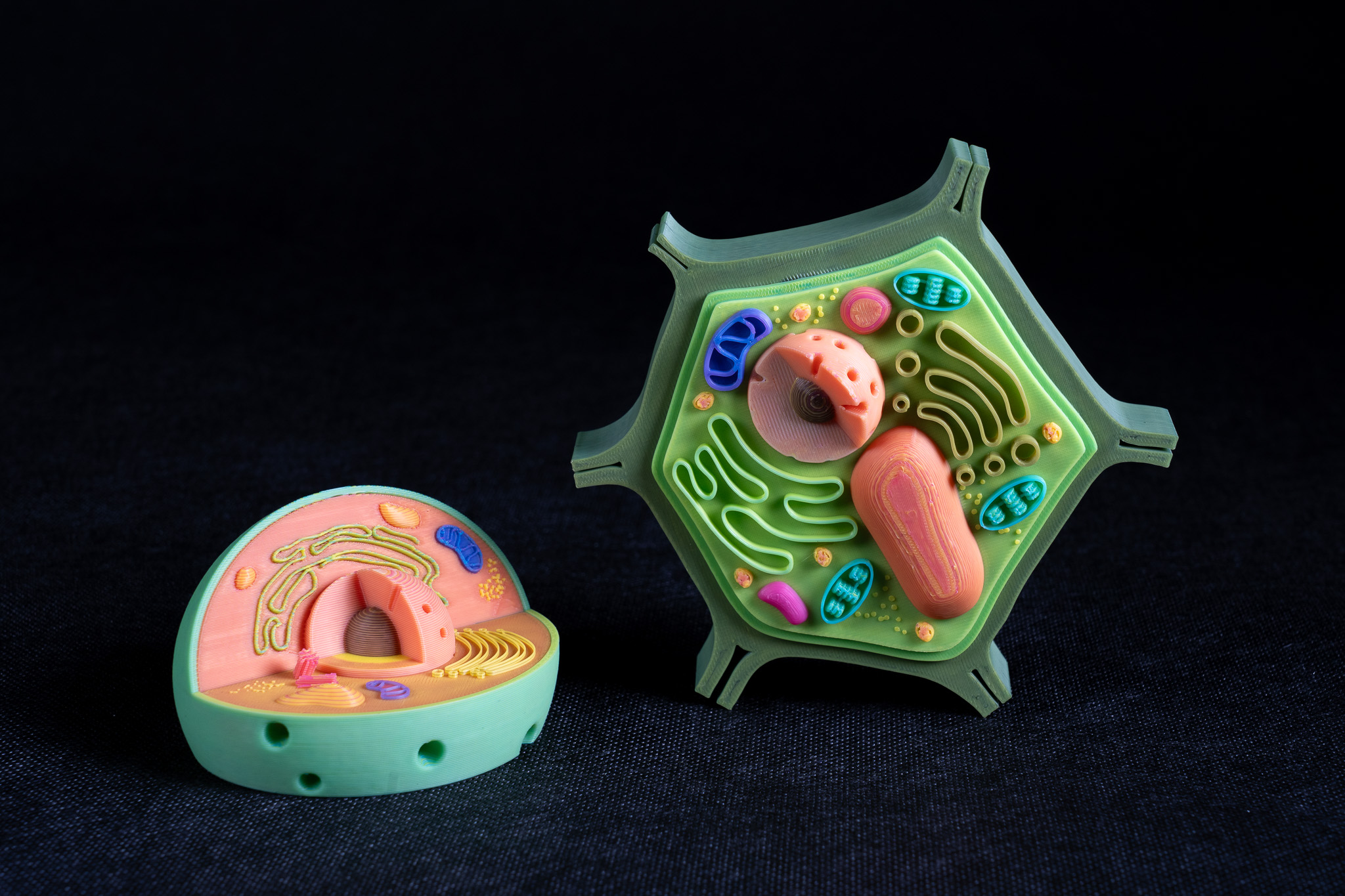
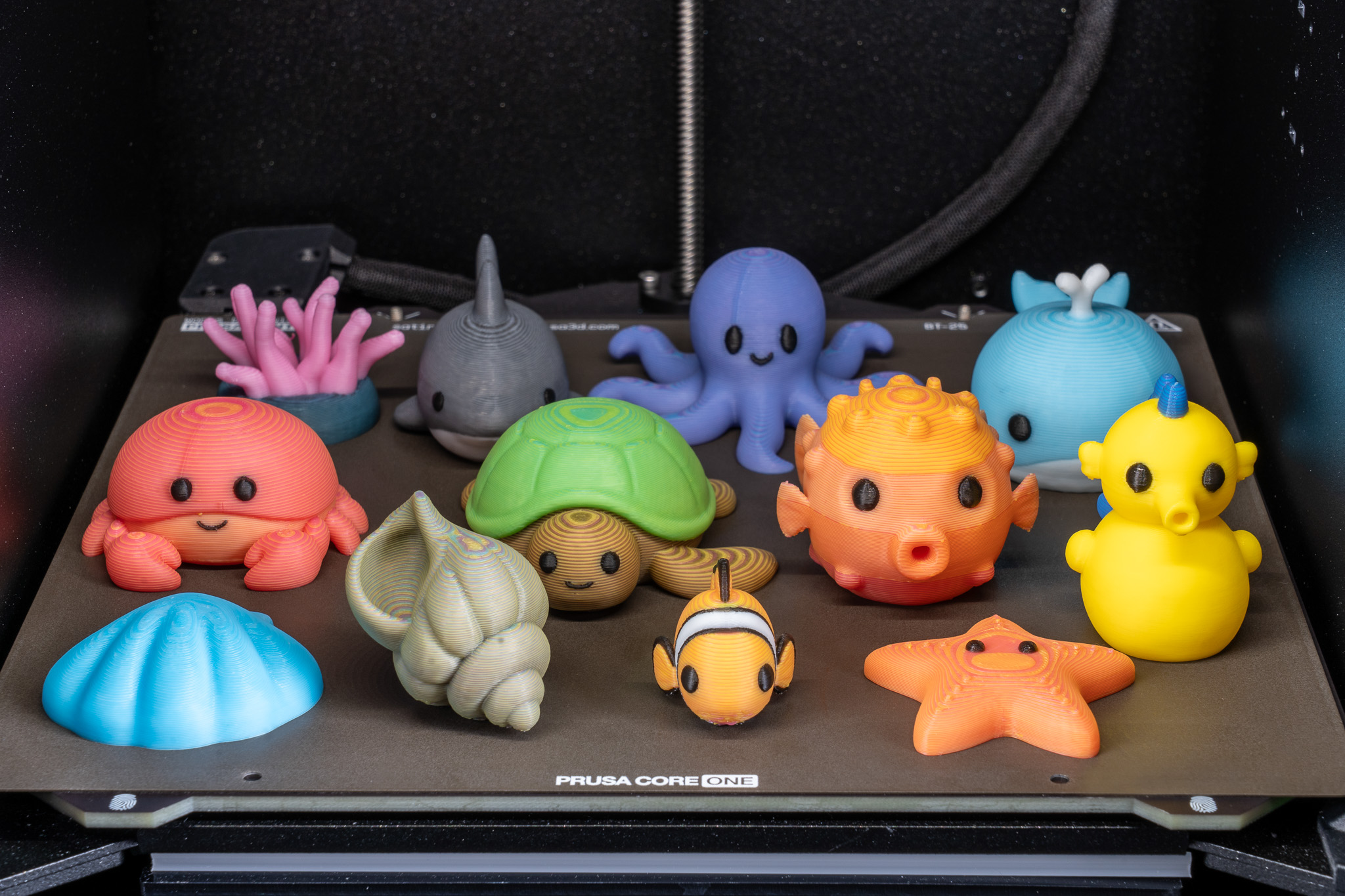
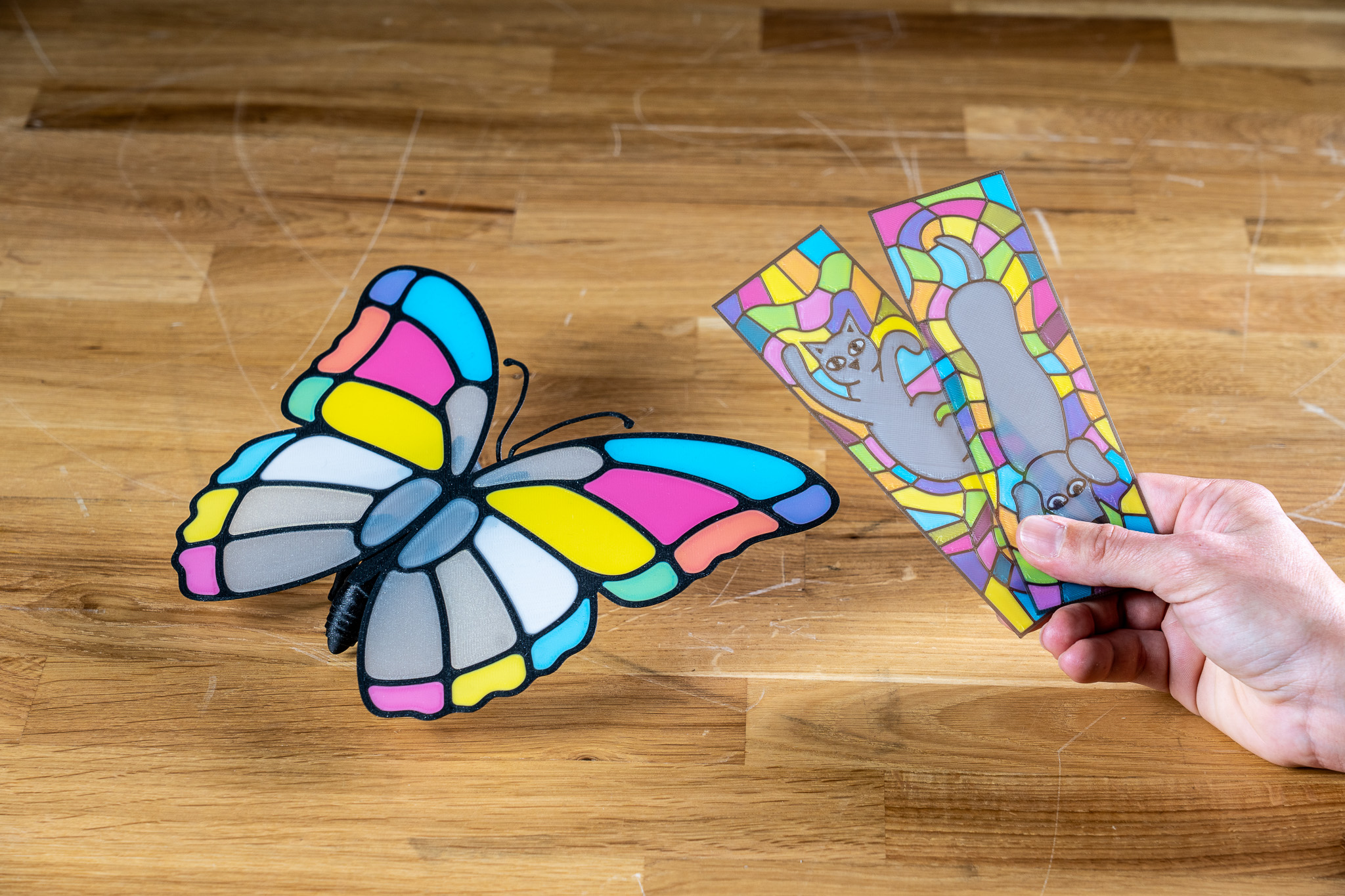
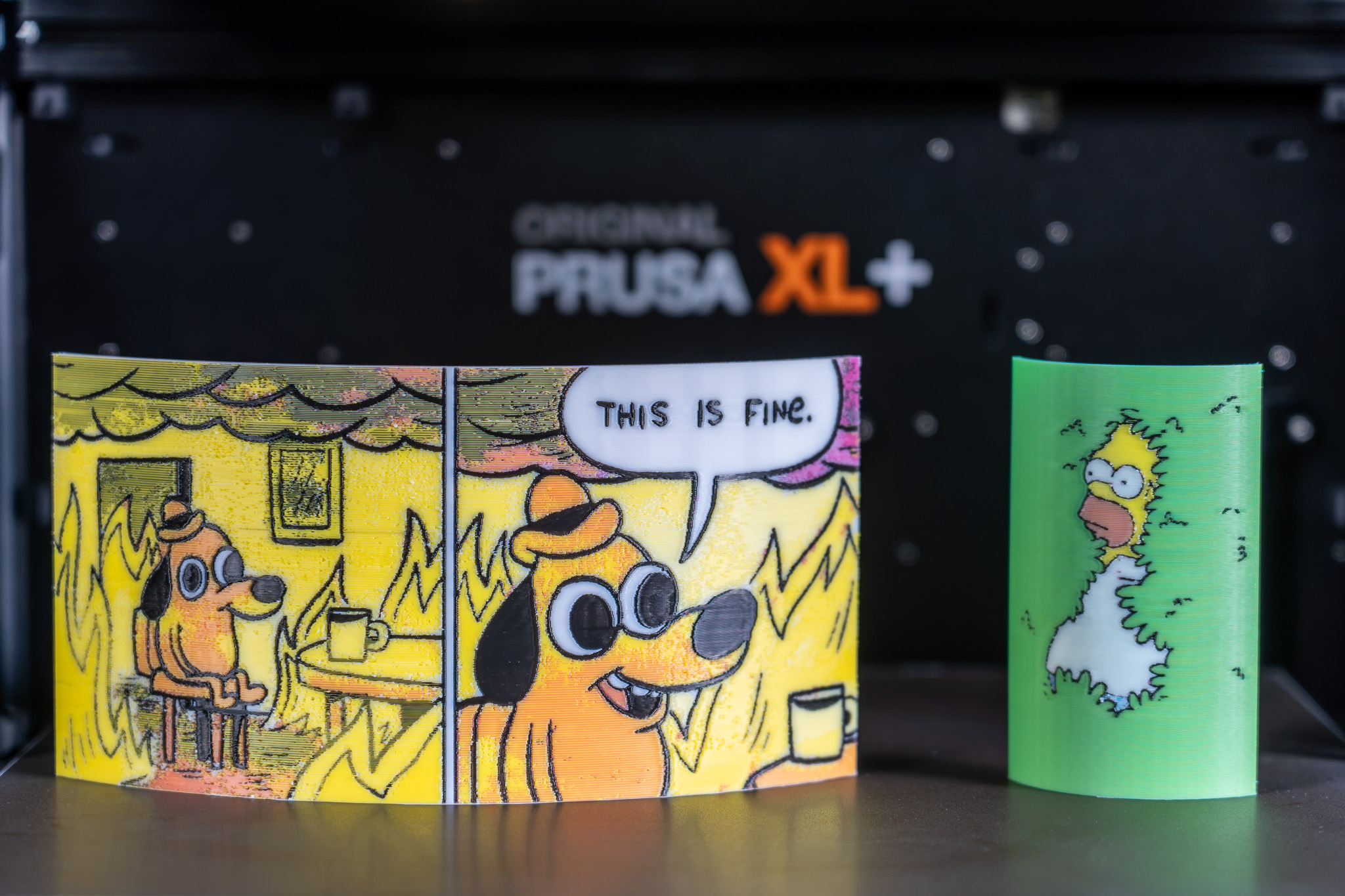
                  All displayed models are available on Printables and they were printed using the ColorMix filament bundle. 

                  References 

                  To learn more about the ColorMix and see more examples of printed models, see the release article and the filament announcement. 

                  The ColorMix feature is based on the works of the 3D printing community. Ratdoux’s OrcaSlicer-FullSpectrum showed how virtual mixed-color filaments could be created by alternating thin layers of differently colored materials. Justin H. Rahb’s filament-mixer helped predict what those colors might look like, and projects like PeggyPalette made it easier to compare and share results.

                  ¿Te resultó útil este artículo?
                  Esta acción está disponible solo para usuarios registrados. Por favor inicia sesión.
                  Inicia sesión  para publicar un comentario
                  Sin comentarios

                  Temas

                  • PrusaSlicer
                    • Laminado multimaterial
                      • Importando modelos Multi Material
                      • Patrones - establecer la secuencia del extrusor
                      • Asignando cabezales / colores / extrusores
                      • ColorPrint con la mmu
                      • Torre de limpieza
                      • Volúmenes de purga (MMU)
                      • Pintado multi material
                      • Experimental Printing with Different Nozzle Diameters
                      • Configuración de Extrusores múltiples, Entrelazado y Unión avanzada
                      • ColorMix
                    • Acerca de PrusaSlicer
                    • Configuración y perfiles
                    • Interfaz de usuario
                    • Entrada/Salida
                    • Barra de herramientas izquierda
                    • Barra de herramientas superior
                    • Ajustes de impresión
                    • Ajustes de filamento
                    • Configuración de la impresora
                    • Características avanzadas
                    • Corte SLA
                    • Otros (PrusaSlicer)