Prusa
  • TIENDA
    • Últimos productos
    POR CATEGORÍA
    • Impresoras 3Dnueva
    • Actualizaciones de impresoras 3Dnueva
    • Materiales
    • Accesorios
    • Piezas de repuesto
    • Cursos
    • Merchandising
    • Obtener un presupuesto
    ENLACES RÁPIDOS
    • Envío y entrega
    • Devoluciones y reembolsos
    • Pago y financiación
    • Garantía
    • IVA y Tasas de aduana
    • Preguntas Frecuentes

    0 artículo en tu carritoartículos en tu carrito

    Tu carrito está vacío

    Ir al carritoComprar impresoras 3D

    Mi perfil

    Iniciar sesión para ver pedidos y artículos guardados

    Mi perfil

    Sesión iniciada como

    • Pedidos
    • Cerrar Sesión
  • Impresión 3D
    • Explorar la impresión 3D
    PARA PRINCIPIANTES
    • Impresión 3D 101
    • Cómo funciona la impresión FDM
    • Comprando tu primera impresora
    • Catálogo de modelos 3D
    POR USO
    • Prototipado rápido
    • Fabricación
    • Ingeniería
    • Investigación
    • Arte y diseño
    PROFUNDIZAR
    • Guía de materiales
    • Cursos
    • Webinars
    • Casos de estudio
    • Impresión 3D personalizada
  • IMPRESORAS 3D
    • Todas las impresoras 3D
    PARA
    • Casa o garajeAficionados, manitas e impresión doméstica
    • EmpresasProducción interna para pequeños equipos
    • EmpresaFlotas, seguridad y escala
    • Qué Prusa es la adecuada para mí
    COMPRAR Y NAVEGAR
    • CORE One+nueva
    • CORE One+ INDXnueva
    • CORE One L+nueva
    • CORE One L+ INDXnueva
    • XL+nueva
    • MK4S
    • Prusa Pro HT90
    • Prusa Pro AFS
    • Prusa Pro SLX
    MÁS DE IMPRESORAS
    • Piezas y actualizacionesnueva
    • Critical infrastructure
    • Casos de estudio
    • Signature Oak
    • Kits
  • MATERIALES
    • Todos los materiales
    POR USO
    • Uso diario y diseño
    • Ingeniería funcional
    • Compuestos
    • Especialidad profesional
    • Resinas SLA
    PRUSAMENT
    • PLA
    • PETG
    • ASA
    • PC
    • PA11
    • Flexible
    • TPU
    MÁS MATERIALES
    • Guía de materiales
    • Fabricamos material nosotros mismos
    • Sostenibilidad
    • Pedir en la tienda
  • SOFTWARE
    • Todo el software
    PREPARAR LA IMPRESIÓN
    • PrusaSlicer 3.0nueva
    IMPRIMIR Y MONITORIZAR
    • PRUSA CONNECT
    • EasyPrint
    • Aplicación iOS y Android
    • Prusa Farm
    EMPEZAR
    • Descargar e instalar
    • Base de conocimientos
    MÁS SOFTWARE
    • Catálogo de modelos 3D
  • SOPORTE
    • Explorar soporte
    ENCONTRAR RESPUESTAS
    • Base de conocimientos
    • Resolución de problemas
    • Cursos
    • Webinars
    OBTENER AYUDA
    • Contacta con nosotros
    • Chat en vivo
    • Envíos y entregas
    • Garantía
    • Devoluciones y reembolsos
    • Servicio y piezas de repuesto
    • Servicio y Reparación
    COMUNIDAD
    • Foro
    • Reddit
    • Printables
  • CENTRO DE CONFIANZA
    • Resumen del Centro de confianza
    POR TEMA
    • RGPD
    • Certificados
    • Seguridad
    • Cumplimiento
    COMPROMISOS
    • Informe de sostenibilidad
    HABLA CON NOSOTROS
    • Contacta con el equipo de seguridad
  • EMPRESA
    • Acerca de Prusa
    CONÓCENOS
    • Nuestra historia
    • Cómo fabricamos impresoras
    • Código abierto
    • Kit de marca y medios
    NOTICIAS
    • Blog
    • Sala de prensa
    • Eventos
    CONFIANZA Y SOCIOS
    • Sostenibilidad
    • Distribuidores y revendedores
    • Programa de afiliados
    • Contacto
    • English
    • Čeština
    • Deutsch
    • Español
    • Français
    • Italiano
    • Polski
    • 日本語
  • Sesión iniciada como

    • Pedidos
    • Dirección
    • Alertas de Stock
    • Mis Cursos
    • Suscripción
    • Editar Cuenta
    • Cerrar Sesión

Iniciar sesión para ver pedidos y artículos guardados

Sesión iniciada como
  • Pedidos
  • Dirección
  • Alertas de Stock
  • Mis Cursos
  • Suscripción
  • Editar Cuenta
  • English
  • Čeština
  • Deutsch
  • Español
  • Français
  • Italiano
  • Polski
  • 日本語
Tienda

0 artículo en tu carritoartículos en tu carrito

Tu carrito está vacío

Ir al carritoComprar impresoras 3D

Mi perfil

Iniciar sesión para ver pedidos y artículos guardados

Mi perfil

Sesión iniciada como

  • Pedidos
  • Cerrar Sesión
TIENDA
  • Últimos productos
POR CATEGORÍA
  • Impresoras 3Dnueva
  • Actualizaciones de impresoras 3Dnueva
  • Materiales
  • Accesorios
  • Piezas de repuesto
  • Cursos
  • Merchandising
  • Obtener un presupuesto
ENLACES RÁPIDOS
  • Envío y entrega
  • Devoluciones y reembolsos
  • Pago y financiación
  • Garantía
  • IVA y Tasas de aduana
  • Preguntas Frecuentes

Productos destacados

    Categorías populares

      Búsquedas populares

        Artículos

          Blog

            Productos

              Categorías

                Búsquedas sugeridas

                  Buscando…
                  Sin resultados
                  Algo salió mal.
                  ↑↓ Seleccionar↵ AbrirEsc Cerrar búsqueda
                  1. Soporte
                  2. Original Prusa XL
                  3. Laminado multimaterial
                  4. Experimental Printing with Different Nozzle Diameters
                   

                  Contenidos

                  • Before Starting
                  • Handling of Profiles
                  • Print Settings Changes
                  • Managing Compatible Printers Condition
                  • Note to the Wipe Tower
                  • Printer Settings Changes
                  • Incompatible Filament Profiles

                  Blog

                  • Pellets de Prusament: Lotes de materia prima para la impresión 3D de gran formato o para la investigación y el desarrollo de polímeros a pequeña escala
                  • Imprime decoraciones de Halloween coloridas y brillantes con nuestra oferta espeluznante
                  • Factorio Ha Llegado a Printables

                  Newsletter

                  Regístrate y obtén nuestro dosier mensual de información útil sobre nuevos firmwares, nuevas versiones de PrusaSlicer y consejos generales para proyectos de impresión 3D.

                  Al hacer clic, aceptas recibir nuestra newsletter.

                  Este sitio está protegido por reCAPTCHA Enterprise y se aplican la Política de Privacidad y los Condiciones del servicio de Google.

                  Factorio Transport Belts
                  Tienda
                  • Impresoras 3D
                  • Mejoras de Impresoras
                  • Filamentos
                  • Accesorios
                  • Merchandising Prusa

                  © Prusa Research a.s.

                  Printables
                  • Modelos 3D
                  • Store
                  • Clubs
                  • Concursos de Diseño 3D
                  • Brands
                  Comunidad
                  • Mapa Mundial
                  • Foro
                  • Grupos de Usuarios
                  • Eventos
                  Ayuda
                  • Ayuda Prusa
                  • Prusa Academy
                  • Calculadoras de Impresión 3D
                  Software
                  • PrusaSlicer
                  • Prusa.app
                  • Prusa Connect
                  • Drivers y Software
                  Empresa
                  • Sobre nosotros
                  • Blog
                  • Distribuidores Oficiales de Prusa
                  • Contacto
                  • Certificado conforme a las normas ISO 9001, ISO 14001 e ISO 45001
                  • Términos y Condiciones generales
                  • Términos Generales y Condiciones de Uso de los sitios Web PRUSA
                  • Política de privacidad
                  • Información sobre las cookies
                  • Política de Reclamaciones de los Clientes
                  • Página de Estado de los Sitios Web
                  • Configuración de las cookies
                  • Términos y Condiciones generales
                  • Términos Generales y Condiciones de Uso de los sitios Web PRUSA
                  • Política de privacidad
                  • Información sobre las cookies
                  • Política de Reclamaciones de los Clientes
                  • Página de Estado de los Sitios Web
                  • Configuración de las cookies

                  © Prusa Research a.s.

                  JOSEF PRUSA®, PRUSA RESEARCH®, PRUSA POLYMERS®, PRUSA ORANGE®, PRUSA 3D ® Y PRUSAMENT® son marcas registradas de Prusa Development a.s. utilizadas por Prusa Research a.s. bajo licencia de Prusa Development a.s.

                  Experimental Printing with Different Nozzle Diameters

                  Relevante para

                  XL
                  PrusaSlicer
                  Artículo está también disponible en los siguientes idiomas
                  English
                  Čeština
                  Polski
                  Deutsch
                  Français
                  Español
                  Italiano
                  日本語

                  Printing with different nozzle diameters is an experimental workflow as it requires tweaking several settings in profiles, and some nozzle combinations may be incompatible, potentially causing unsuccessful prints. However, we would like to open this option to experienced users and developers. We look forward to collecting your feedback to improve this feature and continue its development.

                  This article is only for experienced users.

                  Due to it being a difficult process, this article will explain how to print with different nozzle diameters in a step-by-step example. We used:

                  • Printer: XL 5T – use of 2 tools
                  • Used nozzles: Tool 1: 0.25 mm, Tool 2: 0.6 mm
                  • Usage: Nozzle 0.25 mm for perimeters and support structure, Nozzle 0.6 mm for object infill
                  • Supports: Organic Supports


                  Before Starting

                  Change the nozzles on your XL by following the manual Cómo reemplazar la boquilla Prusa (XL multicabezal). To achieve a successful print, it is recommended to do a Tool Offset Calibration, which can be found in the printer menu in Control -> Calibrations & Tests.

                  Handling of Profiles

                  Select the Correct Profile

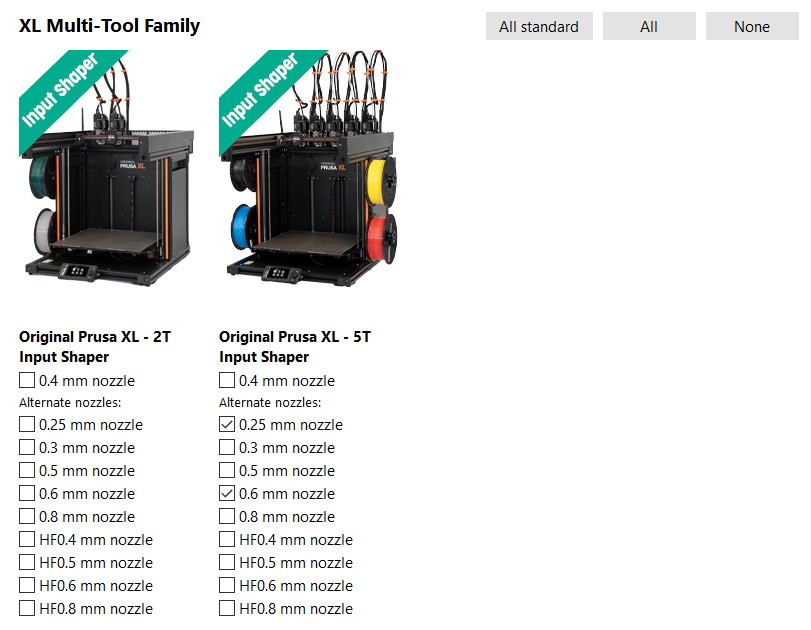
                  To switch between available profiles, go to the Wizard (Configuration -> Configuration Wizard -> Prusa Research) and select the printers with the nozzles you want to use. See the example below where the 0.25 mm and 0.6 mm nozzles that are used are selected.
                  Print Settings Changes

                  Combining infill

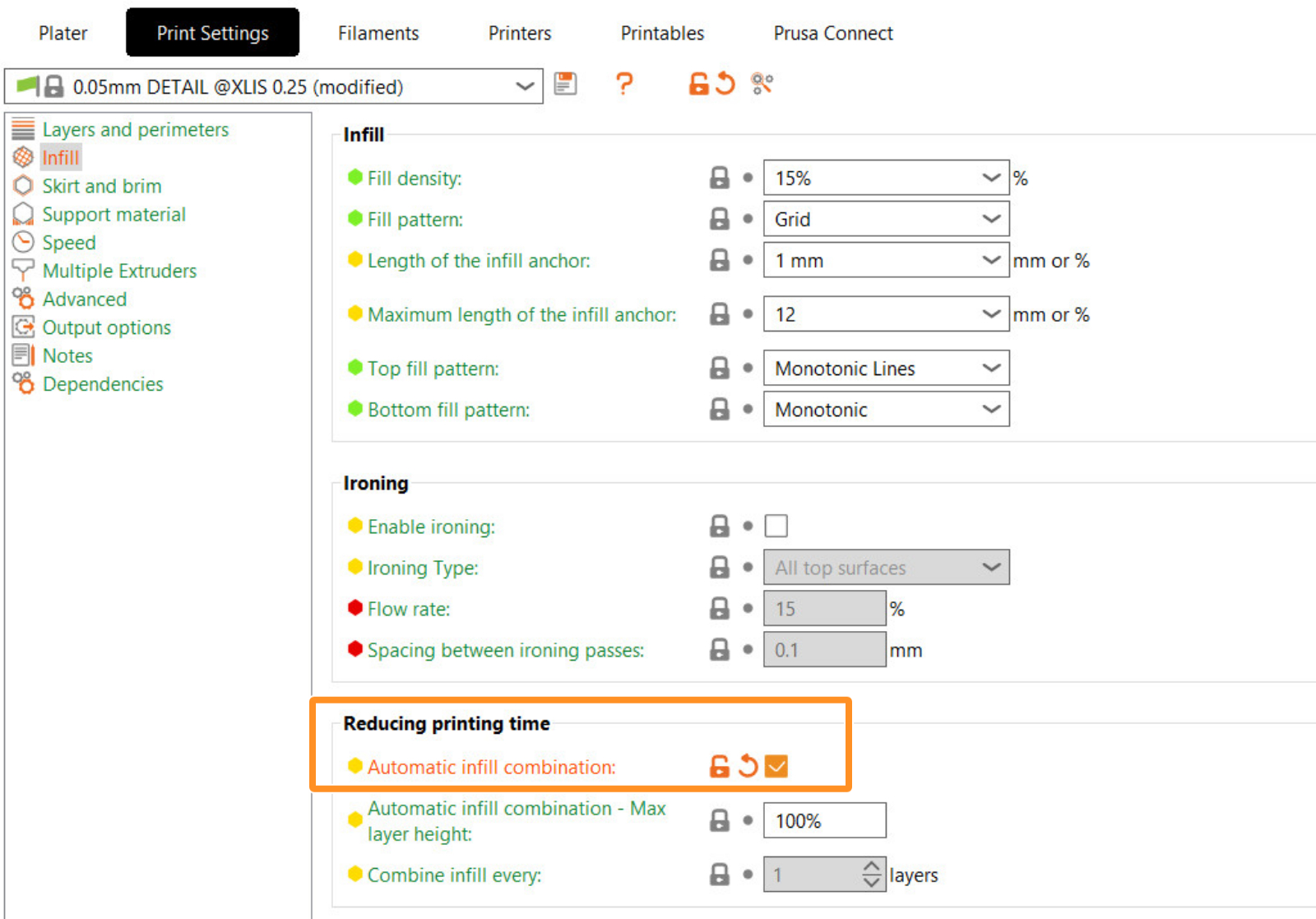
                  For some use cases, when printing with different nozzle diameters it may be useful to print infill every nth layer, typically when the infill is printed with a larger nozzle. To cover these scenarios, you can set it up manually (infill_every_layers) or switch to automatic infill combining (Print Settings -> Infill -> Automatic infill combination).
                  Enable supports

                  Enable the supports in Print settings -> Support material -> Generate support material. In Style, choose Organic.

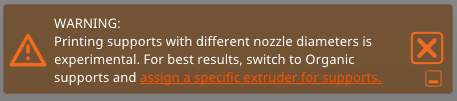
                  When printing with different nozzles, compatibility of supports with the wipe tower and the option to select the support material extruder is critical. Therefore, we highly recommend using Organic Supports. Organic Supports synchronize layers with the object, making things much simpler. This allows you to choose the support material extruder and at the same time have the wipe tower active.
                  Assigning Extruders

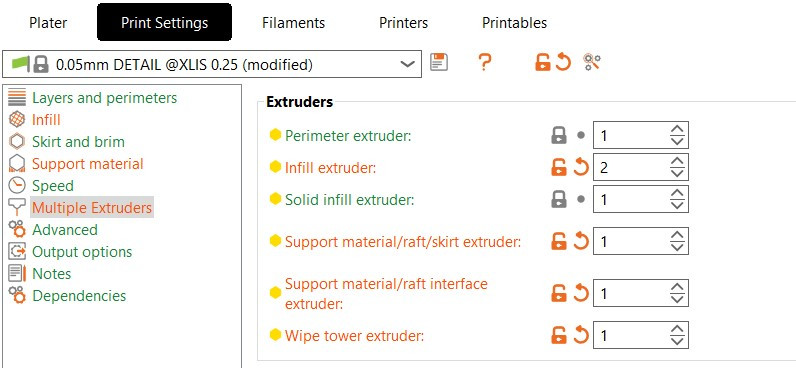
                  To assign extruders to specific features of the printed model across the project, go to Print Settings -> Multiple Extruders -> Extruders, and assign the extruder numbers based on your use case. For our example, we are using:

                  • The Perimeter extruder is set to Extruder 1 to achieve a detailed surface of the model.
                  • The Infill extruder is set to Extruder 2 because I want the infill to be rough.
                  • The Support material/raft/skirt extruder is set to Extruder 1.
                  • The Support material/raft/interface extruder is set to Extruder 1.
                  • The Wipe Tower extruder is set to Extruder 1.

                  This setup ensures that the supports are printed with a single extruder. Specifically for supports, a single extrusion width for the entire structure is selected and its width is based on minimal nozzle diameter. If you leave the extrusion width at zero all extruders could print on supports and you may experience under-extrusion with larger nozzles.
                  It is also possible to assign extruders using multi material printing or set up extruders per object feature by right-clicking on the object and going to Add Settings -> Extruders.

                  Extrusion Widths

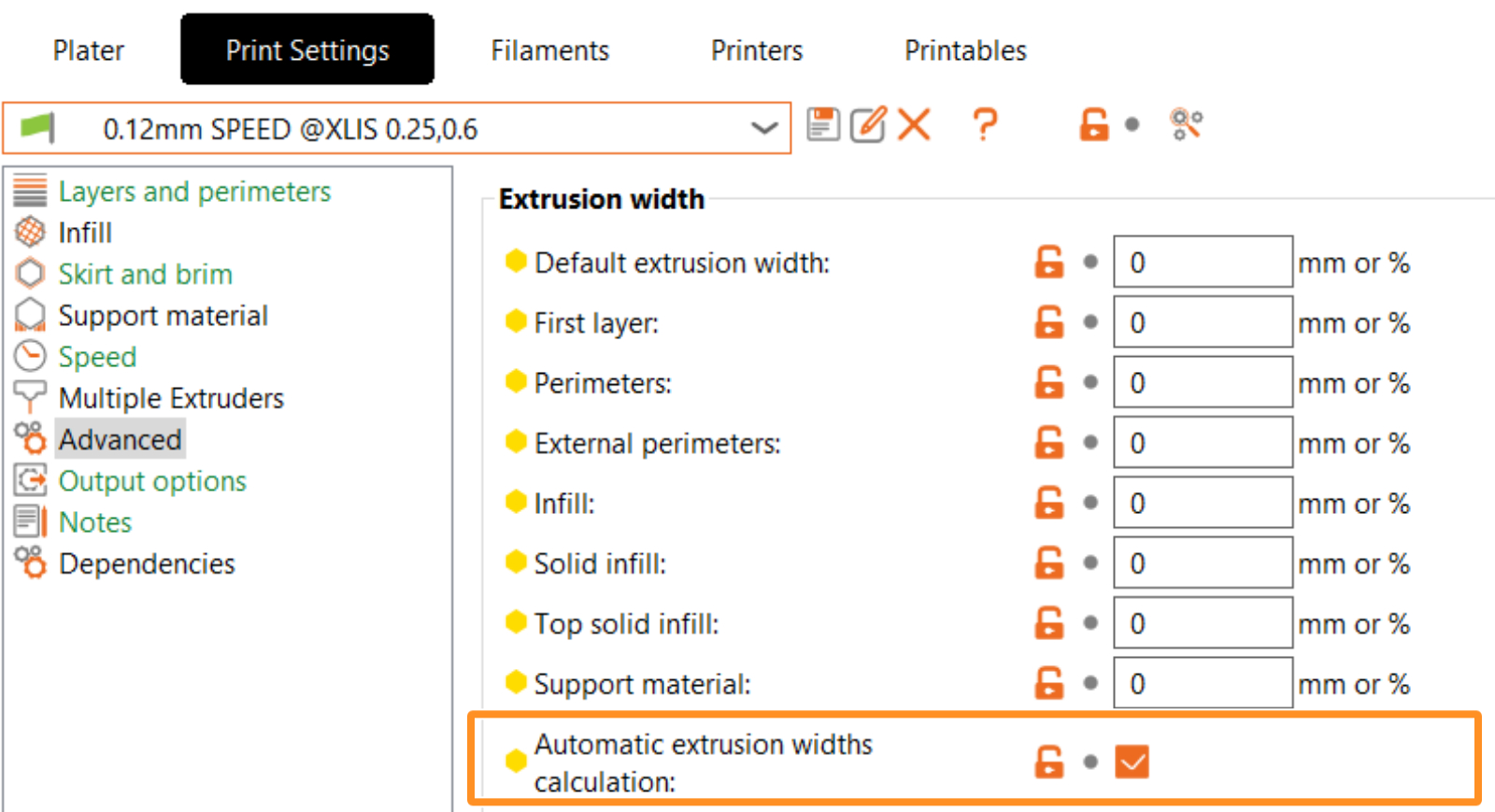
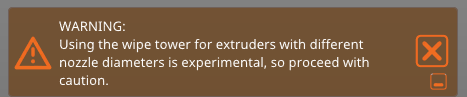
                  To achieve the correct extrusion width when using different nozzle diameters for specific features of the model, we provide automatic extrusion width calculations (Print Settings -> Advanced -> Automatic extrusion widths calculation). When this option is enabled, a window will pop up warning that the extrusion widths will automatically be set to zero, and the system will calculate them based on the currently used nozzle diameters.
                   

                  Managing Compatible Printers Condition

                  This step is optional, but it is possible to edit the print conditions of the default profile for a more flexible handling of the print profile. This lets you share settings with all XL printers (printer profiles). For that, go to Print Settings - Dependencies -> Compatible Printers condition. We have changed it from "printer_notes=~/.*XLIS.*/ and nozzle_diameter[0]==0.25" to "printer_notes=~/.*XLIS.*/"

                  Note that profiles for different nozzle diameters may have varying parameters. If you want to use this profile for another purpose, be sure to check for any differences in parameters between your custom-derived profile and the default one. For instance, parameters such as speed and acceleration may be critical, but other settings could also vary.

                  After that, you can save the Print Setting profile. It will show as a user preset.

                  Note to the Wipe Tower

                  Based on basic tests, the wipe tower can handle printing with different nozzle diameters, but we cannot guarantee a successful print with all possible combinations of settings. That’s why the warning remains active.
                  Printer Settings Changes

                  To configure your custom nozzle diameter hardware setup go to Printers tab - Extruder #. In corresponding extruders set up nozzle diameter. We also highly recommend changing the minimum and maximum layer height limits for the corresponding extruders. This will limit the range of compatible print profiles based on the minimum and maximum layer height values. We have left the Extruder 1 with the selected 0.25 mm nozzle and changed the Extruder 2 to 0.6 mm.

                  Incompatible Filament Profiles

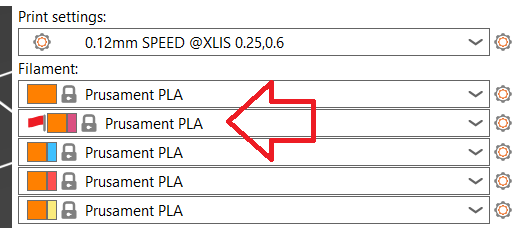
                  When changes are made to the printer profiles, especially due to a nozzle change, incompatible filament profiles will appear with a red flag. It is important to select profiles without red flags to ensure proper functionality.
                  ¿Te resultó útil este artículo?
                  Esta acción está disponible solo para usuarios registrados. Por favor inicia sesión.
                  Inicia sesión  para publicar un comentario
                  Sin comentarios

                  Temas

                  • PrusaSlicer
                    • Laminado multimaterial
                      • Importando modelos Multi Material
                      • Patrones - establecer la secuencia del extrusor
                      • Asignando cabezales / colores / extrusores
                      • ColorPrint con la mmu
                      • Torre de limpieza
                      • Volúmenes de purga (MMU)
                      • Pintado multi material
                      • Experimental Printing with Different Nozzle Diameters
                      • Configuración de Extrusores múltiples, Entrelazado y Unión avanzada
                      • ColorMix
                    • Acerca de PrusaSlicer
                    • Configuración y perfiles
                    • Interfaz de usuario
                    • Entrada/Salida
                    • Barra de herramientas izquierda
                    • Barra de herramientas superior
                    • Ajustes de impresión
                    • Ajustes de filamento
                    • Configuración de la impresora
                    • Características avanzadas
                    • Corte SLA
                    • Otros (PrusaSlicer)