Prusa
  • TIENDA
    • Últimos productos
    POR CATEGORÍA
    • Impresoras 3Dnueva
    • Actualizaciones de impresoras 3Dnueva
    • Materiales
    • Accesorios
    • Piezas de repuesto
    • Cursos
    • Merchandising
    • Obtener un presupuesto
    ENLACES RÁPIDOS
    • Envío y entrega
    • Devoluciones y reembolsos
    • Pago y financiación
    • Garantía
    • IVA y Tasas de aduana
    • Preguntas Frecuentes

    0 artículo en tu carritoartículos en tu carrito

    Tu carrito está vacío

    Ir al carritoComprar impresoras 3D

    Mi perfil

    Iniciar sesión para ver pedidos y artículos guardados

    Mi perfil

    Sesión iniciada como

    • Pedidos
    • Cerrar Sesión
  • Impresión 3D
    • Explorar la impresión 3D
    PARA PRINCIPIANTES
    • Impresión 3D 101
    • Cómo funciona la impresión FDM
    • Comprando tu primera impresora
    • Catálogo de modelos 3D
    POR USO
    • Prototipado rápido
    • Fabricación
    • Ingeniería
    • Investigación
    • Arte y diseño
    PROFUNDIZAR
    • Guía de materiales
    • Cursos
    • Webinars
    • Casos de estudio
    • Impresión 3D personalizada
  • IMPRESORAS 3D
    • Todas las impresoras 3D
    PARA
    • Casa o garajeAficionados, manitas e impresión doméstica
    • EmpresasProducción interna para pequeños equipos
    • EmpresaFlotas, seguridad y escala
    • Qué Prusa es la adecuada para mí
    COMPRAR Y NAVEGAR
    • CORE One+nueva
    • CORE One+ INDXnueva
    • CORE One L+nueva
    • CORE One L+ INDXnueva
    • XL+nueva
    • MK4S
    • Prusa Pro HT90
    • Prusa Pro AFS
    • Prusa Pro SLX
    MÁS DE IMPRESORAS
    • Piezas y actualizacionesnueva
    • Critical infrastructure
    • Casos de estudio
    • Signature Oak
    • Kits
  • MATERIALES
    • Todos los materiales
    POR USO
    • Uso diario y diseño
    • Ingeniería funcional
    • Compuestos
    • Especialidad profesional
    • Resinas SLA
    PRUSAMENT
    • PLA
    • PETG
    • ASA
    • PC
    • PA11
    • Flexible
    • TPU
    MÁS MATERIALES
    • Guía de materiales
    • Fabricamos material nosotros mismos
    • Sostenibilidad
    • Pedir en la tienda
  • SOFTWARE
    • Todo el software
    PREPARAR LA IMPRESIÓN
    • PrusaSlicer 3.0nueva
    IMPRIMIR Y MONITORIZAR
    • PRUSA CONNECT
    • EasyPrint
    • Aplicación iOS y Android
    • Prusa Farm
    EMPEZAR
    • Descargar e instalar
    • Base de conocimientos
    MÁS SOFTWARE
    • Catálogo de modelos 3D
  • SOPORTE
    • Explorar soporte
    ENCONTRAR RESPUESTAS
    • Base de conocimientos
    • Resolución de problemas
    • Cursos
    • Webinars
    OBTENER AYUDA
    • Contacta con nosotros
    • Chat en vivo
    • Envíos y entregas
    • Garantía
    • Devoluciones y reembolsos
    • Servicio y piezas de repuesto
    • Servicio y Reparación
    COMUNIDAD
    • Foro
    • Reddit
    • Printables
  • CENTRO DE CONFIANZA
    • Resumen del Centro de confianza
    POR TEMA
    • RGPD
    • Certificados
    • Seguridad
    • Cumplimiento
    COMPROMISOS
    • Informe de sostenibilidad
    HABLA CON NOSOTROS
    • Contacta con el equipo de seguridad
  • EMPRESA
    • Acerca de Prusa
    CONÓCENOS
    • Nuestra historia
    • Cómo fabricamos impresoras
    • Código abierto
    • Kit de marca y medios
    NOTICIAS
    • Blog
    • Sala de prensa
    • Eventos
    CONFIANZA Y SOCIOS
    • Sostenibilidad
    • Distribuidores y revendedores
    • Programa de afiliados
    • Contacto
    • English
    • Čeština
    • Deutsch
    • Español
    • Français
    • Italiano
    • Polski
    • 日本語
  • Sesión iniciada como

    • Pedidos
    • Dirección
    • Alertas de Stock
    • Mis Cursos
    • Suscripción
    • Editar Cuenta
    • Cerrar Sesión

Iniciar sesión para ver pedidos y artículos guardados

Sesión iniciada como
  • Pedidos
  • Dirección
  • Alertas de Stock
  • Mis Cursos
  • Suscripción
  • Editar Cuenta
  • English
  • Čeština
  • Deutsch
  • Español
  • Français
  • Italiano
  • Polski
  • 日本語
Tienda

0 artículo en tu carritoartículos en tu carrito

Tu carrito está vacío

Ir al carritoComprar impresoras 3D

Mi perfil

Iniciar sesión para ver pedidos y artículos guardados

Mi perfil

Sesión iniciada como

  • Pedidos
  • Cerrar Sesión
TIENDA
  • Últimos productos
POR CATEGORÍA
  • Impresoras 3Dnueva
  • Actualizaciones de impresoras 3Dnueva
  • Materiales
  • Accesorios
  • Piezas de repuesto
  • Cursos
  • Merchandising
  • Obtener un presupuesto
ENLACES RÁPIDOS
  • Envío y entrega
  • Devoluciones y reembolsos
  • Pago y financiación
  • Garantía
  • IVA y Tasas de aduana
  • Preguntas Frecuentes

Productos destacados

    Categorías populares

      Búsquedas populares

        Artículos

          Blog

            Productos

              Categorías

                Búsquedas sugeridas

                  Buscando…
                  Sin resultados
                  Algo salió mal.
                  ↑↓ Seleccionar↵ AbrirEsc Cerrar búsqueda
                  1. Soporte
                  2. Mantenimiento de la impresora
                  3. Regular printer maintenance (CORE One INDX)
                   

                  Contenidos

                  • Useful tools
                  • Frequent maintenance
                  • Sporadic maintenance
                  • Annual maintenance

                  Blog

                  • Factorio Ha Llegado a Printables
                  • Prusament PLA Lightweight: un 65 % más ligero que el PLA normal. Perfecto para aviones, cosplay y mucho más.
                  • Prusament PLA ColorMix: Imprime 45 tonos de color con solo cinco bobinas de filamento (y más)

                  Newsletter

                  Regístrate y obtén nuestro dosier mensual de información útil sobre nuevos firmwares, nuevas versiones de PrusaSlicer y consejos generales para proyectos de impresión 3D.

                  Al hacer clic, aceptas recibir nuestra newsletter.

                  Este sitio está protegido por reCAPTCHA Enterprise y se aplican la Política de Privacidad y los Condiciones del servicio de Google.

                  Factorio Transport Belts
                  Tienda
                  • Impresoras 3D
                  • Mejoras de Impresoras
                  • Filamentos
                  • Accesorios
                  • Merchandising Prusa

                  © Prusa Research a.s.

                  Printables
                  • Modelos 3D
                  • Store
                  • Clubs
                  • Concursos de Diseño 3D
                  • Brands
                  Comunidad
                  • Mapa Mundial
                  • Foro
                  • Grupos de Usuarios
                  • Eventos
                  Ayuda
                  • Ayuda Prusa
                  • Prusa Academy
                  • Calculadoras de Impresión 3D
                  Software
                  • PrusaSlicer
                  • Prusa.app
                  • Prusa Connect
                  • Drivers y Software
                  Empresa
                  • Sobre nosotros
                  • Blog
                  • Distribuidores Oficiales de Prusa
                  • Contacto
                  • Certificado conforme a las normas ISO 9001, ISO 14001 e ISO 45001
                  • Términos y Condiciones generales
                  • Términos Generales y Condiciones de Uso de los sitios Web PRUSA
                  • Política de privacidad
                  • Información sobre las cookies
                  • Política de Reclamaciones de los Clientes
                  • Página de Estado de los Sitios Web
                  • Configuración de las cookies
                  • Términos y Condiciones generales
                  • Términos Generales y Condiciones de Uso de los sitios Web PRUSA
                  • Política de privacidad
                  • Información sobre las cookies
                  • Política de Reclamaciones de los Clientes
                  • Página de Estado de los Sitios Web
                  • Configuración de las cookies

                  © Prusa Research a.s.

                  JOSEF PRUSA®, PRUSA RESEARCH®, PRUSA POLYMERS®, PRUSA ORANGE®, PRUSA 3D ® Y PRUSAMENT® son marcas registradas de Prusa Development a.s. utilizadas por Prusa Research a.s. bajo licencia de Prusa Development a.s.

                  Regular printer maintenance

                  (CORE One INDX)

                  Relevante para

                  CORE One INDX
                  Artículo está también disponible en los siguientes idiomas
                  English
                  Čeština
                  Polski
                  Deutsch
                  Français
                  Español
                  Italiano
                  日本語

                  It is recommended to regularly take some time to maintain your Prusa CORE One INDX. This should be done even if the printer is working perfectly. 

                  Useful tools

                  Besides the usual tools, such as Allen keys, needle-nose pliers, and IPA (Isopropyl Alcohol) + paper towels, you might need:

                  • Compressed air: also known as canned air. Be sure not to hold it upside down while spraying - otherwise, you could damage any electronic components while trying to clean them.
                  • Brass Nozzle Brush: a small brass brush is useful for cleaning the nozzle. If you don't have a brass brush, any brush with hard bristles will do the job.
                  • Prusa Lubricant: used to lubricate the smooth rods with linear bearings and to lubricate the Z-axis leadscrews. DO NOT use Prusa Lubricant on the linear rail! 
                  • Linear rail lubrication set: a set that includes Microlube GL 261, Dosing needle SSS15 2, Cartridge with manual piston 2/2,5mm, and two nitrile gloves. 
                  • Alcohol-free cleaner: used to clean the printer panels. DO NOT use alcohol products, including IPA, to clean the panels. 

                  Frequent maintenance 

                  The following points should be checked before every print. 

                  Keeping the printer clean

                  After several hours of printing, various kinds of debris may start to accumulate around the printer parts or under the heatbed - pieces of filament, dust, scraps, broken supports, etc. Always make sure that the parts of the printer are clean. You can use a brush, a small broom, or a vacuum to remove debris. 

                  Flexible print sheet

                  Acetone should be used sparingly for cleaning and only be used on the Smooth print sheet! Never use acetone on the Textured or Satin print sheet, as the surface will be permanently damaged.

                  Never clean the special PA Nylon sheet with acetone, IPA (isopropyl alcohol), or other alcohol-based solvents (window cleaners, Windex, etc.)! This will damage the surface. 

                  All flexible print sheets should be cleaned regularly to ensure adhesion, but the exact methods and washing solutions can differ depending on your type of sheet.

                  You can find more information on how to take care of your flexible print sheet in this articlein this article.

                  Sporadic maintenance

                  The following checks should be done every 200 hours of printing time. Cleaning the nozzle can be performed as needed, or every 200 hours of printing time, whichever occurs first. 

                  Cleaning the nozzle - Cold pull

                  Do not touch the nozzle during this procedure - it is hot, and there is a risk of burning yourself!
                  To better access the nozzle during cleaning, lower the heatbed using the LCD menu -> Control ->
                  Movement -> Z Axis option.

                  Never heat the nozzle with an external heat source! This could cause irreversible damage to the nozzle. 

                  A cold pull clears carbonized plastic, debris, and partial or full clogs from the nozzle.
                   
                  1. Prepare a piece of light-colored PLA filament. Light colors are ideal because any trapped debris and residues from the nozzle will be clearly visible on the pulled filament.
                  2. Select the INDX Tool with the clogged nozzle in the printer menu. The INDX Toolhead will automatically pick it up.
                  3. Heat the nozzle to the temperature of the currently loaded material or slightly above.
                  4. Remove the PTFE tube from the INDX Toolhead and insert the PLA filament into the filament entry point. Push the filament down manually until it starts coming out of the nozzle, or until you meet firm resistance if the nozzle is completely clogged.
                  5. Turn off the nozzle heating and continue applying light downward pressure on the filament until it solidifies. Once the temperature drops to 100 °C, slowly and steadily pull the filament straight upwards and check the tip for removed impurities.
                  6. Repeat the process if necessary until the pulled filament comes out completely clean and free of any visible residues. At that point, the nozzle is successfully cleared.

                  Axes check - Linear Rail (X-axis)

                  Ensure that there is no debris or dust on the (X-axis) linear rail. If there is, clean it with a clean tissue or a clean cloth, no degreaser or chemicals, as these might damage the rubber in the carriage. 

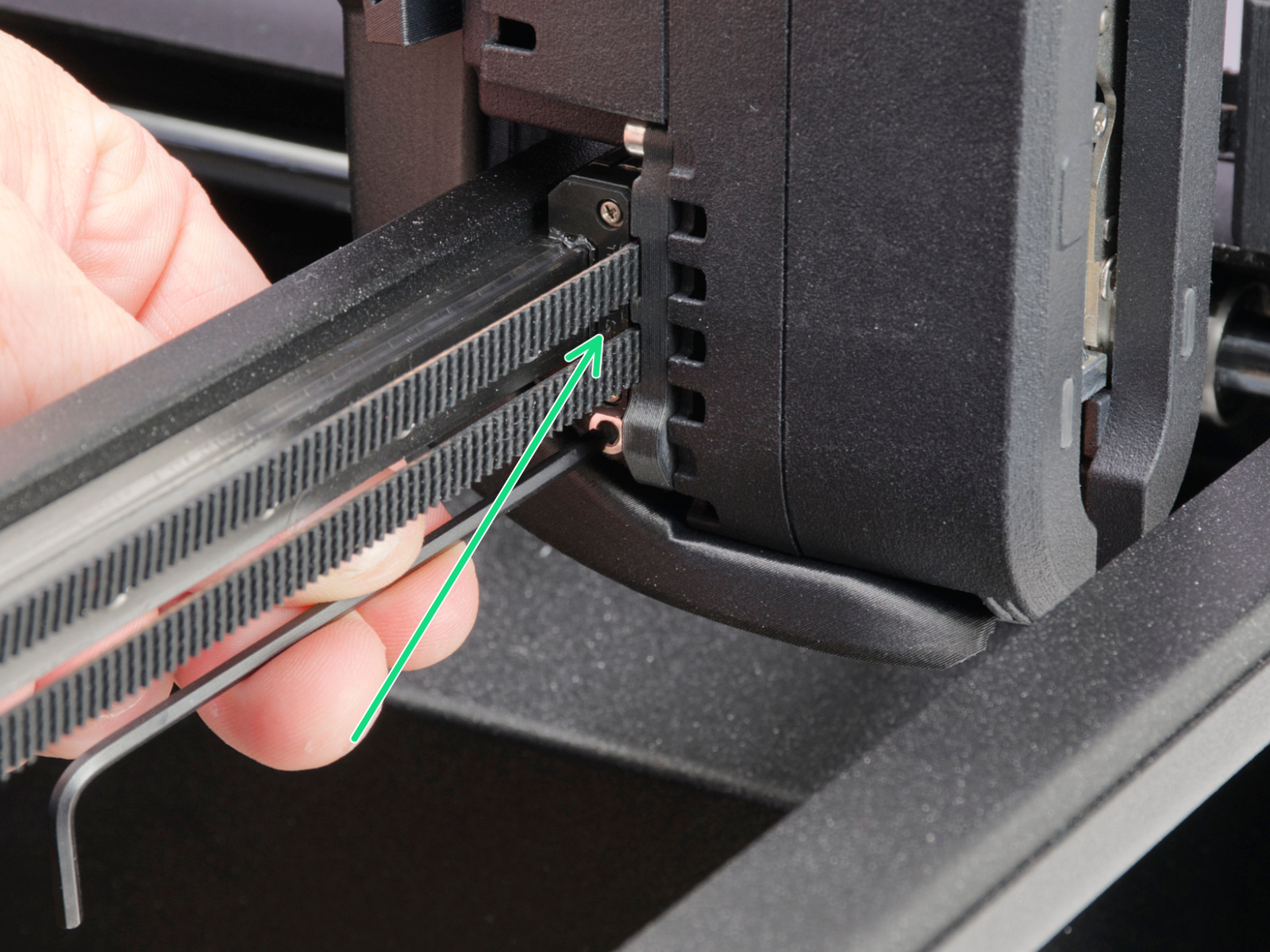
                  We recommend lubricating the linear rail every 3-6 months, using the dedicated linear rail lubrication set at the spots shown below.
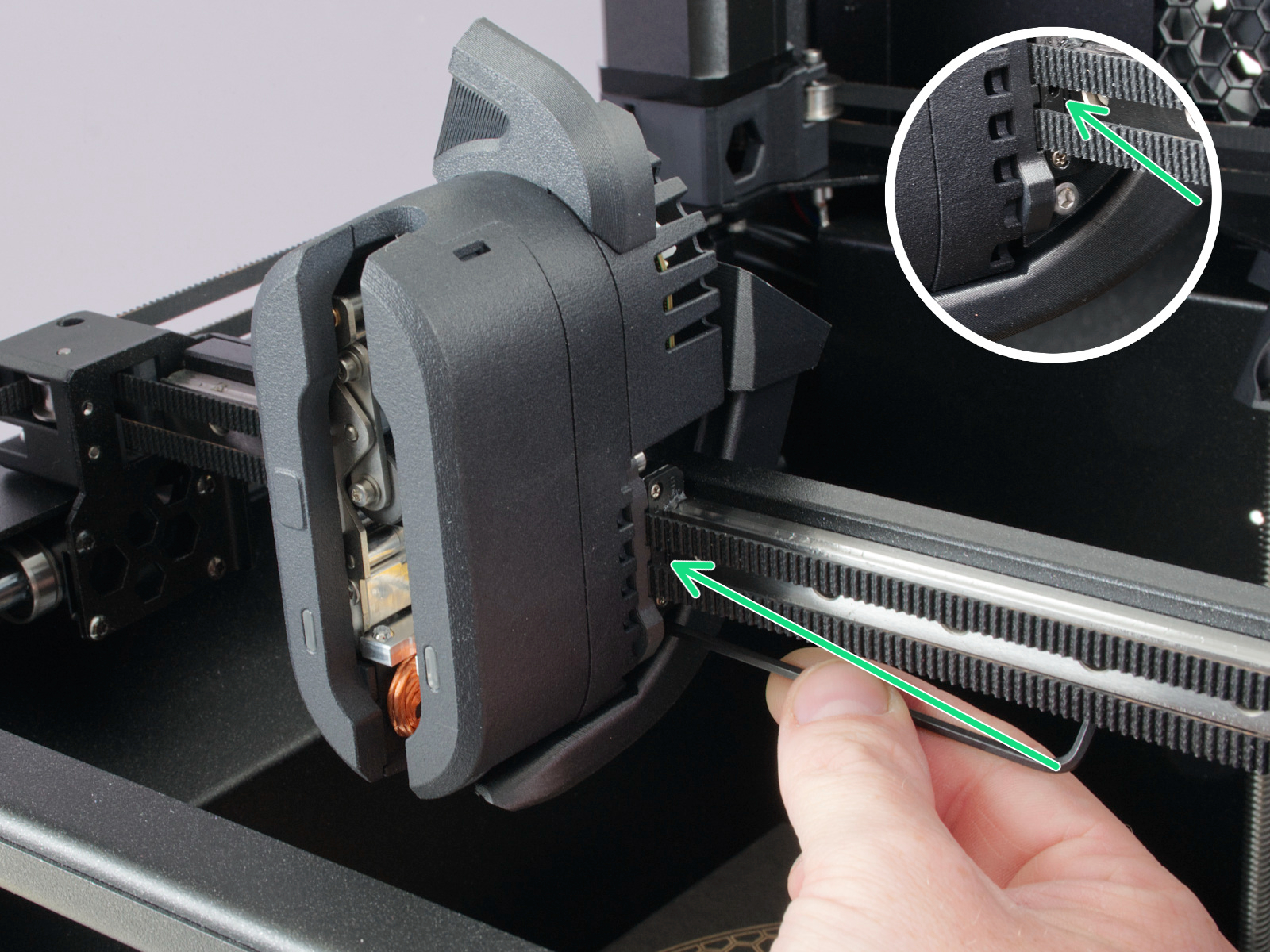
                  On linear rails, DO NOT use Prusa Lubricant or any products not part of the linear rails lubrication set. 

                  Axes check - Smooth Rods and Linear Bearings (Y-axis)

                  Clean the (Y-axis) smooth rods with a clean paper towel, and lubricate them using a small amount of Prusa Lubricant.

                  Only in case you feel the axis is not running smoothly anymore, even after recently cleaning and lubricating the smooth rods, the bearings can be taken out, cleaned with alcohol, and greased on the inside, still using a small amount of Prusa Lubricant. 

                  Axes check - Belt

                  Over a long printing time, the belt can slightly loosen, causing issues such as layer shifting or bad printing quality. The easiest way to check the belt tension is to print a circular object. If the result is not perfectly round, a belt adjustment is needed. 

                  Extruder Feeding Gear

                  The feeding gear in the extruder does not need any lubricant. However, over time, a filament powder deposit may form in the grooves, causing poor extrusion of filament. Remove the debris using compressed air. Small plastic threads can be carefully removed with tweezers.

                  Panels cleaning 

                  Use an alcohol-free cleaner or soapy water to clean the printer panels. 

                  DO NOT use products that contain alcohol, including IPA. Repeat exposure will weaken the panels, causing them to become brittle over time. 

                  Annual maintenance

                  Electronics

                  Before touching the electrical connections, please make sure that the printer is off, and unplugged from the main power source.

                  It is a good practice to check and optionally reconnect the electrical connectors on the xBuddy board, INDX Toolhead, heatbed, PSU, and xLCD every 600-800 hours of printing. 

                  In particular, ensure that the screw-attached connectors are fully tightened, and the Molex-attached connectors are properly connected. 

                  CAUTION: for Molex-attached connectors, it is necessary to press the latch before disconnecting. Otherwise, the connector may get damaged. 

                  ¿Te resultó útil este artículo?
                  Esta acción está disponible solo para usuarios registrados. Por favor inicia sesión.
                  Inicia sesión  para publicar un comentario
                  Sin comentarios

                  Temas

                  • Usando la impresora
                    • Mantenimiento de la impresora
                      • Regular printer maintenance (CORE One INDX)
                      • Cómo flashear el firmware (MK4/S, MK3.9/S, MK3.5, XL)
                      • Cómo reemplazar una Base calefactable (CORE One)
                      • Cómo sustituir el Termistor de la Base Calefactable (CORE One)
                      • Instalación Cámara Buddy3D en la CORE One
                      • Cómo reemplazar los motores Z (CORE One)
                      • Cómo invertir la orientación de la puerta (CORE One)
                      • Cómo instalar la Filtración Avanzada (CORE One)
                      • How to replace the Heatbed Power Cables (CORE One)
                      • How to replace the Belt Tensioner Pulley (CORE One)
                      • How to replace the Belt Tensioner Left (CORE One)
                      • How to replace the Belt Tensioner Right (CORE One)
                      • Cómo reemplazar el sensor de la puerta (CORE One)
                    • Modelos 3D
                    • Guía de materiales
                    • Laminando
                    • Prusa Connect y PrusaLink