Prusa
  • TIENDA
    • Últimos productos
    POR CATEGORÍA
    • Impresoras 3Dnueva
    • Actualizaciones de impresoras 3Dnueva
    • Materiales
    • Accesorios
    • Piezas de repuesto
    • Cursos
    • Merchandising
    • Obtener un presupuesto
    ENLACES RÁPIDOS
    • Envío y entrega
    • Devoluciones y reembolsos
    • Pago y financiación
    • Garantía
    • IVA y Tasas de aduana
    • Preguntas Frecuentes

    0 artículo en tu carritoartículos en tu carrito

    Tu carrito está vacío

    Ir al carritoComprar impresoras 3D

    Mi perfil

    Iniciar sesión para ver pedidos y artículos guardados

    Mi perfil

    Sesión iniciada como

    • Pedidos
    • Cerrar Sesión
  • Impresión 3D
    • Explorar la impresión 3D
    PARA PRINCIPIANTES
    • Impresión 3D 101
    • Cómo funciona la impresión FDM
    • Comprando tu primera impresora
    • Catálogo de modelos 3D
    POR USO
    • Prototipado rápido
    • Fabricación
    • Ingeniería
    • Investigación
    • Arte y diseño
    PROFUNDIZAR
    • Guía de materiales
    • Cursos
    • Webinars
    • Casos de estudio
    • Impresión 3D personalizada
  • IMPRESORAS 3D
    • Todas las impresoras 3D
    PARA
    • Casa o garajeAficionados, manitas e impresión doméstica
    • EmpresasProducción interna para pequeños equipos
    • EmpresaFlotas, seguridad y escala
    • Qué Prusa es la adecuada para mí
    COMPRAR Y NAVEGAR
    • CORE One+nueva
    • CORE One+ INDXnueva
    • CORE One L+nueva
    • CORE One L+ INDXnueva
    • XL+nueva
    • MK4S
    • Prusa Pro HT90
    • Prusa Pro AFS
    • Prusa Pro SLX
    MÁS DE IMPRESORAS
    • Piezas y actualizacionesnueva
    • Spare parts
    • Critical infrastructure
    • Casos de estudio
    • Signature Oak
    • Kits
  • MATERIALES
    • Todos los materiales
    POR USO
    • Uso diario y diseño
    • Ingeniería funcional
    • Compuestos
    • Especialidad profesional
    • Resinas SLA
    PRUSAMENT
    • PLA
    • PETG
    • ASA
    • PC
    • PA11
    • Flexible
    • TPU
    MÁS MATERIALES
    • Guía de materiales
    • Fabricamos material nosotros mismos
    • Sostenibilidad
    • Pedir en la tienda
  • SOFTWARE
    • Todo el software
    PREPARAR LA IMPRESIÓN
    • PrusaSlicer 3.0nueva
    IMPRIMIR Y MONITORIZAR
    • PRUSA CONNECT
    • EasyPrint
    • Aplicación iOS y Android
    • Prusa Farm
    EMPEZAR
    • Descargar e instalar
    • Base de conocimientos
    MÁS SOFTWARE
    • Catálogo de modelos 3D
  • SOPORTE
    • Explorar soporte
    ENCONTRAR RESPUESTAS
    • Base de conocimientos
    • Resolución de problemas
    • Cursos
    • Webinars
    OBTENER AYUDA
    • Contacta con nosotros
    • Chat en vivo
    • Envíos y entregas
    • Garantía
    • Devoluciones y reembolsos
    • Servicio y piezas de repuesto
    • Servicio y Reparación
    COMUNIDAD
    • Foro
    • Reddit
    • Printables
  • CENTRO DE CONFIANZA
    • Resumen del Centro de confianza
    POR TEMA
    • RGPD
    • Certificados
    • Seguridad
    • Cumplimiento
    COMPROMISOS
    • Informe de sostenibilidad
    HABLA CON NOSOTROS
    • Contacta con el equipo de seguridad
  • EMPRESA
    • Acerca de Prusa
    CONÓCENOS
    • Nuestra historia
    • Cómo fabricamos impresoras
    • Código abierto
    • Kit de marca y medios
    NOTICIAS
    • Blog
    • Sala de prensa
    • Eventos
    CONFIANZA Y SOCIOS
    • Sostenibilidad
    • Distribuidores y revendedores
    • Programa de afiliados
    • Contacto
    • English
    • Čeština
    • Deutsch
    • Español
    • Français
    • Italiano
    • Polski
    • 日本語
  • Sesión iniciada como

    • Pedidos
    • Dirección
    • Alertas de Stock
    • Mis Cursos
    • Suscripción
    • Editar Cuenta
    • Cerrar Sesión

Iniciar sesión para ver pedidos y artículos guardados

Sesión iniciada como
  • Pedidos
  • Dirección
  • Alertas de Stock
  • Mis Cursos
  • Suscripción
  • Editar Cuenta
  • English
  • Čeština
  • Deutsch
  • Español
  • Français
  • Italiano
  • Polski
  • 日本語
Tienda

0 artículo en tu carritoartículos en tu carrito

Tu carrito está vacío

Ir al carritoComprar impresoras 3D

Mi perfil

Iniciar sesión para ver pedidos y artículos guardados

Mi perfil

Sesión iniciada como

  • Pedidos
  • Cerrar Sesión
TIENDA
  • Últimos productos
POR CATEGORÍA
  • Impresoras 3Dnueva
  • Actualizaciones de impresoras 3Dnueva
  • Materiales
  • Accesorios
  • Piezas de repuesto
  • Cursos
  • Merchandising
  • Obtener un presupuesto
ENLACES RÁPIDOS
  • Envío y entrega
  • Devoluciones y reembolsos
  • Pago y financiación
  • Garantía
  • IVA y Tasas de aduana
  • Preguntas Frecuentes

Productos destacados

    Categorías populares

      Búsquedas populares

        Artículos

          Blog

            Productos

              Categorías

                Búsquedas sugeridas

                  Buscando…
                  Sin resultados
                  Algo salió mal.
                  ↑↓ Seleccionar↵ AbrirEsc Cerrar búsqueda
                  1. Soporte
                  2. Resolución de problemas
                  3. Nozzle tool remains attached to the print head (CORE One INDX)
                   

                  Contenidos

                  • How to unlock the nozzle tool
                  • If the nozzle tools still cannot be released

                  Blog

                  • Pellets de Prusament: Lotes de materia prima para la impresión 3D de gran formato o para la investigación y el desarrollo de polímeros a pequeña escala
                  • Imprime decoraciones de Halloween coloridas y brillantes con nuestra oferta espeluznante
                  • Factorio Ha Llegado a Printables

                  Newsletter

                  Regístrate y obtén nuestro dosier mensual de información útil sobre nuevos firmwares, nuevas versiones de PrusaSlicer y consejos generales para proyectos de impresión 3D.

                  Al hacer clic, aceptas recibir nuestra newsletter.

                  Este sitio está protegido por reCAPTCHA Enterprise y se aplican la Política de Privacidad y los Condiciones del servicio de Google.

                  Heavy Duty Keyboard Holder (No Supports)
                  Tienda
                  • Impresoras 3D
                  • Mejoras de Impresoras
                  • Filamentos
                  • Accesorios
                  • Merchandising Prusa
                  Prusa

                  © Prusa Research a.s.

                  Printables
                  • Modelos 3D
                  • Store
                  • Clubs
                  • Concursos de Diseño 3D
                  • Brands
                  Comunidad
                  • Mapa Mundial
                  • Foro
                  • Grupos de Usuarios
                  • Eventos
                  Ayuda
                  • Ayuda Prusa
                  • Prusa Academy
                  • Calculadoras de Impresión 3D
                  Software
                  • PrusaSlicer
                  • Prusa.app
                  • Prusa Connect
                  • Drivers y Software
                  Empresa
                  • Sobre nosotros
                  • Blog
                  • Distribuidores Oficiales de Prusa
                  • Contacto
                  • Certificado conforme a las normas ISO 9001, ISO 14001 e ISO 45001
                  • Términos y Condiciones generales
                  • Términos Generales y Condiciones de Uso de los sitios Web PRUSA
                  • Política de privacidad
                  • Información sobre las cookies
                  • Política de Reclamaciones de los Clientes
                  • Página de Estado de los Sitios Web
                  • Configuración de las cookies
                  Prusa
                  • Términos y Condiciones generales
                  • Términos Generales y Condiciones de Uso de los sitios Web PRUSA
                  • Política de privacidad
                  • Información sobre las cookies
                  • Política de Reclamaciones de los Clientes
                  • Página de Estado de los Sitios Web
                  • Configuración de las cookies

                  © Prusa Research a.s.

                  JOSEF PRUSA®, PRUSA RESEARCH®, PRUSA POLYMERS®, PRUSA ORANGE®, PRUSA 3D ® Y PRUSAMENT® son marcas registradas de Prusa Development a.s. utilizadas por Prusa Research a.s. bajo licencia de Prusa Development a.s.

                  Nozzle tool remains attached to the print head

                  (CORE One INDX)

                  Relevante para

                  CORE One INDX
                  Artículo está también disponible en los siguientes idiomas
                  English
                  Čeština
                  Polski
                  Deutsch
                  Français
                  Español
                  Italiano
                  日本語

                  The nozzle tool remains attached to the print head after a tool change or print completion. The printer is unable to pick up or switch to another tool, and tool change operations may repeat or fail. Clicking sounds may be heard from the print head during parking attempts, but the tool does not release.

                  How to unlock the nozzle tool

                  WARNING: Turn off the printer and disconnect it from power before performing any intervention.
                  WARNING: Allow all components to cool down to room temperature before handling the nozzle tool.

                  Before you begin, remove the steel sheet and place an empty cardboard box on the heatbed (e.g. Prusament box) to protect it from accidental damage. 

                  At first, skip the red-colored parts. In case the process does not work, repeat it including the red-colored steps.

                  Required tools:

                  • Small flathead screwdriver with a thin shaft
                  • 2.5mm Allen key
                  • Strong magnet, for example one from this set of neodymium magnets.

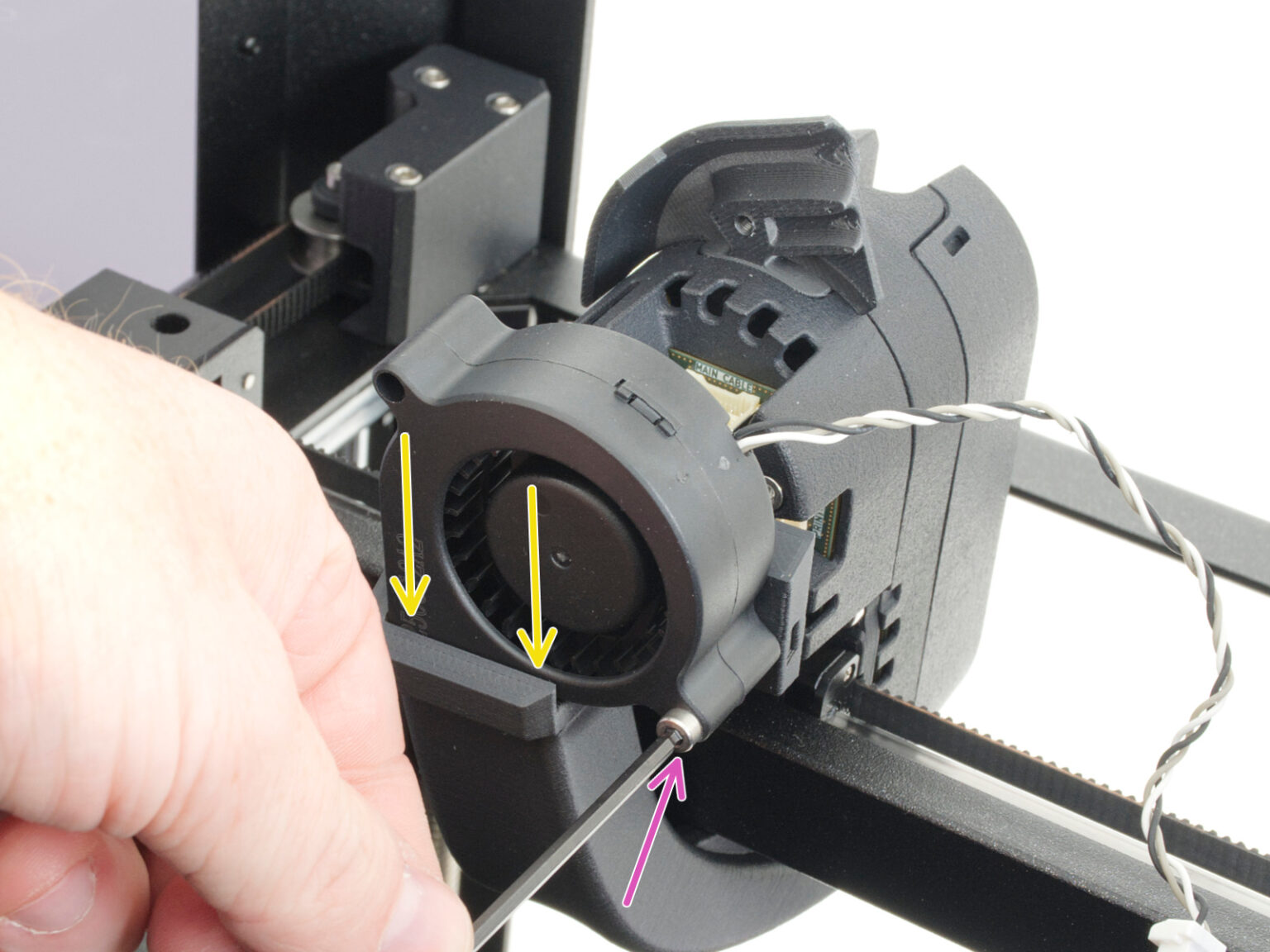
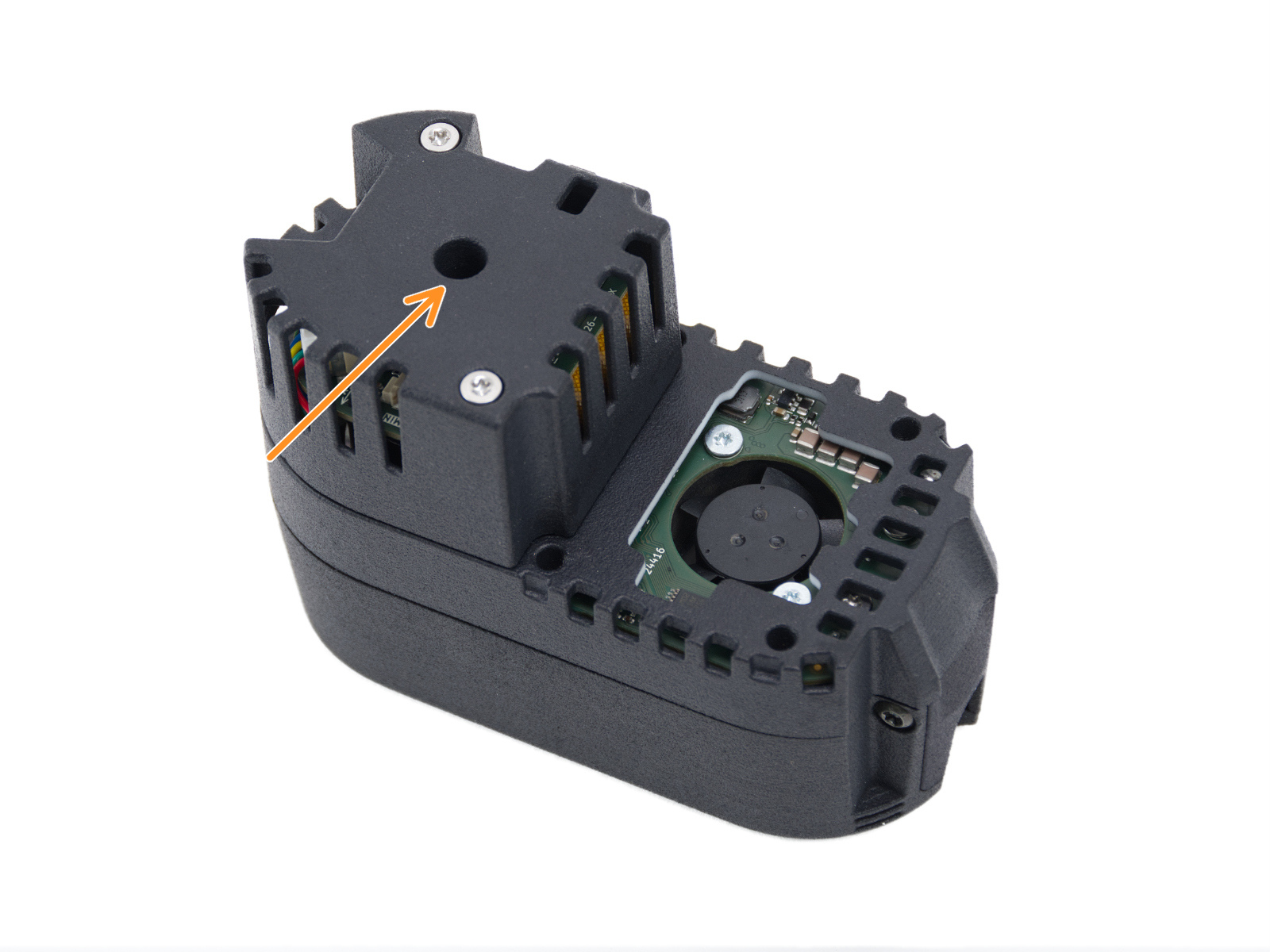
                  The manual release access hole is located behind the print fan assembly.

                    1. Loosen the print fan mounting screw and carefully remove the fan from the fan shroud. 
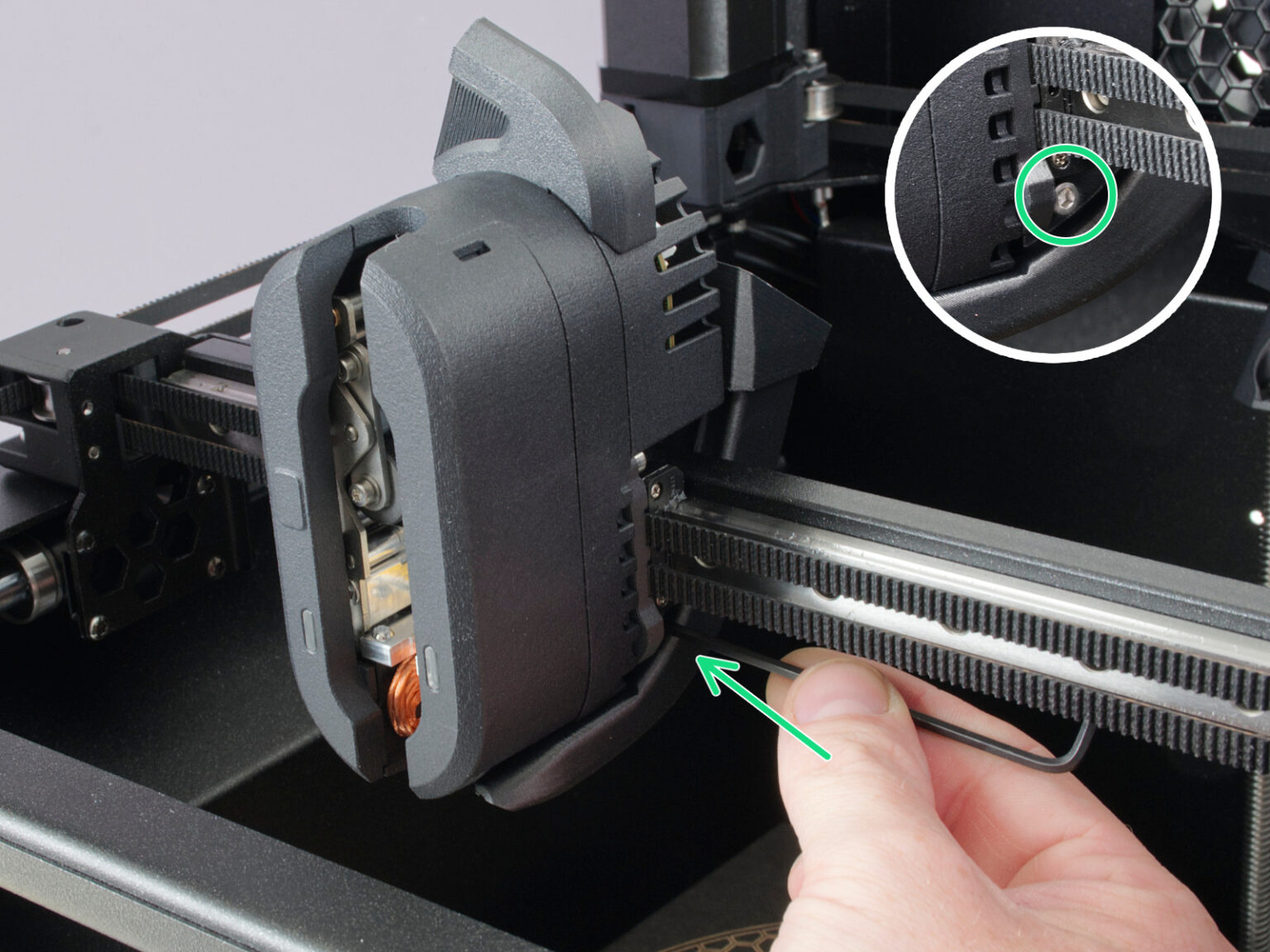
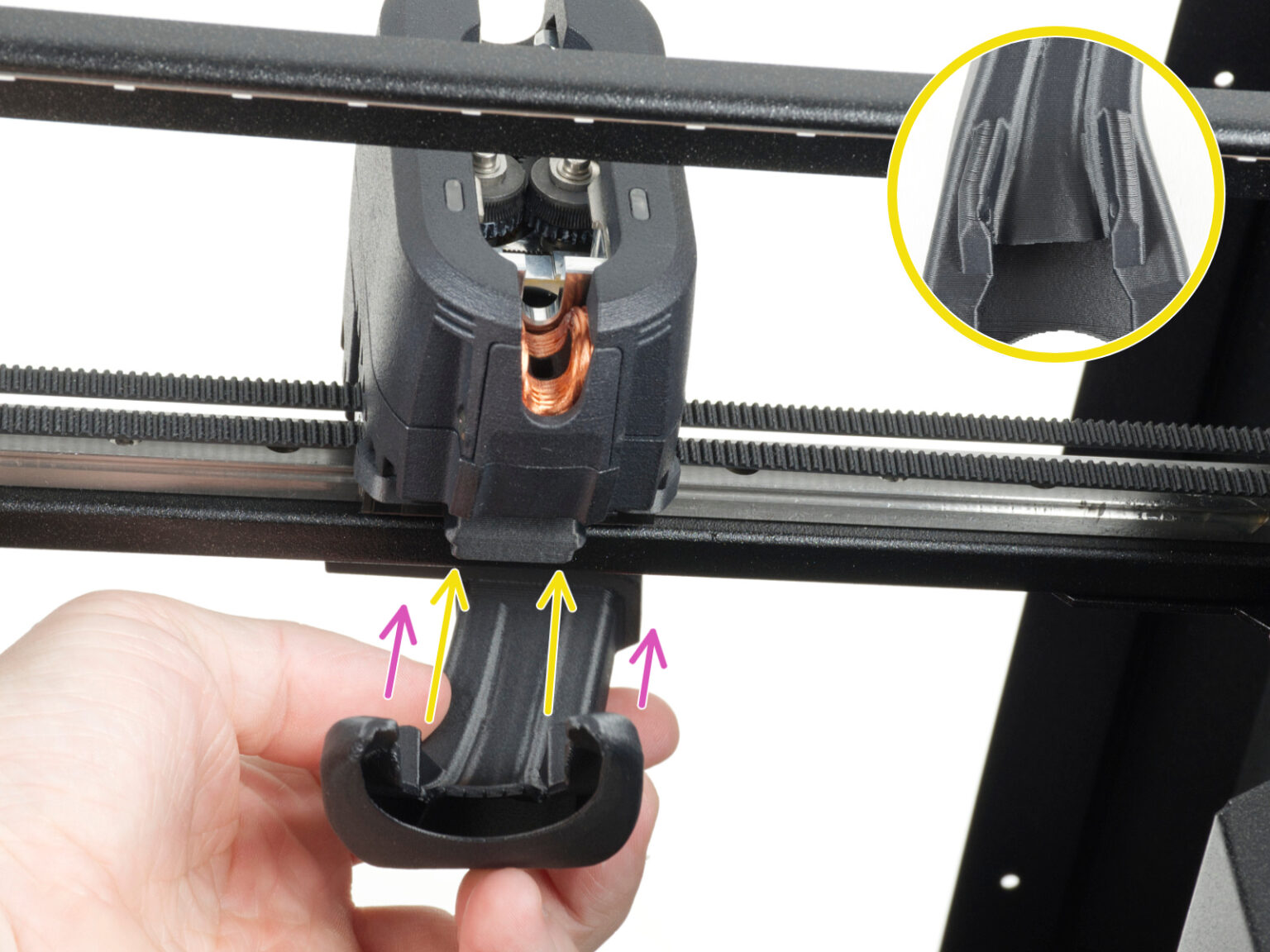
                    2. Loosen the two screws securing the fan shroud on both sides of the print head, then remove the fan shroud from the printer.

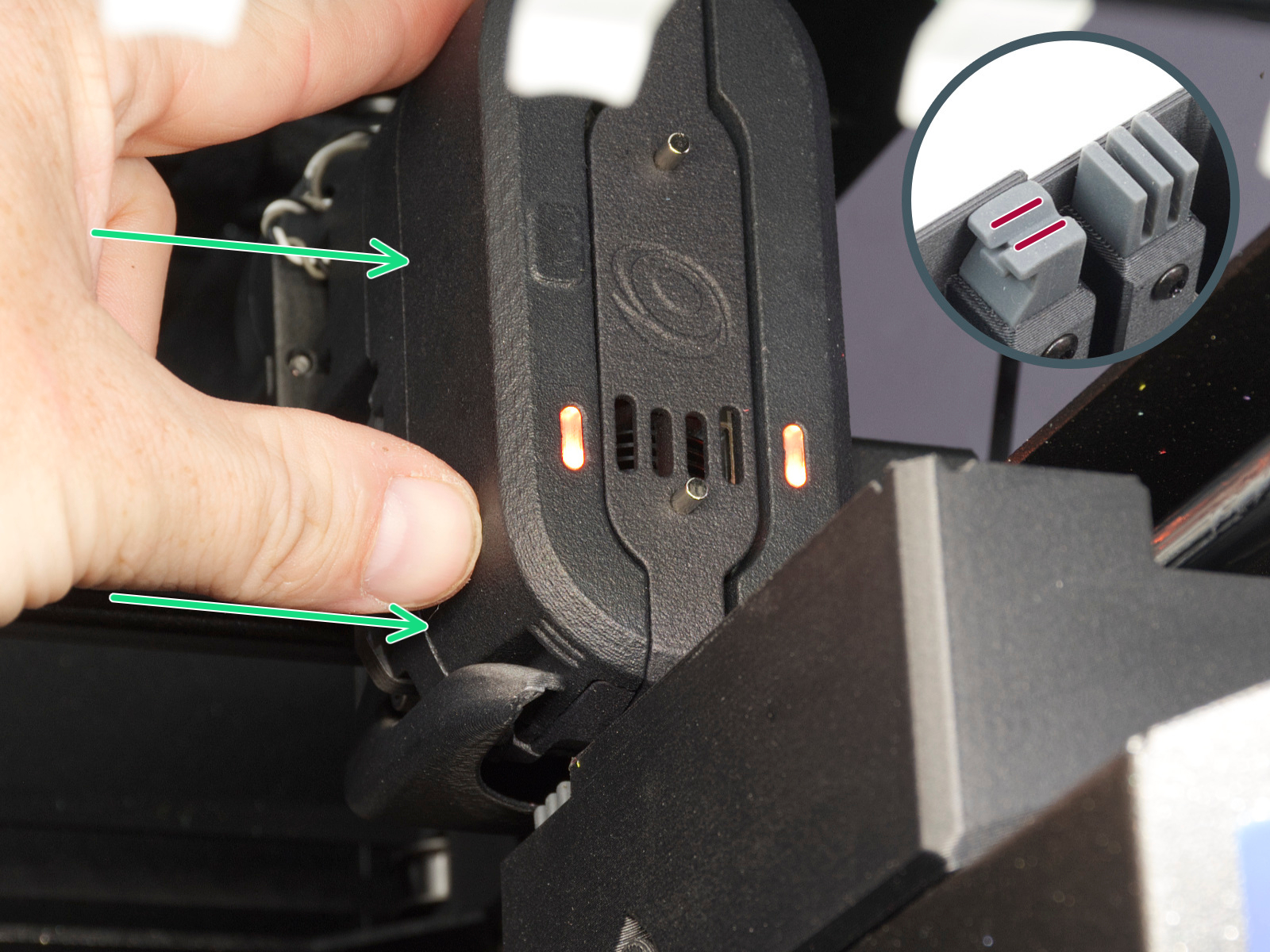
                  The release mechanism only activates when a magnet is touching a rectangle shaped point on the print head cover on left front (pictured in step 4), or if you move the print head close to the appropriate dock so the nozzle tool is aligned with it.
                  1. Attempt moving the print head to the dock position. 
                  2. If the previous step was not enough to release the print head, place a magnet onto front notch, where the magnet from dock engages the gate.

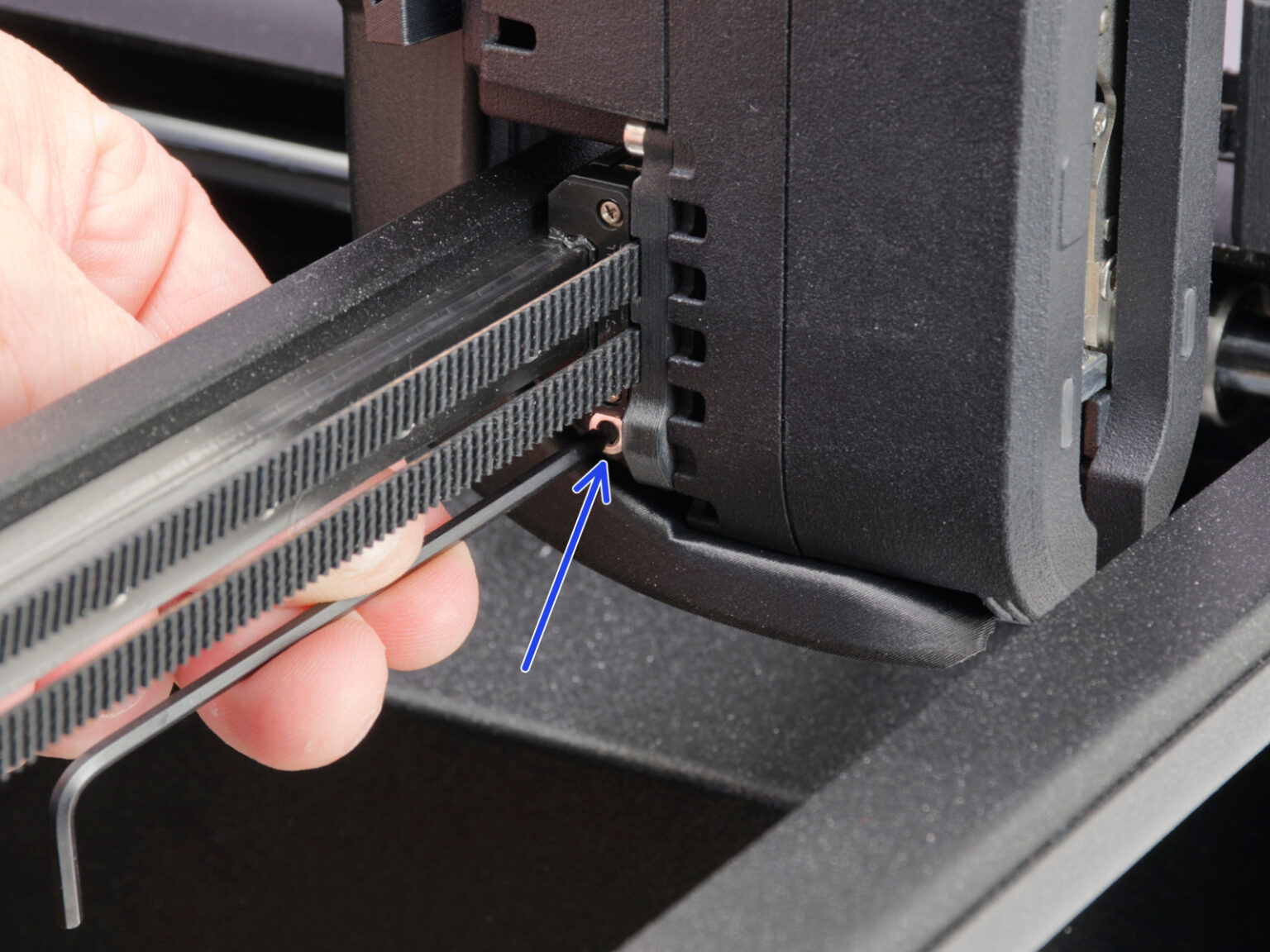
                  3. Locate the access hole behind the print fan.
                  4. Insert the flathead screwdriver into the center circle access hole until it engages with the internal mechanism. Only insert it on the center hole, any other hole such as rectangular hole on the side should not be used. 
                  Note: Use a flathead screwdriver with a sufficiently thin shaft. Forcing a larger screwdriver into the access hole may damage the mechanism.

                  Clicking sounds usually indicate that the mechanism is being actuated. The release mechanism only activates when the printer detects the nozzle tool in the dock position. Move the print head close to the appropriate dock so the nozzle tool is aligned with it.

                  Note: If the nozzle tool is not correctly positioned near the dock magnet, rotating the mechanism may only move the extruder motor without releasing the tool.
                  1. Carefully rotate the screwdriver while keeping the nozzle tool aligned with the dock. This should disengage the mechanism. 

                  Once the locking mechanism disengages, the nozzle tool should remain in the dock.

                  After manually releasing the tool:

                  • Make sure the nozzle tool is fully seated in the dock.
                  • Check whether the mechanism of the print head is clean without any bits or filament residue.
                  • Check that the print head can move freely away from the dock.
                  • Restart the printer.
                  • Perform dock or tool calibration if requested.
                  • Reassemble the print fan shroud, and print fan, following the steps from the assembly guide.

                  If the nozzle tools still cannot be released

                  If the tool remains attached after following the procedure above:

                  • Inspect the dock area for debris or damaged parts.
                  • Verify that the nozzle tool is correctly aligned with the dock.
                  • Repeat the procedure while ensuring the tool is positioned near the dock magnet.
                  • Repeat the procedure once more, this time including the red-colored steps. 
                  • Perform the required dock or tool calibration.

                  If the problem persists, contact customer support. 

                  ¿Te resultó útil este artículo?
                  Esta acción está disponible solo para usuarios registrados. Por favor inicia sesión.
                  Inicia sesión  para publicar un comentario
                  Sin comentarios

                  Temas

                  • Resolución de problemas
                    • Resolución de problemas
                      • Error cambiador #17101 (XL)
                      • Deriva térmica Base  #13203 (MK4) #21203 (MK3.9) #23203 (MK3.5)
                      • Error mintemp base #13207 (MK4) #21207 (MK3.9) #23207 (MK3.5)
                      • Error maxtemp base #13205 (MK4) #21205 (MK3.9) #23205 (MK3.5)
                      • Homing error Y #31305 (CORE One) #35305 (CORE One L) #36305 (CORE One INDX) #17305 (XL)
                      • I2C Send failed #13311 (MK4) #21311 (MK3.9) #23311 (MK3.5)
                      • Mala Configuración Célula de carga #13527 (MK4) #21527 (MK3.9)
                      • Timeout Célula de carga #13528 (MK4) #21528 (MK3.9)
                      • Blue Screen of Death - Pantalla Azul de la Muerte (BSOD) #31538 (CORE One) #35538 (CORE One L) #26538 (MK4S) #13538 (MK4) #27538 (MK3.9S) #17538 (XL) #21538 (MK3.9) #28538 (MK3.5S) #23538 (MK3.5) #12538 (MINI)
                      • Uneven bed #31111 (CORE One) #35111 (CORE One L) #36111 (CORE One INDX)
                      • Filament sensor stuck #31113 (CORE One) #35113 (CORE One L) #36113 (CORE One INDX) #17113 (XL) #26113 (MK4S) #13113 (MK4) #27113 (MK3.9S) #21113 (MK3.9) #28113 (MK3.5S) #23113 (MK3.5) #12113 (MINI/+)
                      • Chamber MAXTEMP error #31214 (CORE One) #35214 (CORE One L) #36214 (CORE One INDX)
                      • Homing error X #31304 (CORE One) #35304 (CORE One L) #36304 (CORE One INDX) #17304 (XL)
                      • Puppy error #31511 (CORE One) #35511 (CORE One L) #36511 (CORE One INDX)
                      • Puppy error #31513 (CORE One) #35513 (CORE One L) #36513 (CORE One INDX)
                      • Chamber Mintemp error #31215 (CORE One) #35215 (CORE One L) #36215 (CORE One INDX)
                      • Homing calibration needed #31118 (CORE One) #35118 (CORE One L) #36118 (CORE One INDX)#17118 (XL)
                      • Calibrate homing from menu #31120 (CORE One) #35120 (CORE One L) #36120 (CORE One INDX) #17120 (XL)
                      • Nozzle tool remains attached to the print head (CORE One INDX)
                      • Ajustando la tensión de la correa (CORE One L, CORE One)
                    • Diagnostics [Traducción en desarrollo]
                    • Resolución de problemas de la calidad de impresión
                    • Códigos QR de error
                    • Mensajes de Error de Impresión