AA

Productos destacados

    Categorías populares

      Búsquedas populares

        Artículos

          Blog

            Productos

              Categorías

                Búsquedas sugeridas

                  Buscando…
                  Sin resultados
                  Algo salió mal.
                  ↑↓ Seleccionar↵ AbrirEsc Cerrar búsqueda
                  • English
                  • Čeština
                  • Deutsch
                  • Español
                  • Français
                  • Italiano
                  • Polski
                  • 日本語
                  • Pedidos
                  • Dirección
                  • Alertas de Stock
                  • Cursos
                  • Subscripción
                  • Editar Cuenta
                  • Impresoras 3D9+▾

                    Impresoras 3Dnueva

                    nuevaPrusa CORE One L+Conoce más
                    nuevaPrusa CORE One+ (Gen 2)Conoce más
                    newPrusa CORE One L+ INDX 8-ToolnuevaPrusa CORE One+ (Gen 2) INDX 8 HerramientasPrusa CORE One L+: Critical InfrastructureOriginal Prusa MK4SnuevaOriginal Prusa XL+Original Prusa XL+: Critical Infrastructure

                    Actualizaciones de impresoras

                    newKit de Conversión CORE One/+ INDXnuevaActualizació Prusa CORE One L a CORE One L+nuevaPrusa CORE One+ a Prusa CORE One+ (Gen 2)nuevaActualización Prusa XL a Prusa XL+
                    Programa de Recompensas PrusaComparte. Recomienda. Gana.
                    ¿Cómo Elegir Una Impresora 3D?Te guiaremos paso a paso por los aspectos básicos para que encuentres la máquina ideal para tu espacio, presupuesto e ideas.
                    Libro electrónico gratuitoDescarga gratis el libro electrónico Fundamentos de la Impresión 3D con Josef Prusa y da tus primeros pasos en el mundo de la impresión 3D
                    Piezas Imprimibles Original PrusaColecciones de piezas de repuesto imprimibles para impresoras 3D Original Prusa y mejoras.
                    Información de envíoInformación actualizada periódicamente sobre la capacidad de fabricación actual y los plazos de entrega de nuestras impresoras.
                    Impresión 3D PersonalizadaImpresión 3D personalizada profesional con diversos materiales según sus requisitos.
                  • Materiales▾

                    Filamentos

                    PrusamentPLAPETGASA / ABSPC BlendPA (Nylon)FlexCompositesEspecialLiquidación de materiales

                    Resinas

                    ResinaLimpiador Resina
                    Guía de FilamentoComprobar Mi Bobina Prusament
                    Prusament.com
                  • Piezas y Accesorios▾

                    Accesorios

                    EnclosureBoquillasLáminas de ImpresiónAccesorios EsencialesCámaras y ComplementosHerramientas y ManualidadesAdhesivos

                    Piezas de recambio

                    Merchandising

                    Piezas de recambio - Todas las ImpresorasCORE OneMK4/S y MK3.9/SMK3/MK3S/MK3S+XL
                    Merch
                  • Para Empresas▾
                    Prusa Pro HT90Prusa Pro SLXPrusa Pro AFSPrusa Pro Medical OneOriginal Prusa XLOriginal Prusa XL: Critical Infrastructure
                    Prusa CORE One+Conoce más
                    Prusa CORE One LConoce más
                    Prusa CORE One L: Critical Infrastructure Edition

                    Impresión 3D para

                    Fabricación e I+DIndustria AutomotrizSanidadEducación e Investigación AcadémicaArquitectos y DiseñadoresIndustria del CineInfraestructuras Críticas

                    Stories de Impresión 3D

                    • Cómo comenzó la impresión 3D: Sobre Rep-rap y el código abierto con Adrian Bowyer
                    • La enseñanza de las matemáticas redefinida con la impresión 3D en JKU Linz
                    • La historia detrás del destornillador de LTT
                    • Victoria Hand Project: Cambiando la Atención Protésica con la Impresión 3D
                    Distribuidores Oficiales de Prusa
                    Sostenibilidad
                    Prusa Education
                    Contactar y Consultar
                    Impresión 3D personalizada
                    Certificado ISO
                  • Software▾
                    PrusaSlicer

                    PrusaSlicerPrusaSlicer

                    PrusaSlicer es una herramienta de código abierto, con numerosas funciones y que se actualiza con frecuencia, que incluye todo lo necesario para exportar los archivos de impresión perfectos para tu impresora 3D.

                    WindowsMacOSLinux
                    Prusa Connect

                    Prusa Connect

                    Prusa Connect es un servicio en la nube que permite controlar y supervisar de forma remota tus impresoras 3D, y que ofrece un tratamiento seguro de los datos, una configuración sencilla y la posibilidad de gestionar varias impresoras desde cualquier lugar.

                    Inicia Sesión en Connect
                    Prusa.app

                    Prusa.app

                    Controla tu(s) impresora(s) de forma remota desde cualquier lugar gracias a la tecnología Prusa Connect. Prusa.app ofrece una experiencia totalmente nueva con las impresoras Prusa en teléfonos Android e iOS.

                    ¡Pruébalo ya!
                    Controladores y firmwareDescarga el firmware y los controladores más recientes para tu impresora 3D.
                    Soporte para PrusaSlicer
                    Soporte para Prusa Connect
                  • Modelos 3D▾
                    Impresoras 3DArte y DiseñoHobby y MakersHogarMiniaturas de EscritorioJuguetes y JuegosTienda de Printables

                    Modelos 3D populares

                    • Strong garden hose holder
                    • Prusa Spool Bot
                    • Build Tray — Modular Organizer for Assembly, Disassembly and Maintenance
                    • Broom Holder
                    • Octagon Fabric
                    • Prusa CORE One ? (Mimic Skin)

                    Concursos de Diseño

                    • Réutilisation de la carte mère Framework Laptop 121/9/2026 – 30/9/2026
                    • 🏆 Défi du designer : Tours de magie !1/9/2026 – 22/9/2026
                    • Organisateurs de maquillage4/9/2026 – 20/9/2026
                  • Comunidad▾

                    Próximos eventos

                    • Maker Faire Tokyo 20265/9/2026 – 6/9/2026 · Tokyo, Japan · Prusa Team
                    • IFA 20264/9/2026 – 8/9/2026 · Berlin, Germany · Prusa Team
                    • Maker Faire Bay Area25/9/2026 – 27/9/2026 · Kalifornie, United States · Prusa Team
                    • 3D Printopia 202626/9/2026 – 27/9/2026 · Pennsylvania, United States · Prusa Team

                    Prusa Forum

                    • Perfil para prusaslicer de MK4 con MMU3 y boquilla de 0,25 para cuando?
                    • Casi convencido de pulsar sobre comprar... convenceme
                    • Core One+: Fallo en calibración del sensor de filamento (Valores ADC fuera de rango / Error 2147483647)
                    Mapamundi de PrusaMapamundi de PrusaEncuentra usuarios de impresión 3D de tu zona y descubre la comunidad que te rodea.
                  • Ayuda▾
                    Guías y TutorialesPrusaSlicerPrusa ConnectMateriales

                    Modelo de Impresora

                    CORE One INDXCORE One LCORE One+CORE One

                    Resolución de Problemas de Hardware

                    • Fallo Selftest (CORE One/+)
                    • Hotend atascado (MK4)
                    • Ajustando la tensión de la correa (CORE One L, CORE One)
                    • Prusa Connect y PrusaLink explicado

                    Drivers & Firmware

                    Familia INDXFamilia CORE OneFamilia MK4Familia XLFamilia MMUFamilia PRO
                  • Cursos▾

                    Conviértete en un experto en impresión 3D

                    Prusa Academy ofrece cursos en línea sobre diversos temas relacionados con la impresión 3D. Cada curso incluye: textos fáciles de leer con numerosas imágenes y vídeos breves; enlaces para inspirarse y profundizar en el tema; cuestionarios para poner a prueba tus conocimientos a lo largo del curso; y un certificado de finalización.

                    Ver todos los cursosMi biblioteca de cursos
                    • Modelado 3D en Autodesk Fusion
                    • Masterclass de PrusaSlicer – De Principiante a Experto
                    • Complete Guide to 3D Print Postprocessing, Painting, and Detailing
                    • Airbrush Your 3D Prints: From Basics to Advanced Tricks
                  • Blog▾
                    • ¡Las Ofertas de la Vuelta al Cole 2026 Han Llegado!
                    • Preview de PrusaSlicer 3.0 – Diseñado para el Futuro de la Impresión 3D
                    • Prusa CORE One+ (Gen 2) INDX, Envíos Iniciados, Impresoras Completas Abiertas a Pedidos
                    E-Book: Fundamentos de la impresión 3D
                  • Empresa▾

                    Sobre Prusa Research

                    Somos el mayor fabricante de impresoras 3D de Europa y Estados Unidos. La empresa fue fundada en 2012 como una startup unipersonal por Josef Prusa, un aficionado, creador e inventor checo. En solo 15 años, hemos crecido hasta convertirnos en una empresa con más de 1.200 empleados. Cada mes, diseñamos, fabricamos y enviamos más de 10000 impresoras 3D innovadoras y seguras desde nuestras sedes de Praga (República Checa) y Delaware (EE. UU.) a usuarios de más de 160 países. ¡Mira el vídeo y descubre cómo nació Prusa Research y lo que hemos logrado en tan solo 10 años!

                    Sobre NosotrosLínea temporalSostenibilidadOpen-source
                    Sobre nosotros
                    Contacta con Nosotros
                    Logo e Imágenes
                    Certificado ISO
                  1. Soporte
                  2. Boquillas
                  3. E3D V6 Nozzles
                   

                  Contenidos

                  • Identify nozzle size
                  • Nozzles for abrasive materials
                  • Nextruder V6 Nozzle Adapter
                  • Other nozzle diameters
                  • PrusaSlicer configuration
                  • First Layer Calibration of other nozzles
                  • Other considerations

                  Blog

                  • ¡Las Ofertas de la Vuelta al Cole 2026 Han Llegado!
                  • Preview de PrusaSlicer 3.0 – Diseñado para el Futuro de la Impresión 3D
                  • Prusa CORE One+ (Gen 2) INDX, Envíos Iniciados, Impresoras Completas Abiertas a Pedidos

                  Newsletter

                  Regístrate y obtén nuestro dosier mensual de información útil sobre nuevos firmwares, nuevas versiones de PrusaSlicer y consejos generales para proyectos de impresión 3D.

                  Al hacer clic, aceptas recibir nuestra newsletter.

                  Este sitio está protegido por reCAPTCHA Enterprise y se aplican la Política de Privacidad y los Condiciones del servicio de Google.

                  Strong garden hose holder
                  Tienda
                  • Impresoras 3D
                  • Mejoras de Impresoras
                  • Filamentos
                  • Accesorios
                  • Merchandising Prusa

                  © Prusa Research a.s.

                  Printables
                  • Modelos 3D
                  • Store
                  • Clubs
                  • Concursos de Diseño 3D
                  • Brands
                  Comunidad
                  • Mapa Mundial
                  • Foro
                  • Grupos de Usuarios
                  • Eventos
                  Ayuda
                  • Ayuda Prusa
                  • Prusa Academy
                  • Calculadoras de Impresión 3D
                  Software
                  • PrusaSlicer
                  • Prusa.app
                  • Prusa Connect
                  • Drivers y Software
                  Empresa
                  • Sobre nosotros
                  • Blog
                  • Distribuidores Oficiales de Prusa
                  • Contacto
                  • Certificado conforme a las normas ISO 9001, ISO 14001 e ISO 45001
                  • Términos y Condiciones generales
                  • Términos Generales y Condiciones de Uso de los sitios Web PRUSA
                  • Política de privacidad
                  • Información sobre las cookies
                  • Política de Reclamaciones de los Clientes
                  • Página de Estado de los Sitios Web
                  • Configuración de las cookies
                  • Términos y Condiciones generales
                  • Términos Generales y Condiciones de Uso de los sitios Web PRUSA
                  • Política de privacidad
                  • Información sobre las cookies
                  • Política de Reclamaciones de los Clientes
                  • Página de Estado de los Sitios Web
                  • Configuración de las cookies

                  © Prusa Research a.s.

                  JOSEF PRUSA®, PRUSA RESEARCH®, PRUSA POLYMERS®, PRUSA ORANGE®, PRUSA 3D ® Y PRUSAMENT® son marcas registradas de Prusa Development a.s. utilizadas por Prusa Research a.s. bajo licencia de Prusa Development a.s.

                  E3D V6 Nozzles

                  Relevante para

                  MK4 family
                  XL family
                  MK3.9 family
                  MK3.5 family
                  MINI family
                  +
                  Artículo está también disponible en los siguientes idiomas
                  English
                  Čeština
                  Polski
                  Deutsch
                  Français
                  Español
                  Italiano
                  日本語

                  The Prusa FFF printers are equipped with a brass nozzle. This article will review the main information about the nozzles that can be used with your printer. 

                  Brass has excellent heat conductivity and is tough enough to print most common filaments. However, when using abrasive filaments, the brass nozzle tends to wear too quickly, so abrasion-resistant nozzles are available. 

                  If you need to change or replace the nozzle, please refer to our guides:

                  • MK2.5/S, MK3/S/+, MK3.5/S
                  • MINI/+

                  The E3D (or E3D compatible) V6 nozzles fit into the MK3, MK3S, MK3S+, as well as MK2-series and previous, and the MINI/+ hotend. This nozzle needs to be tightened while the hotend is heated, or there will be a gap between the nozzle and the heatbreak through which the filament will leak out. The filament is led into the heatbreak through a PTFE tube.

                  Identify nozzle size

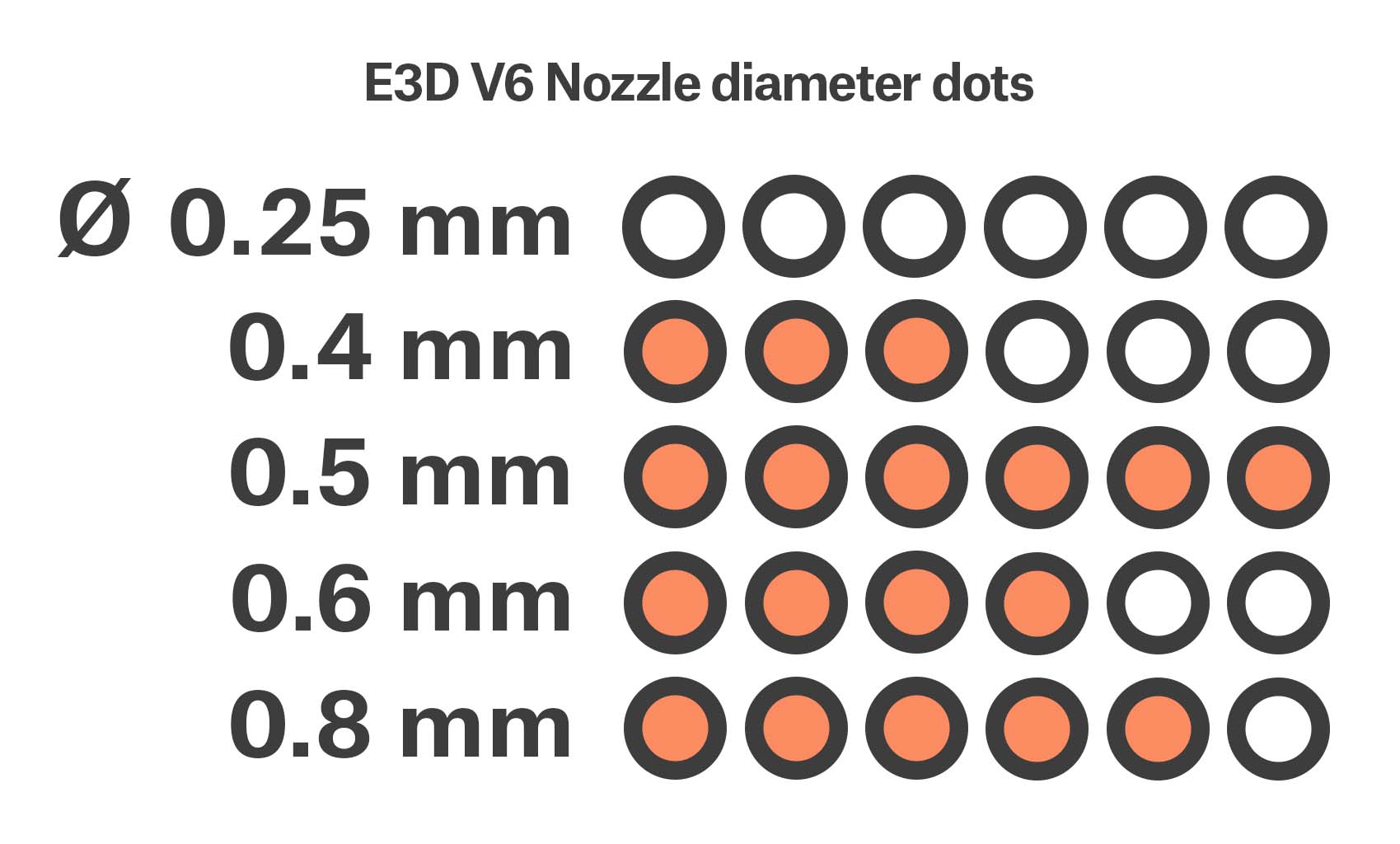
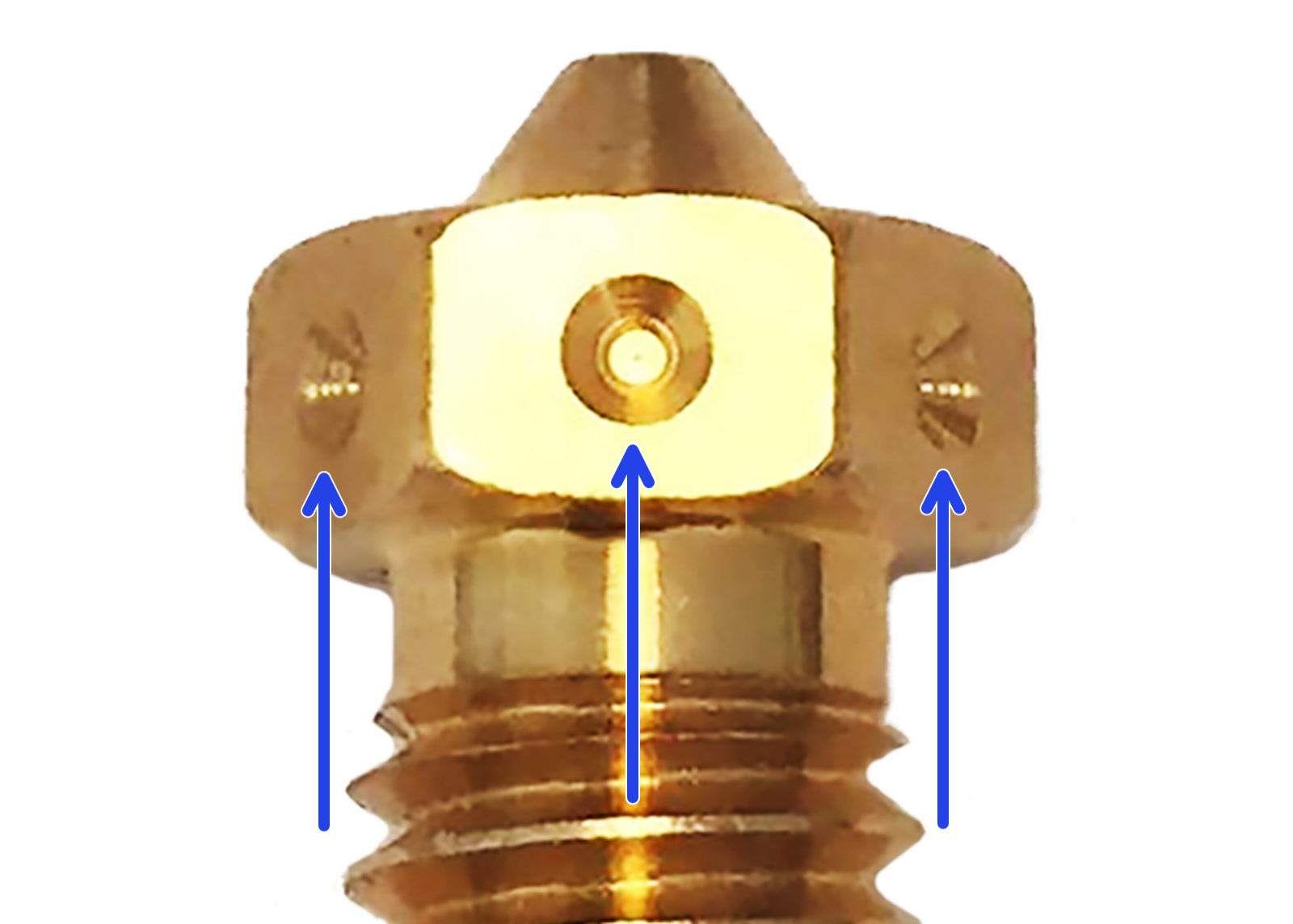
                  You can identify the nozzle diameter by the dots around the rim of the nozzle. For example, the E3D 0.4 mm nozzles shipped with the Original Prusa MK3S+ have three dots.

                  Note that the E3D V6 0.25 mm nozzle has no dots, and looks almost the same as the E3D compatible 0.4 mm nozzle that ships with the Original Prusa MINI/+.
                  Nozzles for abrasive materials

                  Some filaments have particles added to them that can make them abrasive. A regular brass nozzle will degrade quickly and lose its properties when printing these. To print them, you will need to use a nozzle made of another material

                  Most of the abrasive materials are composites and plastics with additives. Some examples are ColorFabb XT CF20, ColorFabb Bronzefill, ColorFabb SteelFill, and some glow-in-the-dark filaments. Always ask your filament vendor if you are not sure about filament requirements. A slight disadvantage of the hardened steel nozzle is that some standard materials, like ABS, cannot be printed as fast as a regular nozzle. Due to the different thermal properties of a hardened steel nozzle compared to a brass nozzle, you may have to increase the nozzle temperature when printing.

                  For multi-material printing using the Original Prusa MMU2S, we only provide presets for a 0.25 mm, 0.4 mm, or 0.6 mm brass nozzle. Other types of nozzles, i.e. hardened steel or other exotic alloys, may cause issues.

                  Hardened steel nozzle by E3D

                  The hardened steel nozzle is recommended for printing abrasive filaments, which wear out the standard brass nozzle very quickly.

                  Most of the abrasive filaments are composites, plastics with something mixed in.

                  Some examples are Bronzefill, Brassfill, filaments with carbon compound, and glow-in-the-dark filaments.

                  Always ask your filament vendor if you are not sure. Keep in mind, hardened steel has different thermal conductivity properties than brass. Due to that, you may need to adjust your printing settings and increase the  hotend temperature by about 5°C to print successfully with the hardened steel nozzle.

                  Nozzle X by E3D

                  Nozzle X is a nozzle designed to address the thermal limitations of a hardened steel nozzle and the poor abrasion resistance of plated copper or brass nozzles. It is coated with WS2, a polyphobic coating, that reduces the amount of plastic that sticks to the inside of the nozzle. For this reason, Nozzle X should not be maintained the same way as hardened steel or copper nozzles.

                  It can be used with abrasive fillers like glass, Kevlar, or carbon reinforcement, but does not support more abrasive fillers, like Boron Carbide, Boron, Boron Nitride, Tungsten, or Tungsten carbide.

                  Recommended cleaning methods:

                  • Non-abrasive cloth/rag for external use.
                  • Cleaning filament for internal use.

                  Non-recommended cleaning methods:

                  • An acupuncture needle or a brass brush can damage the coating.
                  • Cold-pulls. Can tear off the WS2 coating.

                  The Olsson Ruby nozzle

                  Similar to the hardened steel nozzle, the Olsson Ruby is designed to print highly abrasive materials. Since it is mostly made of brass, it retains the excellent heat conductivity and throughput of the stock brass nozzle, but with a very hard gemstone as its tip. Even though the ruby gemstone is highly wear-resistant, it’s also brittle. If you have the Live Z adjust value set incorrectly, or if your PINDA sensor is not set to a correct distance and the nozzle hits the removable steel sheet, the nozzle may crack. For installation, please refer to the official 3DVERKSTAN instructions, as its installation is a bit more involved.

                  Nextruder V6 Nozzle Adapter

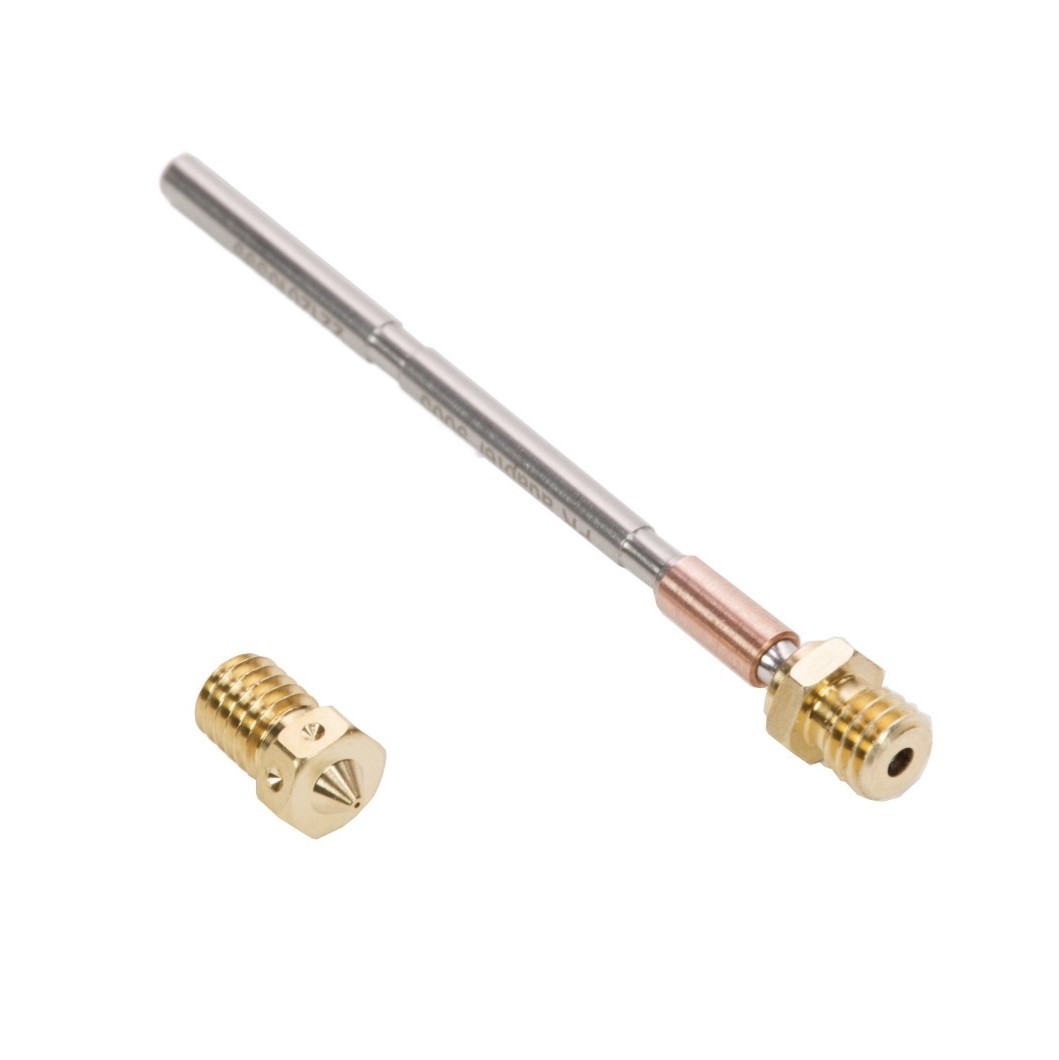
                  The Nextruder V6 Nozzle Adapter enables your Prusa printer’s Nextruder to accept E3D V6 nozzles. 

                  If you need to install or replace a nozzle with Nozzle Adapter, please refer to our guides: 
                  • Nozzle adapter for CORE One
                  • Nozzle adapter for MK4S, MK3.9S
                  • Nozzle adapter for MK4, MK3.9
                  • Nozzle adapter for XL Single tool, Nozzle adapter for XL Multi tool

                  Other nozzle diameters

                  If you want to use a nozzle with a different diameter from the ones we already mentioned, you have to create the profile in PrusaSlicer manually. Starting with your standard 0.4 mm nozzle, you have to change the nozzle diameter in the Printer Settings and Extrusion width (percentage-wise). Keep in mind that the maximal layer height is always around 80% of the nozzle diameter. For more information, please see Creating profiles for different nozzles.

                  A 0.1 mm nozzle can be considered experimental; Its small diameter will not work with all filaments, the tolerances required in its manufacturing are hard to guarantee, and the excessive printing time it requires can be beyond reasonable. For these fine resolutions, you may want to consider SLA printing.

                  PrusaSlicer configuration

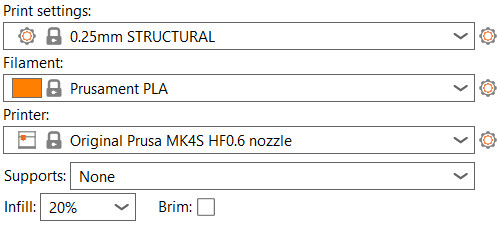
                  To adjust preset settings in PrusaSlicer, go to Menu -> Configuration -> Configuration Wizard -> Prusa Research and select the printer model you have, as well as the nozzle diameter you are currently using (purple squares).

                  Uncheck all the other models and nozzle diameters to avoid confusing the presets. You can always do the Wizard again and modify the settings. To set a different nozzle size on your printer, please see HW setup (MK2.5/S & MK3/S/+).
                  On MINI/+, navigate to Menu -> Settings -> Hardware.

                  Except for the presets for the stock 0.4 nozzle, all other nozzle configurations will have the diameter stated in the name of the profile. If you don't have the words "0.25 nozzle", "0.6 nozzle" or "0.8 nozzle" in the profile's name (green square), the preset is for a 0.4 mm nozzle.
                  First Layer Calibration of other nozzles

                  The First Layer Calibration is not required on MK4/S, MK3.9/S, and XL printers.

                  Starting from firmware 3.13.0, the First Layer calibration works for multiple nozzle sizes. The nozzle size can be changed at Settings -> HW setup -> Nozzle d. [0.25|0.40|0.60|0.80]. The 0.4 mm nozzle is the default.
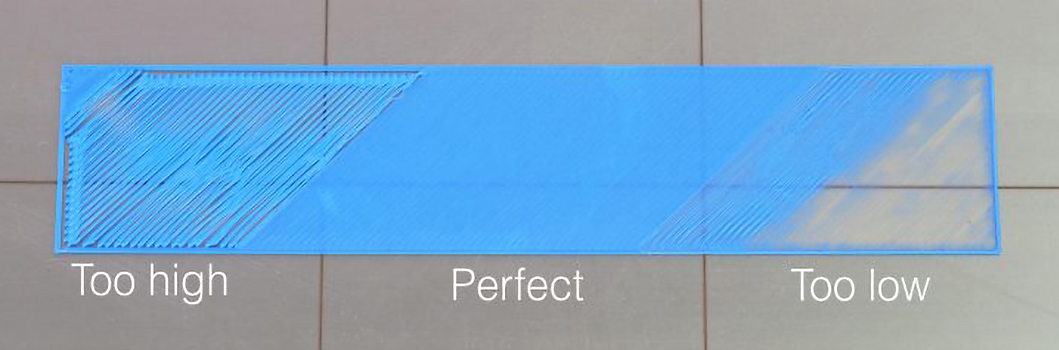
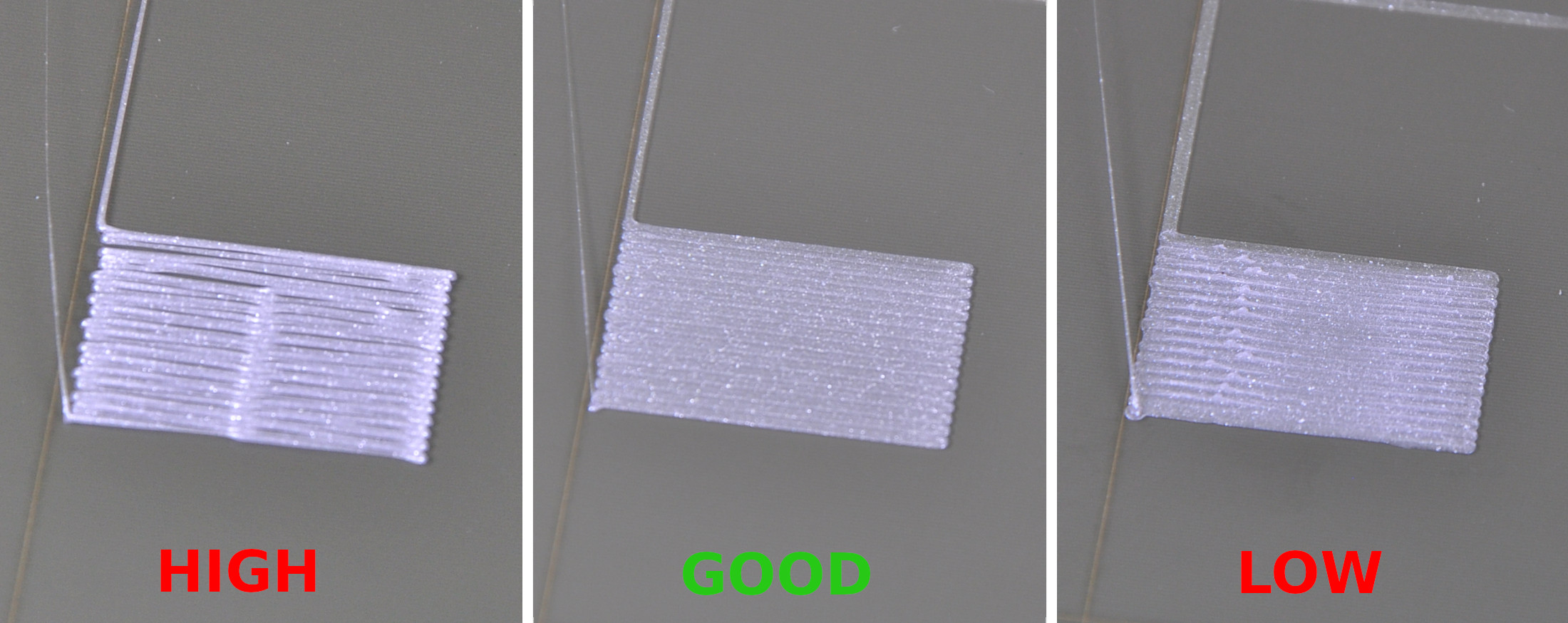
                  You can easily create a rectangle in PrusaSlicer by right-clicking on an empty build plate and select 'Add Shape -> Box'. Then scale it to be 0.2-0.4 mm tall, depending on the nozzle you are calibrating for. You want a box that is only one layer thick.

                  Reset Live Adjust Z value:

                  • Original Prusa MK3S+/MK3S/MK2.5S - Reset your Live Adjust Z value from LCD menu -> Settings -> Live Adjust Z, then scroll the selector knob clockwise until the value reaches zero.
                  • Original Prusa MINI - Reset your Live Adjust Z value from LCD menu -> Calibration -> Live Adjust Z, then scroll the selector knob clockwise until the value reaches zero.
                  • Original Prusa MK4, XL - These models are equipped with a Loadcell. If any Live Adjust Z value is set, this is automatically reset after the next print is done. 

                  After this, start your G-code and 'Adjust Live Z' while printing:

                  1. Press the knob after it has started extruding and locate 'Adjust Live Z'.
                  2. Select it and turn the knob clockwise until the line is flattened, but not squished. It should have a smooth top. When doing solid top-fill, make sure there are neither gaps between the lines (too far away), nor ridges between the lines (too close). Please see First Layer Calibration (i3) or Calibración Primera Capa (MINI/MINI+) for examples.
                  3. Press the selector knob again to store the value.

                  The image depicts the first layer of a 0.4 mm nozzle. The line can be almost half the width of what is depicted.

                  Other considerations 

                  Smaller diameters (~0.25 mm)

                  Almost any Composite material is out of the question. The particles in it can (and will) quickly clog or ruin your nozzle. However, filaments with fine glitter or similar "shine particles", like what is found in Prusament Galaxy Silver, should be no problem.

                  Flexible materials can also be problematic on a smaller diameter nozzle due to the higher pressure required for extrusion. It can buckle and tangle around the filament pulleys with higher pressure.

                  Higher temperature filaments like ASA and PC Blend have a rather high melt-flow rate and will print well with a 0.25 mm nozzle. However, it can not have composite particles like kevlar, carbon fiber, or glass.

                  Slow speed - Precision takes time, prepare yourself for printing times of 24 to 100 hours, even with smaller objects. Not only is each line thinner and narrower than usual, which results in more perimeters, but the extruder movements are also greatly reduced to accommodate the increased accuracy.

                  When printing with a smaller nozzle, calibration and bed leveling become even more important. After changing the nozzle, make sure you at least run the Z calibration of your printer before you start printing.

                  Besides the First layer calibration, additional calibration is not necessary on the Original Prusa MINI.

                  Larger diameters (>0.6 mm)

                  The main drawback is its resolution. The thicker and taller layer lines will print the object faster, but will have limitations regarding fine details. On the other side, functional parts may prove stronger since each line has a larger amount of solid material.

                  Also, thanks to the larger nozzle diameter, there will be more solid material to cool down, which may increase warping. This might be an issue for materials prone to warping during print, like ABS or PC Blend.

                  Nozzle size / Material0.25 mm0.4 mm0.6/0.8 mm
                  Flexible materials✖✔✔
                  PLA✔✔✔
                  ASA/ABS✔✔✔
                  PETG✔✔✔
                  wood/metal infused✖✔ *✔
                  CF/kevlar infused ABS✖✔ *✔ *
                  PC Blend✔✔✔
                  Nylon✔✔✔
                  PVA/BVOH✖✔✔

                  * Hardened nozzle

                  To avoid clogging, we recommend using our Prusament, as it has a low diameter variation tolerance of ±0.02 mm. For more information on different filaments, see our extensive Material table.

                  ¿Te resultó útil este artículo?
                  Esta acción está disponible solo para usuarios registrados. Por favor inicia sesión.
                  Inicia sesión  para publicar un comentario
                  Sin comentarios

                  Temas

                  • Accesorios de terceros y Otros proyectos
                    • Boquillas
                      • E3D V6 Nozzles
                      • Tipos de boquillas Prusa para impresoras con Nextruder
                      • Diferentes tipos de boquillas
                    • Viseras de protección
                    • Octoprint