Prusa
  • TIENDA
    • Últimos productos
    POR CATEGORÍA
    • Impresoras 3Dnueva
    • Actualizaciones de impresoras 3Dnueva
    • Materiales
    • Accesorios
    • Piezas de repuesto
    • Cursos
    • Merchandising
    • Obtener un presupuesto
    ENLACES RÁPIDOS
    • Envío y entrega
    • Devoluciones y reembolsos
    • Pago y financiación
    • Garantía
    • IVA y Tasas de aduana
    • Preguntas Frecuentes

    0 artículo en tu carritoartículos en tu carrito

    Tu carrito está vacío

    Ir al carritoComprar impresoras 3D

    Mi perfil

    Iniciar sesión para ver pedidos y artículos guardados

    Mi perfil

    Sesión iniciada como

    • Pedidos
    • Cerrar Sesión
  • Impresión 3D
    • Explorar la impresión 3D
    PARA PRINCIPIANTES
    • Impresión 3D 101
    • Cómo funciona la impresión FDM
    • Comprando tu primera impresora
    • Catálogo de modelos 3D
    POR USO
    • Prototipado rápido
    • Fabricación
    • Ingeniería
    • Investigación
    • Arte y diseño
    PROFUNDIZAR
    • Guía de materiales
    • Cursos
    • Webinars
    • Casos de estudio
    • Impresión 3D personalizada
  • IMPRESORAS 3D
    • Todas las impresoras 3D
    PARA
    • Casa o garajeAficionados, manitas e impresión doméstica
    • EmpresasProducción interna para pequeños equipos
    • EmpresaFlotas, seguridad y escala
    • Qué Prusa es la adecuada para mí
    COMPRAR Y NAVEGAR
    • CORE One+nueva
    • CORE One+ INDXnueva
    • CORE One L+nueva
    • CORE One L+ INDXnueva
    • XL+nueva
    • MK4S
    • Prusa Pro HT90
    • Prusa Pro AFS
    • Prusa Pro SLX
    MÁS DE IMPRESORAS
    • Piezas y actualizacionesnueva
    • Critical infrastructure
    • Casos de estudio
    • Signature Oak
    • Kits
  • MATERIALES
    • Todos los materiales
    POR USO
    • Uso diario y diseño
    • Ingeniería funcional
    • Compuestos
    • Especialidad profesional
    • Resinas SLA
    PRUSAMENT
    • PLA
    • PETG
    • ASA
    • PC
    • PA11
    • Flexible
    • TPU
    MÁS MATERIALES
    • Guía de materiales
    • Fabricamos material nosotros mismos
    • Sostenibilidad
    • Pedir en la tienda
  • SOFTWARE
    • Todo el software
    PREPARAR LA IMPRESIÓN
    • PrusaSlicer 3.0nueva
    IMPRIMIR Y MONITORIZAR
    • PRUSA CONNECT
    • EasyPrint
    • Aplicación iOS y Android
    • Prusa Farm
    EMPEZAR
    • Descargar e instalar
    • Base de conocimientos
    MÁS SOFTWARE
    • Catálogo de modelos 3D
  • SOPORTE
    • Explorar soporte
    ENCONTRAR RESPUESTAS
    • Base de conocimientos
    • Resolución de problemas
    • Cursos
    • Webinars
    OBTENER AYUDA
    • Contacta con nosotros
    • Chat en vivo
    • Envíos y entregas
    • Garantía
    • Devoluciones y reembolsos
    • Servicio y piezas de repuesto
    • Servicio y Reparación
    COMUNIDAD
    • Foro
    • Reddit
    • Printables
  • CENTRO DE CONFIANZA
    • Resumen del Centro de confianza
    POR TEMA
    • RGPD
    • Certificados
    • Seguridad
    • Cumplimiento
    COMPROMISOS
    • Informe de sostenibilidad
    HABLA CON NOSOTROS
    • Contacta con el equipo de seguridad
  • EMPRESA
    • Acerca de Prusa
    CONÓCENOS
    • Nuestra historia
    • Cómo fabricamos impresoras
    • Código abierto
    • Kit de marca y medios
    NOTICIAS
    • Blog
    • Sala de prensa
    • Eventos
    CONFIANZA Y SOCIOS
    • Sostenibilidad
    • Distribuidores y revendedores
    • Programa de afiliados
    • Contacto
    • English
    • Čeština
    • Deutsch
    • Español
    • Français
    • Italiano
    • Polski
    • 日本語
  • Sesión iniciada como

    • Pedidos
    • Dirección
    • Alertas de Stock
    • Mis Cursos
    • Suscripción
    • Editar Cuenta
    • Cerrar Sesión

Iniciar sesión para ver pedidos y artículos guardados

Sesión iniciada como
  • Pedidos
  • Dirección
  • Alertas de Stock
  • Mis Cursos
  • Suscripción
  • Editar Cuenta
  • English
  • Čeština
  • Deutsch
  • Español
  • Français
  • Italiano
  • Polski
  • 日本語
Tienda

0 artículo en tu carritoartículos en tu carrito

Tu carrito está vacío

Ir al carritoComprar impresoras 3D

Mi perfil

Iniciar sesión para ver pedidos y artículos guardados

Mi perfil

Sesión iniciada como

  • Pedidos
  • Cerrar Sesión
TIENDA
  • Últimos productos
POR CATEGORÍA
  • Impresoras 3Dnueva
  • Actualizaciones de impresoras 3Dnueva
  • Materiales
  • Accesorios
  • Piezas de repuesto
  • Cursos
  • Merchandising
  • Obtener un presupuesto
ENLACES RÁPIDOS
  • Envío y entrega
  • Devoluciones y reembolsos
  • Pago y financiación
  • Garantía
  • IVA y Tasas de aduana
  • Preguntas Frecuentes

Productos destacados

    Categorías populares

      Búsquedas populares

        Artículos

          Blog

            Productos

              Categorías

                Búsquedas sugeridas

                  Buscando…
                  Sin resultados
                  Algo salió mal.
                  ↑↓ Seleccionar↵ AbrirEsc Cerrar búsqueda
                  1. Soporte
                  2. Mantenimiento de la impresora
                  3. Mantenimiento Regular del MMU3
                   

                  Contenidos

                  • Useful tools
                  • MMU unit
                  • Extruder parts

                  Blog

                  • Factorio Ha Llegado a Printables
                  • Prusament PLA Lightweight: un 65 % más ligero que el PLA normal. Perfecto para aviones, cosplay y mucho más.
                  • Prusament PLA ColorMix: Imprime 45 tonos de color con solo cinco bobinas de filamento (y más)

                  Newsletter

                  Regístrate y obtén nuestro dosier mensual de información útil sobre nuevos firmwares, nuevas versiones de PrusaSlicer y consejos generales para proyectos de impresión 3D.

                  Al hacer clic, aceptas recibir nuestra newsletter.

                  Este sitio está protegido por reCAPTCHA Enterprise y se aplican la Política de Privacidad y los Condiciones del servicio de Google.

                  Factorio Transport Belts
                  Tienda
                  • Impresoras 3D
                  • Mejoras de Impresoras
                  • Filamentos
                  • Accesorios
                  • Merchandising Prusa

                  © Prusa Research a.s.

                  Printables
                  • Modelos 3D
                  • Store
                  • Clubs
                  • Concursos de Diseño 3D
                  • Brands
                  Comunidad
                  • Mapa Mundial
                  • Foro
                  • Grupos de Usuarios
                  • Eventos
                  Ayuda
                  • Ayuda Prusa
                  • Prusa Academy
                  • Calculadoras de Impresión 3D
                  Software
                  • PrusaSlicer
                  • Prusa.app
                  • Prusa Connect
                  • Drivers y Software
                  Empresa
                  • Sobre nosotros
                  • Blog
                  • Distribuidores Oficiales de Prusa
                  • Contacto
                  • Certificado conforme a las normas ISO 9001, ISO 14001 e ISO 45001
                  • Términos y Condiciones generales
                  • Términos Generales y Condiciones de Uso de los sitios Web PRUSA
                  • Política de privacidad
                  • Información sobre las cookies
                  • Política de Reclamaciones de los Clientes
                  • Página de Estado de los Sitios Web
                  • Configuración de las cookies
                  • Términos y Condiciones generales
                  • Términos Generales y Condiciones de Uso de los sitios Web PRUSA
                  • Política de privacidad
                  • Información sobre las cookies
                  • Política de Reclamaciones de los Clientes
                  • Página de Estado de los Sitios Web
                  • Configuración de las cookies

                  © Prusa Research a.s.

                  JOSEF PRUSA®, PRUSA RESEARCH®, PRUSA POLYMERS®, PRUSA ORANGE®, PRUSA 3D ® Y PRUSAMENT® son marcas registradas de Prusa Development a.s. utilizadas por Prusa Research a.s. bajo licencia de Prusa Development a.s.

                  Mantenimiento Regular del MMU3

                  Relevante para

                  MMU3
                  Artículo está también disponible en los siguientes idiomas
                  English
                  Čeština
                  Polski
                  Deutsch
                  Français
                  Español
                  Italiano
                  日本語

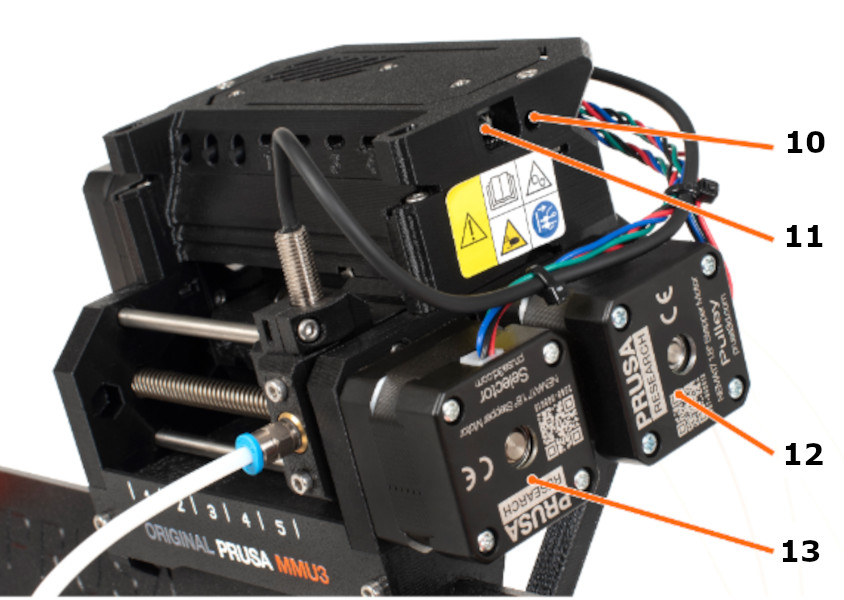
                  Regular maintenance is recommended for your Original Prusa MMU3 upgrade. Refer to the images below to familiarize yourself with the names of each part of the MMU3 unit.
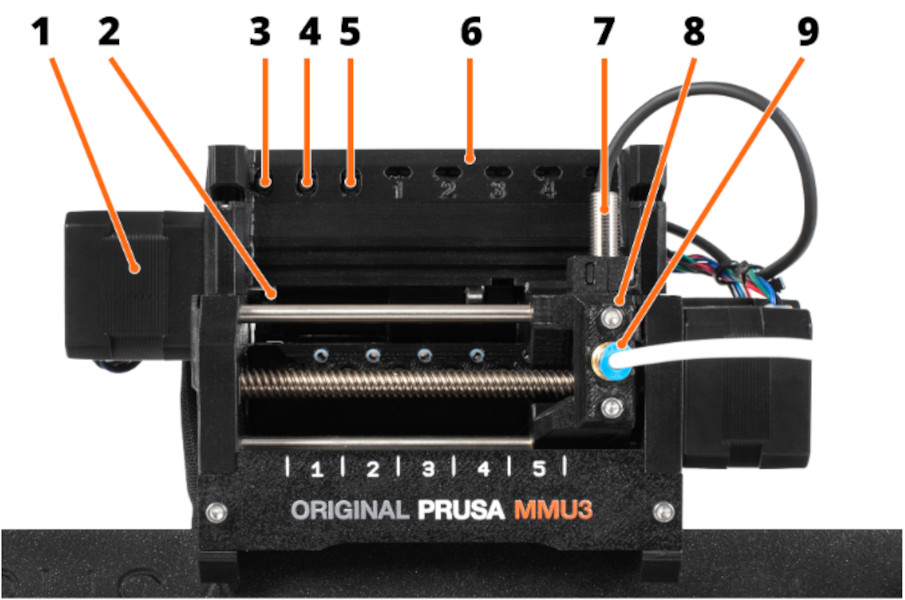
                  1. Idler motor: rotates the idler.
                  2. Idler: Contains five pulleys. By rotating the idler, a single pulley gets directly in contact with the
                    filament and applies pressure on it. Then, the pulley motor can push the filament forward into
                    the selector.
                  3. Left hardware button: moves the selector left.
                  4. Middle hardware button: preloads filament into the selected position.
                  5. Right hardware button: moves the selector right.
                  6. LED indicators: indicate the current status of the MMU (selected position, errors, etc.).
                  7. SuperFINDA (or FINDA for short) - MMU3 filament sensor built into the selector.
                  8. Selector: selects a filament slot by moving to the requested position. The filament is then pushed
                    through the Selector into the nozzle by the Pulley Motor.
                  9. Festo fitting: there are two Festo fittings on the front PTFE tube. The other one is mounted to
                    the top of the extruder.
                  10. Reset button: triggers reset of the MMU3 unit only.
                  11. MicroUSB port: for flashing MMU3 firmware via PC.
                  12. Pulley motor: rotates the pulleys that move the filament inside the MMU3 unit.
                  13. Selector motor: moves the Selector left and right.

                  Useful tools

                  Besides the usual tools, such as Allen keys, needle-nose pliers, and IPA + paper towels, you might need:

                  • Compressed air, also known as canned air, should not be held upside down while spraying. Otherwise, you could damage any electronic components while trying to clean them.
                  • Brush: a small brass brush is ideal for cleaning the pulleys. If you don't have a brass brush any brush with hard bristles will do the job. Alternative: You can use the acupuncture needle that comes with the printer or a toothpick.

                  MMU unit

                  When carrying out maintenance on your printer, extend it also to your MMU unit. 

                  • Regular maintenance CORE One
                  • Regular maintenance MK4/S, MK3.9/S
                  • Regular maintenance MK3.5/S
                  • Regular maintenance MK3/S/+

                  Pulleys

                  The pulleys may be grinding the filament, and their dust may accumulate around them. The best practice is to clean the pulleys with a mini-brush or a similar tool every time you run the maintenance. The pulleys also must be perfectly aligned with the filament holes, as shown in the photo below, and well-tightened by the small black grub screw against the flat part of the Pulley motor axis.


                  Selector

                  Even a properly calibrated selector can be occasionally blocked with filament strings or dust or by a broken piece of filament. By pushing the right MMU button, move the selector fully to the right. Use an interdental brush or any thin wire (⌀ 1.5mm/0.06”) to push the waste through (still in service position). Use compressed air to clean any leftovers.

                  Extruder parts

                  The parts installed on the printer extruder when adding the MMU also need maintenance.

                  Nextruder check and cleaning (CORE One, MK4/S, MK3.9/S)

                  To ensure a smooth loading at all times, check the following parts during regular maintenance. Follow the reverse of the assembly steps on your Nextruder (MK3.9/S, MK4S, CORE One/+) and reach the gearbox. After checking the items below, follow the guide to assemble the Nextruder.
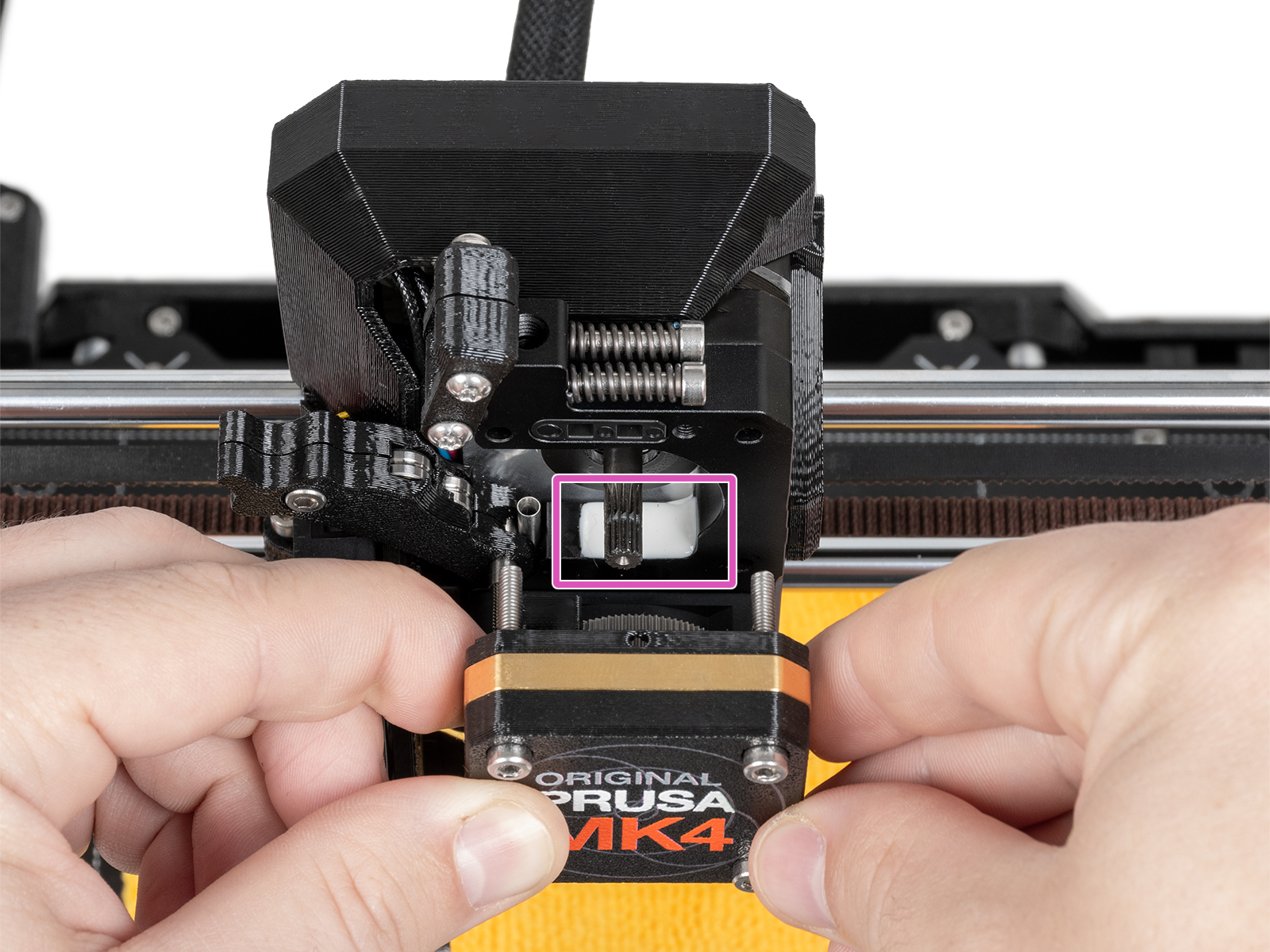
                  • Clean any debris and leftover filament from all the parts.
                  • Check the silicone layer that covers the LoadCell wires. Make sure it is not damaged. Note that the silicone can be white or black.

                  • Check the o-ring to make sure it is not torn, pinched, or otherwise damaged.

                  Nextruder main plate (CORE One, MK4/S, MK3.9/S)

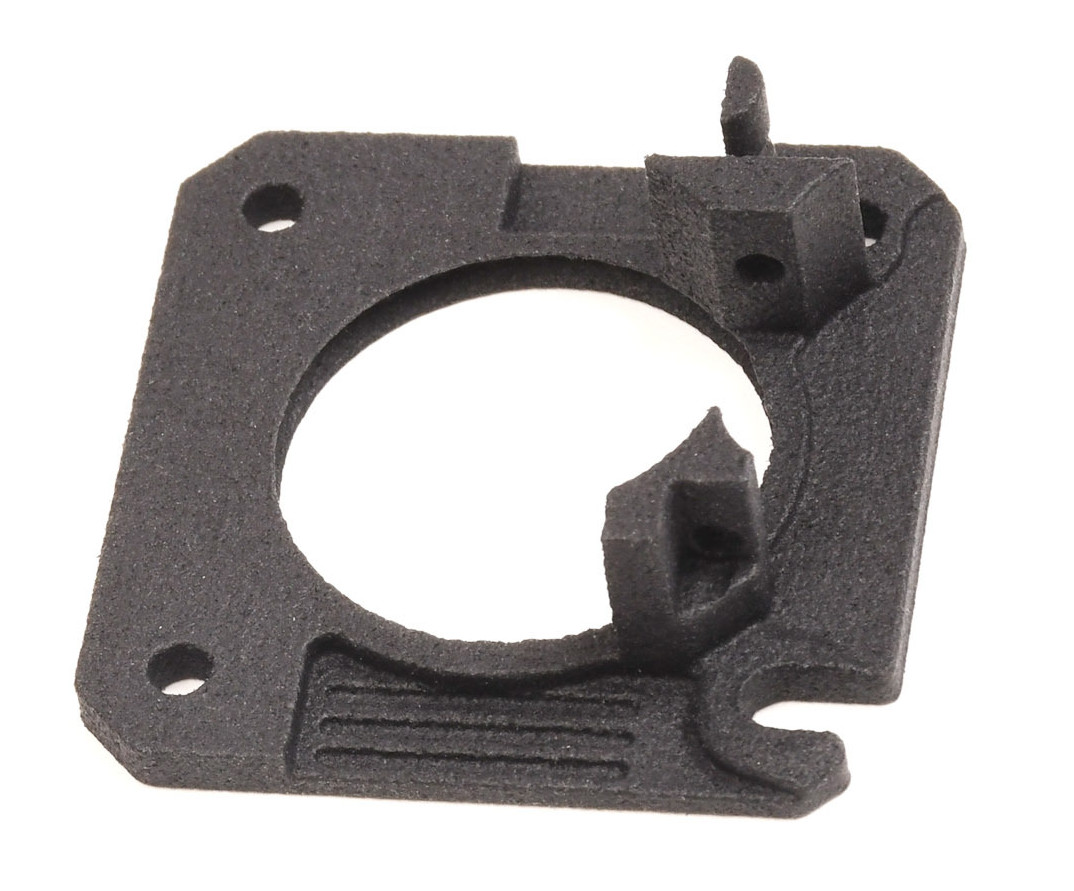
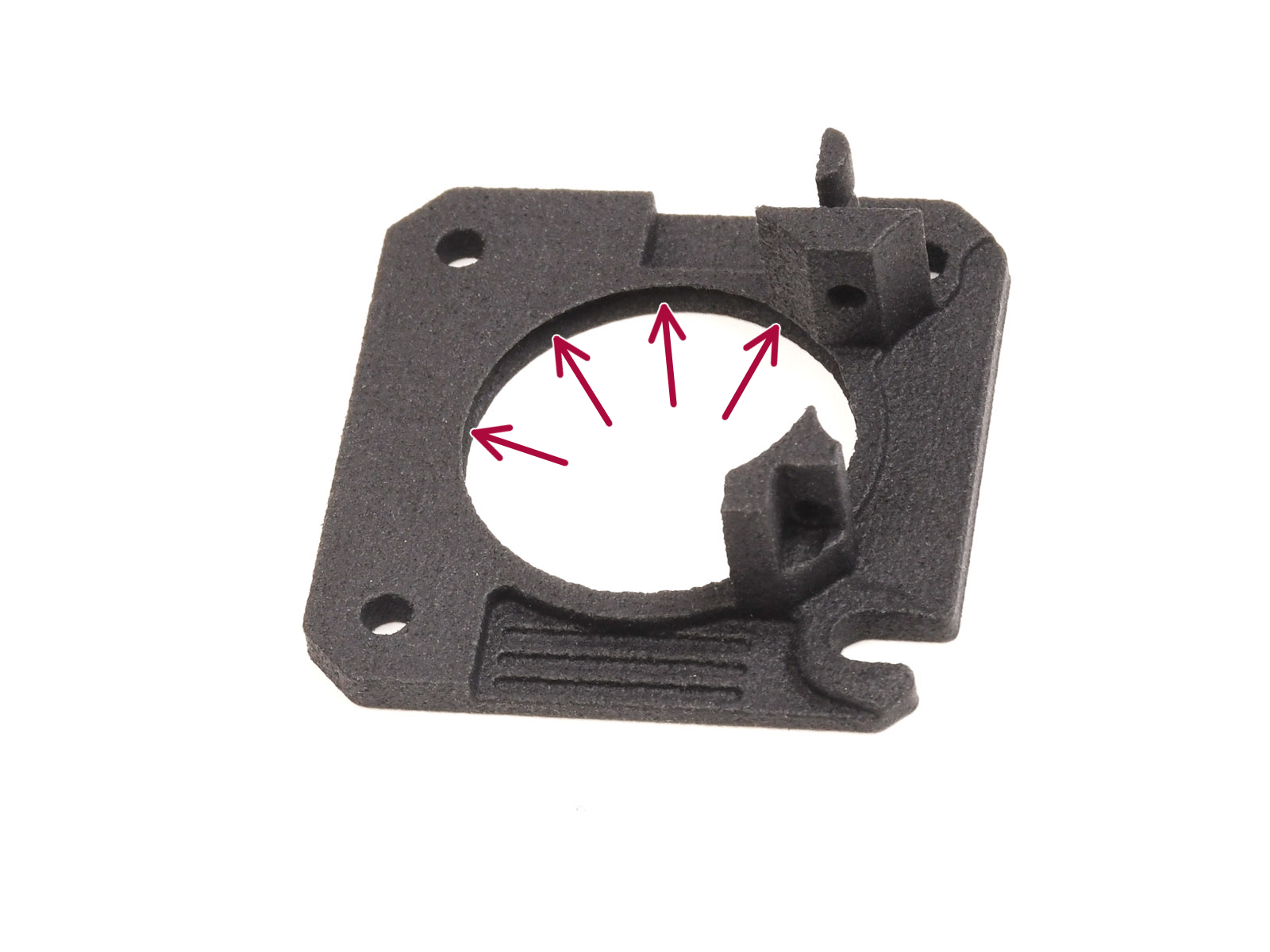
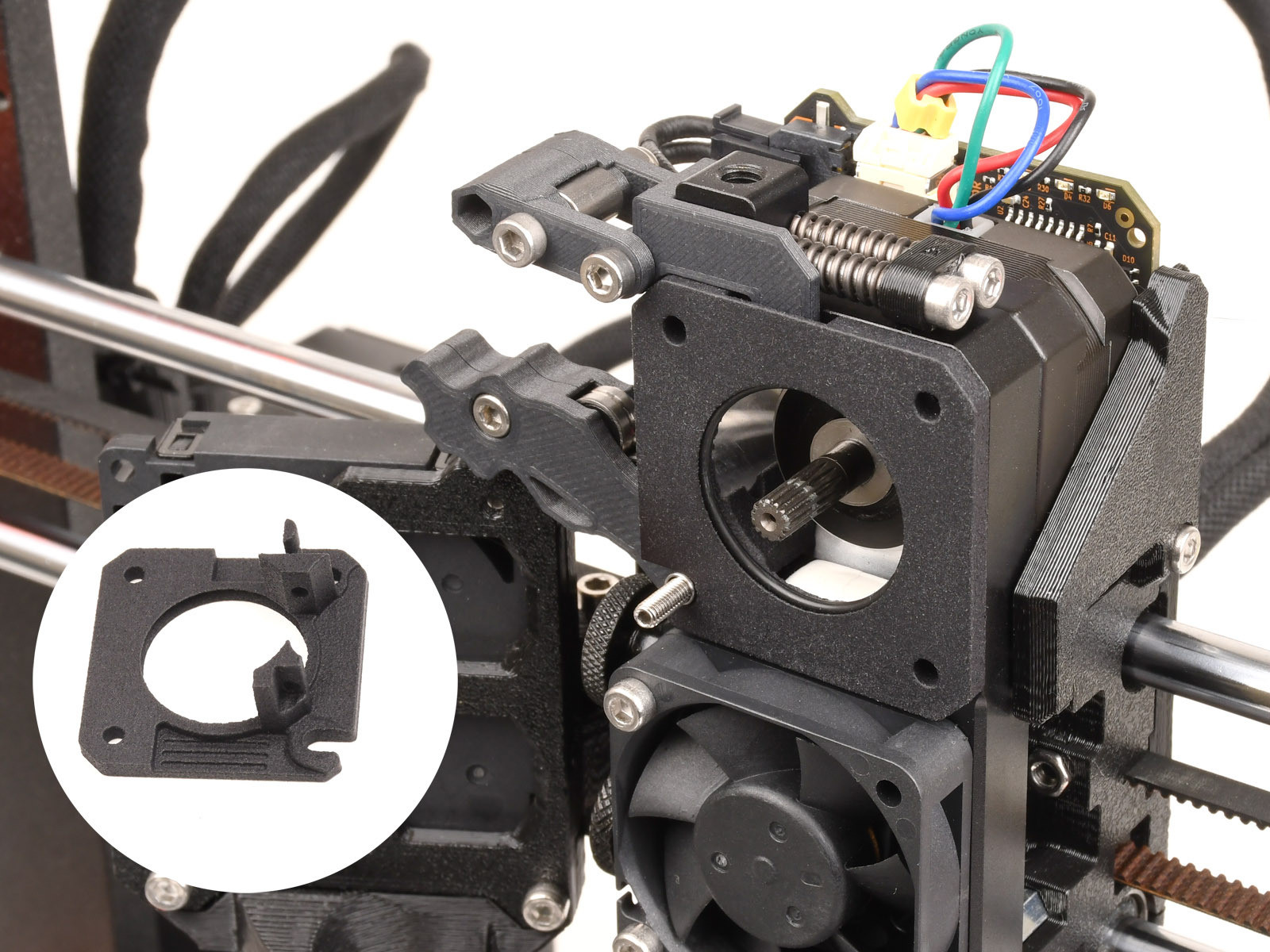
                  This part guides the filament from the drive gears into the nozzle tube. Repeated loads and unloads of filament cause wear. Without the MMU, this wear is insignificant. However, a single MMU print can have thousands of filament loads and unloads, increasing the wear rate. Once this part wears out, the printer cannot properly push filament into the nozzle. Unlike the rest of the MMU parts, this is printed with Multi Jet Fusion so that the part lasts longer.

                  The main plate is expected to last for 30k filament changes. After that, the printer will show the message "Maintenance Reminder. Filament changes have reached main-plate lifespan. Inspect the part and ensure you have a spare plate available."  The MMU3 upgrade kit should have one spare main plate, or it can be purchased in our e-shop.

                  If the printer has 50 failed loads within 1000 successful filament changes, the screen will show the message "Printer recorded multiple loading errors. Run Nextruder Maintenance. Check and clean the Nextruder main plate inside the unit."
                  Once the underlying cause of the failed load is resolved, several consecutive successful loads are required before the warning message clears. 
                  Alternatively, it is possible to clear it in Settings -> Hardware -> Printhead -> Nextruder maintenance. 

                  Filament sensor calibration (MK3S/+ MK3.5/S)

                  If you see the message "Printer has detected multiple consecutive filament loading errors. We recommend checking the extruder" on your MK3.5/S printer, it has detected multiple loading errors within a short period. Use the IR filament sensor calibration to adjust the filament sensor.

                  If your MMU reaches 30k loads to the extruder, the message "Maintenance Reminder. Filament changes have reached 30k. Inspect and clean the extruder." will show, reminding you to perform the Printer Regular Maintenance.

                  ¿Te resultó útil este artículo?
                  Esta acción está disponible solo para usuarios registrados. Por favor inicia sesión.
                  Inicia sesión  para publicar un comentario
                  Sin comentarios

                  Temas

                  • Usando la impresora
                    • Mantenimiento de la impresora
                      • Retirando el filamento del extrusor manualmente
                      • Mantenimiento Regular del MMU3
                      • Como actualizar el firmware (MMU3
                      • Maintenance warning #31117 (CORE One) #26117 (MK4S) #13117 (MK4) #27117 (MK3.9S) #21117 (MK3.9) #28117 (MK3.5S) #23117 (MK3.5)
                      • Maintenance failure warning #28116 (MK3.5S) #23116 (MK3.5)
                      • Maintenance failure warning #31116 (CORE One) #26116 (MK4S) #13116 (MK4) #27116 (MK3.9S) #21116 (MK3.9)
                      • Packing the MK4/S + MMU3 bundle for return - original packaging
                      • Tirón en frío (MK3/S/+, MK2.5/S, MK3.5/S)
                    • Modelos 3D
                    • Guía de materiales
                    • Laminando
                    • Prusa Connect y PrusaLink