Prusa
  • TIENDA
    • Últimos productos
    POR CATEGORÍA
    • Impresoras 3Dnueva
    • Actualizaciones de impresoras 3Dnueva
    • Materiales
    • Accesorios
    • Piezas de repuesto
    • Cursos
    • Merchandising
    • Obtener un presupuesto
    ENLACES RÁPIDOS
    • Envío y entrega
    • Devoluciones y reembolsos
    • Pago y financiación
    • Garantía
    • IVA y Tasas de aduana
    • Preguntas Frecuentes

    0 artículo en tu carritoartículos en tu carrito

    Tu carrito está vacío

    Ir al carritoComprar impresoras 3D

    Mi perfil

    Iniciar sesión para ver pedidos y artículos guardados

    Mi perfil

    Sesión iniciada como

    • Pedidos
    • Cerrar Sesión
  • Impresión 3D
    • Explorar la impresión 3D
    PARA PRINCIPIANTES
    • Impresión 3D 101
    • Cómo funciona la impresión FDM
    • Comprando tu primera impresora
    • Catálogo de modelos 3D
    POR USO
    • Prototipado rápido
    • Fabricación
    • Ingeniería
    • Investigación
    • Arte y diseño
    PROFUNDIZAR
    • Guía de materiales
    • Cursos
    • Webinars
    • Casos de estudio
    • Impresión 3D personalizada
  • IMPRESORAS 3D
    • Todas las impresoras 3D
    PARA
    • Casa o garajeAficionados, manitas e impresión doméstica
    • EmpresasProducción interna para pequeños equipos
    • EmpresaFlotas, seguridad y escala
    • Qué Prusa es la adecuada para mí
    COMPRAR Y NAVEGAR
    • CORE One+nueva
    • CORE One+ INDXnueva
    • CORE One L+nueva
    • CORE One L+ INDXnueva
    • XL+nueva
    • MK4S
    • Prusa Pro HT90
    • Prusa Pro AFS
    • Prusa Pro SLX
    MÁS DE IMPRESORAS
    • Piezas y actualizacionesnueva
    • Spare parts
    • Critical infrastructure
    • Casos de estudio
    • Signature Oak
    • Kits
  • MATERIALES
    • Todos los materiales
    POR USO
    • Uso diario y diseño
    • Ingeniería funcional
    • Compuestos
    • Especialidad profesional
    • Resinas SLA
    PRUSAMENT
    • PLA
    • PETG
    • ASA
    • PC
    • PA11
    • Flexible
    • TPU
    MÁS MATERIALES
    • Guía de materiales
    • Fabricamos material nosotros mismos
    • Sostenibilidad
    • Pedir en la tienda
  • SOFTWARE
    • Todo el software
    PREPARAR LA IMPRESIÓN
    • PrusaSlicer 3.0nueva
    IMPRIMIR Y MONITORIZAR
    • PRUSA CONNECT
    • EasyPrint
    • Aplicación iOS y Android
    • Prusa Farm
    EMPEZAR
    • Descargar e instalar
    • Base de conocimientos
    MÁS SOFTWARE
    • Catálogo de modelos 3D
  • SOPORTE
    • Explorar soporte
    ENCONTRAR RESPUESTAS
    • Base de conocimientos
    • Resolución de problemas
    • Cursos
    • Webinars
    OBTENER AYUDA
    • Contacta con nosotros
    • Chat en vivo
    • Envíos y entregas
    • Garantía
    • Devoluciones y reembolsos
    • Servicio y piezas de repuesto
    • Servicio y Reparación
    COMUNIDAD
    • Foro
    • Reddit
    • Printables
  • CENTRO DE CONFIANZA
    • Resumen del Centro de confianza
    POR TEMA
    • RGPD
    • Certificados
    • Seguridad
    • Cumplimiento
    COMPROMISOS
    • Informe de sostenibilidad
    HABLA CON NOSOTROS
    • Contacta con el equipo de seguridad
  • EMPRESA
    • Acerca de Prusa
    CONÓCENOS
    • Nuestra historia
    • Cómo fabricamos impresoras
    • Código abierto
    • Kit de marca y medios
    NOTICIAS
    • Blog
    • Sala de prensa
    • Eventos
    CONFIANZA Y SOCIOS
    • Sostenibilidad
    • Distribuidores y revendedores
    • Programa de afiliados
    • Contacto
    • English
    • Čeština
    • Deutsch
    • Español
    • Français
    • Italiano
    • Polski
    • 日本語
  • Sesión iniciada como

    • Pedidos
    • Dirección
    • Alertas de Stock
    • Mis Cursos
    • Suscripción
    • Editar Cuenta
    • Cerrar Sesión

Iniciar sesión para ver pedidos y artículos guardados

Sesión iniciada como
  • Pedidos
  • Dirección
  • Alertas de Stock
  • Mis Cursos
  • Suscripción
  • Editar Cuenta
  • English
  • Čeština
  • Deutsch
  • Español
  • Français
  • Italiano
  • Polski
  • 日本語
Tienda

0 artículo en tu carritoartículos en tu carrito

Tu carrito está vacío

Ir al carritoComprar impresoras 3D

Mi perfil

Iniciar sesión para ver pedidos y artículos guardados

Mi perfil

Sesión iniciada como

  • Pedidos
  • Cerrar Sesión
TIENDA
  • Últimos productos
POR CATEGORÍA
  • Impresoras 3Dnueva
  • Actualizaciones de impresoras 3Dnueva
  • Materiales
  • Accesorios
  • Piezas de repuesto
  • Cursos
  • Merchandising
  • Obtener un presupuesto
ENLACES RÁPIDOS
  • Envío y entrega
  • Devoluciones y reembolsos
  • Pago y financiación
  • Garantía
  • IVA y Tasas de aduana
  • Preguntas Frecuentes

Productos destacados

    Categorías populares

      Búsquedas populares

        Artículos

          Blog

            Productos

              Categorías

                Búsquedas sugeridas

                  Buscando…
                  Sin resultados
                  Algo salió mal.
                  ↑↓ Seleccionar↵ AbrirEsc Cerrar búsqueda
                  1. Soporte
                  2. Calibración básica
                  3. Fallo Selftest (MK3.5/S)
                   

                  Contenidos

                  • Selftest procedure checks
                  • Hotend & Print fan test
                  • Axes testing
                  • Heatbed & Hotend test
                  • First Layer Calibration
                  • After the selftest

                  Blog

                  • Pellets de Prusament: Lotes de materia prima para la impresión 3D de gran formato o para la investigación y el desarrollo de polímeros a pequeña escala
                  • Imprime decoraciones de Halloween coloridas y brillantes con nuestra oferta espeluznante
                  • Factorio Ha Llegado a Printables

                  Newsletter

                  Regístrate y obtén nuestro dosier mensual de información útil sobre nuevos firmwares, nuevas versiones de PrusaSlicer y consejos generales para proyectos de impresión 3D.

                  Al hacer clic, aceptas recibir nuestra newsletter.

                  Este sitio está protegido por reCAPTCHA Enterprise y se aplican la Política de Privacidad y los Condiciones del servicio de Google.

                  Heavy Duty Keyboard Holder (No Supports)
                  Tienda
                  • Impresoras 3D
                  • Mejoras de Impresoras
                  • Filamentos
                  • Accesorios
                  • Merchandising Prusa
                  Prusa

                  © Prusa Research a.s.

                  Printables
                  • Modelos 3D
                  • Store
                  • Clubs
                  • Concursos de Diseño 3D
                  • Brands
                  Comunidad
                  • Mapa Mundial
                  • Foro
                  • Grupos de Usuarios
                  • Eventos
                  Ayuda
                  • Ayuda Prusa
                  • Prusa Academy
                  • Calculadoras de Impresión 3D
                  Software
                  • PrusaSlicer
                  • Prusa.app
                  • Prusa Connect
                  • Drivers y Software
                  Empresa
                  • Sobre nosotros
                  • Blog
                  • Distribuidores Oficiales de Prusa
                  • Contacto
                  • Certificado conforme a las normas ISO 9001, ISO 14001 e ISO 45001
                  • Términos y Condiciones generales
                  • Términos Generales y Condiciones de Uso de los sitios Web PRUSA
                  • Política de privacidad
                  • Información sobre las cookies
                  • Política de Reclamaciones de los Clientes
                  • Página de Estado de los Sitios Web
                  • Configuración de las cookies
                  Prusa
                  • Términos y Condiciones generales
                  • Términos Generales y Condiciones de Uso de los sitios Web PRUSA
                  • Política de privacidad
                  • Información sobre las cookies
                  • Política de Reclamaciones de los Clientes
                  • Página de Estado de los Sitios Web
                  • Configuración de las cookies

                  © Prusa Research a.s.

                  JOSEF PRUSA®, PRUSA RESEARCH®, PRUSA POLYMERS®, PRUSA ORANGE®, PRUSA 3D ® Y PRUSAMENT® son marcas registradas de Prusa Development a.s. utilizadas por Prusa Research a.s. bajo licencia de Prusa Development a.s.

                  Fallo Selftest

                  (MK3.5/S)

                  Relevante para

                  MK3.5
                  MK3.5S
                  Artículo está también disponible en los siguientes idiomas
                  English
                  Čeština
                  Polski
                  Deutsch
                  Français
                  Español
                  Italiano
                  日本語

                  The Selftest checks for issues in the assembly of the printer, its wiring, and the electronic components. It is the first part of the Calibration Wizard, which is prompted automatically when you turn on the printer for the first time or after a Restablecimiento de fábrica (MK4/S, MK3.9/S, MK3.5, XL). After the initial calibration, the Selftest can be found at LCD Menu -> Control -> Calibrations & Tests.

                  Selftest procedure checks

                  • Fan Test
                  • XY Axis Check
                  • Z Alignment Calibration
                  • Z Axis check
                  • Heater Test
                  • First Layer Calibration

                  Progress and results of each step are displayed on the LCD screen. After the selftest, you can check the results at any time in the printer menu at LCD Menu -> Control -> Calibrations & Tests. If the step fails, it will show a red "x" near the calibration.

                  Hotend & Print fan test

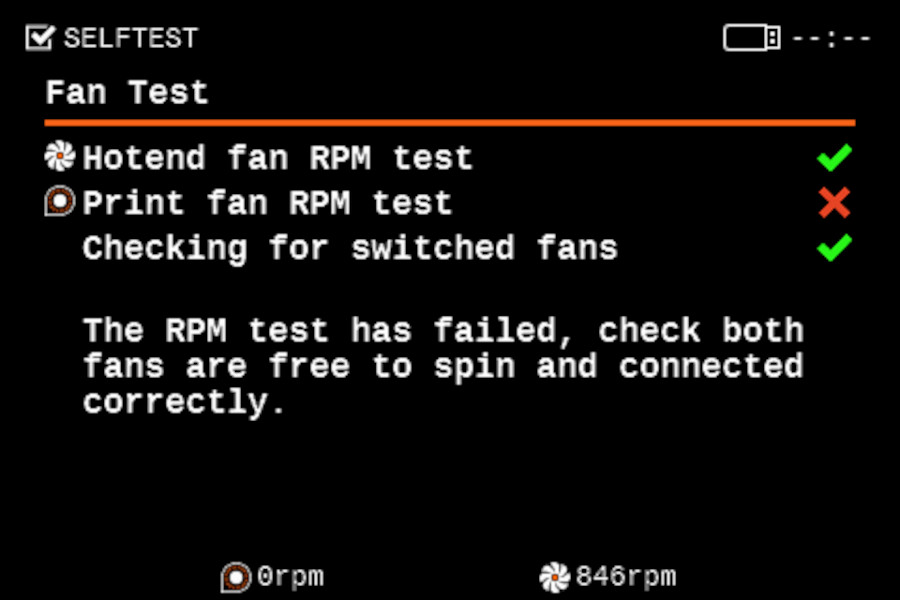
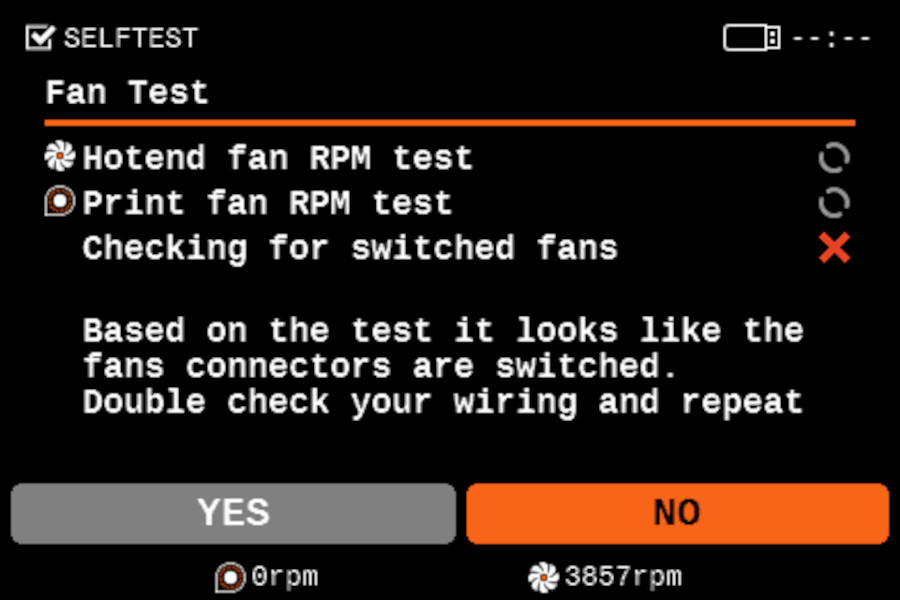
                  The fans selftest checks if they are properly connected, if nothing is blocking their way, and if their connections are not switched. During it, you can see the fans' RPM on the bottom of the screen. If one of the tests fails, you will see a red "x" near the failed part.

                  During the selftest, the printer will ask if the hotend fan (left) is spinning spinning. If the printer detects the fan's RPM is within range, but the option not spinning is chosen, the printer will understand that the fan connectors are switched.

                  The Selftest procedure tells you which of the fans doesn't work. Check the one that has the red "x" on it.
                  • Ensure that both the fans are connected according to the assembly guide and that the print and the hotend fan are not switched.
                  • Check for any blockage that could prevent either of the fans from spinning.
                  • Go over the wiring and ensure that none of the zip-ties is overtightened, preventing the fans from spinning.

                  Axes testing

                  After the fans, the printer will test the axes' length. First, the printer will test the Y and the X axes. Then, the Z-axis will be aligned and tested.

                  If the test shows a red "x" near any of them, check the items listed in this guide: Comprueba la longitud del eje X/Y/Z (MK3S).

                  Heatbed & Hotend test

                  In this step of the selftest, the hotend and heatbed will be heated to their maximum capacity to check if all cables are correctly connected and will not have issues during the print. If the printer is pre-heated, it must go back to room temperature before starting the test. If any of the cables is disconnected, the printer might restart and show an error
                  • Ensure that thermistors and heater are connected properly according to the assembly guide.
                  • Check your heated bed cables and confirm they are not damaged by an overtightened zip tie.
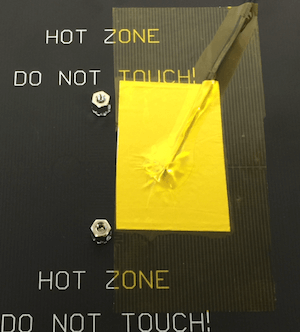
                  • Make sure that your heated bed thermistor is firmly attached underneath the Golden Kapton tape.


                  You can also see our guide La base calefactable no se está calentando correctamente.

                  First Layer Calibration

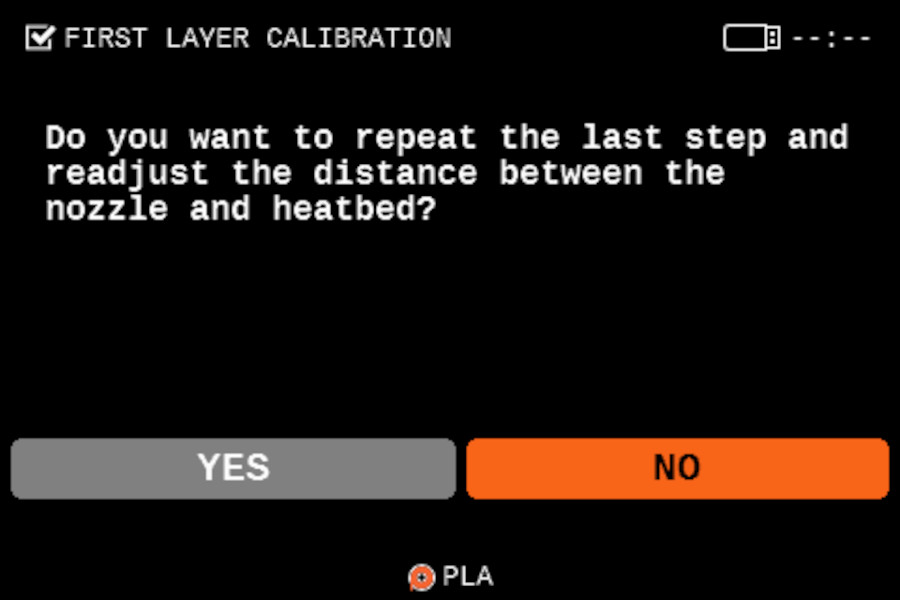
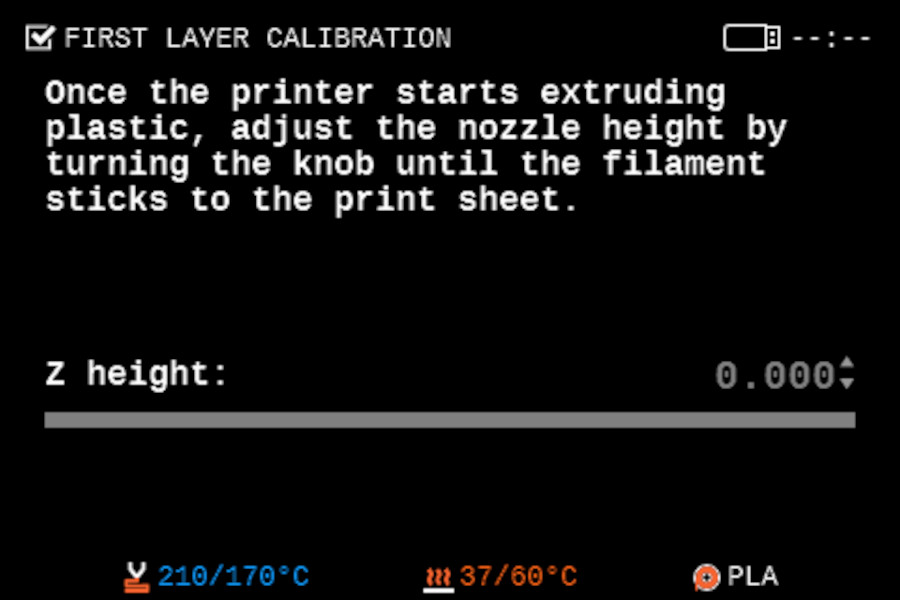
                  Next, the distance between the tip of the nozzle and the print surface needs to be adjusted. You can load a new filament, keep the already loaded filament, or unload the filament to load a new one. Once the test starts, the default value is zero. Turn the knob counterclockwise to make the number more negative, which will take the nozzle closer to the steel sheet. Read more about the first layer calibration here: Calibración de la Primera Capa (i3). If the first layer is unsatisfactory after finishing the test print, you can repeat the calibration.
                  After the selftest

                  If the Wi-fi is not adjusted, the printer will give you the option to Setup the Wi-fi.

                  The Filament Sensor is not tested during the selftest. Make sure that it is functioning and connected, according to our illustrated article.

                  ¿Te resultó útil este artículo?
                  Esta acción está disponible solo para usuarios registrados. Por favor inicia sesión.
                  Inicia sesión  para publicar un comentario
                  Sin comentarios

                  Temas

                  • Calibración
                    • Calibración básica
                      • Nivelación mallada de la base de impresión
                      • Tornillo de ajuste del rodillo de presión
                      • Fallo Selftest (MK3.5/S)
                      • Calibración de la Primera Capa (i3)
                    • Calibrado avanzado
                    • Mensajes de Error de Calibración