Prusa
  • TIENDA
    • Últimos productos
    POR CATEGORÍA
    • Impresoras 3Dnueva
    • Upgradesnueva
    • Materiales
    • Accesorios
    • Piezas de repuesto
    • Cursos
    • Merchandising
    • Sales inquiry & Price quote
    ENLACES RÁPIDOS
    • Shipping information
    • Refunds & returns
    • Payment options
    • Garantía
    • IVA y Tasas de aduana
    • Preguntas Frecuentes

    0 artículo en tu carritoartículos en tu carrito

    Tu carrito está vacío

    Ir al carritoComprar impresoras 3D

    Mi perfil

    Iniciar sesión para ver pedidos y artículos guardados

    Mi perfil

    Sesión iniciada como

    • Pedidos
    • Cerrar Sesión
  • Impresión 3D
    • Explorar la impresión 3D
    PARA PRINCIPIANTES
    • Impresión 3D 101
    • Types of printers (FDM/SLA)
    • How to choose a 3D Printer
    • Printables (3D models)
    POR USO
    • Prototipado rápido
    • Fabricación
    • Ingeniería
    • Investigación
    • Arte y diseño
    PROFUNDIZAR
    • Guía de materiales
    • Cursos
    • Webinars
    • Casos de estudio
    • Impresión 3D personalizada
  • IMPRESORAS 3D
    • Todas las impresoras 3D
    PARA
    • Casa o garajeAficionados, manitas e impresión doméstica
    • Shop or studioProducción interna para pequeños equipos
    • EmpresaFlotas, seguridad y escala
    • How to choose a 3D Printer
    COMPRAR Y NAVEGAR
    • CORE One+nueva
    • CORE One+ INDXnueva
    • CORE One L+nueva
    • CORE One L+ INDXnueva
    • XL+nueva
    • MK4S
    • Prusa Pro HT90
    • Prusa Pro AFS
    • Prusa Pro SLX
    MÁS DE IMPRESORAS
    • Upgradesnueva
    • Spare parts
    • Critical infrastructure
    • Casos de estudio
    • Signature Oak
    • Kits
  • MATERIALES
    • Todos los materiales
    POR USO
    • Uso diario y diseño
    • Ingeniería funcional
    • Compuestos
    • Especialidad profesional
    • Resinas SLA
    PRUSAMENT
    • PLA
    • PETG
    • ASA
    • PC
    • PA11
    • Flexible
    • TPU
    MÁS MATERIALES
    • Guía de materiales
    • Fabricamos material nosotros mismos
    • Sostenibilidad
    • Pedir en la tienda
  • SOFTWARE
    • Todo el software
    PREPARAR LA IMPRESIÓN
    • PrusaSlicer 3.0nueva
    IMPRIMIR Y MONITORIZAR
    • PRUSA CONNECT
    • EasyPrint
    • Aplicación iOS y Android
    • Prusa Farm
    EMPEZAR
    • Descargar e instalar
    • Base de conocimientos
    MÁS SOFTWARE
    • Printables (3D models)
  • SOPORTE
    • Explorar soporte
    ENCONTRAR RESPUESTAS
    • Base de conocimientos
    • Resolución de problemas
    • Cursos
    • Webinars
    OBTENER AYUDA
    • Contacta con nosotros
    • Chat en vivo
    • Shipping information
    • Garantía
    • Refunds & returns
    • Spare parts
    • Factory repair
    COMUNIDAD
    • Foro
    • Reddit
    • Printables
  • CENTRO DE CONFIANZA
    • Resumen del Centro de confianza
    POR TEMA
    • RGPD
    • Certificados
    • Seguridad
    • Cumplimiento
    COMPROMISOS
    • Informe de sostenibilidad
    HABLA CON NOSOTROS
    • Contacta con el equipo de seguridad
  • EMPRESA
    • Acerca de Prusa
    CONÓCENOS
    • Nuestra historia
    • Cómo fabricamos impresoras
    • Código abierto
    • Kit de marca y medios
    NOTICIAS
    • Blog
    • Sala de prensa
    • Eventos
    CONFIANZA Y SOCIOS
    • Sostenibilidad
    • Distribuidores y revendedores
    • Programa de afiliados
    • Contacto
    • English
    • Čeština
    • Deutsch
    • Español
    • Français
    • Italiano
    • Polski
    • 日本語
  • Sesión iniciada como

    • Pedidos
    • Dirección
    • Alertas de Stock
    • Mis Cursos
    • Suscripción
    • Editar Cuenta
    • Cerrar Sesión

Iniciar sesión para ver pedidos y artículos guardados

Sesión iniciada como
  • Pedidos
  • Dirección
  • Alertas de Stock
  • Mis Cursos
  • Suscripción
  • Editar Cuenta
  • English
  • Čeština
  • Deutsch
  • Español
  • Français
  • Italiano
  • Polski
  • 日本語
Tienda

0 artículo en tu carritoartículos en tu carrito

Tu carrito está vacío

Ir al carritoComprar impresoras 3D

Mi perfil

Iniciar sesión para ver pedidos y artículos guardados

Mi perfil

Sesión iniciada como

  • Pedidos
  • Cerrar Sesión
TIENDA
  • Últimos productos
POR CATEGORÍA
  • Impresoras 3Dnueva
  • Upgradesnueva
  • Materiales
  • Accesorios
  • Piezas de repuesto
  • Cursos
  • Merchandising
  • Sales inquiry & Price quote
ENLACES RÁPIDOS
  • Shipping information
  • Refunds & returns
  • Payment options
  • Garantía
  • IVA y Tasas de aduana
  • Preguntas Frecuentes

Productos destacados

    Categorías populares

      Búsquedas populares

        Artículos

          Blog

            Productos

              Categorías

                Búsquedas sugeridas

                  Buscando…
                  Sin resultados
                  Algo salió mal.
                  ↑↓ Seleccionar↵ AbrirEsc Cerrar búsqueda
                  1. Soporte
                  2. Mantenimiento de la impresora
                  3. Drying filament in Memmert UF-series universal oven
                   

                  Contenidos

                  • Product specifications
                  • Inserting filament
                  • Exhaust flap settings
                  • Recommended settings for drying
                  • Material handling process

                  Blog

                  • Pellets de Prusament: Lotes de materia prima para la impresión 3D de gran formato o para la investigación y el desarrollo de polímeros a pequeña escala
                  • Imprime decoraciones de Halloween coloridas y brillantes con nuestra oferta espeluznante
                  • Factorio Ha Llegado a Printables

                  Newsletter

                  Regístrate y obtén nuestro dosier mensual de información útil sobre nuevos firmwares, nuevas versiones de PrusaSlicer y consejos generales para proyectos de impresión 3D.

                  Al hacer clic, aceptas recibir nuestra newsletter.

                  Este sitio está protegido por reCAPTCHA Enterprise y se aplican la Política de Privacidad y los Condiciones del servicio de Google.

                  Heavy Duty Keyboard Holder (No Supports)
                  Tienda
                  • Impresoras 3D
                  • Mejoras de Impresoras
                  • Filamentos
                  • Accesorios
                  • Merchandising Prusa
                  Prusa

                  © Prusa Research a.s.

                  Printables
                  • Modelos 3D
                  • Store
                  • Clubs
                  • Concursos de Diseño 3D
                  • Brands
                  Comunidad
                  • Mapa Mundial
                  • Foro
                  • Grupos de Usuarios
                  • Eventos
                  Ayuda
                  • Ayuda Prusa
                  • Prusa Academy
                  • Calculadoras de Impresión 3D
                  Software
                  • PrusaSlicer
                  • Prusa.app
                  • Prusa Connect
                  • Drivers y Software
                  Empresa
                  • Sobre nosotros
                  • Blog
                  • Distribuidores Oficiales de Prusa
                  • Contacto
                  • Certificado conforme a las normas ISO 9001, ISO 14001 e ISO 45001
                  • Términos y Condiciones generales
                  • Términos Generales y Condiciones de Uso de los sitios Web PRUSA
                  • Política de privacidad
                  • Información sobre las cookies
                  • Política de Reclamaciones de los Clientes
                  • Página de Estado de los Sitios Web
                  • Configuración de las cookies
                  Prusa
                  • Términos y Condiciones generales
                  • Términos Generales y Condiciones de Uso de los sitios Web PRUSA
                  • Política de privacidad
                  • Información sobre las cookies
                  • Política de Reclamaciones de los Clientes
                  • Página de Estado de los Sitios Web
                  • Configuración de las cookies

                  © Prusa Research a.s.

                  JOSEF PRUSA®, PRUSA RESEARCH®, PRUSA POLYMERS®, PRUSA ORANGE®, PRUSA 3D ® Y PRUSAMENT® son marcas registradas de Prusa Development a.s. utilizadas por Prusa Research a.s. bajo licencia de Prusa Development a.s.

                  Drying filament in Memmert UF-series universal oven

                  Relevante para

                  HT90
                  MK4 family
                  XL family
                  MINI family
                  MMU family
                  +
                  Artículo está también disponible en los siguientes idiomas
                  English
                  Čeština
                  Polski
                  Deutsch
                  Français
                  Español
                  Italiano
                  日本語

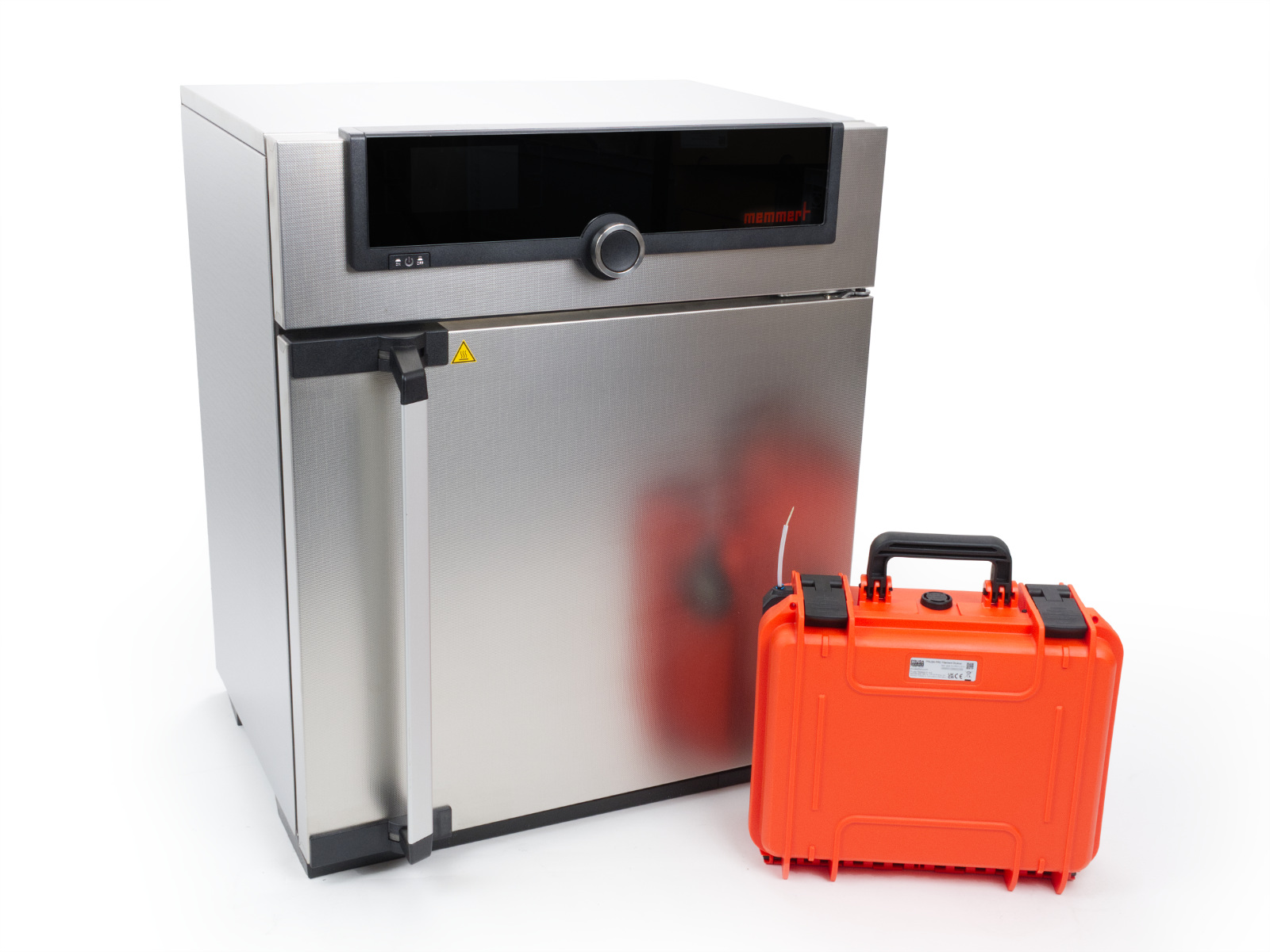
                  Drying filament before printing is a critical step when working with high-performance materials. The Memmert UF-series ovens offer precise temperature control, active ventilation, and adjustable humidity exhaust, making them ideal for drying hygroscopic filaments before use. Unlike passive storage solutions, a drying oven actively removes moisture already present inside the filament. 

                  To maintain low humidity during printing, we recommend using the Prusa Pro Filament Drybox.

                  We offer two models: UF30 and UF55. Both provide identical functionality, with the only difference being internal volume. Both models are available on our eshop at prusa3d.com.

                  Product specifications

                  ModelInternal volumeMax temperatureExternal dimensions (W x D x H)Power
                  UF3032 liters300 °C 585 x 510 x 705 mm 1.6 kW
                  UF5553 liters300 °C 745 x 584 x 864 mm 2.1 kW

                  Oven features:

                  • precise temperature control up to 300 °C
                  • adjustable exhaust flap for controlled humidity removal
                  • controllable fan speed for optimized airflow

                  Official Memmert user manuals and quick start guides

                  Please note: The Memmert UF-series drying oven is a product of Memmert GmbH + Co. KG and is not manufactured by Prusa Research.

                  We recommend reviewing the official Memmert documentation before using the oven for drying filament. The manuals include safety information, installation, interface instructions, maintenance, and advanced configuration options. All the manuals are available on the official memmert.com.

                  Inserting filament

                  You can place up to four Prusament spools upright inside the oven for batch drying. Ensure there is space between spools and that they do not touch the heating surfaces (left, right, top, and bottom sides).

                  For drying a single spool, you may also lay it flat on the wire shelf. The shelf height can be adjusted to fit various spool sizes.

                  Only insert unwrapped filament spools. Do not dry filament in its original packaging.
                  Do not insert multiple different materials simultaneously, as each material requires different drying settings.

                  Exhaust flap settings

                  The exhaust flap, located at the rear of the Memmert oven, regulates the exhaust airflow and influences how much moist air is removed from the chamber. Fresh air is drawn in passively through intake vents, preheated in a separate channel, and introduced into the chamber. The flap position determines the overall air exchange rate, which impacts both drying performance and temperature stability.

                  The flap can be adjusted from 0% (closed) to 100% (fully open) in 10% increments using the control display.

                  Do not attempt to force or adjust the flap position manually.

                  Flap positions

                  • 0% (closed): The exhaust flap is fully closed. Moist air is retained longer in the chamber, and fresh air intake is minimal. This setting favors stable internal temperature but reduces moisture removal.
                  • 50% (partially open): At 50%, the flap is partially open, angled at 45 degrees. This position allows for a balanced air exchange, introducing some fresh air while still maintaining a controlled environment. It is suitable for most drying processes.
                  • 100% (fully open): When the flap is fully open, the oven operates in fresh air mode. This position allows for maximum air exchange, introducing a significant amount of fresh air and removing exhaust air. 


                  Recommended settings for drying 

                  A fan speed of 70 % and flap position of 30 % is a commonly used setting that balances airflow and temperature stability. These values are not mandatory but have worked well in our internal testing. Exact settings may vary depending on material and oven load.

                  For a comprehensive list of recommended drying temperatures and times for various filament types, consult our dedicated Drying filament article.

                  Material handling process

                  Do not open the oven during operation. Internal components such as shelves, walls, and air outlets may reach high temperatures and can cause burns. Always wear heat-resistant gloves when opening the oven or handling any parts inside.
                  1.  Place filament spool(s) in the chamber as described and close the door.
                  2.  Select the Temperature on the control display and turning the knob to adjust the temperature to target value. Press the rotary knob to confirm. 
                    For details on how to operate the control display and its capacitive buttons, please refer to section 6.4 Operating the Appliance in the official Memmert User manual.
                  3.  Set the Fan speed. Press the rotary knob to confirm. 
                  4.  Set the Flap position. Press the rotary knob to confirm.
                  5.  Set the desired time on the Timer. The timer will start immediately after confirmation by pressing the knob. 
                    Keep the timer set to start once the target temperature is reached (default setting). This ensures accurate drying time. For details, see section 8.3.5 Timer Mode in the official Memmert User manual.
                  6.  The oven will now begin the drying process. 
                  7.  After drying, immediately transfer the filament spool into the filament dry box and close it to prevent reabsorption of moisture. 
                    Note: The humidity display on the LCD will spike when the dry box is opened. It's critical for it to return to 10% after closing. If it doesn't, you'll need to replace the desiccant. To do this, refer to the How to replace the desiccant' guide for the Prusa Pro Filament Drybox.
                  8. Connect the dry box to the printer and begin printing.
                  Ensure that the filament path between the dry box and printer is not exposed to ambient humidity, to prevent reabsorption of moisture after drying.


                  ¿Te resultó útil este artículo?
                  Esta acción está disponible solo para usuarios registrados. Por favor inicia sesión.
                  Inicia sesión  para publicar un comentario
                  Sin comentarios

                  Temas

                  • Usando la impresora
                    • Mantenimiento de la impresora
                      • Prusa USS Drybox - Instalación en las impresoras MK
                      • Cómo flashear el firmware (MK4/S, MK3.9/S, MK3.5, XL)
                      • Cómo usar el Prusament Refill 900g
                      • Tirón en frío (MK4/S, MK3.9/S, XL) #13702 #17702
                      • How to replace the filament sensor (HT90)
                      • Unpacking the printer (HT90)
                      • How to downgrade firmware (CORE One/+, MK4/S, MK3.9/S, MK3.5/S, XL)
                      • Regular printer maintenance (HT90)
                      • HEPA filter replacement (HT90)
                      • How to update firmware (HT90)
                      • Changing the print head
                      • Nozzle replacement (HT90)
                      • How to install the Camera dummy module (HT90)
                      • How to replace the door (HT90)
                      • Maintenance failure warning #31116 (CORE One) #26116 (MK4S) #13116 (MK4) #27116 (MK3.9S) #21116 (MK3.9)
                      • Cómo engrasar las guías de los rodamientos lineales (HT90)
                      • How to replace HEPA filter (HT90)
                      • How to clean external filters (HT90)
                      • How to replace the desiccant in the Prusa Pro Filament Drybox
                      • How to replace a high-temperature nozzle (HT90)
                      • How to tension the belts (HT90)
                      • Prusa Pro HT90 Maintenance Kit
                      • Cómo ensamblar el porta bobinas (HT90)
                      • Cómo sustituir el fusible de entrada externo (HT90)
                      • Cómo sustituir el panel de control LCD (HT90)
                      • Como cambiar el tubo Bowden de PTFE (HT90)
                      • Drying filament in Memmert UF-series universal oven
                      • How to lubricate the magballs (HT90)
                      • Fusion 360
                    • Modelos 3D
                    • Guía de materiales
                    • Laminando
                    • Prusa Connect y PrusaLink