Prusa
  • SHOP
    • Latest products
    BY CATEGORY
    • 3D printersnew
    • 3D printer upgradesnew
    • Materials
    • Accessories
    • Spare parts
    • Courses
    • Merch
    • Get a price quote
    QUICK LINKS
    • Shipping & delivery
    • Returns & refunds
    • Payment & financing
    • Warranty
    • VAT & Customs fees
    • FAQ

    0 item in your cartitems in your cart

    Your cart is empty

    Go to cartShop 3D printers

    My profile

    Log in to see orders, saved items

    My profile

    Signed in as

    • Orders
    • Logout
  • 3D PRINTING
    • Explore 3D printing
    FOR BEGINNERS
    • 3D printing 101
    • How FDM printing works
    • Buying your first printer
    • 3D model catalog
    BY APPLICATION
    • Rapid prototyping
    • Manufacturing
    • Engineering
    • Research
    • Arts & design
    GO DEEPER
    • Materials guide
    • Courses
    • Webinars
    • Case studies
    • Custom 3D printing
  • 3D PRINTERS
    • All 3D printers
    FOR
    • Home or garageHobbyists, tinkerers and home printing
    • BusinessIn-house production for small teams
    • EnterpriseFleets, security and scale
    • Which Prusa is right for me
    SHOP & BROWSE
    • CORE One+new
    • CORE One+ INDXnew
    • CORE One L+new
    • CORE One L+ INDXnew
    • XL+new
    • MK4S
    • Prusa Pro HT90
    • Prusa Pro AFS
    • Prusa Pro SLX
    MORE FROM PRINTERS
    • Parts & upgradesnew
    • Critical infrastructure
    • Case studies
    • Signature Oak
    • Kits
  • MATERIALS
    • All materials
    BY USE
    • Every-day & design
    • Functional engineering
    • Composites
    • Pro speciality
    • SLA resins
    PRUSAMENT
    • PLA
    • PETG
    • ASA
    • PC
    • PA11
    • Flex
    • TPU
    MORE FROM MATERIALS
    • Materials guide
    • We make material in house
    • Sustainability
    • Order on the store
  • SOFTWARE
    • All software
    PREPARE THE PRINT
    • PrusaSlicer 3.0New
    PRINT & MONITOR
    • Prusa Connect
    • EasyPrint
    • iOS & Android app
    • Prusa Farm
    GET STARTED
    • Download & install
    • Knowledge base
    MORE FROM SOFTWARE
    • 3D model catalog
  • SUPPORT
    • Explore support
    FIND ANSWERS
    • Knowledge base
    • Troubleshooting
    • Courses
    • Webinars
    GET HELP
    • Contact us
    • Livechat
    • Shipping & delivery
    • Warranty
    • Returns & refunds
    • Service & spare parts
    • Service & Repair
    COMMUNITY
    • Forum
    • Reddit
    • Printables
  • TRUST CENTER
    • Trust Center overview
    BY TOPIC
    • GDPR
    • Certificates
    • Security
    • Compliance
    COMMITMENTS
    • Sustainability report
    TALK TO US
    • Contact the security team
  • COMPANY
    • About Prusa
    GET TO KNOW US
    • Our story
    • How we make printers
    • Open source
    • Brand & media kit
    NEWS
    • Blog
    • Newsroom
    • Events
    TRUST & PARTNERS
    • Sustainability
    • Resellers & distributors
    • Affiliate program
    • Contact
    • English
    • Čeština
    • Deutsch
    • Español
    • Français
    • Italiano
    • Polski
    • 日本語
  • Signed in as

    • Orders
    • Address
    • In-stock Alerts
    • My Courses
    • Subscription
    • Edit Account
    • Logout

Log in to see orders, saved items

Signed in as
  • Orders
  • Address
  • In-stock Alerts
  • My Courses
  • Subscription
  • Edit Account
  • English
  • Čeština
  • Deutsch
  • Español
  • Français
  • Italiano
  • Polski
  • 日本語
Shop

0 item in your cartitems in your cart

Your cart is empty

Go to cartShop 3D printers

My profile

Log in to see orders, saved items

My profile

Signed in as

  • Orders
  • Logout
SHOP
  • Latest products
BY CATEGORY
  • 3D printersnew
  • 3D printer upgradesnew
  • Materials
  • Accessories
  • Spare parts
  • Courses
  • Merch
  • Get a price quote
QUICK LINKS
  • Shipping & delivery
  • Returns & refunds
  • Payment & financing
  • Warranty
  • VAT & Customs fees
  • FAQ

Featured products

    Popular categories

      Trending searches

        Articles

          Blog

            Products

              Categories

                Suggested searches

                  Searching…
                  No results
                  Something went wrong.
                  ↑↓ Select↵ OpenEsc Close search
                  1. Support
                  2. General Information
                  3. Packing SL1/CW1 for return
                   

                  Contents

                  • Return for repair
                  • Packing materials
                  • Packing process

                  Blog

                  • Prusament Pellets: Raw material batches for large-format 3D printing or small-scale polymer research & development
                  • Print colorful and glowing Halloween decorations with our spooky offer
                  • Factorio Has Arrived on Printables

                  Newsletter

                  Signup and get our monthly squeeze on updates, blog, printables and much more.

                  By clicking, you agree to receive our newsletter.

                  This site is protected by reCAPTCHA Enterprise and the Google Privacy Policy and Terms of Service apply.

                  Factorio Transport Belts
                  E-shop
                  • 3D Printers
                  • Printer Upgrades
                  • Filaments
                  • Accessories
                  • Prusa Merchandise

                  © Prusa Research a.s.

                  Printables
                  • 3D Models
                  • Store
                  • Clubs
                  • 3D Design Contests
                  • Brands
                  Community
                  • World Map
                  • Forum
                  • User Groups
                  • Events
                  Help
                  • Prusa Help
                  • Prusa Academy
                  • 3D Printing Calculators
                  Software
                  • PrusaSlicer
                  • Prusa.app
                  • Prusa Connect
                  • Drivers and Software
                  Company
                  • About Us
                  • Blog
                  • Official Prusa Resellers
                  • Contact Us
                  • Certified for ISO 9001, ISO 14001, ISO 45001
                  • General Terms and Conditions
                  • General Terms and Conditions of Use of the PRUSA Websites
                  • Privacy Policy
                  • Information about cookies
                  • Customer Complaints Policy
                  • Status Page
                  • Do Not Sell or Share My Personal Information
                  • Supplemental Statements
                  • General Terms and Conditions
                  • General Terms and Conditions of Use of the PRUSA Websites
                  • Privacy Policy
                  • Information about cookies
                  • Customer Complaints Policy
                  • Status Page
                  • Do Not Sell or Share My Personal Information
                  • Supplemental Statements

                  © Prusa Research a.s.

                  JOSEF PRUSA®, PRUSA RESEARCH®, PRUSA POLYMERS®, PRUSA ORANGE®, PRUSA 3D ® AND PRUSAMENT® are registered trademarks of Prusa Development a.s. used by Prusa Research a.s. under licence from Prusa Development a.s.

                  Packing SL1/CW1 for return

                  Relevant for

                  SL1
                  CW1
                  SL1S SPEED
                  Article is also available in following languages
                  English
                  Čeština
                  Polski
                  Deutsch
                  Français
                  Español
                  Italiano
                  日本語

                  When returning an assembled Original Prusa SL1 printer, we would like you to secure it in a proper way, to prevent any damage during the transport.

                  Before sending any product back to us, please do so after agreement with our Customer Support. Contact us on email [email protected] or live-chat where we are available 24/7.

                  If you are sending it back for a refund, you must include all of the tools and accessories that came with it.

                  That includes:

                  • Build-plate
                  • Resin supplied with the printer
                  • USB flash drive
                  • Power cable
                  • USB cable
                  • Spatula
                  • All tools, like screwdriver, Allen-keys, etc.

                  If we have sent you some replacement parts before, don't forget to also send us back the original (broken) parts too.

                  Return for repair

                  When returning the printer just for repair, you do not have to include everything. You can keep the tools (pliers, spatula, screwdriver, Allen key, spanner, cables, etc).

                  We do need you to send us the resin giving you issues (the whole bottle, not just a sample), and the USB flash drive with the "G-code" that you had trouble printing. Please, also include a copy of the original STL-file.

                  Always include the Prusa Service list, filled out with your order number, serial number, and summary of what went wrong, so that we know what we should focus on. All this will help us to get the printer back to you much faster.

                  Download the Prusa Service List PDF and fill out the form. It can be edited and printed from the browser.

                  Packing materials

                  Before you start packing it down, get out your phone or camera to take pictures of the printer before and during the packing process. Make sure the serial number sticker is present on the back of the printer. If it is not present, please contact support right away.

                  If you bought the printer assembled, please re-use the box and padding in which you received it. If it was a kit, it uses the same box but is missing the special padding. If you have discarded the box, here are some measurements to acquire a new one:

                  • The assembled printer's dimensions are roughly 220 x 240 x 410 mm / 8,6 x 9.4 x 16.1 in
                  • Box should be at least 300 x 320 x 500 mm / 11.8 x 12.6 x 19.6 in.
                  • The original printer's box is 500 x 450 x 320 mm / 19.6 x 17.7 x 12.6 in.

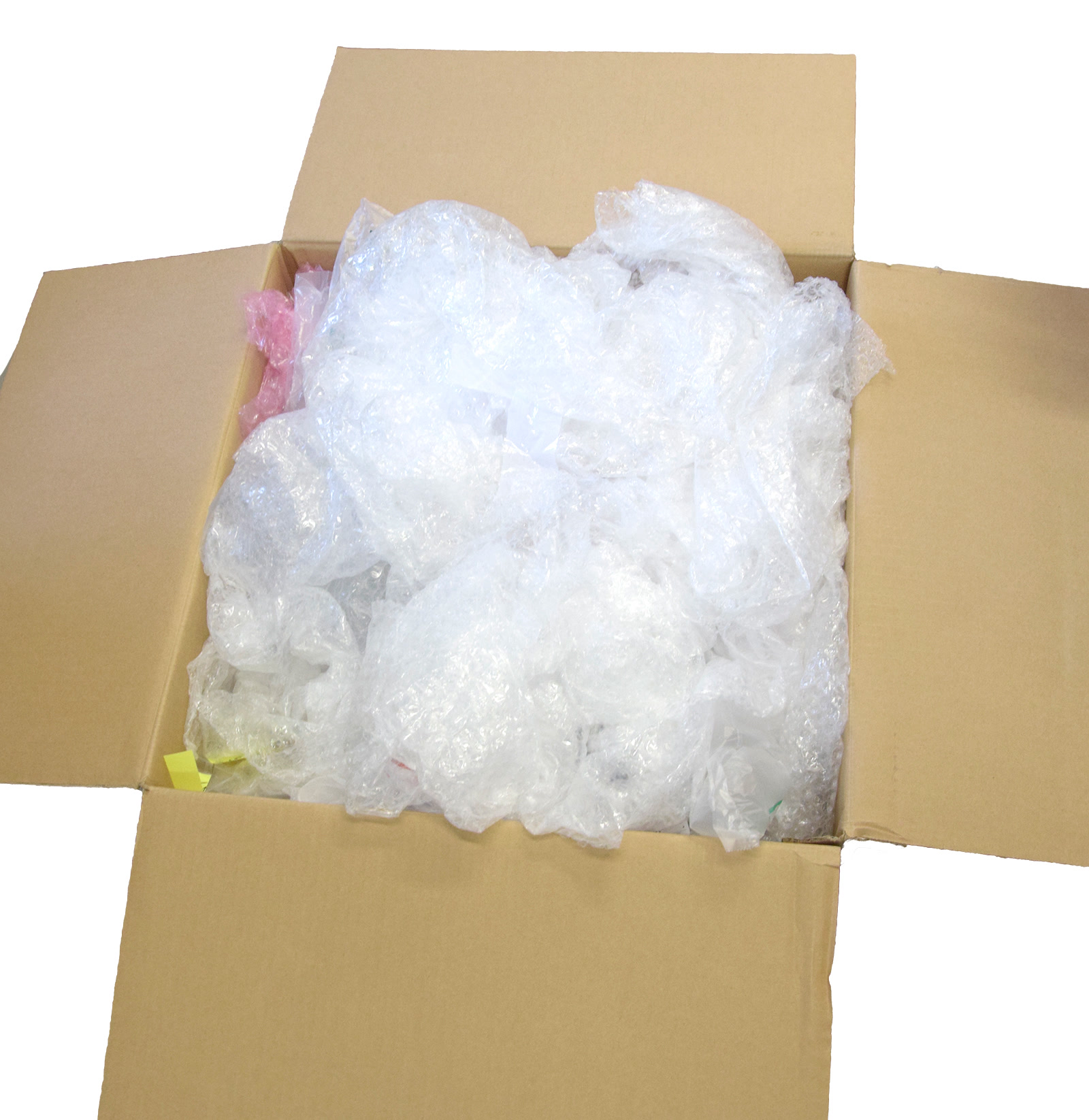
                  You will need a piece of bubble-wrap/sheet padding. Roughly 400 × 400 mm / 15 × 15 in. Do not use packing peanuts and/or shredded paper as padding material! This is not suitable. Use crumpled paper, bubble-wrap, or other inflated packing material.

                  Packing process

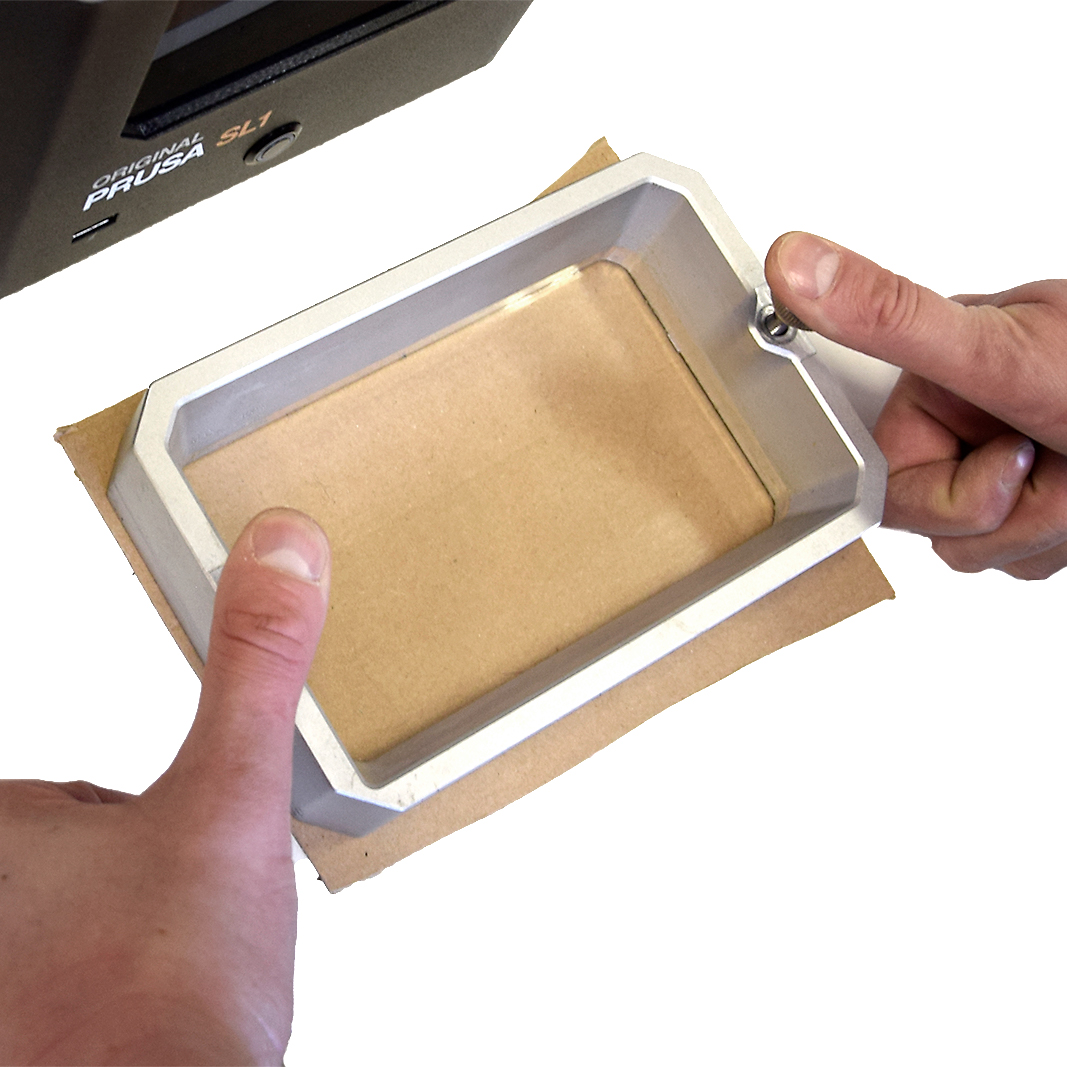
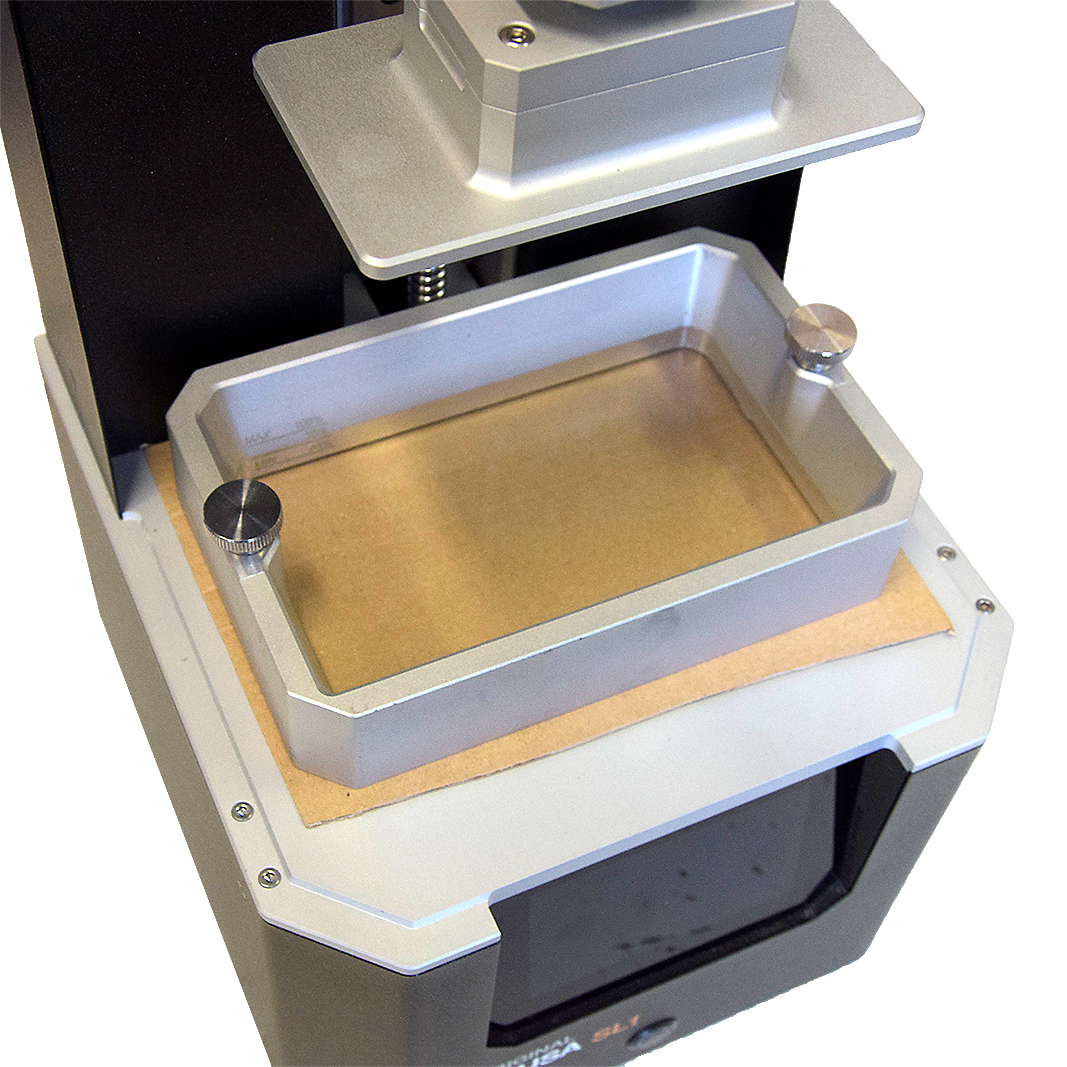
                  1. Remove the resin-tank (vat) and lay a layer of thin cardboard on top of the print-LCD. Make holes in the cardboard at the screw-holes and secure the vat on top with its screws. To easily get the correct holes, place the tank with screws on top of the cardboard and press the screws down to mark where you create some holes (left picture).
                  Cardboard from a box of rubber-gloves or tissues is ideal.
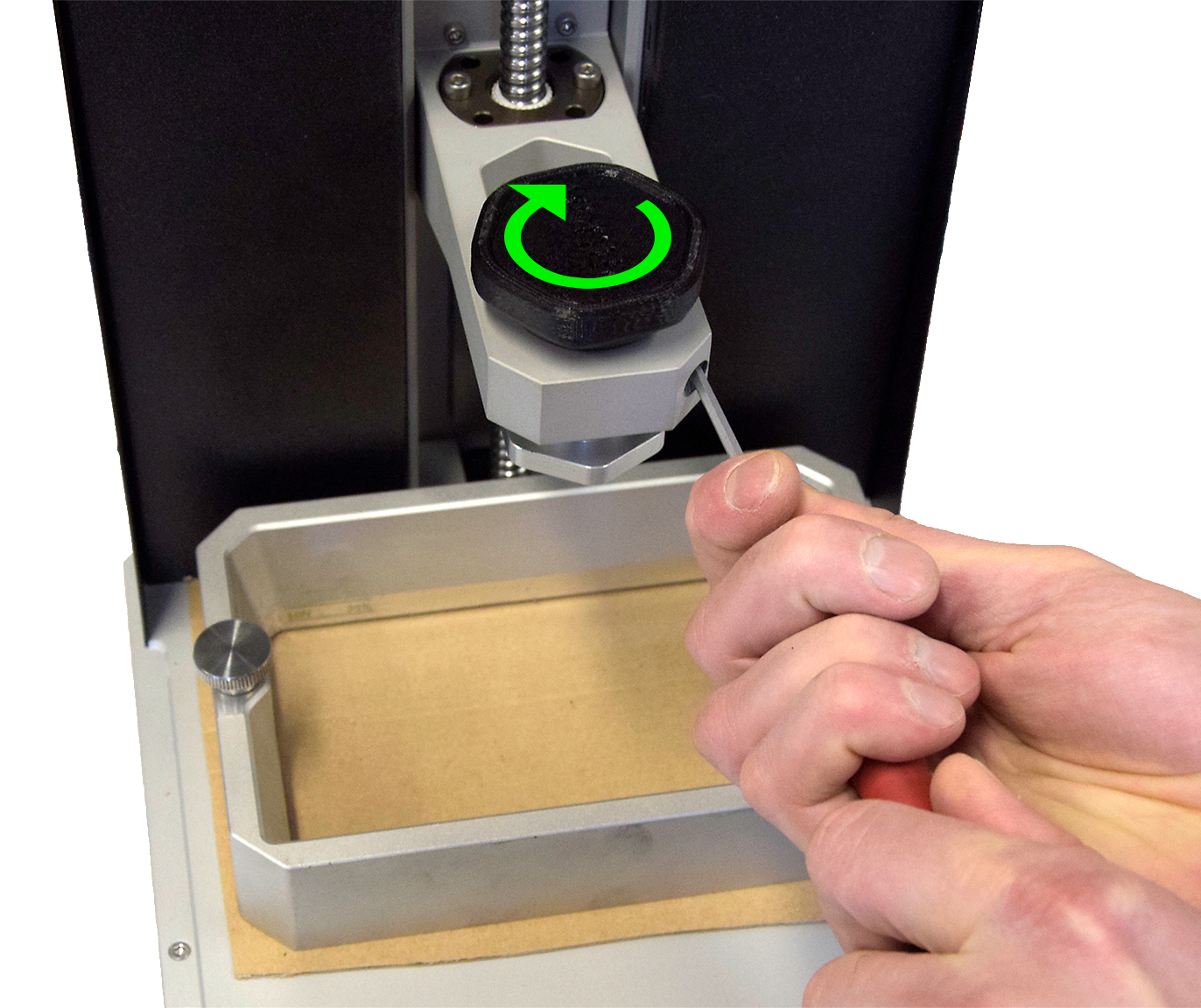
                  1. Remove the build-platform and push the tower halfway down its axis and secure the platform-mount by securing the knob and cantilever screws, as in the last step of the calibration-procedure.

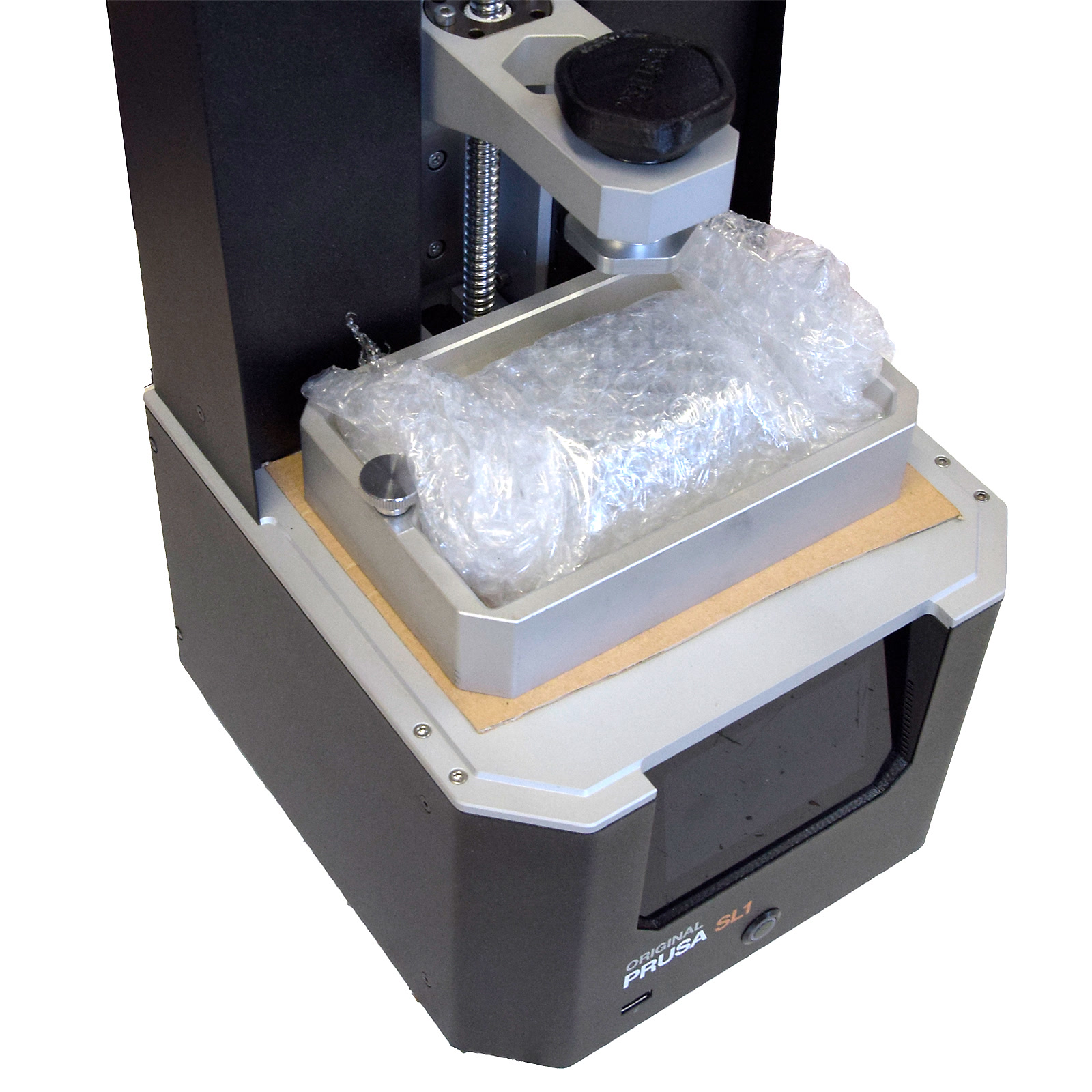
                  1. Wrap the build-plate up in several layers of bubble-wrap and place it inside the resin tank.
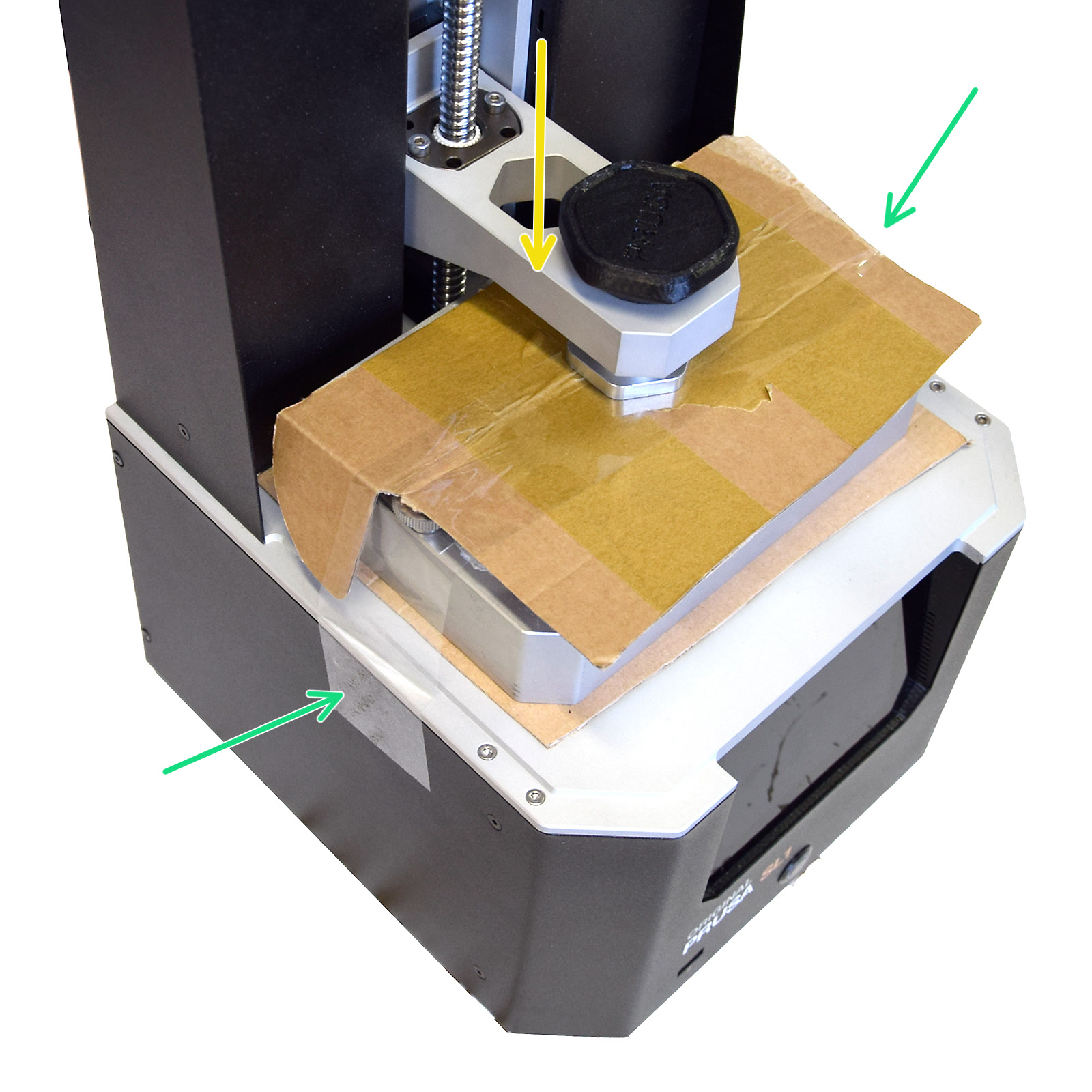
                  2. Cut out another piece of cardboard and place it on top of the tank with the platform and tape it down (green arrows). Then push the lever down until it touches the cardboard (yellow arrow).
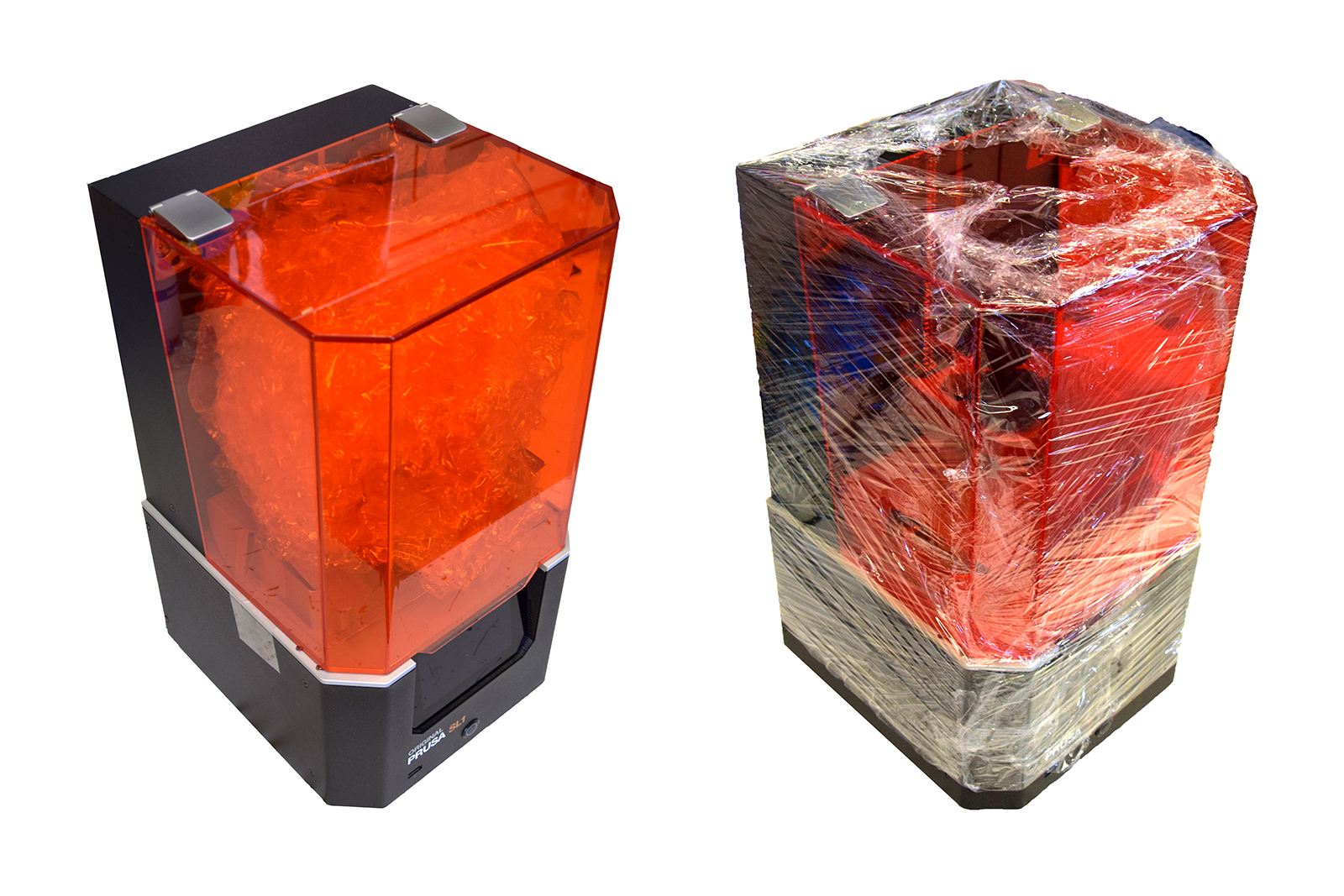
                  1. Fill the remaining space with bubble-wrap or other packing material and close the orange lid of the printer.
                  2. Secure the cover with kitchen cling-film (plastic foil) 2-3 times around the whole printer.

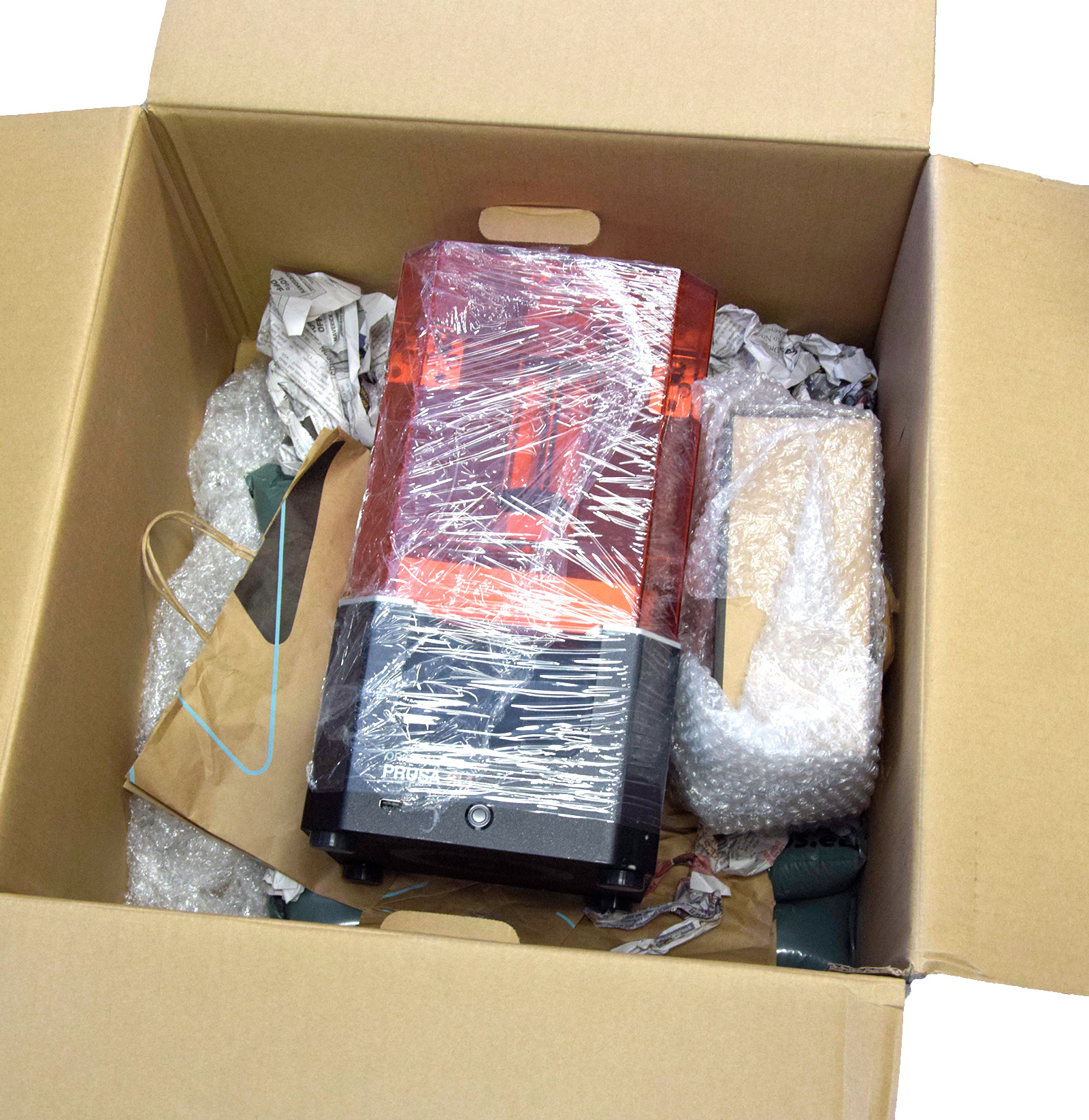
                  If you still have the original box and padding, please use this to pack down the printer. Packing the CW1 is the same process, only tape the rotation-platform so it does not spin around in transit, then wrap accessories and place them in the tank, before wrapping this up and placing it in its place. Then run plastic foil (cling-film) around the machine.
                  1. To secure the printer itself in the box, apply 5-8 cm (2-3 in) of padding to the bottom of the box, place the machine in the center.
                  2. Pack additional material/accessories in a separate box, or in padding material and place it next to the printer.
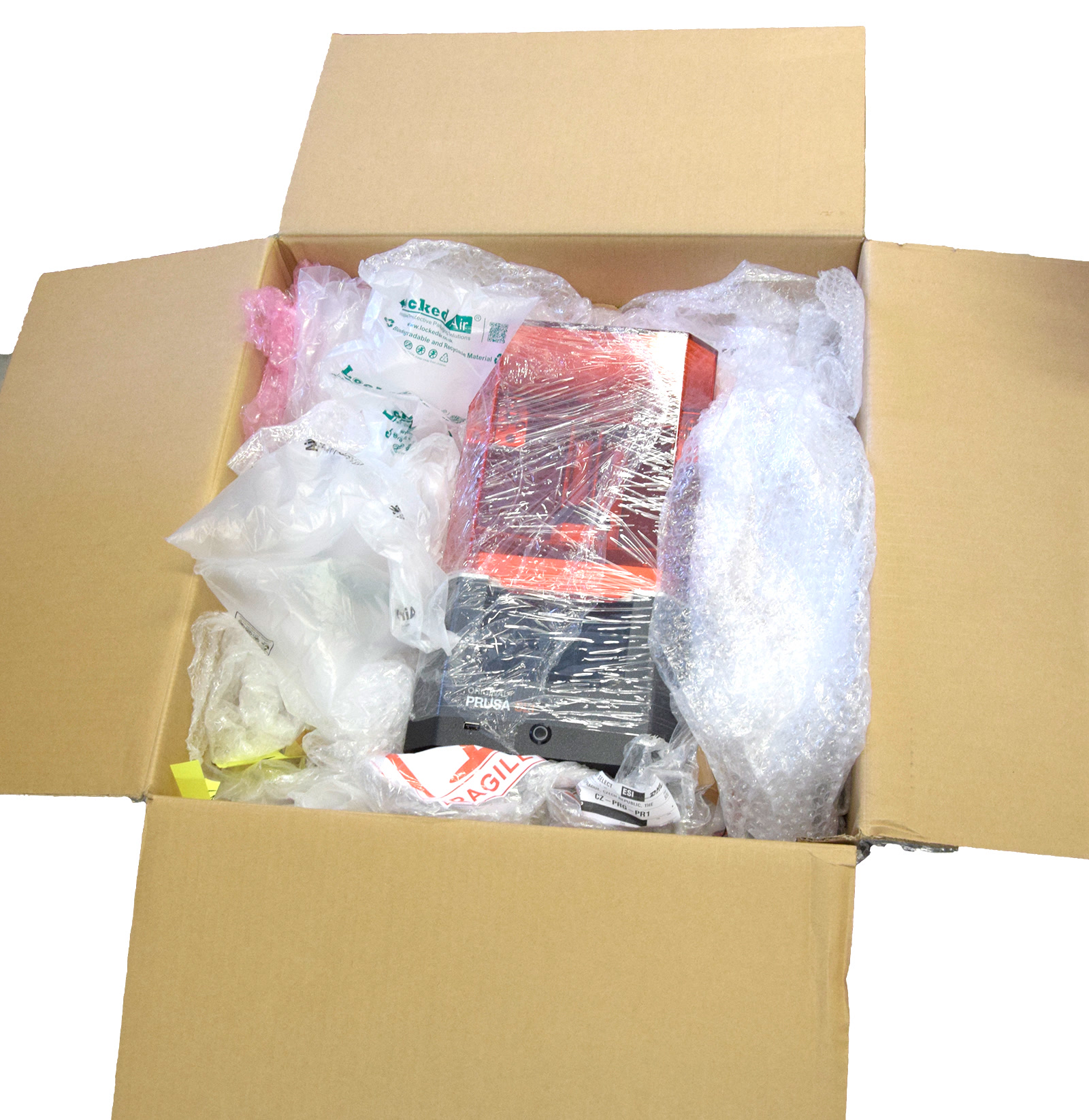
                  3. Fill the remaining empty space inside the box with bubble wrap, inflatable air cushions, or similar soft packaging material.
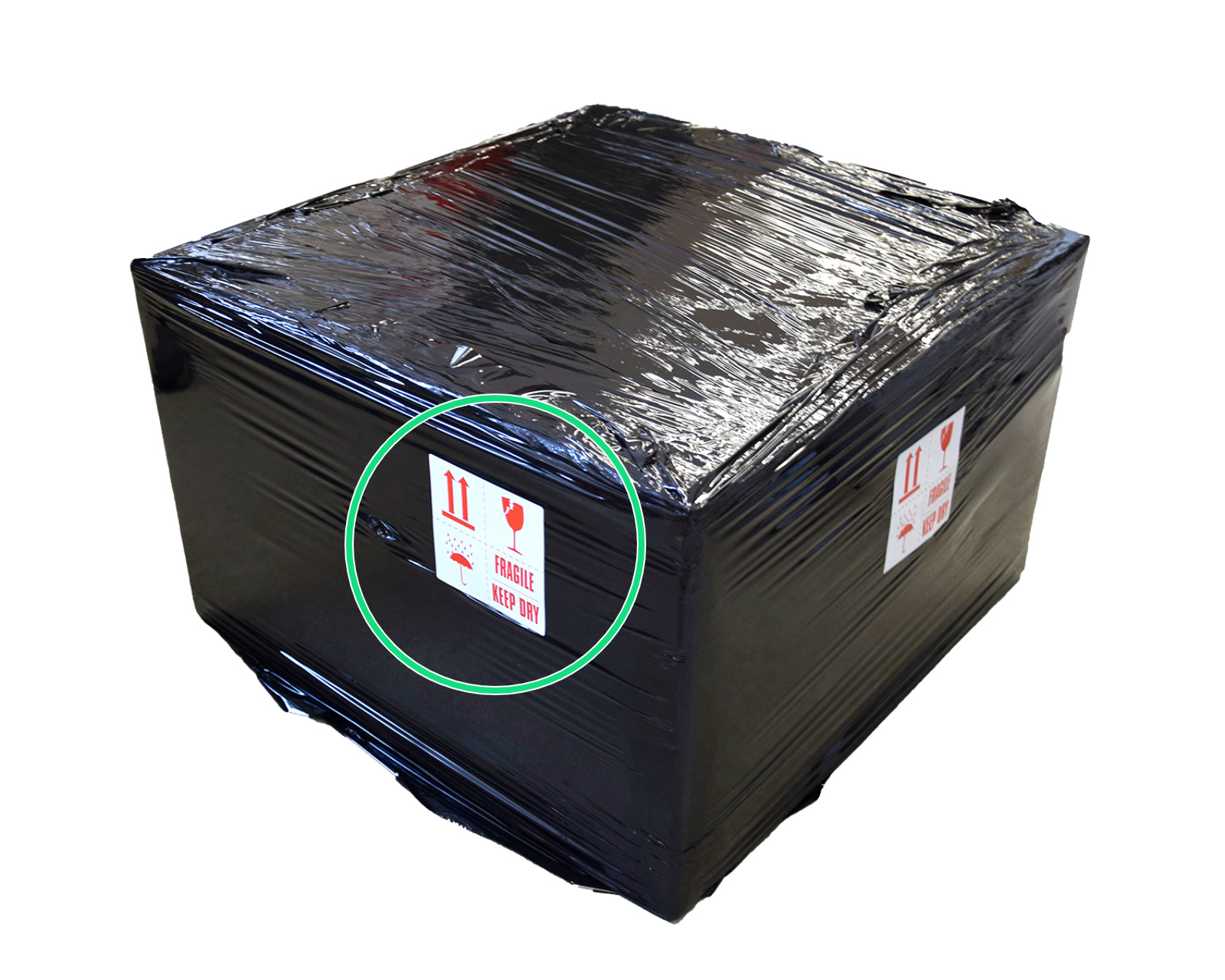
                  1. Wrap the whole box up in a few layers of plastic film for additional protection and print the 'Fragile' picture linked here and tape it to the outside, with the arrows pointing to the top of the box.

                  Document your packing procedures in case of damage during transit.
                  Was this article helpful?
                  This action is available only to registered users. Please log-in.
                  Log in  to post a comment
                  No comments

                  Topics

                  • About your printer
                    • General Information
                      • VAT (Value Added Tax) & Customs fees
                      • Prusa Account creation
                      • Assembly manuals
                      • Customer support
                      • Warranty
                      • Packing SL1/CW1 for return
                      • Unpacking a CW1
                      • Photo and video documentation
                      • Food safe FDM printing
                      • Types of printers and their differences
                      • FAQ - Extended buyers-guide
                      • Printer Handbooks
                      • Glossary SL1/CW1
                      • Original Prusa Serial Number
                      • UPS backup for your printer
                      • Factory repair
                      • Order status
                      • How do Prusameters on Printables work?
                      • E-shop order creation
                      • FAQ - Orders
                      • Supplemental Statements valid on Prusa websites
                      • Printed Solid Service center USA
                      • Purchasing and managing licenses for Prusa Academy courses
                      • Payment error
                      • Prusa Printer Upgrades
                      • Product certifications
                      • Global-e
                    • Printer description
                    • Printer features