AA

Featured products

    Popular categories

      Trending searches

        Articles

          Blog

            Products

              Categories

                Suggested searches

                  Searching…
                  No results
                  Something went wrong.
                  ↑↓ Select↵ OpenEsc Close search
                  • English
                  • Čeština
                  • Deutsch
                  • Español
                  • Français
                  • Italiano
                  • Polski
                  • 日本語
                  • Orders
                  • Address
                  • In-stock Alerts
                  • My Courses
                  • Subscription
                  • Edit Account
                  • 3D printers9+▾

                    3D printersnew

                    newPrusa CORE One L+Learn more
                    newPrusa CORE One+ (Gen 2)Learn more
                    newPrusa CORE One L+ INDX 8-ToolnewPrusa CORE One+ (Gen 2) INDX 8-ToolPrusa CORE One L+: Critical InfrastructureOriginal Prusa MK4SnewOriginal Prusa XL+Original Prusa XL+: Critical Infrastructure

                    Printer upgrades

                    newINDX Conversion KitsnewPrusa CORE One L to CORE One L+ upgradenewPrusa CORE One+ to Prusa CORE One+ (Gen 2)newPrusa XL to Prusa XL+ Upgrade
                    Prusa Reward ProgramLove your Prusa printer? Share your experience and earn $30 Prusa e-shop vouchers.
                    How to Choose a 3D Printer?We’ll walk you through the basics to find the exact machine for your space, budget, and ideas.
                    Free E-bookDownload a free e-book Basics of 3D Printing with Josef Prusa and make your first steps in 3D printing world
                    Original Prusa Printable PartsCollections of printable spare parts for Original Prusa 3D printers and upgrades.
                    Shipping informationRegularly updated info about the current manufacturing capacity and delivery times of our printers.
                    Custom 3D PrintingProfessional custom 3D printing from various materials according to your requirements.
                  • Materials▾

                    Filaments

                    PrusamentPLAPETGASA / ABSPC (Polycarbonate)PA (Nylon)FlexCompositesSpecialMaterials clearance sale

                    Resin

                    Prusament ResinResin Cleaner
                    Filament GuideCheck my Prusament Spool
                    Prusament.com
                  • Parts & Accessories▾

                    Accessories

                    EnclosuresNozzlesPrint SheetsEssential AccessoriesCameras & AddonsTools & CraftingAdhesives

                    Spare parts

                    Merchandise

                    Spare parts - All PrintersCORE OneMK4/S & MK3.9/SMK3/S/+XL
                    Merch
                  • For Business▾
                    Prusa Pro HT90Prusa Pro SLXPrusa Pro AFSPrusa Pro Medical OneOriginal Prusa XLOriginal Prusa XL: Critical Infrastructure
                    Prusa CORE One+Learn more
                    Prusa CORE One LLearn more
                    Prusa CORE One L: Critical Infrastructure Edition

                    3D Printing for

                    Manufacturing and R&DAutomotive IndustryHealthcareEducation and Academic ResearchArchitects and DesignersFilm IndustryCritical Infrastructure

                    3D Printing Stories

                    • How 3D printing started: About Rep-rap and open-source with Adrian Bowyer
                    • Teaching mathematics redefined with 3D printing at JKU Linz
                    • The story behind the LTT screwdriver
                    • Victoria Hand Project: Changing Prosthetic Care with 3D Printing
                    Official Prusa Resellers
                    Sustainability
                    Prusa Education
                    Contact and Inquiry
                    Custom 3D Printing
                    ISO Certified
                  • Software▾
                    PrusaSlicer

                    PrusaSlicerPrusaSlicer

                    PrusaSlicer is an open-source, feature-rich, frequently updated tool that contains everything you need to export the perfect print files for your 3D printer.

                    WindowsMacOSLinux
                    Prusa Connect

                    Prusa Connect

                    Prusa Connect is a cloud service enabling remote control and monitoring of your 3D printers, offering secure data handling, easy setup, and support for managing multiple printers from anywhere.

                    Log in to Connect
                    Prusa.app

                    Prusa.app

                    Control your printer/s remotely from anywhere using the Prusa Connect technology behind. Prusa.app brings a new level of Prusa printer experience to Android and iOS phones.

                    Try it now!
                    Drivers & FirmwareDownload the latest firmware and drivers for your 3D printer.
                    PrusaSlicer Support
                    Prusa Connect Support
                  • 3D Models▾
                    3D PrintersArt & DesignHobby & MakersHouseholdTabletop MiniaturesToys & GamesPrintables Store

                    Popular 3D models

                    • Strong garden hose holder
                    • Prusa Spool Bot
                    • Build Tray — Modular Organizer for Assembly, Disassembly and Maintenance
                    • Broom Holder
                    • Octagon Fabric
                    • Prusa CORE One ? (Mimic Skin)

                    Design Contests

                    • De Prototipo a Producto: Accesorios para Cámaras8/1/2026 – 9/14/2026
                    • Vuelta al Cole 20268/21/2026 – 9/6/2026
                  • Community▾

                    Upcoming Events

                    • Maker Faire Tokyo 20269/5/2026 – 9/6/2026 · Tokyo, Japan · Prusa Team
                    • IFA 20269/4/2026 – 9/8/2026 · Berlin, Germany · Prusa Team
                    • 3D Printopia 20269/26/2026 – 9/27/2026 · Pennsylvania, United States · Prusa Team
                    • Maker Faire Bay Area9/25/2026 – 9/27/2026 · Kalifornie, United States · Prusa Team

                    Prusa Forum

                    • INDX calibrations...
                    • Core One L to Core One L+ (aka Gen2) Discussion
                    • FW 6.10.1+16383 Y-axis homing failure
                    Prusa World MapPrusa World MapFind local 3D printing users and explore the community around you.
                  • Help▾
                    Guides & TutorialsPrusaSlicerPrusa ConnectMaterials

                    Printer Model

                    CORE One INDXCORE One LCORE One+CORE One

                    Hardware Troubleshooting

                    • Selftest failed (CORE One/+)
                    • Clogged nozzle (CORE One, CORE One L, XL, MK4/S, MK3.9/S)
                    • Adjusting belt tension (CORE One/+, CORE One INDX, CORE One L/+)
                    • Prusa Connect and PrusaLink explained

                    Drivers & Firmware

                    INDX familyCORE One familyMK4 familyXL familyMMU familyPRO family
                  • Courses▾

                    Become an expert in 3D printing

                    Prusa Academy offers online courses on various 3D printing related topics. Each course features:

                    • easy-to-read text with many pictures and short videos
                    • links for inspiration and further study
                    • quizzes for testing your knowledge along the way
                    • certificate of completion
                    Browse all coursesMy courses library
                    • 3D Modeling in Autodesk Fusion
                    • PrusaSlicer Masterclass – Beginner to Advanced
                    • Complete Guide to 3D Print Postprocessing, Painting, and Detailing
                    • Airbrush Your 3D Prints: From Basics to Advanced Tricks
                  • Blog▾
                    • PrusaSlicer 3.0 Preview – Built for the Future of 3D Printing
                    • Prusa CORE One+ (Gen 2) INDX, Shipping Has Started, Complete Printers Open for Orders
                    • Better Prints, Easier Use: Prusa XL+, CORE One L+ and CORE One+ (Gen 2), Our Big Product Upgrade
                    E-Book: Basics of 3D Printing
                  • Company▾

                    About Prusa Research

                    We are the largest maker of 3D printers in Europe and the United States.

                    Founded as a one-man startup in 2012 by Josef Prusa, a Czech hobbyist, maker, and inventor. In just 15 years, we've grown into a company of more than 1,200 people. Every month, we design, build, and ship over 10,000 innovative and secure 3D printers from our headquarters in Prague, Czech Republic, and Delaware, USA, to users in more than 160 countries.

                    Watch a video and find out how Prusa Research was born and what we achieved within only 10 years!

                    About UsTimelineSustainabilityOpen-source
                    About Us
                    Contact Us
                    Logo and Photos
                    ISO Certified
                  1. Support
                  2. QR Error codes
                  3. Nozzle Cleaning Failed #31834 (CORE One) #35834 (CORE One L) #26834 (MK4S) #13834 (MK4) #27834 (MK3.9S) #21834 (MK3.9) #17834 (XL)
                   

                  Contents

                  • Nozzle cleaning wizard
                  • Nozzle cleaning
                  • Steel sheet cleaning
                  • Filament spool
                  • Check if the nozzle is not loose
                  • Check the Z-axis bearing housing (XL)
                  • Check the bolts that interact with the loadcell (MK3.9/S, MK4/S, CORE One/+, CORE One L)
                  • Loadcell seal
                  • Expansion joints (CORE One/+, MK4/S, MK3.9/S)

                  Blog

                  • PrusaSlicer 3.0 Preview – Built for the Future of 3D Printing
                  • Prusa CORE One+ (Gen 2) INDX, Shipping Has Started, Complete Printers Open for Orders
                  • Better Prints, Easier Use: Prusa XL+, CORE One L+ and CORE One+ (Gen 2), Our Big Product Upgrade

                  Newsletter

                  Signup and get our monthly squeeze on updates, blog, printables and much more.

                  By clicking, you agree to receive our newsletter.

                  This site is protected by reCAPTCHA Enterprise and the Google Privacy Policy and Terms of Service apply.

                  Strong garden hose holder
                  E-shop
                  • 3D Printers
                  • Printer Upgrades
                  • Filaments
                  • Accessories
                  • Prusa Merchandise

                  © Prusa Research a.s.

                  Printables
                  • 3D Models
                  • Store
                  • Clubs
                  • 3D Design Contests
                  • Brands
                  Community
                  • World Map
                  • Forum
                  • User Groups
                  • Events
                  Help
                  • Prusa Help
                  • Prusa Academy
                  • 3D Printing Calculators
                  Software
                  • PrusaSlicer
                  • Prusa.app
                  • Prusa Connect
                  • Drivers and Software
                  Company
                  • About Us
                  • Blog
                  • Official Prusa Resellers
                  • Contact Us
                  • Certified for ISO 9001, ISO 14001, ISO 45001
                  • General Terms and Conditions
                  • General Terms and Conditions of Use of the PRUSA Websites
                  • Privacy Policy
                  • Information about cookies
                  • Customer Complaints Policy
                  • Status Page
                  • Do Not Sell or Share My Personal Information
                  • Supplemental Statements
                  • General Terms and Conditions
                  • General Terms and Conditions of Use of the PRUSA Websites
                  • Privacy Policy
                  • Information about cookies
                  • Customer Complaints Policy
                  • Status Page
                  • Do Not Sell or Share My Personal Information
                  • Supplemental Statements

                  © Prusa Research a.s.

                  JOSEF PRUSA®, PRUSA RESEARCH®, PRUSA POLYMERS®, PRUSA ORANGE®, PRUSA 3D ® AND PRUSAMENT® are registered trademarks of Prusa Development a.s. used by Prusa Research a.s. under licence from Prusa Development a.s.

                  Nozzle Cleaning Failed

                  #31834 (CORE One) #35834 (CORE One L) #26834 (MK4S) #13834 (MK4) #27834 (MK3.9S) #21834 (MK3.9) #17834 (XL)

                  Relevant for

                  XL
                  MK4 family
                  MK3.9 family
                  CORE One family
                  CORE One+
                  +
                  33 comments
                  Article is also available in following languages
                  English
                  Čeština
                  Polski
                  Deutsch
                  Français
                  Español
                  Italiano
                  日本語

                  To achieve high-quality prints, the nozzle must make the correct amount of contact with the print surface. If this is not achieved, your printer will display the message "Nozzle cleaning failed."

                  CAUTION: Heated parts can cause severe burns!

                  Nozzle cleaning wizard

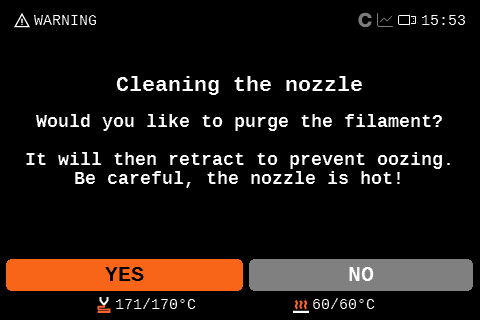
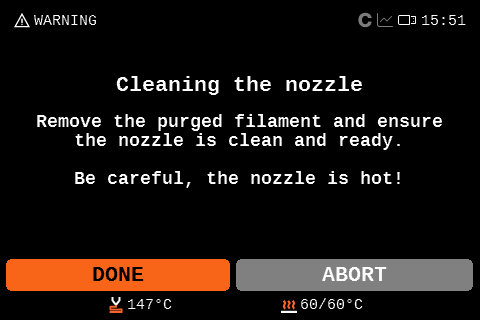
                  Once the message appears, you have the option to abort the print, ignore the nozzle cleaning and start the print, or retry the nozzle cleaning.
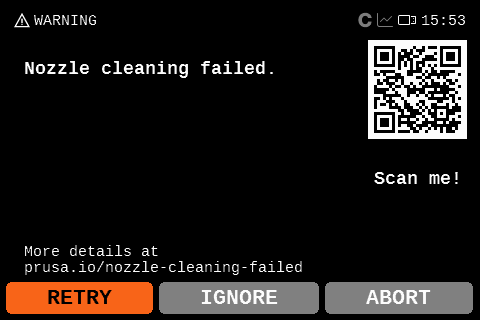
                  For redoing the nozzle cleaning, you can choose to purge filament to clean the nozzle of debris. This will purge the filament and retract it so it does not ooze. After that, the printer will redo the nozzle cleaning. If it does not solve the issue, try checking the items below.

                  Nozzle cleaning

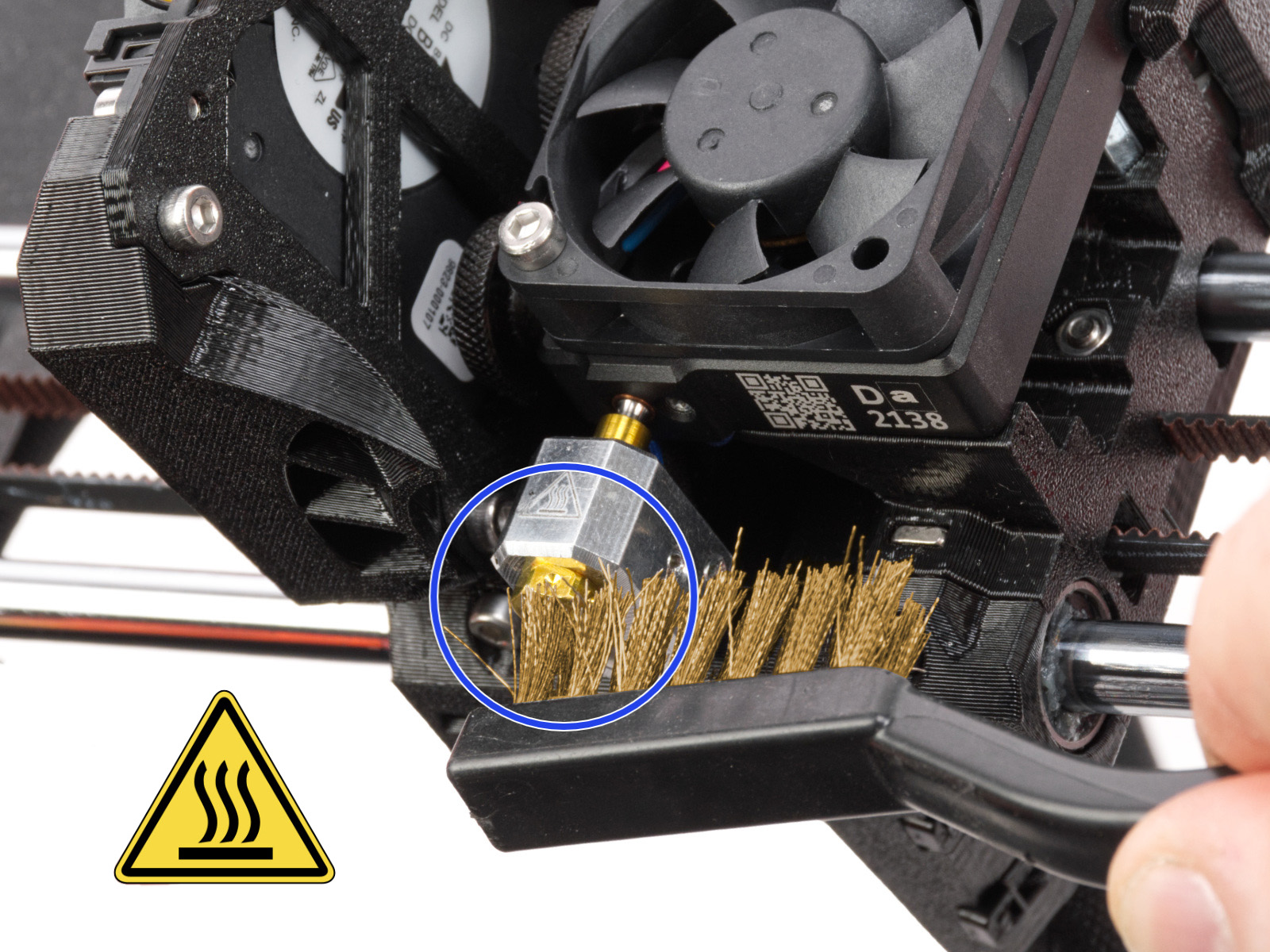
                  Check if the nozzle has residue. Debris on the nozzle or heater block can affect its thermal properties. To clean it, go to the printer menu in Control -> Temperature -> Nozzle, and heat the nozzle for three to five minutes at 250 °C, as the remains of the filament must be melted slightly so they can be removed easily.

                  Use a small brass brush to remove any old plastic stuck on the nozzle and heaterblock.

                  Avoid contact of the brush with the hotend cables, as this could cause a short circuit.

                  Caution: the printer is still at a hot temperature! Wait until the hot parts are cooled down to ambient temperature. It takes approximately 10 minutes. Do not touch it! Always check the values on the display.
                  INDX

                  The CORE One that is equipped with INDX has a tool that is passively heated. To clean it, first pick up the tool on the printer menu in Control -> Pick/park tool, then heat the nozzle normally.

                  Be careful not to damage the induction components.

                  Steel sheet cleaning

                  Make sure that the steel sheet is clean of any residue. For the smooth, textured, or satin sheet, clean with 90% or higher isopropyl alcohol (IPA).

                  Also, make sure that there is nothing between the steel sheet and the heatbed.

                  Filament spool

                  If the extruder needs to make too much effort to pull the filament, the nozzle cleaning error can be triggered. If this error is being shown when you are using a spool heavier than 2 kg, try changing to a smaller one for testing. Also, if you have a custom setup for your filament path, make sure that the filament is not getting caught anywhere.

                  If using a printer with multiple spools loaded, check if the issue is triggered when a specific tool is loaded. If this happens, the spool might be tangled.

                  Check if the nozzle is not loose

                  The nozzle on the Nextruder must be at the correct height and securely tightened. Before proceeding to the next steps, ensure that the nozzle is cooled down.

                  XL

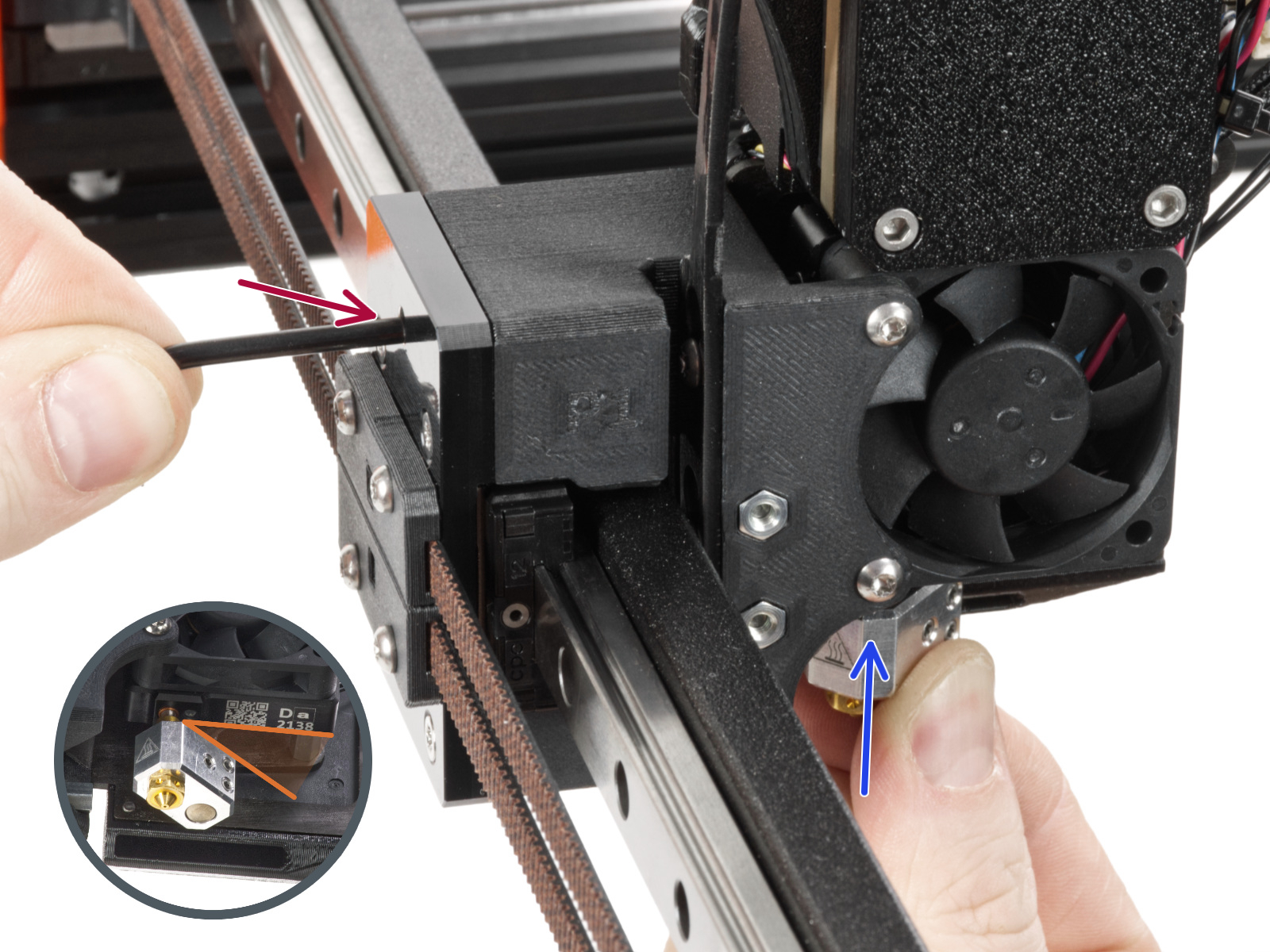
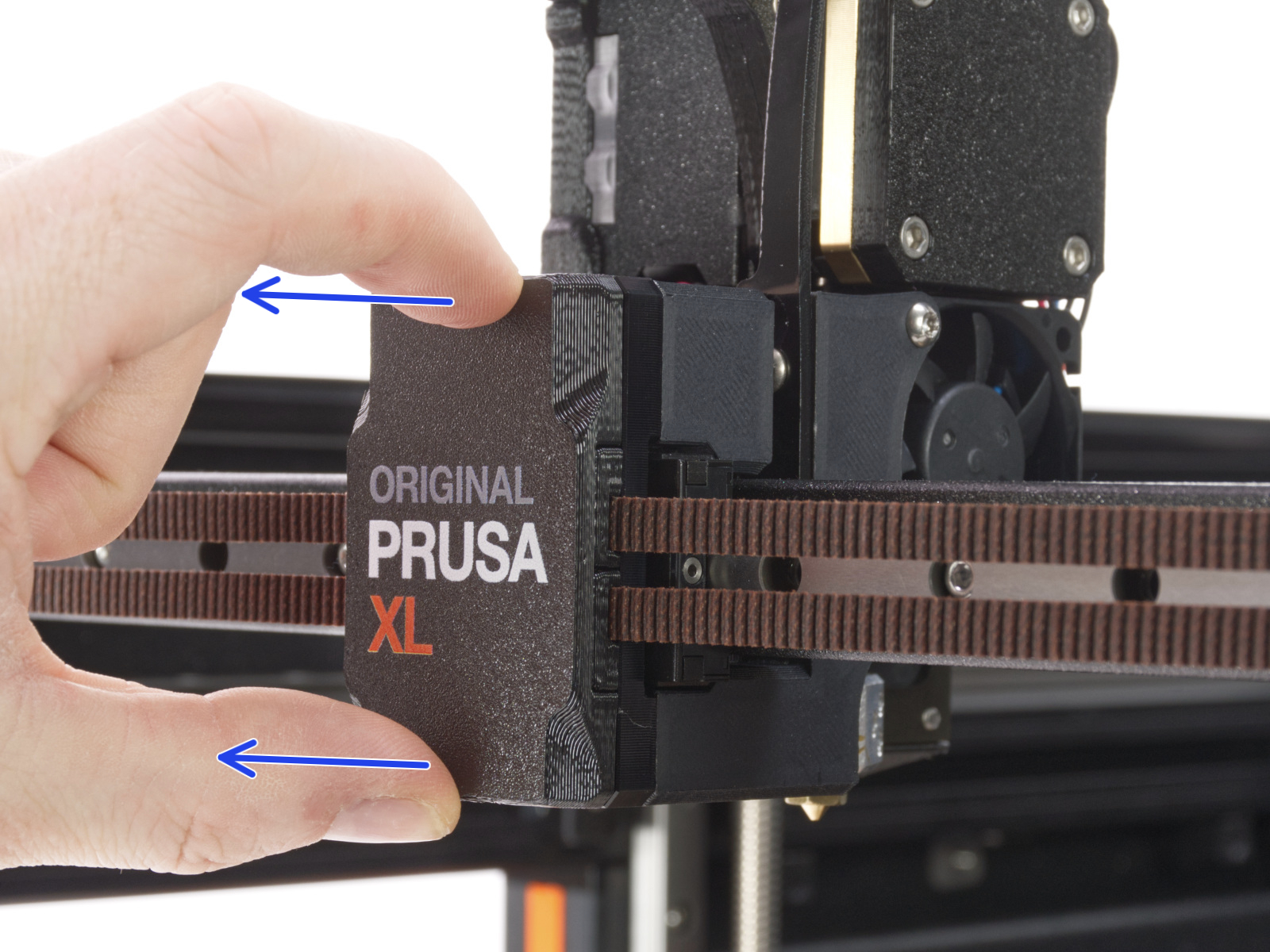
                  On single-tool XL, after removing the x-carriage cover, hold the heater block (make sure that the nozzle is not heated!), and use the Torx TX8 key as shown in the picture to tighten the set screw. Do not use extra force while tightening, as it may damage the hotend tube. The nozzle must be approximately at a 35°-40° angle to avoid damaging the hotend cables.
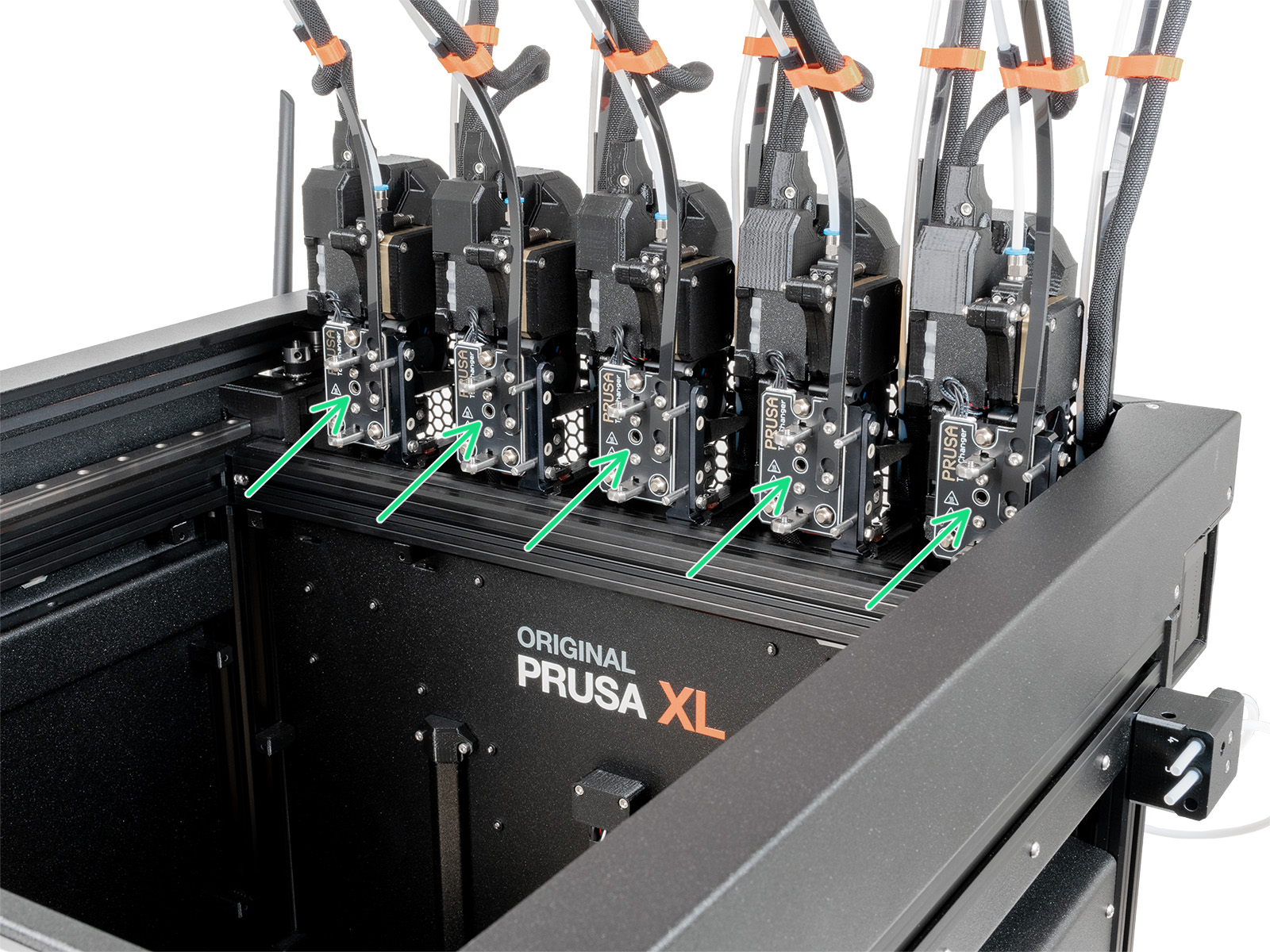
                  On the multi-tool XL, identify the tool that has the nozzle to be checked, and park it. Hold the heater block (make sure that the nozzle is not heated!), and use the Torx TX8 key in the part shown in the picture to tighten the set screw. Do not use extra force while tightening, as it may damage the hotend tube. The nozzle must be approximately at a 35°-40° angle to avoid damaging the hotend cables.
                  Once this is done, with the printer still cold and off, check whether the heater block has any rotational play. If the heater block can rotate:

                  • Check nozzle tightening from the previous steps once more.
                  • Check whether the nozzle and heater block have a loose joint. If needed, follow the nozzle replacement guide as a reference for temporarily extracting the hotend and retightening the nozzle.
                    • Single-tool
                    • Multi-tool

                  MK3.9/S, MK4/S, CORE One/+, CORE One L

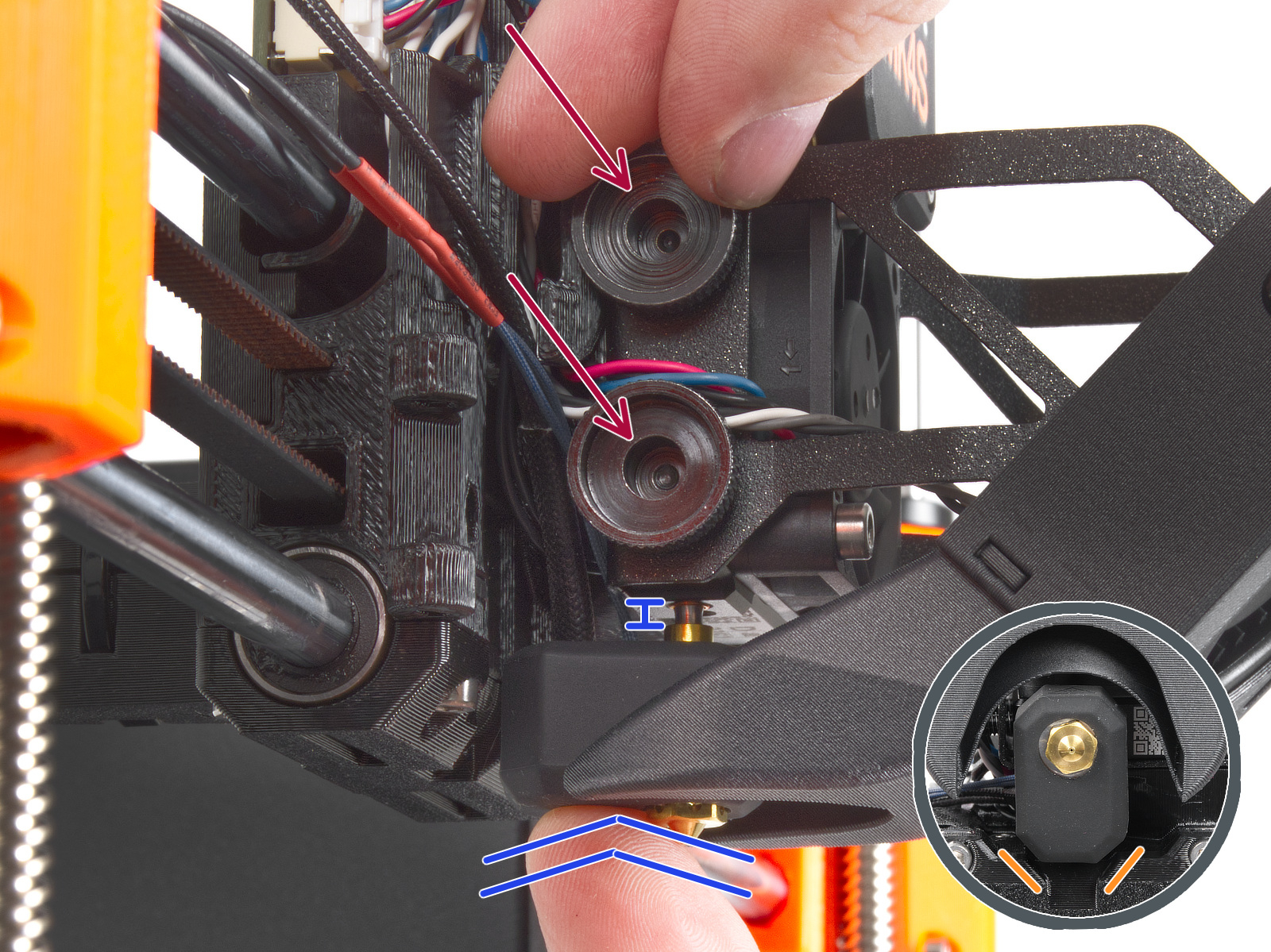
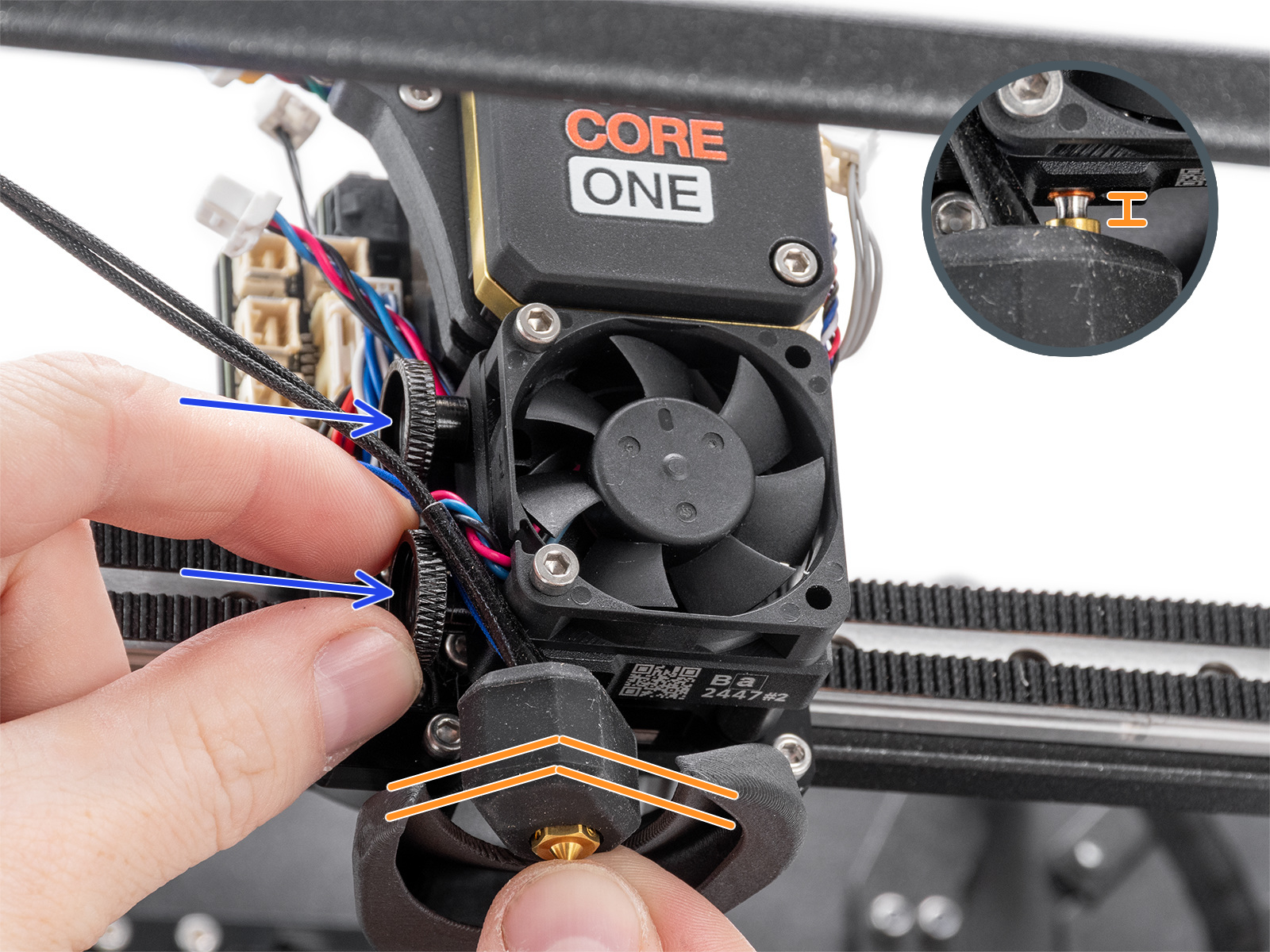
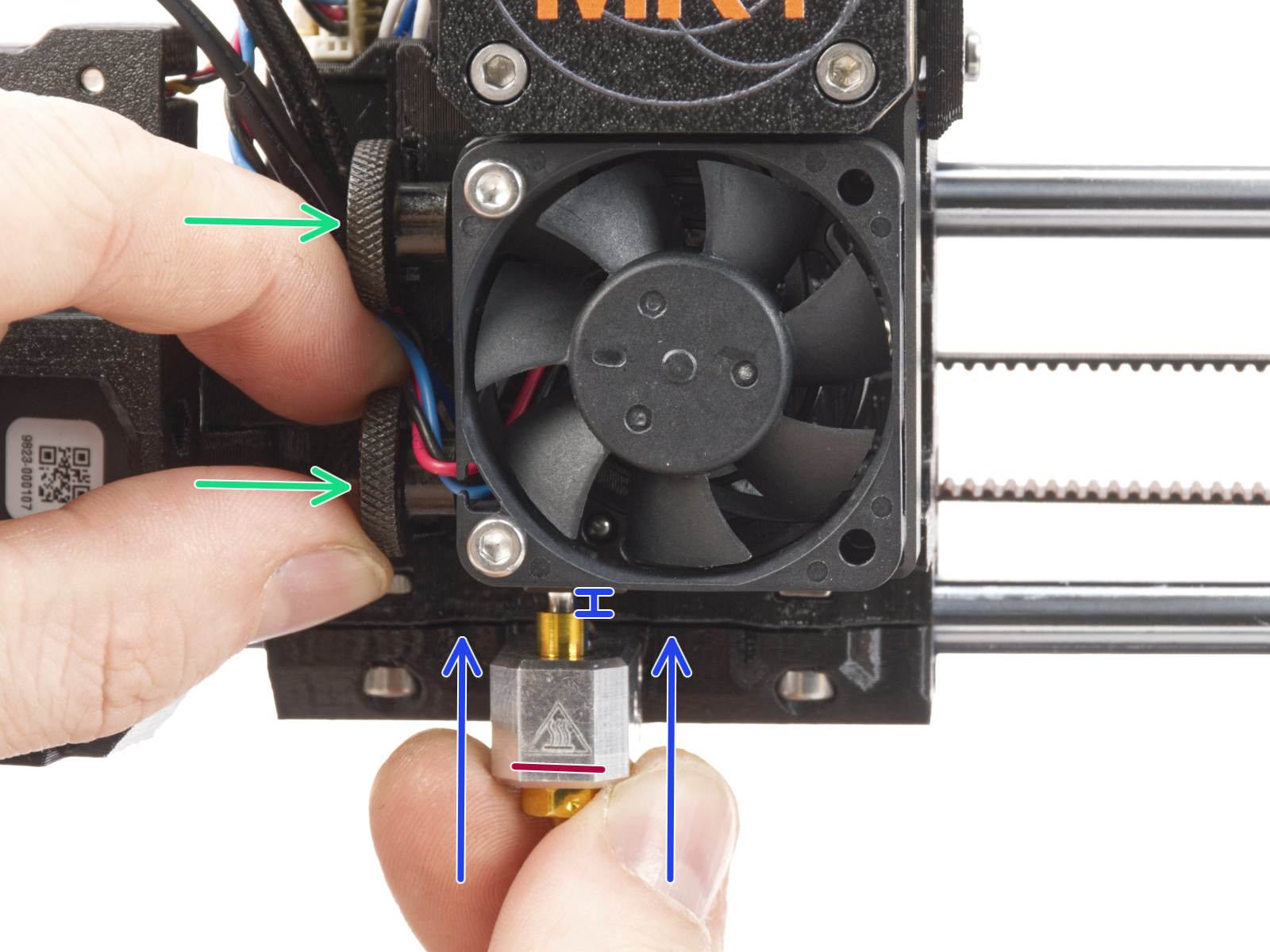
                  Then, loosen the thumb screws (do not completely remove the screws, a few turns are enough) on the side of the heatbreak, and push the nozzle up. Tighten the thumb screws just by hand, do not use any tools. After tightening the thumb screws, try moving the hotend to the sides and make sure it does not move.

                  If you have a Nozzle Adapter, check the installation again to make sure that the nozzle has not been lowered or loosened with the installation of the adapter.
                  MK4, MK3.9MK4S, MK3.9S
                  CORE One, CORE One L

                  INDX

                  If the issue happens multiple times, go to the printer menu in Control - Calibrations & Tests - 7. Dock Calibration. Make sure to push the toolchanger completely into the tool during the calibration.

                  Check the Z-axis bearing housing (XL)

                  The Z-axis bearing housings serve as the end stops for the Z-axis. It is essential to maintain a slight clearance between the Z-axis bearing housings and the heatbed frame when the printer is in its top position.

                  This way, during the mesh bed leveling and the autohome procedures, there can be an ideal amount of tiny contact between the nozzle and the print surface. 

                  A clearance that is too small can cause the "Nozzle Cleaning Failed" warning message to appear. In this case, to achieve the ideal clearance, slightly loosen the bolts securing the bearing housings. 

                  If the warning message still appears, slightly loosen the mentioned bolts once again, keeping in mind to still have the Z-axis bearing housings reasonably tight and held in place. 

                  Once you find an ideal tightness for the bolts that works and holds the Z-axis bearing housings in place, keep the change permanent.
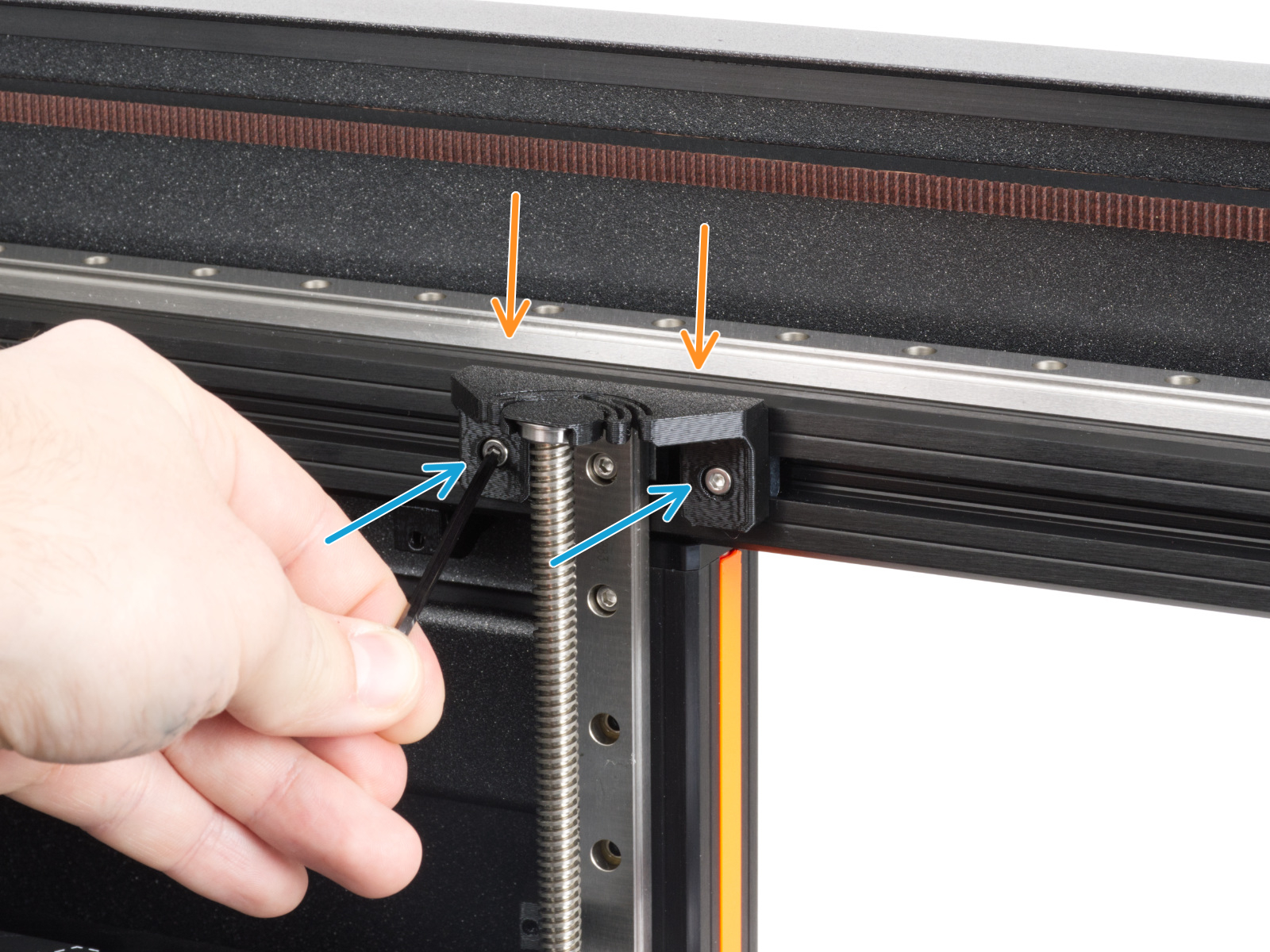
                  Do not remove the bearing housings from their place! This will cause damage to the printer. 
                   

                  Check the bolts that interact with the loadcell (MK3.9/S, MK4/S, CORE One/+, CORE One L)

                  Ensure that the printer is cooled down to room temperature and switched off before manipulating its components. 

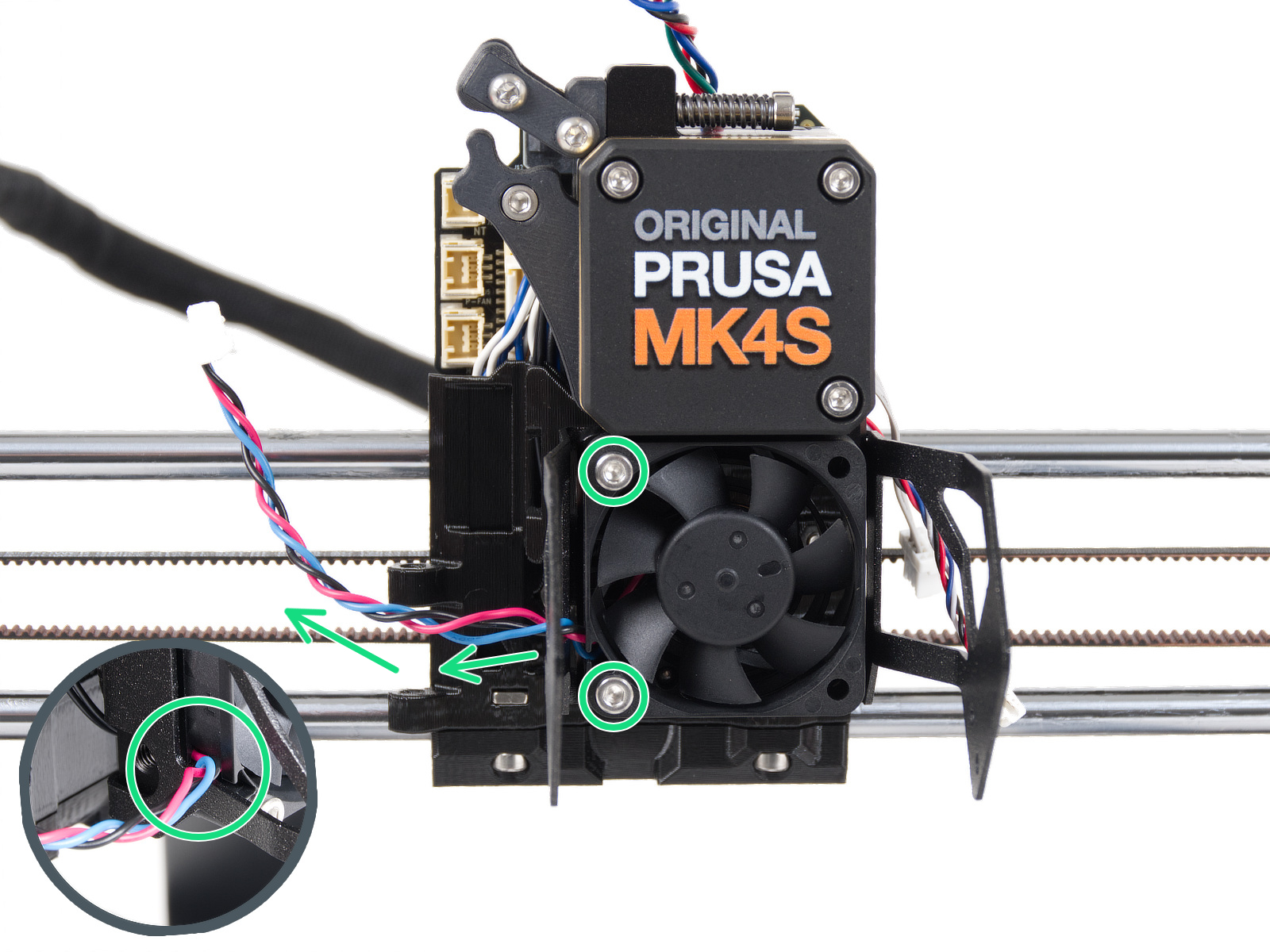
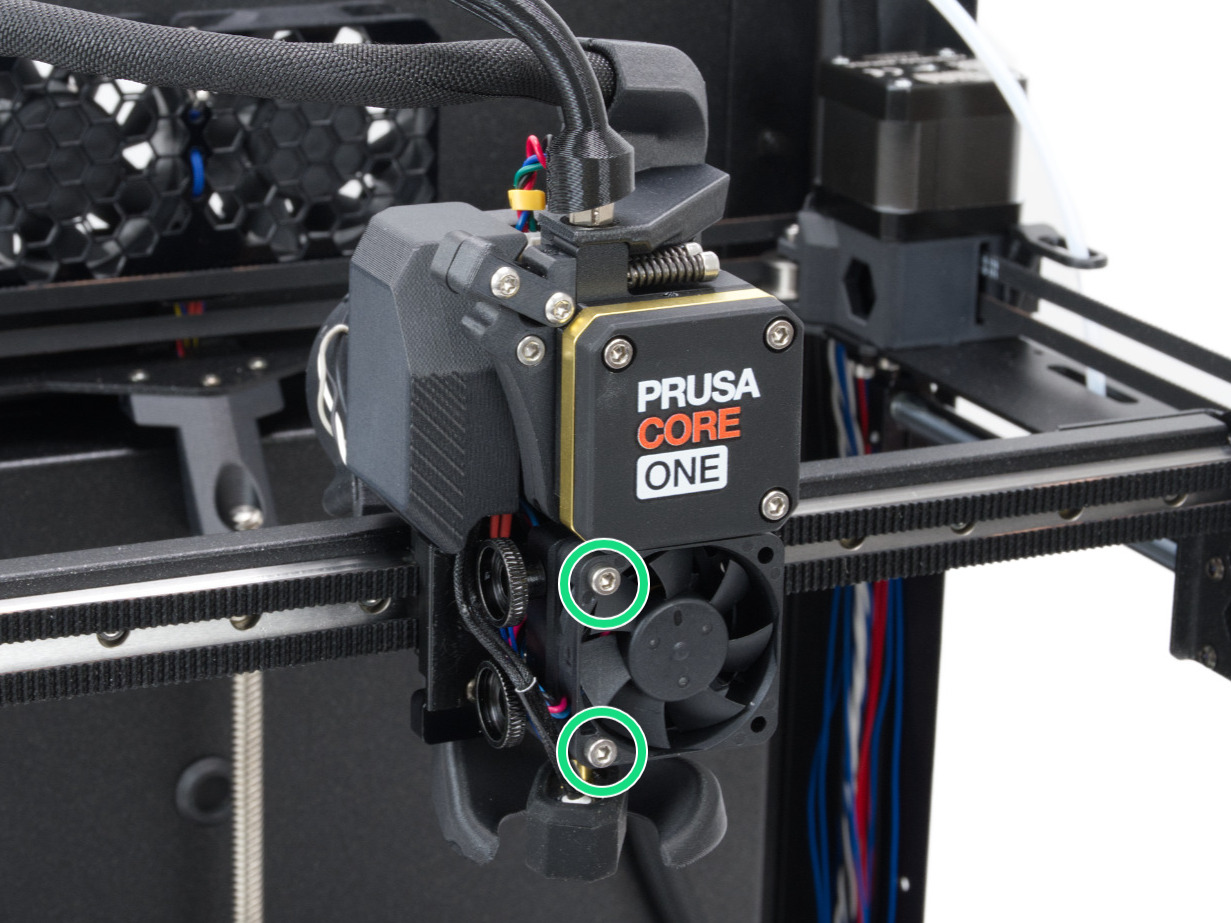
                  Some of the Nextruder bolts, if too tight, might generate extra forces that can be sensed by the loadcell, skewing its readings, hence potentially causing the issue. Check if slightly loosening the following bolts, while having the parts still tight and secured in place, can solve the issue.

                  Hotend fan

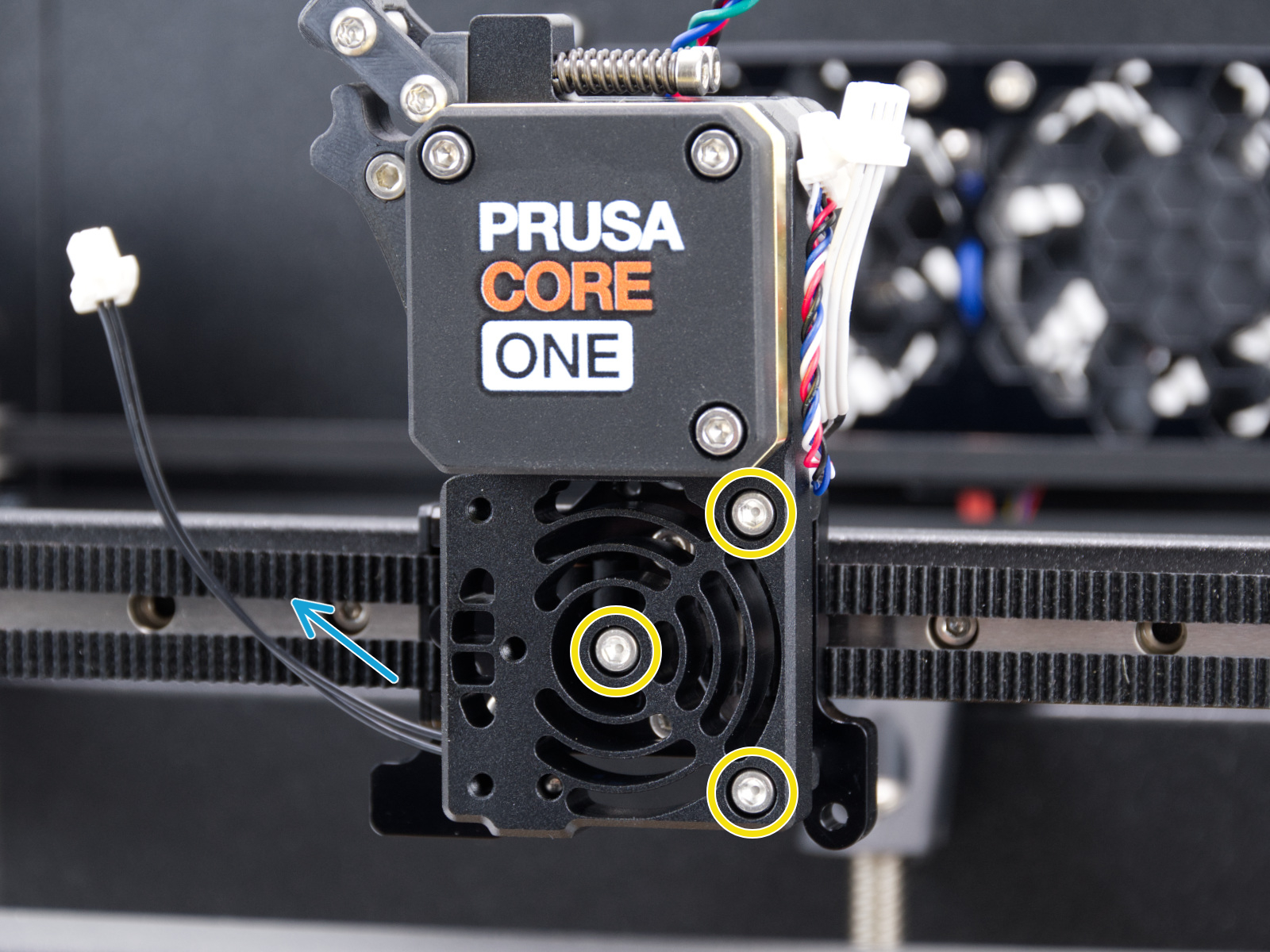
                  Check if the hotend fan is not overtightened. You can loosen the screws by 1/2 a turn.
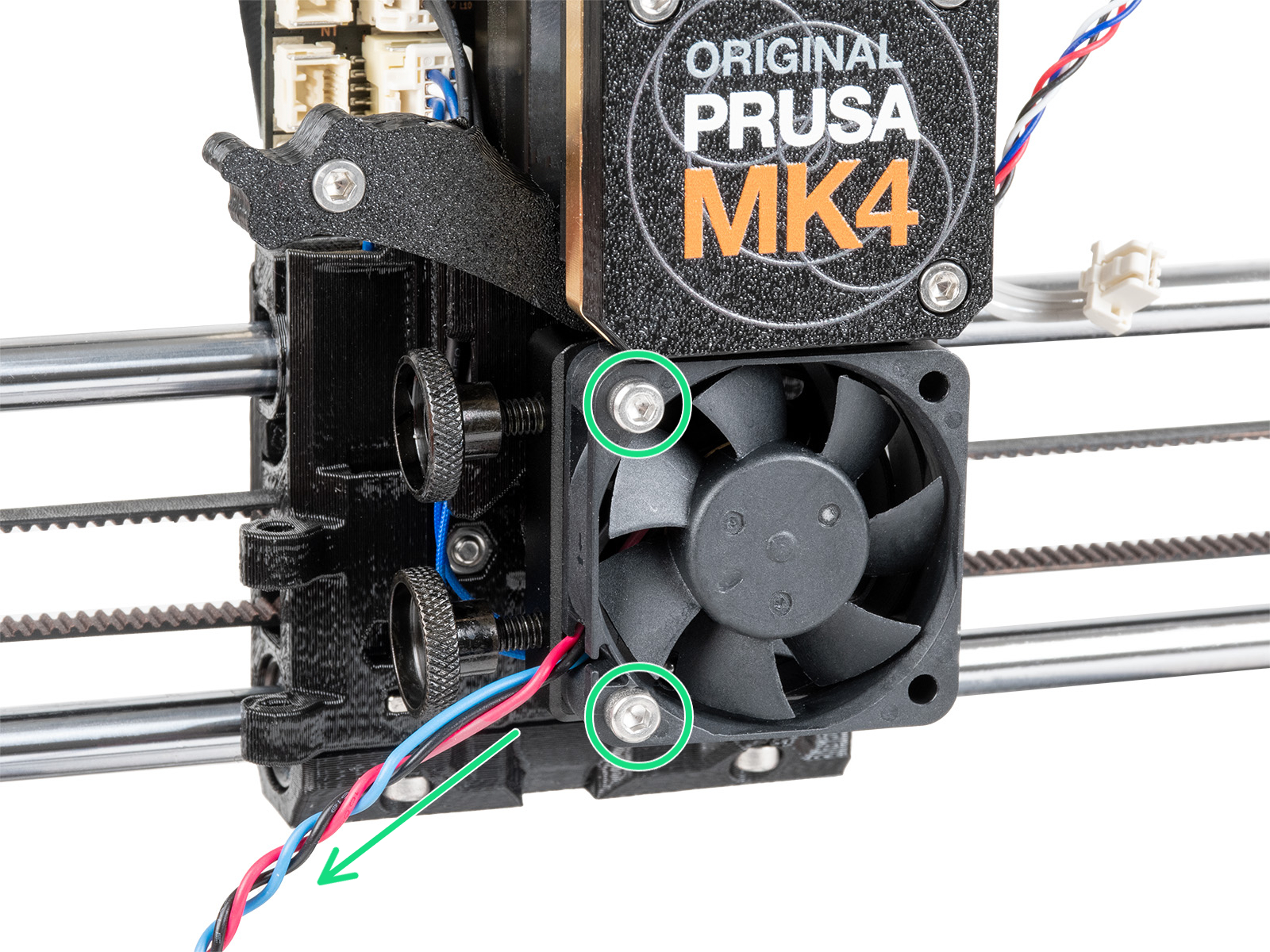
                  MK4, MK3.9MK4S, MK3.9S
                  CORE One, CORE One L

                  Heatsink

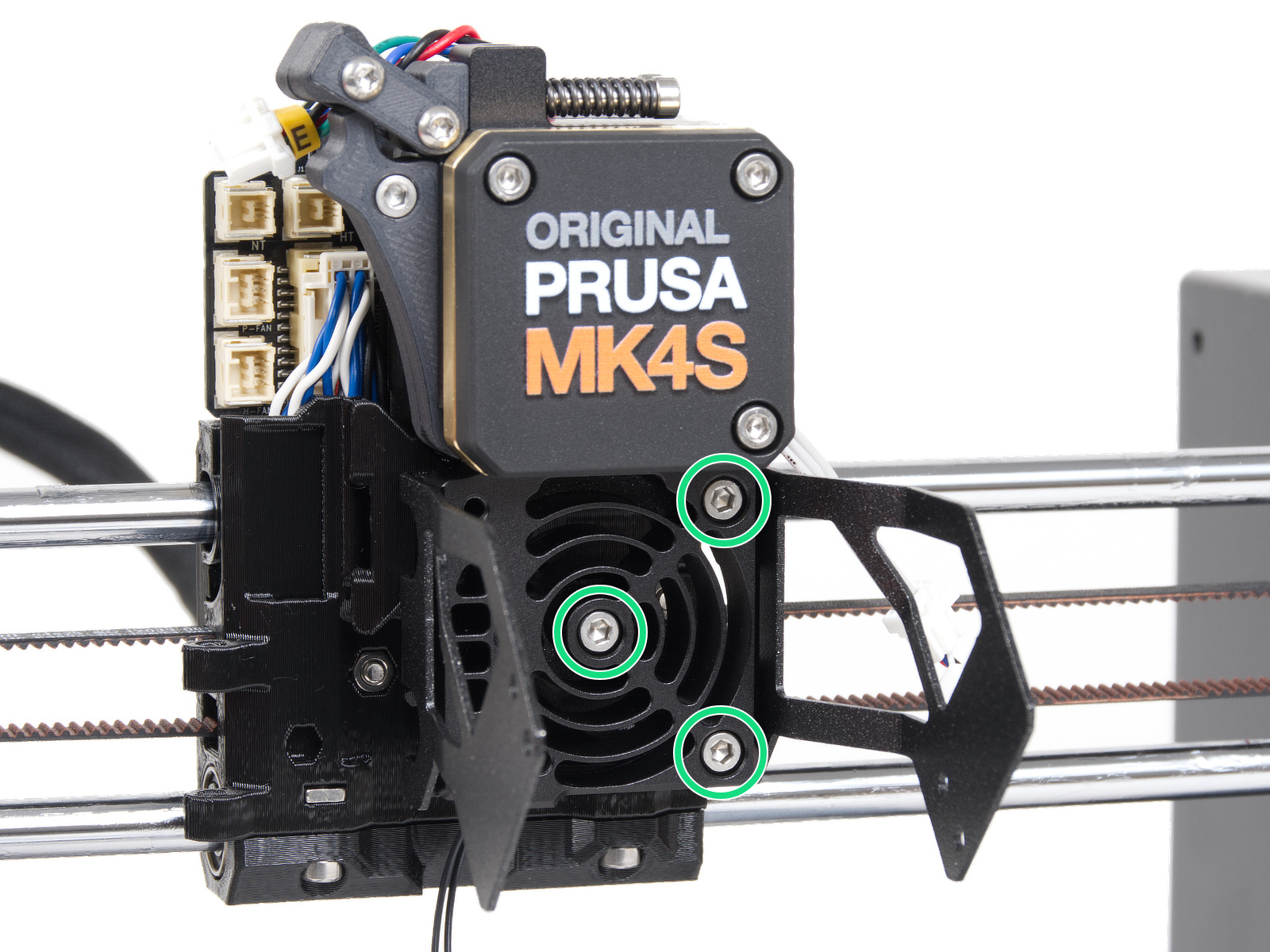
                  Temporarily remove the hotend fan by removing the previously adjusted bolts. This will expose the heatsink/loadcell. Then, loosen very slightly the three bolts that hold the heatsink/loadcell in place.
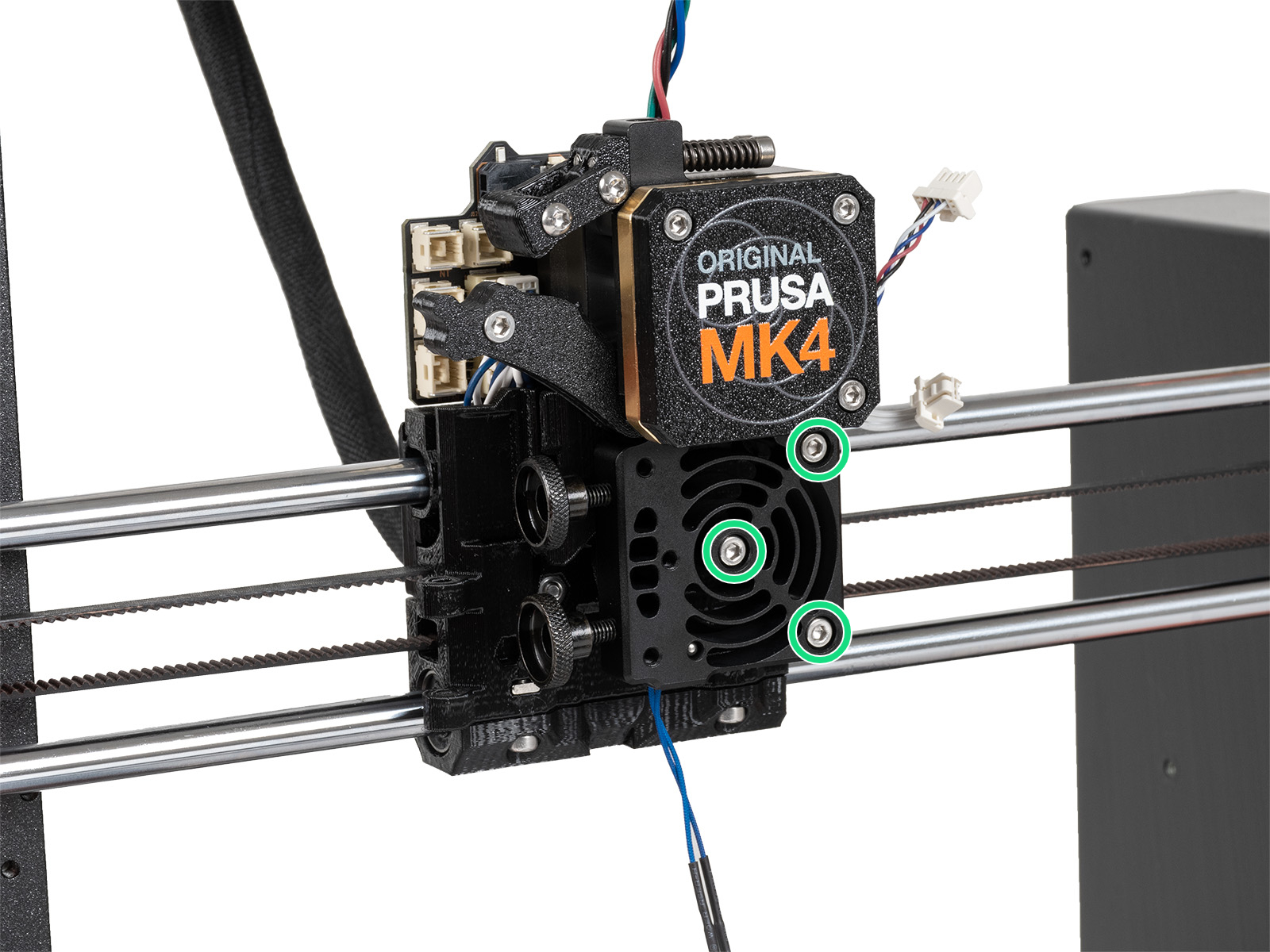
                  MK4, MK3.9MK4S, MK3.9S
                  CORE One, CORE One L

                  Loadcell seal

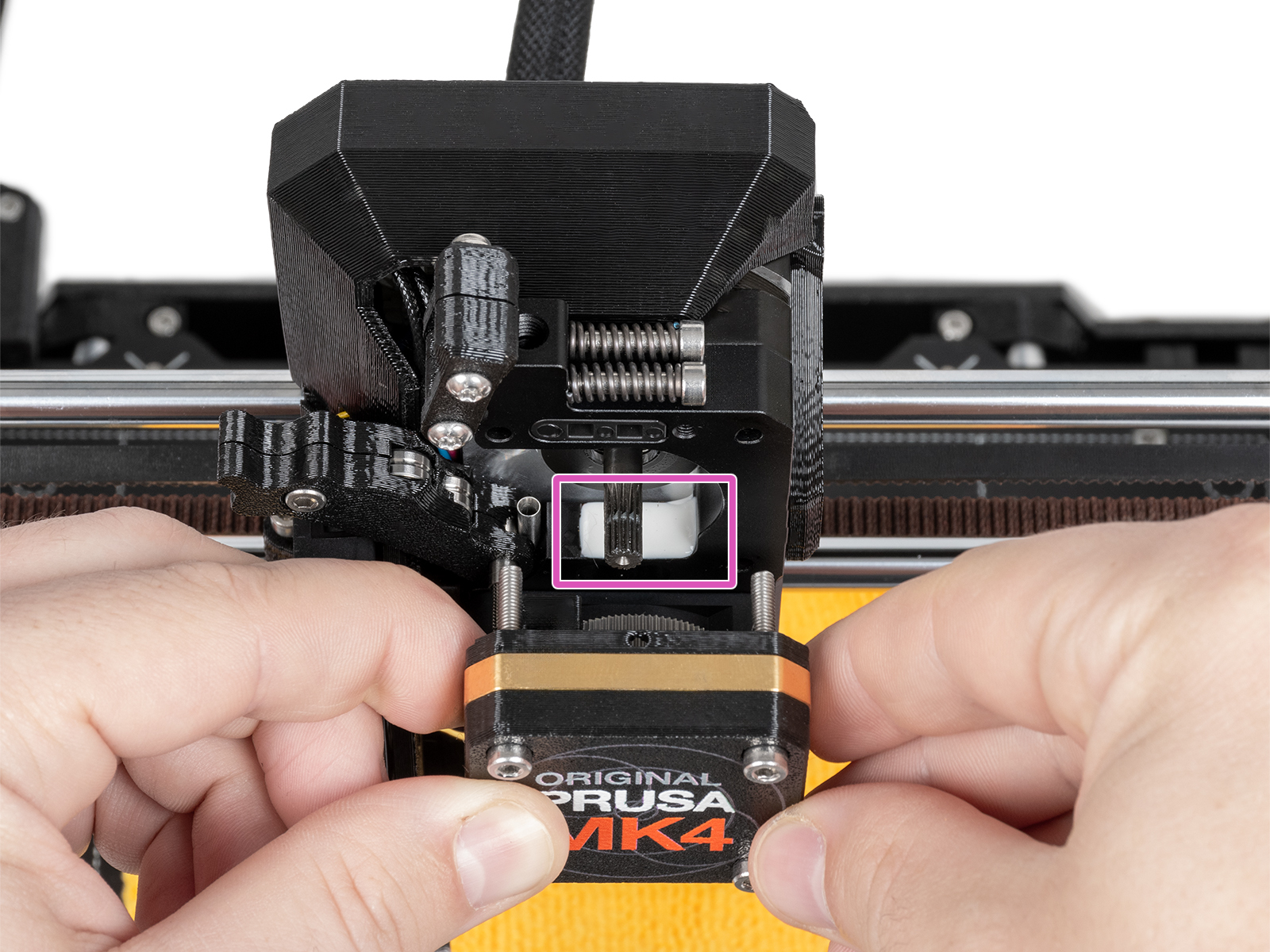
                  The loadcell wires are in the printer's heatsink. The wires and the seal that protects them may get damaged. To access the seal, remove the four screws that hold the front case. Then remove the front case, together with the PG-ring, gearbox, and main plate in one piece. Note that the seal might be white or black.
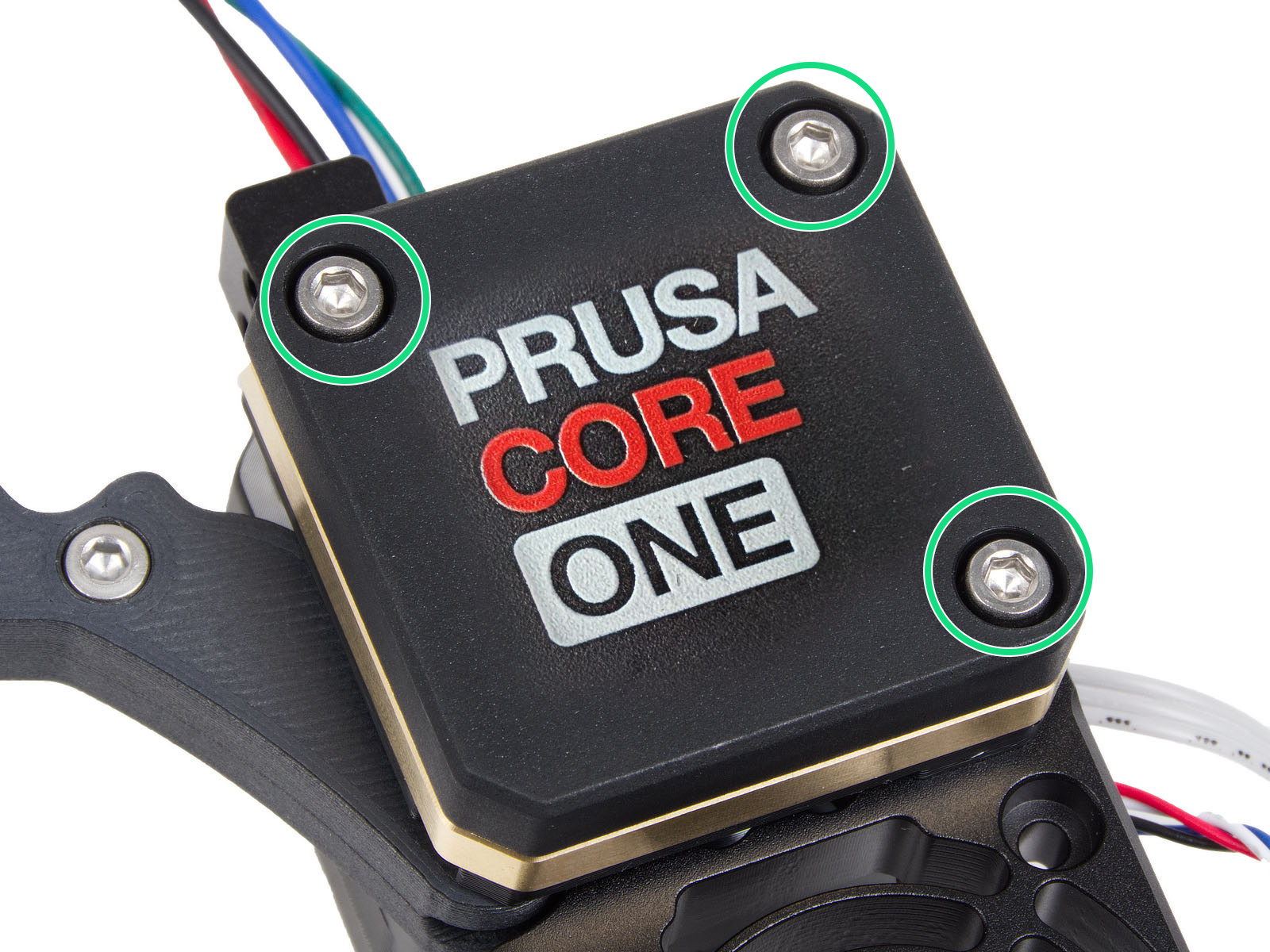
                  Expansion joints (CORE One/+, MK4/S, MK3.9/S)

                  Having the expansion joints in the wrong orientation can cause multiple errors, including the Nozzle cleaning failed. Make sure that all of them have the full side facing the center of the carriage.
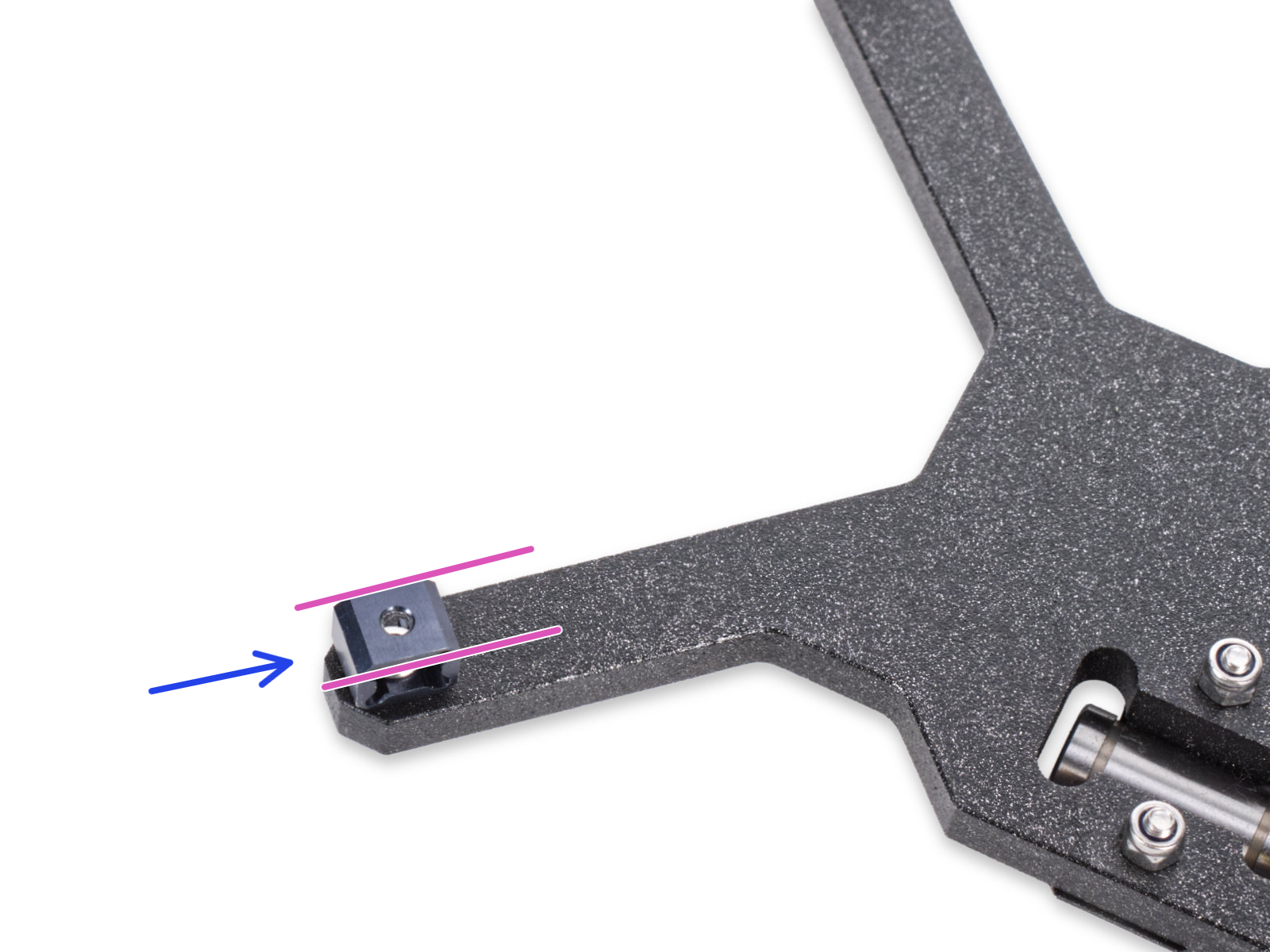
                   

                  Was this article helpful?
                  This action is available only to registered users. Please log-in.

                  Topics

                  • Troubleshooting
                    • QR Error codes
                      • QR Error codes
                      • Homing error Z #17301 (XL)
                      • Modular bed error #17501 (XL)
                      • Dwarf error #17502 (XL)
                      • Nozzle Cleaning Failed #17834 (XL)
                      • Extruder preheat error #17202 (XL)
                      • Extruder thermal runaway #17204 (XL)
                      • Extruder Mintemp error #17208 (XL)
                      • Extruder Maxtemp error #17206 (XL)
                      • Puppy error #17514 (XL)
                      • No FW on USB flash drive #17604 (XL)
                      • Unsupported printer model #17610 (XL)
                      • Unsupported Buddy FW #17611 (XL)
                      • USB flash error #17613 (XL)
                      • Invalid FW size on USB flash drive #17603 (XL)
                      • USB flash drive not connected #17602 (XL)
                      • Firmware missing #17612 (XL)
                      • FW in internal flash corrupted #17608 (XL)
                      • Hash verification failed #17607 (XL)
                      • Imposter! Fake signature #17606 (XL)
                      • Flash erase error #17605 (XL)
                      • Unsupported firmware BBF file #17614 (XL)
                      • Modular bed error #17250 (XL)
                      • Toolchanger error #17135 (XL) #36135 (CORE One INDX)
                      • Extruder temp not matching #17210 (XL)
                      • Modular bed error #17251 (XL)
                      • Modular bed error #17252 (XL)
                      • Modular bed error #17253 (XL)
                      • Modular bed error #17254 (XL)
                      • Modular bed error #17255 (XL)
                      • Modular bed error #17256 (XL)
                      • Modular bed error #17257 (XL)
                      • Modular bed error #17302 (XL)
                      • Modular bed error #17303 (XL)
                      • Dwarf error #17503 (XL)
                      • ESP error #17505 (XL)
                      • ESP error #17506 (XL)
                      • ESP error #17504 (XL)
                      • Emergency stop #17510 (XL)
                      • Puppy error #17511 (XL)
                      • Puppy error #17512 (XL)
                      • Puppy error #17513 (XL)
                      • Puppy error #17515 (XL)
                      • Puppy error #17516 (XL)
                      • Puppy error #17517 (XL)
                      • Puppy error #17518 (XL)
                      • Puppy error #17519 (XL)
                      • Puppy error #17520 (XL)
                      • Puppy error #17521 (XL)
                      • Puppy error #17522 (XL)
                      • Bed preheat error #31201 (CORE One) #35201 (CORE One L) #36201 (CORE One INDX) #26201 (MK4S) #13201 (MK4) #27201 (MK3.9S) #21201 (MK3.9) #28201 (MK3.5S) #23201 (MK3.5) 
                      • Emergency stop #31510 (CORE One) #35510 (CORE One L) #36510 (CORE One INDX) #26510 (MK4S) #13510 (MK4) #17510 (XL) #27510 (MK3.9S) #21510 (MK3.9) #28510 (MK3.5S) #23510 (MK3.5) #12510 (MINI)
                      • Hotend preheat error #31202 (CORE One) #35202 (CORE One L) #26202 (MK4S) #13202 (MK4) #27202 (MK3.9S) #21202 (MK3.9) 
                      • Bed thermal runaway #31203 (CORE One) #35203 (CORE One L) #36203 (CORE One INDX) #26203 (MK4S) #13203 (MK4) #27203 (MK3.9S) #21203 (MK3.9) #28203 (MK3.5S) #23203 (MK3.5) 
                      • Hotend thermal runaway #31204 (CORE One) #35204 (CORE One L) #26204 (MK4S) #13204 (MK4) #27204 (MK3.9S) #21204 (MK3.9)
                      • USB not connected #31602 (CORE One) #35602 (CORE One L) #36602 (CORE One INDX) #26602 (MK4S) #13602 (MK4) #27602 (MK3.9S) #21602 (MK3.9) #28602 (MK3.5S) #23602 (MK3.5) #17602 (XL) #12602 (MINI)
                      • Invalid FW size on USB #31603 (CORE One) #35603 (CORE One L) #36603 (CORE One INDX) #26603 (MK4S) #13603 (MK4) #27603 (MK3.9S) #21603 (MK3.9) #28603 (MK3.5S) #23603 (MK3.5) #17603 (XL) #12603 (MINI)
                      • No FW on USB #31604 (CORE One) #35604 (CORE One L) #36604 (CORE One INDX) #26604 (MK4S) #13604 (MK4) #27604 (MK3.9S) #21604 (MK3.9) #28604 (MK3.5S) #23604 (MK3.5) #17604 (XL) #12604 (MINI)
                      • Signature verification failed #31606 (CORE One) #35606 (CORE One L) #36606 (CORE One INDX) #26606 (MK4S) #13606 (MK4) #27606 (MK3.9S) #21606 (MK3.9) #28606 (MK3.5S) #23606 (MK3.5)
                      • Hash verification failed #31607 (CORE One) #35607 (CORE One L) #36607 (CORE One INDX) #26607 (MK4S) #13607 (MK4) #27607 (MK3.9S) #21607 (MK3.9) #28607 (MK3.5S) #23607 (MK3.5) #17607 (XL) #12607 (MINI)
                      • FW in internal flash corrupted #31608 (CORE One) #35608 (CORE One L) #36608 (CORE One INDX) #26608 (MK4S) #13608 (MK4) #27608 (MK3.9S) #21608 (MK3.9) #28608 (MK3.5S) #23608 (MK3.5) #17608 (XL) #12608 (MINI)
                      • Unsupported printer type #31610 (CORE One) #35610 (CORE One L) #36610 (CORE One INDX) #26610 (MK4S) #13610 (MK4) #27610 (MK3.9S) #21610 (MK3.9) #28610 (MK3.5S) #23610 (MK3.5)
                      • Unsupported printer version #31611 (CORE One) #35611 (CORE One L) #36611 (CORE One INDX) #26611 (MK4S) #13611 (MK4) #27611 (MK3.9S) #21611 (MK3.9) #28611 (MK3.5S) #23611 (MK3.5) #17611 (XL) #12611 (MINI)
                      • No FW in internal flash #31612 (CORE One) #35612 (CORE One L) #36612 (CORE One INDX) #26612 (MK4S)  #13612 (MK4) #27612 (MK3.9S) #21612 (MK3.9) #28612 (MK3.5S) #23612 (MK3.5) #20612
                      • File system error #31613 (CORE One) #35613 (CORE One L) #36613 (CORE One INDX) #26613 (MK4S) #13613 (MK4) #27613 (MK3.9S) #21613 (MK3.9) #28613 (MK3.5S) #23613 (MK3.5)
                      • Unsupported BBF version #31614 (CORE One) #35614 (CORE One L) #36614 (CORE One INDX) #26614 (MK4S) #13614 (MK4) #27614 (MK3.9S) #21614 (MK3.9) #28614 (MK3.5S) #23614 (MK3.5)
                      • Flash erase error #31605 (CORE One) #35605 (CORE One L) #36605 (CORE One INDX) #26605 (MK4S) #13605 (MK4) #27605 (MK3.9S) #21605 (MK3.9) #28605 (MK3.5S) #23605 (MK3.5) #17605 (XL) #12605 (MINI)
                      • Hotend mintemp error #31208 (CORE One) #35208 (CORE One L) #26208 (MK4S) #13208 (MK4) #27208 (MK3.9S) #21208 (MK3.9)
                      • Hotend maxtemp error #31206 (CORE One) #35206 (CORE One L) #26206 (MK4S) #13206 (MK4) #27206 (MK3.9S) #21206 (MK3.9) #28206 (MK3.5S) #23206 (MK3.5)
                      • Homing error Z #31301 (CORE One) #35301 (CORE One L) #36301 (CORE One INDX) #26301 (MK4S) #13301 (MK4) #27301 (MK3.9S) #21301 (MK3.9)
                      • Bed mintemp error #31207 (CORE One) #35207 (CORE One L) #36207 (CORE One INDX) #26207 (MK4S) #13207 (MK4) #27207 (MK3.9S) #21207 (MK3.9) #28207 (MK3.5S) #23207 (MK3.5)
                      • Bed maxtemp error #31205 (CORE One) #35205 (CORE One L) #36205 (CORE One INDX) #26205 (MK4S) #13205 (MK4) #27201 (MK3.9S) #21201 (MK3.9) #28201 (MK3.5S) #23201 (MK3.5)
                      • Heatbreak Mintemp error #17211 (XL)
                      • Heatbreak Maxtemp error #17212 (XL)
                      • Homing error X #17304 (XL)
                      • Homing error Y #31305 (CORE One) #35305 (CORE One L) #36305 (CORE One INDX) #17305 (XL)
                      • USB Port Overcurrent #17306 (XL)
                      • USB Device Overcurrent #17307 (XL)
                      • I2C Send Failed #17311 (XL)
                      • I2C Send Busy #17312 (XL)
                      • I2C Send Timeout #17313 (XL)
                      • I2C Send Undefined #17314 (XL)
                      • I2C Receive failed #17315 (XL)
                      • EEPROM I2C Receive Busy #17316 (XL)
                      • I2C Receive Timeout #17317 (XL)
                      • I2C Receive undefined #17318 (XL)
                      • Modular Bed Error #17319 (XL)
                      • Out of memory #17507 (XL)
                      • PNG Buffer Full #17508 (XL)
                      • Loadcell not calibrated #17523 (XL)
                      • Loadcell tare error #17524 (XL)
                      • Loadcell tare failed #17525 (XL)
                      • Loadcell measure failed #17526 (XL)
                      • Loadcell Bad Configuration #17527 (XL)
                      • Loadcell timeout #17528 (XL)
                      • LED Memory Error #17529 (XL)
                      • Marlin Request Timeout #17530 (XL)
                      • BBF Allocation Failed #17531 (XL)
                      • BBF Initialization failed #17532 (XL)
                      • USB Port overcurrent #31306 (CORE One) #35306 (CORE One L) #36306 (CORE One INDX) #26306 (MK4S) #13306 (MK4) #27306 (MK3.9S) #21306 (MK3.9) #28306 (MK3.5S) #23306 (MK3.5) #12306 (MINI/+)
                      • USB Device Overcurrent #31307 (CORE One) #35307 (CORE One L) #36307 (CORE One INDX) #26307 (MK4S) #13307 (MK4) #27307 (MK3.9S) #21307 (MK3.9) #28307 (MK3.5S) #23307 (MK3.5) #12307 (MINI/+)
                      • Nozzle Heater Overcurrent #31308 (CORE One) #35308 (CORE One L) #36308 (CORE One INDX) #26308 (MK4S) #13308 (MK4) #27308 (MK3.9S) #21308 (MK3.9)
                      • Heatbed Port Overcurrent #31309 (CORE One) #35309 (CORE One L) #26309 (MK4S) #13309 (MK4) #27309 (MK3.9S) #21309 (MK3.9) #28309 (MK3.5S) #23309 (MK3.5) #12309 (MINI) #36309 (INDX)
                      • MMU Overcurrent #31310 (CORE One) #35310 (CORE One L) #26310 (MK4S) #13310 (MK4) #27310 (MK3.9S) #21310 (MK3.9) #28310 (MK3.5S) #23310 (MK3.5)
                      • Out of Memory #31507 (CORE One) #35507 (CORE One L) #26507 (MK4S) #13507 (MK4) #27507 (MK3.9S) #21507 (MK3.9) #28507 (MK3.5S) #23507 (MK3.5) #31507 (CORE One)
                      • PNG Buffer Full #31508 (CORE One) #35508 (CORE One L) #17508 (XL) #26508 (MK4S) #13508 (MK4) #27508 (MK3.9S) #21508 (MK3.9) #28508 (MK3.5S) #23508 (MK3.5) #12508 (MINI)
                      • I2C Send failed #31311 (CORE One) #35311 (CORE One L) #36311 (CORE One INDX) #26311 (MK4S) #13311 (MK4) #27311 (MK3.9S) #21311 (MK3.9) #28311 (MK3.5S) #23311 (MK3.5) #12311 (MINI/+)
                      • I2C Send busy #31312 (CORE One) #35312 (CORE One L) #36312 (CORE One INDX) #26312 (MK4S) #13312 (MK4) #27312 (MK3.9S) #21312 (MK3.9) #28312 (MK3.5S) #23312 (MK3.5) #12312 (MINI/+)
                      • I2C Send Timeout #31313 (CORE One) #35313 (CORE One L) #36313 (CORE One INDX) #26313 (MK4S) #13313 (MK4) #27313 (MK3.9S) #21313 (MK3.9) #28313 (MK3.5S) #23313 (MK3.5) #13313 (MINI/+)
                      • I2C Send Undefined #31314 (CORE One) #35314 (CORE One L) #36314 (CORE One INDX) #26314 (MK4S) #13314 (MK4) #27314 (MK3.9S) #21314 (MK3.9) #28314 (MK3.5S) #23314 (MK3.5) #12314 (MINI/+)
                      • I2C Receive Failed #31315 (CORE One) #35315 (CORE One L) #36315 (CORE One INDX) #26315 (MK4S) #13315 (MK4) #27315 (MK3.9S) #21315 (MK3.9) #28315 (MK3.5S) #23315 (MK3.5) #12315 (MINI/+)
                      • EEPROM I2C Receive Busy #31316 (CORE One) #35316 (CORE One L) #36316 (CORE One INDX) #26316 (MK4S) #13316 (MK4) #27316 (MK3.9S) #21316 (MK3.9) #28316 (MK3.5S) #23316 (MK3.5) #12316 (MINI/+)
                      • I2C Receive Timeout #31317 (CORE One) #35317 (CORE One L) #36317 (CORE One INDX) #26317 (MK4S) #13317 (MK4) #27317 (MK3.9S) #21317 (MK3.9) #28317 (MK3.5S) #23317 (MK3.5) #12317 (MINI/+)
                      • I2C Receive undefined #31318 (CORE One) #35318 (CORE One L) #36318 (CORE One INDX) #26318 (MK4S) #13318 (MK4) #27318 (MK3.9S) #21318 (MK3.9) #28318 (MK3.5S) #23318 (MK3.5) #12318 (MINI/+)
                      • Loadcell Not Calibrated #31523 (CORE One) #35223 (CORE One L) #26523 (MK4S) #13523 (MK4) #27523 (MK3.9S) #21523 (MK3.9)
                      • Loadcell Tare Error #31524 (CORE One) #35524 (CORE One L) #26524 (MK4S) #13524 (MK4) #27524 (MK3.9S) #21524 (MK3.9)
                      • Loadcell Tare Failed #31525 (CORE One) #35525 (CORE One L) #26525 (MK4S) #13525 (MK4) #27525 (MK3.9S) #21525 (MK3.9)
                      • Loadcell Measure Failed #31526 (CORE One) #35526 (CORE One L) #36526 (CORE One INDX) #26526 (MK4S) #13526 (MK4) #27526 (MK3.9S) #21526 (MK3.9) #36526 (CORE One INDX)
                      • Loadcell Bad Configuration #31527 (CORE One) #35527 (CORE One L) #36527 (CORE One INDX) #26527 (MK4S) #13527 (MK4) #27527 (MK3.9S) #21527 (MK3.9)
                      • Loadcell Timeout #31528 (CORE One) #35528 (CORE One L) #26528 (MK4S) #36528 (CORE One INDX) #13528 (MK4) #27528 (MK3.9S) #21528 (MK3.9)
                      • Marlin Request Timeout #31530 (CORE One) #35530 (CORE One L) #36530 (CORE One INDX) #26530 (MK4S) #13530 (MK4) #27530 (MK3.9S) #21530 (MK3.9) #28530 (MK3.5S) #23530 (MK3.5)
                      • LED Memory Error #31529 (CORE One) #35529 (CORE One L) #36529 (CORE One INDX) #26529 (MK4S) #13529 (MK4) #27529 (MK3.9S) #21529 (MK3.9) #28529 (MK3.5S) #23529 (MK3.5)
                      • BBF Allocation Failed #31531 (CORE One) #35531 (CORE One L) #36531 (CORE One INDX) #26531 (MK4S) #13531 (MK4) #27531 (MK3.9S) #21531 (MK3.9) #28531 (MK3.5S) #23531 (MK3.5)
                      • BBF Initialization Failed #31532 (CORE One) #35532 (CORE One L) #36532 (CORE One INDX) #26532 (MK4S) #13532 (MK4) #27532 (MK3.9S) #21532 (MK3.9) #28532 (MK3.5S) #23532 (MK3.5)
                      • ESP Error #31504 (CORE One) #35504 (CORE One L) #26504 (MK4S) #13504 (MK4) #27504 (MK3.9S) #21504 (MK3.9) #28504 (MK3.5S) #23504 (MK3.5) 
                      • ESP Error #31505 (CORE One) #35505 (CORE One L) #26505 (MK4S) #13505 (MK4) #27505 (MK3.9S) #21505 (MK3.9) #28505 (MK3.5S) #23505 (MK3.5)
                      • ESP Error #31506 (CORE One) #35506 (CORE One L) #26506 (MK4S) #13506 (MK4) #27506 (MK3.9S) #21506 (MK3.9) #28506 (MK3.5S) #23506 (MK3.5)
                      • Heatbreak MINTEMP Error #31211 (CORE One) #35211 (CORE One L) #26211 (MK4S) #13211 (MK4) #27211 (MK3.9S) #21211 (MK3.9)
                      • Heatbreak MAXTEMP Error #31212 (CORE One) #35212 (CORE One L) #26212 (MK4S) #13212 (MK4) #27212 (MK3.9S) #21212 (MK3.9) 
                      • Modular Bed Error #17320 (XL)
                      • Homing error X #26304 (MK4S) #13304 (MK4) #27304 (MK3.9S) #21304 (MK3.9) #28304 (MK3.5S) #23304 (MK3.5)
                      • XY probe unstable #17105 (XL)
                      • XY position invalid #17106 (XL)
                      • Pin not reached #17107 (XL)
                      • Precise Refinement Failed #31102 (CORE One) #35102 (CORE One L) #36102 (CORE One INDX) #17102 (XL)
                      • Dock position out of bounds #17103 (XL)
                      • Tool offset out of bounds #17104 (XL)
                      • Power Panic #17321 (XL)
                      • ESP not connected #17533 (XL)
                      • Power Panic #36321 (INDX) #31321 (CORE One) #35321 (CORE One L) #26321 (MK4S) #13321 (MK4) #27321 (MK3.9S) #21321 (MK3.9) #28321 (MK3.5S) #23321 (MK3.5) 
                      • MCU Maxtemp Error #31213 (CORE One) #35213 (CORE One L) #26213 (MK4S) #13213 (MK4) #27213 (MK3.9S) #21213 (MK3.9) #17213 (XL) #12213 (MINI/+)
                      • Firmware Update Required #31701 (CORE One) #35701 (CORE One L) #36701 (CORE One INDX) #26701 (MK4S) #13701 (MK4) #27701 (MK3.9S) #21701 (MK3.9) #28701 (MK3.5S) #23701 (MK3.5)
                      • Connect Registration Failed
                      • Connect Registration Failed #31401 (CORE One) #35401 (CORE One L) #36401 (CORE One INDX) #17401 (XL) #26401 (MK4S) #13401 (MK4) #27401 (MK3.9S) #21401 (MK3.9) #28401 (MK3.5S) #23401 (MK3.5) #12401 (MINI)
                      • Connect Registration Failed #17401 (XL)
                      • Nozzle Cleaning Failed #31834 (CORE One) #35834 (CORE One L) #26834 (MK4S) #13834 (MK4) #27834 (MK3.9S) #21834 (MK3.9) #17834 (XL)
                      • Stuck filament detection #31101 (CORE One) #35101 (CORE One L) #26101 (MK4S) #13101 (MK4) #27101 (MK3.9S) #21101 (MK3.9) #17108 (XL)
                      • Heatbed temp not matching #31209 (CORE One) #35209 (CORE One L) #26209 (MK4S) #13209 (MK4) #27209 (MK3.9S) #21209 (MK3.9) #28209 (MK3.5S) #23209 (MK3.5)
                      • Hotend Heater Overcurrent #17322
                      • Unknown error #31601 (CORE One) #35601 (CORE One L) #36601 (CORE One INDX) #26601 (MK4S) #13601 (MK4) #27601 (MK3.9S) #21601 (MK3.9) #28601 (MK3.5S) #23601 (MK3.5) #17601 (XL) #12601 (MINI)
                      • Extruder not detected #31615 (CORE One) #35615 (CORE One L) #36615 (CORE One INDX) #26615 (MK4S) #13615 (MK4) #27615 (MK3.9S) #21615 (MK3.9) #28615 (MK3.5S) #23615 (MK3.5)
                      • EXTRUDER ERROR #17536 (XL)
                      • Steel sheet not detected #31109 (CORE One) #35109 (CORE One L) #36109 (CORE One INDX)
                      • Door Open #31110 (CORE One) #35110 (CORE One L) #36110 (CORE One INDX)
                      • Firmware x printer mismatch #31609 (CORE One) #35609 (CORE One L) #36609 (CORE One INDX) #17609 (XL) #26609 (MK4S) #13609 (MK4) #27609 (MK3.9S) #21609 (MK3.9) #28609 (MK3.5S) #23609 (MK3.5) #12609 (MINI)
                      • Heaters Timeout #31817 (CORE One) #35817 (CORE One L) #36817 (CORE One INDX) #26817 (MK4S) #13817 (MK4) #27817 (MK3.9S) #21817 (MK3.9) #28817 (MK3.5S) #23817 (MK3.5) #17817 (XL) #12817 (MINI)
                      • Nozzle Timeout #31819 (CORE One) #35819 (CORE One L) #36819 (CORE One INDX) #26819 (MK4S) #13819 (MK4) #27819 (MK3.9S) #21819 (MK3.9) #28819 (MK3.5S) #23819 (MK3.5) #17819 (XL) #12819 (MINI)
                      • Uneven bed #31111 (CORE One) #35111 (CORE One L) #36111 (CORE One INDX)
                      • Ceiling clearance violation #31112 (CORE One) #35112 (CORE One L) #36112 (CORE One INDX)
                      • Filament sensor stuck #31113 (CORE One) #35113 (CORE One L) #36113 (CORE One INDX) #17113 (XL) #26113 (MK4S) #13113 (MK4) #27113 (MK3.9S) #21113 (MK3.9) #28113 (MK3.5S) #23113 (MK3.5) #12113 (MINI/+)
                      • Filament Sensors Disabled #31115 (CORE One) #35115 (CORE One L) #36102 (CORE One INDX) #17115 (XL) #26115 (MK4S) #13115 (MK4) #27115 (MK3.9S) #21115 (MK3.9) #28115 (MK3.5S) #23115 (MK3.5) #12115 (MINI/+)
                      • Chamber MAXTEMP error #31214 (CORE One) #35214 (CORE One L) #36214 (CORE One INDX)
                      • Homing error X #31304 (CORE One) #35304 (CORE One L) #36304 (CORE One INDX) #17304 (XL)
                      • Failed to Reach Chamber Temperature #31259 (CORE One) #35259 (CORE One L) #36259 (CORE One INDX)
                      • Puppy error #31511 (CORE One) #35511 (CORE One L) #36511 (CORE One INDX)
                      • Puppy error #31512 (CORE One) #35512 (CORE One L) #36512 (CORE One INDX)
                      • Puppy error #31513 (CORE One) #35513 (CORE One L) #36513 (CORE One INDX)
                      • Puppy error #31514 (CORE One) #35514 (CORE One L) #36514 (CORE One INDX)
                      • Puppy error #31515 (CORE One) #35515 (CORE One L) #36515 (CORE One INDX)
                      • Puppy error #31516 (CORE One) #35516 (CORE One L) #36516 (CORE One INDX)
                      • Puppy error #31517 (CORE One) #35517 (CORE One L) #36517 (CORE One INDX)
                      • Puppy error #31518 (CORE One) #35518 (CORE One L) #36518 (CORE One INDX)
                      • Puppy error #31519 (CORE One) #35519 (CORE One L) #36519 (CORE One INDX)
                      • Puppy error #31520 (CORE One) #35520 (CORE One L) #36520 (CORE One INDX)
                      • Puppy error #31521 (CORE One) #35521 (CORE One L) #36521 (CORE One INDX)
                      • Puppy error #31522 (CORE One) #35522 (CORE One L) #36522 (CORE One INDX)
                      • Chamber overheating #31260 (CORE One) #35260 (CORE One L) #36260 (CORE One INDX) #17260 (XL)
                      • Chamber temperature is critical #31261 (CORE One) #35261 (CORE One L) #36261 (CORE One INDX) #17261 (XL)
                      • Fil. sensor troubleshooting #31114 (CORE One) #26114 (MK4S) #13114 (MK4) #27114 (MK3.9S) #21114 (MK3.9) #28114 (MK3.5S) #23114 (MK3.5)
                      • Chamber Mintemp error #31215 (CORE One) #35215 (CORE One L) #36215 (CORE One INDX)
                      • Accelerometer communication failed #31323 (CORE One) #35323 (CORE One L) #26323 (MK4S) #13323 (MK4) #27323 (MK3.9S) #21323 (MK3.9) #28323 (MK3.5S) #23323 (MK3.5)
                      • ESP not connected #31533 (CORE One) #35533 (CORE One L) #26533 (MK4S) #13533 (MK4) #27533 (MK3.9S) #21533 (MK3.9) #28533 (MK3.5S) #23533 (MK3.5)
                      • Unknown file system #31703 (CORE One) #35703 (CORE One L) #36703 (CORE One INDX) #26703 (MK4S) #13703 (MK4) #27703 (MK3.9S) #21703 (MK3.9) 
                      • MCU in Buddy is overheated #31825 (CORE One) #35825 (CORE One L) #26825 (MK4S) #27825 (MK3.9S) #28825 (MK3.5S) #13825 (MK4) #21825 (MK3.9) #23825 (MK3.5) #17825 (XL) #12825 (MINI)
                      • The heatbed cooled down during the power outage #31808 (CORE One) #35808 (CORE One L) #26808 (MK4S) #27808 (MK3.9S) #28808 (MK3.5S) #13808 (MK4) #21808 (MK3.9) #23808 (MK3.5) #17808 (XL) 
                      • The G-code isn't fully compatible #31803 (CORE One) #26803 (MK4S) #27803 (MK3.9S) #28803 (MK3.5S) #13803 (MK4) #21803 (MK3.9) #23803 (MK3.5) #17803 (XL) #12803 (MINI)
                      • Print preview wrong filament #31805 (CORE One/+) #35805 (CORE One L) #36805 (CORE One INDX) #26805 (MK4S) #27805 (MK3.9S) #28805 (MK3.5S) #13805 (MK4) #21805 (MK3.9) #23805 (MK3.5) #17805 (XL) #12805 (MINI)
                      • Filament not detected #31804 (CORE One) #35804 (CORE One L) #26804 (MK4S) #27804 (MK3.9S) #28804 (MK3.5S) #13804 (MK4) #21804 (MK3.9) #23804 (MK3.5) #17804 (XL) #12804 (MINI)
                      • Print preview unfinished selftest #31801 (CORE One) #35801 (CORE One L) #26801 (MK4S) #27801 (MK3.9S) #28801 (MK3.5S) #13801 (MK4) #21801 (MK3.9) #23801 (MK3.5) #17801 (XL) #12801 (MINI)
                      • Open chamber ventilation #31837 (CORE One) #36837 (CORE One INDX)
                      • Close chamber ventilation #31838 (CORE One) #36838 (CORE One INDX)
                      • Print fan error #31816 (CORE One) #26816 (MK4S) #27816 (MK3.9S) #13816 (MK4) #21816 (MK3.9) #17816 (XL)
                      • Print preview MMU filament inserted #31806 (CORE One) #26806 (MK4S) #13806 (MK4) #27806 (MK3.9S) #21806 (MK3.9) #28806 (MK3.5S) #23806 (MK3.5)
                      • Crash recovery axis long #31809 (CORE One) #35809 (CORE One L) #26809 (MK4S) #13809 (MK4) #27809 (MK3.9S) #21809 (MK3.9) #28809 (MK3.5S) #23809 (MK3.5) #17809 (XL) #12809 (MINI)
                      • Crash recovery repeated crash #31811 (CORE One) #35811 (CORE One L) #26811 (MK4S) #13811 (MK4) #27811 (MK3.9S) #21811 (MK3.9) #28811 (MK3.5S) #23811 (MK3.5) #17811 (XL) #12811 (MINI)
                      • Crash recovery axis short #31810 (CORE One) #35810 (CORE One L) #26810 (MK4S) #13810 (MK4) #27810 (MK3.9S) #21810 (MK3.9) #28810 (MK3.5S) #23810 (MK3.5) #17810 (XL) #12810 (MINI)
                      • Crash recovery home fail #31812 (CORE One) #35812 (CORE One L) #26812 (MK4S) #13812 (MK4) #27812 (MK3.9S) #21812 (MK3.9) #28812 (MK3.5S) #23812 (MK3.5) #17812 (XL) #12812 (MINI)
                      • Hotend fan error #31828 (CORE One) #35828 (CORE One L) #26828 (MK4S) #27828 (MK3.9S) #13828 (MK4) #21828 (MK3.9) #17828 (XL)
                      • New firmware available #31802 (CORE One) #35802 (CORE One L) #26802 (MK4S) #13802 (MK4) #27802 (MK3.9S) #21802 (MK3.9) #28802 (MK3.5S) #23802 (MK3.5) #17802 (XL) #12802 (MINI)
                      • Chamber filtration fan is not spinning #31840 (CORE One) #35840 (CORE One L) #36840 (CORE One INDX)
                      • USB flash disk error #31821 (CORE One) #35821 (CORE One L) #26821 (MK4S) #13821 (MK4) #27821 (MK3.9S) #21821 (MK3.9) #28821 (MK3.5S) #23821 (MK3.5) #17821 (XL) #12821 (MINI)
                      • Hotend temp discrepancy #31818 (CORE One) #17818 (XL) #26818 (MK4S) #13818 (MK4) #27818 (MK3.9S) #21818 (MK3.9) #28818 (MK3.5S) #23818 (MK3.5) #12818 (MINI)
                      • Steppers timeout #31820 (CORE One) #35820 (CORE One L) #17820 (XL) #26820 (MK4S) #13820 (MK4) #27820 (MK3.9S) #21820 (MK3.9) #28820 (MK3.5S) #23820 (MK3.5) #12820 (MINI)
                      • Heatbreak thermistor fail #31822 (CORE One) #35822 (CORE One L) #17822 (XL) #26822 (MK4S) #13822 (MK4) #27822 (MK3.9S) #21822 (MK3.9)
                      • Print preview tools mapping #31814 (CORE One) #36814 (CORE One INDX) #17814 (XL) #26814 (MK4S) #13814 (MK4) #27814 (MK3.9S) #21814 (MK3.9) #28814 (MK3.5S) #23814 (MK3.5)
                      • Quick pause #31835 (CORE One) #35835 (CORE One L) #36835 (CORE One INDX) #17835 (XL) #26835 (MK4S) #13835 (MK4) #27835 (MK3.9S) #21835 (MK3.9) #28835 (MK3.5S) #23835 (MK3.5) #12835 (MINI)
                      • Not downloaded #31824 (CORE One) #35824 (CORE One L) #17824 (XL) #26824 (MK4S) #13824 (MK4) #27824 (MK3.9S) #21824 (MK3.9) #28824 (MK3.5S) #23824 (MK3.5) #12824 (MINI)
                      • Filament runout #31829 (CORE One) #35829 (CORE One L) #17829 (XL) #26829 (MK4S) #13829 (MK4) #27829 (MK3.9S) #21829 (MK3.9) #28829 (MK3.5S) #23829 (MK3.5) #12829 (MINI)
                      • MMU load unload error #31815 (CORE One) #26815 (MK4S) #13815 (MK4) #27815 (MK3.9S) #21815 (MK3.9) #28815 (MK3.5S) #23815 (MK3.5)
                      • Probing failed #31833 (CORE One) #35833 (CORE One L) #36833 (CORE One INDX) #17833 (XL) #26833 (MK4S) #13833 (MK4) #27833 (MK3.9S) #21833 (MK3.9) #28833 (MK3.5S) #23833 (MK3.5) #12833 (MINI)
                      • Loading timeout #31836 (CORE One) #35836 (CORE One L) #17836 (XL) #26836 (MK4S) #13836 (MK4) #27836 (MK3.9S) #21836 (MK3.9) #28836 (MK3.5S) #23836 (MK3.5) #12836 (MINI)
                      • Selftest not passed #31537 (CORE One) #35537 (CORE One L) #36537 (CORE One INDX) #17537 (XL) #26537 (MK4S) #13537 (MK4) #27537 (MK3.9S) #21537 (MK3.9) #28537 (MK3.5S) #23537 (MK3.5) #12537 (MINI)
                      • G-code cropped #31535 (CORE One) #35535 (CORE One L) #36535 (CORE One INDX) #17535 (XL) #26535 (MK4S) #13535 (MK4) #27535 (MK3.9S) #21535 (MK3.9) #28535 (MK3.5S) #23535 (MK3.5) #12535 (MINI)
                      • G-code corruption #31534 (CORE One) #35534 (CORE One L) #36534 (CORE One INDX) #17534 (XL) #26534 (MK4S) #13534 (MK4) #27534 (MK3.9S) #21534 (MK3.9) #28534 (MK3.5S) #23534 (MK3.5) #12534 (MINI)
                      • G-code metrics config change #31403 (CORE One) #35403 (CORE One L) #36403 (CORE One INDX) #17403 (XL) #26403 (MK4S) #13403 (MK4) #27403 (MK3.9S) #21403 (MK3.9) #28403 (MK3.5S) #23403 (MK3.5) #12403 (MINI)
                      • Display problem detected #36324 (INDX) #31324 (CORE One) #35324 (CORE One L) #17324 (XL) #26324 (MK4S) #13324 (MK4) #27324 (MK3.9S) #21324 (MK3.9) #28324 (MK3.5S) #23324 (MK3.5)
                      • Loading obstruction #31119 (CORE One) #35119 (CORE One L) #17119 (XL)
                      • Homing calibration needed #31118 (CORE One) #35118 (CORE One L) #36118 (CORE One INDX)#17118 (XL)
                      • Calibrate homing from menu #31120 (CORE One) #35120 (CORE One L) #36120 (CORE One INDX) #17120 (XL)
                      • Enclosure filter expiration warning #31831 (CORE One) #35831 (CORE One L) #36831 (CORE One INDX) #17831 (XL)
                      • Enclosure filter expiration #31832 (CORE One) #35832 (CORE One L) #36832 (CORE One INDX) #17832 (XL)
                      • File error #31807 (CORE One/+) #35807 (CORE One L) #17807 (XL) #26807 (MK4S) #13807 (MK4) #27807 (MK3.9S) #21807 (MK3.9) #28807 (MK3.5S) #23807 (MK3.5) #12807 (MINI/+)
                      • Chamber Cooling Fan Error #31839 (CORE One) #35839 (CORE One L) #36839 (CORE One INDX)
                      • PSU fan is not spinning #35850 (CORE One)
                      • Calibrate dock from menu #17136 (XL) #36136 (CORE One INDX)
                      • Toolchanger error #36135 (CORE One INDX) #17135 (XL)
                      • Occupied dock #36123 (CORE One INDX)
                      • Tool lost #36124 (CORE One INDX)
                      • Retry pickup 36126 (CORE One INDX)
                      • Tool Pickup Failed #36125 (CORE One INDX)
                      • Hotend thermal runaway #36204 (INDX)
                      • Hotend mintemp error #36208 (INDX)
                      • Hotend maxtemp error #36206 (INDX)
                      • Tool offset failed #36130 (CORE One INDX)
                      • Chamber overheating #36260 (INDX) #31260 (CORE One) #35260 (CORE One L) #17260 (XL)
                      • Chamber temperature is critical #36261 (INDX) #31261 (CORE One L) #35261 (CORE One) #17261 (XL)
                      • Unsafe Z tool offset #36131 (CORE One INDX)
                      • Hotend burn risk #31140 (CORE One) #35140 (CORE One L)
                      • Maintenance warning #31117 (CORE One) #26117 (MK4S) #13117 (MK4) #27117 (MK3.9S) #21117 (MK3.9) #28117 (MK3.5S) #23117 (MK3.5)
                      • Maintenance failure warning #31116 (CORE One) #26116 (MK4S) #13116 (MK4) #27116 (MK3.9S) #21116 (MK3.9)
                    • Print Quality Troubleshooting
                    • Printer troubleshooting
                    • Print Error Messages

                  25 comments

                  Log in  to post a comment
                  Ed
                  •
                  My C1L reported Nozzle Cleaning Failed errors. No debris, filament extrudes normally (switched from PLA to Prusament PETG in case this is relevant.

                  I notice that the Nozzle Cleaning leaves marks / scratches on the build plate. Ran a Z-axis calibration just now; hopefully this helps?
                  Reply
                  Ed
                  •
                  The XYZ calibration seems to have helped - most likely the Z-axis calibration.

                  Shame about the damage to the build plate though ;-(
                  Reply
                  Warrenuk1
                  •
                  What else causes the nozzle cleaning to fail I’ve done all of tge above but still getting the fault
                  Reply
                  Warrenuk1
                  •
                  ive gone through all the above an still getting nozzle clean fail
                  Reply
                  Marteinn - 3DP Iceland
                  •
                  Hi. I got this error on my Core One L, and what I noticed is that Z axis calibration was needed.

                  when I got this error, the nozzle dove into the bed and pushed the bed downwards while doing the cleaning pattern,

                  I canceled the cleaning process , but when I saw the print starting to print, ( a 10x10cm object aprox.), I noticed the Z axis was going up and down as the nozzle moved while printing, much more than normal. so I did the Z axis calibration, and It resolved my issue.
                  Reply
                  Dazus K
                  •
                  I received a new Core One L and at first, it did not have this issue. After a week and a half of near constant printing, the nozzle cleaning failure happened every time I tried to print. I tried many of the suggestions Prusa provides on this page, but they didn’t work. Before I could try them all, the printer started printing without error. I think I know why, but I'm not an expert, so this is just a guess.

                  I think the problem was that the nozzle was too clean. With no filament oozing out the end, the printer couldn’t detect that it had removed anything. Once I stopped manually removing the blobs that naturally hang out after the last print, it started working. I’m only on the second successful try, but it is working so far.
                  Reply