Prusa
  • SHOP
    • Latest products
    BY CATEGORY
    • 3D printersnew
    • 3D printer upgradesnew
    • Materials
    • Accessories
    • Spare parts
    • Courses
    • Merch
    • Get a price quote
    QUICK LINKS
    • Shipping & delivery
    • Returns & refunds
    • Payment & financing
    • Warranty
    • VAT & Customs fees
    • FAQ

    0 item in your cartitems in your cart

    Your cart is empty

    Go to cartShop 3D printers

    My profile

    Log in to see orders, saved items

    My profile

    Signed in as

    • Orders
    • Logout
  • 3D PRINTING
    • Explore 3D printing
    FOR BEGINNERS
    • 3D printing 101
    • How FDM printing works
    • Buying your first printer
    • 3D model catalog
    BY APPLICATION
    • Rapid prototyping
    • Manufacturing
    • Engineering
    • Research
    • Arts & design
    GO DEEPER
    • Materials guide
    • Courses
    • Webinars
    • Case studies
    • Custom 3D printing
  • 3D PRINTERS
    • All 3D printers
    FOR
    • Home or garageHobbyists, tinkerers and home printing
    • BusinessIn-house production for small teams
    • EnterpriseFleets, security and scale
    • Which Prusa is right for me
    SHOP & BROWSE
    • CORE One+new
    • CORE One+ INDXnew
    • CORE One L+new
    • CORE One L+ INDXnew
    • XL+new
    • MK4S
    • Prusa Pro HT90
    • Prusa Pro AFS
    • Prusa Pro SLX
    MORE FROM PRINTERS
    • Parts & upgradesnew
    • Critical infrastructure
    • Case studies
    • Signature Oak
    • Kits
  • MATERIALS
    • All materials
    BY USE
    • Every-day & design
    • Functional engineering
    • Composites
    • Pro speciality
    • SLA resins
    PRUSAMENT
    • PLA
    • PETG
    • ASA
    • PC
    • PA11
    • Flex
    • TPU
    MORE FROM MATERIALS
    • Materials guide
    • We make material in house
    • Sustainability
    • Order on the store
  • SOFTWARE
    • All software
    PREPARE THE PRINT
    • PrusaSlicer 3.0New
    PRINT & MONITOR
    • Prusa Connect
    • EasyPrint
    • iOS & Android app
    • Prusa Farm
    GET STARTED
    • Download & install
    • Knowledge base
    MORE FROM SOFTWARE
    • 3D model catalog
  • SUPPORT
    • Explore support
    FIND ANSWERS
    • Knowledge base
    • Troubleshooting
    • Courses
    • Webinars
    GET HELP
    • Contact us
    • Livechat
    • Shipping & delivery
    • Warranty
    • Returns & refunds
    • Service & spare parts
    • Service & Repair
    COMMUNITY
    • Forum
    • Reddit
    • Printables
  • TRUST CENTER
    • Trust Center overview
    BY TOPIC
    • GDPR
    • Certificates
    • Security
    • Compliance
    COMMITMENTS
    • Sustainability report
    TALK TO US
    • Contact the security team
  • COMPANY
    • About Prusa
    GET TO KNOW US
    • Our story
    • How we make printers
    • Open source
    • Brand & media kit
    NEWS
    • Blog
    • Newsroom
    • Events
    TRUST & PARTNERS
    • Sustainability
    • Resellers & distributors
    • Affiliate program
    • Contact
    • English
    • Čeština
    • Deutsch
    • Español
    • Français
    • Italiano
    • Polski
    • 日本語
  • Signed in as

    • Orders
    • Address
    • In-stock Alerts
    • My Courses
    • Subscription
    • Edit Account
    • Logout

Log in to see orders, saved items

Signed in as
  • Orders
  • Address
  • In-stock Alerts
  • My Courses
  • Subscription
  • Edit Account
  • English
  • Čeština
  • Deutsch
  • Español
  • Français
  • Italiano
  • Polski
  • 日本語
Shop

0 item in your cartitems in your cart

Your cart is empty

Go to cartShop 3D printers

My profile

Log in to see orders, saved items

My profile

Signed in as

  • Orders
  • Logout
SHOP
  • Latest products
BY CATEGORY
  • 3D printersnew
  • 3D printer upgradesnew
  • Materials
  • Accessories
  • Spare parts
  • Courses
  • Merch
  • Get a price quote
QUICK LINKS
  • Shipping & delivery
  • Returns & refunds
  • Payment & financing
  • Warranty
  • VAT & Customs fees
  • FAQ

Featured products

    Popular categories

      Trending searches

        Articles

          Blog

            Products

              Categories

                Suggested searches

                  Searching…
                  No results
                  Something went wrong.
                  ↑↓ Select↵ OpenEsc Close search
                  1. Support
                  2. Printer troubleshooting
                  3. Printer does not turn on or keeps turning off
                   

                  Contents

                  • The printer is stuck in a boot loop
                  • The printer does not turn on
                  • MK2S / MK2.5 / MK2.5S
                  • Checking the status LED on the PSU

                  Blog

                  • Prusament Pellets: Raw material batches for large-format 3D printing or small-scale polymer research & development
                  • Print colorful and glowing Halloween decorations with our spooky offer
                  • Factorio Has Arrived on Printables

                  Newsletter

                  Signup and get our monthly squeeze on updates, blog, printables and much more.

                  By clicking, you agree to receive our newsletter.

                  This site is protected by reCAPTCHA Enterprise and the Google Privacy Policy and Terms of Service apply.

                  Factorio Transport Belts
                  E-shop
                  • 3D Printers
                  • Printer Upgrades
                  • Filaments
                  • Accessories
                  • Prusa Merchandise

                  © Prusa Research a.s.

                  Printables
                  • 3D Models
                  • Store
                  • Clubs
                  • 3D Design Contests
                  • Brands
                  Community
                  • World Map
                  • Forum
                  • User Groups
                  • Events
                  Help
                  • Prusa Help
                  • Prusa Academy
                  • 3D Printing Calculators
                  Software
                  • PrusaSlicer
                  • Prusa.app
                  • Prusa Connect
                  • Drivers and Software
                  Company
                  • About Us
                  • Blog
                  • Official Prusa Resellers
                  • Contact Us
                  • Certified for ISO 9001, ISO 14001, ISO 45001
                  • General Terms and Conditions
                  • General Terms and Conditions of Use of the PRUSA Websites
                  • Privacy Policy
                  • Information about cookies
                  • Customer Complaints Policy
                  • Status Page
                  • Do Not Sell or Share My Personal Information
                  • Supplemental Statements
                  • General Terms and Conditions
                  • General Terms and Conditions of Use of the PRUSA Websites
                  • Privacy Policy
                  • Information about cookies
                  • Customer Complaints Policy
                  • Status Page
                  • Do Not Sell or Share My Personal Information
                  • Supplemental Statements

                  © Prusa Research a.s.

                  JOSEF PRUSA®, PRUSA RESEARCH®, PRUSA POLYMERS®, PRUSA ORANGE®, PRUSA 3D ® AND PRUSAMENT® are registered trademarks of Prusa Development a.s. used by Prusa Research a.s. under licence from Prusa Development a.s.

                  Printer does not turn on or keeps turning off

                  Relevant for

                  MK2.5
                  MK2.5S
                  MK3
                  MK3S
                  MK3S+
                  19 comments
                  Article is also available in following languages
                  English
                  Čeština
                  Polski
                  Deutsch
                  Français
                  Español
                  Italiano
                  日本語

                  If your printer doesn't turn on, keeps turning off, or is stuck in a boot loop, see here how to fix the issue.

                  The printer must be powered off and disconnected from power when the electronics are being accessed.

                  The printer is stuck in a boot loop

                  This can happen if you are trying to re-flash the printer firmware, or on rare occasions when trying to start a print. The solution for this issue is to turn off the printer on the PSU button and turn it on again (do not use the LCD reset button for this issue).

                  In case the issue is not fixed, make sure that all the cables are properly connected to the main board.

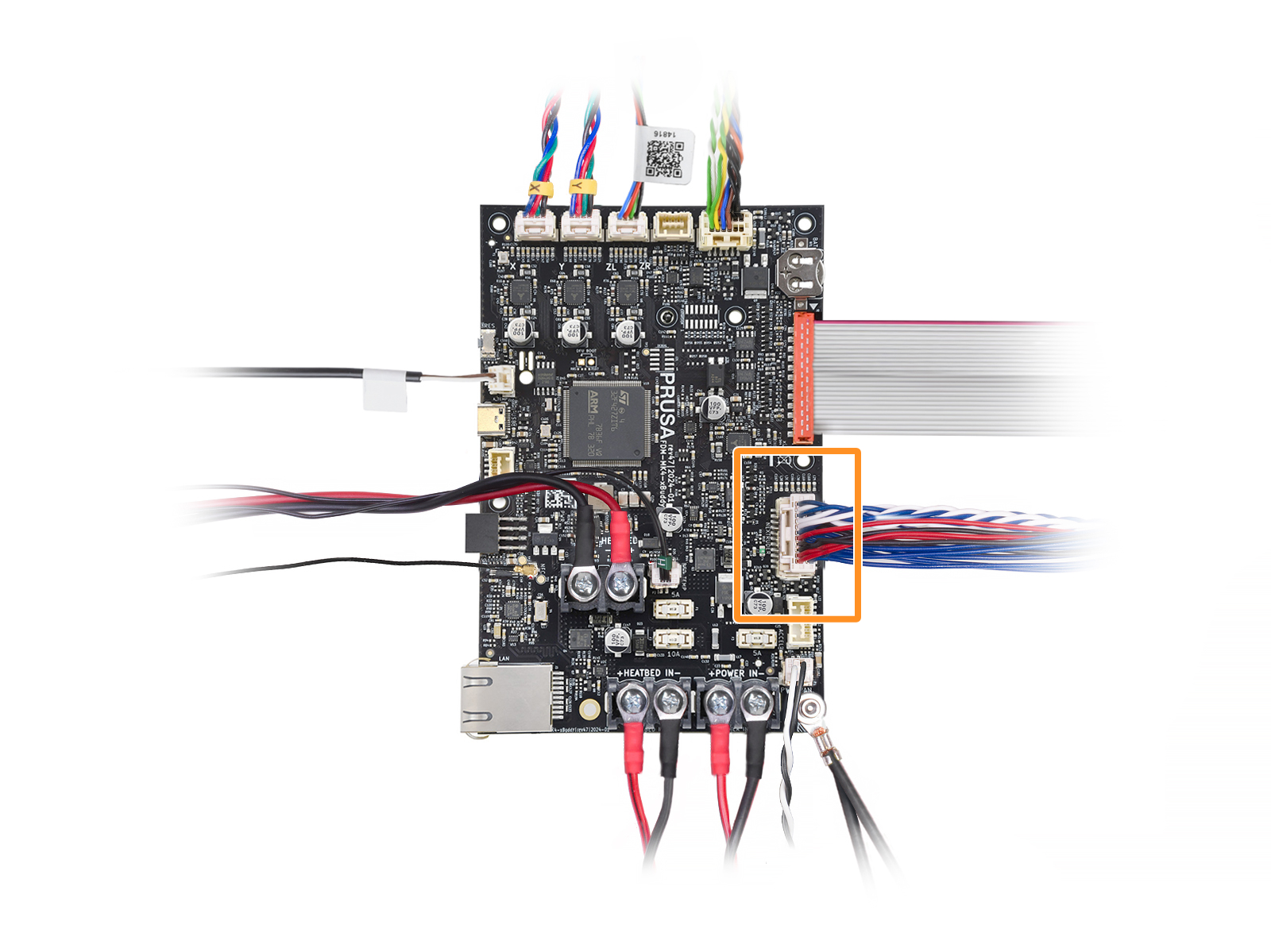
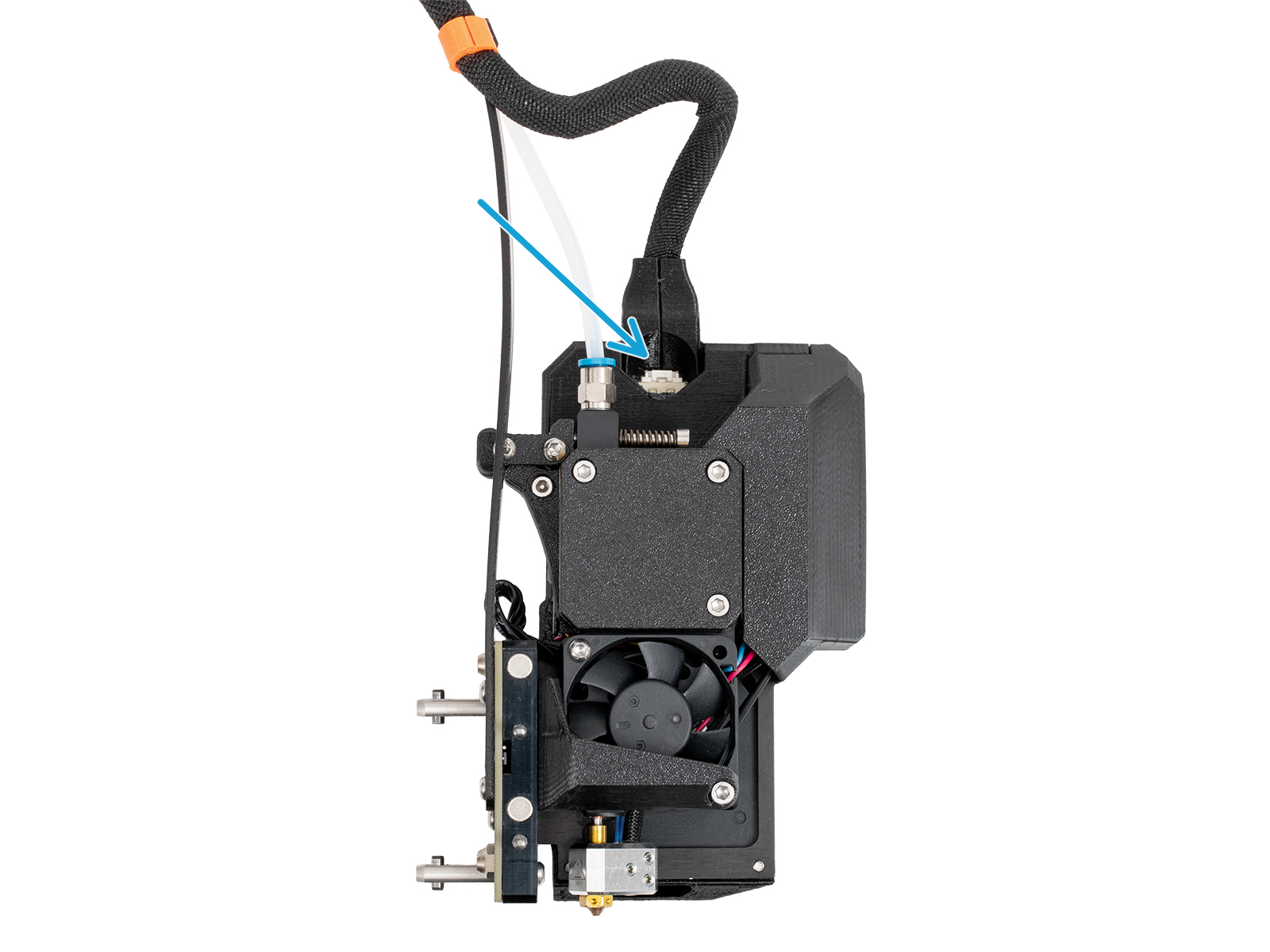
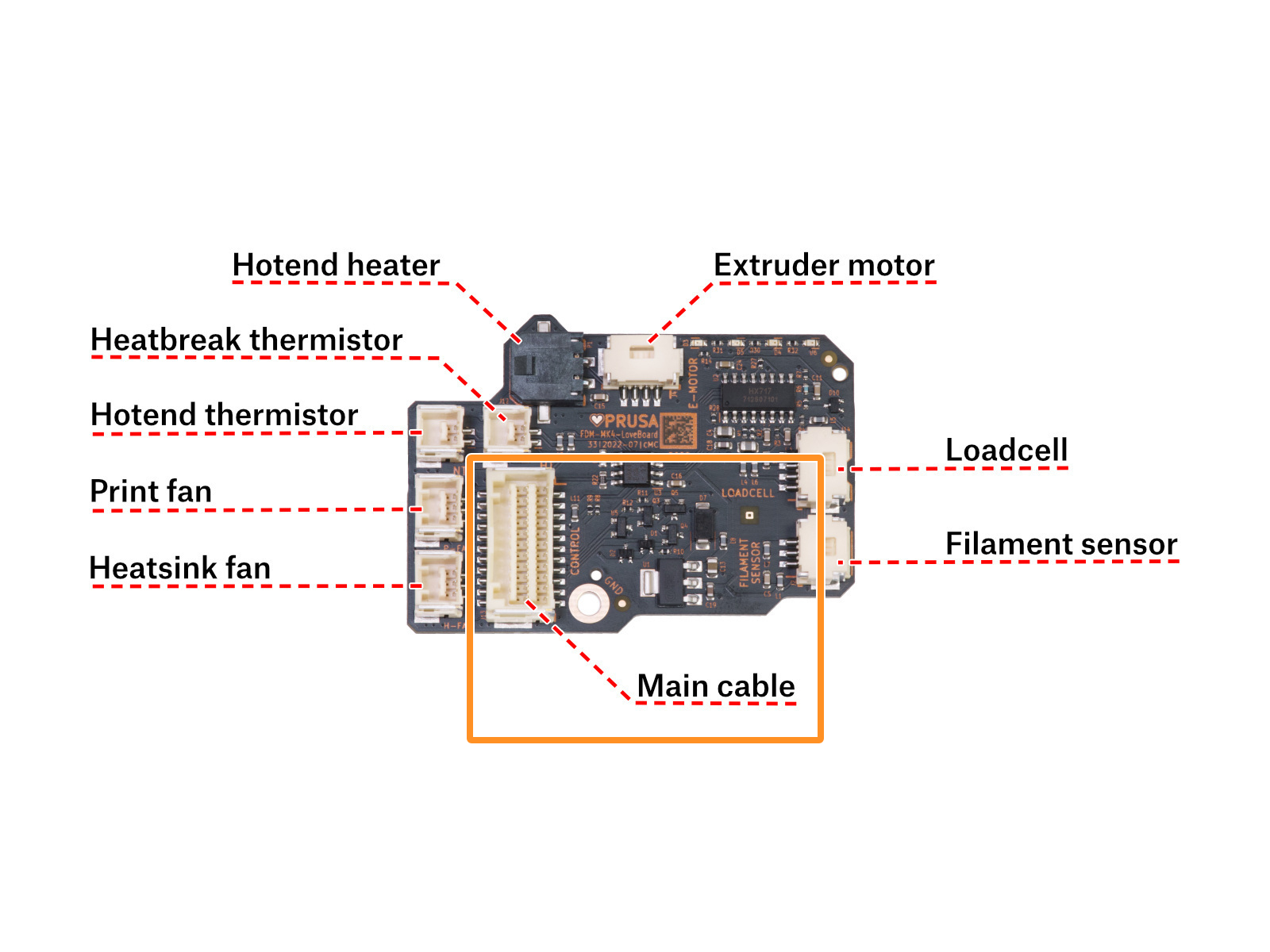
                  For the printers with the Nextruder, check also the main cable. On the CORE One, MK4/S, and MK3.9/S, that is the cable that leads the XBuddy board to the Nextruder. Make sure that it is well-connected on both sides and that the length of the cable has no damage.
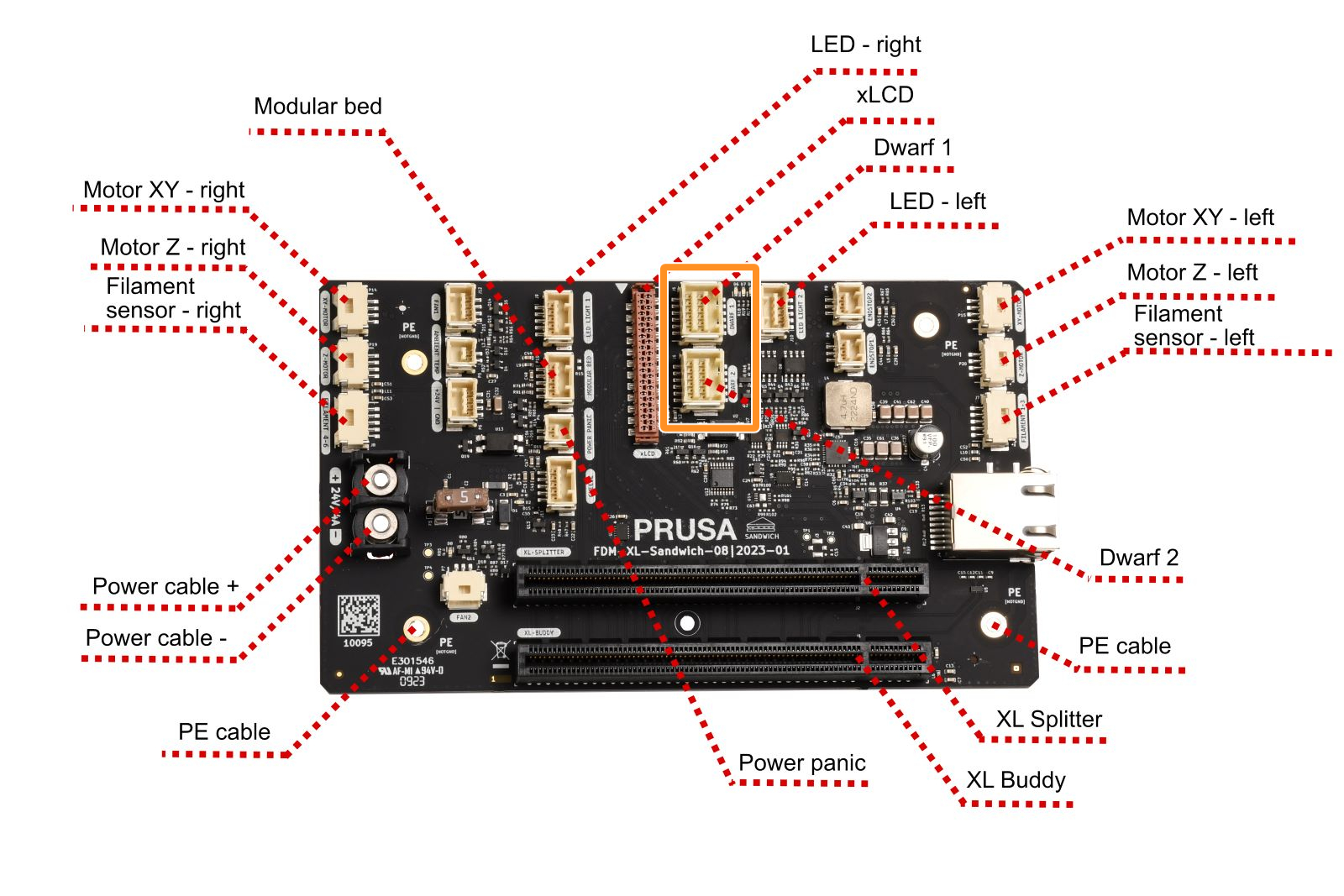
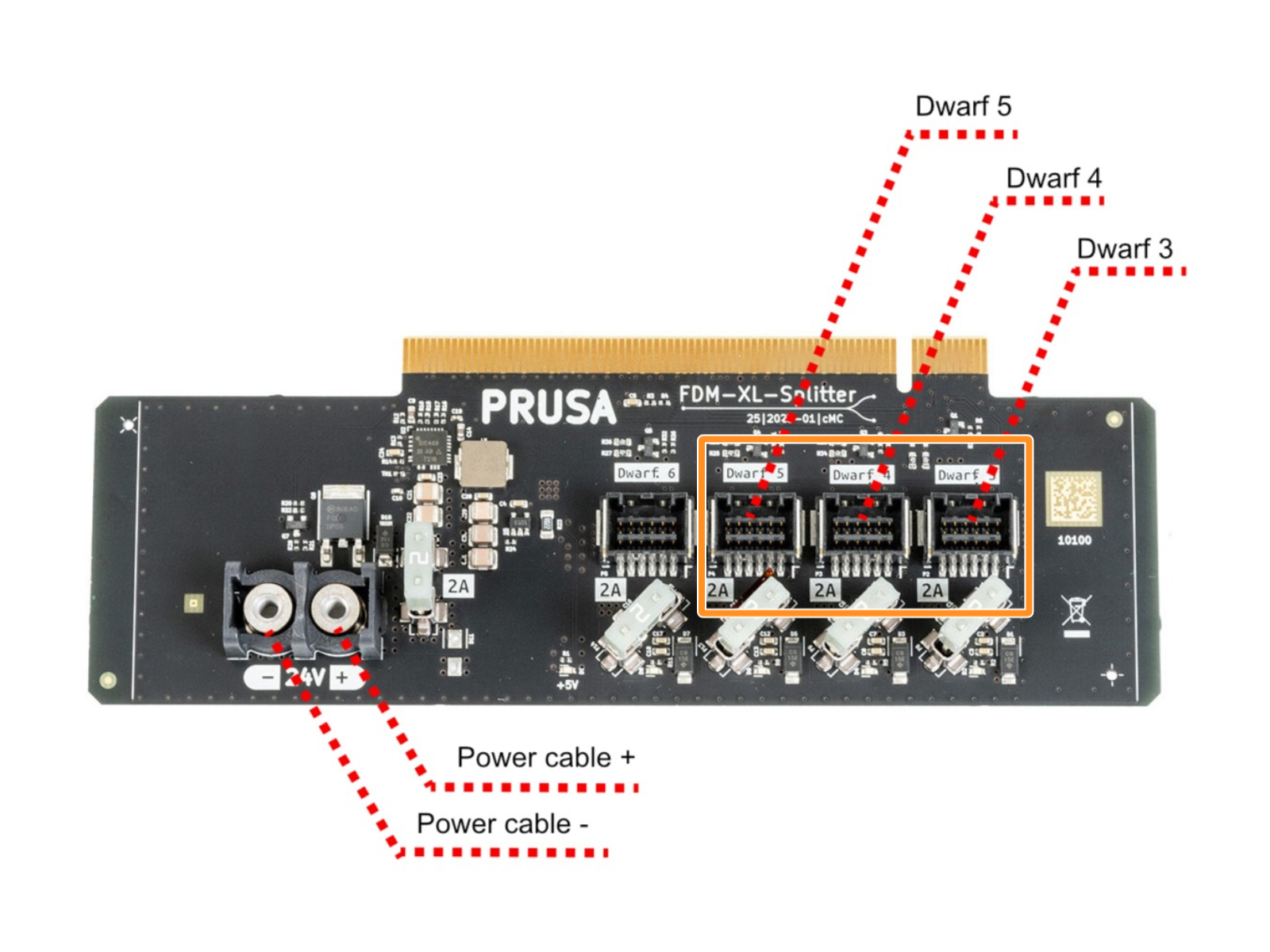
                  On the XL, check the main cable connection on the Dwarf board, Sandwich board, and if applicable, the XL Splitter board.
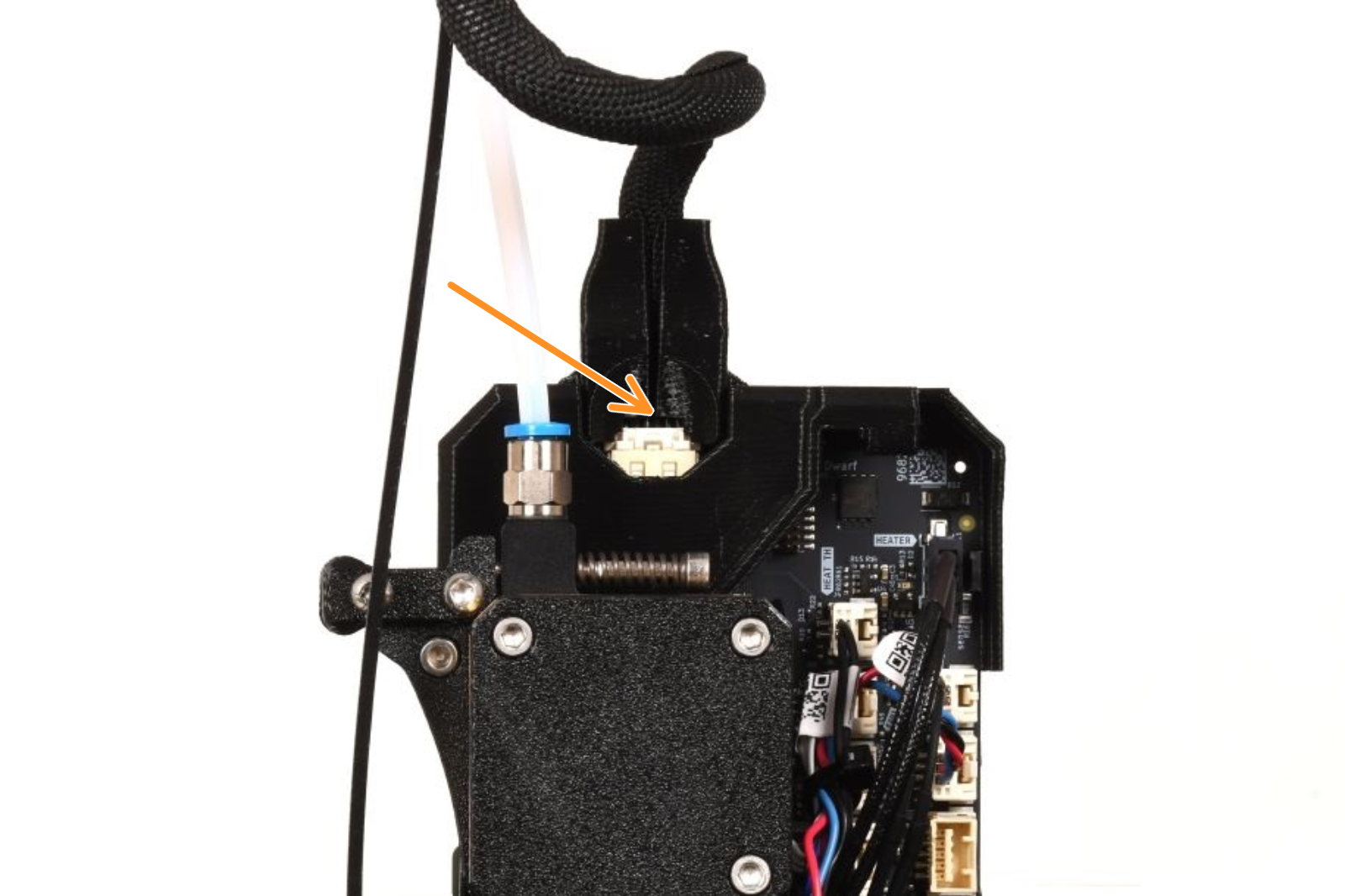
                  XL Single-toolXL Multi-tool
                  Sandwich board connectorsXL Splitter board connectors

                  The printer does not turn on

                  If your printer does not turn on at all, then there might be a more serious problem present. Try the following steps:
                  • Turn the printer off and disconnect the power cord.
                  • Check all the wiring for broken cables. In some cases, overtightening the zip-ties can damage the wire insulation and cause a short.
                  • Check the wiring of your main board. Make sure that the PSU cables are properly plugged in.
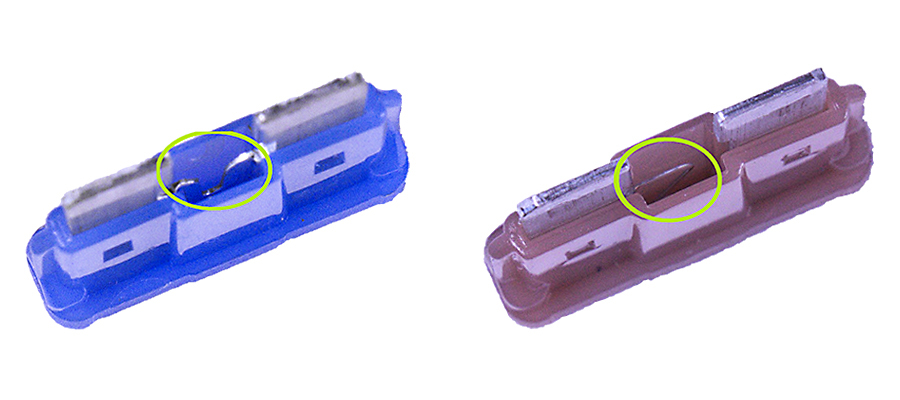
                  • Use the appropriate guide to check if any of the fuses in your printer are blown:
                    • Blown Fuse (MK3/MK3S/MK3S+)
                    • Blown Fuse (MK2S/MK2.5/MK2.5S)
                    • Blown Fuse (MINI)
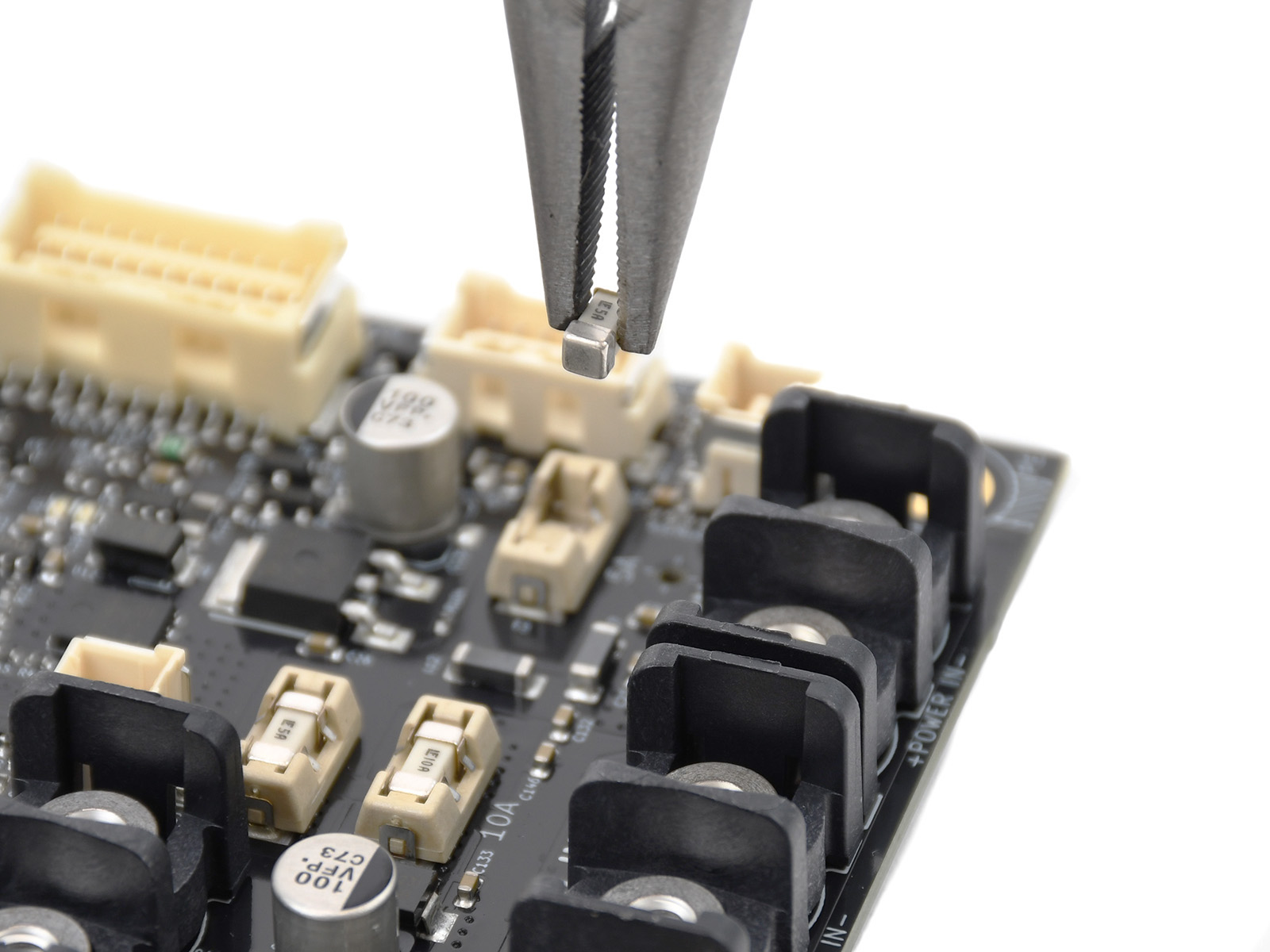
                    • Blown Fuse (MK4/S, MK3.9/S)
                  Blade fusesSMD fuses

                  MK2S / MK2.5 / MK2.5S

                  If your printer happens to power off during the initial preheating process, there's usually no serious damage. Most likely, you just have the voltage switch set to 220V in a 110V power environment.
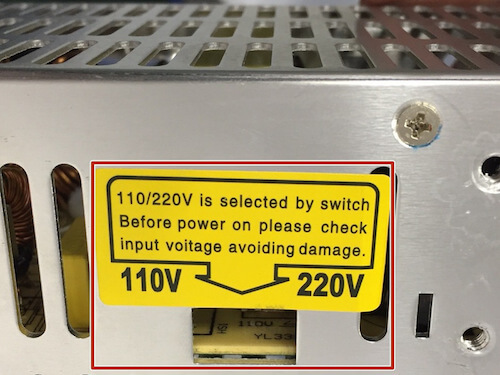
                  1. Turn the printer off and remove it from the power source.
                  2. Find the AC voltage switch for 110V or 220V on the PSU.
                  3. Make sure that the rocker is switched to your local voltage setting.
                  4. Try to turn the printer on again.
                  Both the silver and black Delta PSUs will automatically switch between 110V and 220V, depending on the grid it is connected.

                  Checking the status LED on the PSU

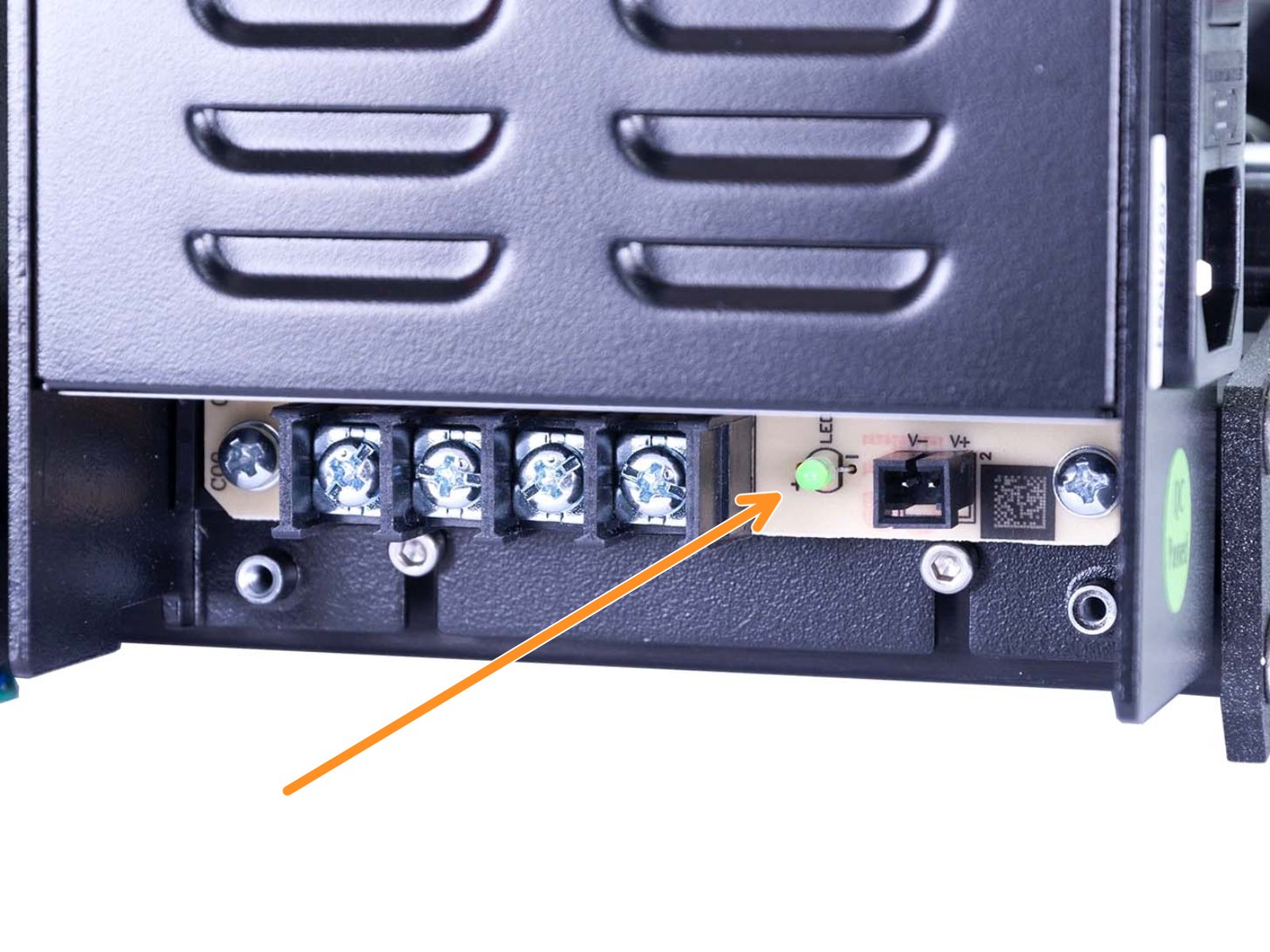
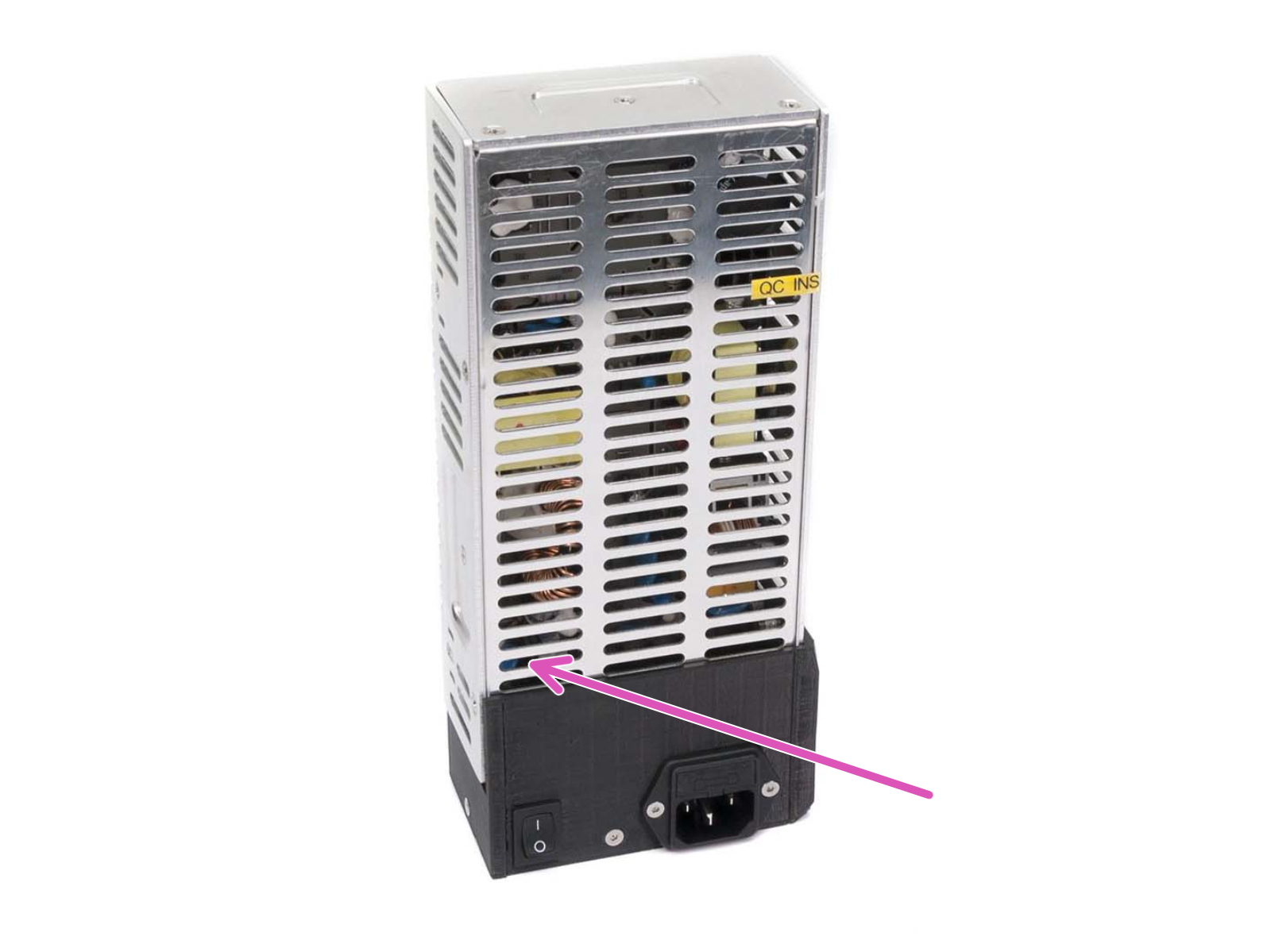
                  Every PSU has a green indicator LED to show whether it is active or not.

                  The silver PSU has this located inside its case, seen through the metal cover, in the bottom-left (purple arrow).
                  The black Delta PSU has this LED hidden behind the cover of its terminals. Remove the two screws on the cover (green circles) to reveal the terminals, for probing with a multi-meter, and the green indicator-LED (orange arrow).
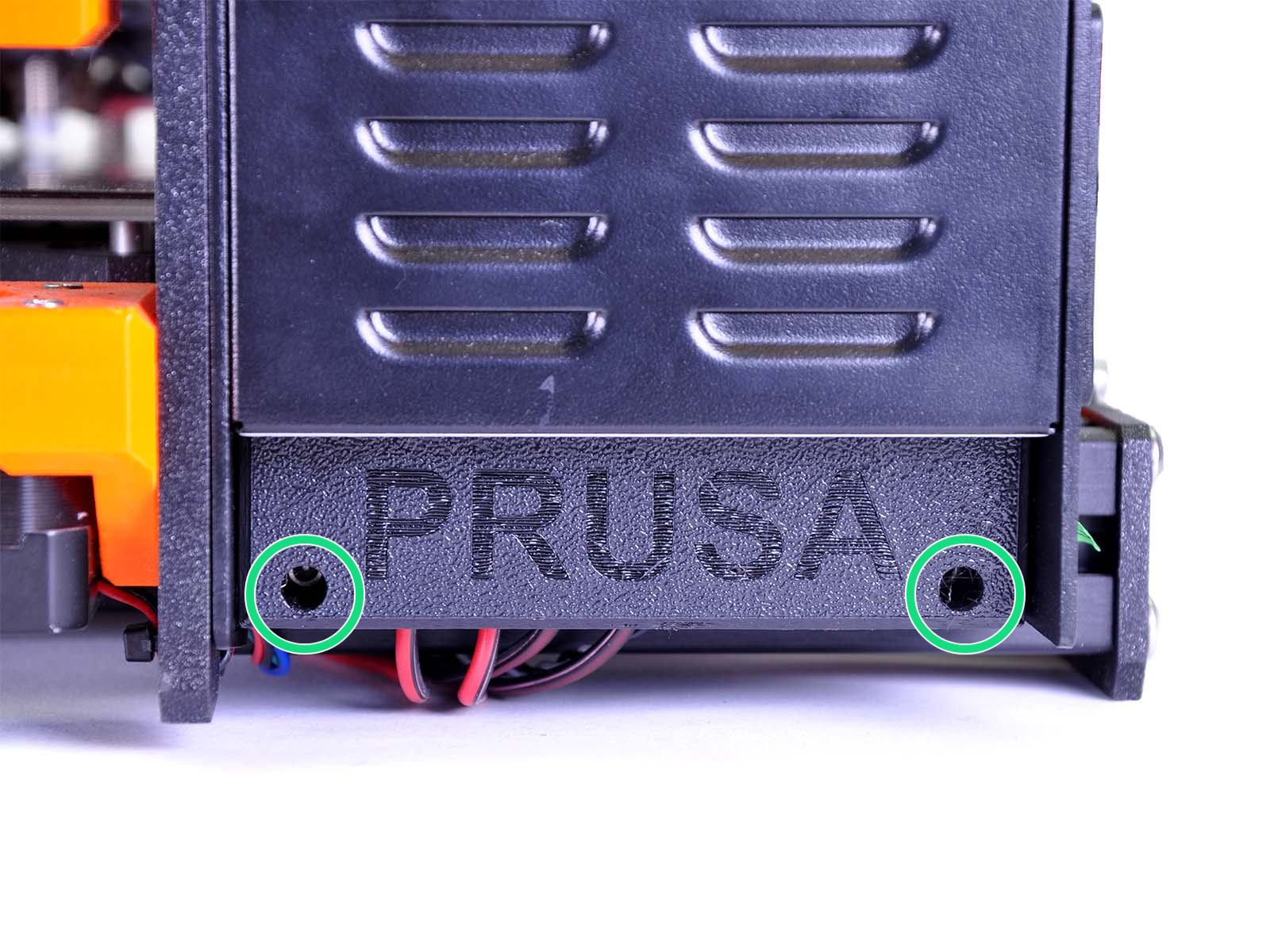
                  The power switch on the black Delta PSU does not have an LED.
                  Was this article helpful?
                  This action is available only to registered users. Please log-in.

                  Topics

                  • Troubleshooting
                    • Printer troubleshooting
                      • Blown Fuse (MK3/MK3S/MK3S+)
                      • Extrusion stopped mid-print (Heat creep)
                      • Spaghetti monster
                      • Extruder blob
                      • Clogged nozzle/hotend (MK3.5/S, MK3S+, MK2.5S)
                      • Extruder noises
                      • Filament Not Loading
                      • Misaligned PINDA Sensor (MK2/S)
                      • Print fan is not spinning
                      • Hotend fan is not spinning
                      • Heatbed not heating up properly
                      • P.I.N.D.A./SuperPINDA Sensor testing
                      • SD card not working
                      • LCD screen not working
                      • Printer does not turn on or keeps turning off
                      • Blown Fuse (MK2S/MK2.5/MK2.5S)
                      • MK3S keeps prompting filament change
                      • Vibration when printing (MK3S+/MK2.5S)
                      • Factory reset (MK2S/MK2.5S/MK3S)
                      • Firmware updating issues (MK2.5S/MK3S+/MMU2S/MMU3)
                      • Nozzle crashed into the heatbed
                      • External SPI flash W25X20CL/xFLASH not responding - error
                      • IR Filament Sensor Troubleshooting (MK2.5S, MK3S)
                      • Failing Z calibration (MK3S/MK2.5S)
                      • Ambient temperature check (MK3/MK3S)
                      • PrusaLink Troubleshooting
                      • Tangled filament
                      • SD cards and USB drives
                    • Diagnostics
                    • Print Quality Troubleshooting
                    • QR Error codes
                    • Print Error Messages

                  8 comments

                  Log in  to post a comment
                  Jamores72
                  •
                  My green Led light is on but the printer doesn't have any power at all.  My hotend wasn't heating up and found out the 5A fuse was broken.  But. Now, it doesn't power on my printer even after I changed the fuse.
                  Reply
                  Jakub Dolezal
                  •

                  Hi Jamores, looks like this needs a detailed look from our specialist. Please get in touch with our 24/7 support. They will help you troubleshoot your issue :)

                  Reply
                  Jamores72
                  •
                  Thank you, changed both 5A and 15A fuse and also the 250V 20A Fast Acting ceramic fuse on the power supply still just the green led on but nothing on the screen or any sounds on the motors
                  Reply
                  Damien DARRIET
                  •
                  Hi,
                  my Prusa i3 MK3S+ does not turn on anymore.
                  The green led of the my black delta PSU is off.
                  I have verified the fuse of the PSU and it is OK.
                  Can you help me please ?
                  Damien
                  Reply
                  Giuliano - Official Prusa CS
                  •
                  Hello. Please contact the support via email or live chat for troubleshooting. Any video or photo showing the issue will help to determine how it could be solved.
                  Reply
                  tj1
                  •
                  If the greenLED is off in my PSU does this simply mean PSU is bad, have checked all voltage and replaced F8250 fuse.
                   
                  TJ
                  Reply
                  Twisted Zion
                  •
                  Hi, i have a problem with my hotend it seems. It is the same as this video (not my video) :
                  https://youtu.be/pQLD6czwmBg
                  Tried everything in this troubleshoot but no luck (mk3s). Also checked forums. Any tips i havent tried would be much appriciated :)
                  Reply
                  Twisted Zion
                  •
                  Side note: my z axis moves for half a second before turning off. 
                  Reply
                  David
                  •

                  Hi! Do you have a PSU version with voltage switch to  accomodate both 110 and 230V? is it set correctly? Are all of the power supply cables good and have a good contact? Try re-tightening all the cable clamps on both the Rambo board and the PSU. If nothing helps, please prepare the order number and contact support via shop.Prusa3D.com :)

                  Reply
                  Badwolf
                  •
                  I'm having this same problem now after changing a fuse
                  Reply
                  Same Old Shane
                  •
                  We would need a bit more info as far as where you are located, and if you have a MK3 or MK2 so we know the right things to check. Also which fuses you changed, but with individual situation, I would suggest reaching out to support and they can pull up your order and walk you through the things to check as well. 
                  Reply
                  Torem13
                  •
                  Never mind. I was pressing the x button and not pushing down on the knob. X button is reset. Pushing knob is accepting selection made by turning knob.
                  Reply
                  Wauter
                  •
                  I did the same, only your comment made me realise the encoder is the button. I'd say thats a bit of a UI / Manual fail? at no point do i remember coming across this.
                  Reply