Prusa
  • ショップ
    • 最新製品
    カテゴリー別
    • 3Dプリンター新着
    • 3Dプリンターアップグレード新着
    • 材料
    • アクセサリー
    • スペアパーツ
    • コース
    • グッズ
    • 見積もりを取得
    クイックリンク
    • 配送と配達
    • 返品と返金
    • 支払いと融資
    • 保証
    • VATと関税
    • よくある質問

    0 点の商品がカートに入っています点の商品がカートに入っています

    カートは空です

    カートを見る3Dプリンターを購入

    マイプロフィール

    ログイン すると注文や保存した商品を確認できます

    マイプロフィール

    ログイン中:

    • 注文
    • ログアウト
  • 3Dプリント
    • 3Dプリントを探る
    初心者向け
    • 3Dプリントの基礎
    • FDM印刷の仕組み
    • 初めてのプリンターを購入する
    • 3Dモデルカタログ
    用途別
    • ラピッドプロトタイピング
    • 製造
    • エンジニアリング
    • 研究
    • アートとデザイン
    さらに深く
    • 材料ガイド
    • コース
    • ウェビナー
    • 導入事例
    • カスタム3Dプリンティング
  • 3Dプリンター
    • すべての3Dプリンター
    用途
    • 自宅またはガレージ愛好家、改造愛好家、ホームプリンティング
    • ビジネス小規模チーム向けの社内生産
    • エンタープライズフリート、セキュリティ、大規模生産
    • どのPrusaが私に適していますか
    ショップと閲覧
    • CORE One+新着
    • CORE One+ INDX新着
    • CORE One L+新着
    • CORE One L+ INDX新着
    • XL+新着
    • MK4S
    • Prusa Pro HT90
    • Prusa Pro AFS
    • Prusa Pro SLX
    プリンターからさらに
    • 部品とアップグレード新着
    • 重要インフラ
    • 導入事例
    • シグネチャーオーク
    • キット
  • 材料
    • すべての材料
    用途別
    • 日常とデザイン
    • 機能工学
    • 複合材料
    • プロフェッショナル向け特殊材料
    • SLAレジン
    Prusament
    • PLA
    • PETG
    • ASA
    • PC
    • PA11
    • Flex
    • TPU
    材料からさらに
    • 材料ガイド
    • 自社製材料
    • サステナビリティ
    • ストアで注文
  • ソフトウェア
    • すべてのソフトウェア
    印刷の準備
    • PrusaSlicer 3.0新着
    印刷と監視
    • Prusa Connect
    • EasyPrint
    • iOS & Androidアプリ
    • Prusaファーム
    始める
    • ダウンロードとインストール
    • ナレッジベース
    その他のソフトウェア
    • 3Dモデルカタログ
  • サポート
    • サポートを探す
    回答を探す
    • ナレッジベース
    • トラブルシューティング
    • コース
    • ウェビナー
    ヘルプ
    • お問い合わせ
    • ライブチャット
    • 配送と配達
    • 保証
    • 返品と返金
    • サービスとスペアパーツ
    • サービスと修理
    コミュニティ
    • フォーラム
    • Reddit
    • Printables
  • トラストセンター
    • トラストセンター概要
    トピック別
    • GDPR
    • 証明書
    • セキュリティ
    • コンプライアンス
    コミットメント
    • サステナビリティレポート
    お問い合わせ
    • セキュリティチームに連絡
  • 会社
    • Prusaについて
    私たちについて
    • 私たちのストーリー
    • プリンターの製造方法
    • オープンソース
    • ブランド&メディアキット
    ニュース
    • ブログ
    • ニュースルーム
    • イベント
    信頼とパートナー
    • サステナビリティ
    • 再販業者と販売代理店
    • アフィリエイトプログラム
    • お問い合わせ
    • English
    • Čeština
    • Deutsch
    • Español
    • Français
    • Italiano
    • Polski
    • 日本語
  • ログイン中:

    • 注文
    • 住所
    • 在庫アラート
    • マイコース
    • サブスクリプション
    • アカウントを編集
    • ログアウト

ログイン すると注文や保存した商品を確認できます

ログイン中:
  • 注文
  • 住所
  • 在庫アラート
  • マイコース
  • サブスクリプション
  • アカウントを編集
  • English
  • Čeština
  • Deutsch
  • Español
  • Français
  • Italiano
  • Polski
  • 日本語
ショップ

0 点の商品がカートに入っています点の商品がカートに入っています

カートは空です

カートを見る3Dプリンターを購入

マイプロフィール

ログイン すると注文や保存した商品を確認できます

マイプロフィール

ログイン中:

  • 注文
  • ログアウト
ショップ
  • 最新製品
カテゴリー別
  • 3Dプリンター新着
  • 3Dプリンターアップグレード新着
  • 材料
  • アクセサリー
  • スペアパーツ
  • コース
  • グッズ
  • 見積もりを取得
クイックリンク
  • 配送と配達
  • 返品と返金
  • 支払いと融資
  • 保証
  • VATと関税
  • よくある質問

おすすめ製品

    人気のカテゴリー

      急上昇ワード

        記事

          ブログ

            製品

              カテゴリー

                検索候補

                  検索中…
                  結果がありません
                  エラーが発生しました。
                  ↑↓ 選択↵ 開くEsc 検索を閉じる
                  1. サポート
                  2. プリンタートラブルシューティング
                  3. Blown Fuse (MK2S/MK2.5/MK2.5S)
                   

                  内容

                  • miniRAMBo
                  • Checking the miniRAMBo fuses
                  • PSU fuse
                  • Replacing blown fuses

                  ブログ

                  • Prusament PLA ColorMix:わずか5巻のフィラメントで45色以上をプリント
                  • PrusaSlicer 3.0プレビュー版 — 3Dプリントの未来を見据えた仕様
                  • より高品質なプリントを、もっと簡単に:Prusa XL+、CORE One L+、CORE One+(Gen 2)― 大規模製品アップグレード

                  ニュースレター

                  ご登録いただくと、毎月 新しいファームウェア、PrusaSlicerの新バージョン、3Dプリントプロジェクトの一般的なヒントなど、役立つ情報をお届けします。

                  クリックして、ニュースレターを受け取る。

                  このサイトはreCAPTCHA Enterpriseによって保護されており、Googleのプライバシーポリシーと利用規約が適用されます。

                  Heavy Duty Keyboard Holder (No Supports)
                  E-shop
                  • 3Dプリンター
                  • プリンターのアップグレード
                  • フィラメント
                  • アクセサリー
                  • Prusa 商品
                  Prusa

                  © Prusa Research a.s.

                  Printables
                  • 3Dモデル
                  • Store
                  • Clubs
                  • 3Dデザインコンテスト
                  • Brands
                  コミュニティ
                  • ワールドマップ
                  • フォーラム
                  • ユーザーグループ
                  • イベント
                  ヘルプ
                  • Prusa ヘルプ
                  • Prusa アカデミー
                  • 3Dプリンティング計算機
                  ソフトウェア
                  • PrusaSlicer
                  • Prusa.app
                  • Prusa Connect
                  • ドライバーとソフトウェア
                  会社概要
                  • 私たちについて
                  • Blog
                  • プルサ正規販売代理店
                  • お問い合わせ
                  • ISO 9001・ISO 14001・ISO 45001 認証取得済み
                  • 一般利用規約
                  • PRUSAウェブサイト利用のための一般利用規約
                  • プライバシーポリシー
                  • クッキーに関する情報
                  • お客様の苦情対応に関する方針
                  • Webサイトのステータスページ
                  • Cookie 設定
                  Prusa
                  • 一般利用規約
                  • PRUSAウェブサイト利用のための一般利用規約
                  • プライバシーポリシー
                  • クッキーに関する情報
                  • お客様の苦情対応に関する方針
                  • Webサイトのステータスページ
                  • Cookie 設定

                  © Prusa Research a.s.

                  JOSEF PRUSA®、PRUSA RESEARCH®、PRUSA POLYMERS®、PRUSA ORANGE®、PRUSA 3D ® および PRUSAMENT® は、Prusa Development a.s. の登録商標であり、Prusa Research a.s. が Prusa Development a.s. からのライセンスに基づき使用しています。

                  Blown Fuse

                  (MK2S/MK2.5/MK2.5S)

                  関連するもの

                  MK2.5
                  MK2.5S
                  MK2S
                  記事 他の言語でもご覧になれます。
                  English
                  Čeština
                  Polski
                  Deutsch
                  Français
                  Español
                  Italiano
                  日本語

                  The Original Prusa i3 MK2 series printer is equipped with fuses to protect the most important peripheries. If your printer or some of its components suddenly stopped working, it is recommended to check for blown fuses and replace them if necessary.

                  miniRAMBo

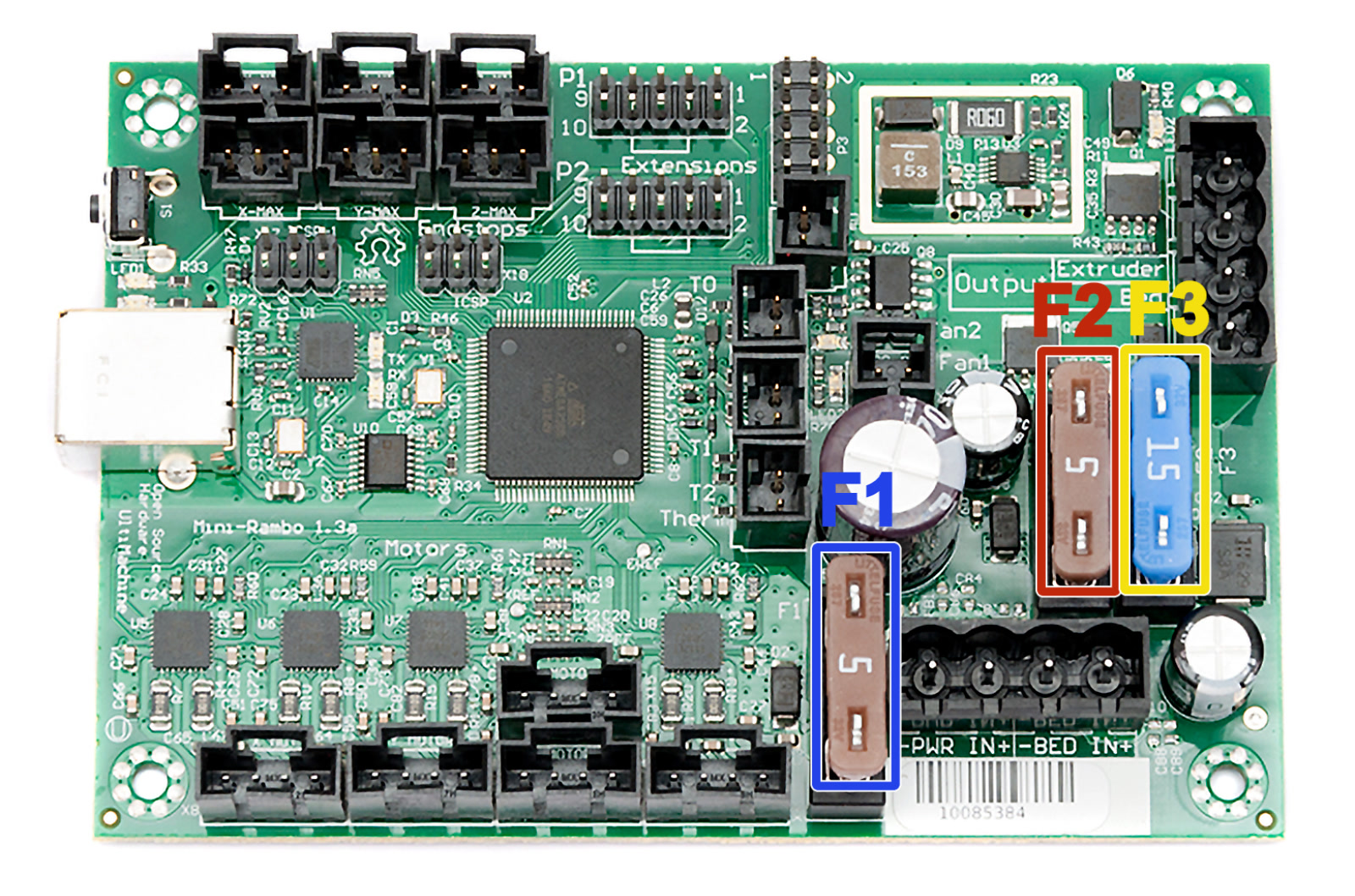
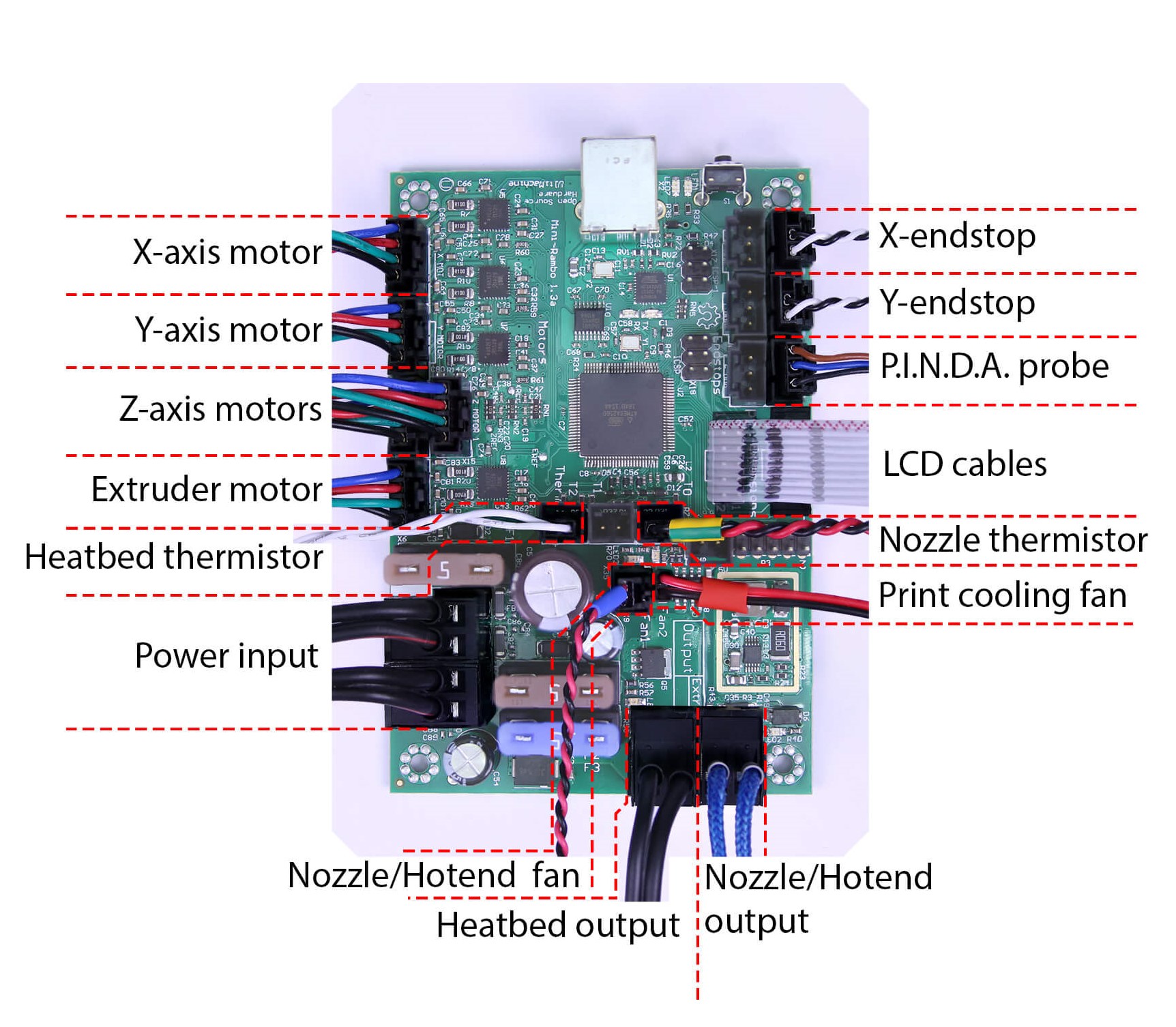
                  The printer has a miniRAMBo logic board that has three removable fuses. The fuses we use are known as ATO blade fuses for automotive applications.

                  Each fuse protects a different part of the miniRAMBO board:

                  • F1 (5A fuse) - Extruder motor, X-axis motor, Y-axis motor, and both Z-axis motors
                  • F2 (5A fuse) - Extruder heating, fans, and logic unit.
                  • F3 (15A fuse) - Bed heating

                  Checking the miniRAMBo fuses

                  1. Turn the printer off and disconnect the power cord.
                  2. Open the miniRAMBo cover by removing the long M3x40 screw holding the Rambo-cover doors closed. Please refer to Electronics assembly - Finalizing Rambo Cover of the assembly manual for more details.
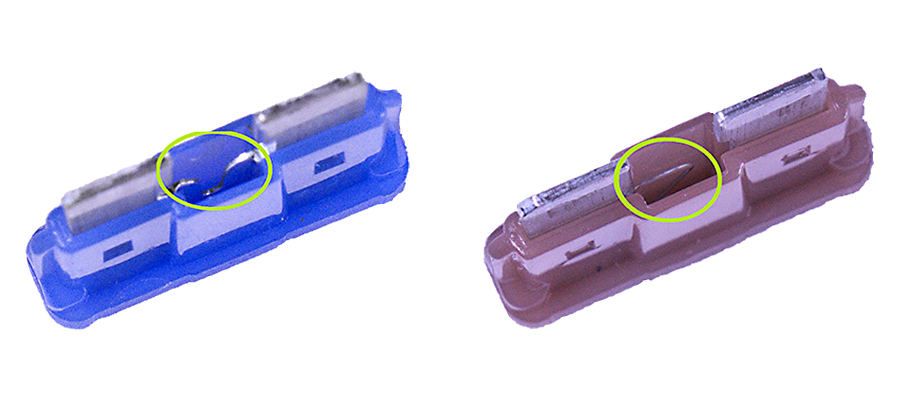
                  3. Now you have access to the miniRAMBo. Pull the fuses out and inspect them. The photos below show what the intact fuses look like. Inspect them from below and check if the little wire inside is not broken. In case you cannot tell if the fuse is broken, replace the fuse preventively.

                  If you own a multimeter, you can check the components for a potential short. Multimeter usage will show you how.
                  Your RAMBo board can be black/brown instead of green. The color does not matter.

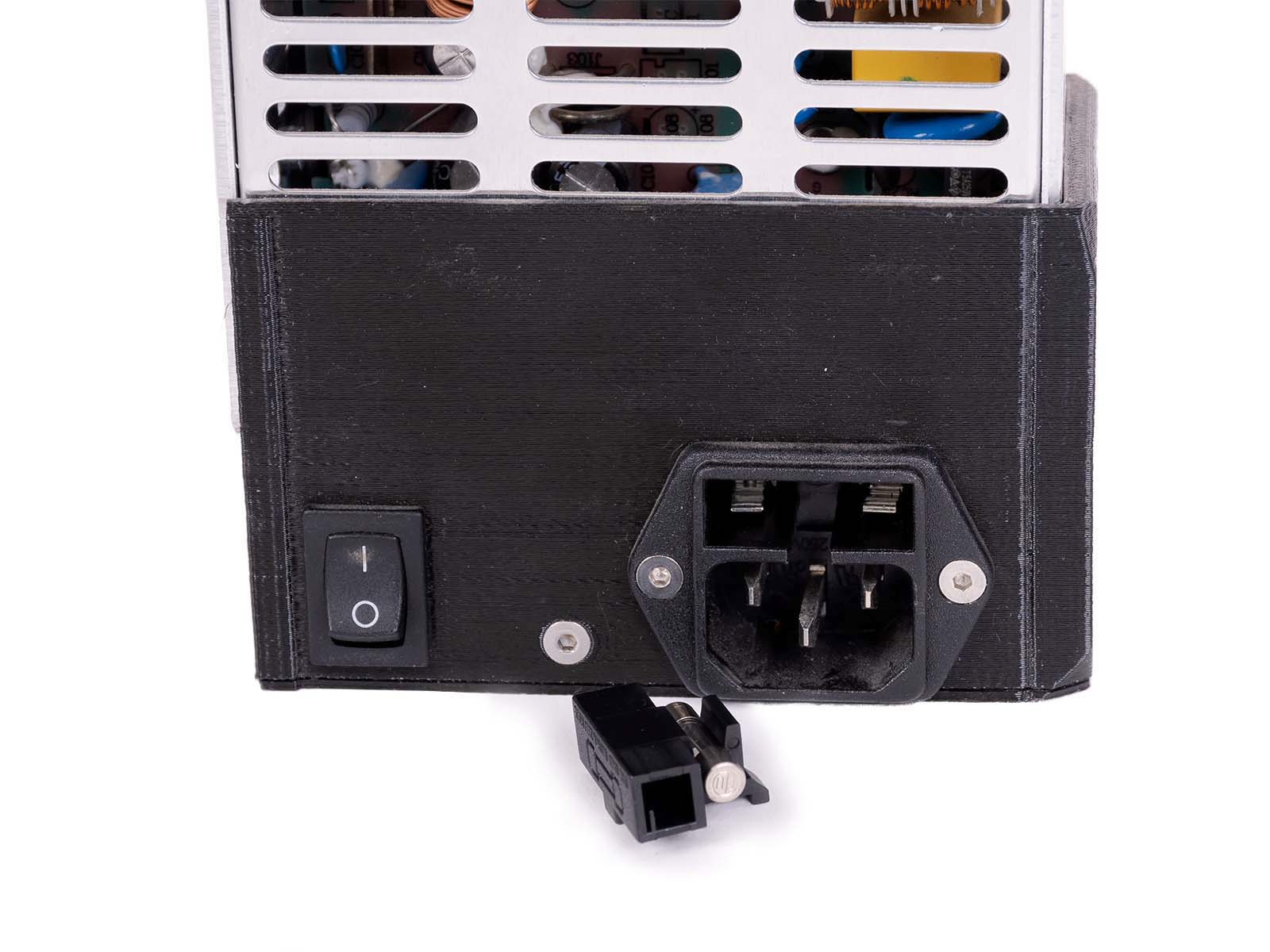
                  PSU fuse

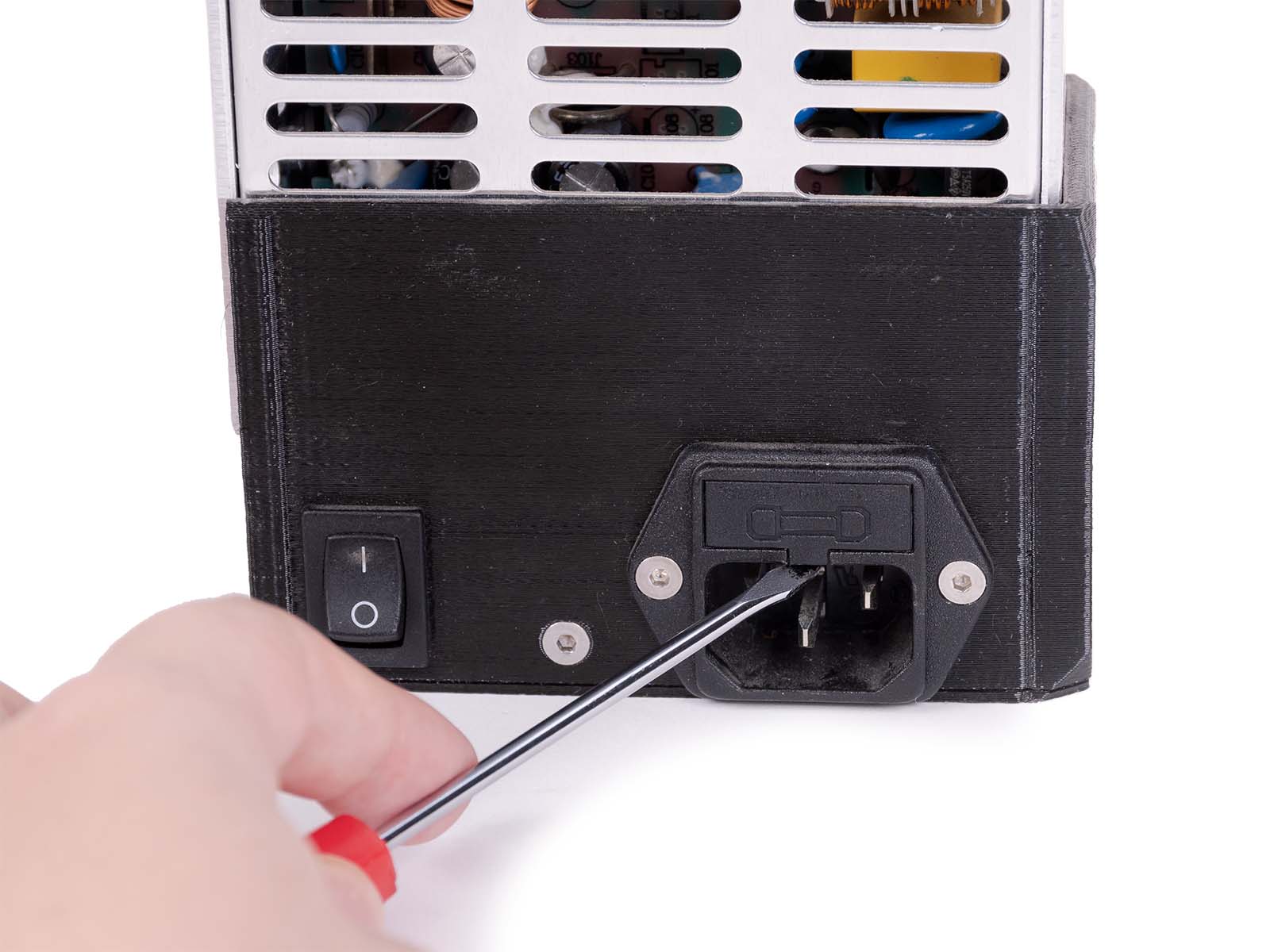
                  The printers are equipped with an additional fuse in their PSUs. You can check the pictures below for how to find it.

                  When you are replacing the fuse, make sure that the printer is turned off and disconnected from the power source.

                  • Find the PSU fuse, which is located just above the PSU's power plug.
                  • Remove the cover of the PSU fuse, the best tool for that is the screwdriver that comes bundled with our printer.
                  • Inspect if the wire inside of the fuse is intact. If it is damaged, then it must be replaced.

                  Replacing blown fuses

                  If you find out that any of the fuses are blown, you can easily replace them. The fuses can be found at any local car parts/hardware store or ordered online. It's a good practice to bring the blown fuse with you so that you can get the exact same one.

                  1. Turn the printer off, disconnect the power and remove the blown fuse(s) from their sockets.
                  2. Place the new fuse in the correct slot - Double check that you are replacing 5A for 5A or 15A for 15A.
                  3. Unplug any components connected to the previously blown fuse and try to turn on your printer. Check for any kind of unwanted behavior.
                  4. Once again, turn off the printer and remove the power cord. Then reconnect all the disconnected components.

                  この記事は役に立ちましたか?
                  この操作は登録ユーザーのみが利用できます。ログインしてください。
                  ログイン してコメントを投稿する
                  コメントなし

                  トピックス

                  • トラブルシューティング
                    • プリンタートラブルシューティング
                      • プリント途中でエクストルーダーの押し出しが止まる現象(ヒートクリープ)
                      • スパゲッティモンスター
                      • エクストルーダーのブロブ
                      • ノズル/ホットエンドの詰まり (MK3.5/S, MK3S+, MK2.5S)
                      • エクストルーダーのノイズ
                      • フィラメントがロードされていかない
                      • Misaligned PINDA Sensor (MK2/S)
                      • プリントファンが回転していません
                      • ホットエンドファンが回転しない
                      • ヒートベッドが正常に加熱されない
                      • M.I.N.D.A./SuperPINDA センサーのテスト (MINI/MINI+)
                      • SDカードが読めません
                      • LCDスクリーンが機能しない
                      • プリンタの電源が入らない、または電源が切れたままになる
                      • Blown Fuse (MK2S/MK2.5/MK2.5S)
                      • MK3Sがフィラメント交換を促し続ける
                      • プリント中の振動とノイズ (MK3S+/MK2.5S)
                      • Live Z補正が保存されない
                      • ファクトリーリセット (MK2S/MK2.5S/MK3S)
                      • ファームウェアのアップデート時の問題 (MK2.5S/MK3S+/MMU2S/MMU3)
                      • ノズルがヒートベッドに衝突する
                      • IRフィラメントセンサーのトラブルシューティング(MK2.5S, MK3S)
                      • Zキャリブレーションの失敗 (MK3S/MK2.5S)
                      • PrusaLinkのトラブルシューティング
                      • Tangled filament
                      • SDカード・USBメモリ
                    • Diagnostics [進行中の翻訳]
                    • プリント品質のトラブルシューティング
                    • QR Error codes [進行中の翻訳]
                    • プリントエラーメッセージ