AA

Featured products

    Popular categories

      Trending searches

        Articles

          Blog

            Products

              Categories

                Suggested searches

                  Searching…
                  No results
                  Something went wrong.
                  ↑↓ Select↵ OpenEsc Close search
                  • English
                  • Čeština
                  • Deutsch
                  • Español
                  • Français
                  • Italiano
                  • Polski
                  • 日本語
                  • Orders
                  • Address
                  • In-stock Alerts
                  • My Courses
                  • Subscription
                  • Edit Account
                  • 3D printers9+▾

                    3D printersnew

                    newPrusa CORE One L+Learn more
                    newPrusa CORE One+ (Gen 2)Learn more
                    newPrusa CORE One L+ INDX 8-ToolnewPrusa CORE One+ (Gen 2) INDX 8-ToolPrusa CORE One L+: Critical InfrastructureOriginal Prusa MK4SnewOriginal Prusa XL+Original Prusa XL+: Critical Infrastructure

                    Printer upgrades

                    newINDX Conversion KitsnewPrusa CORE One L to CORE One L+ upgradenewPrusa CORE One+ to Prusa CORE One+ (Gen 2)newPrusa XL to Prusa XL+ Upgrade
                    Prusa Reward ProgramLove your Prusa printer? Share your experience and earn $30 Prusa e-shop vouchers.
                    How to Choose a 3D Printer?We’ll walk you through the basics to find the exact machine for your space, budget, and ideas.
                    Free E-bookDownload a free e-book Basics of 3D Printing with Josef Prusa and make your first steps in 3D printing world
                    Original Prusa Printable PartsCollections of printable spare parts for Original Prusa 3D printers and upgrades.
                    Shipping informationRegularly updated info about the current manufacturing capacity and delivery times of our printers.
                    Custom 3D PrintingProfessional custom 3D printing from various materials according to your requirements.
                  • Materials▾

                    Filaments

                    PrusamentPLAPETGASA / ABSPC (Polycarbonate)PA (Nylon)FlexCompositesSpecialMaterials clearance sale

                    Resin

                    Prusament ResinResin Cleaner
                    Filament GuideCheck my Prusament Spool
                    Prusament.com
                  • Parts & Accessories▾

                    Accessories

                    EnclosuresNozzlesPrint SheetsEssential AccessoriesCameras & AddonsTools & CraftingAdhesives

                    Spare parts

                    Merchandise

                    Spare parts - All PrintersCORE OneMK4/S & MK3.9/SMK3/S/+XL
                    Merch
                  • For Business▾
                    Prusa Pro HT90Prusa Pro SLXPrusa Pro AFSPrusa Pro Medical OneOriginal Prusa XL+Original Prusa XL: Critical Infrastructure
                    Prusa CORE One+ (Gen 2)Learn more
                    Prusa CORE One L+Learn more
                    Prusa CORE One L: Critical Infrastructure Edition

                    3D Printing for

                    Manufacturing and R&DAutomotive IndustryHealthcareEducation and Academic ResearchArchitects and DesignersFilm IndustryCritical Infrastructure

                    3D Printing Stories

                    • How 3D printing started: About Rep-rap and open-source with Adrian Bowyer
                    • Teaching mathematics redefined with 3D printing at JKU Linz
                    • The story behind the LTT screwdriver
                    • Victoria Hand Project: Changing Prosthetic Care with 3D Printing
                    Official Prusa Resellers
                    Sustainability
                    Prusa Education
                    Contact and Inquiry
                    Custom 3D Printing
                    ISO Certified
                  • Software▾
                    PrusaSlicer

                    PrusaSlicerPrusaSlicer

                    PrusaSlicer is an open-source, feature-rich, frequently updated tool that contains everything you need to export the perfect print files for your 3D printer.

                    WindowsMacOSLinux
                    Prusa Connect

                    Prusa Connect

                    Prusa Connect is a cloud service enabling remote control and monitoring of your 3D printers, offering secure data handling, easy setup, and support for managing multiple printers from anywhere.

                    Log in to Connect
                    Prusa.app

                    Prusa.app

                    Control your printer/s remotely from anywhere using the Prusa Connect technology behind. Prusa.app brings a new level of Prusa printer experience to Android and iOS phones.

                    Try it now!
                    Drivers & FirmwareDownload the latest firmware and drivers for your 3D printer.
                    PrusaSlicer Support
                    Prusa Connect Support
                  • 3D Models▾
                    3D PrintersArt & DesignHobby & MakersHouseholdTabletop MiniaturesToys & GamesPrintables Store

                    Popular 3D models

                    • Top tether hook
                    • SQUATCHEE-SPIN
                    • The Over-engineered Backpack Wall Mount V2
                    • Black Hole Lamp
                    • Strong garden hose holder
                    • Prusa Spool Bot

                    Design Contests

                    • Tapones Soporte Bobinas Personalizados9/18/2026 – 10/4/2026
                    • Reutilizacion Placa Base Framework 129/1/2026 – 9/30/2026
                    • 🏆 Reto de Diseño: ¡Trucos de magia!9/1/2026 – 9/22/2026
                  • Community▾

                    Upcoming Events

                    • 3D Printopia 20269/26/2026 – 9/27/2026 · Pennsylvania, United States · Prusa Team
                    • Maker Faire Bay Area9/25/2026 – 9/27/2026 · Kalifornie, United States · Prusa Team
                    • Hobby Messe10/2/2026 – 10/4/2026 · Sachsen, Germany · Prusa Team
                    • Mezinárodní strojírenský veletrh10/6/2026 – 10/9/2026 · Jihomoravský kraj, Czechia · Prusa Team

                    Prusa Forum

                    • What is wrong?
                    • CoreOne Front Plate Delete mod.
                    • Mirror Option on Prusa Slicer 3.0.0
                    Prusa World MapPrusa World MapFind local 3D printing users and explore the community around you.
                  • Help▾
                    Guides & TutorialsPrusaSlicerPrusa ConnectMaterials

                    Printer Model

                    CORE One INDXCORE One LCORE One+CORE One

                    Hardware Troubleshooting

                    • Selftest failed (CORE One/+)
                    • Clogged nozzle (CORE One, CORE One L, XL, MK4/S, MK3.9/S)
                    • Adjusting belt tension (CORE One/+, CORE One INDX, CORE One L/+)
                    • Prusa Connect and PrusaLink explained

                    Drivers & Firmware

                    INDX familyCORE One familyMK4 familyXL familyMMU familyPRO family
                  • Courses▾

                    Become an expert in 3D printing

                    Prusa Academy offers online courses on various 3D printing related topics. Each course features:

                    • easy-to-read text with many pictures and short videos
                    • links for inspiration and further study
                    • quizzes for testing your knowledge along the way
                    • certificate of completion
                    Browse all coursesMy courses library
                    • 3D Modeling in Autodesk Fusion
                    • PrusaSlicer Masterclass – Beginner to Advanced
                    • Complete Guide to 3D Print Postprocessing, Painting, and Detailing
                    • Beginners' Guide to Blender for 3D Printing: Edit and Remix STLs
                  • Blog▾
                    • Prusament PLA Lightweight: 65% lighter than regular PLA. Perfect choice for aircraft, cosplay, and more.
                    • Prusament PLA ColorMix: Print 45 color shades using just five filament spools (and more)
                    • Back-to-School 2026 Deals Are Here!
                    E-Book: Basics of 3D Printing
                  • Company▾

                    About Prusa Research

                    We are the largest maker of 3D printers in Europe and the United States.

                    Founded as a one-man startup in 2012 by Josef Prusa, a Czech hobbyist, maker, and inventor. In just 15 years, we've grown into a company of more than 1,200 people. Every month, we design, build, and ship over 10,000 innovative and secure 3D printers from our headquarters in Prague, Czech Republic, and Delaware, USA, to users in more than 160 countries.

                    Watch a video and find out how Prusa Research was born and what we achieved within only 10 years!

                    About UsTimelineSustainabilityOpen-source
                    About Us
                    Contact Us
                    Logo and Photos
                    ISO Certified
                  1. Support
                  2. Original Prusa i3 MK2 to MK2.5S upgrade
                  3. Upgrading MK2/S and MK2.5/S to MK2.5S+
                   

                  Contents

                  • Which parts can be upgraded?
                  • Extruder
                  • Heatbed
                  • RAMBo cover
                  • Incompatible upgrades
                  • Printed parts
                  • Update manual(s)

                  Blog

                  • Prusament PLA Lightweight: 65% lighter than regular PLA. Perfect choice for aircraft, cosplay, and more.
                  • Prusament PLA ColorMix: Print 45 color shades using just five filament spools (and more)
                  • Back-to-School 2026 Deals Are Here!

                  Newsletter

                  Signup and get our monthly squeeze on updates, blog, printables and much more.

                  By clicking, you agree to receive our newsletter.

                  This site is protected by reCAPTCHA Enterprise and the Google Privacy Policy and Terms of Service apply.

                  Top tether hook
                  E-shop
                  • 3D Printers
                  • Printer Upgrades
                  • Filaments
                  • Accessories
                  • Prusa Merchandise

                  © Prusa Research a.s.

                  Printables
                  • 3D Models
                  • Store
                  • Clubs
                  • 3D Design Contests
                  • Brands
                  Community
                  • World Map
                  • Forum
                  • User Groups
                  • Events
                  Help
                  • Prusa Help
                  • Prusa Academy
                  • 3D Printing Calculators
                  Software
                  • PrusaSlicer
                  • Prusa.app
                  • Prusa Connect
                  • Drivers and Software
                  Company
                  • About Us
                  • Blog
                  • Official Prusa Resellers
                  • Contact Us
                  • Certified for ISO 9001, ISO 14001, ISO 45001
                  • General Terms and Conditions
                  • General Terms and Conditions of Use of the PRUSA Websites
                  • Privacy Policy
                  • Information about cookies
                  • Customer Complaints Policy
                  • Status Page
                  • Do Not Sell or Share My Personal Information
                  • Supplemental Statements
                  • General Terms and Conditions
                  • General Terms and Conditions of Use of the PRUSA Websites
                  • Privacy Policy
                  • Information about cookies
                  • Customer Complaints Policy
                  • Status Page
                  • Do Not Sell or Share My Personal Information
                  • Supplemental Statements

                  © Prusa Research a.s.

                  JOSEF PRUSA®, PRUSA RESEARCH®, PRUSA POLYMERS®, PRUSA ORANGE®, PRUSA 3D ® AND PRUSAMENT® are registered trademarks of Prusa Development a.s. used by Prusa Research a.s. under licence from Prusa Development a.s.

                  Upgrading MK2/S and MK2.5/S to MK2.5S+

                  Relevant for

                  MK2.5
                  MK2.5S
                  MK2S
                  19 comments
                  Article is also available in following languages
                  English
                  Čeština
                  Polski
                  Deutsch
                  Français
                  Español
                  Italiano
                  日本語

                  This article describes all the components necessary to upgrade your Original Prusa i3 MK2/MK2S/MK2.5/MK2.5S to the latest iteration of the hardware and software available from Prusa Research. For all intents and purposes let's use a codename "MK2.5S+", but please note two important things:

                  • "MK2.5S+" is not an official upgrade and the complete package won't be available on the e-shop. You have to purchase the listed parts separately.
                  • From the point of firmware and software (PrusaSlicer) use files for the Original Prusa MK2.5S.

                  This upgrade gives you the best features of MK3S+

                  • Magnetic bed with spring steel sheet
                  • New extruder head with Bondtech
                  • Hotend fan with advanced RPM management
                  • SuperPINDA bed leveling sensor
                  • IR filament sensor
                  Don't disassemble your printer, before you read the entire article! You need first to decide, which parts you will upgrade and you have to print them!

                  Important! While getting the components for your printer, make sure all the components are compatible! MK2/MK2.5 family of printers runs on 12 V! Don't buy parts, which require 24 V.

                  Which parts can be upgraded?

                  Based on the printer you currently have, there are multiple upgrades available. Learn below, which are compatible with your printer and which are not. Before you buy or print any part, double-check it will work with your printer. Also, if you have the MK2.5/MK2.5S printer you might already have some parts installed and you can reuse them.

                  In case you purchase parts from the Prusa e-shop, note that some parts are already bundled to the main part (e.g. to the heatbed set) and there is no need to get them separately. The fasteners might differ slightly in your country (dimensions, thread type). 


                  Extruder

                  Applicable to: MK2, MK2S, MK2.5, MK2.5S

                  the biggest upgrade is the new extruder, which is entirely redesigned to provide better performance while printing and reducing the overall noise. You have to print new extruder parts, get the new electronics, fasteners, and some other accessories. Also, note that the new extruder design will work correctly only with the new magnetic heatbed MK52.
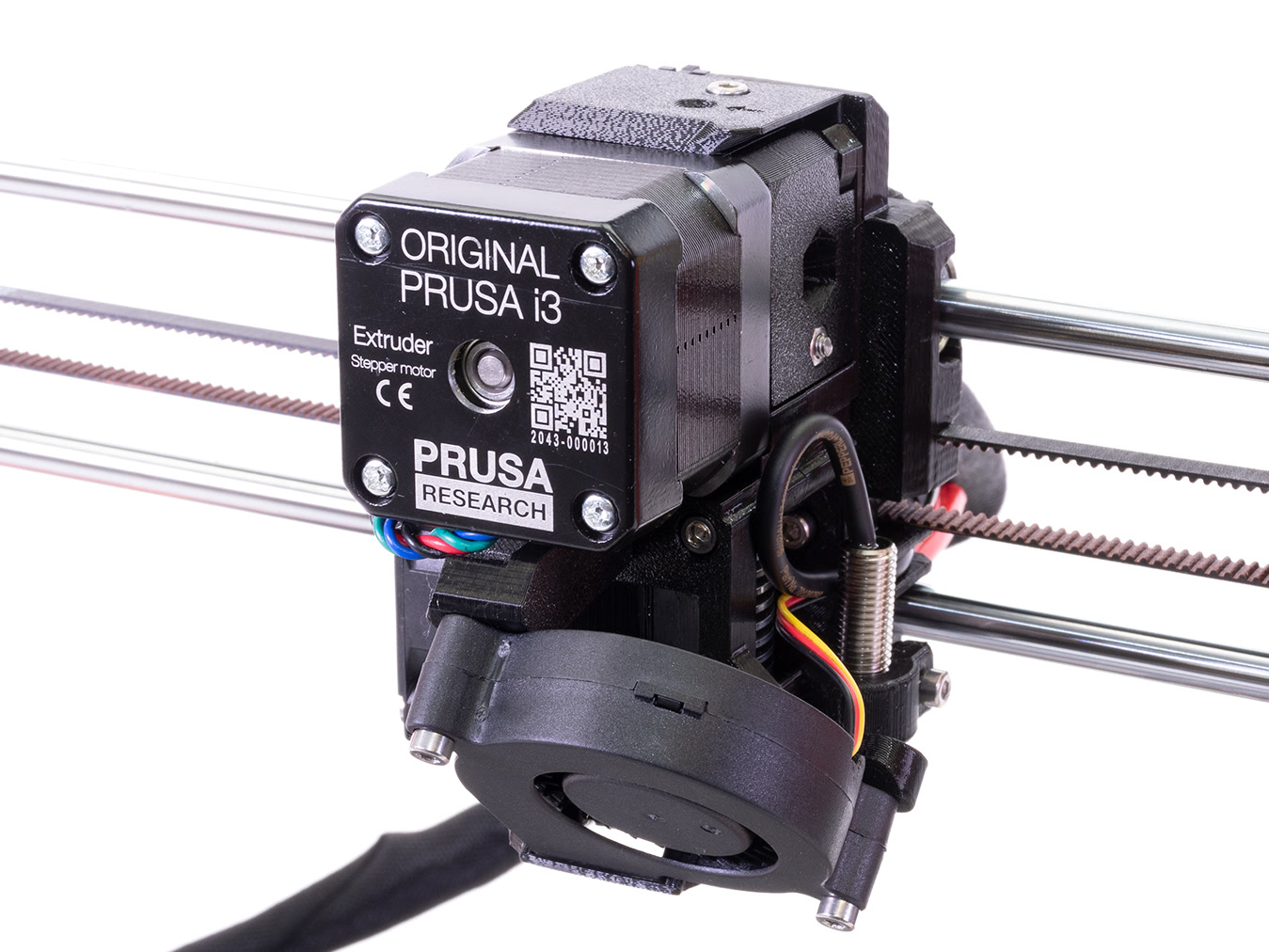


                  TypeItemAmountNote
                  Printed partscable holder (GitHub)1MK2.5S compatible part
                  Printed partsendstop-block (GitHub)1MK2.5S compatible part
                  Printed partsx-carriage-back (GitHub)1MK3S+ compatible part
                  Printed partsx-carriage (GitHub)1MK3S+ compatible part
                  Printed partsadapter-printer (GitHub)1MK3S+ compatible part
                  Printed partsextruder-body (GitHub)1MK3S+ compatible part
                  Printed partsextruder-cover (GitHub)1MK3S+ compatible part
                  Printed partsextruder-idler (GitHub)1MK3S+ compatible part
                  Printed partsextruder-motor-plate (GitHub)1MK3S+ compatible part
                  Printed partsfan-shroud (GitHub)1MK3S+ compatible part
                  Printed partsfs-cover (GitHub)1MK3S+ compatible part
                  Printed partsfs-lever (GitHub)1MK3S+ compatible part
                  Printed partsprint-fan-support (GitHub)1MK3S+ compatible part
                  FastenersM3nS nut8square nut, DIN 562/A2
                  FastenersM3n nut9hexagonal nut
                  FastenersSpring 0.8x4.9x15/10 (e-shop)1patented wire DIN 2076-B
                  FastenersM3x10 screw12DIN 912/A2
                  FastenersM3x14 screw3DIN 912/A2
                  FastenersM3x18 screw2DIN 912/A2
                  FastenersM3x20 screw3DIN 912/A2
                  FastenersM3x40 screw6-
                  FastenersM2x8 screw1-
                  ElectronicsHotend fan (e-shop)1-
                  ElectronicsHotend fan cable reduction (e-shop)1-
                  ElectronicsSuperPINDA (e-shop)1-
                  ElectronicsSuperPINDA cable reduction (e-shop)1-
                  ElectronicsIR filament sensor (e-shop)1-
                  ElectronicsIR filament sensor cable (e-shop)1MK2.5S compatible part
                  ElectronicsMK2S/MK2.5S 12V hotend1optional for MK2 owners, improved heatbreak
                  OthersBondtech Drivegear set (e-shop)1

                  -

                  OthersPTFE tube (e-shop)2MK3S+ compatible part (1 + 1 spare)
                  Others13mm textile sleeve (49 cm long)1

                  -

                  Others3mm nylon (50 cm long)1

                  -

                  OthersMagnet 20x6x21-
                  OthersMagnet 10x6x21-
                  OthersStainless steel ball 7mm 1-
                  OthersZip tie (2.5x160 mm)15(9 + 6 spare)
                   

                  Heatbed

                  Applicable to: MK2, MK2S

                  The second important update is the new magnetic heatbed MK52 with removable flexible steel sheets. You can get multiple steel sheets with different surface finish and change them quickly based on your needs. Note that the new magnetic heatbed will work correctly only with the new extruder design described above.

                  In a rare case, when your printer is still using the zip ties to hold the Y-carriage and Y-axis bearings together, it is highly recommended to change them for U-bolts. The bearing clips introduced with the Original Prusa MK3S<strong>+ are not compatible. 
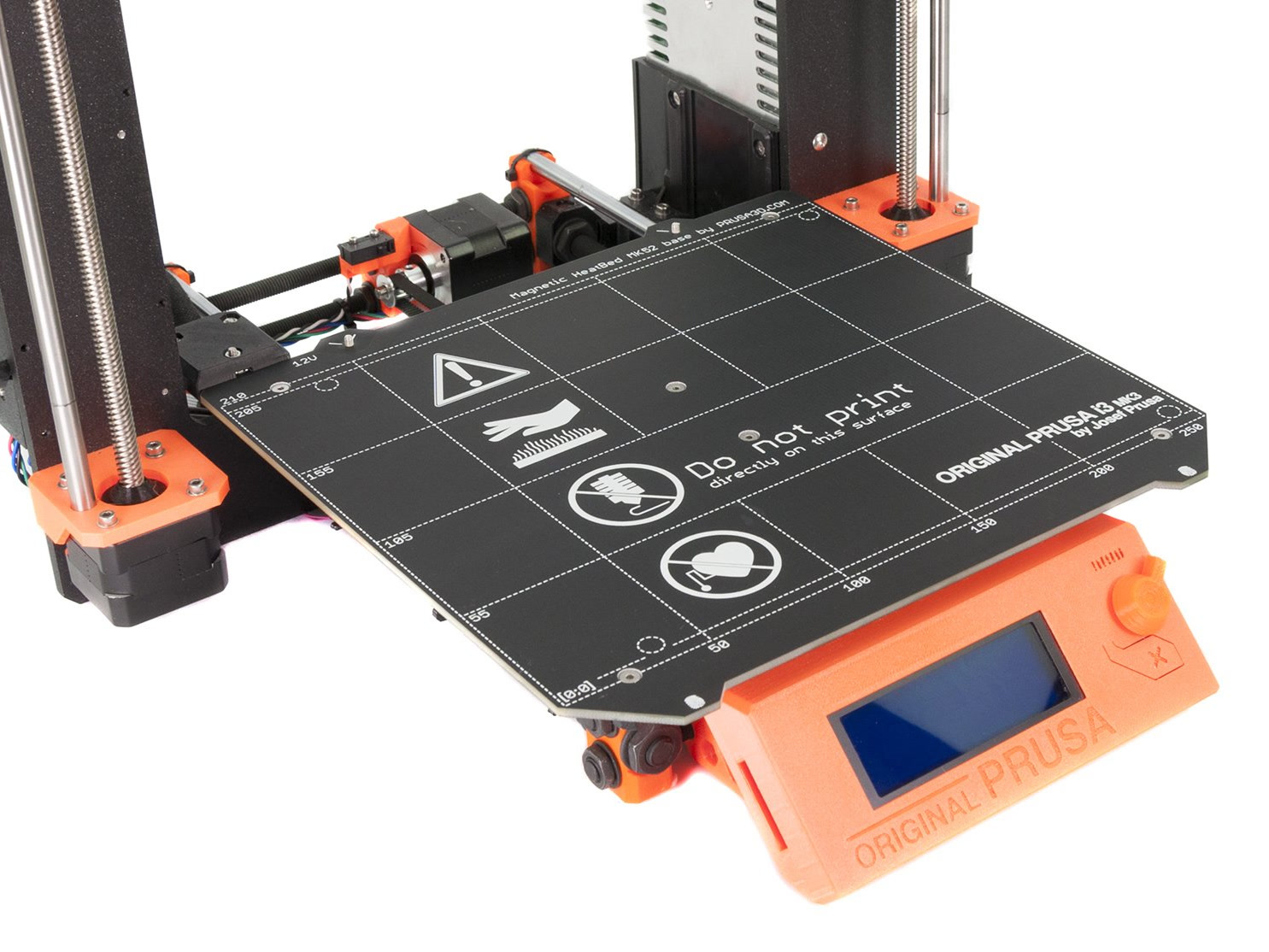
                   

                  TypeItemAmountNote
                  AccessoryPEI steel sheet (e-shop)1Choose any sheet, based on your needs.
                  AccessoryTXT steel sheet (e-shop)1Choose any sheet, based on your needs.
                  AccessorySATIN steel sheet (e-shop)1Choose any sheet, based on your needs.
                  ElectronicsMagnetic heatbed MK52 12V1 
                  ElectronicsPower cable 12V (HB <-> RAMBo)1 
                  Printed partsHB cable cover -2 parts (GitHub)1 
                  FastenersM3nN nut3 
                  FastenersM3n nut2 
                  FastenersM3x10 screw5 
                  FastenersM3w washer (3.2/9/0.8)2 
                  Others5mm textile sleeve (30 cm long)1 
                  FastenersU-bolt (e-shop)3optional (for MK2 with zip ties around bearings)
                  FastenersM3nN nut6optional (for MK2 with zip ties around bearings)


                  RAMBo cover

                  Applicable to: MK2, MK2S

                  Starting with MK2.5 the box for the miniRAMBo mainboard, it was significantly upgraded providing better cable management and also ensuring better endurance of the cable bundles thanks to an improved retention mechanism.
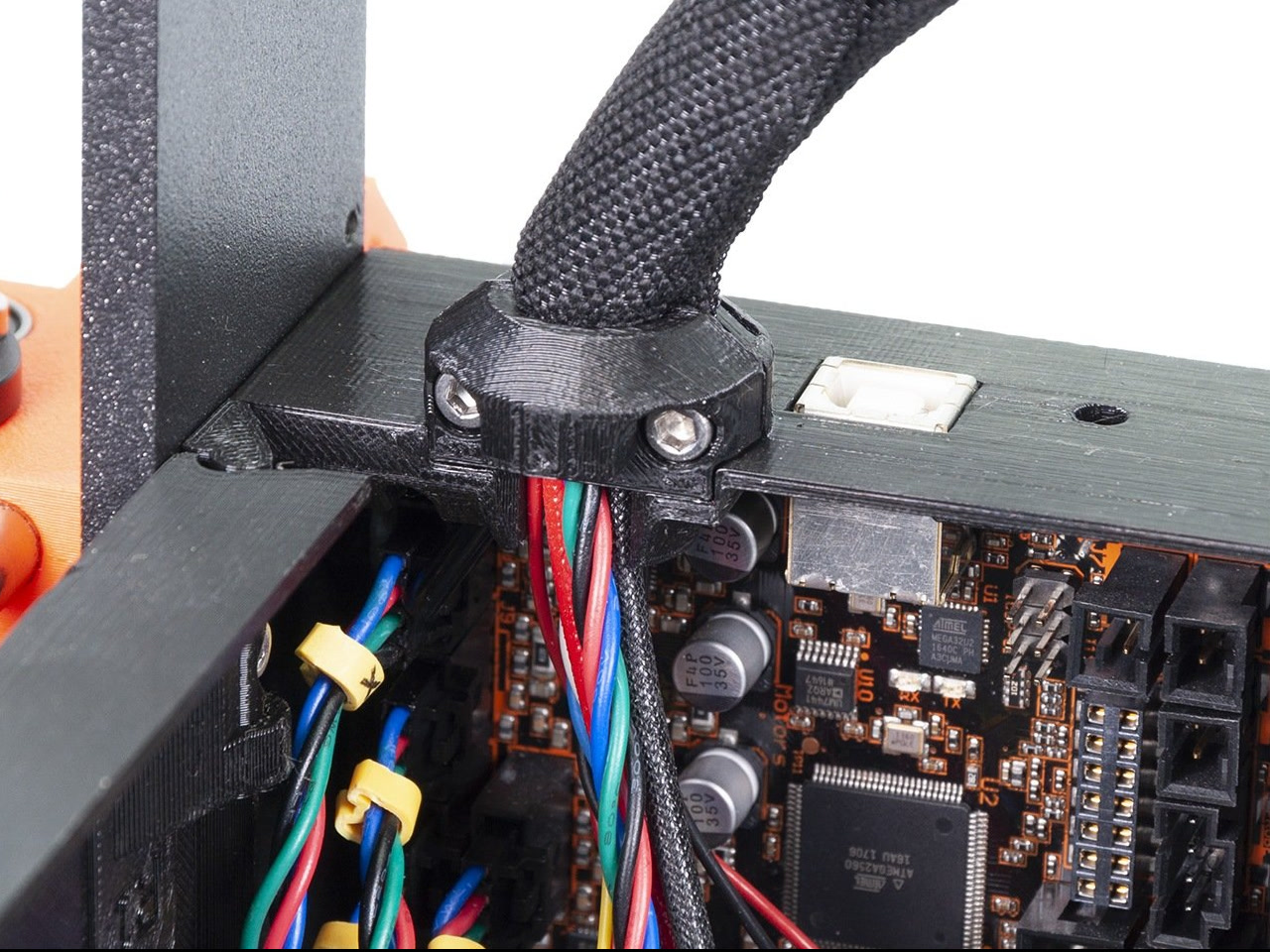
                   

                  TypeItemAmountNote
                  Printed partsRambo-Hinges (GitHub)1MK2.5S compatible part
                  Printed partsRambo-base (GitHub)1MK2.5S compatible part
                  Printed partsRambo-doors (GitHub)1MK2.5S compatible part
                  Printed partsRambo-extruder-cable-clip (GitHub)1MK2.5S compatible part
                  Printed partsRambo-heatbed-cable-clip (GitHub)1MK2.5S compatible part
                  FastenersM3n nut8hexagonal nut
                  FastenersM3nS nut1square nut, DIN 562/A2
                  FastenersM3x10 screw10

                  DIN 912/A2

                  FastenersM3x40 screw1DIN 912/A2
                  Others5mm textile sleeve (30 cm long)1-


                  Incompatible upgrades

                  Bearing clips

                  A new retaining system, which is holding the bearings in the Y-carriage. Bearing clips are replacing the previously used U-bolts. Changing U-bolts for clips will bring no extra performance. Also note that you have to adjust and reprint one Y-corner, as the bearing clip will hit it before the Y-axis endstop is triggered.

                  X-ends with the tensioning system

                  Few months after releasing the initial design of the Original Prusa i3 MK3 the X-ends on the X-axis were updated with a tensioning system providing easier assembly. However, this part brings no extra performance. The design is not compatible with the MK2.5 family as it doesn't have a mounting system for the X-axis endstop.


                  Printed parts

                  All the upgrades above require some printed parts, we have prepared a bundle including all of them. Use the link below to download it. Read the recommended settings and materials before you arrange them in your slicer. The arrangement below is used as an example, yours can differ. The smallest parts might sometimes detach during the print, it is a good practice to print them in a separate print.
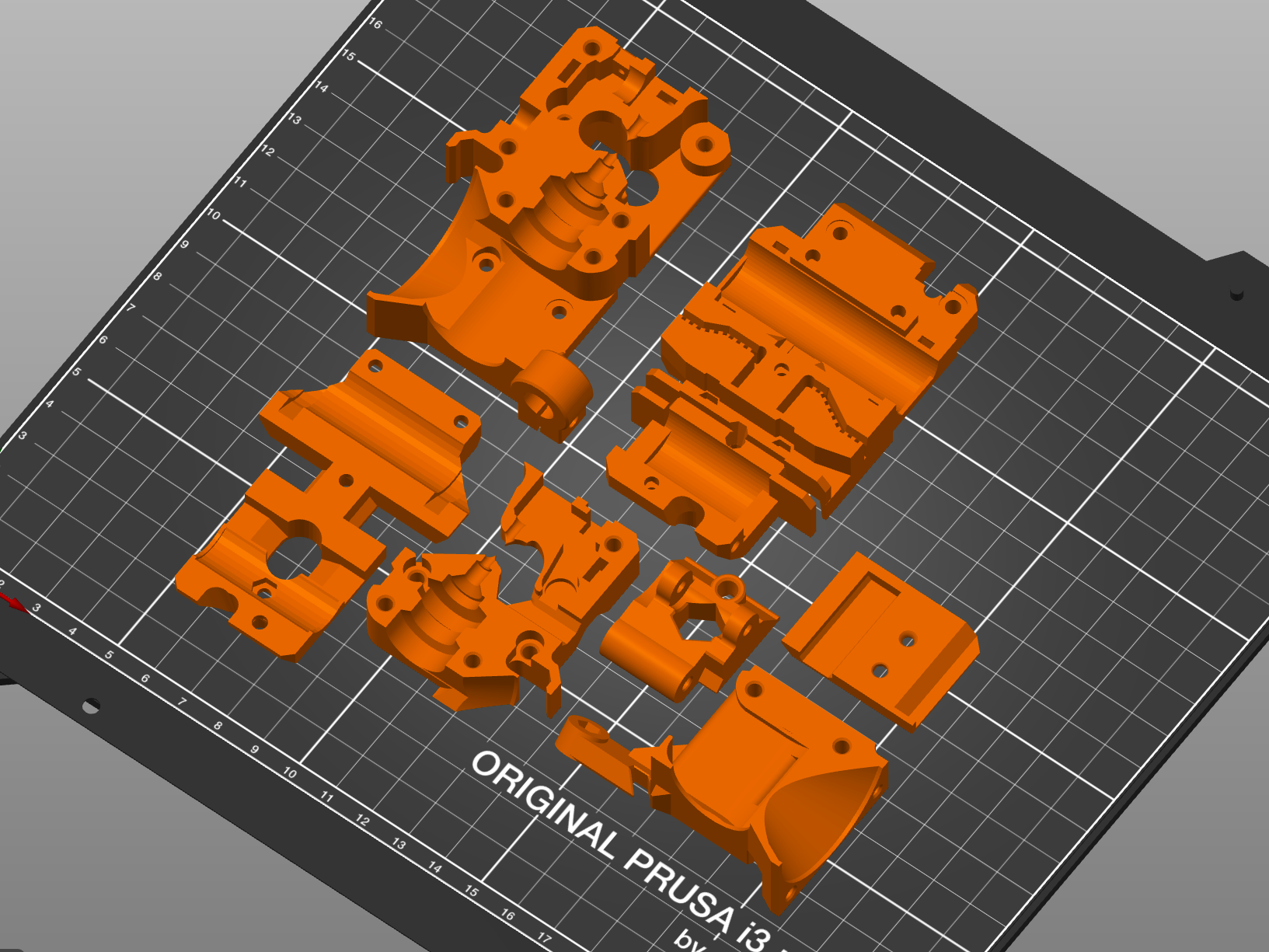
                  Download here: MK2.5S+ printed parts bundle

                  Recommended print settings

                  • Layer height: 0.2 mm
                  • Infill: 20 %
                  • Infill type: grid

                  Recommended print materials

                  All materials listed below can be used. The black color is recommended, in case you want to use a different color, make sure the space surrounding the IR-sensor is dark and protected from the outside light (namely for the translucent materials).

                  • PETG - the majority of the printed parts for Prusa printers are designed, tested and printed using PETG. This is why this material is recommended. The only exception is fan-shroud, which should be printed from ASA or PC.
                  • ASA - you can use this material, but keep in mind, it is ideal to use a chamber around the printer to maintain the temperature, also due to the different material properties, the final dimensions of the printed part may slightly differ.
                  • PC - you can use this material, but keep in mind, it is ideal to use a chamber around the printer to maintain the temperature, also due to the different material properties, the final dimensions of the printed part may slightly differ.
                  • ABS - in case you have ABS at home, you can use it. However, ABS tends to warp and you might have to use a partial brim around the objects (at corners) to prevent them from lifting from the print sheet.


                  TypeItemAmountNote
                  FilamentPrusament PETG Black (e-shop)11kg spool is enough, recommended material


                  Update manual(s)

                  For the upgrade to MK2.5S+, you can use the guide "MK2/S to MK2.5S upgrade". Pay attention to the extruder upgrade chapter, which was created for the previous MK2.5S design, but you will be assembling the MK3S+ extruder design, which is visually slightly different. However, the assembly procedure is almost the same.

                  WARNING: for all printer types you need to replace the PTFE in the hotend with the MK3S+ version (different length, shape)


                  Continue here: Original Prusa i3 MK2 to MK2.5S upgrade

                  Was this article helpful?
                  This action is available only to registered users. Please log-in.

                  10 comments

                  Log in  to post a comment
                  Corliss82
                  •
                  Would it be possible to build a base Mk2 with the threaded rod framing, but buy a new power supply and rambo compatible with an MK3 or MK4?
                  Reply
                  Dave Binny
                  •
                  Im partway through this upgrade and realised that the hotend fan is a larger 40mm formfactor than the 30mm I took out of my mk 2s. I need to source an alternative in Australia but I'm not sure if it should be 5v or 12v. I've found some indications that the mk3s is a 5v fan but I noticed the one I took out of the 2s is a 12v fan. What should I be using in my venerable Rambo mk 2s board?
                  Reply
                  Jan Kratochvíl
                  •

                  Hello. The fan is 5V, but the MK2.5/S Rambo requires the v-cable adapter, the fan can NOT be connected to the MK2.5/S Rambo directly.

                  Reply
                  JC
                  •
                  Thank you for this article! I found two issues with the article: 1. The Heatbed cable cover linked in the table under the "Heatbed" section points to the old style cover. 2. The "printer parts bundle" link at the bottom of the article does not contain gcode, which that section seems to imply will be included. Instead the zip file only contains the STL files.  That zip file does have the new style cable cover in the rambo folder though :-)
                  Reply
                  davcamis
                  •
                  I am a little late to the party...but I'm hoping someone is still able to assist me. I have gone and done the upgrade on my mk2s and now the printer can't do the full calibration. I have tried flashing the firmware to the mk2.5 and the printer just sits there beeping showing just line on the screen. If I flash it to the mk2.5s firmware I just get the lines on the screen. any ideas?
                  Reply
                  Giuliano - Official Prusa CS
                  •
                  Hello. This should be checked carefully, and can't be solved with a commentary on this article. Please contact the tech support via email or live chat and provide photos of the screen and screenshots of any eventual error message while flashing the firmware.
                  Reply
                  Lama
                  •
                  I just upgrade my mk2s to mk2.5s+ with this article. I have a magnetic bed 12v, superpinda and every printed part of the bundle. The printer pass selftest but can't find any calibration point. The superpinda working because it's stop before hitting the bed.  I run the latest mk2.5s firmware.    What did I did wrong? Any clue?             edit: I was able to do the calibration on mk2.5 firmware but the IR sensor not working. After calibration, I flash back the mk2.5s firmware and keep the past calibration. Now IR filament sensor work but I can't do another calibration without the mk2.5 firmware.  Any explanation?
                  Reply
                  Same Old Shane
                  •
                  In cases like this, it is best to contact prusa support, either via the eshop or email [email protected] as there would be multiple steps to check and they will be able to assist you with troubleshooting and soliving the issue.
                  Reply

                  Topics

                  • Assembly manuals
                    • Original Prusa i3 MK2 to MK2.5S upgrade
                      • 1. Introduction
                      • Upgrading MK2/S and MK2.5/S to MK2.5S+
                      • 2. Disassembly
                      • 3. E-axis assembly
                      • 4. Heatbed assembly
                      • 5. Electronics
                      • 6. Preflight check
                      • Manual changelog MK2.5S
                    • Bondtech INDX Conversion kit for the Prusa CORE One/+ (Founders Edition)
                    • MMU2S to MMU3 Upgrade (MK3S+, MK3.5, MK3.9/S, MK4/S)
                    • MMU3 for CORE One (Assembled)
                    • MMU3 for CORE One (Kit)
                    • Original Prusa CW1 to CW1S platform upgrade
                    • Original Prusa i3 MK3/MK3S/MK3S+ to MK3.9 upgrade
                    • Original Prusa i3 MK3/MK3S/MK3S+ to MK4 upgrade
                    • Original Prusa i3 MK3/MK3S/MK3S+ to MK4S/MK3.9S upgrade
                    • Original Prusa i3 MK3S/MK3S+ to MK3.5 upgrade
                    • Original Prusa i3 MK3S/MK3S+ to MK3.5S upgrade
                    • Original Prusa MK4 kit assembly
                    • Original Prusa MK4/MK3.9 to MK4S/MK3.9S upgrade
                    • Original Prusa MK4S kit assembly
                    • Original Prusa MK4S MMU3 to CORE One MMU3 Conversion
                    • Prusa CORE One (assembled)
                    • Prusa CORE One conversion kit
                    • Prusa CORE One kit assembly
                    • Prusa CORE One L to CORE One L+ upgrade
                    • Prusa CORE One L Unpacking & First run
                    • Prusa CORE One L+ Unpacking & First run
                    • Prusa CORE One to CORE One+ upgrade
                    • Prusa CORE One+ (assembled)
                    • Prusa CORE One+ (Gen 2) conversion kit
                    • Prusa CORE One+ (Gen 2) kit assembly
                    • Prusa CORE One+ (Gen 2) Unpacking & First run
                    • Prusa CORE One+ conversion kit
                    • Prusa CORE One+ kit assembly
                    • Prusa CORE One+ to (Gen 2) upgrade
                    • Prusa INDX Conversion kit for the Prusa CORE One/+
                    • Prusa Signature Oak Unpacking & First run
                    • Prusa XL to Prusa XL+ upgrade (Dual-Head, Five-Head)
                    • Prusa XL to Prusa XL+ upgrade (Single Tool)
                    • Prusa XL+ Dual-Head / Five- Head (assembled)
                    • Prusa XL+ Single-Tool (assembled)
                    • MMU3 Assembly (MK3S+, MK3.5, MK3.9/S, MK4/S, CORE)
                    • Original Prusa Enclosure assembly
                    • Original Prusa i3 MK3S+ kit assembly
                    • Original Prusa Enclosure assembly (external display mounting)
                    • Original Prusa MK4S with MMU3 (assembled bundle)
                    • Original Prusa SL1 to SL1S SPEED upgrade
                    • Original Prusa XL Single-Tool (Assembled)
                    • Original Prusa MINI+ kit assembly
                    • Original Prusa MK3S+ MMU3 to MK4/MK3.9 MMU3 upgrade
                    • Original Prusa XL Single-Tool (Semi-Assembled)
                    • Original Prusa i3 to MMU2S upgrade
                    • Original Prusa XL Dual-Head (Assembled)
                    • Original Prusa i3 MK3/MK3S to MK3S+ upgrade
                    • Original Prusa MINI+ semi-assembled
                    • Original Prusa XL Dual-Head (Semi-Assembled)
                    • Original Prusa SL1 kit assembly
                    • Original Prusa i3 MK3S kit assembly
                    • Original Prusa MINI Enclosure
                    • Original Prusa XL Five-Head (Assembled)
                    • Original Prusa i3 MK1 to MK2 upgrade
                    • Original Prusa XL Five-Head (Semi-Assembled)
                    • Original Prusa i3 Plus 2.85 mm to 1.75 mm upgrade
                    • Original Prusa XL Single-Tool to Five-Head Upgrade
                    • Original Prusa XL Single-Tool to Dual-Head Upgrade
                    • Original Prusa i3 Plus 1.75 mm to MK2S upgrade
                    • Original Prusa XL Dual-Head to Five-Head Upgrade
                    • Original Prusa i3 Plus 1.75 mm kit assembly
                    • Original Prusa i3 MK2 to MK2S upgrade
                    • Original Prusa XL Enclosure
                    • Original Prusa i3 MK2/S to MMU1 upgrade
                    • Original Prusa MINI assembly
                    • Original Prusa i3 MK2S kit assembly
                    • Original Prusa i3 MK2 kit assembly
                    • Original Prusa i3 MK3 kit assembly
                    • Original Prusa i3 MK3 to MK3S upgrade
                    • Original Prusa i3 MK2 MMU1 to MK2.5S MMU2S
                    • Original Prusa i3 MK2 to MK3S upgrade
                    • Original Prusa i3 MK3/MK2.5 to MMU2 v1.01
                    • Original Prusa i3 MK2.5 to MK2.5S upgrade