Prusa
  • SHOP
    • Latest products
    BY CATEGORY
    • 3D printersnew
    • 3D printer upgradesnew
    • Materials
    • Accessories
    • Spare parts
    • Courses
    • Merch
    • Get a price quote
    QUICK LINKS
    • Shipping & delivery
    • Returns & refunds
    • Payment & financing
    • Warranty
    • VAT & Customs fees
    • FAQ

    0 item in your cartitems in your cart

    Your cart is empty

    Go to cartShop 3D printers

    My profile

    Log in to see orders, saved items

    My profile

    Signed in as

    • Orders
    • Logout
  • 3D PRINTING
    • Explore 3D printing
    FOR BEGINNERS
    • 3D printing 101
    • How FDM printing works
    • Buying your first printer
    • 3D model catalog
    BY APPLICATION
    • Rapid prototyping
    • Manufacturing
    • Engineering
    • Research
    • Arts & design
    GO DEEPER
    • Materials guide
    • Courses
    • Webinars
    • Case studies
    • Custom 3D printing
  • 3D PRINTERS
    • All 3D printers
    FOR
    • Home or garageHobbyists, tinkerers and home printing
    • BusinessIn-house production for small teams
    • EnterpriseFleets, security and scale
    • Which Prusa is right for me
    SHOP & BROWSE
    • CORE One+new
    • CORE One+ INDXnew
    • CORE One L+new
    • CORE One L+ INDXnew
    • XL+new
    • MK4S
    • Prusa Pro HT90
    • Prusa Pro AFS
    • Prusa Pro SLX
    MORE FROM PRINTERS
    • Parts & upgradesnew
    • Spare parts
    • Critical infrastructure
    • Case studies
    • Signature Oak
    • Kits
  • MATERIALS
    • All materials
    BY USE
    • Every-day & design
    • Functional engineering
    • Composites
    • Pro speciality
    • SLA resins
    PRUSAMENT
    • PLA
    • PETG
    • ASA
    • PC
    • PA11
    • Flex
    • TPU
    MORE FROM MATERIALS
    • Materials guide
    • We make material in house
    • Sustainability
    • Order on the store
  • SOFTWARE
    • All software
    PREPARE THE PRINT
    • PrusaSlicer 3.0New
    PRINT & MONITOR
    • Prusa Connect
    • EasyPrint
    • iOS & Android app
    • Prusa Farm
    GET STARTED
    • Download & install
    • Knowledge base
    MORE FROM SOFTWARE
    • 3D model catalog
  • SUPPORT
    • Explore support
    FIND ANSWERS
    • Knowledge base
    • Troubleshooting
    • Courses
    • Webinars
    GET HELP
    • Contact us
    • Livechat
    • Shipping & delivery
    • Warranty
    • Returns & refunds
    • Service & spare parts
    • Service & Repair
    COMMUNITY
    • Forum
    • Reddit
    • Printables
  • TRUST CENTER
    • Trust Center overview
    BY TOPIC
    • GDPR
    • Certificates
    • Security
    • Compliance
    COMMITMENTS
    • Sustainability report
    TALK TO US
    • Contact the security team
  • COMPANY
    • About Prusa
    GET TO KNOW US
    • Our story
    • How we make printers
    • Open source
    • Brand & media kit
    NEWS
    • Blog
    • Newsroom
    • Events
    TRUST & PARTNERS
    • Sustainability
    • Resellers & distributors
    • Affiliate program
    • Contact
    • English
    • Čeština
    • Deutsch
    • Español
    • Français
    • Italiano
    • Polski
    • 日本語
  • Signed in as

    • Orders
    • Address
    • In-stock Alerts
    • My Courses
    • Subscription
    • Edit Account
    • Logout

Log in to see orders, saved items

Signed in as
  • Orders
  • Address
  • In-stock Alerts
  • My Courses
  • Subscription
  • Edit Account
  • English
  • Čeština
  • Deutsch
  • Español
  • Français
  • Italiano
  • Polski
  • 日本語
Shop

0 item in your cartitems in your cart

Your cart is empty

Go to cartShop 3D printers

My profile

Log in to see orders, saved items

My profile

Signed in as

  • Orders
  • Logout
SHOP
  • Latest products
BY CATEGORY
  • 3D printersnew
  • 3D printer upgradesnew
  • Materials
  • Accessories
  • Spare parts
  • Courses
  • Merch
  • Get a price quote
QUICK LINKS
  • Shipping & delivery
  • Returns & refunds
  • Payment & financing
  • Warranty
  • VAT & Customs fees
  • FAQ

Featured products

    Popular categories

      Trending searches

        Articles

          Blog

            Products

              Categories

                Suggested searches

                  Searching…
                  No results
                  Something went wrong.
                  ↑↓ Select↵ OpenEsc Close search
                  1. Support
                  2. Advanced calibration
                  3. PID tuning
                   

                  Contents

                  • How to perform PID tuning

                  Blog

                  • Prusament Pellets: Raw material batches for large-format 3D printing or small-scale polymer research & development
                  • Print colorful and glowing Halloween decorations with our spooky offer
                  • Factorio Has Arrived on Printables

                  Newsletter

                  Signup and get our monthly squeeze on updates, blog, printables and much more.

                  By clicking, you agree to receive our newsletter.

                  This site is protected by reCAPTCHA Enterprise and the Google Privacy Policy and Terms of Service apply.

                  Heavy Duty Keyboard Holder (No Supports)
                  E-shop
                  • 3D Printers
                  • Printer Upgrades
                  • Filaments
                  • Accessories
                  • Prusa Merchandise
                  Prusa

                  © Prusa Research a.s.

                  Printables
                  • 3D Models
                  • Store
                  • Clubs
                  • 3D Design Contests
                  • Brands
                  Community
                  • World Map
                  • Forum
                  • User Groups
                  • Events
                  Help
                  • Prusa Help
                  • Prusa Academy
                  • 3D Printing Calculators
                  Software
                  • PrusaSlicer
                  • Prusa.app
                  • Prusa Connect
                  • Drivers and Software
                  Company
                  • About Us
                  • Blog
                  • Official Prusa Resellers
                  • Contact Us
                  • Certified for ISO 9001, ISO 14001, ISO 45001
                  • General Terms and Conditions
                  • General Terms and Conditions of Use of the PRUSA Websites
                  • Privacy Policy
                  • Information about cookies
                  • Customer Complaints Policy
                  • Status Page
                  • Do Not Sell or Share My Personal Information
                  • Supplemental Statements
                  Prusa
                  • General Terms and Conditions
                  • General Terms and Conditions of Use of the PRUSA Websites
                  • Privacy Policy
                  • Information about cookies
                  • Customer Complaints Policy
                  • Status Page
                  • Do Not Sell or Share My Personal Information
                  • Supplemental Statements

                  © Prusa Research a.s.

                  JOSEF PRUSA®, PRUSA RESEARCH®, PRUSA POLYMERS®, PRUSA ORANGE®, PRUSA 3D ® AND PRUSAMENT® are registered trademarks of Prusa Development a.s. used by Prusa Research a.s. under licence from Prusa Development a.s.

                  PID tuning

                  Relevant for

                  MK2.5
                  MK2.5S
                  MK3
                  MK3S
                  MK3S+
                  16 comments
                  Article is also available in following languages
                  English
                  Čeština
                  Polski
                  Deutsch
                  Français
                  Español
                  Italiano
                  日本語

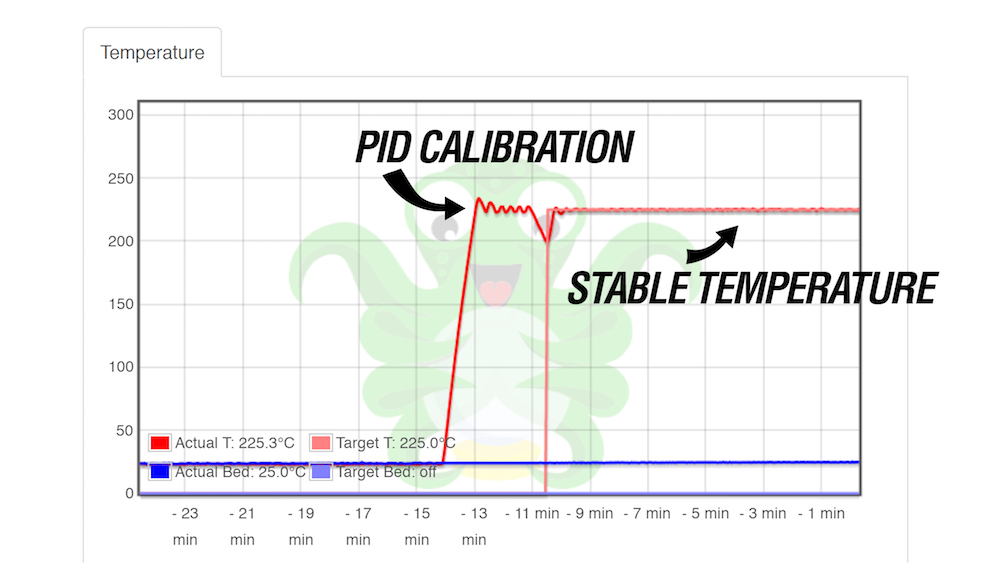
                  PID tuning is a calibration procedure that ensures the printer holds a stable target temperature at all times. PID (Proportional Integral Derivate) is used on the Original Prusa printers to maintain a stable temperature on the hotend. You can use the PID tuning to calibrate its values in case you are experiencing small fluctuations in temperature readings of your printer's nozzle (e.g +/- 5 °C). 

                  If you are experiencing major temperature fluctuations, higher than +/-5 °C, there could be a problem with your fan or thermistor wire/connector.

                  How to perform PID tuning

                  Starting with firmware version 2.0.12., PID tuning is an optional calibration procedure, which is super easy to perform. It can be found in the LCD Menu -> Calibration -> PID calibration.

                  Follow these steps: 

                  1. Once you open the PID calibration menu, set the temperature at which the calibration should run.
                  2. To achieve optimal results, select a temperature you use most often during your prints (e.g. the temperature for PLA, PETG, or other favorite material).
                  The PID tuning will increase the stability for all temperatures, it is not necessary to make it multiple times for different temperatures.
                  1. The nozzle will heat up to the selected temperature in 5 cycles. During these cycles, the printer will determine the amount of power needed to reach the user-defined temperature and maintain it. 

                  Be aware that PID tuning is not a solution for every temperature fluctuation issue. Always make sure that your printer is located in a dry environment with a stable temperature over 20 °C and no breeze.
                  Was this article helpful?
                  This action is available only to registered users. Please log-in.

                  Topics

                  • Calibration
                    • Advanced calibration
                      • Manual temperature calibration
                      • Linear Advance
                      • Extruder linearity correction calibration
                      • Extrusion multiplier calibration
                      • PID tuning
                      • Bed Level Correction
                    • Basic calibration
                    • Calibration Error Messages

                  8 comments

                  Log in  to post a comment
                  loadinglevelone
                  •
                  What about PID tuning for the bed?
                  Reply
                  Bedlamite 23
                  •
                  and what would Prusa suggest after the 3.14 update broke my machine, been down for a month now, but sadly no one cares about mk3 users anymore...

                  the last update, killed or broke or otherwise screwed up my thermistor, or ?
                  Reply
                  Helder112
                  •
                  Hello Prusa,
                   
                  in fact I'm havin issues on this temperature fluctuation. now I will need to perform this type of PID tunning to troubleshoot what could be wrong.
                   
                  how it is possible Prusa sell Upgrade from mk3s to mk3.5 and half of old funcionalities were left behind?
                  what is the timeline to have this implemented? and I as a customer what I will get for the money I spend from the upgrade that make my printer worke worst?
                   
                  Best regards
                  Helder
                  Reply
                  Jan Kratochvíl
                  •

                  Hello. We are sorry that you are having issues after upgrading your 3D printer. For troubleshooting, please contact our support team.

                  Reply
                  VINNIE3000
                  •
                  Will pid tuning be available for the MK3.5? I have installed E3D Revo 6 hotends on both my mini+ and MK3.5 and self testing unfortunately fails for the MK3.5. The Revo 6 prints very well 'untuned' but I have to skip the 'finish calibration' warning every time I print which is sometimes unfortunate when uploading using wifi functionality. Thank you!
                  Reply
                  Jakub Dolezal
                  •

                  Hi Vinnie, we are aware that some features are missing and we will add them to the new firmware including the PID, Revo and others :) 

                  Reply
                  GarHens
                  •
                  Is PID tuning in the new firmware now? 
                  Reply
                  dakota guglielmo
                  •
                  Is there a way to do this on 5.1.0 Beta for the mini?
                  Reply
                  David B.
                  •

                  Hi! 
                  Not the same way. On the MINI, MK4, XL etc., the PID values are set to work with the stock heaters and there is no need to change them. However, there are PID-related G-code commands such as M301, M303, M304:
                  https://help.prusa3d.com/article/buddy-firmware-specific-g-code-commands_633112

                  Reply